back Ram 1500 2015 Owner's Manual
[x] Cancel search | Manufacturer: RAM, Model Year: 2015, Model line: 1500, Model: Ram 1500 2015Pages: 871, PDF Size: 24.83 MB
Page 587 of 871
During operation, HSA will activate the brake control
system and a clicking noise may occur. If your foot is on
the brake pedal during operation you may feel a slight
pedal movement. The clicking and pedal movement is
normal and both will stop when HSA becomes inactive.
HSA Activation Criteria
The following criteria must be met in order for HSA to
activate:
•Vehicle must be stopped
•Vehicle must be on an approximate 7% or greater
incline
•Gear selection matches vehicle uphill direction (i.e.,
vehicle facing uphill is in forward gear; vehicle back-
ing uphill is in REVERSE gear).
WARNING!
There may be situations on minor hills with a loaded
vehicle or while pulling a trailer where the system
will not activate and slight rolling may occur, which
could cause a collision with another vehicle or object.
Always remember the driver is responsible for brak-
ing the vehicle.
The system will only work if the intended direction of the
vehicle and vehicle gear match. For example, if the
intended direction is forward up a hill and the vehicle is
in DRIVE and the activation criteria are met, HSA will
activate.
The system will work in REVERSE and all forward gears,
and will not activate if the vehicle is placed in NEU-
TRAL.
5
STARTING AND OPERATING 585
Page 590 of 871
WARNING!
Electronic Stability Control (ESC) cannot prevent the
natural laws of physics from acting on the vehicle,
nor can it increase the traction afforded by prevailing
road conditions. ESC cannot prevent accidents, in-
cluding those resulting from excessive speed in
turns, driving on very slippery surfaces, or hydro-
planing. ESC also cannot prevent accidents resulting
from loss of vehicle control due to inappropriate
driver input for the conditions. Only a safe, attentive,
and skillful driver can prevent accidents. The capa-
bilities of an ESC equipped vehicle must never be
exploited in a reckless or dangerous manner which
could jeopardize the user ’s safety or the safety of
others.
All Two-Wheel Drive Vehicles And Four-Wheel
Drive Vehicles In 2WD, 4WD AUTO, Or 4WD
LOCK Modes Can Choose The Following ESC
Operating Modes:
ESC On
This is the normal operating mode for ESC in 2WD/4WD
AUTO/4WD LOCK modes and in 2WD vehicles. When-
ever the vehicle is started or the transfer case (if
equipped) is shifted from 4WD LOW or Neutral, back to
4WD LOCK or 4WD AUTO, the ESC system will be in
this mode. This mode should be used for almost all
driving situations. ESC should only be turned to#ESC
Partial Off#or “ESC Full Off” for specific reasons as noted
below.
ESC Partial Off
This mode is entered by momentarily pressing the “ESC
Partial Off” switch. When in#Partial Off#mode, the TCS
588 STARTING AND OPERATING
Page 591 of 871
portion of ESC, except for the “limited slip” feature
described in the TCS section, has been disabled and the
#ESC Off Indicator Light#will be illuminated. All other
stability features of ESC function normally. This mode is
intended to be used if the vehicle is in deep snow, sand,
or gravel conditions and more wheel spin than TCS
would normally allow is required to gain traction. To
turn ESC on again, momentarily press the “ESC Off”
switch. This will restore the normal “ESC On” mode of
operation.
NOTE:To improve the vehicle’s traction when driving
with snow chains or starting off in deep snow, sand or
gravel, it may be desirable to switch to the “ESC Partial
Off” mode by pressing the “ESC Off” switch. Once the
situation requiring ESC to be switched to the “ESC Partial
Off” mode is overcome, turn ESC back on by momen-
tarily pressing the “ESC Off” switch. This may be done
while the vehicle is in motion.
WARNING!
•When in “ESC Partial Off” mode, the TCS func-
tionality of ESC, (except for the limited slip feature
described in the TCS section), has been disabled
and the “ESC Off Indicator Light” will be illumi-
nated. When in “ESC Partial Off” mode, the engine
power reduction feature of TCS is disabled, and
the enhanced vehicle stability offered by the ESC
system is reduced.
•Trailer Sway Control (TSC) is disabled when the
ESC system is in the%ESC Partial Off%mode.
5
STARTING AND OPERATING 589
Page 592 of 871
All Four-Wheel Drive Vehicles In 4WD AUTO And
4WD LOCK Modes Can Also Choose The
Following ESC Operating Mode. This Is The Only
Selectable ESC Operating Mode in 4WD LOW:
ESC Full Off
This mode is intended for off-road use when ESC stabil-
ity features could inhibit vehicle maneuverability due to
trail conditions. This mode is entered by pressing and
holding the “ESC Off” switch for five seconds when the
vehicle is stopped and the engine is running. After five
seconds, the “ESC Off Indicator Light” will illuminate.
Press and release the trip odometer button located on the
instrument cluster to clear this message.
NOTE:The “ESC OFF” message will display and the
audible chime will sound when the shift lever is placed
into the PARK position from any other position and then
moved out of the PARK position. This will occur even if
the message was previously cleared.
In this mode, ESC and TCS except for the “limited slip”
feature described in the TCS section are turned off until
the vehicle reaches a speed of 40 mph (64 km/h). At
40 mph (64 km/h) the system returns to “ESC Partial
Off” mode, described above. When the vehicle speed
drops below 35 mph (56 km/h) the ESC system reverts
back to#ESC Full Off#. ESC is off at low vehicle speeds so
that it will not interfere with off-road driving but ESC
function returns to provide the stability feature at speeds
above 40 mph (64 km/h). The “ESC Off Indicator Light”
will always be illuminated when ESC is in#ESC Partial
Off#and#ESC Full Off#. To turn ESC on again, momen-
tarily press the “ESC Off” switch. This will restore the
normal “ESC On” mode of operation.
“ESC Full Off” is the only operating mode for ESC in
4WD LOW. Whenever the vehicle is started in 4WD LOW
or the transfer case (if equipped) is shifted from 4WD
LOCK or NEUTRAL, to 4WD LOW, the ESC system will
be in this mode.
590 STARTING AND OPERATING
Page 598 of 871
Feedback to the driver:
The instrument cluster has a HDC icon and a HDC
switch which has an LED which offers feedback to the
driver about the state HDC is in.
•While HDC is Enabled or Active the gear position
typically associated with ERS manual mode will indi-
cate target set speed not the top gear limit which is
typical of ERS manual mode.
•The cluster icon and switch lamp will illuminate and
remain on solid when HDC is enabled or activated.
This is the normal operating condition for HDC.
•The cluster icon and switch lamp will flash for several
seconds then extinguish when the driver presses the
HDC switch but enable conditions are not met.
•The cluster icon and switch lamp will flash for several
seconds then extinguish when HDC deactivates due to
excess speed.
•The cluster icon and switch lamp will flash when HDC
deactivates due to overheated brakes. The flashing will
stop and HDC will activate again once the brakes have
cooled sufficiently.
WARNING!
HDC is only intended to assist the driver in control-
ling vehicle speed when descending hills. The driver
must remain attentive to the driving conditions and
is responsible for maintaining a safe vehicle speed.
596 STARTING AND OPERATING
Page 669 of 871
Towing Tips
Before setting out on a trip, practice turning, stopping
and backing the trailer up in an area away from heavy
traffic.
Automatic Transmission
The DRIVE range can be selected when towing. The
transmission controls include a drive strategy to avoid
frequent shifting when towing. However, if frequent
shifting does occur while in DRIVE, select TOW/HAUL
mode or select a lower gear range (using the Electronic
Range Select (ERS) shift control).
NOTE:Using TOW/HAUL mode or selecting a lower
gear range (using the ERS shift control) while operating
the vehicle under heavy loading conditions will improve
performance and extend transmission life by reducing
excessive shifting and heat build up. This action will also
provide better engine braking.
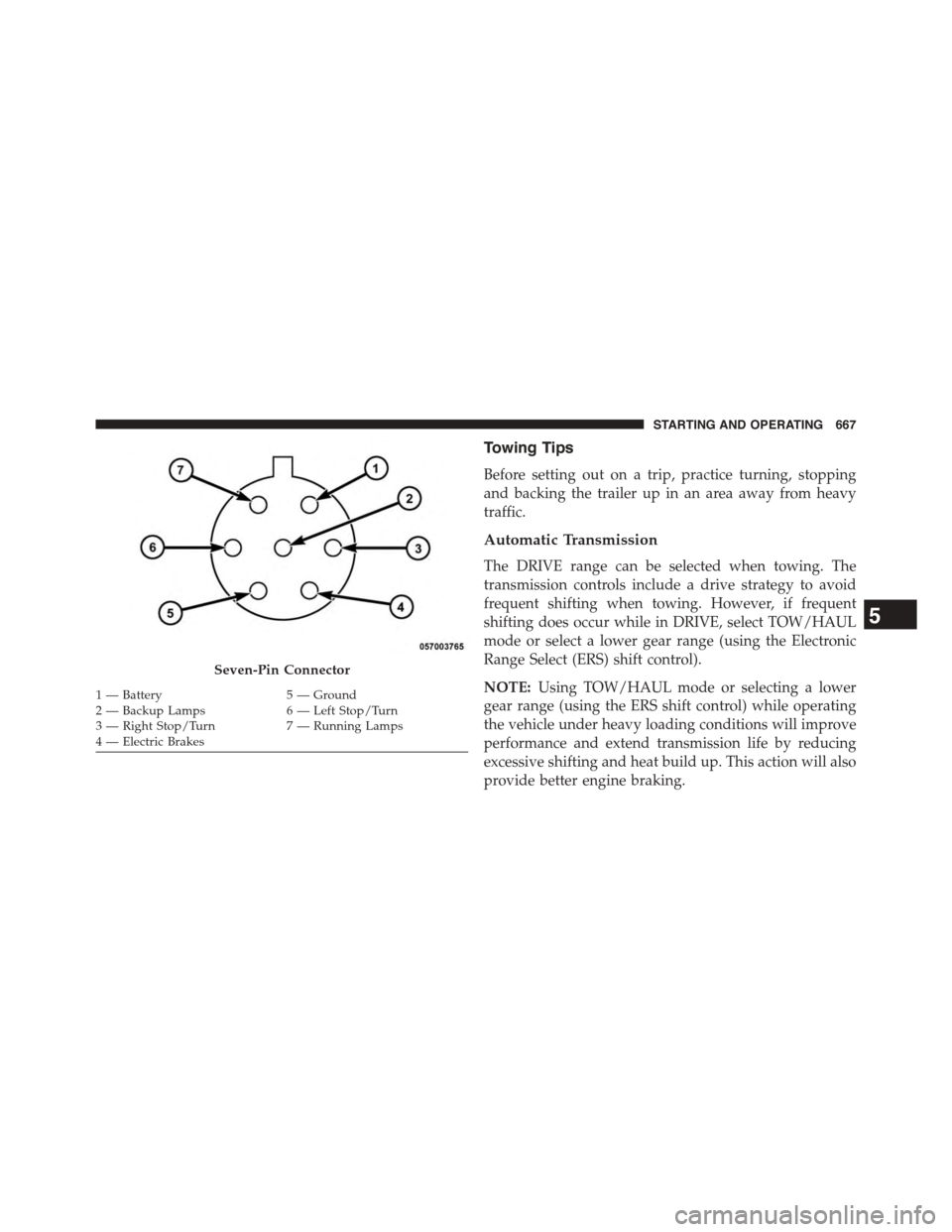
Seven-Pin Connector
1—Battery5—Ground2—BackupLamps6—LeftStop/Turn3—RightStop/Turn7—RunningLamps4 — Electric Brakes
5
STARTING AND OPERATING 667
Page 670 of 871
![Ram 1500 2015 Owners Manual When towing a loaded trailer up steep grades at low
speeds (20 mph [32 km/h] or below), holding your
vehicle in first gear (using the ERS shift control) can help
to avoid transmission overheating.
If](/img/34/12541/w960_12541-669.png "Ram 1500 2015 Owners Manual When towing a loaded trailer up steep grades at low
speeds (20 mph [32 km/h] or below), holding your
vehicle in first gear (using the ERS shift control) can help
to avoid transmission overheating.
If")
When towing a loaded trailer up steep grades at low
speeds (20 mph [32 km/h] or below), holding your
vehicle in first gear (using the ERS shift control) can help
to avoid transmission overheating.
If you regularly tow a trailer for more than 45 minutes of
continuous operation, then change the automatic trans-
mission fluid and filter(s) as specified for#police, taxi,
fleet, or frequent trailer towing.#Refer to the “Mainte-
nance Schedule” for the proper maintenance intervals.
NOTE:Check the automatic transmission fluid level
before towing (6-speed automatic only).
Tow/Haul Mode
To reduce potential for automatic transmission overheat-
ing, activate TOW/HAUL mode when driving in hilly
areas, or select a lower gear range (using the Electronic
Range Select (ERS) shift control) on more severe grades.
Electronic Speed Control — If Equipped
•Do not use in hilly terrain or with heavy loads.
•When using the speed control, if you experience speed
drops greater than 10 mph (16 km/h), disengage until
you can get back to cruising speed.
•Use speed control in flat terrain and with light loads to
maximize fuel efficiency.
Cooling System
To reduce potential for engine and transmission over-
heating, take the following actions:
City Driving
When stopped for short periods of time, shift the trans-
mission into NEUTRAL and increase engine idle speed.
Highway Driving
Reduce speed.
668 STARTING AND OPERATING
Page 678 of 871
CAUTION!(Continued)
•Tow only in the forward direction. Towing this
vehicle backwards can cause severe damage to the
transfer case.
•Automatic transmissions must be placed in PARK
for recreational towing.
•Manual transmissions must be placed in gear (not
in Neutral) for recreational towing.
•Before recreational towing, perform the procedure
outlined under “Shifting Into NEUTRAL (N)” to be
certain that the transfer case is fully in NEUTRAL
(N). Otherwise, internal damage will result.
•Towing this vehicle in violation of the above re-
quirements can cause severe transmission and/or
transfer case damage. Damage from improper tow-
ing is not covered under the New Vehicle Limited
Warranty.
(Continued)
CAUTION!(Continued)
•Do not disconnect the rear driveshaft because fluid
will leak from the transfer case, causing damage to
internal parts.
•Do not use a bumper-mounted clamp-on tow bar
on your vehicle. The bumper face bar will be
damaged.
Shifting Into NEUTRAL (N)
Use the following procedure to prepare your vehicle for
recreational towing.
WARNING!
You or others could be injured or killed if you leave
the vehicle unattended with the transfer case in the
NEUTRAL (N) position without first fully engaging
(Continued)
676 STARTING AND OPERATING
Page 680 of 871
5. Release the parking brake.
6. Shift the transmission into REVERSE.
7. Release the brake pedal (and clutch pedal on manual
transmissions) for five seconds and ensure that there is
no vehicle movement.
8. Repeat steps 7 and 8 with automatic transmission in
DRIVE or manual transmission in first gear.
9. Shift the transmission to NEUTRAL. Firmly apply the
parking brake. Turn OFF the engine. For vehicles with
Keyless Enter-N-Go™, press and hold the ENGINE
START/STOP button until the engine shuts off.
10. Shift the transmission into PARK or place manual
transmission in gear (NOT in Neutral). On 8-speed
transmissions the shifter will automatically select
PARK when the engine is turned off.
11. Turn the ignition switch to the OFF position, then
cycle the key or the Keyless Enter-N-Go™ button to
the RUN position and back to the OFF position.
12. Attach the vehicle to the tow vehicle using a suitable
tow bar.
13. Release the parking brake.
NOTE:With electronic shift transfer case:
•Steps 2 through 4 are requirements that must be met
before pressing the NEUTRAL (N) button, and must
continue to be met until the shift has been completed.
If any of these requirements are not met before press-
ing the NEUTRAL (N) button or are no longer met
during the shift, the NEUTRAL (N) indicator light will
flash continuously until all requirements are met or
until the NEUTRAL (N) button is released.
678 STARTING AND OPERATING
Page 688 of 871
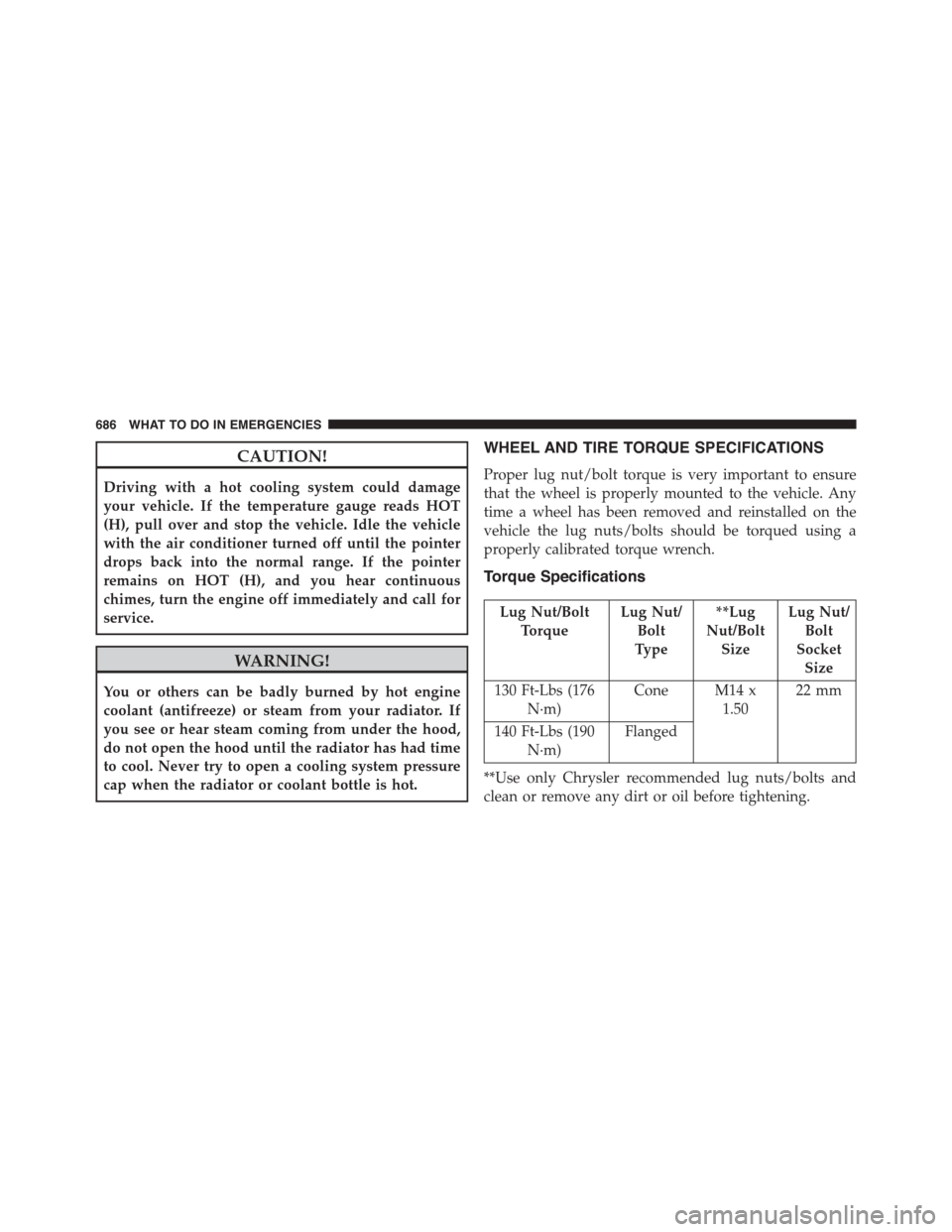
CAUTION!
Driving with a hot cooling system could damage
your vehicle. If the temperature gauge reads HOT
(H), pull over and stop the vehicle. Idle the vehicle
with the air conditioner turned off until the pointer
drops back into the normal range. If the pointer
remains on HOT (H), and you hear continuous
chimes, turn the engine off immediately and call for
service.
WARNING!
You or others can be badly burned by hot engine
coolant (antifreeze) or steam from your radiator. If
you see or hear steam coming from under the hood,
do not open the hood until the radiator has had time
to cool. Never try to open a cooling system pressure
cap when the radiator or coolant bottle is hot.
WHEEL AND TIRE TORQUE SPECIFICATIONS
Proper lug nut/bolt torque is very important to ensure
that the wheel is properly mounted to the vehicle. Any
time a wheel has been removed and reinstalled on the
vehicle the lug nuts/bolts should be torqued using a
properly calibrated torque wrench.
Torque Specifications
Lug Nut/Bolt
Torque
Lug Nut/
Bolt
Type
**Lug
Nut/Bolt
Size
Lug Nut/
Bolt
Socket
Size
130 Ft-Lbs (176
N·m)
Cone M14 x
1.50
22 mm
140 Ft-Lbs (190
N·m)
Flanged
**Use only Chrysler recommended lug nuts/bolts and
clean or remove any dirt or oil before tightening.
686 WHAT TO DO IN EMERGENCIES