light Ram 1500 2015 Owner's Manual
[x] Cancel search | Manufacturer: RAM, Model Year: 2015, Model line: 1500, Model: Ram 1500 2015Pages: 871, PDF Size: 24.83 MB
Page 352 of 871
Screen Setup
Push and release theUPorDOWNarrow
button until the Screen Setup display icon is
highlighted in the DID. Push and release the
RIGHTarrow button to enter the Screen Setup
submenu. The Screen Setup feature allows you to change
what information is displayed in the instrument cluster
as well as the location that information is displayed.
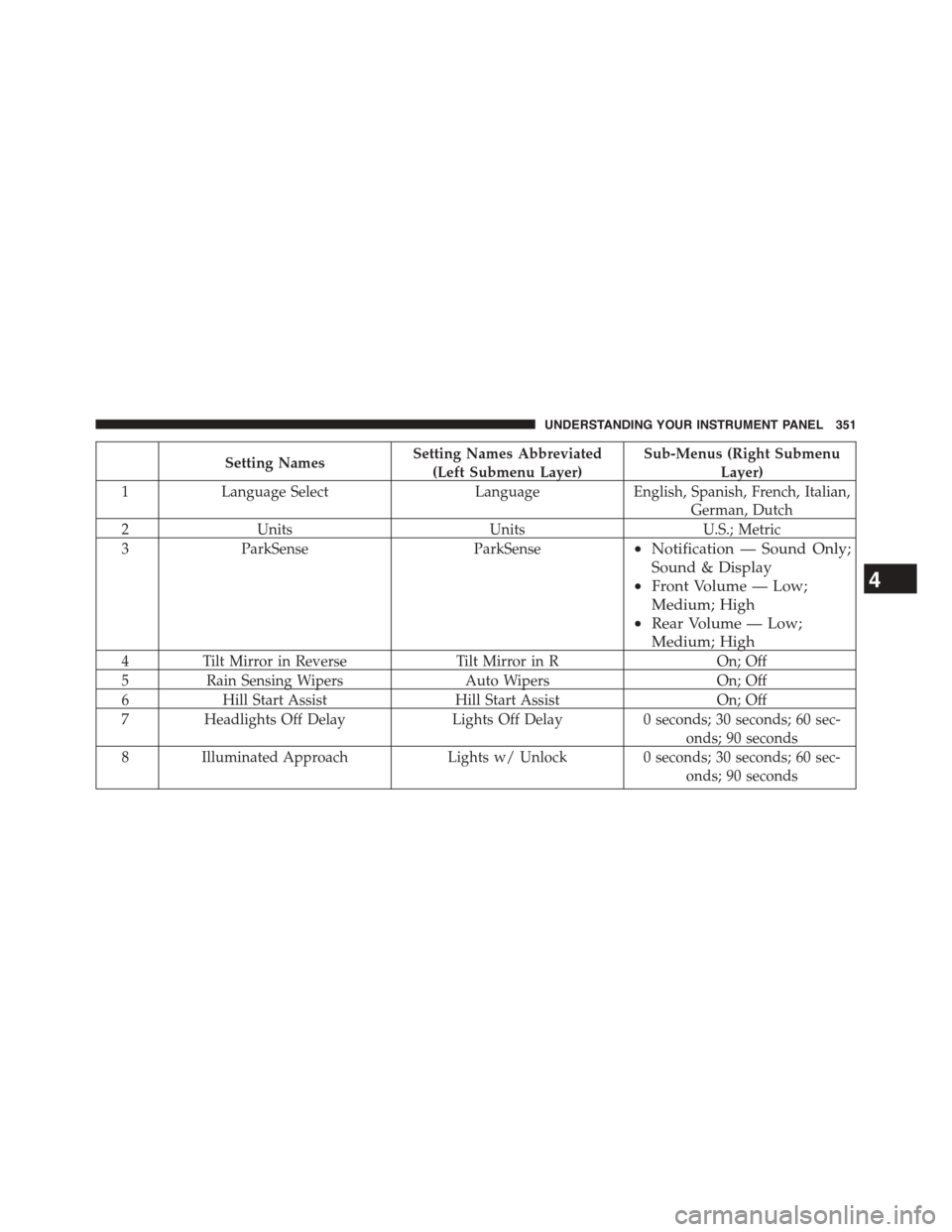
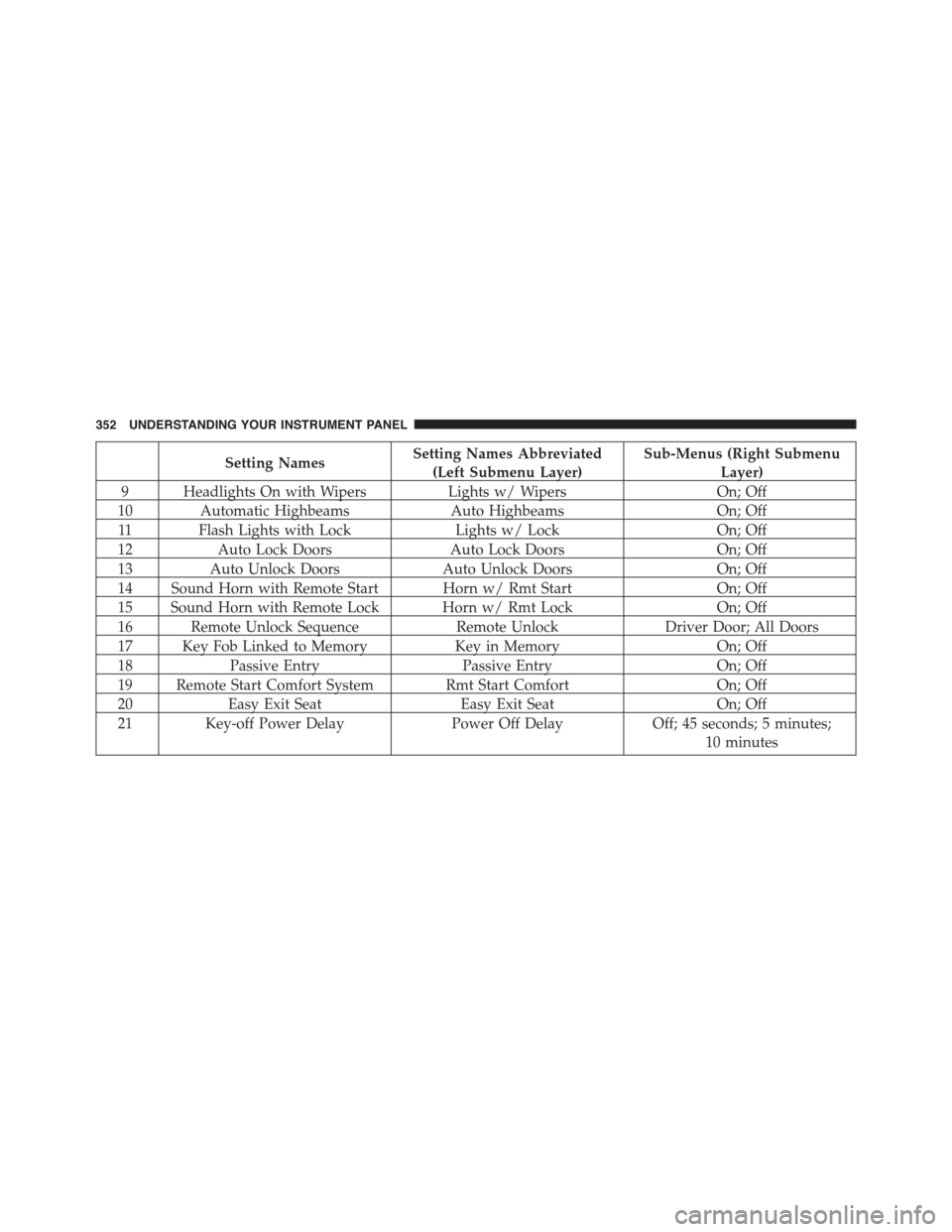
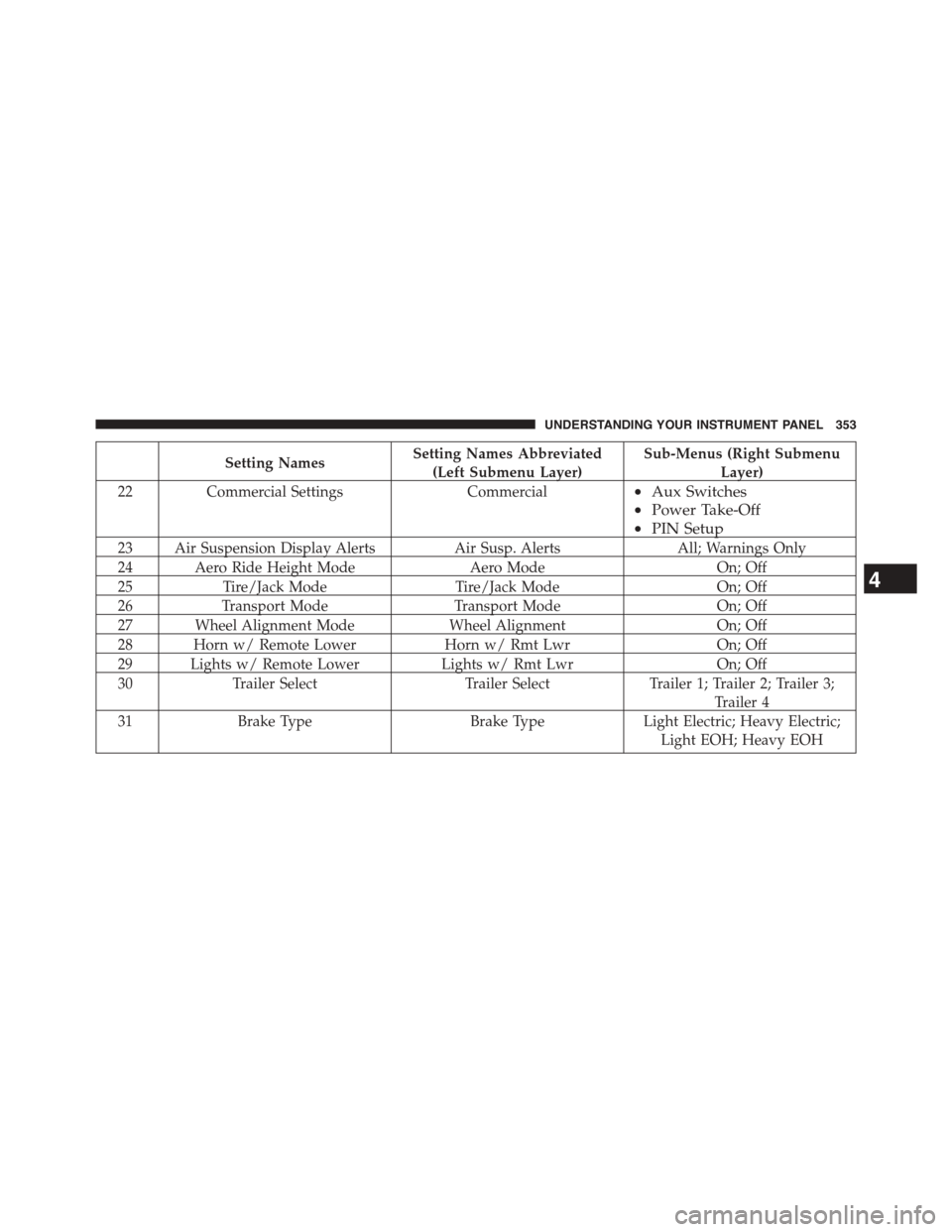
Vehicles Settings (Customer-Programmable Features)
NOTE:This feature is only available on 5.0 and
8.4 Uconnect® Radios
Personal Settings allows the driver to set and recall
features when the transmission is in PARK.
Push and release theUPandDOWNbutton until Per-
sonal Settings displays in the DID.
Follow the prompts to display and set any of the follow-
ing Personal Settings.
NOTE:Your vehicle may or may not be equipped with
all the following settings.
350 UNDERSTANDING YOUR INSTRUMENT PANEL
Page 353 of 871
Setting NamesSetting Names Abbreviated
(Left Submenu Layer)
Sub-Menus (Right Submenu
Layer)
1Language SelectLanguageEnglish, Spanish, French, Italian,
German, Dutch
2UnitsUnitsU.S.; Metric
3ParkSenseParkSense•Notification — Sound Only;
Sound & Display
•Front Volume — Low;
Medium; High
•Rear Volume — Low;
Medium; High
4Tilt Mirror in ReverseTilt Mirror in ROn; Off
5Rain Sensing WipersAuto WipersOn; Off
6Hill Start AssistHill Start AssistOn; Off
7Headlights Off DelayLights Off Delay0 seconds; 30 seconds; 60 sec-
onds; 90 seconds
8 Illuminated ApproachLights w/ Unlock0 seconds; 30 seconds; 60 sec-
onds; 90 seconds
4
UNDERSTANDING YOUR INSTRUMENT PANEL 351
Page 354 of 871
Setting NamesSetting Names Abbreviated
(Left Submenu Layer)
Sub-Menus (Right Submenu
Layer)
9 Headlights On with WipersLights w/ WipersOn; Off
10 Automatic HighbeamsAuto HighbeamsOn; Off
11 Flash Lights with LockLights w/ LockOn; Off
12Auto Lock DoorsAuto Lock DoorsOn; Off
13Auto Unlock DoorsAuto Unlock DoorsOn; Off
14 Sound Horn with Remote Start Horn w/ Rmt StartOn; Off
15 Sound Horn with Remote Lock Horn w/ Rmt LockOn; Off
16 Remote Unlock SequenceRemote UnlockDriver Door; All Doors
17 Key Fob Linked to MemoryKey in MemoryOn; Off
18Passive EntryPassive EntryOn; Off
19 Remote Start Comfort System Rmt Start ComfortOn; Off
20Easy Exit SeatEasy Exit SeatOn; Off
21 Key-off Power DelayPower Off DelayOff; 45 seconds; 5 minutes;
10 minutes
352 UNDERSTANDING YOUR INSTRUMENT PANEL
Page 355 of 871
Setting NamesSetting Names Abbreviated
(Left Submenu Layer)
Sub-Menus (Right Submenu
Layer)
22Commercial SettingsCommercial•Aux Switches
•Power Take-Off
•PIN Setup
23 Air Suspension Display AlertsAir Susp. AlertsAll; Warnings Only
24 Aero Ride Height ModeAero ModeOn; Off
25Tire/Jack ModeTire/Jack ModeOn; Off
26Transport ModeTransport ModeOn; Off
27 Wheel Alignment ModeWheel AlignmentOn; Off
28 Horn w/ Remote LowerHorn w/ Rmt LwrOn; Off
29 Lights w/ Remote LowerLights w/ Rmt LwrOn; Off
30Trailer SelectTrailer SelectTrailer 1; Trailer 2; Trailer 3;
Trailer 4
31Brake TypeBrake TypeLight Electric; Heavy Electric;
Light EOH; Heavy EOH
4
UNDERSTANDING YOUR INSTRUMENT PANEL 353
Page 360 of 871
Buttons On The Touchscreen
Buttons on the touchscreen are accessible on the
Uconnect® display.
Customer Programmable Features — Uconnect®
5.0 Personal Settings
Push the Settings button on the faceplate to display the
settings menu screen. In this mode the Uconnect® system
allows you to access programmable features that may be
equipped such as Display, Voice, Clock, Safety & Assis-
tance, Lights, Doors & Locks, Auto-On Comfort (if
equipped), Engine Off Options, Suspension, Trailer
Brake, Audio, Compass Settings, Phone/Bluetooth®,
SiriusXM Setup (if equipped), Restore Settings, Clear
Personal Data and System Information.
NOTE:Only one category may be selected at a time.
When making a selection, press the button on the touch-
screen to enter the desired mode. Once in the desired
mode, press and release the preferred setting until the
button is highlighted. Once the setting is complete, either
press the back arrow or Done button on the touchscreen
or the Back button on the faceplate to return to the
previous menu. Pressing the Up or Down Arrow buttons
on the touchscreen on the right side of the screen will
allow you to toggle up or down through the list of
available settings.
NOTE:All settings should be changed with the ignition
in the “Run” position.
358 UNDERSTANDING YOUR INSTRUMENT PANEL
Page 365 of 871

Lights
After pressing the “Lights” button on the touchscreen,
the following settings will be available:
•Headlight Off Delay
When this feature is selected, it allows the adjustment of
the amount of time the headlights remain on after the
engine is shut off. To change the Headlight Off Delay
setting, press the “Headlight Off Delay” button on the
touchscreen and choose either “0,” “30,” “60,” or “90”
buttons on the touchscreen to select your desired time
interval. Press the back arrow/Done button on the touch-
screen to return to the previous menu.
•Headlight Illumination On Approach
When this feature is selected, it allows the adjustment of
the amount of time the headlights remain on when the
doors are unlocked with the Remote Keyless Entry (RKE)
transmitter. To change the Illuminated Approach status,
press the “Illuminated Approach” button on the touch-
screen and choose either “0,” “30,” “60,” or “90” buttons
on the touchscreen to select your desired time interval.
Press the back arrow/Done button on the touchscreen to
return to the previous menu.
•Headlights With Wipers — If Equipped
When this feature is selected, and the headlight switch is
in the AUTO position, the headlights will turn on ap-
proximately 10 seconds after the wipers are turned on.
The headlights will also turn off when the wipers are
turned off, if they were turned on by this feature. To
make your selection, press the “Lights w/Wipers” button
and select from “On” or “Off.” Press the back arrow/
Done button on the touchscreen to return to the previous
menu.
4
UNDERSTANDING YOUR INSTRUMENT PANEL 363
Page 366 of 871

•Auto Dim High Beams — If Equipped
When this feature is selected, the high beam headlights
will activate/deactivate automatically under certain con-
ditions. To make your selection, press the “Auto High
Beams” button on the touchscreen, and select from “On”
or “Off.” Press the back arrow/Done button on the
touchscreen to return to the previous menu. Refer to
”Automatic High Beam — If Equipped” in “Understand-
ing The Features Of Your Vehicle” for further informa-
tion.
•Daytime Running Lights — If Equipped
When this feature is selected, the headlights will turn on
whenever the engine is running. To make your selection,
press the “Daytime Running Lights” button on the touch-
screen, and select from “On” or “Off.” Press the back
arrow/Done button on the touchscreen to return to the
previous menu.
•Flash Lights With Lock
When this feature is selected, the exterior lights will flash
when the doors are locked or unlocked with the Remote
Keyless Entry (RKE) transmitter. This feature may be
selected with or without the sound horn on lock feature
selected. To make your selection, press the “Flash Lights
w/Lock” button on the touchscreen, and select from
“On” or “Off.” Press the back arrow/Done button on the
touchscreen to return to the previous menu.
Doors & Locks
After pressing the “Doors & Locks” button on the touch-
screen, the following settings will be available:
•Auto Door Locks
When this feature is selected, all doors will lock auto-
matically when the vehicle reaches a speed of 15 mph
(24 km/h). To make your selection, press the “Auto Door
Locks” button on the touchscreen and select from “On”
364 UNDERSTANDING YOUR INSTRUMENT PANEL
Page 368 of 871

•Memory Linked to Fob — If Equipped
This feature provides automatic driver seat positioning to
enhance driver mobility when entering and exiting the
vehicle. To make your selection, press the “Memory
Linked to Fob” button on the touchscreen and select from
“On” or “Off.” Press the back arrow/Done button on the
touchscreen to return to the previous menu.
NOTE:The seat will return to the memorized seat
location if “Memory Linked to Fob” is set to (ON) when
the Remote Keyless Entry (RKE) transmitter is used to
unlock the door. Refer to “Driver Memory Seat” in
“Understanding The Features Of Your Vehicle” for fur-
ther information.
•Passive Entry
This feature allows you to lock and unlock the vehicle’s
door(s) without having to push the Remote Keyless Entry
(RKE) transmitter lock or unlock buttons. It automatically
unlocks the doors when the outside door handle is
grabbed. To make your selection, press the “Passive
Entry” button on the touchscreen and select from “On” or
“Off.” Press the back arrow/Done button on the touch-
screen to return to the previous menu. Refer to “Keyless
Enter-N-Go™” in “Things To Know Before Starting Your
Vehicle” for further information.
•Flash Lights With Lock
When this feature is selected, the exterior lights will flash
when the doors are locked or unlocked with the Remote
Keyless Entry (RKE) transmitter. This feature may be
selected with or without the sound horn on lock feature
selected. To make your selection, press the “Flash Lights
w/Lock” button on the touchscreen, and select from
“On” or “Off.” Press the back arrow/Done button on the
touchscreen to return to the previous menu.
366 UNDERSTANDING YOUR INSTRUMENT PANEL
Page 369 of 871
Auto Comfort Systems — If Equipped
After pressing the “Auto-On Comfort” button on the
touchscreen the following settings will be available:
•Auto-On Driver Heated/Ventilated Seat & Steering
Wheel With Vehicle Start — If Equipped
When this feature is selected the driver’s heated seat and
heated steering wheel will automatically turn ON when
temperatures are below 40° F (4.4° C). When tempera-
tures are above 80° F (26.7° C) the driver vented seat will
turn ON. To make your selection, press the “Auto Heated
Seats” button on the touchscreen, then select either “On”
or “Off.” Press the back arrow/Done button on the
touchscreen to return to the previous menu.
Engine Off Options
After pressing the “Engine Off Options” button on the
touchscreen the following settings will be available.
•Easy Exit Seats — If Equipped
When this feature is selected, the Driver ’s seat will
automatically move rearward once the engine is shut off.
To make your selection, press the “Easy Exit Seats”
button on the touchscreen and make your selection. Press
the back arrow/Done button on the touchscreen to return
to the previous menu.
•Headlight Off Delay
When this feature is selected, the driver can choose to
have the headlights remain on for 0, 30, 60, or 90 seconds
when exiting the vehicle. Press the “Headlight Off Delay”
button on the touchscreen and choose from “0,” “30,”
“60,” or “90” seconds to select your desired time interval.
Press the back arrow/Done button on the touchscreen to
return to the previous menu.
4
UNDERSTANDING YOUR INSTRUMENT PANEL 367
Page 370 of 871

•Engine Off Power Delay
When this feature is selected, the power window
switches, radio, Uconnect® phone system (if equipped),
DVD video system (if equipped), power sunroof (if
equipped), and power outlets will remain active for up to
10 minutes after the ignition is cycled to OFF. Opening
either front door will cancel this feature. Press the “En-
gine Off Power Delay” button on the touchscreen and
choose from “0 sec,” “45 sec,” “5 min” or “10 min” to
select your desired time interval. Then press the back
arrow/Done button on the touchscreen to return to the
previous menu.
•Auto Entry/Exit — If Equipped
When this feature is selected, it automatically lowers the
vehicle ride height position when shifted into park. Press
the “Auto Entry/Exit” button on the touchscreen and
choose from “On” or “Off.” Press the back arrow/Done
button on the touchscreen to return to the previous menu.
Suspension — If Equipped
After pressing the “Suspension” button on the touch-
screen the following settings will be available:
•Sound Horn With Lower
When this feature is selected, a short horn sound will
occur when the RKE transmitter REMOTE LOWER but-
ton is pressed. To make your selection, press the “Horn
w/lower” button on the touchscreen, select “On” or
“Off” followed by pressing the back arrow/Done button
on the touchscreen.
•Flash Lights With Lower
When this feature is selected, the front and rear turn
signals will flash when the RKE transmitter REMOTE
LOWER button is pressed twice. To make your selection,
press the “Light w/Lower” button on the touchscreen,
select “On” or “Off” followed by pressing the back
arrow/Done button on the touchscreen.
368 UNDERSTANDING YOUR INSTRUMENT PANEL