panel Ram 1500 2015 Owner's Manual
[x] Cancel search | Manufacturer: RAM, Model Year: 2015, Model line: 1500, Model: Ram 1500 2015Pages: 871, PDF Size: 24.83 MB
Page 354 of 871
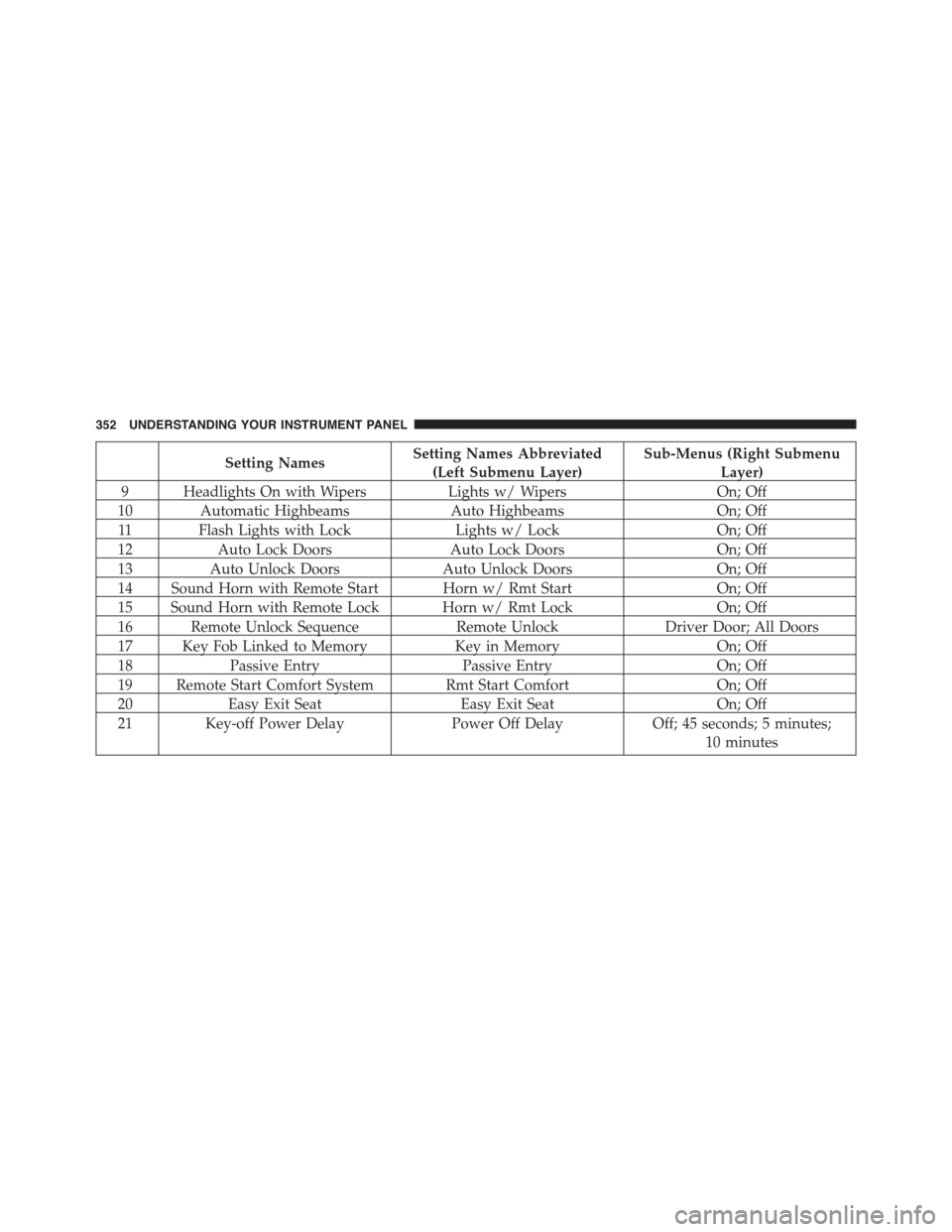
Setting NamesSetting Names Abbreviated
(Left Submenu Layer)
Sub-Menus (Right Submenu
Layer)
9 Headlights On with WipersLights w/ WipersOn; Off
10 Automatic HighbeamsAuto HighbeamsOn; Off
11 Flash Lights with LockLights w/ LockOn; Off
12Auto Lock DoorsAuto Lock DoorsOn; Off
13Auto Unlock DoorsAuto Unlock DoorsOn; Off
14 Sound Horn with Remote Start Horn w/ Rmt StartOn; Off
15 Sound Horn with Remote Lock Horn w/ Rmt LockOn; Off
16 Remote Unlock SequenceRemote UnlockDriver Door; All Doors
17 Key Fob Linked to MemoryKey in MemoryOn; Off
18Passive EntryPassive EntryOn; Off
19 Remote Start Comfort System Rmt Start ComfortOn; Off
20Easy Exit SeatEasy Exit SeatOn; Off
21 Key-off Power DelayPower Off DelayOff; 45 seconds; 5 minutes;
10 minutes
352 UNDERSTANDING YOUR INSTRUMENT PANEL
Page 355 of 871
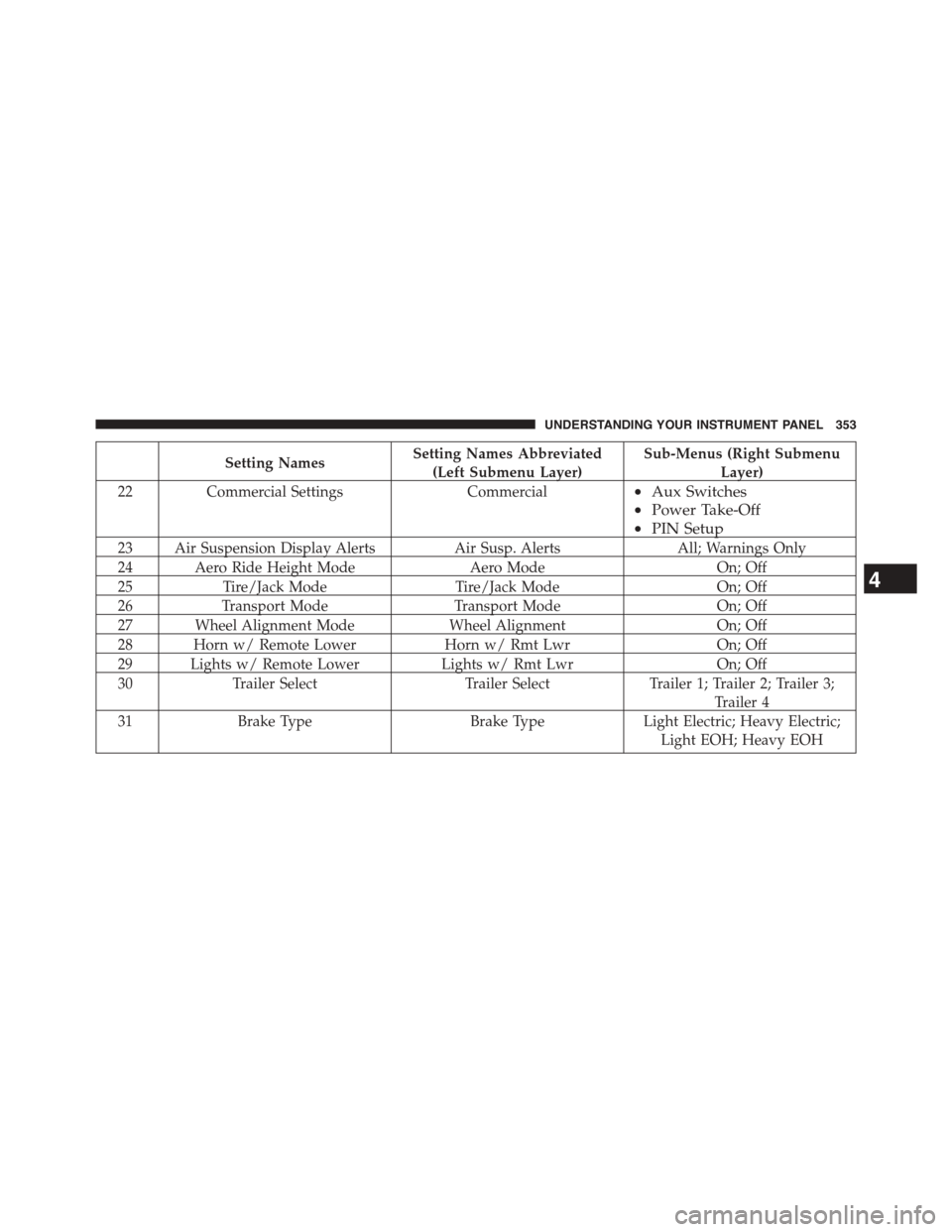
Setting NamesSetting Names Abbreviated
(Left Submenu Layer)
Sub-Menus (Right Submenu
Layer)
22Commercial SettingsCommercial•Aux Switches
•Power Take-Off
•PIN Setup
23 Air Suspension Display AlertsAir Susp. AlertsAll; Warnings Only
24 Aero Ride Height ModeAero ModeOn; Off
25Tire/Jack ModeTire/Jack ModeOn; Off
26Transport ModeTransport ModeOn; Off
27 Wheel Alignment ModeWheel AlignmentOn; Off
28 Horn w/ Remote LowerHorn w/ Rmt LwrOn; Off
29 Lights w/ Remote LowerLights w/ Rmt LwrOn; Off
30Trailer SelectTrailer SelectTrailer 1; Trailer 2; Trailer 3;
Trailer 4
31Brake TypeBrake TypeLight Electric; Heavy Electric;
Light EOH; Heavy EOH
4
UNDERSTANDING YOUR INSTRUMENT PANEL 353
Page 356 of 871
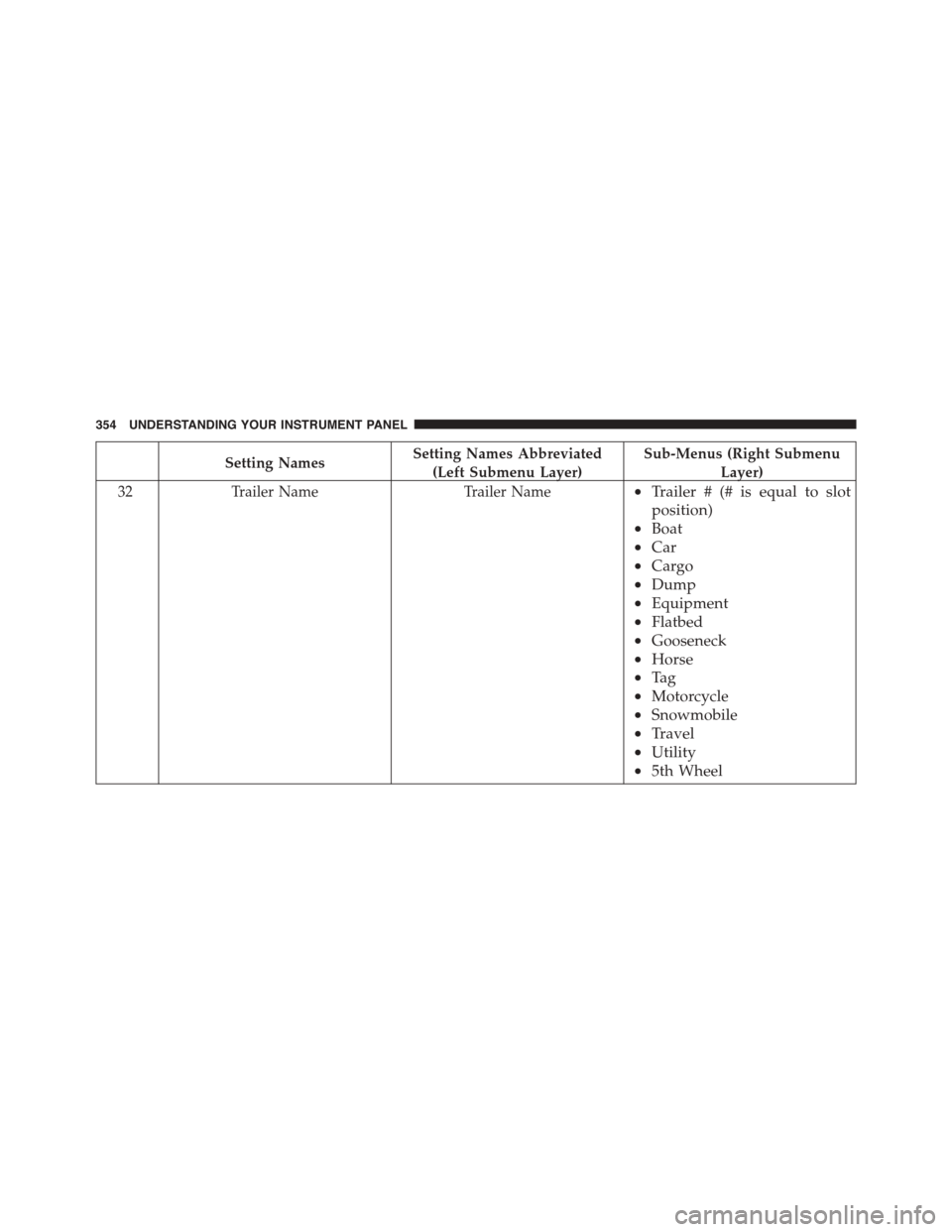
Setting NamesSetting Names Abbreviated
(Left Submenu Layer)
Sub-Menus (Right Submenu
Layer)
32Trailer NameTrailer Name•Trailer # (# is equal to slot
position)
•Boat
•Car
•Cargo
•Dump
•Equipment
•Flatbed
•Gooseneck
•Horse
•Ta g
•Motorcycle
•Snowmobile
•Travel
•Utility
•5th Wheel
354 UNDERSTANDING YOUR INSTRUMENT PANEL
Page 357 of 871
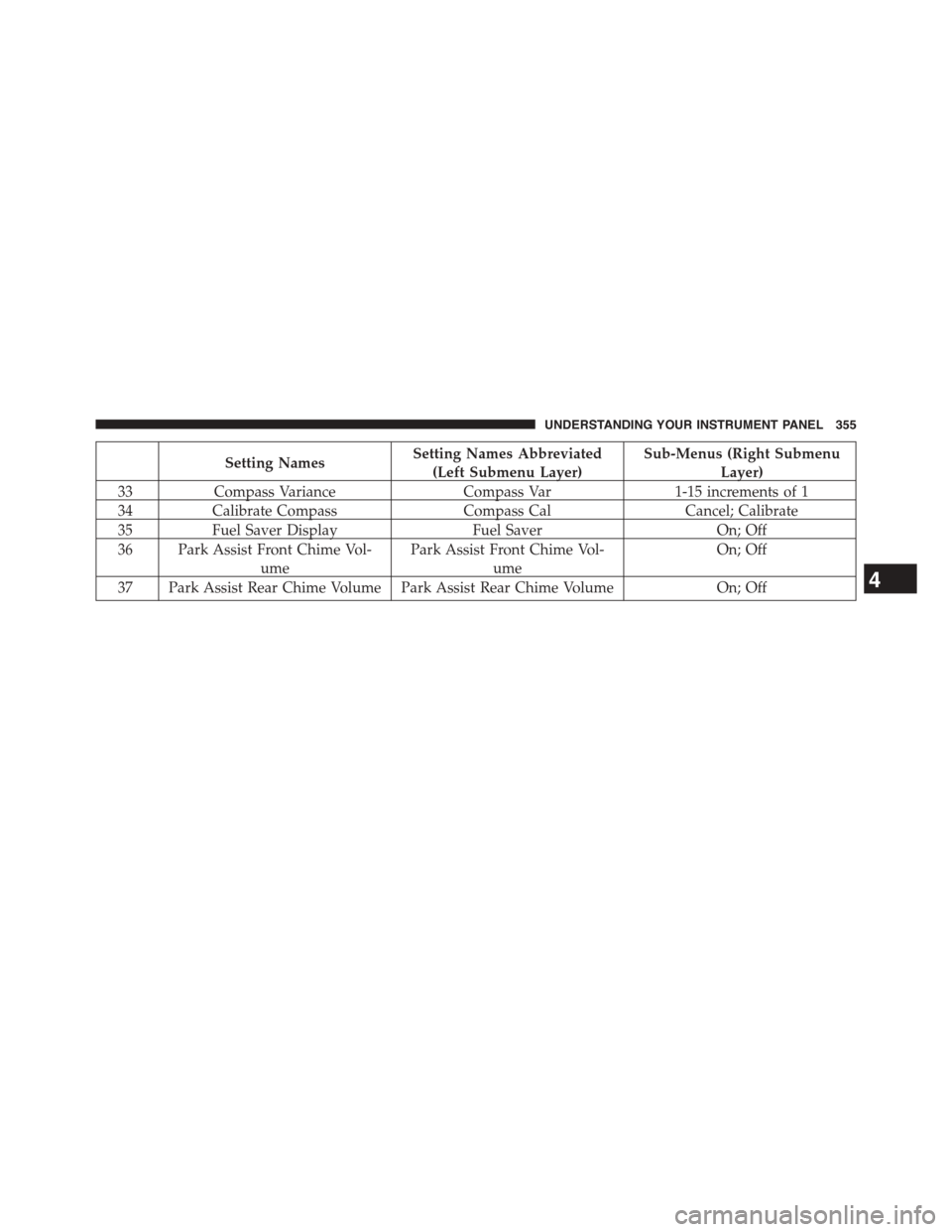
Setting NamesSetting Names Abbreviated
(Left Submenu Layer)
Sub-Menus (Right Submenu
Layer)
33Compass VarianceCompass Var1-15 increments of 1
34Calibrate CompassCompass CalCancel; Calibrate
35Fuel Saver DisplayFuel SaverOn; Off
36 Park Assist Front Chime Vol-
ume
Park Assist Front Chime Vol-
ume
On; Off
37 Park Assist Rear Chime Volume Park Assist Rear Chime VolumeOn; Off4
UNDERSTANDING YOUR INSTRUMENT PANEL 355
Page 358 of 871
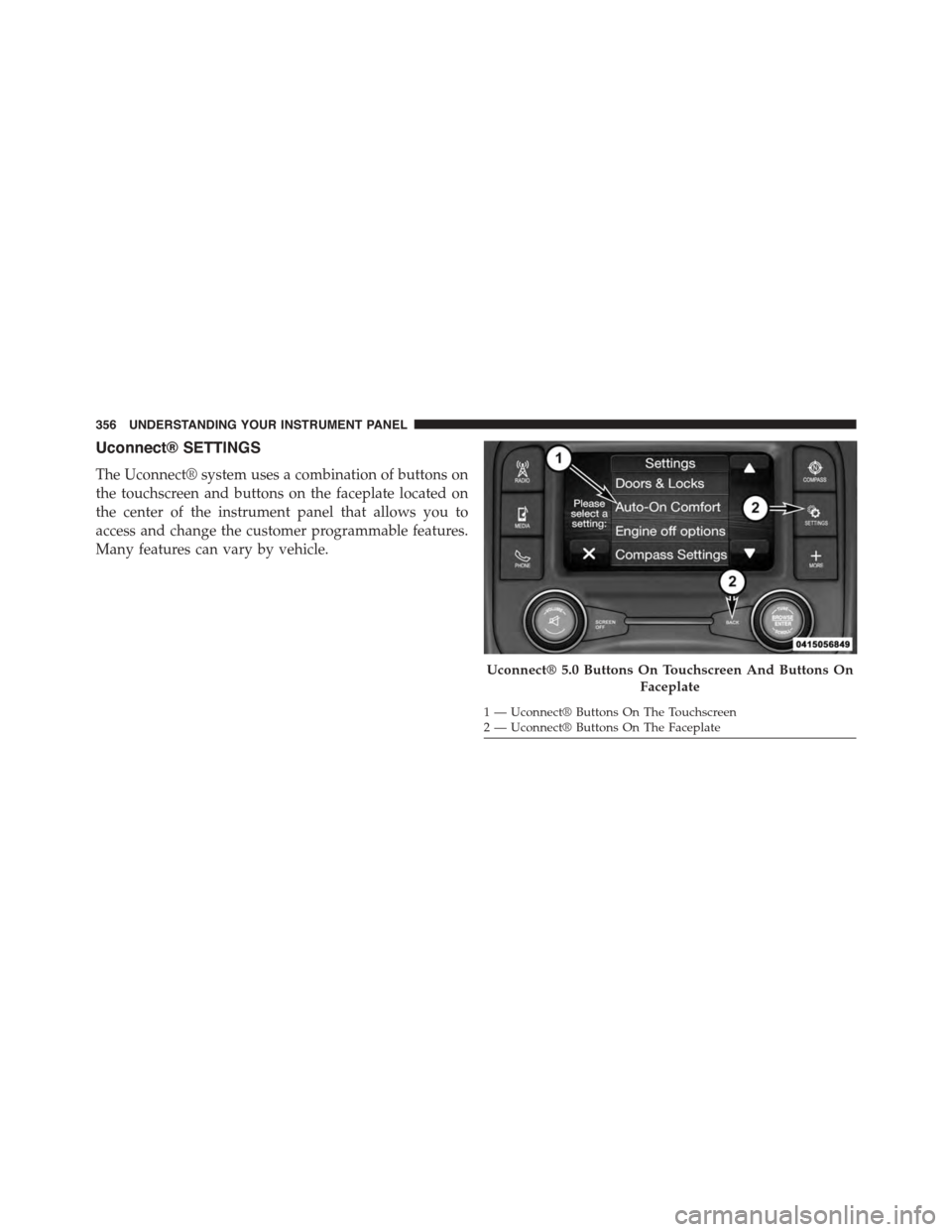
Uconnect® SETTINGS
The Uconnect® system uses a combination of buttons on
the touchscreen and buttons on the faceplate located on
the center of the instrument panel that allows you to
access and change the customer programmable features.
Many features can vary by vehicle.
Uconnect® 5.0 Buttons On Touchscreen And Buttons On
Faceplate
1—Uconnect®ButtonsOnTheTouchscreen2—Uconnect®ButtonsOnTheFaceplate
356 UNDERSTANDING YOUR INSTRUMENT PANEL
Page 359 of 871
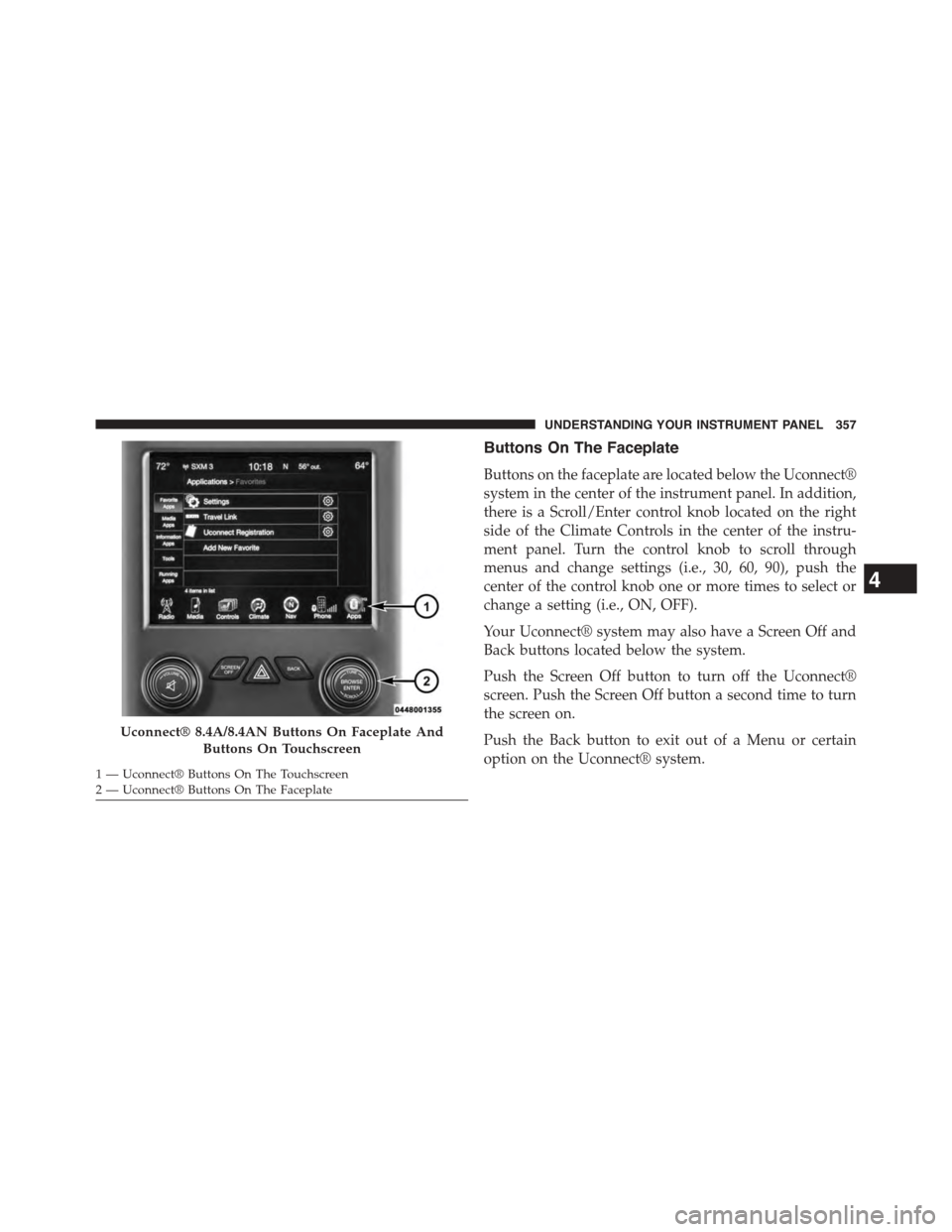
Buttons On The Faceplate
Buttons on the faceplate are located below the Uconnect®
system in the center of the instrument panel. In addition,
there is a Scroll/Enter control knob located on the right
side of the Climate Controls in the center of the instru-
ment panel. Turn the control knob to scroll through
menus and change settings (i.e., 30, 60, 90), push the
center of the control knob one or more times to select or
change a setting (i.e., ON, OFF).
Your Uconnect® system may also have a Screen Off and
Back buttons located below the system.
Push the Screen Off button to turn off the Uconnect®
screen. Push the Screen Off button a second time to turn
the screen on.
Push the Back button to exit out of a Menu or certain
option on the Uconnect® system.
Uconnect® 8.4A/8.4AN Buttons On Faceplate And
Buttons On Touchscreen
1—Uconnect®ButtonsOnTheTouchscreen2—Uconnect®ButtonsOnTheFaceplate
4
UNDERSTANDING YOUR INSTRUMENT PANEL 357
Page 360 of 871
Buttons On The Touchscreen
Buttons on the touchscreen are accessible on the
Uconnect® display.
Customer Programmable Features — Uconnect®
5.0 Personal Settings
Push the Settings button on the faceplate to display the
settings menu screen. In this mode the Uconnect® system
allows you to access programmable features that may be
equipped such as Display, Voice, Clock, Safety & Assis-
tance, Lights, Doors & Locks, Auto-On Comfort (if
equipped), Engine Off Options, Suspension, Trailer
Brake, Audio, Compass Settings, Phone/Bluetooth®,
SiriusXM Setup (if equipped), Restore Settings, Clear
Personal Data and System Information.
NOTE:Only one category may be selected at a time.
When making a selection, press the button on the touch-
screen to enter the desired mode. Once in the desired
mode, press and release the preferred setting until the
button is highlighted. Once the setting is complete, either
press the back arrow or Done button on the touchscreen
or the Back button on the faceplate to return to the
previous menu. Pressing the Up or Down Arrow buttons
on the touchscreen on the right side of the screen will
allow you to toggle up or down through the list of
available settings.
NOTE:All settings should be changed with the ignition
in the “Run” position.
358 UNDERSTANDING YOUR INSTRUMENT PANEL
Page 361 of 871
Display
After pressing the “Display” button on the touchscreen
the following settings will be available.
•Display Mode
When in this display you may select the Auto or Manual
display settings. To change Mode status, press and re-
lease the “Auto” or “Manual” button on the touchscreen.
Press the back arrow/Done button on the touchscreen to
return to the previous menu.
•Set Language
When in this display, you may select one of multiple
languages (English/Français/Español) for all display no-
menclature, including the trip functions and the naviga-
tion system (if equipped). Press the “Language” button
on the touchscreen and select from “English,” “Français,”
or “Español.” Press the back arrow/Done button on the
touchscreen to return to the previous menu.
•Units
When in this display, you may select to have the EVIC/
DID, odometer, and navigation system (if equipped)
changed between US and Metric units of measure. Press
“US” or “Metric” to make your selection. Press the back
arrow/Done button on the touchscreen to return to the
previous menu.
•Touchscreen Beep
When in this display, you may turn on or shut off the
sound heard when a touchscreen button is pressed. To
change the Mode status, press and release the “On” or
“Off” button on the touchscreen. Press the back arrow/
Done button on the touchscreen to return to the previous
menu
•Fuel Saver Display — If Equipped
This feature will allow you to enable fuel saver mode and
will be displayed in the EVIC/DID. Press the “Fuel Saver
4
UNDERSTANDING YOUR INSTRUMENT PANEL 359
Page 362 of 871
Display” button on the touchscreen select from “On” or
“Off.” Press the back arrow/Done button on the touch-
screen to return to the previous menu.
Voice
After pressing the “Voice” button on the touchscreen the
following settings will be available:
•Voice Response Length
When in this display, you may change the Voice Re-
sponse Length settings. To change the Voice Response
Length, press the “Voice Response Length” button on the
touchscreen and select from “Brief” or “Detailed.” Press
the back arrow/Done button on the touchscreen to return
to the previous menu.
•Show Command List
When in this display, you may change the Show Com-
mand List settings. To change the Show Command List
settings, press the “Show Command List” button on the
touchscreen and select from “Always,” “With Help” or
“Never.” Press the back arrow/Done button on the
touchscreen to return to the previous menu.
Clock & Date
After pressing the “Clock & Date” button on the touch-
screen the following settings will be available:
•Set Time
When in this display, you may set the time and format
manually. Press the “Set Time” button then choose from
a “12 hour” or “24 hour format.” Press the corresponding
arrow above and below the current time to adjust, then
select “AM” or “PM.” Press the back arrow/Done button
on the touchscreen to return to the previous menu.
•Set Date
When in this display, you may set the date manually.
Press the “Set Date” button then press the corresponding
360 UNDERSTANDING YOUR INSTRUMENT PANEL
Page 363 of 871

arrows above and below the current date to adjust. Press
the back arrow/Done button on the touchscreen to return
to the previous menu.
Safety/Assistance
After pressing the “Safety/Assistance” button on the
touchscreen the following settings will be available:
•ParkSense®
The ParkSense® system will scan for objects behind the
vehicle when the transmission shift lever/gear selector is
in REVERSE and the vehicle speed is less than 11 mph
(18 km/h). It will provide an alert (audible and/or visual)
to indicate the proximity to other objects. The system can
be enabled with Sound Only, or Sound and Display. To
change the ParkSense® status, press and release the
“Sound Only” or “Sounds and Display” button. Then press
the back arrow/Done button on the touchscreen. Refer to
“ParkSense®” in “Understanding The Features Of Your
Vehicle” for system function and operating information.
•Tilt Mirrors In Reverse — If Equipped
When this feature is selected, the exterior sideview
mirrors will tilt downward when the ignition is in the
RUN position and the transmission shift lever/gear
selector is in the REVERSE position. The mirrors will
move back to their previous position when the transmis-
sion is shifted out of REVERSE. To make your selection,
press the “Tilt Mirrors In Reverse” button on the touch-
screen and make your selection. Press the back arrow/
Done button on the touchscreen to return to the previous
menu.
•ParkView® Backup Camera Active Guidelines
Your vehicle may be equipped with the ParkView® Rear
Back Up Camera Active Guidelines that allows you to see
active guidelines over the ParkView Back up camera
display whenever the shift lever/gear selector is put into
REVERSE. The image will be displayed on the radio
touchscreen display along with a caution note to “check
4
UNDERSTANDING YOUR INSTRUMENT PANEL 361