battery Ram 1500 2015 Owner's Guide
[x] Cancel search | Manufacturer: RAM, Model Year: 2015, Model line: 1500, Model: Ram 1500 2015Pages: 871, PDF Size: 24.83 MB
Page 229 of 871
Sunroof Maintenance
Use only a nonabrasive cleaner and a soft cloth to clean
the glass panel.
Ignition Off Operation
The power sunroof switch will remain active for up to
approximately ten minutes after the ignition switch is
turned to the LOCK position. Opening either front door
will cancel this feature.
NOTE:Ignition Off time is programmable through the
Uconnect® System. Refer to “Uconnect® Settings/
Customer Programmable Features” in “Understanding
Your Instrument Panel” for further information.
ELECTRICAL POWER OUTLETS
The auxiliary 12 Volt (13 Amp) power outlets can provide
power for in-cab accessories designed for use with the
standard “cigar lighter” plug. The 12 Volt power outlets
have a cap attached to the outlet indicating “12V DC,”
together with either a key symbol or a battery symbol.
A key symbol indicates that the key must be in the
ON/RUN or ACC positions for the outlet to provide
power. The battery symbol indicates that the outlet is
connected to the battery, and can provide power at all
times.
NOTE:To ensure proper operation, a MOPAR® knob
and element must be used.
3
UNDERSTANDING THE FEATURES OF YOUR VEHICLE 227
Page 233 of 871
The key symbol indicates that this outlet can supply
power when the key is in the ON/RUN or ACC posi-
tions.
All accessories connected to the outlet(s) should be
removed or turned off when the vehicle is not in use to
protect the battery against discharge.
WARNING!
To avoid serious injury or death:
•Only devices designed for use in this type of outlet
should be inserted into any 12 Volt outlet.
•Do not touch with wet hands.
•Close the lid when not in use and while driving the
vehicle.
•If this outlet is mishandled, it may cause an electric
shock and failure.
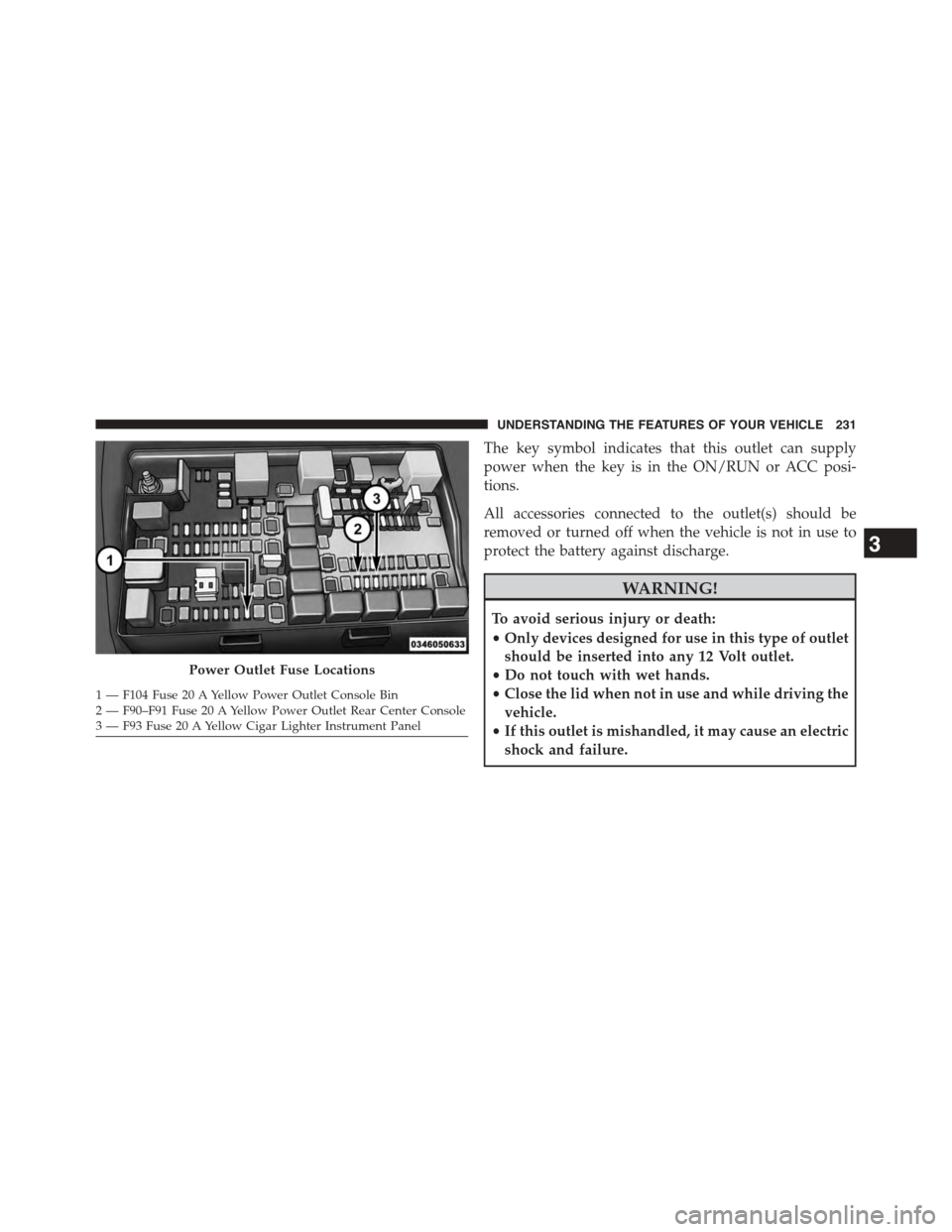
Power Outlet Fuse Locations
1—F104Fuse20AYellowPowerOutletConsoleBin2 — F90–F91 Fuse 20 A Yellow Power Outlet Rear Center Console3—F93Fuse20AYellowCigarLighterInstrumentPanel
3
UNDERSTANDING THE FEATURES OF YOUR VEHICLE 231
Page 234 of 871
CAUTION!
•Many accessories that can be plugged in draw
power from the vehicle’s battery, even when not in
use (i.e., cellular phones, etc.). Eventually, if
plugged in long enough, the vehicle’s battery will
discharge sufficiently to degrade battery life and/or
prevent the engine from starting.
•Accessories that draw higher power (i.e., coolers,
vacuum cleaners, lights, etc.), will discharge the
battery even more quickly. Only use these intermit-
tently and with greater caution.
•After the use of high power draw accessories, or
long periods of the vehicle not being started (with
accessories still plugged in), the vehicle must be
driven a sufficient length of time to allow the
generator to recharge the vehicle’s battery.
CIGAR LIGHTER AND ASH RECEIVER — IF
EQUIPPED
A removable ash receiver and cigar lighter are available.
For vehicles with a bench seat the cupholder tray can be
used to hold the ash receiver.
232 UNDERSTANDING THE FEATURES OF YOUR VEHICLE
Page 247 of 871
Plastic Grocery Bag Retainers (Regular Cab
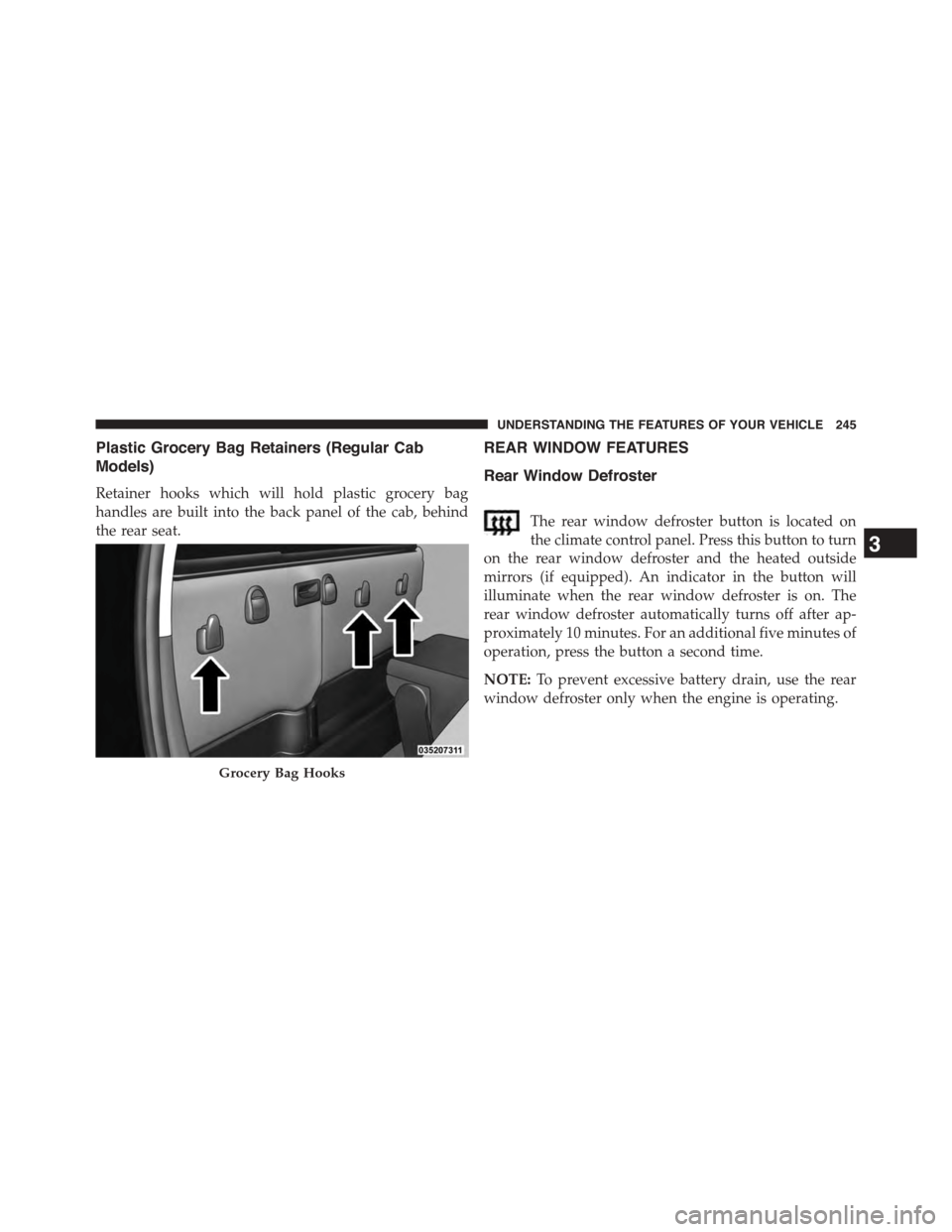
Models)
Retainer hooks which will hold plastic grocery bag
handles are built into the back panel of the cab, behind
the rear seat.
REAR WINDOW FEATURES
Rear Window Defroster
The rear window defroster button is located on
the climate control panel. Press this button to turn
on the rear window defroster and the heated outside
mirrors (if equipped). An indicator in the button will
illuminate when the rear window defroster is on. The
rear window defroster automatically turns off after ap-
proximately 10 minutes. For an additional five minutes of
operation, press the button a second time.
NOTE:To prevent excessive battery drain, use the rear
window defroster only when the engine is operating.
Grocery Bag Hooks
3
UNDERSTANDING THE FEATURES OF YOUR VEHICLE 245
Page 258 of 871
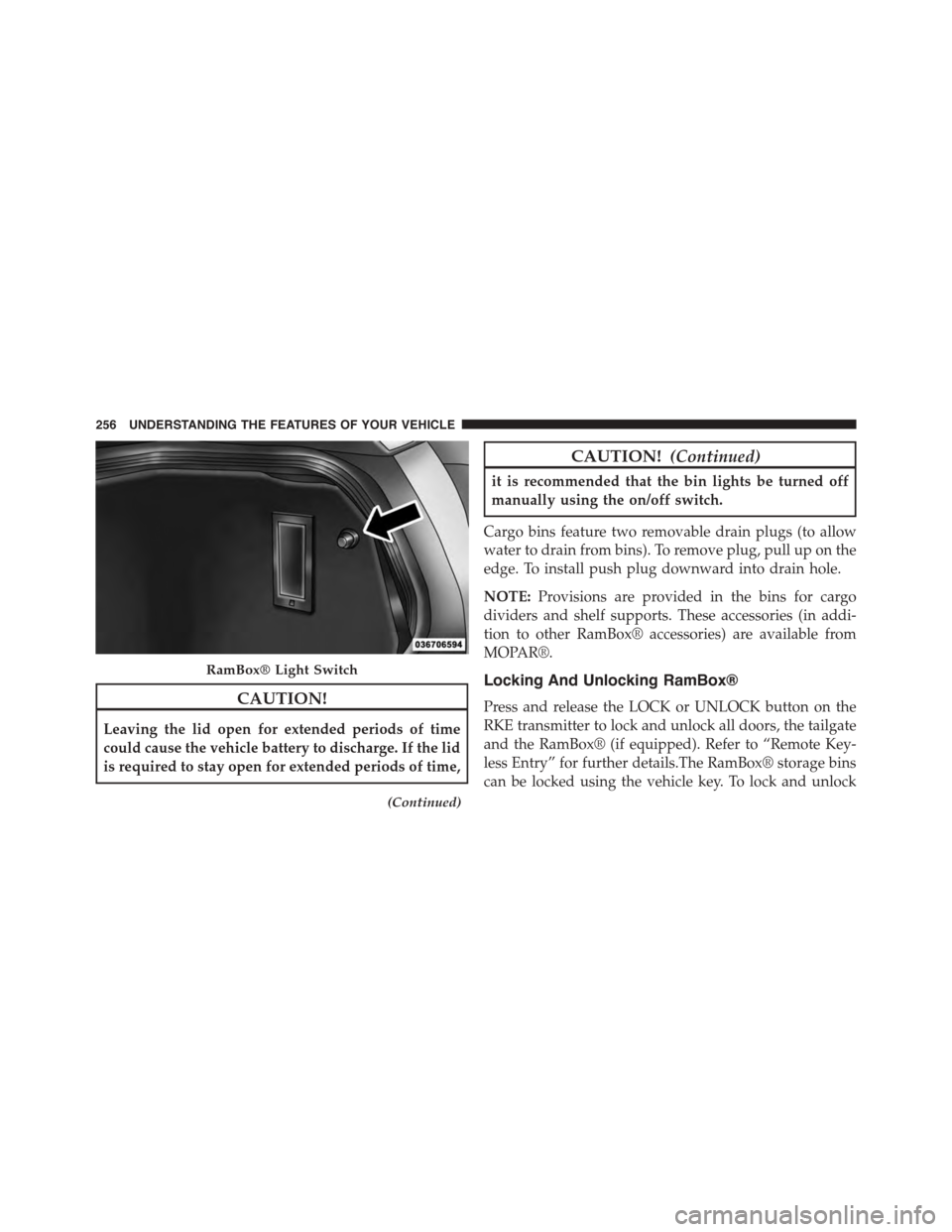
CAUTION!
Leaving the lid open for extended periods of time
could cause the vehicle battery to discharge. If the lid
is required to stay open for extended periods of time,
(Continued)
CAUTION!(Continued)
it is recommended that the bin lights be turned off
manually using the on/off switch.
Cargo bins feature two removable drain plugs (to allow
water to drain from bins). To remove plug, pull up on the
edge. To install push plug downward into drain hole.
NOTE:Provisions are provided in the bins for cargo
dividers and shelf supports. These accessories (in addi-
tion to other RamBox® accessories) are available from
MOPAR®.
Locking And Unlocking RamBox®
Press and release the LOCK or UNLOCK button on the
RKE transmitter to lock and unlock all doors, the tailgate
and the RamBox® (if equipped). Refer to “Remote Key-
less Entry” for further details.The RamBox® storage bins
can be locked using the vehicle key. To lock and unlock
RamBox® Light Switch
256 UNDERSTANDING THE FEATURES OF YOUR VEHICLE
Page 293 of 871
NOTE:
•A continuous chime will sound if the vehicle is
driven more than 1 mile (1.6 km) with either turn
signal on.
•Check for an inoperative outside light bulb if either
indicator remains on and does not flash, or flashes at
a rapid rate.
5. Voltmeter
When the engine is running, the gauge indicates
the electrical system voltage. The pointer should
stay within the normal range if the battery is charged. If
the pointer moves to either extreme left or right and
remains there during normal driving, the electrical sys-
tem should be serviced.
NOTE:The voltmeter may show a gauge fluctuation at
various engine temperatures. This cycling operation is
caused by the post-heat cycle of the intake manifold
heater system. The number of cycles and the length of the
cycling operation is controlled by the engine control
module. Post-heat operation can run for several minutes,
and then the electrical system and voltmeter needle will
stabilize.
6. Brake Warning Light
This light monitors various brake functions,
including brake fluid level and parking brake
application. If the brake light turns on it may
indicate that the parking brake is applied, that
the brake fluid level is low, or that there is a problem with
the Anti-lock Brake System reservoir.
If the light remains on when the parking brake has been
disengaged, and the fluid level is at the full mark on the
master cylinder reservoir, it indicates a possible brake
4
UNDERSTANDING YOUR INSTRUMENT PANEL 291
Page 310 of 871
•Service Airbag System
•Traction Control Off
•Washer Fluid Low
•Oil Pressure Low
•Oil Change Due
•Fuel Low
•Service Antilock Brake System
•Service Electronic Throttle Control
•Service Power Steering
•Cruise Off
•Cruise Ready
•Cruise Set To XXX MPH
•Tire Pressure Screen With Low Tire(s) “Inflate Tire to
XX”
•Tire Pressure Information System (TPIS)
•Service Tire Pressure System
•Parking Brake Engaged
•Brake Fluid Low
•Service Electronic Braking System
•Engine Temperature Hot
•Battery Voltage Low
•Service Electronic Throttle Control
•Lights On
•Right Turn Signal Light Out
•Left Turn Signal Light Out
308 UNDERSTANDING YOUR INSTRUMENT PANEL
Page 313 of 871
•Battery Low Start Engine To Change Ride Height
•Stop/Start Ready – If Equipped
•Stop/Start Not Ready – If Equipped
•Stop/Start Not Ready Hood Open – If Equipped
•Stop/Start Not Ready Battery Charging – If Equipped
•Stop/Start Not Ready Trailer Tow/Haul Selected – If
Equipped
•Stop/Start Not Ready 4WD/Low Range Selected – If
Equipped
•Stop/Start Not Ready Fuel Level Low – If Equipped
•Stop/Start Not Ready Steep Incline – If Equipped
•Stop/Start Not Ready Extreme Outside Temperature –
If Equipped
•Stop/Start Not Ready Engine Temperature Too High –
If Equipped
•Stop/Start Not Ready Engine Temperature Too Low –
If Equipped
•Stop/Start Not Ready Driver Seatbelt Unbuckled – If
Equipped
•Stop/Start Not Ready Driver Door Open – If Equipped
•Stop/Start Not Ready Cabin Cooling Or Heating – If
Equipped
•Stop/Start Not Ready Not Ready Max Cooling Or
Heating – If Equipped
•Stop/Start Not Ready Max Cooling Or Heating Se-
lected – If Equipped
•Stop/Start Not Ready Front Defrost Selected – If
Equipped
4
UNDERSTANDING YOUR INSTRUMENT PANEL 311
Page 314 of 871
•Stop/Start Not Ready Steering Wheel Turned – If
Equipped
•Stop/Start Autostop Active – If Equipped
•Stop/Start To Restart Press Clutch Or Shift To Neutral
– If Equipped
•Stop/Start Req’d Fault Detected – If Equipped
•Stop/Start Cannot Autostart Hood Open – If
Equipped
•Stop/Start Unavailable Service Battery – If Equipped
•Stop/Start Unavailable Service Stop/Start System – If
Equipped
•Stop/Start To Restart Shift Out Of Park – If Equipped
•Stop/Start Off – If Equipped
•Autostop Duration – If Equipped
The Reconfigurable Telltales section is divided into the
white telltales area on the right, yellow telltales in the
middle, and red telltales on the left.
EVIC Red Telltales
This area will show reconfigurable red telltales. These
telltales include:
•Door Ajar
This light will turn on to indicate that one or
more doors may be ajar.
•Oil Pressure Warning Light
This telltale indicates low engine oil pressure. If
the light turns on while driving, stop the vehicle and shut
off the engine as soon as possible. A chime will sound
when this light turns on.
312 UNDERSTANDING YOUR INSTRUMENT PANEL
Page 319 of 871
EVIC Selectable Menu Items
Push and release the UP or DOWN arrow buttons until the
desired Selectable Menu item is highlighted in the EVIC.
Speedometer
Push and release theUPorDOWNarrow button until
the speedometer menu item is highlighted in the EVIC.
Push and release theRIGHTarrow button to cycle the
display between mph and km/h.
Vehicle Info
Push and release theUPorDOWNarrow button(s) until
the Vehicle Info menu item is highlighted in the EVIC.
Push and release theRIGHTarrow button to enter the
sub-menus items of Vehicle Info. follow the directional
prompts to access or reset any of the following Vehicle
Info sub-menu items:
•Tire Pressure
•Coolant Temp
•Transmission Temp (Automatic only)
•Oil Temp
•Oil Pressure
•Oil Life
•Battery Voltage
•Gauge Summary
•Engine Hours
Fuel Economy
Push and release theUPorDOWNarrow button until
the Fuel Economy menu item is highlighted. Push and
Hold theRIGHTarrow button to reset Average Fuel
Economy.
•Current Fuel
•Economy gauge
4
UNDERSTANDING YOUR INSTRUMENT PANEL 317