panel Ram 1500 2015 Workshop Manual
[x] Cancel search | Manufacturer: RAM, Model Year: 2015, Model line: 1500, Model: Ram 1500 2015Pages: 871, PDF Size: 24.83 MB
Page 194 of 871
ParkSense® will retain the last system state (enabled or
disabled) from the last ignition cycle when the ignition is
changed to the ON/RUN position.
ParkSense® can be active only when the shift lever/gear
selector is in REVERSE. If ParkSense® is enabled at this
shift lever/gear selector position, the system will remain
active until the vehicle speed is increased to approxi-
mately 7 mph (11 km/h) or above. When in REVERSE
and above the system’s operating speed, a warning will
appear within the Electronic Vehicle Information Center
(EVIC) or Driver Information Display (DID) indicating
the vehicle speed is too fast. The system will become
active again if the vehicle speed is decreased to speeds
less than approximately 6 mph (9 km/h).
ParkSense® Sensors
The four ParkSense® sensors, located in the rear fascia/
bumper, monitor the area behind the vehicle that is
within the sensors’ field of view. The sensors can detect
obstacles from approximately 12 in (30 cm) up to 79 in
(200 cm) from the rear fascia/bumper in the horizontal
direction, depending on the location, type and orienta-
tion of the obstacle.
ParkSense® Warning Display
The ParkSense® Warning screen is located within the
Electronic Vehicle Information Center (EVIC) or Driver
Information Display (DID). It provides visual warnings
to indicate the distance between the rear fascia/bumper
and the detected obstacle. Refer to “Electronic Vehicle
Information Center (EVIC) or Driver Information Display
(DID) Settings” in Understanding Your Instrument
Panel” for further information.
192 UNDERSTANDING THE FEATURES OF YOUR VEHICLE
Page 195 of 871

The ParkSense® Warning screen will only be displayed if
Sound and Display is selected.
NOTE:If your vehicle is equipped with a touchscreen,
this feature can be programmed through the Uconnect®
system. Refer to “Uconnect® Settings” in “Understand-
ing Your Instrument Panel” for further information.
If your vehicle is not equipped with a touchscreen, this
feature can be programmed through the Electronic Ve-
hicle Information Center (EVIC) or Driver Information
Display (DID). Refer to “Electronic Vehicle Information
Center (EVIC) or Driver Information Display (DID)” in
“Understanding Your Instrument Panel” for further in-
formation.
ParkSense® Display
When the vehicle is in REVERSE, the warning display
will turn ON indicating the system status.
The system will indicate a detected obstacle by showing
a single arc in the left and/or right rear regions based on
the object’s distance and location relative to the vehicle.
If an object is detected in the left and/or right rear region,
the display will show a single solid arc in the left and/or
right rear region and the system will produce a tone. As
the vehicle moves closer to the object, the display will
show the single arc moving closer to the vehicle and the
tone will change from a single 1/2 second tone to slow, to
fast, to continuous.
3
UNDERSTANDING THE FEATURES OF YOUR VEHICLE 193
Page 199 of 871
Adjustable Chime Volume Settings
The Rear chime volume settings are programmable.
•If your vehicle is equipped with a touchscreen, the
settings may be programmed through the Uconnect®
System. Refer to “Uconnect® Settings ” in “Under-
standing Your Instrument Panel” for further informa-
tion.
•If your vehicle is not equipped with a touchscreen, the
settings may be programmed through the Electronic
Vehicle Information Center (EVIC) or Driver Informa-
tion Display (DID). Refer to “Electronic Vehicle Infor-
mation Center (EVIC)” or “Driver Information Display
(DID)” in “Understanding Your Instrument Panel” for
further information.
Enabling And Disabling ParkSense®
ParkSense® can be enabled and disabled with the
ParkSense® switch.
When the ParkSense switch is pressed to dis-
able the system, the instrument cluster will
display the “PARKSENSE OFF” message for
approximately five seconds. Refer to “Elec-
tronic Vehicle Information Center (EVIC) or Driver Infor-
mation Display (DID)” in “Understanding Your Instru-
ment Panel” for further information. When the shift lever
is moved to REVERSE and the system is disabled, the
EVIC/DID will display the “PARKSENSE OFF” message
for as long as the vehicle is in REVERSE.
NOTE:The ParkSense® system will automatically dis-
able when the system detects that a trailer with trailer
brakes has been connected to the Integrated Trailer Brake
Module. The EVIC/DID will display “PARKSENSE OFF”
message for as long as the vehicle is in reverse.
3
UNDERSTANDING THE FEATURES OF YOUR VEHICLE 197
Page 200 of 871
The ParkSense® switch LED will be ON when
ParkSense® is disabled or defective. The ParkSense®
switch LED will be OFF when the system is enabled.
If the ParkSense switch is pressed, and the system is
disabled or requires service, the ParkSense switch LED
will blink momentarily, and then the LED will be ON.
Service The ParkSense® Rear Park Assist
System
During vehicle start up, when the ParkSense® Rear Park
Assist System has detected a faulted condition, the
instrument cluster will actuate a single chime, once per
ignition cycle, and it will display the#PARKSENSE
UNAVAILABLE WIPE REAR SENSORS#or the
#PARKSENSE UNAVAILABLE SERVICE REQUIRED#
message. Refer to “Electronic Vehicle Information Center
(EVIC) or Driver Information Display (DID)” in “Under-
standing Your Instrument Panel” for further information.
When the shift lever is moved to REVERSE and the
system has detected a faulted condition, the EVIC/DID
will display the#PARKSENSE UNAVAILABLE WIPE
REAR SENSORS#or the#PARKSENSE UNAVAILABLE
SERVICE REQUIRED#message for as long as the vehicle
is in REVERSE. Under this condition, ParkSense® will
not operate.
If#PARKSENSE UNAVAILABLE WIPE REAR SENSORS#
appears in the Electronic Vehicle Information Center
(EVIC) or Driver Information Display (DID) make sure
the outer surface and the underside of the rear fascia/
bumper is clean and clear of snow, ice, mud, dirt or other
obstruction, and then cycle the ignition. If the message
continues to appear, see an authorized dealer.
If#PARKSENSE UNAVAILABLE SERVICE REQUIRED#
appears in the EVIC/DID, see your authorized dealer.
198 UNDERSTANDING THE FEATURES OF YOUR VEHICLE
Page 204 of 871

ParkSense® Sensors
The four ParkSense® sensors, located in the rear fascia/
bumper, monitor the area behind the vehicle that is
within the sensors’ field of view. The sensors can detect
obstacles from approximately 18 in (45 cm) up to 79 in
(200 cm) from the rear fascia/bumper in the horizontal
direction, depending on the location, type and orienta-
tion of the obstacle.
The six ParkSense® sensors, located in the front fascia/
bumper, monitor the area in front of the vehicle that is
within the sensors’ field of view. The sensors can detect
obstacles from approximately 12 in (30 cm) up to 47 in
(120 cm) from the front fascia/bumper in the horizontal
direction, depending on the location, type and orienta-
tion of the obstacle.
ParkSense® Warning Display
The ParkSense® Warning screen is located within the
Electronic Vehicle Information Center (EVIC) or Driver
Information Display (DID). It provides visual warnings
to indicate the distance between the rear fascia/bumper
and/or front fascia/bumper and the detected obstacle.
Refer to “Electronic Vehicle Information Center (EVIC) or
Driver Information Display (DID) Settings” in Under-
standing Your Instrument Panel” for further information.
The ParkSense® Warning screen will only be displayed if
Sound and Display is selected.
202 UNDERSTANDING THE FEATURES OF YOUR VEHICLE
Page 205 of 871

NOTE:If your vehicle is equipped with a touchscreen,
this feature can be programmed through the Uconnect®
system. Refer to “Uconnect® Settings” in “Understand-
ing Your Instrument Panel” for further information.
If your vehicle is not equipped with a touchscreen, this
feature can be programmed through the Electronic Ve-
hicle Information Center (EVIC) or Driver Information
Display (DID). Refer to “Electronic Vehicle Information
Center (EVIC) or Driver Information Display (DID)” in
“Understanding Your Instrument Panel” for further in-
formation.
ParkSense® Display
The warning display will turn ON indicating the system
status when the vehicle is in REVERSE or when the
vehicle is in DRIVE and an obstacle has been detected.
The system will indicate a detected obstacle by showing
a single arc in the left and/or right rear regions based on
the obstacle’s distance and location relative to the vehicle.
If an obstacle is detected in the left and/or right rear
region, the display will show a single arc in the left
and/or right rear region and the system will produce a
tone. As the vehicle moves closer to the obstacle, the
display will show the single arc moving closer to the
vehicle and the tone will change from a single 1/2 second
tone to slow, to fast, to continuous.
3
UNDERSTANDING THE FEATURES OF YOUR VEHICLE 203
Page 207 of 871

Front Park Assist Audible Alerts
ParkSense® will turn off the Front Park Assist audible
alert (chime) after approximately three seconds when an
obstacle has been detected, the vehicle is stationary, and
brake pedal is applied.
Adjustable Chime Volume Settings
The Front and Rear chime volume settings are program-
mable.
•If your vehicle is equipped with a touchscreen, the
settings may be programmed through the Uconnect®
System. Refer to “Uconnect® Settings ” in “Understand-
ing Your Instrument Panel” for further information.
•If your vehicle is not equipped with a touchscreen, the
settings may be programmed through the Electronic
Vehicle Information Center (EVIC) or Driver Information
Display (DID). Refer to “Electronic Vehicle Information
Center (EVIC)” or “Driver Information Display (DID)” in
“Understanding Your Instrument Panel” for further infor-
mation.
Enabling And Disabling Front And/Or Rear
ParkSense®
Front ParkSense® can be enabled and disabled with the
Front ParkSense® switch.
Rear ParkSense® can be enabled and disabled with the
Rear ParkSense® switch.
When the Front or Rear ParkSense® switch is
pressed to disable the system, the Electronic
Vehicle Information Center (EVIC) or Driver
Information Display (DID) will display the
“PARKSENSE OFF” message for approximately five sec-
onds. Refer to “Electronic Vehicle Information Center
(EVIC) or Driver Information Display (DID)” in “Under-
standing Your Instrument Panel” for further information.
3
UNDERSTANDING THE FEATURES OF YOUR VEHICLE 205
Page 213 of 871
When the vehicle is shifted out of REVERSE (with camera
delay turned ON), The rear camera image will be dis-
played for up to 10 seconds after shifting out of#RE-
VERSE#unless the forward vehicle speed exceeds 8 mph
(13 km/h), the transmission is shifted into#PARK#or the
ignition is switched to the OFF position.
When enabled, active guide lines are overlaid on the
image to illustrate the width of the vehicle and its
projected backup path based on the steering wheel
position. The active guide lines will show separate zones
that will help indicate the distance to the rear of the
vehicle.
For further information about how to access and change
the programmable features of the ParkView® Rear
Backup Camera, refer to “Uconnect® Settings” in “Un-
derstanding Your Instrument Panel” for further informa-
tion.
The following table shows the approximate distances for
each zone:
ZonesDistance to the rear of
the vehicle
Red0 - 1 ft (0 - 30 cm)
Yellow1 ft - 3 ft (30 cm-1m)
Green3 ft or greater (1 m or
greater)
WARNING!
Drivers must be careful when backing up even when
using the ParkView® Rear Back Up Camera. Always
check carefully behind your vehicle, and be sure to
check for pedestrians, animals, other vehicles, ob-
structions, or blind spots before backing up. You are
responsible for the safety of your surroundings and
(Continued)
3
UNDERSTANDING THE FEATURES OF YOUR VEHICLE 211
Page 229 of 871
Sunroof Maintenance
Use only a nonabrasive cleaner and a soft cloth to clean
the glass panel.
Ignition Off Operation
The power sunroof switch will remain active for up to
approximately ten minutes after the ignition switch is
turned to the LOCK position. Opening either front door
will cancel this feature.
NOTE:Ignition Off time is programmable through the
Uconnect® System. Refer to “Uconnect® Settings/
Customer Programmable Features” in “Understanding
Your Instrument Panel” for further information.
ELECTRICAL POWER OUTLETS
The auxiliary 12 Volt (13 Amp) power outlets can provide
power for in-cab accessories designed for use with the
standard “cigar lighter” plug. The 12 Volt power outlets
have a cap attached to the outlet indicating “12V DC,”
together with either a key symbol or a battery symbol.
A key symbol indicates that the key must be in the
ON/RUN or ACC positions for the outlet to provide
power. The battery symbol indicates that the outlet is
connected to the battery, and can provide power at all
times.
NOTE:To ensure proper operation, a MOPAR® knob
and element must be used.
3
UNDERSTANDING THE FEATURES OF YOUR VEHICLE 227
Page 233 of 871
The key symbol indicates that this outlet can supply
power when the key is in the ON/RUN or ACC posi-
tions.
All accessories connected to the outlet(s) should be
removed or turned off when the vehicle is not in use to
protect the battery against discharge.
WARNING!
To avoid serious injury or death:
•Only devices designed for use in this type of outlet
should be inserted into any 12 Volt outlet.
•Do not touch with wet hands.
•Close the lid when not in use and while driving the
vehicle.
•If this outlet is mishandled, it may cause an electric
shock and failure.
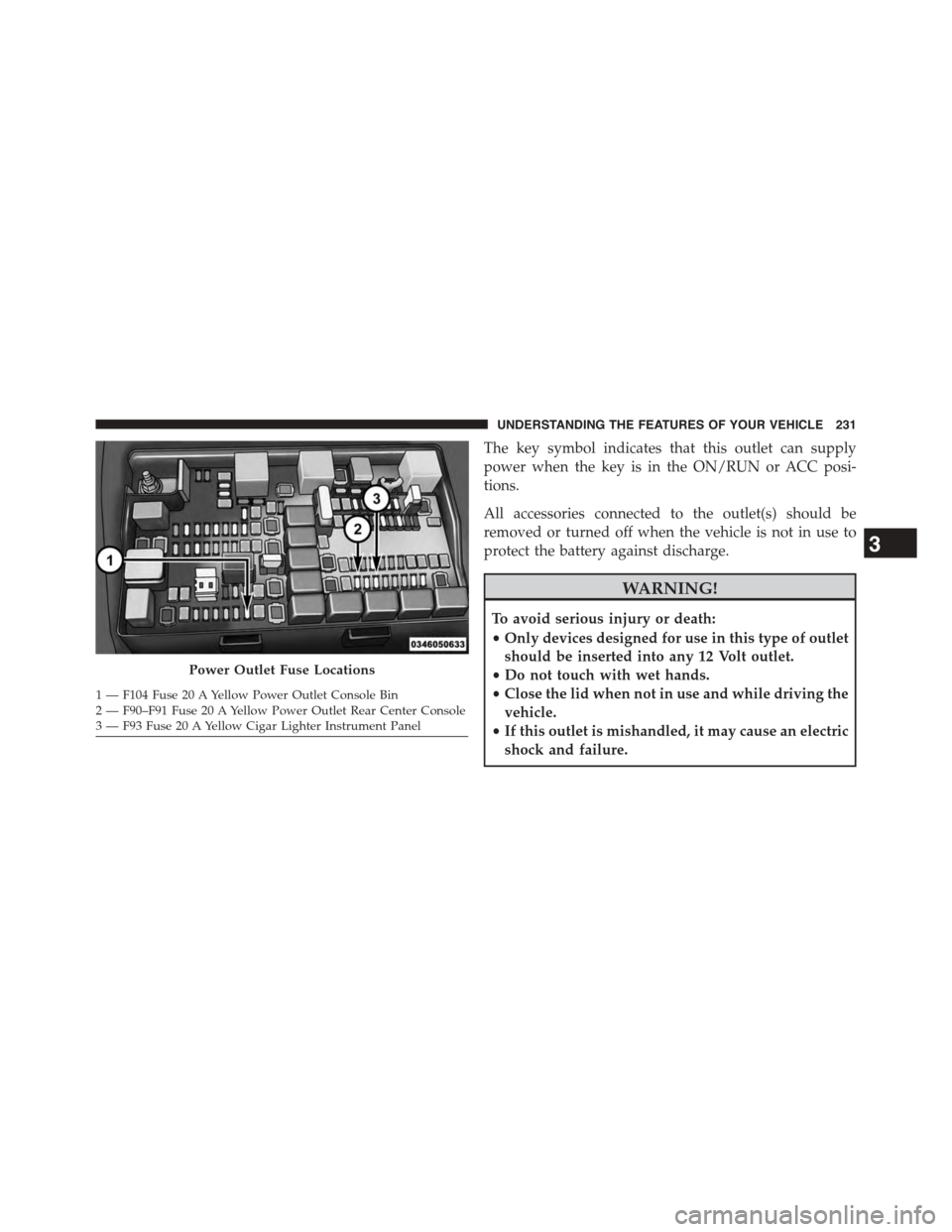
Power Outlet Fuse Locations
1—F104Fuse20AYellowPowerOutletConsoleBin2 — F90–F91 Fuse 20 A Yellow Power Outlet Rear Center Console3—F93Fuse20AYellowCigarLighterInstrumentPanel
3
UNDERSTANDING THE FEATURES OF YOUR VEHICLE 231