DID Ram 1500 2015 Repair Manual
[x] Cancel search | Manufacturer: RAM, Model Year: 2015, Model line: 1500, Model: Ram 1500 2015Pages: 871, PDF Size: 24.83 MB
Page 458 of 871

The engine may then be restarted by moving the trans-
mission shift selector out of PARK (e.g. to DRIVE) or, in
some cases, only by a KEY START. The Electronic Vehicle
Information Center (EVIC)/Driver Information Display
(DID) will display a SHIFT OUT OF PARK message, or a
STOP/START KEY START REQUIRED message, to indi-
cate which action is required. Refer to “Electronic Vehicle
Information Center (EVIC) or Driver Information Display
(DID)” in “Understanding Your Instrument Panel” for
further information.
To Manually Turn Off The Stop Start System
1. Press the STOP/START Off switch (located on the
switch bank). The light on the switch will illuminate.
STOP/START OFF Switch
456 STARTING AND OPERATING
Page 459 of 871
2. The STOP/START OFF message will appear in Elec-
tronic Vehicle Information Center (EVIC)/Driver In-
formation Display (DID). Refer to “Electronic Vehicle
Information Center (EVIC) or Driver Information Dis-
play (DID)” in “Understanding Your Instrument
Panel” for further information.
3. At the next vehicle stop (after turning off the STOP/
START system) the engine will not be stopped.
4. If the STOP/START system is manually turned off, the
engine can only be started and stopped by cycling the
ignition switch.
5. The STOP/START system will reset itself back to an
ON condition every time the key is turned off and
back on.
To Manually Turn On The Stop Start System
1. Press the STOP/START Off switch (located on the
switch bank).
2. The light on the switch will turn off.
System Malfunction
If there is a malfunction in the STOP/START system, the
system will not shut down the engine. A SERVICE
STOP/START SYSTEM message will appear in the Elec-
tronic Vehicle Information Center (EVIC)/Driver Infor-
mation Display (DID). Refer to “Electronic Vehicle Infor-
mation Center (EVIC) or Driver Information Display
(DID)” in “Understanding Your Instrument Panel” for
further information.
The system will need to be checked by your authorized
dealer.
5
STARTING AND OPERATING 457
Page 463 of 871
Key Ignition Park Interlock
This vehicle is equipped with a Key Ignition Park Inter-
lock which requires the transmission to be in PARK
before the ignition switch can be turned to the LOCK/
OFF (key removal) position. The Key Fob can only be
removed from the ignition when the ignition is in the
LOCK/OFF position, and the transmission is locked in
PARK whenever the ignition switch is in the LOCK/OFF
position.
NOTE:If a malfunction occurs, the system will trap the
Key Fob in the ignition switch to warn you that this
safety feature is inoperable. The engine can be started
and stopped but the Key Fob cannot be removed until
you obtain service.
Brake/Transmission Shift Interlock System
This vehicle is equipped with a Brake Transmission Shift
Interlock System (BTSI) that holds the transmission gear
selector in PARK unless the brakes are applied. To shift
the transmission out of PARK, the ignition switch must
be turned to the ON/RUN position (engine running, for
vehicles with eight-speed transmission) and the brake
pedal must be pressed.
In 8-speed vehicles, the brake pedal must also be pressed
to shift from NEUTRAL into DRIVE or REVERSE when
the vehicle is stopped or moving at low speeds.
Eight-Speed Automatic Transmission — If
Equipped
The transmission is controlled using a rotary electronic
gear selector located on the instrument panel. The trans-
mission gear range (PRND) is displayed both above the
gear selector and in the Electronic Vehicle Information
Center (EVIC)/Driver Information Display (DID). To
select a gear range, simply rotate the gear selector. You
must press the brake pedal to shift the transmission out
of PARK, or to shift from NEUTRAL into DRIVE or
REVERSE, when the vehicle is stopped or moving at low
5
STARTING AND OPERATING 461
Page 519 of 871
NOTE:The vehicle will automatically enter Aero Mode
when the vehicle speed remains between 62 mph
(100 km/h) and 66 mph (106 km/h) for greater than 20
seconds or if the vehicle speed exceeds 66 mph (106 km/h).
•Normal Ride Height (NRH)– This is the standard
position of the suspension and is meant for normal
driving.
•Off-Road 1 (OR1) (Raises the vehicle approximately
1 in [26 mm])–This position should be the primary
position for all off-road driving until Off Road 2 (OR2) is
needed. A smoother and more comfortable ride will
result. To enter OR1, press the “Up” button once from
the NRH position while the vehicle speed is below
35 mph (56 km/h). When in the OR1 position, if the
vehicle speed remains between 40 mph (64 km/h) and
50 mph (80 km/h) for greater than 20 seconds or if the
vehicle speed exceeds 50 mph (80 km/h), the vehicle
will be automatically lowered to NRH. Off-Road 1 may
not be available due to vehicle payload, an EVIC/DID
message will be displayed when this occurs. Refer to
“Electronic Vehicle Information Center (EVIC) or Driver
Information Display (DID)” in “Understanding Your
Instrument Panel” for further information.
•Off-Road 2 (OR2) (Raises the vehicle approximately
2 in [51 mm])– This position is intended for off-
roading use only where maximum ground clearance is
required. To enter OR2, press the “Up” button twice
from the NRH position or once from the OR1 position
while vehicle speed is below 20 mph (32 km/h). While
in OR2, if the vehicle speed exceeds 25 mph (40 km/h)
the vehicle height will be automatically lowered to
OR1. Off-Road 2 may not be available due to vehicle
payload, an EVIC/DID message will be displayed
when this occurs. Refer to “Electronic Vehicle Informa-
tion Center (EVIC) or Driver Information Display
(DID)” in “Understanding Your Instrument Panel” for
further information.
5
STARTING AND OPERATING 517
Page 520 of 871
•If the vehicle is in OFFROAD1 or OFFROAD2 setting,
be aware of your surroundings, you may not have the
clearance required for certain areas and vehicle dam-
age may occur.
•Aero Mode (Lowers the vehicle approximately .6 in
[15 mm])– This position provides improved aerody-
namics by lowering the vehicle. The vehicle will
automatically enter Aero Mode when the vehicle
speed remains between 62 mph (100 km/h) and
66 mph (106 km/h) for greater than 20 seconds or if the
vehicle speed exceeds 66 mph (106 km/h). The vehicle
will return to NRH from Aero Mode if the vehicle
speed remains between 30 mph (48 km/h) and 35 mph
(56 km/h) for greater than 20 seconds or if the vehicle
speed falls below 30 mph (48 km/h).
NOTE:Automatic Aero Mode may be disabled through
vehicle settings in the Electronic Vehicle Information
Center (EVIC)/Driver Information Display (DID) when
equipped with Uconnect 3.0, or your Uconnect® Radio
when equipped with UConnect® 5.0, 8.4A, or 8.4AN.
Refer to “Electronic Vehicle Information Center (EVIC) or
Driver Information Display (DID)” in “Understanding
Your Instrument Panel” or “Uconnect® Settings” in “Un-
derstanding Your Instrument Panel” for further informa-
tion.
•Entry/Exit Mode (Lowers the vehicle approximately 2
in [51 mm])– This position lowers the vehicle for
easier passenger entry and exit as well as lowering the
rear of the vehicle for easier loading and unloading of
cargo. To enter Entry/Exit Mode, press the “Down”
button once from the NRH while the vehicle speed is
below 33 mph (53 km/h). Once the vehicle speed goes
below 15 mph (24 km/h) the vehicle height will begin
to lower. If the vehicle speed remains between 15 mph
518 STARTING AND OPERATING
Page 521 of 871
(24 km/h) and 25 mph (40 km/h) for greater than 60
seconds, or the vehicle speed exceeds 25 mph
(40 km/h) the Entry/Exit change will be cancelled. To
return to Normal Height Mode, press the “Up” button
once while in Entry/Exit or drive the vehicle over
15 mph (24 km/h). Entry/Exit mode may not be
available due to vehicle payload, an EVIC/DID mes-
sage will be displayed when this occurs. Refer to
“Electronic Vehicle Information Center (EVIC) or
Driver Information Display (DID)” in “Understanding
Your Instrument Panel” for further information.
NOTE:Entry/Exit mode may be achieved using your
key fob for easier entry/loading. Refer to “A Word About
Your Keys” in “Things To Know Before Starting Your
Vehicle” for further information.
•When in ENTRY/EXIT setting, be aware of your sur-
roundings, you may not have the clearance required for
certain areas and vehicle damage may occur.
The system requires that the ignition be in ON/RUN
position or the engine running for all user requested
changes. When lowering the vehicle all of the doors,
must be closed. If a door is opened at any time while the
vehicle is lowering the change will not be completed
until the open door(s) is closed.
This system uses a lifting and lowering pattern which
keeps the headlights from incorrectly shining into on-
coming traffic. When raising the vehicle, the rear of the
vehicle will move up first and then the front. When
lowering the vehicle, the front will move down first and
then the rear.
After the engine is turned off, it may be noticed that the
air suspension system operates briefly, this is normal. The
system is correcting the position of the vehicle to ensure
a proper appearance.
To assist with changing a spare tire, the air suspension
system has a feature which allows the automatic leveling
5
STARTING AND OPERATING 519
Page 522 of 871
to be disabled. Refer to “Electronic Vehicle Information
Center (EVIC) or Driver Information Display (DID)” in
“Understanding Your Instrument Panel” for further in-
formation.
NOTE:If equipped with a touch screen radio all
enabling/disabling of air suspension features must be
done through the radio. Refer to “Uconnect® Settings” in
“Understanding Your Instrument Panel” for further in-
formation.
WARNING!
The air suspension system uses a high pressure
volume of air to operate the system. To avoid per-
sonal injury or damage to the system, see your
authorized dealer for service.
Air Suspension Modes
The Air Suspension system has multiple modes to protect
the system in unique situations:
Tire/Jack Mode
To assist with changing a spare tire, the air suspension
system has a feature which allows the automatic leveling
to be disabled. Refer to “Electronic Vehicle Information
Center (EVIC) or Driver Information Display (DID)” in
“Understanding Your Instrument Panel” or “Uconnect®
Settings” in “Understanding Your Instrument Panel” if
equipped with a touch screen radio for further informa-
tion.
NOTE:This mode is intended to be enabled with engine
running.
520 STARTING AND OPERATING
Page 523 of 871
Transport Mode
To assist with flat bed towing, the air suspension system
has a feature which will put the vehicle into Entry/Exit
height and disable the automatic load leveling system.
Refer to “Electronic Vehicle Information Center (EVIC) or
Driver Information Display (DID)” in “Understanding
Your Instrument Panel” or “Uconnect® Settings” in “Un-
derstanding Your Instrument Panel” if equipped with a
touch screen radio for further information.
NOTE:This mode is intended to be enabled with engine
running.
Wheel Alignment Mode
Before performing a wheel alignment this mode must be
enabled. Refer to “Electronic Vehicle Information Center
(EVIC) or Driver Information Display (DID)” in “Under-
standing Your Instrument Panel” or “Uconnect® Settings”
in “Understanding Your Instrument Panel” if equipped
with a touch screen radio for further information.
NOTE:This mode is intended to be enabled with engine
running.
Protection Mode
In order to “protect” the air suspension system, the
vehicle will enter Protection Mode when load leveling
cannot be achieved. Some driving may be required to
clear the protection mode telltale in the EVIC/DID. Refer
to “Electronic Vehicle Information Center (EVIC) or
Driver Information Display (DID)” in “Understanding
Your Instrument Panel” or “Uconnect® Settings” in “Un-
derstanding Your Instrument Panel” if equipped with a
touch screen radio for further information.
NOTE:If equipped with a touch screen radio all
enabling/disabling of air suspension features must be
done through the radio. Refer to “Uconnect® Settings” in
“Understanding Your Instrument Panel” for further in-
formation.
5
STARTING AND OPERATING 521
Page 524 of 871
Electronic Vehicle Information Center
(EVIC)/Driver Information Display (DID) Display
Messages
When the appropriate conditions exist, a message will
appear in the EVIC/DID display. Refer to “Electronic
Vehicle Information Center (EVIC) or Driver Information
Display (DID)” in “Understanding Your Instrument
Panel” for further information.
An audible chime will be heard whenever a system error
has been detected.
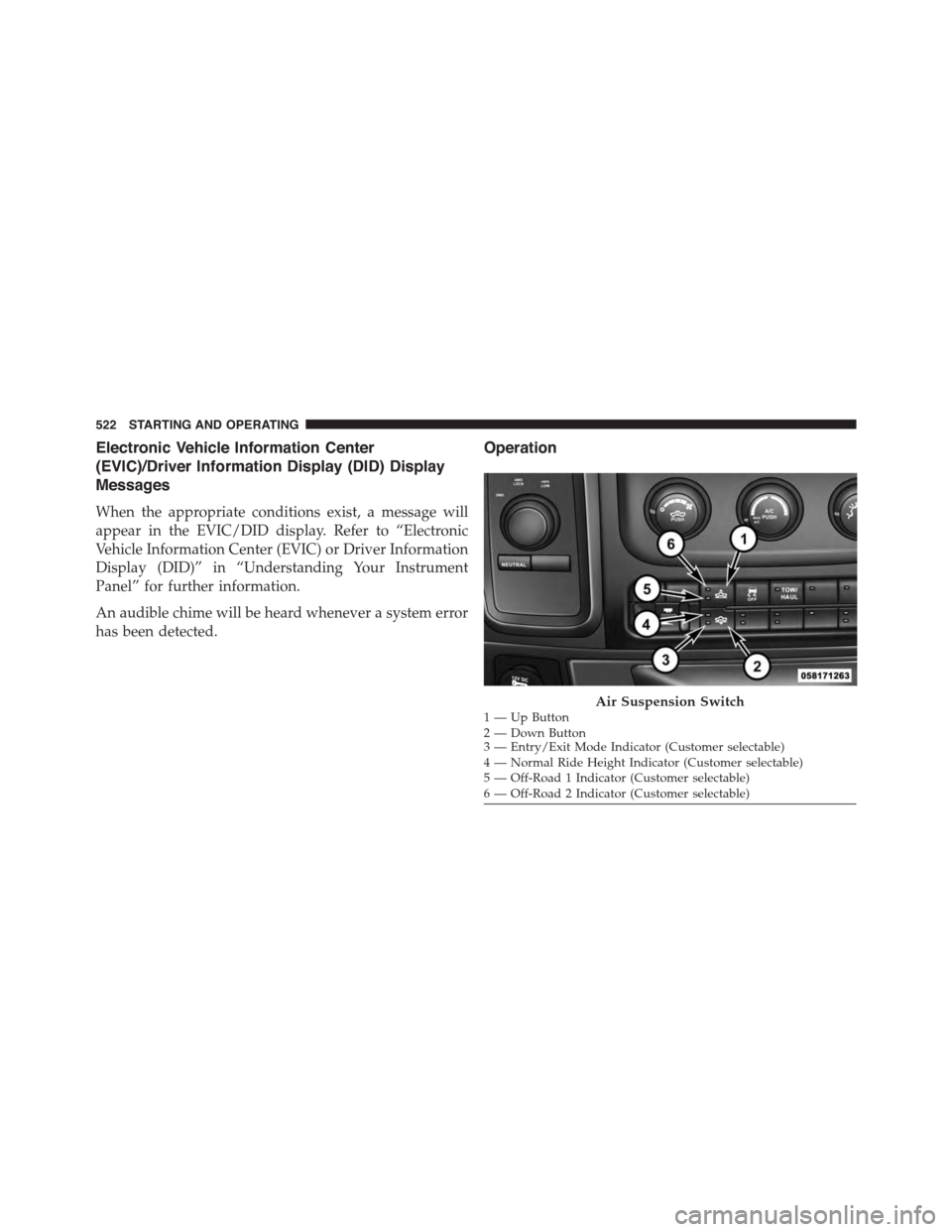
Operation
1—UpButton2—DownButton3 — Entry/Exit Mode Indicator (Customer selectable)4 — Normal Ride Height Indicator (Customer selectable)5 — Off-Road 1 Indicator (Customer selectable)6 — Off-Road 2 Indicator (Customer selectable)
Air Suspension Switch
522 STARTING AND OPERATING
Page 525 of 871
The indicator lamps 3 through 6 will illuminate to show
the current position of the vehicle. Flashing indicator
lamps will show a position which the system is working
to achieve. When raising, if multiple indicator lamps are
flashing, the highest flashing indicator lamp is the posi-
tion the system is working to achieve. When lowering, if
multiple indicators are flashing, the lowest solid indica-
tor lamp is the position the system is working to achieve.
Pressing the “UP” button once will move the suspension
one position higher from the current position, assuming
all conditions are met (i.e. key in ON/RUN position,
engine running, speed below threshold, etc). The “UP”
button can be pressed multiple times, each press will
raise the requested level by one position up to a maxi-
mum position of OR2 or the highest position allowed
based on current conditions (i.e. vehicle speed, etc).
Pressing the “DOWN” button once will move the sus-
pension one position lower from the current level, as-
suming all conditions are met (i.e. key in ON/RUN
position, engine running, doors closed, speed below
threshold, etc). The “DOWN” button can be pressed
multiple times, each press will lower the requested level
by one position down to a minimum of Entry/Exit Mode
or the lowest position allowed based on current condi-
tions (i.e. vehicle speed, etc.)
Automatic height changes will occur based on vehicle
speed and the current vehicle height. The indicator lamps
and EVIC/DID messages will operate the same for
automatic changes and user requested changes.
•Off-Road 2 (OR2) – Indicator lamps 3, 4, 5 and 6 will be
illuminated when the vehicle is in OR2.
•Off-Road 1 (OR1) – Indicator lamps 3, 4 and 5 will be
illuminated when the vehicle is in OR1.
•Normal Ride Height (NRH)/Aero Mode – Indicator
lamps 3 and 4 will be illuminated when the vehicle is
in this position.
5
STARTING AND OPERATING 523