Tow Ram 1500 2020 Owner's Manual
[x] Cancel search | Manufacturer: RAM, Model Year: 2020, Model line: 1500, Model: Ram 1500 2020Pages: 674, PDF Size: 32.69 MB
Page 546 of 674
544 SERVICING AND MAINTENANCE
• For grease stains, apply Mopar Multi-Purpose Cleaner to aclean, damp cloth and remove stain. Use a fresh, damp
towel to remove soap residue.
• Do not use any harsh solvents or any other form of protectants on Stain Repel products.
Seat Belt Maintenance
Do not bleach, dye or clean the belts with chemical solvents
or abrasive cleaners. This will weaken the fabric. Sun
damage can also weaken the fabric.
If the belts need cleaning, use a mild soap solution or luke -
warm water. Do not remove the belts from the vehicle to
wash them. Dry with a soft cloth.
Replace the belts if they appear frayed or worn or if the
buckles do not work properly.
NOTE:
If the belts retract slowly, inspect the upper turning loop for
soiling. If soiling is present, clean with a wet soft cloth until
all residue is removed.
Plastic And Coated Parts
Use Mopar Total Clean to clean vinyl upholstery.
WARNING!
A frayed or torn belt could rip apart in a collision and
leave you with no protection. Inspect the belt system
periodically, checking for cuts, frays, or loose parts.
Damaged parts must be replaced immediately. Do not
disassemble or modify the system. Seat belt assemblies
must be replaced after a collision if they have been
damaged (i.e., bent retractor, torn webbing, etc.).
CAUTION!
• Direct contact of air fresheners, insect repellents, suntan lotions, or hand sanitizers to the plastic,
painted, or decorated surfaces of the interior may cause
permanent damage. Wipe away immediately.
• Damage caused by these type of products may not be covered by your New Vehicle Limited Warranty.
2020_DT_1500_OM_US.book Page 544
Page 547 of 674
SERVICING AND MAINTENANCE 545
Cleaning Plastic Instrument Cluster Lenses
The lenses in front of the instruments in this vehicle are
molded in clear plastic. When cleaning the lenses, care must
be taken to avoid scratching the plastic.
1. Clean with a wet soft cloth. A mild soap solution may beused, but do not use high alcohol content or abrasive
cleaners. If soap is used, wipe clean with a clean damp
cloth.
2. Dry with a soft cloth.
Leather Parts
Mopar Total Clean is specifically recommended for leather
upholstery.
Your leather upholstery can be best preserved by regular
cleaning with a damp soft cloth. Small particles of dirt can act
as an abrasive and damage the leather upholstery and
should be removed promptly with a damp cloth. Stubborn
soils can be removed easily with a soft cloth and Mopar Total
Clean. Care should be taken to avoid soaking your leather
upholstery with any liquid. Please do not use polishes, oils,
cleaning fluids, solvents, detergents, or ammonia-based
cleaners to clean your leather upholstery. Application of a
leather conditioner is not required to maintain the original
condition. NOTE:
If equipped with light colored leather, it tends to show any
foreign material, dirt, and fabric dye transfer more so than
darker colors. The leather is designed for easy cleaning, and
FCA recommends Mopar Total Clean leather cleaner applied
on a cloth to clean the leather seats as needed.Glass Surfaces
All glass surfaces should be cleaned on a regular basis with
Mopar Glass Cleaner, or any commercial household-type
glass cleaner. Never use an abrasive type cleaner. Use
caution when cleaning the inside rear window equipped
with electric defrosters or windows equipped with radio
antennas. Do not use scrapers or other sharp instruments
that may scratch the elements.
When cleaning the rear view mirror, spray cleaner on the
towel or cloth that you are using. Do not spray cleaner
directly on the mirror.
CAUTION!
Do not use Alcohol and Alcohol-based and/or Ketone
based cleaning products to clean leather upholstery, as
damage to the upholstery may result. 7
2020_DT_1500_OM_US.book Page 545
Page 558 of 674

556 TECHNICAL SPECIFICATIONS
Chassis
ComponentFluid, Lubricant, or Genuine Part
Automatic Transmission Use only Mopar ZF 8&9 Speed ATF Automatic Transmission
Fluid, or equivalent. Failure to use the correct fluid may
affect the function or performance of your transmission.
Transfer Case – 48-11 Active On-Demand 2–speed Transfer
Case (With 4WD AUTO) We recommend you use Mobil Fluid LT.
Transfer Case – 48-12 Part Time 2–Speed Transfer Case
(Without 4WD AUTO) We recommend you use Shell Spirax S2 ATF A389
Front Axle We recommend you use Mopar GL-5 Synthetic Axle
Lubricant SAE 75W-85.
Rear Axle (3.21/3.55) We recommend you use Mopar Synthetic Gear Lubricant
SAE 75W-90 (MS-A0160). Limited-Slip Rear Axles require
the addition of 5 oz. (148 ml) Mopar Limited Slip Additive
(MS-10111).
Rear Axle (3.92) We recommend you use Mopar Synthetic Gear Lubricant
SAE 75W-140 (MS-8985). Limited-Slip Rear Axles require the
addition of 5 oz. (148 ml) Mopar Limited Slip Additive
(MS-10111).
Max Tow Rear Axle (3.92) We Recommend You Use Dana SAE 80W90 Axle Lubricant.
Brake Master Cylinder We recommend you use Mopar DOT 3.
2020_DT_1500_OM_US.book Page 556
Page 570 of 674

568 MULTIMEDIA
Power Side Steps — If Equipped
After pressing the Power Side Steps button on the touchscreen, the following settings will be available:Passive Entry — If Equipped
On Off
NOTE:
The “Passive Entry” feature allows you to lock and unlock the vehicle’s door(s) without having to push the key fob lock or
unlock buttons. It automatically unlocks the doors when the outside door handle is grabbed. Flash Lights With Lock On Off
NOTE:
When the “Flash Lights With Lock” feature is selected, the exterior lights flash when the doors are locked or unlocked with
the key fob. This feature may be selected with or without the “Sound Horn With Lock” feature selected. Setting Name
Selectable Options
Setting NameSelectable Options
Power Side Steps AutomaticStow
2020_DT_1500_OM_US.book Page 568
Page 572 of 674
570 MULTIMEDIA
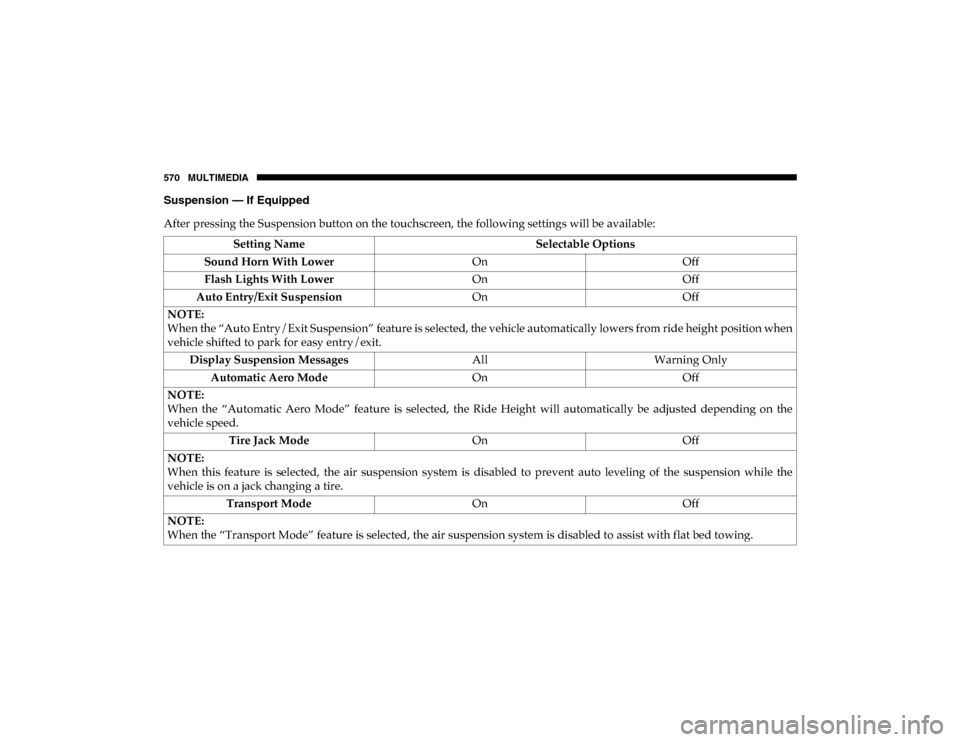
Suspension — If Equipped
After pressing the Suspension button on the touchscreen, the following settings will be available:Setting Name Selectable Options
Sound Horn With Lower OnOff
Flash Lights With Lower OnOff
Auto Entry/Exit Suspension OnOff
NOTE:
When the “Auto Entry/Exit Suspension” feature is selected, the vehicle automatically lowers from ride height position when
vehicle shifted to park for easy entry/exit. Display Suspension Messages AllWarning Only
Automatic Aero Mode OnOff
NOTE:
When the “Automatic Aero Mode” feature is selected, the Ride Height will automatically be adjusted depending on the
vehicle speed. Tire Jack Mode OnOff
NOTE:
When this feature is selected, the air suspension system is disabled to prevent auto leveling of the suspension while the
vehicle is on a jack changing a tire. Transport Mode OnOff
NOTE:
When the “Transport Mode” feature is selected, the air suspension system is disabled to assist with flat bed towing.
2020_DT_1500_OM_US.book Page 570
Page 591 of 674
MULTIMEDIA 589
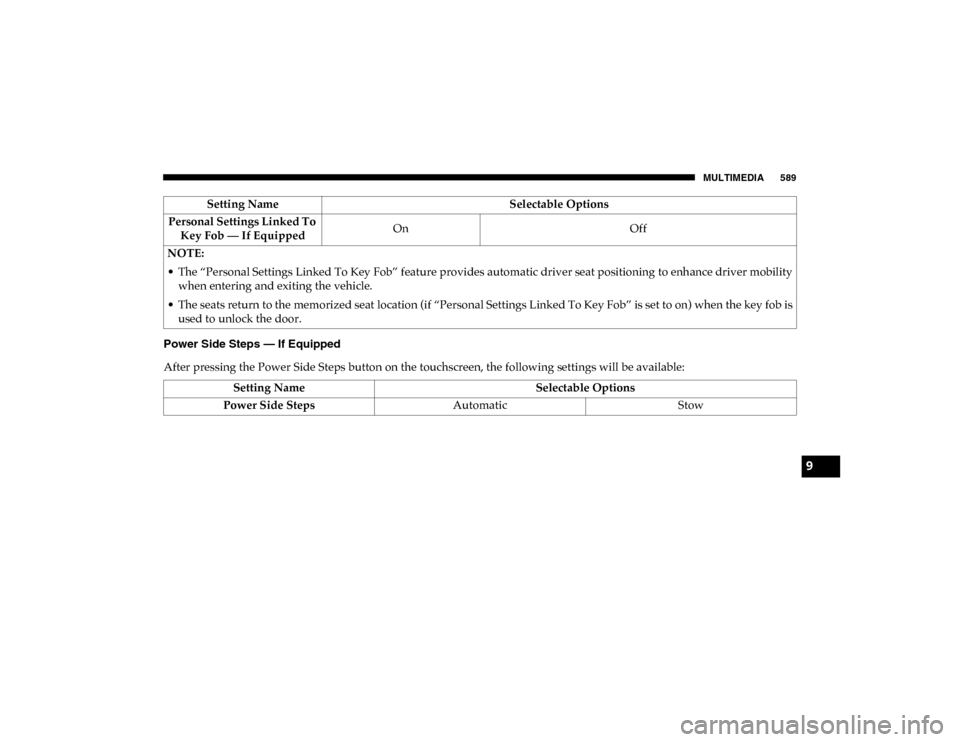
Power Side Steps — If Equipped
After pressing the Power Side Steps button on the touchscreen, the following settings will be available:Personal Settings Linked To
Key Fob — If Equipped On
Off
NOTE:
• The “Personal Settings Linked To Key Fob” feature provides automatic driver seat positioning to enhance driver mobility when entering and exiting the vehicle.
• The seats return to the memorized seat location (if “Personal Settings Linked To Key Fob” is set to on) when the key fob is used to unlock the door. Setting Name
Selectable Options
Setting NameSelectable Options
Power Side Steps AutomaticStow
9
2020_DT_1500_OM_US.book Page 589
Page 594 of 674
592 MULTIMEDIA
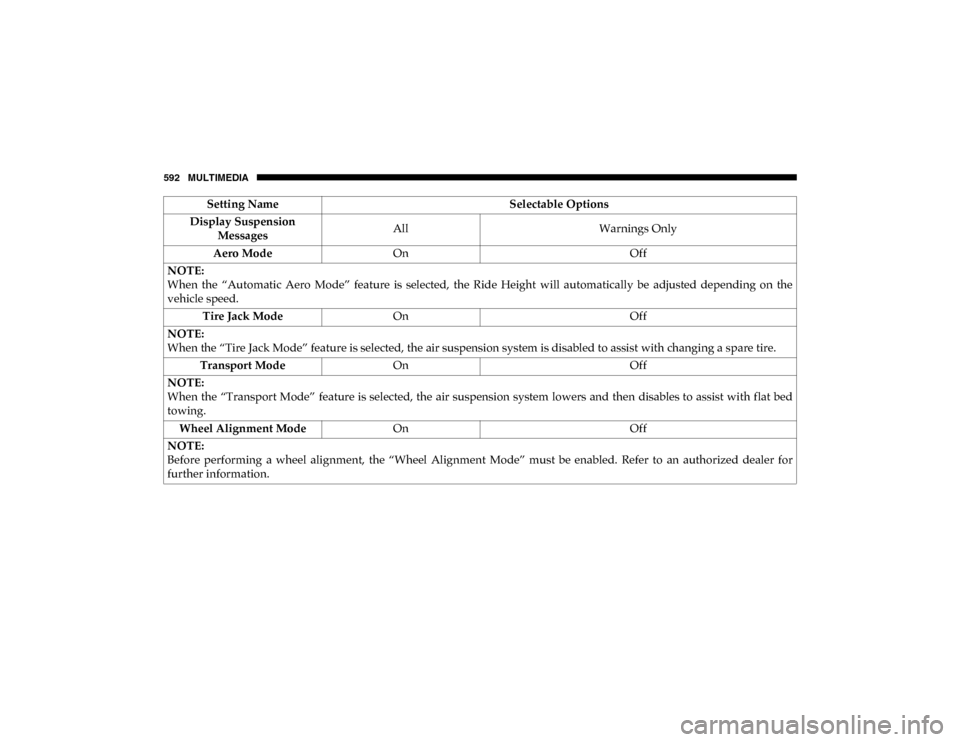
Display Suspension Messages All
Warnings Only
Aero Mode On Off
NOTE:
When the “Automatic Aero Mode” feature is selected, the Ride Height will automatically be adjusted depending on the
vehicle speed. Tire Jack Mode On Off
NOTE:
When the “Tire Jack Mode” feature is selected, the air suspension system is disabled to assist with changing a spare tire. Transport Mode On Off
NOTE:
When the “Transport Mode” feature is selected, the air suspension system lowers and then disables to assist with flat bed
towing. Wheel Alignment Mode On Off
NOTE:
Before performing a wheel alignment, the “Wheel Alignment Mode” must be enabled. Refer to an authorized dealer for
further information. Setting Name
Selectable Options
2020_DT_1500_OM_US.book Page 592
Page 595 of 674
MULTIMEDIA 593
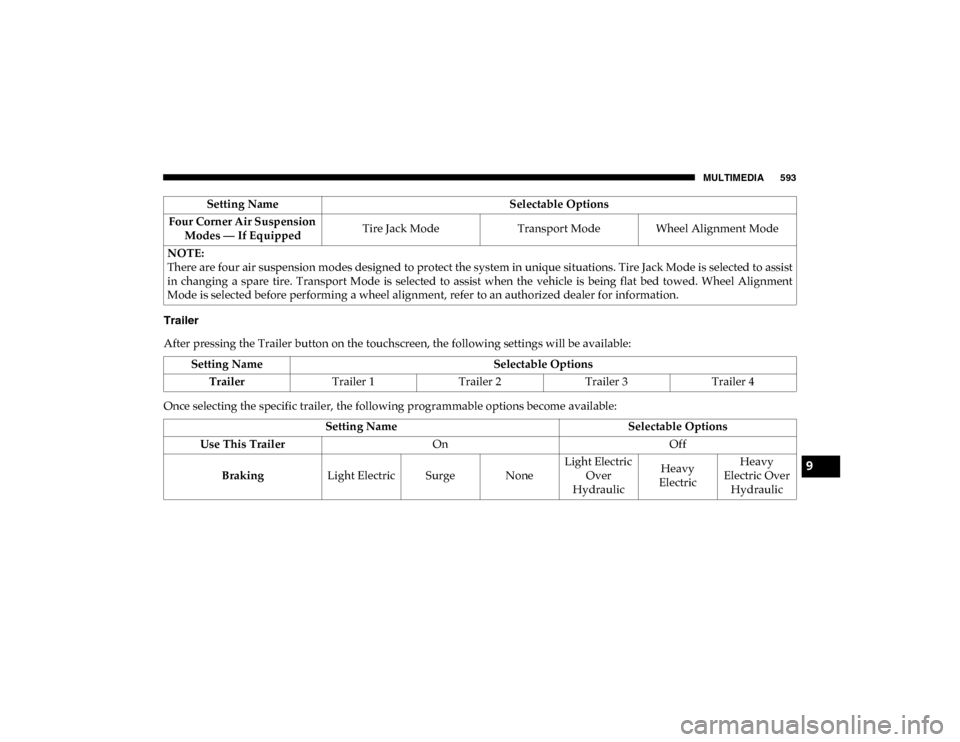
Trailer
After pressing the Trailer button on the touchscreen, the following settings will be available:
Once selecting the specific trailer, the following programmable options become available:Four Corner Air Suspension
Modes — If Equipped Tire Jack Mode
Transport Mode Wheel Alignment Mode
NOTE:
There are four air suspension modes designed to protect the system in unique situations. Tire Jack Mode is selected to assist
in changing a spare tire. Transport Mode is selected to assist when the vehicle is being flat bed towed. Wheel Alignment
Mode is selected before performing a wheel alignment, refer to an authorized dealer for information. Setting Name
Selectable Options
Setting NameSelectable Options
Trailer Trailer 1 Trailer 2Trailer 3 Trailer 4
Setting Name Selectable Options
Use This Trailer On Off
Braking Light Electric Surge None Light Electric
Over
Hydraulic Heavy
Electric Heavy
Electric Over Hydraulic
9
2020_DT_1500_OM_US.book Page 593
Page 617 of 674
MULTIMEDIA 615
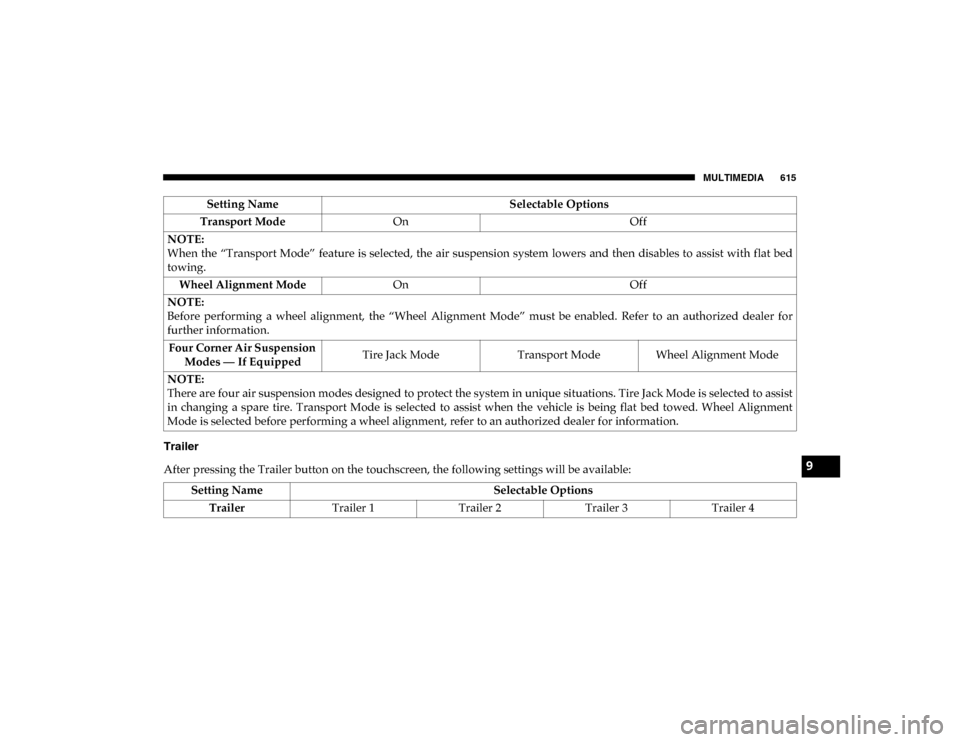
Trailer
After pressing the Trailer button on the touchscreen, the following settings will be available:Transport Mode
On Off
NOTE:
When the “Transport Mode” feature is selected, the air suspension system lowers and then disables to assist with flat bed
towing. Wheel Alignment Mode On Off
NOTE:
Before performing a wheel alignment, the “Wheel Alignment Mode” must be enabled. Refer to an authorized dealer for
further information. Four Corner Air Suspension Modes — If Equipped Tire Jack Mode
Transport Mode Wheel Alignment Mode
NOTE:
There are four air suspension modes designed to protect the system in unique situations. Tire Jack Mode is selected to assist
in changing a spare tire. Transport Mode is selected to assist when the vehicle is being flat bed towed. Wheel Alignment
Mode is selected before performing a wheel alignment, refer to an authorized dealer for information. Setting Name
Selectable Options
Setting NameSelectable Options
Trailer Trailer 1 Trailer 2Trailer 3 Trailer 4
9
2020_DT_1500_OM_US.book Page 615
Page 661 of 674

659
Cargo Light ................................................................................ 72
Cellular Phone ......................................................................... 626
Center High Mounted Stop Light......................................... 443
Center Seat Storage Compartment ....................................... 118
Chart, Tire Sizing .................................................................... 517
Check Engine Light (Malfunction Indicator Light) ........... 196
Checking Your Vehicle For Safety ........................................ 285
Checks, Safety .......................................................................... 285
Child Restraint ........................................................................ 265
Child Restraints Booster Seats ........................................................................ 269
Child Seat Installation ................................................ 278, 280
How To Stow An unused ALR Seat Belt ......................... 276Infant And Child Restraints .............................................. 266Locating The LATCH Anchorages ................................... 274
Lower Anchors And Tethers For Children ..................... 270Older Children And Child Restraints .............................. 268
Seating Positions ................................................................. 270
Clean Air Gasoline .................................................................. 549
Cleaning Wheels................................................................................... 535
Climate Control ......................................................................... 78 Automatic ............................................................................... 82
Manual .................................................................................... 78
Cold Weather Operation........................................................ 296
Compact Spare Tire ................................................................ 533 Contract, Service......................................................................654
Cooling Pressure Cap (Radiator Cap) ..................................509
Cooling System ........................................................................506
Adding Coolant (Antifreeze) .............................................508
Coolant Level ...............................................................507, 510Cooling Capacity .................................................................553
Disposal Of Used Coolant..................................................509Drain, Flush, And Refill .....................................................507
Inspection ............................................................................. 510
Points To Remember ........................................................... 511Pressure Cap ........................................................................509Radiator Cap ........................................................................509Selection Of Coolant (Antifreeze) .....................507, 553, 554
Corrosion Protection ...............................................................539
Cruise Control (Speed Control) ............................................340
Cruise Light .....................................................................193, 194
Cupholders...............................................................................126
Customer Assistance ..............................................................652
Cybersecurity ...........................................................................558 D
Daytime Running Lights ..........................................................67
Dealer Service ..........................................................................492
Defroster, Rear Window ..........................................................78
Defroster, Windshield ......................................................78, 287
Delay (Intermittent) Wipers ....................................................76
Diagnostic System, Onboard .................................................195
11
2020_DT_1500_OM_US.book Page 659