park assist Ram 1500 2020 Owner's Guide
[x] Cancel search | Manufacturer: RAM, Model Year: 2020, Model line: 1500, Model: Ram 1500 2020Pages: 674, PDF Size: 32.69 MB
Page 383 of 674

STARTING AND OPERATING 381
The system will then instruct the driver to check their
surroundings and move backward.Check Surroundings — Move Backwards Your vehicle is now in the parallel park position. When the
maneuver is complete, the driver will be instructed to check
the vehicle's parking position. If the driver is satisfied with
the vehicle position, they should shift to PARK. The "Active
ParkSense Complete - Check Parking Position" message will
be momentarily displayed.
Perpendicular Parking Space Assistance Operation/
Display
When the ParkSense Active Park Assist system is enabled,
the “Active ParkSense Searching - Push OK to Switch to
Perpendicular Park” message will show in the instrument
cluster display. Push the OK button on the left side steering
wheel switch to change your parking space setting to a
perpendicular maneuver. You may switch back to parallel
parking if you desire.
5
2020_DT_1500_OM_US.book Page 381
Page 384 of 674
382 STARTING AND OPERATING
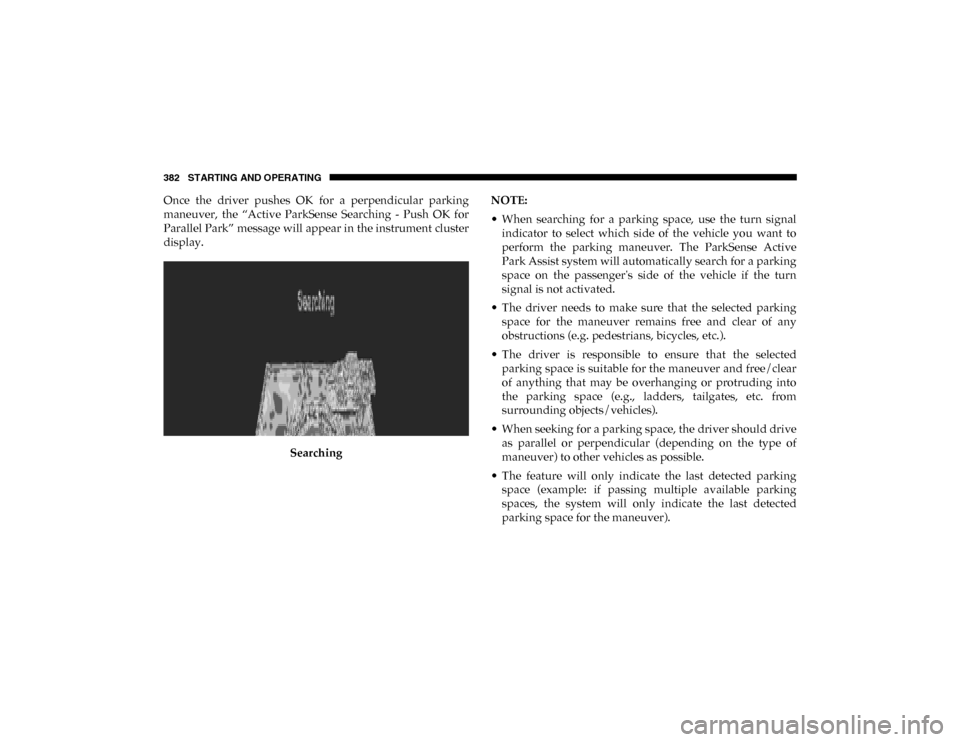
Once the driver pushes OK for a perpendicular parking
maneuver, the “Active ParkSense Searching - Push OK for
Parallel Park” message will appear in the instrument cluster
display.Searching NOTE:
• When searching for a parking space, use the turn signal
indicator to select which side of the vehicle you want to
perform the parking maneuver. The ParkSense Active
Park Assist system will automatically search for a parking
space on the passenger's side of the vehicle if the turn
signal is not activated.
• The driver needs to make sure that the selected parking space for the maneuver remains free and clear of any
obstructions (e.g. pedestrians, bicycles, etc.).
• The driver is responsible to ensure that the selected parking space is suitable for the maneuver and free/clear
of anything that may be overhanging or protruding into
the parking space (e.g., ladders, tailgates, etc. from
surrounding objects/vehicles).
• When seeking for a parking space, the driver should drive as parallel or perpendicular (depending on the type of
maneuver) to other vehicles as possible.
• The feature will only indicate the last detected parking space (example: if passing multiple available parking
spaces, the system will only indicate the last detected
parking space for the maneuver).
2020_DT_1500_OM_US.book Page 382
Page 387 of 674
STARTING AND OPERATING 385
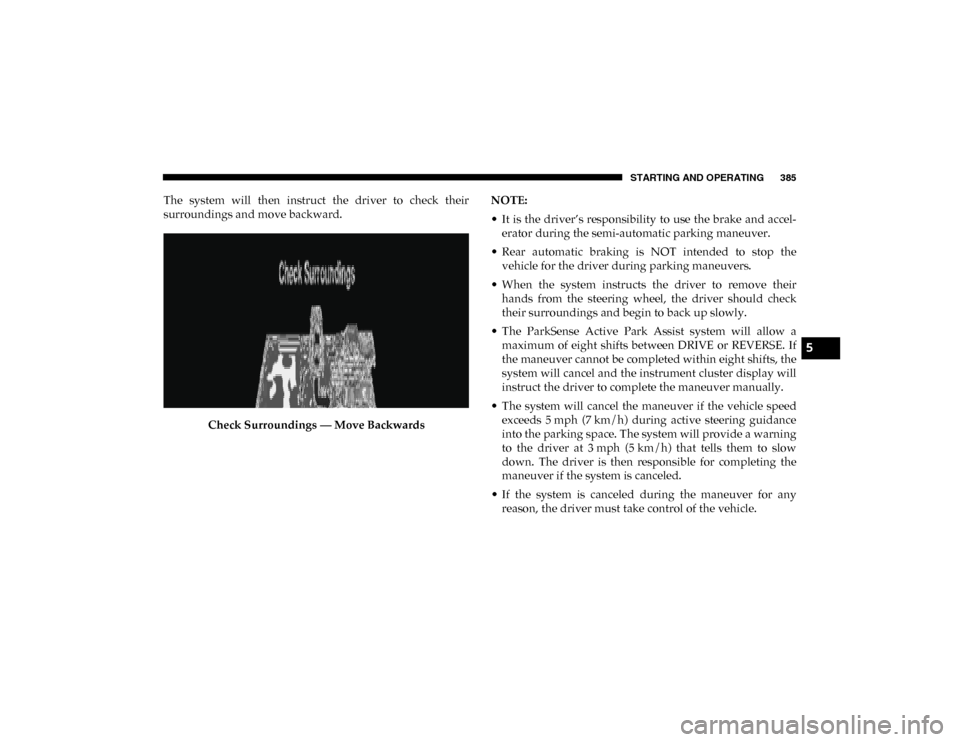
The system will then instruct the driver to check their
surroundings and move backward.Check Surroundings — Move Backwards NOTE:
• It is the driver’s responsibility to use the brake and accel
-
erator during the semi-automatic parking maneuver.
• Rear automatic braking is NOT intended to stop the vehicle for the driver during parking maneuvers.
• When the system instructs the driver to remove their hands from the steering wheel, the driver should check
their surroundings and begin to back up slowly.
• The ParkSense Active Park Assist system will allow a maximum of eight shifts between DRIVE or REVERSE. If
the maneuver cannot be completed within eight shifts, the
system will cancel and the instrument cluster display will
instruct the driver to complete the maneuver manually.
• The system will cancel the maneuver if the vehicle speed exceeds 5 mph (7 km/h) during active steering guidanceinto the parking space. The system will provide a warning
to the driver at 3 mph (5 km/h) that tells them to slowdown. The driver is then responsible for completing the
maneuver if the system is canceled.
• If the system is canceled during the maneuver for any reason, the driver must take control of the vehicle.
5
2020_DT_1500_OM_US.book Page 385
Page 392 of 674
390 STARTING AND OPERATING
Your vehicle is now in the perpendicular park position.
When the maneuver is complete, the driver will be instructed
to check the vehicle's parking position. If the driver is satis-
fied with the vehicle position, they should shift to PARK. The
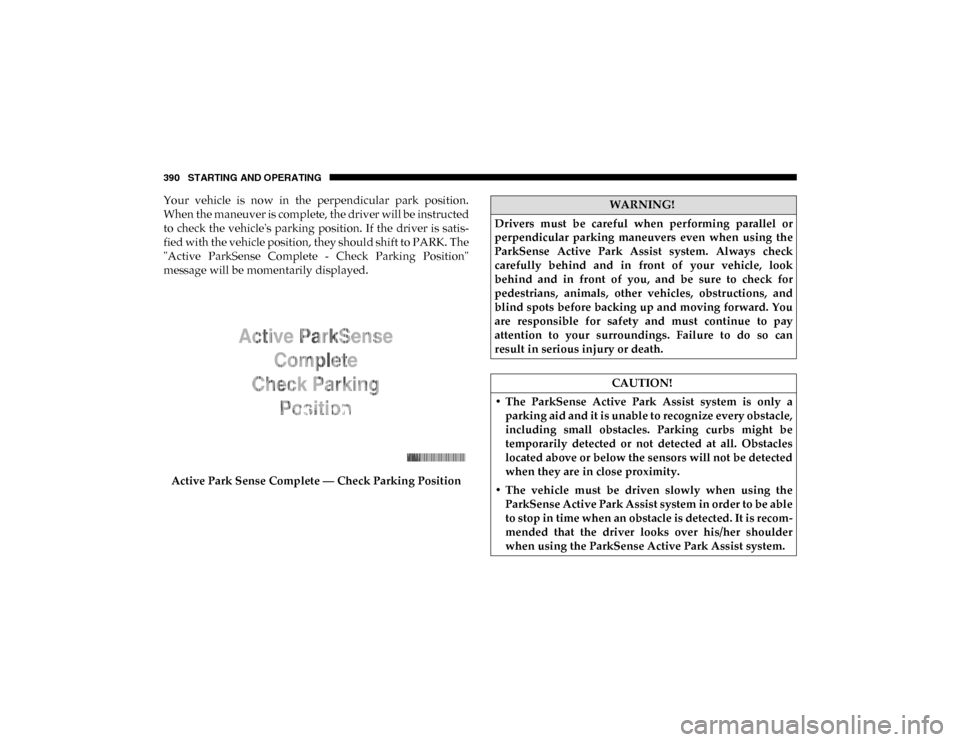
"Active ParkSense Complete - Check Parking Position"
message will be momentarily displayed.
Active Park Sense Complete — Check Parking PositionWARNING!
Drivers must be careful when performing parallel or
perpendicular parking maneuvers even when using the
ParkSense Active Park Assist system. Always check
carefully behind and in front of your vehicle, look
behind and in front of you, and be sure to check for
pedestrians, animals, other vehicles, obstructions, and
blind spots before backing up and moving forward. You
are responsible for safety and must continue to pay
attention to your surroundings. Failure to do so can
result in serious injury or death.
CAUTION!
• The ParkSense Active Park Assist system is only a parking aid and it is unable to recognize every obstacle,
including small obstacles. Parking curbs might be
temporarily detected or not detected at all. Obstacles
located above or below the sensors will not be detected
when they are in close proximity.
• The vehicle must be driven slowly when using the ParkSense Active Park Assist system in order to be able
to stop in time when an obstacle is detected. It is recom -
mended that the driver looks over his/her shoulder
when using the ParkSense Active Park Assist system.
2020_DT_1500_OM_US.book Page 390
Page 399 of 674

STARTING AND OPERATING 397
NOTE:
For further information about how to access and change the
programmable features of the ParkView Rear Backup
Camera, refer to “Uconnect Settings” in “Multimedia” for
further information.
A dashed center line overlay indicates the center of the
vehicle to assist with parking or aligning to a hitch/receiver.
The following table shows the approximate distances for
each zone:The ParkView Camera is located in the center of the tailgate
handle.
Zones
Distance To The Rear Of
The Vehicle
Red 0 - 1 ft (0 - 30 cm)
Yellow 1 ft - 6.5 ft (30 cm - 2m)
Green 6.5 ft or greater
(2 m or greater)WARNING!
Drivers must be careful when backing up even when
using the ParkView Rear Back Up Camera. Always check
carefully behind your vehicle, and be sure to check for
pedestrians, animals, other vehicles, obstructions, or
blind spots before backing up. You are responsible for
the safety of your surroundings and must continue to
pay attention while backing up. Failure to do so can
result in serious injury or death.
CAUTION!
• To avoid vehicle damage, ParkView should only be used as a parking aid. The ParkView camera is unable
to view every obstacle or object in your drive path.
• To avoid vehicle damage, the vehicle must be driven slowly when using ParkView to be able to stop in time
when an obstacle is seen. It is recommended that the
driver look frequently over his/her shoulder when
using ParkView.
5
2020_DT_1500_OM_US.book Page 397
Page 453 of 674
IN CASE OF EMERGENCY 451
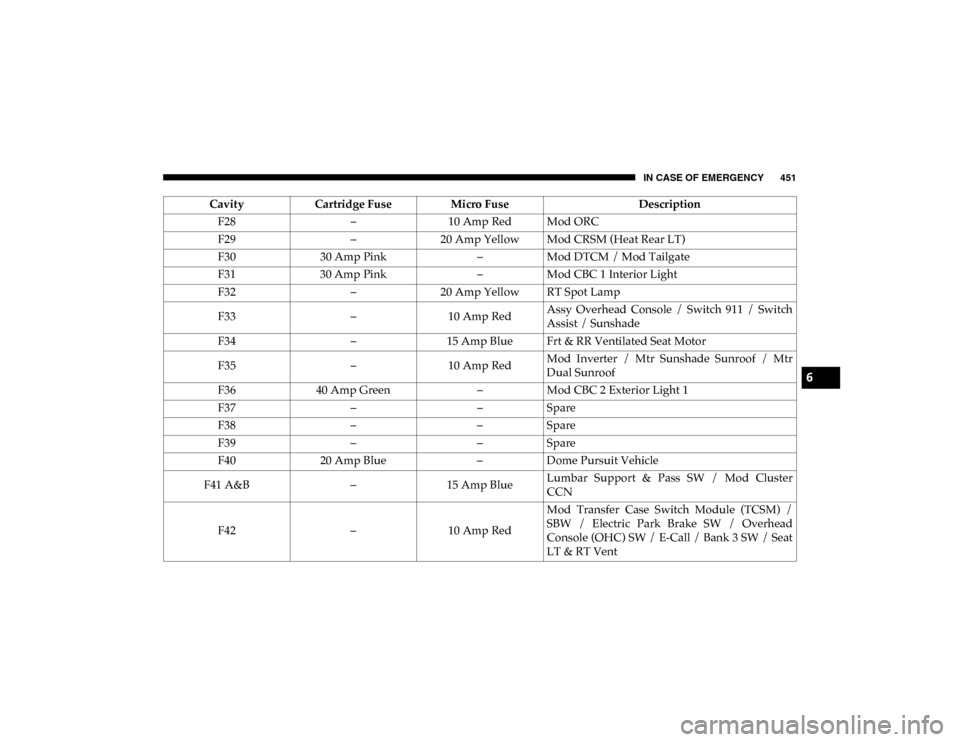
F28–10 Amp Red Mod ORC
F29 –20 Amp Yellow Mod CRSM (Heat Rear LT)
F30 30 Amp Pink –Mod DTCM / Mod Tailgate
F31 30 Amp Pink –Mod CBC 1 Interior Light
F32 –20 Amp Yellow RT Spot Lamp
F33 –10 Amp Red Assy Overhead Console / Switch 911 / Switch
Assist / Sunshade
F34 –15 Amp Blue Frt & RR Ventilated Seat Motor
F35 –10 Amp Red Mod Inverter / Mtr Sunshade Sunroof / Mtr
Dual Sunroof
F36 40 Amp Green –Mod CBC 2 Exterior Light 1
F37 ––Spare
F38 ––Spare
F39 ––Spare
F40 20 Amp Blue –Dome Pursuit Vehicle
F41 A&B –15 Amp Blue Lumbar Support & Pass SW / Mod Cluster
CCN
F42 –10 Amp Red Mod Transfer Case Switch Module (TCSM) /
SBW / Electric Park Brake SW / Overhead
Console (OHC) SW / E-Call / Bank 3 SW / Seat
LT & RT Vent
Cavity
Cartridge Fuse Micro Fuse Description
6
2020_DT_1500_OM_US.book Page 451
Page 554 of 674
552 TECHNICAL SPECIFICATIONS
NOTE:
Intentional tampering with the emissions control system can
result in civil penalties being assessed against you.
Carbon Monoxide Warnings
• An out-of-tune engine or certain fuel or ignitionmalfunctions can cause the catalytic converter to over -
heat. If you notice a pungent burning odor or some
light smoke, your engine may be out of tune or
malfunctioning and may require immediate service.
Contact an authorized dealer for service assistance.
• The use of fuel additives, which are now being sold as octane enhancers, is not recommended. Most of these
products contain high concentrations of methanol. Fuel
system damage or vehicle performance problems
resulting from the use of such fuels or additives is not
the responsibility of the manufacturer and may void or
not be covered under the New Vehicle Limited
Warranty. CAUTION!
(Continued)WARNING!
Carbon monoxide (CO) in exhaust gases is deadly.
Follow the precautions below to prevent carbon
monoxide poisoning:
• Do not inhale exhaust gases. They contain carbon monoxide, a colorless and odorless gas, which can kill.
Never run the engine in a closed area, such as a garage,
and never sit in a parked vehicle with the engine
running for an extended period. If the vehicle is
stopped in an open area with the engine running for
more than a short period, adjust the ventilation system
to force fresh, outside air into the vehicle.
• Guard against carbon monoxide with proper mainte -
nance. Have the exhaust system inspected every time
the vehicle is raised. Have any abnormal conditions
repaired promptly. Until repaired, drive with all side
windows fully open.
2020_DT_1500_OM_US.book Page 552
Page 565 of 674
MULTIMEDIA 563
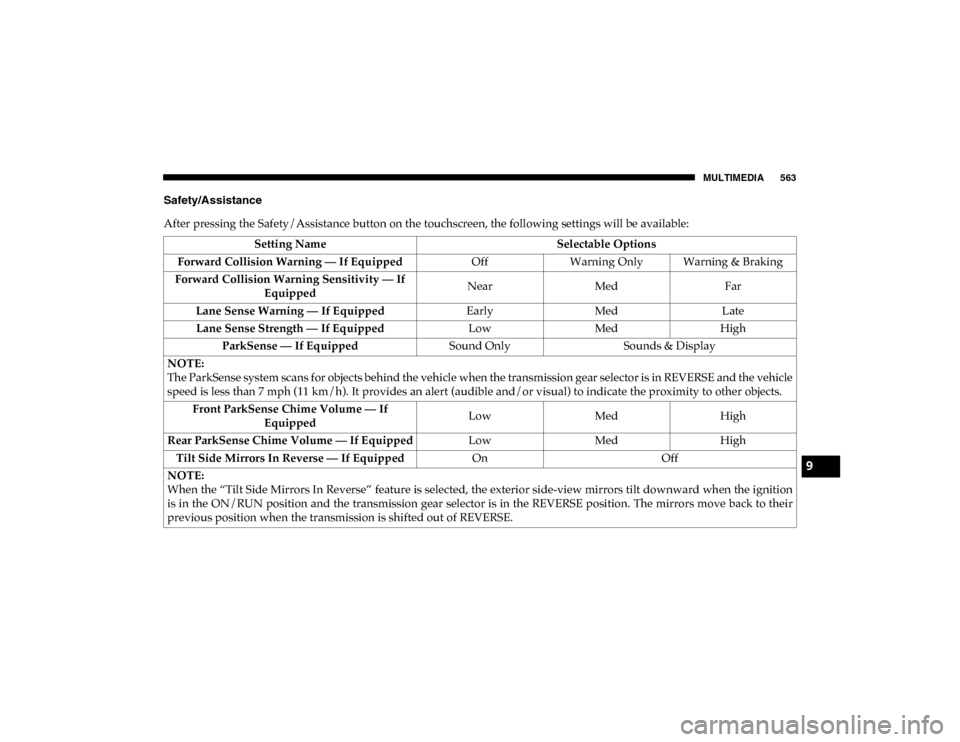
Safety/Assistance
After pressing the Safety/Assistance button on the touchscreen, the following settings will be available:Setting Name Selectable Options
Forward Collision Warning — If Equipped OffWarning Only Warning & Braking
Forward Collision Warning Sensitivity — If Equipped Near
Med Far
Lane Sense Warning — If Equipped EarlyMedLate
Lane Sense Strength — If Equipped LowMedHigh
ParkSense — If Equipped Sound OnlySounds & Display
NOTE:
The ParkSense system scans for objects behind the vehicle when the transmission gear selector is in REVERSE and the vehicle
speed is less than 7 mph (11 km/h). It provides an alert (audible and/or visual) to indicate the proximity to other objects. Front ParkSense Chime Volume — If Equipped Low
MedHigh
Rear ParkSense Chime Volume — If Equipped LowMedHigh
Tilt Side Mirrors In Reverse — If Equipped OnOff
NOTE:
When the “Tilt Side Mirrors In Reverse” feature is selected, the exterior side-view mirrors tilt downward when the ignition
is in the ON/RUN position and the transmission gear selector is in the REVERSE position. The mirrors move back to their
previous position when the transmission is shifted out of REVERSE.
9
2020_DT_1500_OM_US.book Page 563
Page 566 of 674
564 MULTIMEDIA
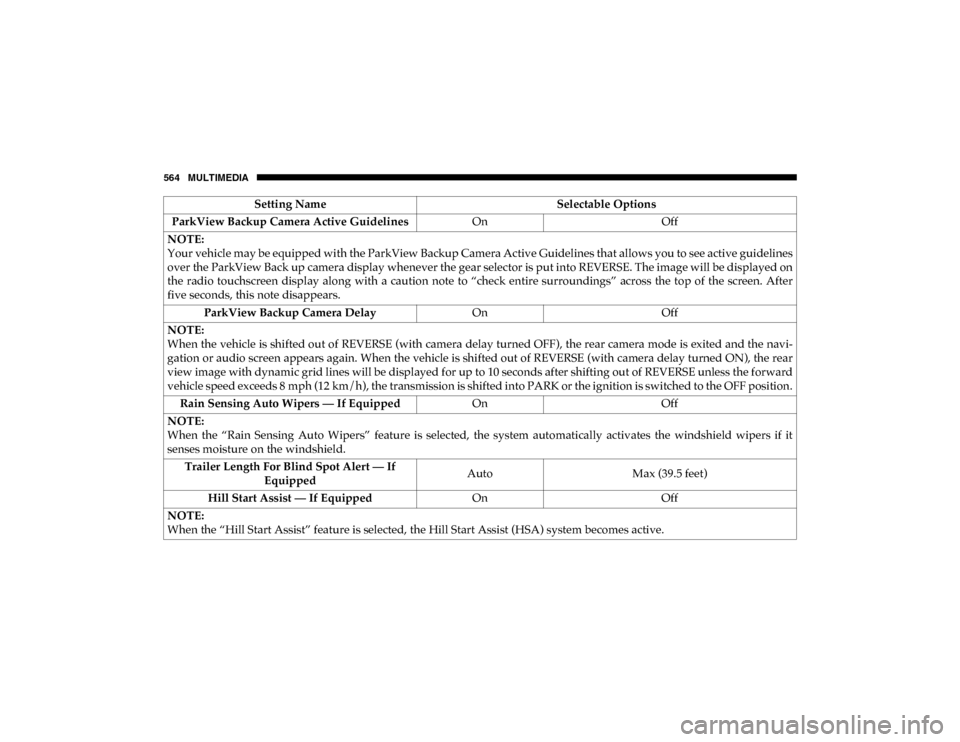
ParkView Backup Camera Active GuidelinesOnOff
NOTE:
Your vehicle may be equipped with the ParkView Backup Camera Active Guidelines that allows you to see active guidelines
over the ParkView Back up camera display whenever the gear selector is put into REVERSE. The image will be displayed on
the radio touchscreen display along with a caution note to “check entire surroundings” across the top of the screen. After
five seconds, this note disappears. ParkView Backup Camera Delay OnOff
NOTE:
When the vehicle is shifted out of REVERSE (with camera delay turned OFF), the rear camera mode is exited and the navi -
gation or audio screen appears again. When the vehicle is shifted out of REVERSE (with camera delay turned ON), the rear
view image with dynamic grid lines will be displayed for up to 10 seconds after shifting out of REVERSE unless the forward
vehicle speed exceeds 8 mph (12 km/h), the transmission is shifted into PARK or the ignition is switched to the OFF position.
Rain Sensing Auto Wipers — If Equipped OnOff
NOTE:
When the “Rain Sensing Auto Wipers” feature is selected, the system automatically activates the windshield wipers if it
senses moisture on the windshield. Trailer Length For Blind Spot Alert — If Equipped Auto
Max (39.5 feet)
Hill Start Assist — If Equipped OnOff
NOTE:
When the “Hill Start Assist” feature is selected, the Hill Start Assist (HSA) system becomes active. Setting Name
Selectable Options
2020_DT_1500_OM_US.book Page 564
Page 572 of 674
570 MULTIMEDIA
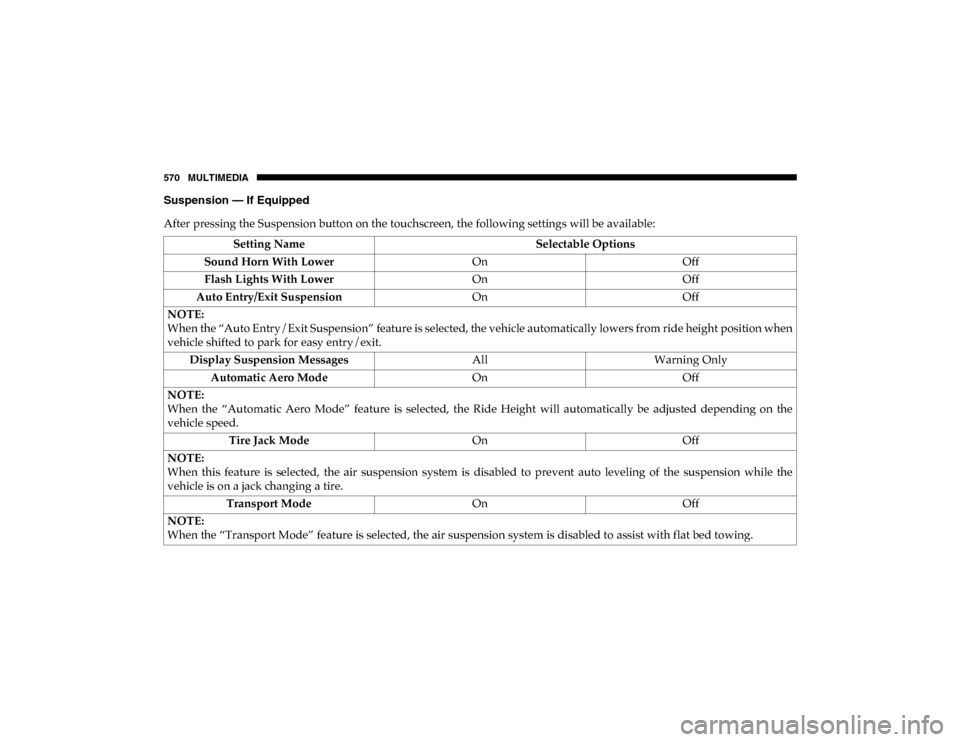
Suspension — If Equipped
After pressing the Suspension button on the touchscreen, the following settings will be available:Setting Name Selectable Options
Sound Horn With Lower OnOff
Flash Lights With Lower OnOff
Auto Entry/Exit Suspension OnOff
NOTE:
When the “Auto Entry/Exit Suspension” feature is selected, the vehicle automatically lowers from ride height position when
vehicle shifted to park for easy entry/exit. Display Suspension Messages AllWarning Only
Automatic Aero Mode OnOff
NOTE:
When the “Automatic Aero Mode” feature is selected, the Ride Height will automatically be adjusted depending on the
vehicle speed. Tire Jack Mode OnOff
NOTE:
When this feature is selected, the air suspension system is disabled to prevent auto leveling of the suspension while the
vehicle is on a jack changing a tire. Transport Mode OnOff
NOTE:
When the “Transport Mode” feature is selected, the air suspension system is disabled to assist with flat bed towing.
2020_DT_1500_OM_US.book Page 570