tow Ram 1500 2020 Owner's Guide
[x] Cancel search | Manufacturer: RAM, Model Year: 2020, Model line: 1500, Model: Ram 1500 2020Pages: 674, PDF Size: 32.69 MB
Page 211 of 674

SAFETY 209
Towing With HSA
Hill Start Assist (HSA) will also provide assistance to miti-
gate roll back while towing a trailer. Disabling And Enabling HSA
This feature can be turned on or turned off. To change the
current setting, proceed as follows:
• If disabling HSA using your instrument cluster display,
refer to “Instrument Cluster Display” in “Getting To Know
Your Instrument Panel” for further information.
• If disabling HSA using Uconnect Settings, refer to “Ucon -
nect Settings” in “Multimedia” for further information.
For vehicles not equipped with an instrument cluster
display, perform the following steps:
1. Center the steering wheel (front wheels pointing straight forward).
2. Shift the transmission into PARK (P).
3. Apply the park brake.
4. Start the engine.
5. Rotate the steering wheel slightly more than one-half turn to the left.
WARNING!
• If you use a trailer brake controller with your trailer, the trailer brakes may be activated and deactivated with
the brake switch. If so, there may not be enough brake
pressure to hold both the vehicle and the trailer on a
hill when the brake pedal is released. In order to avoid
rolling down an incline while resuming acceleration,
manually activate the trailer brake or apply more
vehicle brake pressure prior to releasing the brake
pedal.
• HSA is not a parking brake. Always apply the parking brake fully when exiting your vehicle. Also, be certain
to place the transmission in PARK.
• Failure to follow these warnings can result in a colli -
sion or serious personal injury.
4
2020_DT_1500_OM_US.book Page 209
Page 212 of 674
210 SAFETY
6. Push the “ESC Off” button located in the lower switch bankbelow the climate control four times within 20 seconds. The
“ESC Off Indicator Light” should turn on and turn off two
times.
7. Rotate the steering wheel back to center and then an addi -
tional slightly more than one-half turn to the right.
8. Turn the ignition to the OFF mode and then back to ON. If the sequence was completed properly, the “ESC Off
Indicator Light” will blink several times to confirm HSA
is disabled.
9. Repeat these steps if you want to return this feature to its previous setting.
Traction Control System (TCS)
The Traction Control System (TCS) monitors the amount of
wheel spin of each of the driven wheels. If wheel spin is
detected, the TCS may apply brake pressure to the spinning
wheel(s) and/or reduce engine power to provide enhanced
acceleration and stability. A feature of the TCS, Brake
Limited Differential (BLD), functions similar to a limited slip
differential and controls the wheel spin across a driven axle.
If one wheel on a driven axle is spinning faster than the other,
the system will apply the brake of the spinning wheel. This will allow more engine torque to be applied to the wheel that
is not spinning. BLD may remain enabled even if TCS and
ESC are in a reduced mode.
Trailer Sway Control (TSC)
Trailer Sway Control (TSC) uses sensors in the vehicle to
recognize an excessively swaying trailer and will take the
appropriate actions to attempt to stop the sway. TSC will
become active automatically once an excessively swaying
trailer is recognized.
NOTE:
TSC cannot stop all trailers from swaying. Always use
caution when towing a trailer and follow the trailer tongue
weight recommendations. Refer to “Trailer Towing” in
“Starting And Operating” for further information.
When TSC is functioning, the “ESC Activation/Malfunction
Indicator Light” will flash, the engine power may be reduced
and you may feel the brakes being applied to individual
wheels to attempt to stop the trailer from swaying. TSC is
disabled when the ESC system is in the “Partial Off” or “Full
Off” modes.
WARNING!
If TSC activates while driving, slow the vehicle down,
stop at the nearest safe location, and adjust the trailer
load to eliminate trailer sway.
2020_DT_1500_OM_US.book Page 210
Page 218 of 674
216 SAFETY
For information on how Blind Spot Monitoring functions
when pulling a trailer, refer to “Trailer Merge Assist” in this
section.
Rear Cross Path (RCP)
The Rear Cross Path (RCP) feature is intended to aid the
driver when backing out of parking spaces where their
vision of oncoming vehicles may be blocked. Proceed slowly
and cautiously out of the parking space until the rear end of
the vehicle is exposed. The RCP system will then have a clear
view of the cross traffic, and if an oncoming vehicle is
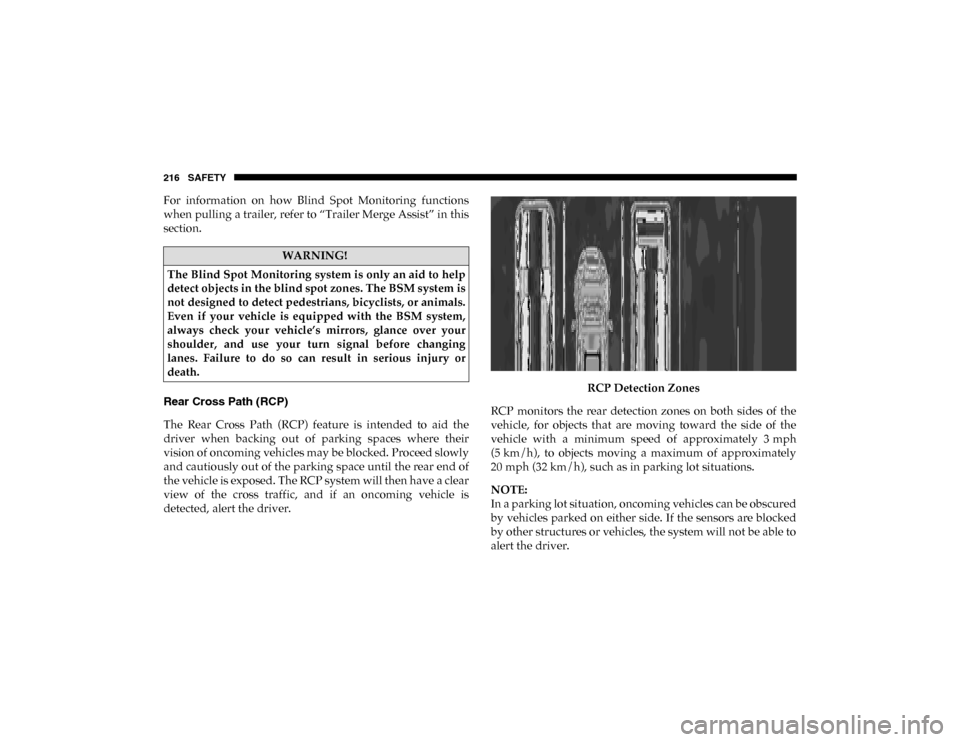
detected, alert the driver.RCP Detection Zones
RCP monitors the rear detection zones on both sides of the
vehicle, for objects that are moving toward the side of the
vehicle with a minimum speed of approximately 3 mph
(5 km/h), to objects moving a maximum of approximately
20 mph (32 km/h), such as in parking lot situations.
NOTE:
In a parking lot situation, oncoming vehicles can be obscured
by vehicles parked on either side. If the sensors are blocked
by other structures or vehicles, the system will not be able to
alert the driver.
WARNING!
The Blind Spot Monitoring system is only an aid to help
detect objects in the blind spot zones. The BSM system is
not designed to detect pedestrians, bicyclists, or animals.
Even if your vehicle is equipped with the BSM system,
always check your vehicle’s mirrors, glance over your
shoulder, and use your turn signal before changing
lanes. Failure to do so can result in serious injury or
death.
2020_DT_1500_OM_US.book Page 216
Page 239 of 674
SAFETY 237
(Continued)
Reminder Light will remain on until the seat belts are
buckled. The BeltAlert warning sequence may repeat based
on vehicle speed until the driver and occupied outboard
front seat passenger seat belts are buckled. The driver should
instruct all occupants to buckle their seat belts.
Change Of Status
If the driver or outboard front seat passenger (if equipped
with outboard front passenger seat BeltAlert) unbuckles
their seat belt while the vehicle is traveling, the BeltAlert
warning sequence will begin until the seat belts are buckled
again.
The outboard front passenger seat BeltAlert is not active
when the outboard front passenger seat is unoccupied.
BeltAlert may be triggered when an animal or other items are
placed on the outboard front passenger seat or when the seat
is folded flat (if equipped). It is recommended that pets be
restrained in the rear seat (if equipped) in pet harnesses or
pet carriers that are secured by seat belts, and cargo is prop-
erly stowed.
BeltAlert can be activated or deactivated by an authorized
dealer. FCA US LLC does not recommend deactivating
BeltAlert. NOTE:
If BeltAlert has been deactivated and the driver or outboard
front seat passenger (if equipped with outboard front
passenger seat BeltAlert) is unbuckled the Seat Belt
Reminder Light will turn on and remain on until the driver
and outboard front seat passenger seat belts are buckled.
Lap/Shoulder Belts
All seating positions in your vehicle are equipped with lap/
shoulder belts.
The seat belt webbing retractor will lock only during very
sudden stops or collisions. This feature allows the shoulder
part of the seat belt to move freely with you under normal
conditions. However, in a collision the seat belt will lock and
reduce your risk of striking the inside of the vehicle or being
thrown out of the vehicle.
WARNING!
• Relying on the air bags alone could lead to more severe injuries in a collision. The air bags work with your seat
belt to restrain you properly. In some collisions, the air
bags won’t deploy at all. Always wear your seat belt
even though you have air bags.
4
2020_DT_1500_OM_US.book Page 237
Page 242 of 674

240 SAFETY
3. When the seat belt is long enough to fit, insert the latchplate into the buckle until you hear a “click.”
Inserting Latch Plate Into Buckle
4. Position the lap belt so that it is snug and lies low across your hips, below your abdomen. To remove slack in the
lap belt portion, pull up on the shoulder belt. To loosen
the lap belt if it is too tight, tilt the latch plate and pull on
the lap belt. A snug seat belt reduces the risk of sliding
under the seat belt in a collision. Positioning The Lap Belt
5. Position the shoulder belt across the shoulder and chest with minimal, if any slack so that it is comfortable and not
resting on your neck. The retractor will withdraw any
slack in the shoulder belt.
6. To release the seat belt, push the red button on the buckle. The seat belt will automatically retract to its stowed posi -
tion. If necessary, slide the latch plate down the webbing
to allow the seat belt to retract fully.
2020_DT_1500_OM_US.book Page 240
Page 278 of 674

276 SAFETY
Always follow the directions of the child restraint manu-
facturer when installing your child restraint. Not all child
restraint systems will be installed as described here.
To Install A LATCH-Compatible Child Restraint
If the selected seating position has a Switchable Automatic
Locking Retractor (ALR) seat belt, stow the seat belt,
following the instructions below. See the section “Installing
Child Restraints Using the Vehicle Seat Belt” to check what
type of seat belt each seating position has.
1. Loosen the adjusters on the lower straps and on the tether strap of the child seat so that you can more easily attach
the hooks or connectors to the vehicle anchorages.
2. Place the child seat between the lower anchorages for that seating position. For some second row seats, you may
need to recline the seat and / or raise the head restraint (if
adjustable) to get a better fit. If the rear seat can be moved
forward and rearward in the vehicle, you may wish to move it to its rear-most position to make room for the
child seat. You may also move the front seat forward to
allow more room for the child seat.
3. Attach the lower hooks or connectors of the child restraint to the lower anchorages in the selected seating position.
4. If the child restraint has a tether strap, connect it to the top tether anchorage. See the section “Installing Child
Restraints Using the Top Tether Anchorage” for direc -
tions to attach a tether anchor.
5. Tighten all of the straps as you push the child restraint rearward and downward into the seat. Remove slack in
the straps according to the child restraint manufacturer’s
instructions.
6. Test that the child restraint is installed tightly by pulling back and forth on the child seat at the belt path. It should
not move more than 1 inch (25.4 mm) in any direction.
How To Stow An Unused Switchable-ALR (ALR) Seat
Belt:
When using the LATCH attaching system to install a child
restraint, stow all ALR seat belts that are not being used by
other occupants or being used to secure child restraints. An
unused belt could injure a child if they play with it and acci -
WARNING!
Never use the same lower anchorage to attach more than
one child restraint. Please refer to “To Install A
LATCH-Compatible Child Restraint” for typical
installation instructions.
2020_DT_1500_OM_US.book Page 276
Page 290 of 674
288 SAFETY
(Continued)
• ONLY install floor mats designed to fit your vehicle.NEVER install a floor mat that cannot be properly
attached and secured to your vehicle. If a floor mat
needs to be replaced, only use a FCA approved floor
mat for the specific make, model, and year of your
vehicle.
• ONLY use the driver’s side floor mat on the driver’s side floor area. To check for interference, with the
vehicle properly parked with the engine off, fully
depress the accelerator, the brake, and the clutch pedal
(if present) to check for interference. If your floor mat
interferes with the operation of any pedal, or is not
secure to the floor, remove the floor mat from the
vehicle and place the floor mat in your trunk.
• ONLY use the passenger’s side floor mat on the passenger’s side floor area.
• ALWAYS make sure objects cannot fall or slide into the driver’s side floor area when the vehicle is moving.
Objects can become trapped under accelerator, brake,
or clutch pedals and could cause a loss of vehicle
control.
WARNING! (Continued)
• NEVER place any objects under the floor mat (e.g.,
towels, keys, etc.). These objects could change the posi -
tion of the floor mat and may cause interference with
the accelerator, brake, or clutch pedals.
• If the vehicle carpet has been removed and re-installed, always properly attach carpet to the floor and check the
floor mat fasteners are secure to the vehicle carpet.
Fully depress each pedal to check for interference with
the accelerator, brake, or clutch pedals then re-install
the floor mats.
• It is recommended to only use mild soap and water to clean your floor mats. After cleaning, always check
your floor mat has been properly installed and is
secured to your vehicle using the floor mat fasteners by
lightly pulling mat.
WARNING! (Continued)
2020_DT_1500_OM_US.book Page 288
Page 297 of 674
STARTING AND OPERATING 295
(Continued)
4WD LOW — If Equipped
AutoPark will be disabled when operating the vehicle in
4WD LOW.
The MESSAGE “AutoPark Disabled ” will be displayed in
the instrument cluster.
Additional customer warnings will be given when all of
these conditions are met:
• Vehicle is not in PARK
• Driver’s Door is ajar
• Vehicle is in 4WD LOW range
The MESSAGE “ AutoPark Not Engaged ” will be displayed
in the instrument cluster. A warning chime will continue
until you shift the vehicle into PARK or the Driver’s Door is
closed.
ALWAYS DO A VISUAL CHECK
that your vehicle is in
PARK by looking for the "P" in the Instrument Cluster
Display and near the shifter. As an added precaution, always
apply the parking brake when exiting the vehicle. If Engine Fails To Start
If the engine fails to start after you have followed the
“Normal Starting” procedure, it may be flooded. Push the
accelerator pedal all the way to the floor and hold it there
while the engine is cranking. This should clear any excess
fuel in case the engine is flooded.
The starter motor will engage automatically, run for 10
seconds, and then disengage. Once this occurs, release the
accelerator pedal and the brake pedal, wait 10 to 15 seconds,
then repeat the “Normal Starting” procedure.
WARNING!
• Never pour fuel or other flammable liquid into the throttle body air inlet opening in an attempt to start the
vehicle. This could result in flash fire causing serious
personal injury.
• Do not attempt to push or tow your vehicle to get it started. Vehicles equipped with an automatic transmis -
sion cannot be started this way. Unburned fuel could
enter the catalytic converter and once the engine has
started, ignite and damage the converter and vehicle.
5
2020_DT_1500_OM_US.book Page 295
Page 301 of 674
STARTING AND OPERATING 299
(Continued)(Continued)
NOTE:
When parking on a hill, it is important to turn the front
wheels toward the curb on a downhill grade and away from
the curb on an uphill grade. Apply the park brake before
placing the gear selector in PARK, otherwise the load on the
transmission locking mechanism may make it difficult to
move the gear selector out of PARK. The parking brake
should always be applied whenever the driver is not in the
vehicle.
WARNING!
• Never use the PARK position as a substitute for the parking brake. Always apply the parking brake fully
when parked to guard against vehicle movement and
possible injury or damage.
• When exiting the vehicle, always remove the key fob from the ignition and lock your vehicle.
• Never leave children alone in a vehicle, or with access to an unlocked vehicle. Allowing children to be in a
vehicle unattended is dangerous for a number of
reasons. A child or others could be seriously or fatally
injured. Children should be warned not to touch the
parking brake, brake pedal or the gear selector.
• Do not leave the key fob in or near the vehicle, or in alocation accessible to children, and do not leave a
vehicle equipped with Keyless Enter-N-Go in the ACC
or ON/RUN mode. A child could operate power
windows, other controls, or move the vehicle.
• Be sure the parking brake is fully disengaged before driving; failure to do so can lead to brake failure and a
collision.
• Always fully apply the parking brake when leaving your vehicle, or it may roll and cause damage or injury.
Also be certain to leave the transmission in PARK.
Failure to do so may allow the vehicle to roll and cause
damage or injury.
WARNING!
• Do not rely on the parking brake to operate effectively if the rear brakes have been immersed in water or mud.
• Never use the PARK position as a substitute for the parking brake. Always apply the parking brake fully
when parked to guard against vehicle movement and
possible injury or damage.
WARNING! (Continued)
5
2020_DT_1500_OM_US.book Page 299
Page 307 of 674
STARTING AND OPERATING 305
in the instrument cluster as 1, 2, 3, etc. Refer to “Electronic
Range Select (ERS) Operation” in this section for further
information. Some models will display both the selected gear
limit, and the actual current gear, while in ERS mode.Electronic Transmission Gear Selector
Gear Ranges
Do not depress the accelerator pedal when shifting from
PARK or NEUTRAL into another gear range.
NOTE:
After selecting any gear range, wait a moment to allow the
selected gear to engage before accelerating. This is especially
important when the engine is cold. PARK (P)
This range supplements the parking brake by locking the
transmission. The engine can be started in this range. Never
attempt to use PARK while the vehicle is in motion. Apply
the parking brake when exiting the vehicle in this range.
When parking on a level surface, you may shift the transmis
-
sion into PARK first, and then apply the parking brake.
When parking on a hill, apply the parking brake before
shifting the transmission to PARK. As an added precaution,
turn the front wheels toward the curb on a downhill grade
and away from the curb on an uphill grade.
NOTE:
On four-wheel drive vehicles be sure that the transfer case is
in a drive position.
When exiting the vehicle, always:
• Apply the parking brake.
• Shift the transmission into PARK.
• Turn the engine OFF.
• Remove the key fob.
5
2020_DT_1500_OM_US.book Page 305