lights Ram 1500 2020 Service Manual
[x] Cancel search | Manufacturer: RAM, Model Year: 2020, Model line: 1500, Model: Ram 1500 2020Pages: 674, PDF Size: 32.69 MB
Page 323 of 674
STARTING AND OPERATING 321
33 mph (53 km/h). Once the vehicle speed goes below15 mph (24 km/h) the vehicle height will begin to lower. If
the vehicle speed remains between 15 mph (24 km/h) and
25 mph (40 km/h) for greater than 60 seconds, or the
vehicle speed exceeds 25 mph (40 km/h) the Entry/Exitchange will be cancelled. To return to Normal Height
Mode, push the height selector switch up once while in
Entry/Exit or drive the vehicle over 15 mph (24 km/h).
Entry/Exit mode may not be available due to vehicle
payload, an instrument cluster message will be displayed
when this occurs. Refer to “Instrument Cluster Display” in
“Getting To Know Your Instrument Panel” for further
information.
NOTE:
Entry/Exit mode may be achieved using your key fob for
easier entry/loading. Refer to “Keys” in “Getting To Know
Your Vehicle” for further information. The system requires that the ignition be in the ON/RUN
position or the engine running for all user requested
changes. When lowering the vehicle all of the doors, must be
closed. If a door is opened at any time while the vehicle is
lowering the change will not be completed until the open
door(s) is closed.
This system uses a lifting and lowering pattern which keeps
the headlights from incorrectly shining into oncoming
traffic. When raising the vehicle, the rear of the vehicle will
move up first and then the front. When lowering the vehicle,
the front will move down first and then the rear.
After the engine is turned off, it may be noticed that the air
suspension system operates briefly, this is normal. The
system is correcting the position of the vehicle to ensure a
proper appearance.
To assist with changing a spare tire, the air suspension
system has a feature which allows the automatic leveling to
be disabled. Refer to “Instrument Cluster Display” in
“Getting To Know Your Instrument Panel” for further infor
-
mation.
CAUTION!
When in ENTRY/EXIT setting, be aware of your
surroundings, you may not have the clearance required
for certain areas and vehicle damage may occur.
5
2020_DT_1500_OM_US.book Page 321
Page 329 of 674

STARTING AND OPERATING 327
NOTE:
Automatic Aero Mode may be disabled through vehicle
settings on your Uconnect Radio.
•Entry/Exit Mode (Lowers the vehicle approximately
3 inches (73 mm)) – This position lowers the vehicle for
easier passenger entry and exit as well as lowering the
rear of the vehicle for easier loading and unloading of
cargo. To enter Entry/Exit Mode, push the height
selector switch down twice from the NRH while the
vehicle speed is below 33 mph (53 km/h). Once the
vehicle speed goes below 15 mph (24 km/h) the vehicle
height will begin to lower. If the vehicle speed remains
between 15 mph (24 km/h) and 25 mph (40 km/h) for
greater than 60 seconds, or the vehicle speed exceeds
25 mph (40 km/h) the Entry/Exit change will be
cancelled. To return to Normal Height Mode, push the
height selector switch up twice while in Entry/Exit or
drive the vehicle over 15 mph (24 km/h). Entry/Exit
mode may not be available due to vehicle payload, an
instrument cluster display message will be shown when
this occurs.
Refer to “Instrument Cluster Display” in “Getting To
Know Your Instrument Panel” for further information. The system requires that the ignition be in the ON/RUN
position or the engine running for all user requested
changes. When lowering the vehicle all of the doors, must be
closed. If a door is opened at any time while the vehicle is
lowering the change will not be completed until the open
door(s) is closed.
This system uses a lifting and lowering pattern which keeps
the headlights from incorrectly shining into oncoming
traffic. When raising the vehicle, the rear of the vehicle will
move up first and then the front. When lowering the vehicle,
the front will move down first and then the rear.
After the engine is turned off, it may be noticed that the air
suspension system operates briefly, this is normal. The
system is correcting the position of the vehicle to ensure a
proper appearance.CAUTION!
When in ENTRY/EXIT setting, be aware of your
surroundings, you may not have the clearance required
for certain areas and vehicle damage may occur.
5
2020_DT_1500_OM_US.book Page 327
Page 352 of 674
350 STARTING AND OPERATING
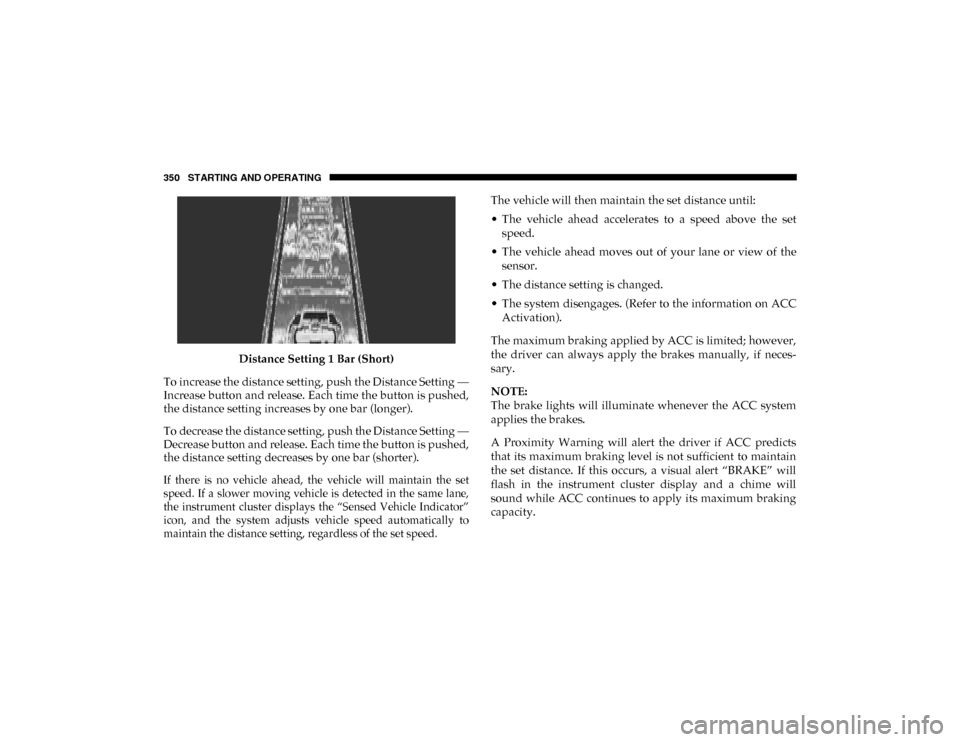
Distance Setting 1 Bar (Short)
To increase the distance setting, push the Distance Setting —
Increase button and release. Each time the button is pushed,
the distance setting increases by one bar (longer).
To decrease the distance setting, push the Distance Setting —
Decrease button and release. Each time the button is pushed,
the distance setting decreases by one bar (shorter).
If there is no vehicle ahead, the vehicle will maintain the set
speed. If a slower moving vehicle is detected in the same lane,
the instrument cluster displays the “Sensed Vehicle Indicator”
icon, and the system adjusts vehicle speed automatically to
maintain the distance setting, regardless of the set speed.
The vehicle will then maintain the set distance until:
• The vehicle ahead accelerates to a speed above the set
speed.
• The vehicle ahead moves out of your lane or view of the sensor.
• The distance setting is changed.
• The system disengages. (Refer to the information on ACC Activation).
The maximum braking applied by ACC is limited; however,
the driver can always apply the brakes manually, if neces -
sary.
NOTE:
The brake lights will illuminate whenever the ACC system
applies the brakes.
A Proximity Warning will alert the driver if ACC predicts
that its maximum braking level is not sufficient to maintain
the set distance. If this occurs, a visual alert “BRAKE” will
flash in the instrument cluster display and a chime will
sound while ACC continues to apply its maximum braking
capacity.
2020_DT_1500_OM_US.book Page 350
Page 421 of 674
STARTING AND OPERATING 419
Towing Requirements — Trailer Lights And Wiring
Whenever you pull a trailer, regardless of the trailer size,
stoplights and turn signals on the trailer are required for
motoring safety.
The Trailer Tow Package may include a four- and seven-pin
wiring harness. Use a factory approved trailer harness and
connector.
NOTE:
Do not cut or splice wiring into the vehicle’s wiring harness.
The electrical connections are all complete to the vehicle but
you must mate the harness to a trailer connector. Refer to the
following illustrations.
NOTE:
• Disconnect trailer wiring connector from the vehiclebefore launching a boat (or any other device plugged into
vehicle’s electrical connect) into water.
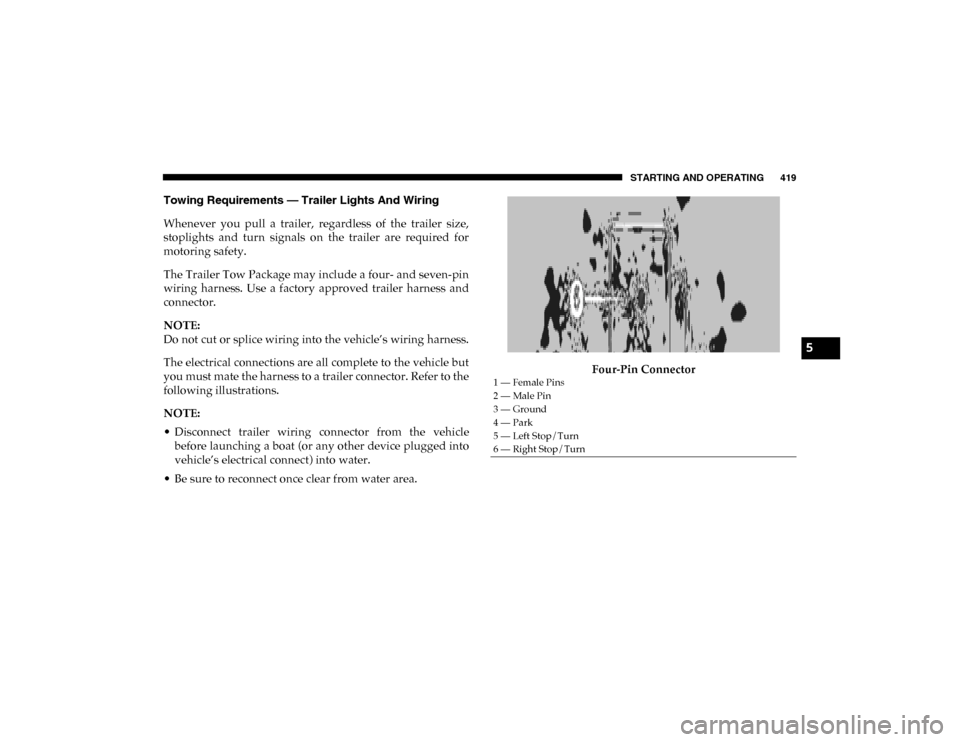
• Be sure to reconnect once clear from water area. Four-Pin Connector
1 — Female Pins
2 — Male Pin
3 — Ground
4 — Park
5 — Left Stop/Turn
6 — Right Stop/Turn
5
2020_DT_1500_OM_US.book Page 419
Page 428 of 674
426 STARTING AND OPERATING
NOTE:
• Steps 2 and 3 are requirements that must be met beforepushing the NEUTRAL (N) button, and must continue to
be met until the shift has been completed. If any of these
requirements are not met before pushing the NEUTRAL
(N) button or are no longer met during the shift, the
NEUTRAL (N) indicator light will flash continuously until
all requirements are met or until the NEUTRAL (N) button
is released.
• The ignition must be in the ON/RUN mode for a shift to take place and for the position indicator lights to be oper -
able. If the ignition is not in the ON/RUN mode, the shift
will not take place and no position indicator lights will be
on or flashing.
• A flashing NEUTRAL (N) position indicator light indi -
cates that shift requirements have not been met.
• If the vehicle is equipped with air suspension, the engine should be started and left running for a minimum of 60
seconds (with all the doors closed) at least once every 24
hours. This process allows the air suspension to adjust the
vehicle’s ride height to compensate for temperature
effects. Shifting Out Of NEUTRAL (N)
Use the following procedure to prepare your vehicle for
normal usage:
1. Bring the vehicle to a complete stop, leaving it connected
to the tow vehicle.
2. Press and hold the brake pedal.
3. Start the engine. Apply the parking brake. Shift the trans -
mission into NEUTRAL.
4. Using a ballpoint pen or similar object, push and hold the recessed transfer case NEUTRAL (N) button (at the center
of the transfer case switches).
5. When the NEUTRAL (N) indicator light turns off, release the NEUTRAL (N) button.
6. Turn the engine OFF. The transmission will automatically select PARK when the engine is turned off.
7. Release the brake pedal.
8. Disconnect vehicle from the tow vehicle.
9. Press and hold the brake pedal.
2020_DT_1500_OM_US.book Page 426
Page 429 of 674

STARTING AND OPERATING 427
10. Start the engine.
11. Release the parking brake.
12. Shift the transmission into DRIVE, release the brakepedal, and check that the vehicle operates normally.
NOTE:
• Steps 3 and 4 are requirements that must be met before pushing the button to shift out of NEUTRAL (N), and must
continue to be met until the shift has been completed. If
any of these requirements are not met before pushing the
button or are no longer met during the shift, the
NEUTRAL (N) indicator light will flash continuously until
all requirements are met or until the button is released.
• The ignition must be in the ON/RUN mode for a shift to take place and for the position indicator lights to be oper -
able. If the ignition is not in the ON/RUN mode, the shift
will not take place and no position indicator lights will be
on or flashing.
• A flashing NEUTRAL (N) position indicator light indi -
cates that shift requirements have not been met.DRIVING TIPS
Driving On Slippery Surfaces
Acceleration
Rapid acceleration on snow covered, wet, or other slippery
surfaces may cause the driving wheels to pull erratically to
the right or left. This phenomenon occurs when there is a
difference in the surface traction under the rear (driving)
wheels.
Driving Through Water
Driving through water more than a few inches/centimeters
deep will require extra caution to ensure safety and prevent
damage to your vehicle.
WARNING!
Rapid acceleration on slippery surfaces is dangerous.
Unequal traction can cause sudden pulling of the rear
wheels. You could lose control of the vehicle and
possibly have a collision. Accelerate slowly and carefully
whenever there is likely to be poor traction (ice, snow,
wet, mud, loose sand, etc.).5
2020_DT_1500_OM_US.book Page 427
Page 448 of 674
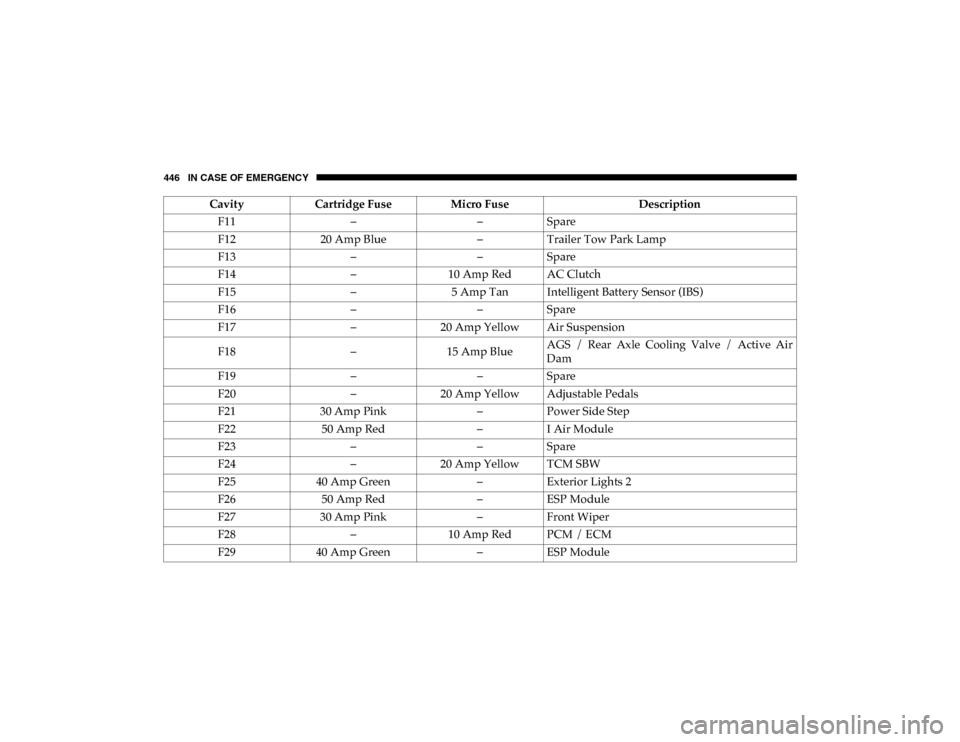
446 IN CASE OF EMERGENCY
F11––Spare
F12 20 Amp Blue –Trailer Tow Park Lamp
F13 ––Spare
F14 –10 Amp Red AC Clutch
F15 –5 Amp Tan Intelligent Battery Sensor (IBS)
F16 ––Spare
F17 –20 Amp Yellow Air Suspension
F18 –15 Amp Blue AGS / Rear Axle Cooling Valve / Active Air
Dam
F19 ––Spare
F20 –20 Amp Yellow Adjustable Pedals
F21 30 Amp Pink –Power Side Step
F22 50 Amp Red –I Air Module
F23 ––Spare
F24 –20 Amp Yellow TCM SBW
F25 40 Amp Green –Exterior Lights 2
F26 50 Amp Red –ESP Module
F27 30 Amp Pink –Front Wiper
F28 –10 Amp Red PCM / ECM
F29 40 Amp Green –ESP Module
Cavity
Cartridge Fuse Micro Fuse Description
2020_DT_1500_OM_US.book Page 446
Page 485 of 674

SERVICING AND MAINTENANCE 483
Once A Month Or Before A Long Trip:
• Check engine oil level.
• Check windshield washer fluid level.
• Check tire pressure and look for unusual wear or damage.Rotate tires at the first sign of irregular wear, even if it
occurs before the oil indicator system turns on.
• Check the fluid levels of the coolant reservoir, brake master cylinder, and fill as needed.
• Check function of all interior and exterior lights.Maintenance Plan
Required Maintenance
Refer to the Maintenance Plan on the following pages for
required maintenance.
NOTE:
Using white lithium grease, lubricate the door hinge roller pivot joints twice a year to prevent premature wear. At Every Oil Change Interval As Indicated By Oil Change Indicator System:
• Change the oil and filter.
• Rotate the tires. Rotate at the first sign of irregular wear, even if it occurs before the oil indicator system turns on.
• Inspect the battery and clean and tighten terminals as required.
• Inspect the CV/Universal joints.
• Inspect the brake pads, shoes, rotors, drums, and hoses.
• Inspect the engine cooling system protection and hoses.
• Inspect the exhaust system.
• Inspect the engine air cleaner if using in dusty or off-road conditions.
7
2020_DT_1500_OM_US.book Page 483
Page 542 of 674

540 SERVICING AND MAINTENANCE
What Causes Corrosion?
Corrosion is the result of deterioration or removal of paint
and protective coatings from your vehicle.
The most common causes are:
• Road salt, dirt and moisture accumulation.
• Stone and gravel impact.
• Insects, tree sap and tar.
• Salt in the air near seacoast localities.
• Atmospheric fallout/industrial pollutants.
Body And Underbody Maintenance
Cleaning Headlights
Your vehicle is equipped with plastic headlights and fog
lights that are lighter and less susceptible to stone breakage
than glass headlights.
Plastic is not as scratch resistant as glass and therefore
different lens cleaning procedures must be followed.
To minimize the possibility of scratching the lenses and
reducing light output, avoid wiping with a dry cloth. To
remove road dirt, wash with a mild soap solution followed
by rinsing.Do not use abrasive cleaning components, solvents, steel
wool or other aggressive material to clean the lenses.
Tri-Fold Soft Tonneau Cover Care
For cleaning and protecting the vinyl Tri-Fold Tonneau
cover, use Mopar Whitewall & Vinyl Top Cleaner and Mopar
Leather and Vinyl Conditioner/Protectant.
Preserving The Bodywork
Washing
• Wash your vehicle regularly. Always wash your vehicle in
the shade using Mopar Car Wash, or a mild car wash soap,
and rinse the panels completely with clear water.
• If insects, tar, or other similar deposits have accumulated on your vehicle, use Mopar Super Kleen Bug and Tar
Remover to remove.
• Use a high quality cleaner wax, such as Mopar Cleaner Wax to remove road film, stains and to protect your paint
finish. Take care never to scratch the paint.
• Avoid using abrasive compounds and power buffing that may diminish the gloss or thin out the paint finish.
2020_DT_1500_OM_US.book Page 540
Page 562 of 674

560 MULTIMEDIA
Push the MORE or SETTINGS button on the faceplate, then
press the Settings button on the touchscreen (if equipped) to
display the Settings menu screen. In this mode, the Uconnect
system allows you to access programmable features that may
be equipped such as Display, Units, Voice, Clock, Safety &
Driving Assistance, Brakes, Lights, Doors & Locks, Power
Side Steps (if equipped), Auto-On Comfort (if equipped),
Engine Off Options, Suspension (if equipped), Trailer Brake,
Audio, Phone/Bluetooth®, SiriusXM® Setup (if equipped),
Restore Settings, Clear Personal Data, and System Informa-
tion.
NOTE:
Only one category may be selected at a time. When making a selection, press the button on the touch
-
screen to enter the desired mode. Once in the desired mode,
press and release the preferred setting until the button is
highlighted. Once the setting is complete, either press the
Back arrow or the Done button on the touchscreen. Pressing
the Up or Down arrow buttons on the touchscreen on the
right side of the screen will allow you to toggle up or down
through the list of available settings.
NOTE:
All settings should be changed with the ignition in the ON/
RUN position.
2020_DT_1500_OM_US.book Page 560