USB port RAM 1500 2021 User Guide
[x] Cancel search | Manufacturer: RAM, Model Year: 2021, Model line: 1500, Model: RAM 1500 2021Pages: 496, PDF Size: 20.89 MB
Page 272 of 496

270MULTIMEDIA
Repeat
In USB Mode, press the Repeat button on the
touchscreen to toggle the repeat functionality.
The Repeat button on the touchscreen is
highlighted when active. The Radio will continue
to play the current track, repeatedly, as long as
the repeat is active. Press the Repeat button
again to enter Repeat All. The radio will continue
to play all the current tracks, repeatedly, as long
as the repeat function is active. To cancel
Repeat, press the Repeat button a third time.
Shuffle
In USB Mode, press the Shuffle button on the
touchscreen to play the selections on the USB
device in random order to provide an interesting
change of pace. Press the Shuffle button on the
touchscreen a second time to turn this feature
off.
Audio
Audio settings can be accessed by pressing the
Audio button Ú page 259. Info
In both Disc and USB Modes, press the Info
button on the touchscreen to display the
current track information. Press the Info or X
button on the touchscreen a second time to
cancel this feature.
Tracks
In both Disc and USB Modes, press the Tracks
button on the touchscreen to display a pop-up
with the Song List. The song currently playing is
indicated by an arrow and lines above and
below the song title. When in the Tracks List
screen you can rotate the Tune/Scroll knob to
highlight a track (indicated by the line above
and below the track name) and then push the
Enter/Browse knob to start playing that track.
In Bluetooth® Mode, if the Bluetooth® device
supports this feature, press the Tracks button
on the touchscreen to display a pop-up with the
Song List. The currently playing song is
indicated by a red arrow and lines above and
below the song title.
Pressing the Tracks button on the touchscreen
while the pop-up is displayed will close the
pop-up. Media Voice Commands
Uconnect offers connections via USB,
Bluetooth®, and auxiliary (AUX) ports. Voice
operation is only available for connected USB
and AUX devices.
Push the VR button located on the steering
wheel. After the beep, say one of the following
commands and follow the prompts to switch
your media source or choose an artist.
“
Change source to Bluetooth®”
“Change source to AUX”
“Change source to USB”
“Play artist Beethoven”; “ Play album
Greatest Hits”; “ Play song Moonlight
Sonata”; “ Play genre Classical”
Did You Know: Press the Browse button on the
touchscreen to see all of the music on your USB
device. Your Voice Command must match
exactly how the artist, album, song, and genre
information is displayed.
21_DT_OM_EN_USC_t.book Page 270
Page 436 of 496
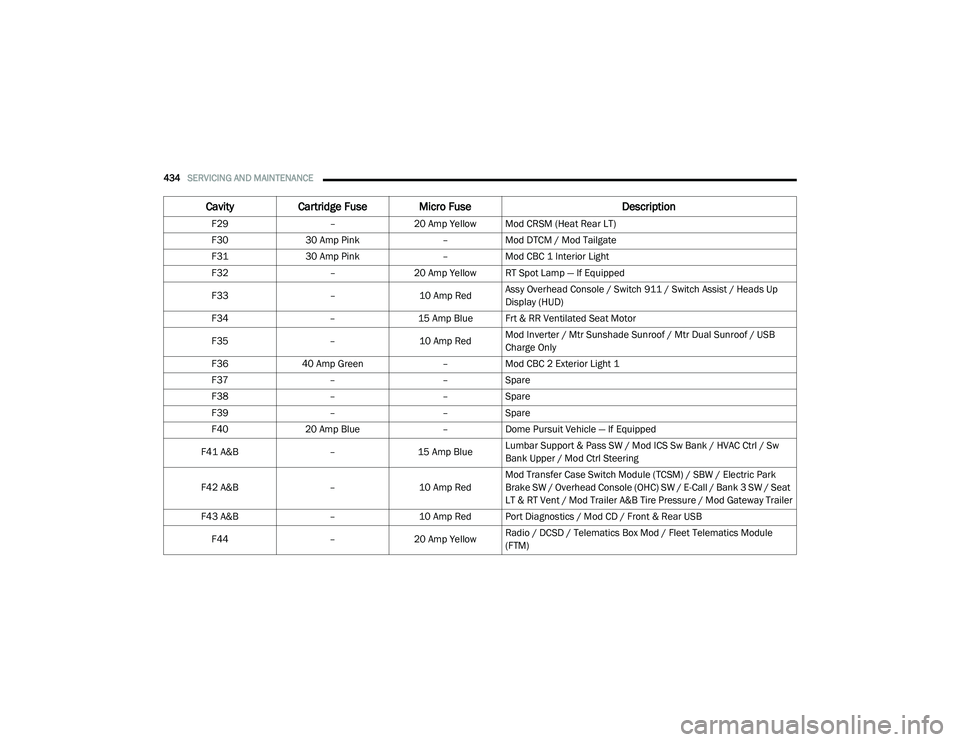
434SERVICING AND MAINTENANCE
F29–20 Amp Yellow Mod CRSM (Heat Rear LT)
F30 30 Amp Pink –Mod DTCM / Mod Tailgate
F31 30 Amp Pink –Mod CBC 1 Interior Light
F32 –20 Amp Yellow RT Spot Lamp — If Equipped
F33 –10 Amp RedAssy Overhead Console / Switch 911 / Switch Assist / Heads Up
Display (HUD)
F34 –15 Amp Blue Frt & RR Ventilated Seat Motor
F35 –10 Amp RedMod Inverter / Mtr Sunshade Sunroof / Mtr Dual Sunroof / USB
Charge Only
F36 40 Amp Green –Mod CBC 2 Exterior Light 1
F37 ––Spare
F38 ––Spare
F39 ––Spare
F40 20 Amp Blue –Dome Pursuit Vehicle — If Equipped
F41 A&B –15 Amp BlueLumbar Support & Pass SW / Mod ICS Sw Bank / HVAC Ctrl / Sw
Bank Upper / Mod Ctrl Steering
F42 A&B –10 Amp RedMod Transfer Case Switch Module (TCSM) / SBW / Electric Park
Brake SW / Overhead Console (OHC) SW / E-Call / Bank 3 SW / Seat
LT & RT Vent / Mod Trailer A&B Tire Pressure / Mod Gateway Trailer
F43 A&B –10 Amp Red Port Diagnostics / Mod CD / Front & Rear USB
F44 –20 Amp Yellow Radio / DCSD / Telematics Box Mod / Fleet Telematics Module
(FTM)
Cavity
Cartridge Fuse Micro Fuse Description
21_DT_OM_EN_USC_t.book Page 434
Page 494 of 496

492
Pair (Link) Uconnect Phone To A Mobile Phone
................................................... 273Phonebook Download............................... 275Place/Retrieve A Call From Hold............... 278Power-Up................................................... 281Recent Calls.............................................. 277Redial........................................................ 279To Remove A Favorite............................... 276Toggling Between Calls............................. 278Touch-Tone Number Entry......................... 277Transfer Call To And From Mobile Phone.. 279Voice Command........................................ 279Uconnect SettingsCustomer Programmable Features............. 28Passive Entry Programming......................... 28Uconnect System........................................... 256Uniform Tire Quality Grades........................... 460Unleaded Gasoline........................................ 468Untwisting Procedure, Seat Belt.................... 339USB................................................................. 72Utility Rails, Rear Cargo Area........................... 91
V
Vehicle Finder...................................... 295, 303Vehicle Health Alert...................................... 298Vehicle Health Report................................... 297Vehicle Loading................................... 213, 447Vehicle Maintenance.................................... 409Vehicle Modifications/Alterations.................... 11Vehicle Notifications..................................... 298Vehicle Storage.......................................66, 461Voice Command............................................... 41Voice Recognition System (VR)........................ 41
W
Warning Lights (Instrument Cluster
Descriptions)
................................................. 131Warnings And Cautions.................................... 11Warranty Information.................................... 481Washers, Windshield.................................... 408Washing Vehicle........................................... 462WaterDriving Through........................................ 234
Water SeparatorDiesel Fuel................................................ 412Wheel And Wheel Tire Care........................... 456Wheel And Wheel Tire Trim........................... 456Wi-fi............................................................... 296Wind Buffeting.................................................80Window Fogging...............................................66Windows..........................................................77Power...........................................................77Rear Sliding.................................................79Reset Auto-Up..............................................78Windshield Defroster.................................... 369Windshield Washers.............................. 58, 408Fluid................................................... 58, 408Windshield Wiper Blades.............................. 418Windshield Wipers...........................................58Wipers Blade Replacement........................... 418Wipers, Rain Sensitive.....................................59Wireless Charging Pad.....................................77
21_DT_OM_EN_USC_t.book Page 492