change time RAM 1500 2021 User Guide
[x] Cancel search | Manufacturer: RAM, Model Year: 2021, Model line: 1500, Model: RAM 1500 2021Pages: 496, PDF Size: 20.89 MB
Page 147 of 496

STARTING AND OPERATING145
NOTE:
A delay of the start, up to five seconds is
possible under very cold conditions. The "Wait
to Start" telltale will be illuminated during the
pre-heat process. When the engine “Wait To
Start” light goes off the engine will automati -
cally crank.
3. The system starts the vehicle. If the vehicle fails to start, the starter will disengage
automatically after 25 seconds.
4. If you wish to stop the cranking of the engine prior to the engine starting, push the
button again.
NOTE:
Normal starting of either a cold or a warm
engine is obtained without pumping or pressing
the accelerator pedal. To Turn Off The Engine Using ENGINE START/
STOP Button
1. Place the gear selector in PARK, then push
and release the ENGINE START/STOP
button. The ignition will return to the OFF
mode.
2. If the gear selector is not in PARK, the ENGINE START/STOP button must be held
for two seconds or three short pushes in a
row with the vehicle speed above 5 mph
(8 km/h) before the engine will shut off. The
ignition will remain in the ACC mode until
the gear selector is in PARK and the button
is pushed twice to the OFF mode.
3. If the gear selector is not in PARK and the ENGINE START/STOP button is pushed
once with the vehicle speed above 5 mph
(8 km/h), the instrument cluster will display
a “Vehicle Not In Park ” message and the
engine will remain running. Never leave a
vehicle out of the PARK position, or it could
roll.
NOTE:
If the gear selector is not in PARK, and the
ENGINE START/STOP button is pushed once
with the vehicle speed below 5 mph (8 km/h), the engine will shut off and the ignition will
remain in the ACC position. If vehicle speed
drops below 1.2 mph (1.9 km/h), the vehicle
may AutoPark Ú
page 141.
ENGINE START/STOP Button Functions — With
Driver’s Foot OFF The Brake Pedal (In PARK Or
NEUTRAL Position)
The ENGINE START/STOP button operates
similar to an ignition switch. It has three modes:
OFF, ACC, and RUN. To change the ignition
modes without starting the vehicle and use the
accessories, follow these directions:
1. Start with the ignition in the OFF mode.
2. Push the ENGINE START/STOP button once to place the ignition to the ACC mode.
3. Push the ENGINE START/STOP button a second time to place the ignition to the RUN
mode.
4. Push the ENGINE START/STOP button a third time to return the ignition to the OFF
mode.
CAUTION!
If the “Water in Fuel Indicator Light” remains
on, DO NOT START the engine before you
drain the water from the fuel filter to avoid
engine damage Ú page 412.4
21_DT_OM_EN_USC_t.book Page 145
Page 151 of 496
STARTING AND OPERATING149
NOTE:
Under certain conditions the engine fan will run
after the engine is turned off. These conditions
are under high load and high temperature
conditions.
Do Not Operate The Engine With Low Oil
Pressure
If the low oil pressure warning light turns on
while driving, stop the vehicle and shut down
the engine as soon as possible. A chime will
sound when the light turns on. NOTE:
Do not operate the vehicle until the cause is
corrected. This light does not show how much
oil is in the engine. The engine oil level must be
checked under the hood.
Do Not Operate The Engine With Failed
Parts
All engine failures give some warning before the
parts fail. Some important observations are:
Engine misfiring or vibrating severely
Sudden loss of power
Unusual engine noises
Fuel, oil or coolant leaks
Sudden change, outside the normal operating
range, in the engine operating temperature
Excessive smoke
Oil pressure drop
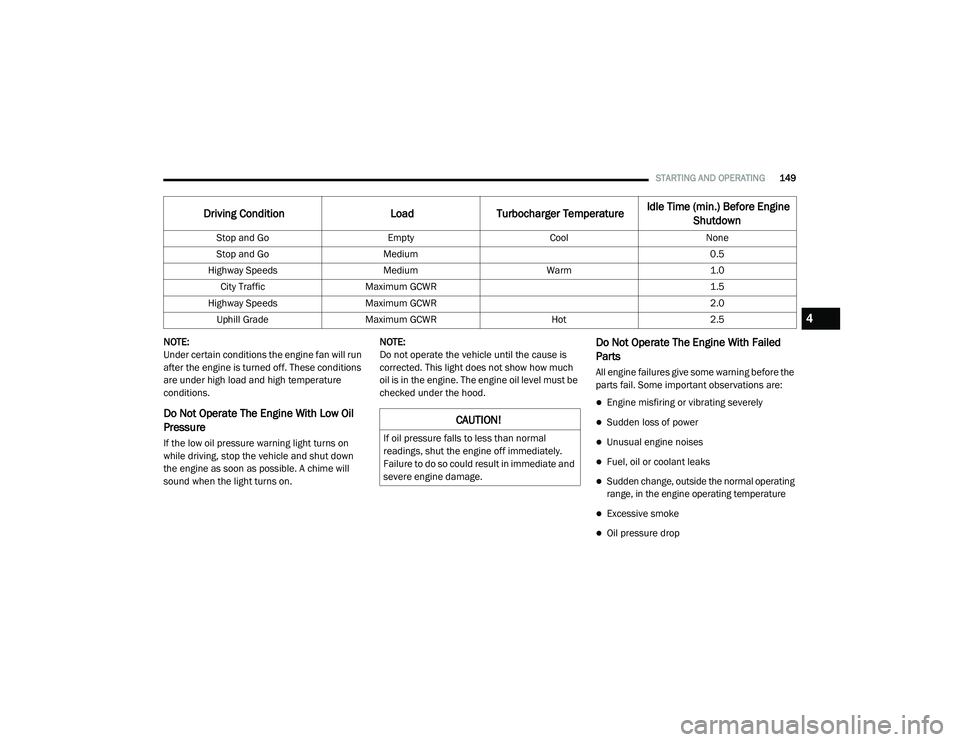
Driving Condition
Load Turbocharger Temperature Idle Time (min.) Before Engine
Shutdown
Stop and Go EmptyCoolNone
Stop and Go Medium 0.5
Highway Speeds MediumWarm 1.0
City Traffic Maximum GCWR 1.5
Highway Speeds Maximum GCWR 2.0
Uphill Grade Maximum GCWR Hot2.5
CAUTION!
If oil pressure falls to less than normal
readings, shut the engine off immediately.
Failure to do so could result in immediate and
severe engine damage.
4
21_DT_OM_EN_USC_t.book Page 149
Page 152 of 496
150STARTING AND OPERATING
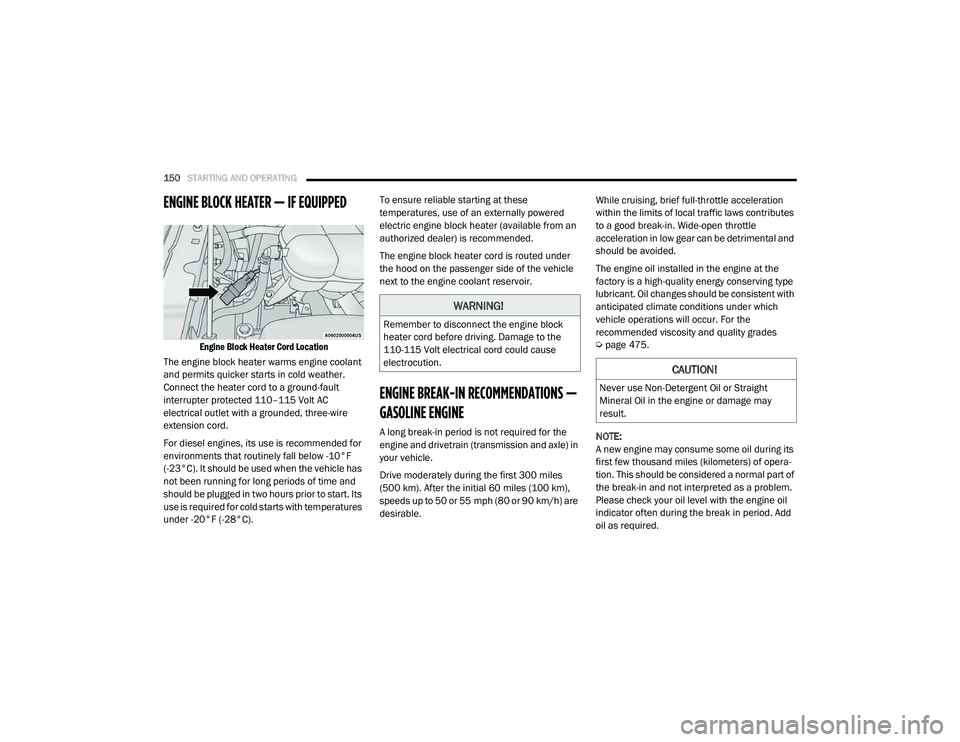
ENGINE BLOCK HEATER — IF EQUIPPED
Engine Block Heater Cord Location
The engine block heater warms engine coolant
and permits quicker starts in cold weather.
Connect the heater cord to a ground-fault
interrupter protected 110–115 Volt AC
electrical outlet with a grounded, three-wire
extension cord.
For diesel engines, its use is recommended for
environments that routinely fall below -10°F
(-23°C). It should be used when the vehicle has
not been running for long periods of time and
should be plugged in two hours prior to start. Its
use is required for cold starts with temperatures
under -20°F (-28°C). To ensure reliable starting at these
temperatures, use of an externally powered
electric engine block heater (available from an
authorized dealer) is recommended.
The engine block heater cord is routed under
the hood on the passenger side of the vehicle
next to the engine coolant reservoir.
ENGINE BREAK-IN RECOMMENDATIONS —
GASOLINE ENGINE
A long break-in period is not required for the
engine and drivetrain (transmission and axle) in
your vehicle.
Drive moderately during the first 300 miles
(500 km). After the initial 60 miles (100 km),
speeds up to 50 or 55 mph (80 or 90 km/h) are
desirable.
While cruising, brief full-throttle acceleration
within the limits of local traffic laws contributes
to a good break-in. Wide-open throttle
acceleration in low gear can be detrimental and
should be avoided.
The engine oil installed in the engine at the
factory is a high-quality energy conserving type
lubricant. Oil changes should be consistent with
anticipated climate conditions under which
vehicle operations will occur. For the
recommended viscosity and quality grades
Ú
page 475.
NOTE:
A new engine may consume some oil during its
first few thousand miles (kilometers) of opera -
tion. This should be considered a normal part of
the break-in and not interpreted as a problem.
Please check your oil level with the engine oil
indicator often during the break in period. Add
oil as required.
WARNING!
Remember to disconnect the engine block
heater cord before driving. Damage to the
110-115 Volt electrical cord could cause
electrocution.
CAUTION!
Never use Non-Detergent Oil or Straight
Mineral Oil in the engine or damage may
result.
21_DT_OM_EN_USC_t.book Page 150
Page 153 of 496

STARTING AND OPERATING151
ENGINE BREAK-IN RECOMMENDATIONS —
DIESEL ENGINE
The diesel engine does not require a break-in
period due to its construction. Normal operation
is allowed, providing the following
recommendations are followed:
Warm up the engine before placing it under
load.
Do not operate the engine at idle for
prolonged periods.
Observe vehicle oil pressure and tempera -
ture indicators.
Check the coolant and oil levels frequently.
Vary throttle position at highway speeds
when carrying or towing significant weight.
NOTE:
Light duty operation such as light trailer towing
or no load operation will extend the time before
the engine is at full efficiency. Reduced fuel
economy and power may be seen at this time.
The engine oil installed in the engine at the
factory is a high-quality energy conserving type
lubricant. Oil changes should be consistent with anticipated climate conditions under which
vehicle operations will occur. For the
recommended viscosity and quality grades
Ú
page 475.
NOTE:
NON-DETERGENT OR STRAIGHT MINERAL OILS
MUST NEVER BE USED.
PARKING BRAKE
ELECTRIC PARK BRAKE (EPB)
Your vehicle is equipped with an EPB that offers
simple operation, and some additional features
that make the parking brake more convenient
and useful.
The parking brake is primarily intended to
prevent the vehicle from rolling while parked.
Before leaving the vehicle, make sure that the
parking brake is applied. Also, be certain to
leave the transmission in PARK.
You can engage the parking brake in two ways:
Manually, by applying the parking brake
switch.
Automatically, by enabling the Auto Park
Brake feature in the customer programmable
features section of the Uconnect settings. The parking brake switch is located on the
instrument panel to the left of the steering
wheel (below the headlamp switch).
Electric Park Brake Switch
To apply the parking brake manually, pull up on
the switch momentarily. You may hear a slight
sound from the back of the vehicle while the
parking brake engages. Once the park brake is
fully engaged, the BRAKE telltale light in the
instrument cluster and an indicator on the
switch will illuminate. If your foot is on the brake
pedal while you apply the parking brake, you
may notice a small amount of brake pedal
movement. The parking brake can be applied
even when the ignition switch is OFF but the
BRAKE telltale light will not illuminate, however,
it can only be released when the ignition is in
the ON/RUN mode.
4
21_DT_OM_EN_USC_t.book Page 151
Page 169 of 496

STARTING AND OPERATING167
to Normal Height Mode, push the height
selector switch up once while in Entry/Exit or
drive the vehicle over 15 mph (24 km/h).
Entry/Exit mode may not be available due to
vehicle payload, an instrument cluster
message will be displayed when this occurs
Úpage 114.
NOTE:
Entry/Exit mode may be achieved using your
key fob for easier entry/loading Ú page 17.
The system requires that the ignition be in the
ON/RUN position or the engine running for all
user requested changes. When lowering the
vehicle, all of the doors must be closed. If a door
is opened at any time while the vehicle is
lowering, the change will not be completed until
the open door(s) is closed. This system uses a lifting and lowering pattern
which keeps the headlights from incorrectly
shining into oncoming traffic. When raising the
vehicle, the rear of the vehicle will move up first
and then the front. When lowering the vehicle,
the front will move down first and then the rear.
After the engine is turned off, it may be noticed
that the air suspension system operates briefly;
this is normal. The system is correcting the
position of the vehicle to ensure a proper
appearance.
To assist with changing a spare tire, the air
suspension system has a feature which allows
the automatic leveling to be disabled
Ú
page 114.
NOTE:
If equipped with a touchscreen radio, all
enabling/disabling of air suspension features
must be done through the radio Ú page 237.AIR SUSPENSION MODES
The air suspension system has multiple modes
to protect the system in unique situations. The
engine should be running to change between
Air Suspension Modes.
Automatic AERO Mode
To improve aerodynamics, the air suspension
system has a feature which will put the vehicle
into AERO height automatically Úpage 114.
Automatic Aero Mode may be disabled through
vehicle settings in the Uconnect Radio (if
equipped) Ú page 237.
Tire Jack Mode
To assist with changing a tire, the air
suspension system has a feature which allows
the automatic leveling to be disabled
Ú page 237.
Transport Mode
For towing your vehicle with four wheels off the
road, the air suspension system has a feature
which will put the vehicle into Entry/Exit height
and disable the automatic load leveling system
Ú page 237.
CAUTION!
When in ENTRY/EXIT setting, be aware of your
surroundings, you may not have the
clearance required for certain areas and
vehicle damage may occur.
WARNING!
The air suspension system uses a high
pressure volume of air to operate the system.
To avoid personal injury or damage to the
system, see an authorized dealer for service.
4
21_DT_OM_EN_USC_t.book Page 167
Page 170 of 496

168STARTING AND OPERATING
Wheel Alignment Mode
Before performing a wheel alignment, this
mode must be enabled Úpage 237.
Protection Strategy
In order to “protect” the air suspension system,
the vehicle will disable load leveling as required
(suspension overloaded, battery charge low,
etc.). Load leveling will automatically resume as
soon as system operation requirements are
met. See an authorized dealer if system does
not resume.
NOTE:
For towing with air suspension Ú page 214.
INSTRUMENT CLUSTER DISPLAY
M
ESSAGES
When the appropriate conditions exist, a
message will appear in the instrument cluster
display Ú page 114.
An audible chime will be heard whenever a
system error has been detected.
See an authorized dealer for system service if
normal operation does not resume.
OPERATION
Air Suspension Switch
The indicator lamps 1 through 5 will illuminate
to show the current position of the vehicle.
Flashing indicator lamps will show a position
which the system is working to achieve. When
raising, if multiple indicator lamps are flashing,
the highest flashing indicator lamp is the
position the system is working to achieve. When
lowering, if multiple indicators are flashing, the
lowest solid indicator lamp is the position the
system is working to achieve.
Pushing the height selector up once will move
the suspension one position higher from the
current position, assuming all conditions are
met (i.e. key in ON/RUN position, engine
running, speed below threshold, etc). The height selector switch can be pushed up
multiple times, each push will raise the
requested level by one position up to a
maximum position of OR2 or the highest
position allowed based on current conditions
(i.e. vehicle speed, etc).
Pushing the height selector down once will
move the suspension one position lower from
the current level, assuming all conditions are
met (i.e. key in ON/RUN position, engine
running, doors closed, speed below threshold,
etc). The height selector switch can be pushed
down multiple times, each push will lower the
requested level by one position down to a
minimum of Entry/Exit Mode or the lowest
position allowed based on current conditions
(i.e. vehicle speed, etc.)
Automatic height changes will occur based on
vehicle speed and the current vehicle height.
The indicator lamps and instrument cluster
display messages will operate the same for
automatic changes and user requested
changes.
21_DT_OM_EN_USC_t.book Page 168
Page 172 of 496

170STARTING AND OPERATING
OR, if the vehicle speed exceeds 25 mph
(40 km/h) the vehicle height will be automat -
ically lowered to NRH. Off-Road may not be
available due to vehicle payload, an instru -
ment cluster display message will be shown
when this occurs Ú page 114.
Aero Mode (Lowers the vehicle approxi -
mately 0.6 inches (15 mm)) – This position
provides improved aerodynamics by
lowering the vehicle. The vehicle will auto -
matically enter Aero Mode when the vehicle
speed remains between 62 mph (100 km/h)
and 66 mph (106 km/h) for greater than 20 seconds or if the vehicle speed exceeds
66 mph (106 km/h). The vehicle will return to NRH from Aero Mode if the vehicle speed
remains between 30 mph (48 km/h) and
35 mph (56 km/h) for greater than 20 seconds or if the vehicle speed falls
below 30 mph (48 km/h).
NOTE:
The vehicle will automatically enter Aero
Mode when the vehicle speed remains
between 62 mph (100 km/h) and 66 mph
(106 km/h) for greater than
20 seconds or if the vehicle speed exceeds
66 mph (106 km/h).
Speed thresholds for raising the vehicle only
apply if Automatic Aero Mode is enabled.
To enter Aero Mode manually push the height
selector switch down once from NRH at any
vehicle speed. To return to NRH push the
height selector switch up once while vehicle
speed is less than 56 mph (90 km/h).
Automatic Aero Mode may be disabled
through vehicle settings on your Uconnect
Radio.
Entry/Exit Mode (Lowers the vehicle approxi-
mately 3 inches (73 mm))
– This position
lowers the vehicle for easier passenger entry
and exit as well as lowering the rear of the
vehicle for easier loading and unloading of
cargo. To enter Entry/Exit Mode, push the
height selector switch down twice from the
NRH while the vehicle speed is below 33 mph
(53 km/h). Once the vehicle speed goes below 15 mph (24 km/h) the vehicle height
will begin to lower. If the vehicle speed
remains between 15 mph (24 km/h) and
25 mph (40 km/h) for greater than
60 seconds, or the vehicle speed exceeds
25 mph (40 km/h) the Entry/Exit change will
be canceled. To return to Normal Height
Mode, push the height selector switch up
twice while in Entry/Exit or drive the vehicle
over 15 mph (24 km/h). Entry/Exit mode
may not be available due to vehicle payload,
an instrument cluster display message will
be shown when this occurs Ú
page 114.
The system requires that the ignition be in the
ON/RUN position or the engine running for all
user requested changes. When lowering the
vehicle, all of the doors must be closed. If a door
is opened at any time while the vehicle is
lowering, the change will not be completed until
the open door(s) is closed.
CAUTION!
If the vehicle is in Off-Road setting, be aware
of your surroundings, you may not have the
clearance required for certain areas and
vehicle damage may occur.
CAUTION!
When in ENTRY/EXIT setting, be aware of your
surroundings, you may not have the
clearance required for certain areas and
vehicle damage may occur.
21_DT_OM_EN_USC_t.book Page 170
Page 174 of 496

172STARTING AND OPERATING
OPERATION
Air Suspension Switch
The indicator lamps 1 through 4 will illuminate
to show the current position of the vehicle.
Flashing indicator lamps will show a position
which the system is working to achieve. When
raising or lowering, the flashing indicator lamp
is the position the system is working to achieve.
Pushing the height selector switch up once will
move the suspension one position higher from
the current position, assuming all conditions
are met (i.e. key in ON/RUN position, engine
running, speed below threshold, etc). The
height selector switch can be pushed up
multiple times, each push will raise the
requested level by one position up to a maximum position of OR or the highest position
allowed based on current conditions (i.e.
vehicle speed, etc).
Pushing the height selector switch down once
will move the suspension one position lower
from the current level, assuming all conditions
are met (i.e. key in ON/RUN position, engine
running, doors closed, speed below threshold,
etc). The height selector switch can be pushed
down multiple times, each push will lower the
requested level by one position down to a
minimum of Entry/Exit Mode or the lowest
position allowed based on current conditions
(i.e. vehicle speed, etc.)
Automatic height changes will occur based on
vehicle speed and the current vehicle height.
The indicator lamps and instrument cluster
display messages will operate the same for
automatic changes and user requested
changes.
Off-Road 1 (OR1) – Indicator lamps 4, 3, 2,
and 1 will be illuminated when the vehicle is
in OR1.
Normal Ride Height (NRH) – Indicator lamps
4, 3, and 2 will be illuminated when the
vehicle is in this position.
Aero Mode – Indicator lamps 4 and 3 will be
illuminated when the vehicle is in this posi
-
tion.
Entry/Exit Mode – Indicator lamp 4 will be
illuminated when the vehicle is in Entry Exit
Mode. Entry/Exit mode can be requested up
to 33 mph (53 km/h). If vehicle speed is reduced to, and kept below, 15 mph
(24 km/h) indicator lamp 3 will flash and
indicator lamp 4 will remain solid until
Entry/Exit Mode is achieved at which point
indicator lamp 3 will turn off.
Transport Mode – No indicator lamps will be
illuminated. Transport Mode is disabled by
driving the vehicle.
Tire/Jack Mode – Indicator lamps 4 and 1 will
be illuminated. Tire/Jack Mode is disabled by
driving the vehicle.
Wheel Alignment Mode – Indicator lamps 2,
3, and 4 will be illuminated. Wheel Alignment
Mode is disabled by driving the vehicle.
21_DT_OM_EN_USC_t.book Page 172
Page 180 of 496

178STARTING AND OPERATING
second time. The cruise indicator light will turn
off. The system should be turned off when not in
use.
To Set A Desired Speed
Turn the Cruise Control on.
When the vehicle has reached the desired
speed, push the SET (+) or SET (-) button and
release. Release the accelerator and the
vehicle will operate at the selected speed.
NOTE:
The vehicle should be traveling at a steady
speed and on level ground before pushing the
SET (+) or SET (-) button.
To Vary The Speed Setting
To Increase Or Decrease The Set Speed
When the Cruise Control is set, you can increase
speed by pushing the SET (+) button, or
decrease speed by pushing the SET (-) button.
U.S. Speed (mph)
Pushing the SET (+), or SET (-) button once
will result in a 1 mph speed adjustment. Each
subsequent tap of the button results in an
adjustment of 1 mph.
If the button is continually pushed, the set
speed will continue to adjust until the button
is released, then the new set speed will be
established.
Metric Speed (km/h)
Pushing the SET (+), or SET (-) button once
will result in a 1 km/h speed adjustment.
Each subsequent tap of the button results in
an adjustment of 1 km/h.
If the button is continually pushed, the set
speed will continue to adjust until the button
is released, then the new set speed will be
established.
To Accelerate For Passing
While the Cruise Control is set, press the
accelerator to pass as you would normally.
When the pedal is released, the vehicle will
return to the set speed.
Using Cruise Control On Hills
The transmission may downshift on hills to
maintain the vehicle set speed.
NOTE:
The Cruise Control system maintains speed up
and down hills. A slight speed change on
moderate hills is normal.
On steep hills, a greater speed loss or gain may
occur so it may be preferable to drive without
Cruise Control.
WARNING!
Leaving the Cruise Control system on when
not in use is dangerous. You could
accidentally set the system or cause it to go
faster than you want. You could lose control
and have an accident. Always ensure the
system is off when you are not using it.
WARNING!
Cruise Control can be dangerous where the
system cannot maintain a constant speed.
Your vehicle could go too fast for the
conditions, and you could lose control and
have an accident. Do not use Cruise Control
in heavy traffic or on roads that are winding,
icy, snow-covered or slippery.
21_DT_OM_EN_USC_t.book Page 178
Page 186 of 496

184STARTING AND OPERATING
When An ACC Distance Is Also Set:
When you use the SET (-) button to decel -
erate, if the engine’s braking power does not
slow the vehicle sufficiently to reach the set
speed, the brake system will automatically
slow the vehicle.
The ACC system decelerates the vehicle to a
full stop when following the vehicle in front. If
your vehicle follows the vehicle in front to a
standstill, after two seconds the driver will
either have to push the RES (resume) button,
or apply the accelerator pedal to reengage
the ACC to the existing set speed.
The ACC system maintains set speed when
driving uphill and downhill. However, a slight
speed change on moderate hills is normal. In
addition, downshifting may occur while
climbing uphill or descending downhill. This
is normal operation and necessary to main -
tain set speed. When driving uphill and down -
hill, the ACC system will cancel if the braking
temperature exceeds normal range (over -
heated).
Setting The Following Distance In ACC
The specified following distance for Adaptive
Cruise Control (ACC) can be set by varying the
distance setting between four bars (longest),
three bars (long), two bars (medium) and one
bar (short). Using this distance setting and the
vehicle speed, ACC calculates and sets the
distance to the vehicle ahead. This distance
setting displays in the instrument cluster
display.
Distance Settings
To increase the distance setting, push the
Distance Increase button and release. Each
time the button is pushed, the distance setting
increases by one bar (longer).
To decrease the distance setting, push the
Distance Decrease button and release. Each
time the button is pushed, the distance setting
decreases by one bar (shorter).
If there is no vehicle ahead, the vehicle will
maintain the set speed. If a slower moving
vehicle is detected in the same lane, the
instrument cluster displays the ACC Set With
Target Detected Indicator Light, and the system
adjusts vehicle speed automatically to maintain
the distance setting, regardless of the set
speed.
The vehicle will then maintain the set distance
until:
The vehicle ahead accelerates to a speed
above the set speed.
The vehicle ahead moves out of your lane or
view of the sensor.
The distance setting is changed.
The system disengages.
1 — Longest Distance Setting (Four Bars)
2 — Long Distance Setting (Three Bars)
3 — Medium Distance Setting (Two Bars)
4 — Short Distance Setting (One Bar)
21_DT_OM_EN_USC_t.book Page 184