weight RAM 1500 2021 Owners Manual
[x] Cancel search | Manufacturer: RAM, Model Year: 2021, Model line: 1500, Model: RAM 1500 2021Pages: 496, PDF Size: 20.89 MB
Page 8 of 496
6
VEHICLE LOADING ............................................. 213 Gross Vehicle Weight Rating (GVWR) ......213Payload .......................................................213Gross Axle Weight Rating (GAWR) ............213
Tire Size ......................................................213
Rim Size......................................................214
Inflation Pressure ......................................214
Curb Weight................................................214
Loading .......................................................214
TRAILER TOWING .............................................. 214
Common Towing Definitions .....................214Trailer Hitch Type and Maximum Trailer
Weight.........................................................218 Trailer Towing Weights (Maximum Trailer
Weight Ratings) ..........................................218 Trailer And Tongue Weight ........................ 219Trailer Reverse Steering Control ...............219
Towing Requirements ...............................221
Towing Tips ................................................227
SNOWPLOW ...................................................... 227
Before Plowing ........................................... 228
Snowplow Prep Package Model
Availability .................................................. 228 Over The Road Operation With Snowplow
Attached .....................................................229 Operating Tips ............................................229
General Maintenance ................................229 RECREATIONAL TOWING (BEHIND
MOTORHOME) ...................................................230
Towing This Vehicle Behind Another
Vehicle ........................................................ 230 Recreational Towing — Two-Wheel Drive
Models ........................................................ 230 Recreational Towing — Four-Wheel Drive
Models ........................................................ 231
DRIVING TIPS ...................................................... 234
Driving On Slippery Surfaces ................... 234
Driving Through Water .............................. 234
Off-Road Driving Tips ................................. 235
MULTIMEDIA
UCONNECT SYSTEMS .......................................236
CYBERSECURITY ............................................... 236
UCONNECT SETTINGS ........................................ 237Customer Programmable Features .......... 237
HEAD-UP DISPLAY (HUD) .................................. 254
UCONNECT INTRODUCTION ..............................256
System Overview ....................................... 256Safety And General Information ............... 258
UCONNECT MODES ............................................259
Steering Wheel Audio Controls ................ 259
Radio Mode ............................................... 259Media Mode .............................................. 268
Phone Mode .............................................. 271 CONNECTED VEHICLE SERVICES —
IF EQUIPPED ...................................................... 282
Is My Vehicle Connected? ......................... 282
Introduction To Connected Vehicle
Services ..................................................... 282 Getting Started With Connected Vehicle
Services ..................................................... 284 Using SiriusXM Guardian™ ...................... 286
Manage My SiriusXM Guardian™
Account ...................................................... 301
CONNECTED SERVICES FAQs ......................... 301
Connected Services SOS FAQs ................ 301
Connected Services Remote Door Lock/
Unlock FAQs .............................................. 302 Connected Services Roadside
Assistance FAQs ....................................... 302 Connected Services Send & Go FAQs ..... 302Connected Services Vehicle Finder
FAQs .......................................................... 303 Connected Services Stolen Vehicle
Assistance FAQs ....................................... 303 Connected Services Remote Vehicle
Start FAQs ................................................. 303 Connected Services Remote Horn &
Lights FAQs ................................................ 304 Connected Services Account FAQs........... 304
Data Collection & Privacy .......................... 306
21_DT_OM_EN_USC_t.book Page 6
Page 70 of 496
68GETTING TO KNOW YOUR VEHICLE
INTERIOR STORAGE AND EQUIPMENT
STORAGE
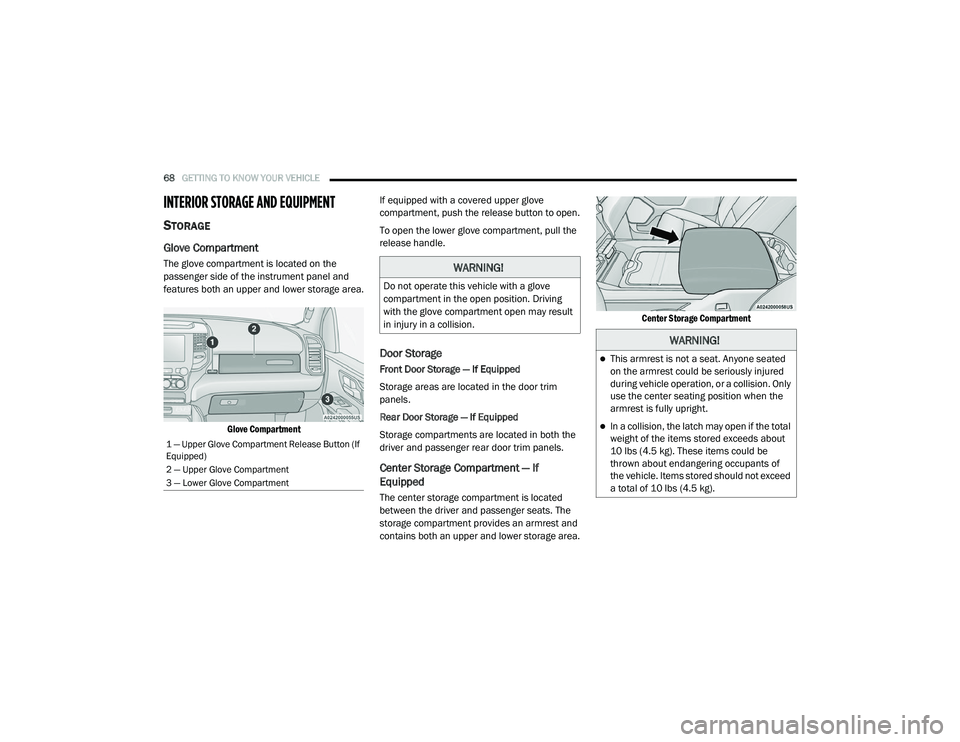
Glove Compartment
The glove compartment is located on the
passenger side of the instrument panel and
features both an upper and lower storage area.
Glove Compartment
If equipped with a covered upper glove
compartment, push the release button to open.
To open the lower glove compartment, pull the
release handle.
Door Storage
Front Door Storage — If Equipped
Storage areas are located in the door trim
panels.
Rear Door Storage — If Equipped
Storage compartments are located in both the
driver and passenger rear door trim panels.
Center Storage Compartment — If
Equipped
The center storage compartment is located
between the driver and passenger seats. The
storage compartment provides an armrest and
contains both an upper and lower storage area.
Center Storage Compartment
1 — Upper Glove Compartment Release Button (If
Equipped)
2 — Upper Glove Compartment
3 — Lower Glove Compartment
WARNING!
Do not operate this vehicle with a glove
compartment in the open position. Driving
with the glove compartment open may result
in injury in a collision.
WARNING!
This armrest is not a seat. Anyone seated
on the armrest could be seriously injured
during vehicle operation, or a collision. Only
use the center seating position when the
armrest is fully upright.
In a collision, the latch may open if the total
weight of the items stored exceeds about
10 lbs (4.5 kg). These items could be
thrown about endangering occupants of
the vehicle. Items stored should not exceed
a total of 10 lbs (4.5 kg).
21_DT_OM_EN_USC_t.book Page 68
Page 93 of 496
GETTING TO KNOW YOUR VEHICLE91
There are stampings in the sheet metal on the
inner side bulkheads of the box in front of and
behind both wheel housings. Place wooden
boards across the box from side to side to
create separate load compartments in the
pickup box.
There are four tie-down cleats bolted to the
lower sides of the pickup box that can sustain
loads up to 1,000 lbs (450 kg) total.
BED RAIL TIE-DOWN SYSTEM — IF
E
QUIPPED
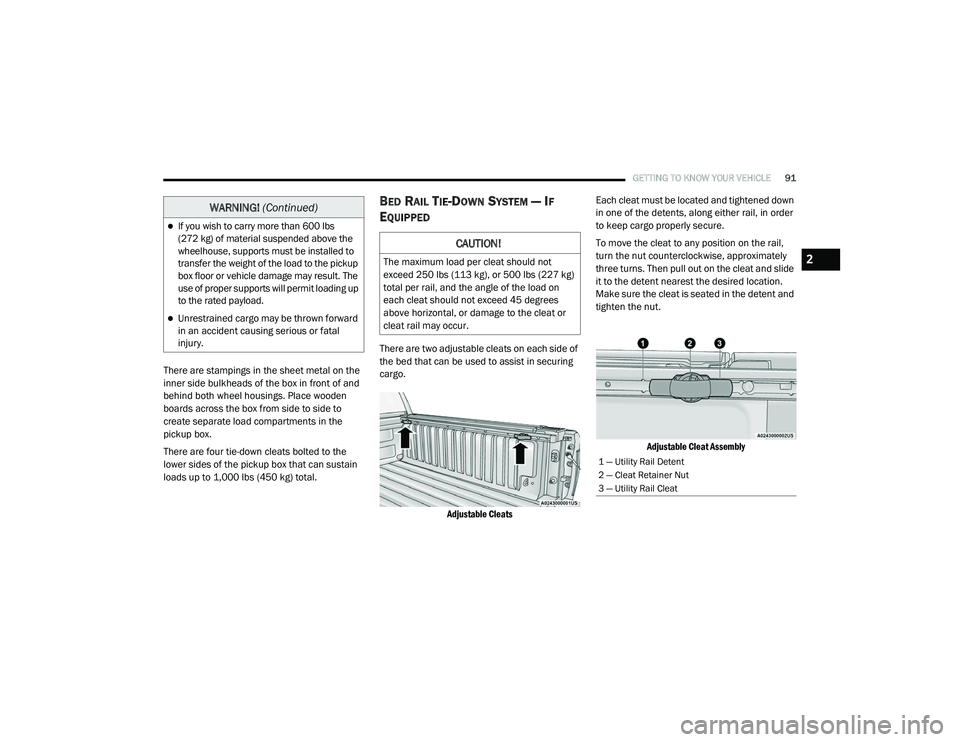
There are two adjustable cleats on each side of
the bed that can be used to assist in securing
cargo.
Adjustable Cleats
Each cleat must be located and tightened down
in one of the detents, along either rail, in order
to keep cargo properly secure.
To move the cleat to any position on the rail,
turn the nut counterclockwise, approximately
three turns. Then pull out on the cleat and slide
it to the detent nearest the desired location.
Make sure the cleat is seated in the detent and
tighten the nut.
Adjustable Cleat Assembly
If you wish to carry more than 600 lbs
(272 kg) of material suspended above the
wheelhouse, supports must be installed to
transfer the weight of the load to the pickup
box floor or vehicle damage may result. The
use of proper supports will permit loading up
to the rated payload.
Unrestrained cargo may be thrown forward
in an accident causing serious or fatal
injury.
WARNING! (Continued)
CAUTION!
The maximum load per cleat should not
exceed 250 lbs (113 kg), or 500 lbs (227 kg)
total per rail, and the angle of the load on
each cleat should not exceed 45 degrees
above horizontal, or damage to the cleat or
cleat rail may occur.
1 — Utility Rail Detent
2 — Cleat Retainer Nut
3 — Utility Rail Cleat
2
21_DT_OM_EN_USC_t.book Page 91
Page 95 of 496
GETTING TO KNOW YOUR VEHICLE93
LOCKING AND UNLOCKING RAMBOX
Push and release the lock or unlock button on
the key fob to lock and unlock all doors, the
tailgate and the RamBox Úpage 17. To unlatch
the storage bin manually, insert the emergency
key into the keyhole and turn clockwise. Always
return the key to the upright (vertical) position
before removing it from the keyhole.
RAMBOX CARGO STORAGE BINS
Cargo storage bins are located on both sides of
the pickup box. The cargo storage bins provide
watertight, lockable, illuminated storage for up
to 150 lbs (68 kg) of evenly distributed cargo.
RamBox Cargo Storage Bins
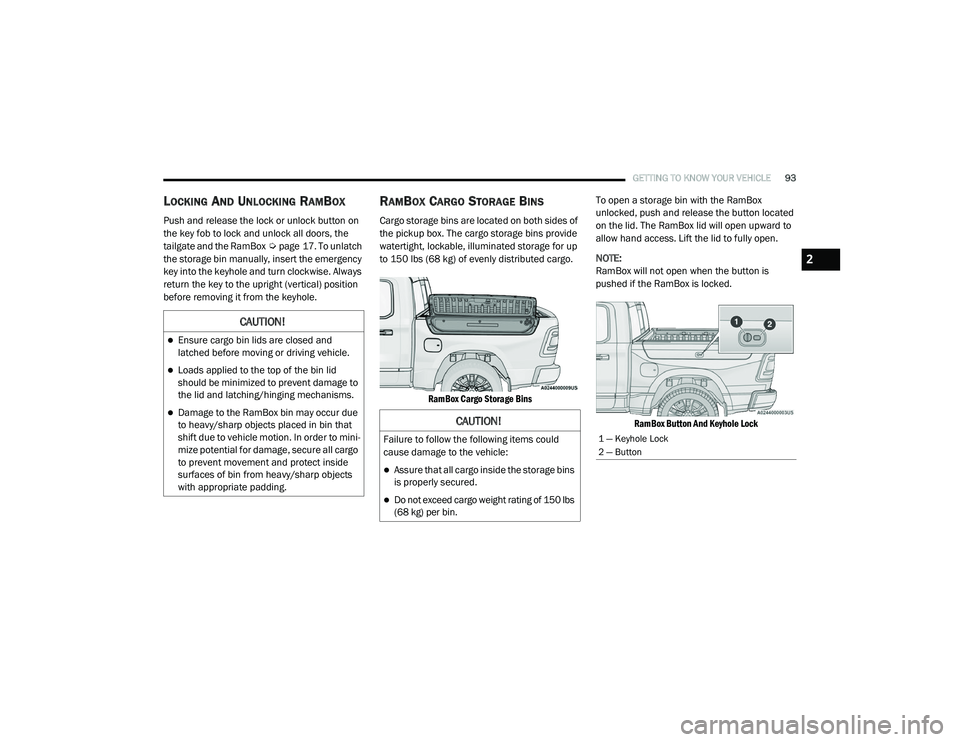
To open a storage bin with the RamBox
unlocked, push and release the button located
on the lid. The RamBox lid will open upward to
allow hand access. Lift the lid to fully open.
NOTE:
RamBox will not open when the button is
pushed if the RamBox is locked.
RamBox Button And Keyhole Lock
CAUTION!
Ensure cargo bin lids are closed and
latched before moving or driving vehicle.
Loads applied to the top of the bin lid
should be minimized to prevent damage to
the lid and latching/hinging mechanisms.
Damage to the RamBox bin may occur due
to heavy/sharp objects placed in bin that
shift due to vehicle motion. In order to mini -
mize potential for damage, secure all cargo
to prevent movement and protect inside
surfaces of bin from heavy/sharp objects
with appropriate padding.CAUTION!
Failure to follow the following items could
cause damage to the vehicle:
Assure that all cargo inside the storage bins
is properly secured.
Do not exceed cargo weight rating of 150 lbs
(68 kg) per bin.
1 — Keyhole Lock
2 — Button
2
21_DT_OM_EN_USC_t.book Page 93
Page 101 of 496
GETTING TO KNOW YOUR VEHICLE99
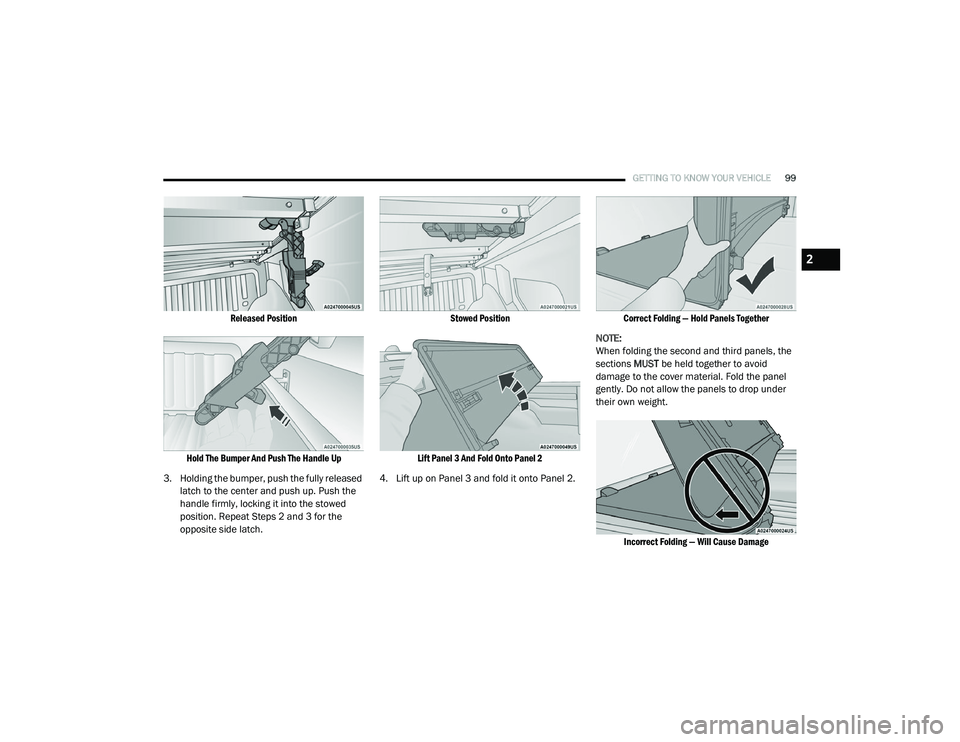
Released Position
Hold The Bumper And Push The Handle Up
3. Holding the bumper, push the fully released latch to the center and push up. Push the
handle firmly, locking it into the stowed
position. Repeat Steps 2 and 3 for the
opposite side latch.
Stowed Position
Lift Panel 3 And Fold Onto Panel 2
4. Lift up on Panel 3 and fold it onto Panel 2.
Correct Folding — Hold Panels Together
NOTE:
When folding the second and third panels, the
sections MUST be held together to avoid
damage to the cover material. Fold the panel
gently. Do not allow the panels to drop under
their own weight.
Incorrect Folding — Will Cause Damage
2
21_DT_OM_EN_USC_t.book Page 99
Page 104 of 496
102GETTING TO KNOW YOUR VEHICLE
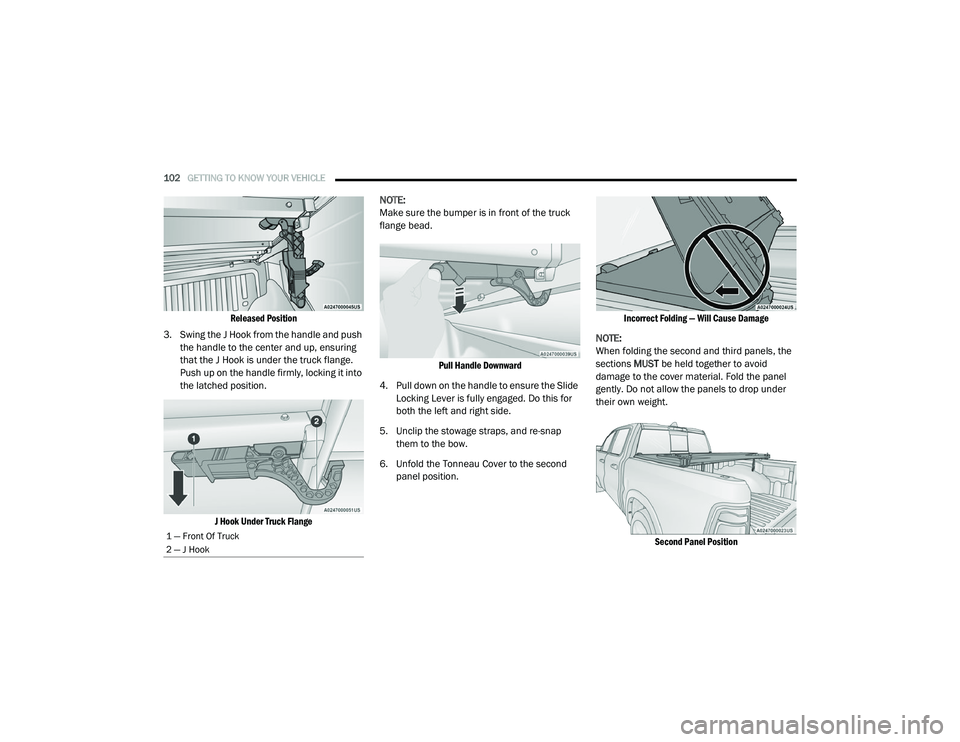
Released Position
3. Swing the J Hook from the handle and push the handle to the center and up, ensuring
that the J Hook is under the truck flange.
Push up on the handle firmly, locking it into
the latched position.
J Hook Under Truck Flange
NOTE:
Make sure the bumper is in front of the truck
flange bead.
Pull Handle Downward
4. Pull down on the handle to ensure the Slide Locking Lever is fully engaged. Do this for
both the left and right side.
5. Unclip the stowage straps, and re-snap them to the bow.
6. Unfold the Tonneau Cover to the second panel position.
Incorrect Folding — Will Cause Damage
NOTE:
When folding the second and third panels, the
sections MUST be held together to avoid
damage to the cover material. Fold the panel
gently. Do not allow the panels to drop under
their own weight.
Second Panel Position
1 — Front Of Truck
2 — J Hook
21_DT_OM_EN_USC_t.book Page 102
Page 105 of 496
GETTING TO KNOW YOUR VEHICLE103
NOTE:
Unfold the panel gently, and do not allow the
panels to drop under their own weight.
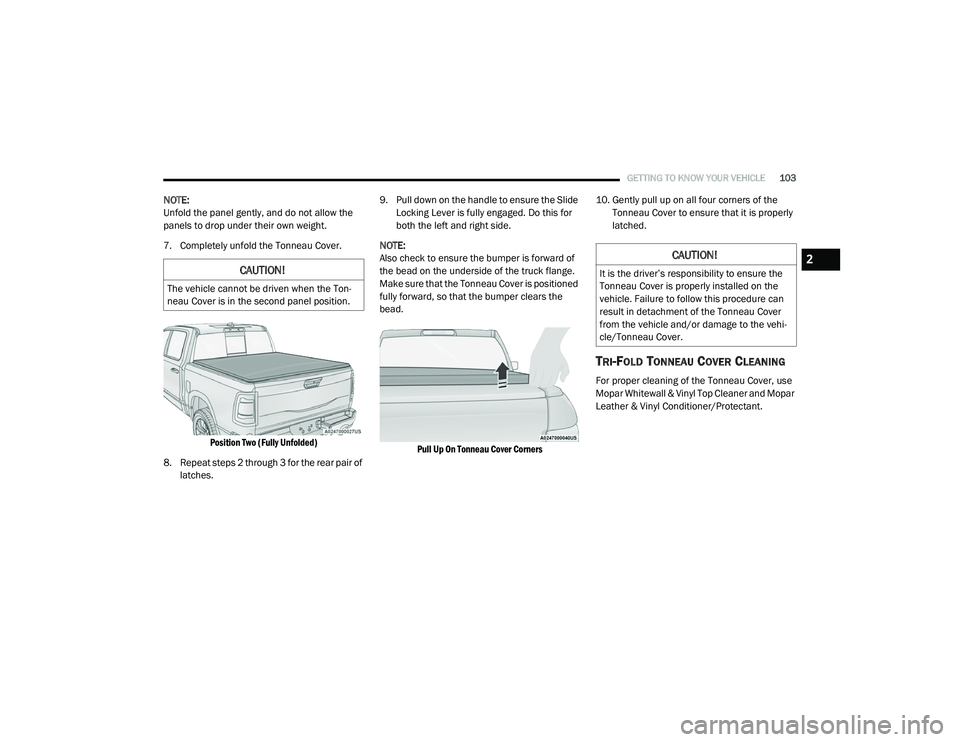
7. Completely unfold the Tonneau Cover.
Position Two (Fully Unfolded)
8. Repeat steps 2 through 3 for the rear pair of latches. 9. Pull down on the handle to ensure the Slide
Locking Lever is fully engaged. Do this for
both the left and right side.
NOTE:
Also check to ensure the bumper is forward of
the bead on the underside of the truck flange.
Make sure that the Tonneau Cover is positioned
fully forward, so that the bumper clears the
bead.
Pull Up On Tonneau Cover Corners
10. Gently pull up on all four corners of the
Tonneau Cover to ensure that it is properly
latched.
TRI-FOLD TONNEAU COVER CLEANING
For proper cleaning of the Tonneau Cover, use
Mopar Whitewall & Vinyl Top Cleaner and Mopar
Leather & Vinyl Conditioner/Protectant.
CAUTION!
The vehicle cannot be driven when the Ton -
neau Cover is in the second panel position.
CAUTION!
It is the driver’s responsibility to ensure the
Tonneau Cover is properly installed on the
vehicle. Failure to follow this procedure can
result in detachment of the Tonneau Cover
from the vehicle and/or damage to the vehi -
cle/Tonneau Cover.
2
21_DT_OM_EN_USC_t.book Page 103
Page 153 of 496

STARTING AND OPERATING151
ENGINE BREAK-IN RECOMMENDATIONS —
DIESEL ENGINE
The diesel engine does not require a break-in
period due to its construction. Normal operation
is allowed, providing the following
recommendations are followed:
Warm up the engine before placing it under
load.
Do not operate the engine at idle for
prolonged periods.
Observe vehicle oil pressure and tempera -
ture indicators.
Check the coolant and oil levels frequently.
Vary throttle position at highway speeds
when carrying or towing significant weight.
NOTE:
Light duty operation such as light trailer towing
or no load operation will extend the time before
the engine is at full efficiency. Reduced fuel
economy and power may be seen at this time.
The engine oil installed in the engine at the
factory is a high-quality energy conserving type
lubricant. Oil changes should be consistent with anticipated climate conditions under which
vehicle operations will occur. For the
recommended viscosity and quality grades
Ú
page 475.
NOTE:
NON-DETERGENT OR STRAIGHT MINERAL OILS
MUST NEVER BE USED.
PARKING BRAKE
ELECTRIC PARK BRAKE (EPB)
Your vehicle is equipped with an EPB that offers
simple operation, and some additional features
that make the parking brake more convenient
and useful.
The parking brake is primarily intended to
prevent the vehicle from rolling while parked.
Before leaving the vehicle, make sure that the
parking brake is applied. Also, be certain to
leave the transmission in PARK.
You can engage the parking brake in two ways:
Manually, by applying the parking brake
switch.
Automatically, by enabling the Auto Park
Brake feature in the customer programmable
features section of the Uconnect settings. The parking brake switch is located on the
instrument panel to the left of the steering
wheel (below the headlamp switch).
Electric Park Brake Switch
To apply the parking brake manually, pull up on
the switch momentarily. You may hear a slight
sound from the back of the vehicle while the
parking brake engages. Once the park brake is
fully engaged, the BRAKE telltale light in the
instrument cluster and an indicator on the
switch will illuminate. If your foot is on the brake
pedal while you apply the parking brake, you
may notice a small amount of brake pedal
movement. The parking brake can be applied
even when the ignition switch is OFF but the
BRAKE telltale light will not illuminate, however,
it can only be released when the ignition is in
the ON/RUN mode.
4
21_DT_OM_EN_USC_t.book Page 151
Page 215 of 496

STARTING AND OPERATING213
3. Stop filling the DEF tank immediately when
any of the following happen: DEF stops
flowing from the fill bottle into the DEF tank,
DEF splashes out the filler neck, or a DEF
pump nozzle automatically shuts off.
4. Reinstall cap onto DEF tank.
Filling The Def Tank In Cold Climates
Your vehicle is equipped with an automatic DEF
heating system. This allows the DEF injection
system to operate properly at temperatures below 12°F (-11°C). If your vehicle is not in
operation for an extended period of time with
temperatures below 12°F (-11°C), the DEF in
the tank may freeze. Do not overfill the DEF
tank. If the tank is overfilled and freezes, it
could be damaged.
Extra care should be taken when filling with
portable containers to avoid overfilling. Keep an
eye on the DEF gauge in your instrument
cluster. You may safely add a maximum of
2 gallons (7.6 Liters) when your DEF gauge is
reading at the half mark.
VEHICLE LOADING
GROSS VEHICLE WEIGHT RATING
(GVWR)
The GVWR is the total permissible weight of your
vehicle including driver, passengers, vehicle,
options and cargo. The label also specifies
maximum capacities of front and rear Gross
Axle Weight Rating (GAWR). Total load must be
limited so GVWR and front and rear GAWR are
not exceeded.
PAYLOAD
The payload of a vehicle is defined as the
allowable load weight a truck can carry,
including the weight of the driver, all
passengers, options and cargo.
GROSS AXLE WEIGHT RATING (GAWR)
The GAWR is the maximum permissible load on
the front and rear axles. The load must be
distributed in the cargo area so that the GAWR
of each axle is not exceeded.
Each axle GAWR is determined by the
components in the system with the lowest load
carrying capacity (axle, springs, tires or wheels).
Heavier axles or suspension components
sometimes specified by purchasers for
increased durability does not necessarily
increase the vehicle's GVWR.
TIRE SIZE
The tire size on the Vehicle Certification Label
represents the actual tire size on your vehicle.
Replacement tires must be equal to the load
capacity of this tire size.
Never add anything other than DEF to the
tank – especially any form of hydrocarbon
such as diesel fuel, fuel system additives,
gasoline, or any other petroleum-based
product. Even a very small amount of these,
less than 100 parts per million or less than
1 oz. per 78 gallons (295 liters) will contam -
inate the entire DEF system and will require
replacement. If owners use a container,
funnel or nozzle when refilling the tank, it
should either be new or one that is has only
been used for adding DEF. Mopar provides
an attachable nozzle with its DEF for this
purpose.
CAUTION! (Continued)
4
21_DT_OM_EN_USC_t.book Page 213
Page 216 of 496
214STARTING AND OPERATING
RIM SIZE
This is the rim size that is appropriate for the tire
size listed.
INFLATION PRESSURE
This is the cold tire inflation pressure for your
vehicle for all loading conditions up to full Gross
Axle Weight Rating (GAWR).
CURB WEIGHT
The curb weight of a vehicle is defined as the
total weight of the vehicle with all fluids,
including vehicle fuel, at full capacity
conditions, and with no occupants or cargo
loaded into the vehicle. The front and rear curb
weight values are determined by weighing your
vehicle on a commercial scale before any
occupants or cargo are added.
LOADING
The actual total weight and the weight of the
front and rear of your vehicle at the ground can
best be determined by weighing it when it is
loaded and ready for operation.
The entire vehicle should first be weighed on a
commercial scale to insure that the Gross
Vehicle Weight Rating (GVWR) has not been exceeded. The weight on the front and rear of
the vehicle should then be determined
separately to be sure that the load is properly
distributed over the front and rear axle.
Weighing the vehicle may show that the Gross
Axle Weight Rating (GAWR) of either the front or
rear axles has been exceeded but the total load
is within the specified GVWR. If so, weight must
be shifted from front to rear or rear to front as
appropriate until the specified weight
limitations are met. Store the heavier items
down low and be sure that the weight is
distributed equally. Stow all loose items
securely before driving.
Improper weight distributions can have an
adverse effect on the way your vehicle steers
and handles and the way the brakes operate.
TRAILER TOWING
In this section you will find safety tips and
information on limits to the type of towing you
can reasonably do with your vehicle. Before
towing a trailer, carefully review this information
to tow your load as efficiently and safely as
possible.
To maintain the New Vehicle Limited Warranty
coverage, follow the requirements and
recommendations in this manual concerning
vehicles used for trailer towing.
COMMON TOWING DEFINITIONS
The following trailer towing related definitions
will assist you in understanding the following
information:
Gross Vehicle Weight Rating (GVWR)
The GVWR is the total allowable weight of your
vehicle. This includes driver, passengers, cargo
and tongue weight. The total load must be
limited so that you do not exceed the GVWR
Ú
page 213.CAUTION!
Do not load your vehicle any heavier than the
GVWR or the maximum front and rear GAWR.
If you do, parts on your vehicle can break, or
it can change the way your vehicle handles.
This could cause you to lose control. Also
overloading can shorten the life of your
vehicle.
21_DT_OM_EN_USC_t.book Page 214