instrument panel RAM 1500 2021 User Guide
[x] Cancel search | Manufacturer: RAM, Model Year: 2021, Model line: 1500, Model: RAM 1500 2021Pages: 496, PDF Size: 20.89 MB
Page 64 of 496

62GETTING TO KNOW YOUR VEHICLE
Driver And Passenger Temperature Up And
Down Buttons
These buttons provide the driver and passenger
with independent temperature control.
Push the red button (or rotate knob if
equipped) on the faceplate or
touchscreen, or press and slide the
temperature bar towards the red
arrow button on the touchscreen for warmer
temperature settings.
Push the blue button (or rotate knob if
equipped) on the faceplate or
touchscreen, or press and slide the
temperature bar towards the blue
arrow button on the touchscreen for cooler
temperature settings.
NOTE:
The numbers within the temperature display
will only appear if the system is equipped
with an automatic climate control system.
Up and down buttons are only available on
vehicles equipped with a 12-inch display.
SYNC Button
Press the SYNC button on the
touchscreen to toggle the SYNC
feature on/off. The SYNC indicator
illuminates when SYNC is on. SYNC
synchronizes the passenger temperature
setting with the driver temperature setting.
Changing the passenger’s temperature setting
while in SYNC will automatically exit this
feature.
NOTE:
The SYNC button is only available on the touch -
screen.
Blower Control
Blower Control regulates the amount
of air forced through the climate
control system. There are seven
blower speeds available. Adjusting
the blower will cause automatic mode to switch
to manual operation. The speeds can be
selected using either the blower control knob on
the faceplate or the buttons on the
touchscreen. Faceplate
The blower speed increases as you turn the
blower control knob clockwise from the lowest
blower setting. The blower speed decreases as
you turn the blower control knob
counterclockwise.
Touchscreen
Use the small blower icon to reduce the blower
setting and the large blower icon to increase the
blower setting. Blower can also be selected by
pressing the blower bar area between the icons.
Mode Control
Select Mode by pressing one of the
Mode buttons on the touchscreen, or
pushing the Mode button on the
faceplate, to change the airflow
distribution mode. The airflow distribution mode
can be adjusted so air comes from the
instrument panel outlets, floor outlets, defrost
outlets, and demist outlets.
21_DT_OM_EN_USC_t.book Page 62
Page 65 of 496

GETTING TO KNOW YOUR VEHICLE63
Panel Mode
Air comes from the outlets in the
instrument panel. Each of these
outlets can be individually adjusted to
direct the flow of air. The air vanes of
the center outlets and outboard outlets can be
moved up and down or side to side to regulate
airflow direction. There is a shut off wheel
located below the air vanes to shut off or adjust
the amount of airflow from these outlets.
Bi-Level Mode
Air comes from the instrument panel
outlets and floor outlets. A slight
amount of air is directed through the
defrost and side window demister
outlets.
NOTE:
Bi-Level mode is designed under comfort condi -
tions to provide cooler air out of the panel
outlets and warmer air from the floor outlets.
Floor Mode
Air comes from the floor outlets. A
slight amount of air is directed
through the defrost and side window
demister outlets.
Mix Mode
Air is directed through the floor,
defrost, and side window demister
outlets. This setting works best in cold
or snowy conditions that require extra
heat to the windshield. This setting is good for
maintaining comfort while reducing moisture on
the windshield.
Climate Control OFF Button
Press and release the OFF button on
the touchscreen, or push the OFF
button on the faceplate (if equipped)
to turn the Climate Control on/off.
MANUAL CLIMATE CONTROL
D
ESCRIPTIONS AND FUNCTIONS
Uconnect 3 With 5-inch Display Manual Temperature
Controls
MAX A/C Setting
Set the temperature control knob to
the MAX A/C setting to change the
current setting to the coldest output
of air. Moving the temperature control
knob away from the MAX A/C setting causes the
MAX A/C operation to exit.
2
21_DT_OM_EN_USC_t.book Page 63
Page 67 of 496

GETTING TO KNOW YOUR VEHICLE65
Temperature Control
Temperature Control regulates the temperature
of the air forced through the climate system.
The temperature increases as you
turn the temperature control knob
clockwise.
The temperature decreases as you
turn the temperature control knob
counterclockwise.
Blower Control
Blower Control regulates the amount
of air forced through the climate
control system. There are seven
blower speeds available. The blower
speed increases as you turn the blower control
knob clockwise from the lowest blower setting.
The blower speed decreases as you turn the
blower control knob counterclockwise.
Mode Control
Turn the mode control knob to adjust
airflow distribution. The airflow
distribution mode can be adjusted so
air comes from the instrument panel
outlets, floor outlets, defrost outlets and demist
outlets.
Panel Mode
Air comes from the outlets in the
instrument panel. Each of these
outlets can be individually adjusted to
direct the flow of air. The air vanes of
the center outlets and outboard outlets can be
moved up and down or side to side to regulate
airflow direction. There is a shut off wheel
located below the air vanes to shut off or adjust
the amount of airflow from these outlets.
Bi-Level Mode
Air comes from the instrument panel
outlets and floor outlets. A slight
amount of air is directed through the
defrost and side window demister
outlets.
NOTE:
Bi-Level mode is designed under comfort condi -
tions to provide cooler air out of the panel
outlets and warmer air from the floor outlets.
Floor Mode
Air comes from the floor outlets. A
slight amount of air is directed
through the defrost and side window
demister outlets.
Mix Mode
Air is directed through the floor,
defrost, and side window demister
outlets. This setting works best in cold
or snowy conditions that require extra
heat to the windshield. This setting is good for
maintaining comfort while reducing moisture on
the windshield.
AUTOMATIC TEMPERATURE CONTROL
(ATC) — I
F EQUIPPED
Automatic Operation
1. Push the AUTO button on the faceplate, or the AUTO button on the touchscreen on the
Automatic Temperature Control (ATC)
Panel.
2. Next, adjust the temperature that you would like the system to maintain by adjusting the
driver and passenger temperature control
buttons. Once the desired temperature is
displayed, the system will achieve and
automatically maintain that comfort level.
3. When the system is set up for your comfort level, it is not necessary to change the
settings. You will experience the greatest
efficiency by simply allowing the system to
function automatically.
2
21_DT_OM_EN_USC_t.book Page 65
Page 70 of 496
68GETTING TO KNOW YOUR VEHICLE
INTERIOR STORAGE AND EQUIPMENT
STORAGE
Glove Compartment
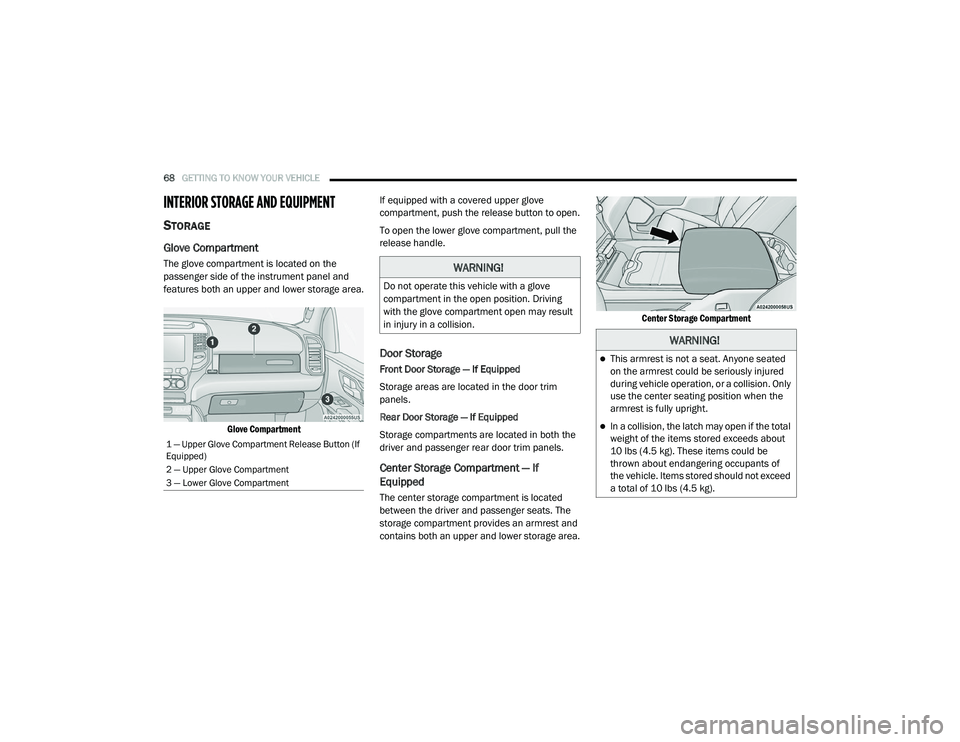
The glove compartment is located on the
passenger side of the instrument panel and
features both an upper and lower storage area.
Glove Compartment
If equipped with a covered upper glove
compartment, push the release button to open.
To open the lower glove compartment, pull the
release handle.
Door Storage
Front Door Storage — If Equipped
Storage areas are located in the door trim
panels.
Rear Door Storage — If Equipped
Storage compartments are located in both the
driver and passenger rear door trim panels.
Center Storage Compartment — If
Equipped
The center storage compartment is located
between the driver and passenger seats. The
storage compartment provides an armrest and
contains both an upper and lower storage area.
Center Storage Compartment
1 — Upper Glove Compartment Release Button (If
Equipped)
2 — Upper Glove Compartment
3 — Lower Glove Compartment
WARNING!
Do not operate this vehicle with a glove
compartment in the open position. Driving
with the glove compartment open may result
in injury in a collision.
WARNING!
This armrest is not a seat. Anyone seated
on the armrest could be seriously injured
during vehicle operation, or a collision. Only
use the center seating position when the
armrest is fully upright.
In a collision, the latch may open if the total
weight of the items stored exceeds about
10 lbs (4.5 kg). These items could be
thrown about endangering occupants of
the vehicle. Items stored should not exceed
a total of 10 lbs (4.5 kg).
21_DT_OM_EN_USC_t.book Page 68
Page 73 of 496
GETTING TO KNOW YOUR VEHICLE71
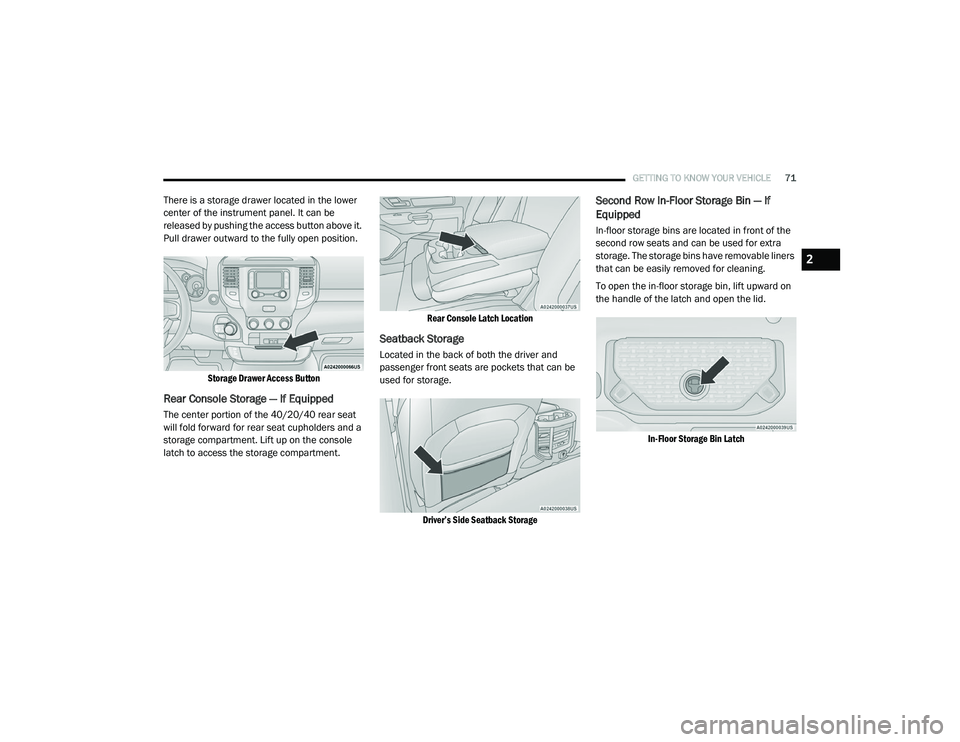
There is a storage drawer located in the lower
center of the instrument panel. It can be
released by pushing the access button above it.
Pull drawer outward to the fully open position.
Storage Drawer Access Button
Rear Console Storage — If Equipped
The center portion of the 40/20/40 rear seat
will fold forward for rear seat cupholders and a
storage compartment. Lift up on the console
latch to access the storage compartment.
Rear Console Latch Location
Seatback Storage
Located in the back of both the driver and
passenger front seats are pockets that can be
used for storage.
Driver’s Side Seatback Storage
Second Row In-Floor Storage Bin — If
Equipped
In-floor storage bins are located in front of the
second row seats and can be used for extra
storage. The storage bins have removable liners
that can be easily removed for cleaning.
To open the in-floor storage bin, lift upward on
the handle of the latch and open the lid.
In-Floor Storage Bin Latch
2
21_DT_OM_EN_USC_t.book Page 71
Page 74 of 496

72GETTING TO KNOW YOUR VEHICLE
NOTE:
The front seat may have to be moved forward to
fully open the lid.
Opened Storage Bin
Each storage bin also contains two hooks for
securing cargo. These hooks should be used to
secure loads safely when the vehicle is moving.
In-Floor Storage Bin Hooks
NOTE:
The maximum load limit for each hook is 250 lbs
(113 kg).
Storage Under Rear Seat — If Equipped
To access the storage under the rear seats,
unlatch the lock mechanism in the center of the
seat base by rotating it to either side, and fold
the front of the seat base forward.
Folding Down Front Of Seat Base
Flip the inside of the base upward into the
upright position, locking into place, creating and
extended storage area.
Fully Extended Storage Area
NOTE:
The rear seats do not need to be folded up to
access this feature.
USB/AUX CONTROL
Located on the center stack, just below the
instrument panel, is the main media hub. There
are four total USB ports: Two Mini-USBs (Type C)
and two Standard USBs (Type A). There is also
an AUX port located in the middle of the USB
Ports.
Plugging in a smartphone device to a USB Port
may activate Android Auto™ or Apple CarPlay®
features, if equipped. For further information,
refer to “Android Auto™” or “Apple CarPlay®” in
the Owner’s Manual Supplement.
1 — Lock Mechanism
2 — Front Of Seat Base
21_DT_OM_EN_USC_t.book Page 72
Page 86 of 496
84GETTING TO KNOW YOUR VEHICLE
Venting Sunroof — Express
Push and release the Vent button within one
half second and the sunroof will open to the
vent position. This is called “Express Vent” and
it will occur regardless of sunroof position.
During Express Vent operation, any movement
of the switch will stop the sunroof.
NOTE:
If the sunshade was not already open, it will
automatically open prior to the roof opening to
the vent position.
Ignition Off Operation
The power sunroof switch will remain active for
up to approximately 10 minutes after the
ignition switch is placed in the OFF position.
Opening either front door will cancel this
feature.
NOTE:
Ignition Off time is programmable through the
Uconnect system Úpage 237.
Sunroof Maintenance
Use only a non-abrasive cleaner and a soft cloth
to clean the glass panel. Periodically check for
and clear out any debris that may have
collected in the tracks.
HOOD
TO OPEN THE HOOD
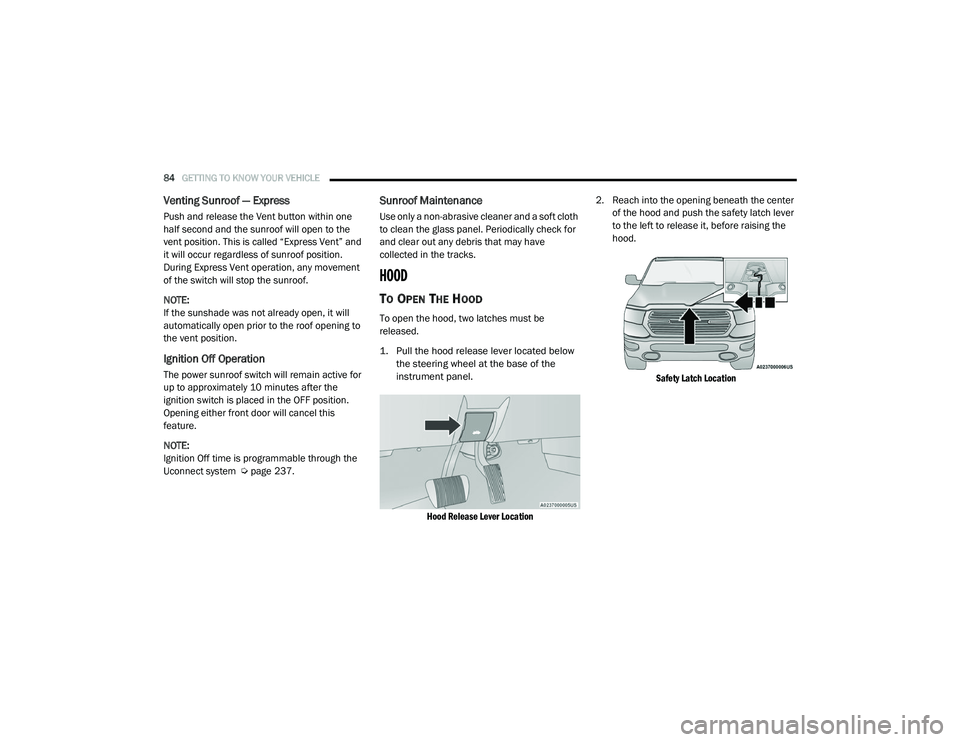
To open the hood, two latches must be
released.
1. Pull the hood release lever located below
the steering wheel at the base of the
instrument panel.
Hood Release Lever Location
2. Reach into the opening beneath the center
of the hood and push the safety latch lever
to the left to release it, before raising the
hood.
Safety Latch Location
21_DT_OM_EN_USC_t.book Page 84
Page 96 of 496
94GETTING TO KNOW YOUR VEHICLE
(Continued)
The interior of the RamBox will automatically
illuminate when the lid is opened. The timing
can be adjusted within Uconnect Settings
Úpage 237.
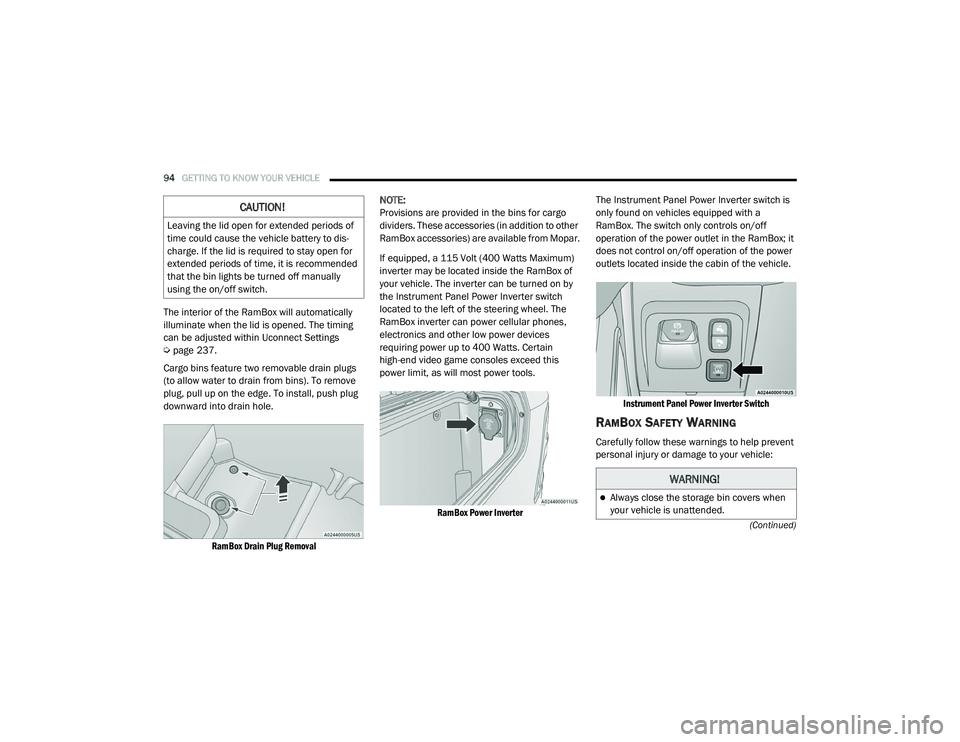
Cargo bins feature two removable drain plugs
(to allow water to drain from bins). To remove
plug, pull up on the edge. To install, push plug
downward into drain hole.
RamBox Drain Plug Removal
NOTE:
Provisions are provided in the bins for cargo
dividers. These accessories (in addition to other
RamBox accessories) are available from Mopar.
If equipped, a 115 Volt (400 Watts Maximum)
inverter may be located inside the RamBox of
your vehicle. The inverter can be turned on by
the Instrument Panel Power Inverter switch
located to the left of the steering wheel. The
RamBox inverter can power cellular phones,
electronics and other low power devices
requiring power up to 400 Watts. Certain
high-end video game consoles exceed this
power limit, as will most power tools.
RamBox Power Inverter
The Instrument Panel Power Inverter switch is
only found on vehicles equipped with a
RamBox. The switch only controls on/off
operation of the power outlet in the RamBox; it
does not control on/off operation of the power
outlets located inside the cabin of the vehicle.
Instrument Panel Power Inverter Switch
RAMBOX SAFETY WARNING
Carefully follow these warnings to help prevent
personal injury or damage to your vehicle:
CAUTION!
Leaving the lid open for extended periods of
time could cause the vehicle battery to dis -
charge. If the lid is required to stay open for
extended periods of time, it is recommended
that the bin lights be turned off manually
using the on/off switch.
WARNING!
Always close the storage bin covers when
your vehicle is unattended.
21_DT_OM_EN_USC_t.book Page 94
Page 106 of 496
104
GETTING TO KNOW YOUR INSTRUMENT PANEL
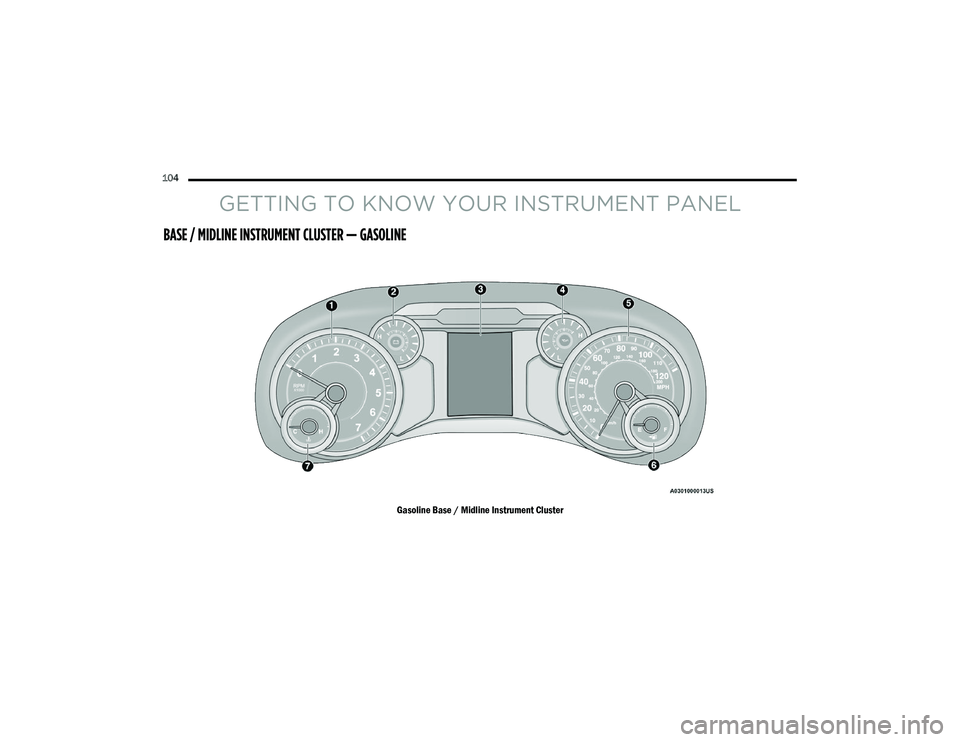
BASE / MIDLINE INSTRUMENT CLUSTER — GASOLINE
Gasoline Base / Midline Instrument Cluster
21_DT_OM_EN_USC_t.book Page 104
Page 107 of 496

GETTING TO KNOW YOUR INSTRUMENT PANEL105
BASE / MIDLINE INSTRUMENT CLUSTER
D
ESCRIPTIONS — GASOLINE
1. Tachometer
Indicates the engine speed in revolutions
per minute (RPM x 1000).
2. Voltmeter
When the vehicle is in the RUN state, the
gauge indicates the electrical system
voltage. The pointer should stay within
the normal range if the battery is
charged. If the pointer moves to either
extreme left or right and remains there
during normal driving, the electrical
system should be serviced.
NOTE:
In vehicles equipped with Stop/Start, a reduced
voltage may be present during an Autostop.
3. Instrument Cluster Display
When the appropriate conditions exist,
this display shows the instrument cluster
display messages Ú page 114.
Instrument Cluster Display/Controls Location
The display always show one of the main
menu item after ignition on.
4. Oil Pressure Gauge
The pointer should always indicate the oil
pressure when the engine is running. A
continuous high or low reading under
normal driving conditions may indicate a
lubrication system malfunction. Imme -
diate service should be obtained from an
authorized dealer.
NOTE:
In vehicles equipped with Stop/Start, an oil
pressure indication of zero is normal during an
Autostop. 5. Speedometer
Indicates vehicle speed.
6. Fuel Gauge
The pointer shows the level of fuel in the
fuel tank when the ignition is in the ON/
RUN position.
The fuel pump symbol points to the
side of the vehicle where the fuel door
is located.
7. Temperature Gauge
The pointer shows engine coolant
temperature. The pointer positioned
within the normal range indicates that
the engine cooling system is operating
satisfactorily.
The pointer will likely indicate a higher
temperature when driving in hot weather,
up mountain grades, or when towing a
trailer. It should not be allowed to exceed
the upper limits of the normal operating
range.
1 – Instrument Cluster Display Controls
2 – Instrument Cluster Display Screen
3
21_DT_OM_EN_USC_t.book Page 105