phone RAM 1500 2021 User Guide
[x] Cancel search | Manufacturer: RAM, Model Year: 2021, Model line: 1500, Model: RAM 1500 2021Pages: 496, PDF Size: 20.89 MB
Page 77 of 496
GETTING TO KNOW YOUR VEHICLE75
(Continued)
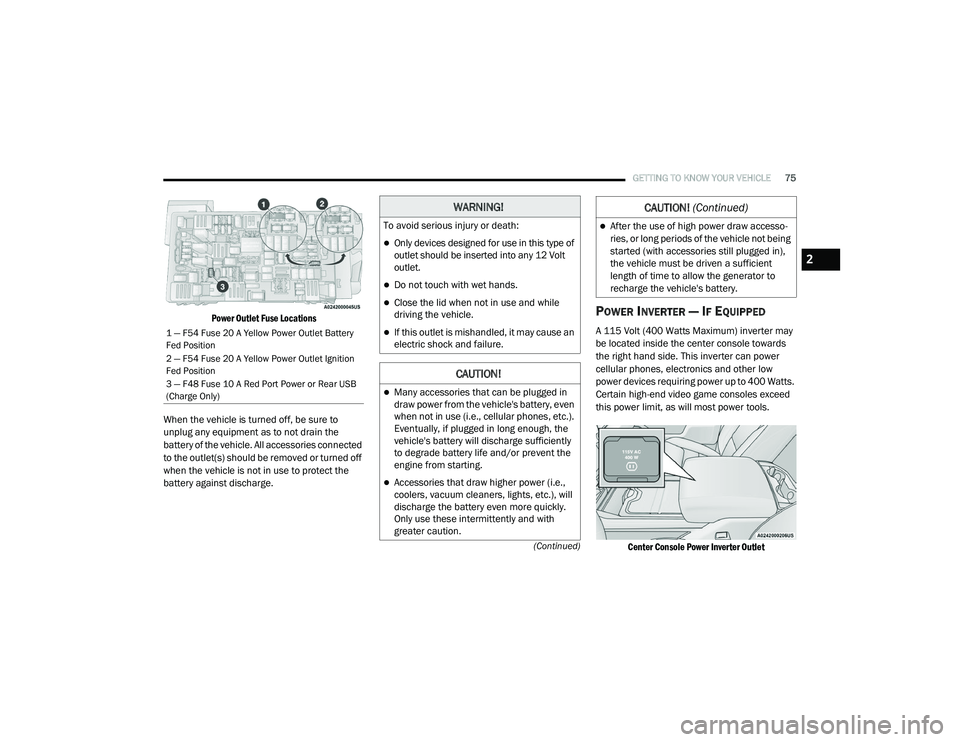
Power Outlet Fuse Locations
When the vehicle is turned off, be sure to
unplug any equipment as to not drain the
battery of the vehicle. All accessories connected
to the outlet(s) should be removed or turned off
when the vehicle is not in use to protect the
battery against discharge.POWER INVERTER — IF EQUIPPED
A 115 Volt (400 Watts Maximum) inverter may
be located inside the center console towards
the right hand side. This inverter can power
cellular phones, electronics and other low
power devices requiring power up to 400 Watts.
Certain high-end video game consoles exceed
this power limit, as will most power tools.
Center Console Power Inverter Outlet
1 — F54 Fuse 20 A Yellow Power Outlet Battery
Fed Position
2 — F54 Fuse 20 A Yellow Power Outlet Ignition
Fed Position
3 — F48 Fuse 10 A Red Port Power or Rear USB
(Charge Only)
WARNING!
To avoid serious injury or death:
Only devices designed for use in this type of
outlet should be inserted into any 12 Volt
outlet.
Do not touch with wet hands.
Close the lid when not in use and while
driving the vehicle.
If this outlet is mishandled, it may cause an
electric shock and failure.
CAUTION!
Many accessories that can be plugged in
draw power from the vehicle's battery, even
when not in use (i.e., cellular phones, etc.).
Eventually, if plugged in long enough, the
vehicle's battery will discharge sufficiently
to degrade battery life and/or prevent the
engine from starting.
Accessories that draw higher power (i.e.,
coolers, vacuum cleaners, lights, etc.), will
discharge the battery even more quickly.
Only use these intermittently and with
greater caution.
After the use of high power draw accesso -
ries, or long periods of the vehicle not being
started (with accessories still plugged in),
the vehicle must be driven a sufficient
length of time to allow the generator to
recharge the vehicle's battery.
CAUTION! (Continued)
2
21_DT_OM_EN_USC_t.book Page 75
Page 78 of 496

76GETTING TO KNOW YOUR VEHICLE
There is also a second 115 Volt (400 Watts
Maximum) power inverter located on the rear of
the center console. This inverter can power
cellular phones, electronics and other low
power devices requiring power up to 400 Watts.
Certain high-end video game consoles exceed
this power limit, as will most power tools.
All power inverters are designed with built-in
overload protection. If the power rating of
400 Watts is exceeded, the power inverter
shuts down. Once the electrical device has
been removed from the outlet the inverter
should reset.
Rear Center Console Power Inverter Outlet
NOTE:
400 Watts is the maximum for the inverter, not
each outlet. If three outlets are in use, 400 Watts
is shared amongst the devices plugged in.
If equipped with a front bench seat, there may
be a 115 Volt (400 Watts Maximum) inverter
located to the right of the center stack, just
below the climate controls. This inverter can
power cellular phones, electronics and other
low power devices requiring power up to
400 Watts. Certain high-end video game
consoles exceed this power limit, as will most
power tools.
Center Stack Power Inverter
To turn on the power outlet, simply plug in the
device. The outlet turns off when the device is
unplugged.
NOTE:
The Center Stack Power Inverter is only avail
-
able on vehicles equipped with a front bench
seat.
The power inverter only turns on if the ignition
is in the ACC or ON/RUN position.
Due to built-in overload protection, the power
inverter shuts down if the power rating is
exceeded.
WARNING!
To avoid serious injury or death:
Do not insert any objects into the recepta -
cles.
Do not touch with wet hands.
Close the lid when not in use.
If this outlet is mishandled, it may cause an
electric shock and failure.
21_DT_OM_EN_USC_t.book Page 76
Page 79 of 496
GETTING TO KNOW YOUR VEHICLE77
WIRELESS CHARGING PAD — IF
E
QUIPPED
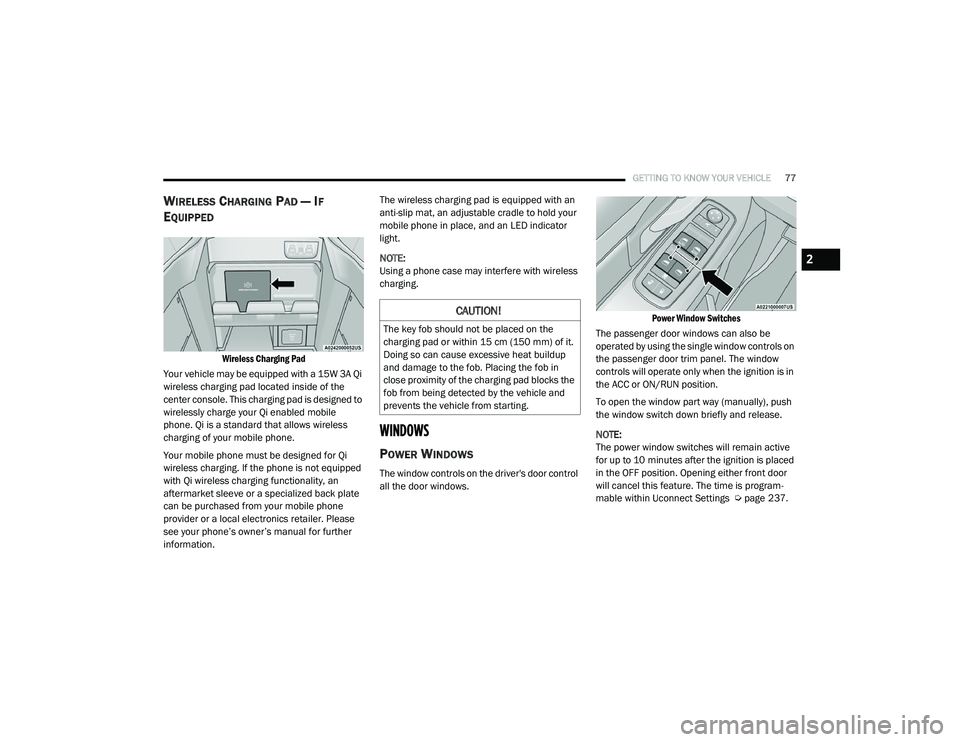
Wireless Charging Pad
Your vehicle may be equipped with a 15W 3A Qi
wireless charging pad located inside of the
center console. This charging pad is designed to
wirelessly charge your Qi enabled mobile
phone. Qi is a standard that allows wireless
charging of your mobile phone.
Your mobile phone must be designed for Qi
wireless charging. If the phone is not equipped
with Qi wireless charging functionality, an
aftermarket sleeve or a specialized back plate
can be purchased from your mobile phone
provider or a local electronics retailer. Please
see your phone’s owner’s manual for further
information. The wireless charging pad is equipped with an
anti-slip mat, an adjustable cradle to hold your
mobile phone in place, and an LED indicator
light.
NOTE:
Using a phone case may interfere with wireless
charging.
WINDOWS
POWER WINDOWS
The window controls on the driver's door control
all the door windows.
Power Window Switches
The passenger door windows can also be
operated by using the single window controls on
the passenger door trim panel. The window
controls will operate only when the ignition is in
the ACC or ON/RUN position.
To open the window part way (manually), push
the window switch down briefly and release.
NOTE:
The power window switches will remain active
for up to 10 minutes after the ignition is placed
in the OFF position. Opening either front door
will cancel this feature. The time is program -
mable within Uconnect Settings Ú page 237.
CAUTION!
The key fob should not be placed on the
charging pad or within 15 cm (150 mm) of it.
Doing so can cause excessive heat buildup
and damage to the fob. Placing the fob in
close proximity of the charging pad blocks the
fob from being detected by the vehicle and
prevents the vehicle from starting.
2
21_DT_OM_EN_USC_t.book Page 77
Page 96 of 496
94GETTING TO KNOW YOUR VEHICLE
(Continued)
The interior of the RamBox will automatically
illuminate when the lid is opened. The timing
can be adjusted within Uconnect Settings
Úpage 237.
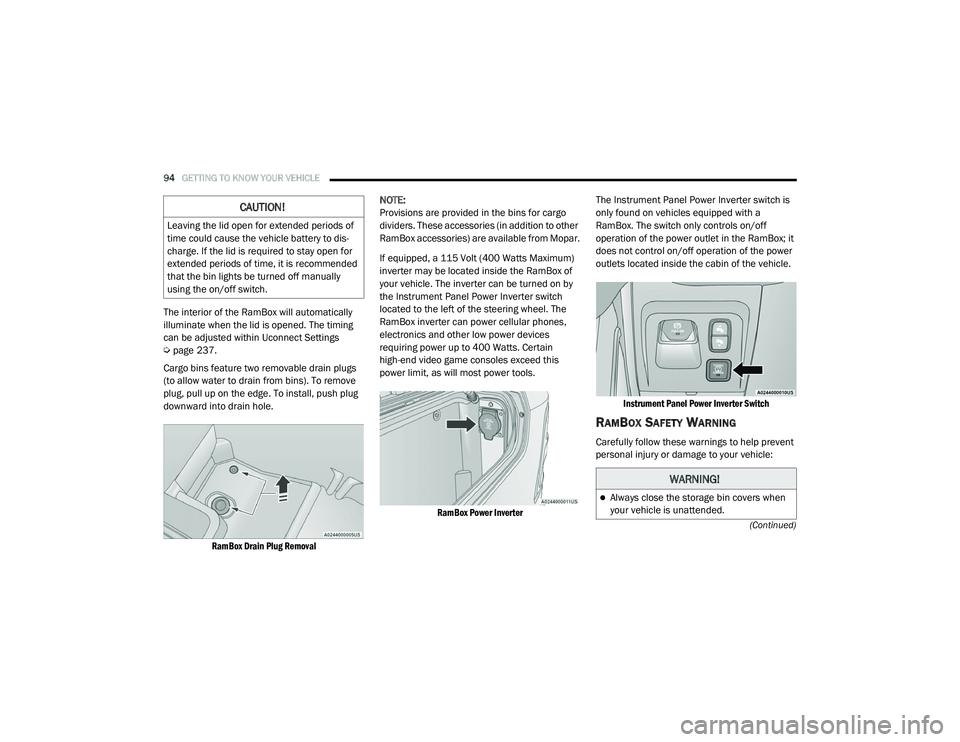
Cargo bins feature two removable drain plugs
(to allow water to drain from bins). To remove
plug, pull up on the edge. To install, push plug
downward into drain hole.
RamBox Drain Plug Removal
NOTE:
Provisions are provided in the bins for cargo
dividers. These accessories (in addition to other
RamBox accessories) are available from Mopar.
If equipped, a 115 Volt (400 Watts Maximum)
inverter may be located inside the RamBox of
your vehicle. The inverter can be turned on by
the Instrument Panel Power Inverter switch
located to the left of the steering wheel. The
RamBox inverter can power cellular phones,
electronics and other low power devices
requiring power up to 400 Watts. Certain
high-end video game consoles exceed this
power limit, as will most power tools.
RamBox Power Inverter
The Instrument Panel Power Inverter switch is
only found on vehicles equipped with a
RamBox. The switch only controls on/off
operation of the power outlet in the RamBox; it
does not control on/off operation of the power
outlets located inside the cabin of the vehicle.
Instrument Panel Power Inverter Switch
RAMBOX SAFETY WARNING
Carefully follow these warnings to help prevent
personal injury or damage to your vehicle:
CAUTION!
Leaving the lid open for extended periods of
time could cause the vehicle battery to dis -
charge. If the lid is required to stay open for
extended periods of time, it is recommended
that the bin lights be turned off manually
using the on/off switch.
WARNING!
Always close the storage bin covers when
your vehicle is unattended.
21_DT_OM_EN_USC_t.book Page 94
Page 120 of 496

118GETTING TO KNOW YOUR INSTRUMENT PANEL
Trailer Tow
Push and release the up or down arrow
button until the Trailer Tow menu item is
highlighted in the instrument cluster display.
Push and release the right or left arrow
button to cycle through the following trailer tow
information:
Trip (trailer specific) Distance: Push and hold
the OK button to reset the distance.
Integrated Trailer Brake Module (ITBM):
Braking Output
Trailer Type
ITBM Gain
Trailer Light Check: Push and hold the OK
button to begin the Trailer Light Test
sequence Ú page 225.
Trailer Tire Pressure Monitoring: The Instru-
ment Cluster Display will display the Trailer
Tire Pressure for a connected trailer with
sensors that match the active trailer profile.
When a low tire is present, the low tire value
will be displayed in red, and the affected low
tire will have a red glow. “Trailer Tire Low“ will
be displayed on the center bottom of the
Instrument Cluster Display screen.
Audio
Push and release the up or down arrow
button until the Audio Menu icon/title is
highlighted in the instrument cluster display.
This menu will display the audio source
information, including the Song name, Artist
name, and audio source with an accompanying
graphic.
Phone Call Status
When a call is incoming, a Phone Call Status
pop-up will display on the screen. The pop-up
will remain until the phone is answered or
ignored.
NOTE:
The call status will temporarily replace the
previous media source information displayed
on the screen. When the pop-up is no longer
displayed, the display will return to the last used
screen.
Stored Messages
Push and release the up or down arrow
button until the Messages Menu item is
highlighted. This feature shows the number of
stored warning messages. Push and release the
right or left arrow button to cycle through
stored messages.
Settings
Head-Up Display (HUD)
NOTE:
The HUD feature Settings are available at any
vehicle speed.
Push and release the up or down arrow
button until the Settings Menu icon/title is
highlighted in the instrument cluster display.
Push and release the left or right arrow
button until the HUD Menu icon/title is
highlighted in the instrument cluster
display.Push and release the OK button to enter
HUD. Use the up or down arrow button to
select a setting, then push and release the OK
button to adjust the setting.
ON/OFF
Content and Layout
Simple : Speed, Speed Limit
Standard : Speed, Speed Limit, Naviga-
tion
Advanced : Speed, Speed Limit, Naviga-
tion, Driver Assist (ACC/Cruise, Lane -
Sense, Highway Assist/Highway Assist+),
Gear
21_DT_OM_EN_USC_t.book Page 118
Page 238 of 496
236 (Continued)
MULTIMEDIA
UCONNECT SYSTEMS For detailed information about your Uconnect
4C/4C NAV with 8.4-inch Display system or your
Uconnect 4C NAV with 12-inch Display system,
refer to your Uconnect Owner’s Manual
Supplement.
NOTE:
Uconnect screen images are for illustration
purposes only and may not reflect exact soft-
ware for your vehicle.
CYBERSECURITY Your vehicle may be a connected vehicle and
may be equipped with both wired and wireless
networks. These networks allow your vehicle to
send and receive information. This information
allows systems and features in your vehicle to
function properly.
Your vehicle may be equipped with certain
security features to reduce the risk of
unauthorized and unlawful access to vehicle
systems and wireless communications. Vehicle
software technology continues to evolve over
time and FCA US LLC, working with its suppliers,
evaluates and takes appropriate steps as
needed. Similar to a computer or other devices, your vehicle may require software updates to
improve the usability and performance of your
systems or to reduce the potential risk of
unauthorized and unlawful access to your
vehicle systems.
The risk of unauthorized and unlawful access to
your vehicle systems may still exist, even if the
most recent version of vehicle software (such as
Uconnect software) is installed.
NOTE:
FCA US LLC or your dealer may contact you
directly regarding software updates.
To help further improve vehicle security and
minimize the potential risk of a security
breach, vehicle owners should:
Routinely check www.driveuconnect.com
(US Residents) or www.driveuconnect.ca
(Canadian Residents) to learn about
available Uconnect software updates.
Only connect and use trusted media
devices (e.g. personal mobile phones,
USBs, CDs).
Privacy of any wireless and wired
communications cannot be assured. Third
parties may unlawfully intercept information and
private communications without your consent.
For further information, refer to “Data Collection
& Privacy” in your Uconnect Owner’s Manual
Supplement or Ú page 137.
WARNING!
It is not possible to know or to predict all of the
possible outcomes if your vehicle’s systems
are breached. It may be possible that vehicle
systems, including safety related systems,
could be impaired or a loss of vehicle control
could occur that may result in an accident
involving serious injury or death.
ONLY insert media (e.g., USB, SD card, or CD)
into your vehicle if it came from a trusted
source. Media of unknown origin could
possibly contain malicious software, and if
installed in your vehicle, it may increase the
possibility for vehicle systems to be breached.
As always, if you experience unusual
vehicle behavior, take your vehicle to your
nearest authorized dealer immediately.
WARNING! (Continued)
21_DT_OM_EN_USC_t.book Page 236
Page 241 of 496

MULTIMEDIA239
Keyboard — If Equipped This setting will change the keyboard type on the display. The selectable
keyboards are ABCDEF Keyboard, QWERTY Keyboard, and AZERTY
Keyboard.
Touchscreen Beep This setting will allow you to turn the touchscreen beep on or off.
Control Screen Timeout This setting allows you to set the Control Screen to turn off automatically
after five seconds or stay open until manually closed.
Navigation Next Turn Pop-ups Displayed in Cluster — If Equipped This setting will display navigation prompts in the Instrument Cluster
Display.
Phone Pop-ups Displayed In Cluster This setting will display smartphone notifications and messages in the
Instrument Cluster Display.
Fuel Saver Display This setting will enable fuel saver mode in the Instrument Cluster Display.
Ready To Drive Pop-ups — If Equipped This setting will enable the Ready To Drive Pop-ups in the Instrument
Cluster Display.
Setting Name
Description
5
21_DT_OM_EN_USC_t.book Page 239
Page 253 of 496
MULTIMEDIA251
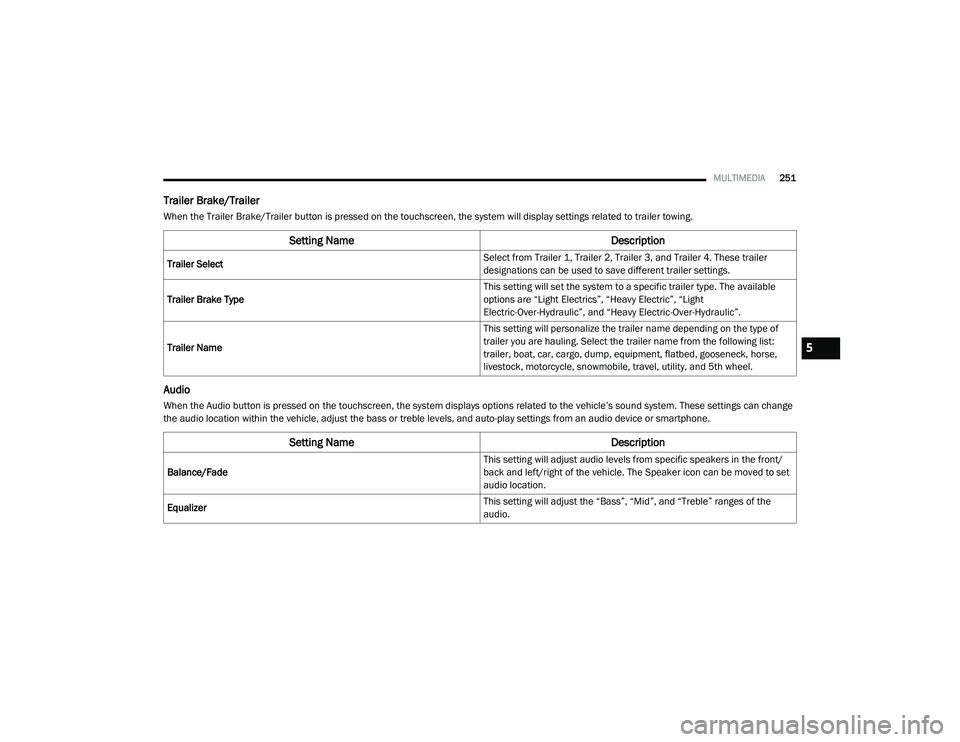
Trailer Brake/Trailer
When the Trailer Brake/Trailer button is pressed on the touchscreen, the system will display settings related to trailer towing.
Audio
When the Audio button is pressed on the touchscreen, the system displays options related to the vehicle’s sound system. These settings can change
the audio location within the vehicle, adjust the bass or treble levels, and auto-play settings from an audio device or smartphone.
Setting Name Description
Trailer Select Select from Trailer 1, Trailer 2, Trailer 3, and Trailer 4. These trailer
designations can be used to save different trailer settings.
Trailer Brake Type This setting will set the system to a specific trailer type. The available
options are “Light Electrics”, “Heavy Electric”, “Light
Electric-Over-Hydraulic”, and “Heavy Electric-Over-Hydraulic”.
Trailer Name This setting will personalize the trailer name depending on the type of
trailer you are hauling. Select the trailer name from the following list:
trailer, boat, car, cargo, dump, equipment, flatbed, gooseneck, horse,
livestock, motorcycle, snowmobile, travel, utility, and 5th wheel.
Setting Name
Description
Balance/Fade This setting will adjust audio levels from specific speakers in the front/
back and left/right of the vehicle. The Speaker icon can be moved to set
audio location.
Equalizer This setting will adjust the “Bass”, “Mid”, and “Treble” ranges of the
audio.
5
21_DT_OM_EN_USC_t.book Page 251
Page 254 of 496

252MULTIMEDIA
Phone/Bluetooth®
When the Phone/Bluetooth® button is pressed on the touchscreen, the system displays the options related to Bluetooth® connectivity from an external
audio device or smartphone. The list of paired audio devices or smartphones can be accessed from this menu.Speed Adjusted Volume
This setting will adjust audio volume as speeds increase. At a higher
setting, the volume will increase more as the vehicle speeds up. The
available setting are “Off”, “1”, “2”, and “3”.
Surround Sound — If Equipped This setting will turn the Surround Sound system on or off.
AUX Volume Offset This setting will tune the audio levels from a device connected through
the AUX port. The available settings are “+” and “-”.
Auto Play This setting will automatically begin playing audio from a connected
device.
Loudness This setting will improve audio quality at lower volumes.
Setting NameDescription
Setting NameDescription
Phone Pop-Ups Displayed In Cluster This setting will activate phone message pop-ups in the instrument
cluster display.
Do Not Disturb This setting will open the “Do Not Disturb” settings menu. The settings
are Auto Reply (both, text, call), Auto Reply Message (custom, default),
and Custom Auto Reply Message (create message).
Paired Phones This setting will show the list of paired phones.
Paired Audio Sources This setting will show the list of paired audio sources.
Paired Phones And Audio Devices This setting will show the list of paired phones and audio devices.
21_DT_OM_EN_USC_t.book Page 252
Page 258 of 496
256MULTIMEDIA
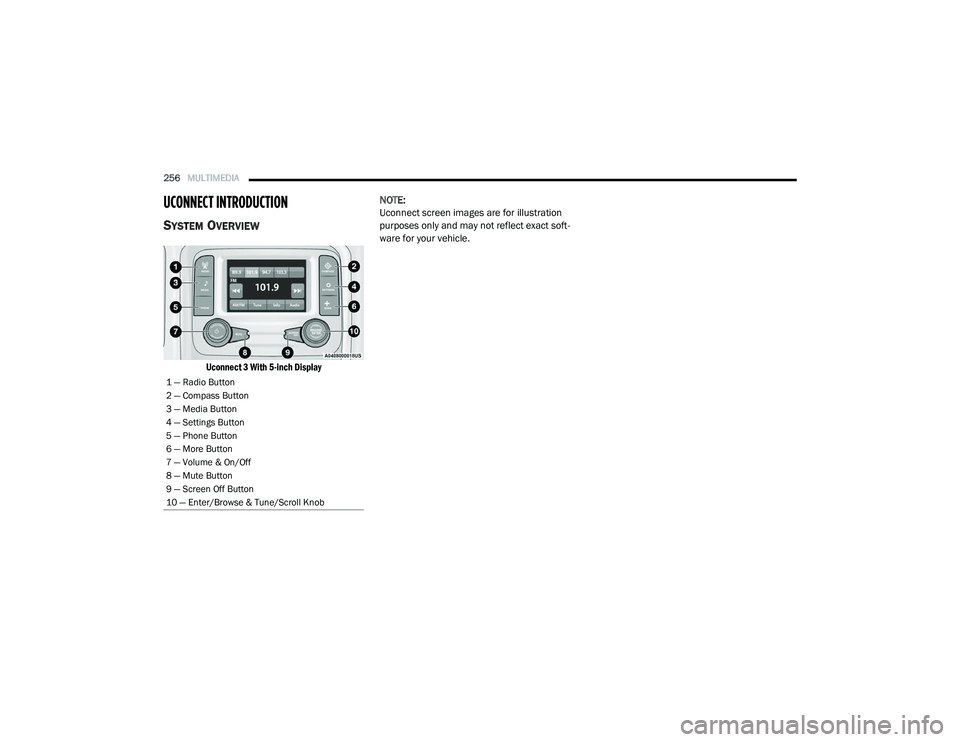
UCONNECT INTRODUCTION
SYSTEM OVERVIEW
Uconnect 3 With 5-inch Display
NOTE:
Uconnect screen images are for illustration
purposes only and may not reflect exact soft
-
ware for your vehicle.
1 — Radio Button
2 — Compass Button
3 — Media Button
4 — Settings Button
5 — Phone Button
6 — More Button
7 — Volume & On/Off
8 — Mute Button
9 — Screen Off Button
10 — Enter/Browse & Tune/Scroll Knob
21_DT_OM_EN_USC_t.book Page 256