phone RAM 1500 2021 Service Manual
[x] Cancel search | Manufacturer: RAM, Model Year: 2021, Model line: 1500, Model: RAM 1500 2021Pages: 496, PDF Size: 20.89 MB
Page 307 of 496
MULTIMEDIA305
2.Why do I need an email address? Without
an email address, customers cannot
register for SiriusXM Guardian™. Customers
need to register so they can subscribe to
receive additional services and create a
SiriusXM Guardian™ Security PIN for
remote command requests.
3. How do I create a SiriusXM Guardian™
security PIN? Set up your SiriusXM
Guardian™ Security PIN during the
registration process. The SiriusXM
Guardian™ Security PIN will be required to
authenticate you when accessing your
account via SiriusXM Guardian™ Call or
performing any remote services, such as
Remote Door Lock/Unlock, Remote Horn &
Lights, or Remote Vehicle Start.
4. What if I forgot my SiriusXM Guardian™
security PIN? If you’ve already activated
services and forgot your SiriusXM
Guardian™ Security PIN, you can reset the
PIN by selecting Edit Profile on your Owner’s
Site.
5. How do I update my SiriusXM Guardian™
payment account address? Your SiriusXM
Guardian™ Payment Account address can be updated online, or by calling SiriusXM
Guardian™ Customer Care from ASSIST in
your vehicle. To update online: login to your
Owner’s Site, and select Edit Profile >
SiriusXM Guardian™ Payment Account.
6. How do I update my SiriusXM Guardian™
profile? Your name, home address, phone
number, email address and SiriusXM
Guardian™ Security PIN can be updated
online on your Owner’s Site. Log in to your
Owner’s Site then select Edit Profile to edit
your personal information. Make your edits
and click Save.
7. Can I try features or packages before I buy
them? Your new vehicle purchase may have
come with an included trial period for
certain Apps and services.
8. Can I access every App and service while
driving? No, some applications and services
are not available while driving. For your own
safety, it is not possible to use some of the
touchscreen features while the vehicle is in
motion (e.g. key pad).
9. What happens when my subscription
comes up for renewal? If you have added a
credit card to your account information, your subscription will be automatically
renewed for a term length in accordance
with the service plan that you have selected
at the then current subscription rate and on
every renewal date thereafter, unless you
cancel your subscription by calling SiriusXM
Guardian™ Care. If you have not added a
credit card to your account, SiriusXM
Guardian™ will send you an email or letter
in advance of your expiration date to remind
you that your subscription is ending soon.
10. How do I manage my SiriusXM Guardian™
notification preferences? Contact SiriusXM
Guardian™ Customer Care, or go to your
Owner’s Site and then update your
preferences on the SiriusXM Guardian™
customer web portal.
11. How do I purchase a subscription? Contact
SiriusXM Guardian™ Customer Care by
pushing the ASSIST button on your rearview
mirror.
12. How do I update my credit card
information? Login to your Owner’s Site,
and select Edit Profile, then select SiriusXM
Guardian™ Payment Account.
5
21_DT_OM_EN_USC_t.book Page 305
Page 308 of 496
306MULTIMEDIA
13.How do I find out how much longer I have on
my subscription? Contact SiriusXM
Guardian™ Customer Care.
You also can visit your Owner’s Site and
choose a subscription to view its expiration
date. When your subscription is about to ex -
pire, you will receive an email or letter of no -
tification.
14. Can I get a refund if I have not used the
entire subscription? Prorated refunds are
provided from the date of cancellation for
annual plans or longer. Please see the
Uconnect and SiriusXM Guardian™ Terms &
Conditions for refunds related to billing
plans of other lengths and other circum -
stances.
15. Can I cancel a subscription before it
expires? Yes. If you have an annual
subscription, your subscription will be
canceled the day you cancel. If you have a
monthly subscription, your subscription will
be canceled on the last day of the month in
which you choose to cancel. 16.
What should I do if I want to sell my vehicle?
Before your vehicle is sold to a new owner,
you’ll want to remove your account
information. This process removes all
personal information, returns the Uconnect
system to its original factory settings,
removes all SiriusXM Guardian™ services
and account information. To remove your
account information from the Uconnect
system, contact SiriusXM Guardian™
Customer Care.
17. What if I forgot to remove my account
information before I returned my lease
vehicle or sold it? Contact SiriusXM
Guardian™ Customer Care.
18. What will happen if an operable LTE (voice/
data), 4G (data), or 5G (data) network
connection compatible with my device is
temporarily unavailable? The SOS Call and
ASSIST buttons will NOT function if you are
not connected to an operable LTE (voice/
data) or 3G, 4G (data), 5G (data) network.
Services that required your smartphone
only direct calls to Roadside Assistance Call
may be functioning if you have an operable
network.DATA COLLECTION & PRIVACY
The Uconnect system collects and transmits
data which may include information about your
vehicle, your vehicle’s health and performance,
your vehicle’s location, your utilization of the
features in your vehicle, and other data. The
collection, use and sharing of this information is
required to provide the SiriusXM Guardian™
services and is further described by the
Uconnect Privacy Policy, which can be found at
www.driveuconnect.com/connectedservices/
privacy (US Residents) or
www.driveuconnect.ca (Canadian Residents).
This information may be collected by SiriusXM®
Connected Vehicle Services Inc. and shared
with FCA US LLC for the purposes stated in the
Uconnect Privacy Policy. Vehicle health and
diagnostic information including location data
may be used by Uconnect to provide a Vehicle
Health Report to you.
Even if you cancel your SiriusXM Guardian™
subscription, this vehicle diagnostic health
information, including location data, may still be
transmitted from your vehicle and you may still
have a Vehicle Health Report sent to you.
21_DT_OM_EN_USC_t.book Page 306
Page 311 of 496
MULTIMEDIA309
SUSPENSION
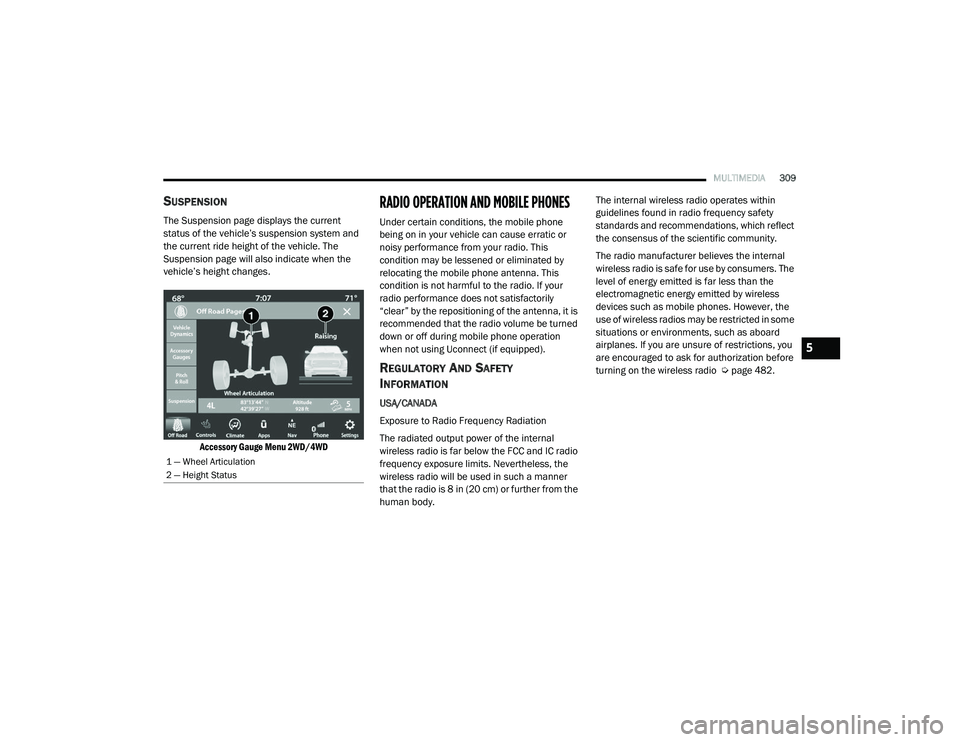
The Suspension page displays the current
status of the vehicle’s suspension system and
the current ride height of the vehicle. The
Suspension page will also indicate when the
vehicle’s height changes.
Accessory Gauge Menu 2WD/4WD
RADIO OPERATION AND MOBILE PHONES
Under certain conditions, the mobile phone
being on in your vehicle can cause erratic or
noisy performance from your radio. This
condition may be lessened or eliminated by
relocating the mobile phone antenna. This
condition is not harmful to the radio. If your
radio performance does not satisfactorily
“clear” by the repositioning of the antenna, it is
recommended that the radio volume be turned
down or off during mobile phone operation
when not using Uconnect (if equipped).
REGULATORY AND SAFETY
I
NFORMATION
USA/CANADA
Exposure to Radio Frequency Radiation
The radiated output power of the internal
wireless radio is far below the FCC and IC radio
frequency exposure limits. Nevertheless, the
wireless radio will be used in such a manner
that the radio is 8 in (20 cm) or further from the
human body. The internal wireless radio operates within
guidelines found in radio frequency safety
standards and recommendations, which reflect
the consensus of the scientific community.
The radio manufacturer believes the internal
wireless radio is safe for use by consumers. The
level of energy emitted is far less than the
electromagnetic energy emitted by wireless
devices such as mobile phones. However, the
use of wireless radios may be restricted in some
situations or environments, such as aboard
airplanes. If you are unsure of restrictions, you
are encouraged to ask for authorization before
turning on the wireless radio Ú
page 482.
1 — Wheel Articulation
2 — Height Status
5
21_DT_OM_EN_USC_t.book Page 309
Page 481 of 496
479
CUSTOMER ASSISTANCE
SUGGESTIONS FOR OBTAINING SERVICE
FOR YOUR VEHICLE
PREPARE FOR THE APPOINTMENT
All work to be performed may not be covered by
the warranty. Discuss additional charges with
the service manager. Keep a maintenance log
of your vehicle's service history. This can often
provide a clue to the current problem.
PREPARE A LIST
Make a written list of your vehicle's problems or
the specific work you want done. If you've had
an accident or work done that is not on your
maintenance log, let the service advisor know.
BE REASONABLE WITH REQUESTS
If you list a number of items and you must have
your vehicle by the end of the day, discuss the
situation with the service advisor and list the
items in order of priority. At many authorized
dealers, you may obtain a rental vehicle (additional charges may apply). If you need a
rental, it is advisable to make these
arrangements when you call for an
appointment.
IF YOU NEED ASSISTANCE
FCA US LLC and its authorized dealers are vitally
interested in your satisfaction. We want you to
be happy with our products and services.
Warranty service must be done by an
authorized dealer. We strongly recommend that
you take the vehicle to an authorized dealer.
They know your vehicle the best, and are most
concerned that you get prompt and high quality
service. FCA US LLC's authorized dealers have
the facilities, factory-trained technicians,
special tools, and the latest information to
ensure the vehicle is fixed correctly and in a
timely manner.
This is why you should always talk to an
authorized dealer’s service manager first. If for
some reason you are still not satisfied, talk to
the general manager or owner of the authorized
dealer. They want to know if you need
assistance. If an authorized dealer is unable to
resolve the concern, you may contact the FCA
US LLC's Customer Assistance center.
Any communication to FCA US LLC's customer
center should include the following information:
Owner's name and address
Owner's telephone number (home, mobile,
and office)
Authorized dealer name
Vehicle Identification Number (VIN)
Vehicle delivery date and mileage
FCA U S LLC CUSTOMER CENTER
P.O. Box 21–8004
Auburn Hills, MI 48321–8004
Phone: (866) 726-463610
21_DT_OM_EN_USC_t.book Page 479
Page 482 of 496

480CUSTOMER ASSISTANCE
FCA CANADA INC. CUSTOMER CENTER
P.O. Box 1621
Windsor, Ontario N9A 4H6
Phone: (800) 465-2001 English /
(800) 387-9983 French
MEXICO
Av. Prolongacion Paseo de la Reforma, 1240
Sante Fe C.P. 05109
Mexico, D. F.
In Mexico City: 800-505-1300
Outside Mexico City: +(52) 55 50817568
PUERTO RICO AND US VIRGIN ISLANDS
FCA Caribbean LLC
P.O. Box 191857
San Juan 00919-1857
Phone: (866) 726-4636
Fax: (787) 782-3345
CUSTOMER ASSISTANCE FOR THE
H
EARING OR SPEECH IMPAIRED (TDD/
TTY)
To assist customers who have hearing
difficulties, FCA US LLC has installed special
TDD (Telecommunication Devices for the Deaf)
equipment at its customer center. Any hearing
or speech impaired customer, who has access
to a TDD or a conventional teletypewriter (TTY)
in the United States, can communicate with FCA
US LLC by dialing 1-800-380-2479.
Canadian residents with hearing difficulties that
require assistance can use the special needs
relay service offered by Bell Canada. For TTY
teletypewriter users, dial 711 and for Voice
callers, dial 1-800-855-0511 to connect with a
Bell Relay Service operator.
SERVICE CONTRACT
You may have purchased a service contract for
a vehicle to help protect you from the high cost
of unexpected repairs after the FCA US LLC's
New Vehicle Limited Warranty expires. The
Mopar Vehicle Protection plans are the ONLY
vehicle extended protection plans authorized,
endorsed and backed by FCA US LLC to provide
additional protection beyond your vehicle’s
warranty. If you purchased a Mopar Vehicle
Protection Plan, you will receive Plan Provisions
and an Owner Identification Card in the mail
within three weeks of the vehicle delivery date.
If you have any questions about the service
contract, call the FCA US LLC's Service Contract
National Customer Hotline at 1-800-521-9922
(Canadian residents, call (800) 465-2001
English / (800) 387-9983 French).
FCA US LLC is not responsible for any service
contract you may have purchased from another
manufacturer. If you require service after the
FCA US LLC New Vehicle Limited Warranty
expires, please refer to the contract documents,
and contact the person listed in those
documents.
21_DT_OM_EN_USC_t.book Page 480
Page 484 of 496

482CUSTOMER ASSISTANCE
PUBLICATION ORDER FORMS
To order the following manuals, you may use
either the website or the phone numbers listed
below.
Service Manuals
These comprehensive Service Manuals provide
a complete working knowledge of the vehicle,
system, and/or components and is written in
straightforward language with illustrations,
diagrams, and charts.
Diagnostic Procedure Manuals
Diagnostic Procedure Manuals are filled with
diagrams, charts and detailed illustrations.
These manuals make it easy to find and fix
problems on computer-controlled vehicle
systems and features. They show exactly how to
find and correct problems, using step-by-step
troubleshooting and drivability procedures,
proven diagnostic tests and a complete list of all
tools and equipment.
Owner's Manuals
These Owner's Manuals have been prepared
with the assistance of service and engineering
specialists to acquaint you with specific FCA US
LLC vehicles. To access your Owner's Information online, visit
www.mopar.com/om
To order a hard copy of your Owner’s
Information, visit:
www.techauthority.com (US)
Or
Call Tech Authority toll free at:
1-800-890-4038 (US)
1-800-387-1143 (Canada)
GENERAL INFORMATION
The following regulatory statement applies to all
Radio Frequency (RF) devices equipped in this
vehicle:
This device complies with Part 15 of the FCC
Rules and with Innovation, Science and
Economic Development Canada license-exempt
RSS standard(s). Operation is subject to the
following two conditions:
1. This device may not cause harmful interference, and
2. This device must accept any interference received, including interference that may
cause undesired operation. Le présent appareil est conforme aux CNR
d`Innovation, Science and Economic
Development applicables aux appareils radio
exempts de licence. L'exploitation est autorisée
aux deux conditions suivantes:
1. l'appareil ne doit pas produire de
brouillage, et
2. l'utilisateur de l'appareil doit accepter tout brouillage radioélectrique subi, même si le
brouillage est susceptible d'en compro -
mettre le fonctionnement.
La operación de este equipo está sujeta a las
siguientes dos condiciones:
1. es posible que este equipo o dispositivo no cause interferencia perjudicial y
2. este equipo o dispositivo debe aceptar cualquier interferencia, incluyendo la que
pueda causar su operación no deseada.
NOTE:
Changes or modifications not expressly
approved by the party responsible for compli -
ance could void the user’s authority to operate
the equipment.
21_DT_OM_EN_USC_t.book Page 482
Page 485 of 496

483
INDEX
A
Adaptive Cruise Control (ACC) (Cruise
Control)
................................................ 177, 179Adding Engine Coolant (Antifreeze)............... 422Adding Fuel.......................................... 208, 210Additives, Fuel............................................... 469AdjustDown........................................................... 36Forward....................................................... 36Rearward..................................................... 36Up................................................................ 36Adjustable Pedals............................................ 43Advance Phone Connectivity......................... 279Air BagAir Bag Operation...................................... 344Air Bag Warning Light...................... 342, 345Enhanced Accident Response......... 353, 394Event Data Recorder (EDR)....................... 394Front Air Bag............................................. 345If Deployment Occurs................................ 352Knee Impact Bolsters................................ 349Maintaining Your Air Bag System.............. 354Maintenance............................................. 354Redundant Air Bag Warning Light.............343Transporting Pets...................................... 369Air Bag Light............................... 126, 342, 369
Air Cleaner, Engine (Engine Air Cleaner
Filter)............................................................ 411Air Conditioner Maintenance........................ 415Air Conditioner Refrigerant........................... 415Air Conditioner System................................. 415Air Conditioning................................................ 63Air Conditioning Filter..............................67, 415Air Conditioning System................................... 65Air Conditioning, Operating Tips....................... 66Air Filter........................................................ 411Air PressureTires......................................................... 450Air Suspension..................................... 165, 169AlarmSecurity Alarm....................................26, 127Alterations/ModificationsVehicle......................................................... 11Antifreeze (Engine Coolant)................. 422, 474Disposal................................................... 423Anti-Lock Brake System (ABS)...................... 310Anti-Lock Warning Light................................ 132Assist, Hill Start............................................. 317Audio Settings............................................... 266Audio Systems (Radio).................................. 236Auto Down Power Windows............................. 78Automatic Door Locks...................................... 30
Automatic Headlights.......................................54Automatic High Beams.....................................53Automatic Tailgate Release.............................85Automatic Temperature Control (ATC)..............65Automatic Transmission....................... 156, 426Adding Fluid.............................................. 426Fluid And Filter Change............................. 426Fluid Change............................................. 426Fluid Level Check...................................... 426Fluid Type........................................ 426, 478Special Additives...................................... 426Automatic Transmission Limp Home Mode... 159AutoPark....................................................... 141AUX Camera......................................... 204, 208Auxiliary Driving Systems.............................. 318Axle Fluid.............................................. 426, 478Axle Lubrication............................................ 426
B
Back-Up......................................................... 202Back-Up Camera........................................... 202Battery................................................. 128, 409Charging System Light.............................. 128Keyless Key Fob Replacement....................18Battery Saver Feature......................................57Belts, Seat.................................................... 369
11
21_DT_OM_EN_USC_t.book Page 483
Page 486 of 496
484
Blind Spot Monitoring
.................................... 318Bluetooth Connecting To A Particular Mobile PhoneOr Audio Device After Pairing
................275Body Builders Guide........................................ 11Body Mechanism Lubrication........................ 418B-Pillar Location............................................. 447Brake Assist System...................................... 311Brake Control System.................................... 311Brake Fluid.......................................... 425, 478Brake System...................................... 425, 467Fluid Check............................................... 425Master Cylinder......................................... 425Parking...................................................... 151Warning Light............................................ 126Brake/Transmission Interlock....................... 155Bulb Replacement......................................... 437Bulbs, Light.......................................... 371, 437
C
Camera.......................................................... 202Camera, AUX........................................ 204, 208Camera, Rear...................................... 202, 204Camper............................................................ 97Capacities, Fuel............................................. 474Caps, FillerOil (Engine)................................................ 404Radiator (Coolant Pressure)...................... 423Car Washes................................................... 462
Carbon Monoxide Warning................... 371, 372Cargo Light....................................................... 56CD................................................................. 268Cellular Phone.............................................. 309Center High Mounted Stop Light................... 442Center Seat Storage Compartment.................. 68Charge Air Cooler.......................................... 424Chart, Tire Sizing........................................... 444Check Engine Light (Malfunction Indicator
Light)............................................................. 138Checking Your Vehicle For Safety................. 369Checks, Safety.............................................. 369Child Restraint.............................................. 355Child RestraintsBooster Seats........................................... 358Child Seat Installation..................... 364, 365How To Stow An unused ALR Seat Belt.... 363Infant And Child Restraints....................... 357Locating The LATCH Anchorages.............. 362Lower Anchors And Tethers For Children.. 360Older Children And Child Restraints......... 357Seating Positions...................................... 359Clean Air Gasoline......................................... 469CleaningWheels..................................................... 456Climate Control................................................ 60Automatic.................................................... 60Manual........................................................ 63Cold Weather Operation............................... 146
Compact Spare Tire...................................... 455Connected Services...................................... 282Connected Services FAQ............................... 301Connected Services Features....................... 286Connected Services, Getting Started............ 284Connected Services, Introduction................. 282Contract, Service........................................... 480Controls........................................................ 259Cooling Pressure Cap (Radiator Cap)............ 423Cooling System............................................. 421Adding Coolant (Antifreeze)...................... 422Coolant Level................................... 421, 423Cooling Capacity....................................... 474Disposal Of Used Coolant......................... 423Drain, Flush, And Refill............................. 422Inspection................................................. 423Points To Remember................................ 424Pressure Cap............................................ 423Radiator Cap............................................. 423Selection Of Coolant (Antifreeze)......................... 422, 474, 475Corrosion Protection..................................... 461Cruise ControlAccel/Decel.............................................. 178Cancel....................................................... 179Resume.................................................... 179Cruise Control (Speed Control)............. 177, 179Cruise Light................................................... 136Customer Assistance.................................... 479Cybersecurity................................................ 236
21_DT_OM_EN_USC_t.book Page 484
Page 487 of 496
485
D
Daytime Running Lights
................................... 53Dealer Service............................................... 409Defroster, Rear Window................................... 63Defroster, Windshield............................. 63, 369Deleting A Phone........................................... 275Diagnostic System, Onboard......................... 137Diesel Fuel..................................................... 471Diesel Fuel Requirements............................. 471Bulk Storage Of......................................... 210Diesel Fuel System, Re-Priming..................... 414Differential, Limited Slip................................ 174Disable Vehicle Towing.................................. 392Disc Drive...................................................... 268Disconnecting................................................ 275Disposal Antifreeze (Engine Coolant)....................... 423Disturb........................................................... 278Door Ajar........................................................ 129Door Ajar Light............................................... 129Door LocksAutomatic.................................................... 30Doors............................................................... 27Draining Fuel/Water Separator Filter............ 412Driver Memory Presets.................................. 265Driver’s Seat Back Tilt..................................... 34DrivingThrough Flowing, Rising, Or Shallow Standing Water
..................................... 234Dual Rear Wheels.......................................... 467
E
Electric Brake Control System....................... 311Anti-Lock Brake System............................ 310Electronic Roll Mitigation................. 312, 318Electric Parking Brake................................... 151Electrical Power Outlets................................... 74Electronic Range Select (ERS)...................... 159Electronic Stability Control (ESC).................. 312Electronic Throttle Control Warning Light...... 128Electronically Shifted Transfer Case.... 161, 163Emergency Braking....................................... 327Emergency Gas Can Refueling...................... 389Emergency, In Case OfFreeing Vehicle When Stuck..................... 391Hazard Warning Flasher........................... 373Jump Starting........................................... 386Emission Control System Maintenance........ 138Engine........................................................... 404Air Cleaner................................................ 411Block Heater............................................. 150Break-In Recommendations..................... 150Compartment................404, 405, 406, 407Compartment Identification.............404, 405, 406, 407Coolant (Antifreeze).................................. 475Exhaust Gas Caution....................... 371, 372Fails To Start............................................ 144Flooded, Starting...................................... 144Fuel Requirements.......................... 468, 474Idling........................................................ 148
Jump Starting........................................... 386Oil...........................................410, 474, 475Oil Filler Cap............................................. 404Oil Filter.................................................... 410Oil Selection..................................... 410, 474Oil Synthetic.............................................. 410Overheating.............................................. 389Starting............................................ 143, 144Enhanced Accident Response
Feature................................................ 353, 394Entry System, Illuminated................................58Ethanol.......................................................... 469Exhaust Gas Cautions.......................... 371, 372Exhaust System................................... 371, 420Exterior Lighting...............................................52Exterior Lights........................................ 52, 371
F
Family Alerts................................................. 300FiltersAir Cleaner................................................ 411Air Conditioning................................. 67, 415Engine Fuel............................................... 412Engine Oil........................................ 410, 475Engine Oil Disposal................................... 410FlashersTurn Signals.............................. 55, 136, 371Flash-To-Pass...................................................54Flat Tire Stowage.......................................... 384Fluid Capacities............................................ 474
11
21_DT_OM_EN_USC_t.book Page 485
Page 490 of 496
488
Malfunction Indicator Light (Check
Engine)
.......................................................... 130Manual Service...................................................... 482Media Hub....................................................... 72Media Mode.................................................. 268Memory Seat................................................... 32Memory Settings............................................. 32Methanol....................................................... 469Mirrors............................................................. 44Electric Powered......................................... 47Heated........................................................ 48Memory....................................................... 32Outside........................................................ 46Rearview..................................... 44, 45, 373Trailer Towing.............................................. 48Modifications/AlterationsVehicle........................................................ 11Monitor, Tire Pressure System....................... 327Mopar Parts................................................... 481MP3 Control.................................................... 72Multi-Function Control Lever............................ 53
N
New Vehicle Break-In Period................ 150, 151
O
Occupant Restraints...................................... 334Octane Rating, Gasoline (Fuel)............ 468, 469Off-Pavement Driving (Off-Road).................... 235
Off-Road Driving (Off-Pavement)................... 235Oil Filter, Change.......................................... 410Oil Filter, Selection........................................ 410Oil Pressure Light.......................................... 128Oil, Engine............................................ 410, 475Capacity.................................................... 474Dipstick.................................................... 408Disposal................................................... 410Filter................................................ 410, 475Filter Disposal........................................... 410Identification Logo.................................... 410Materials Added To.................................. 410Pressure Warning Light............................ 128Recommendation............................ 410, 474Synthetic.................................................. 410Viscosity................................................... 474Onboard Diagnostic System.......................... 137Operating Precautions.................................. 137Operator ManualOwner's Manual........................................ 482Outside Rearview Mirrors................................ 46Overheating, Engine...................................... 389
P
Paint Care..................................................... 461Parking Brake............................................... 151ParkSense Active Park Assist........................ 195ParkSense System, Rear.............................. 189Passive Entry................................................... 28Pedals, Adjustable........................................... 43
Pets............................................................... 369Phone Mode.................................................. 271Pickup Box................................................90, 92Pinch Protection........................................81, 83Placard, Tire And Loading Information.......... 447PowerDistribution Center (Fuses).............. 428, 432Door Locks...................................................28Mirrors.........................................................47Outlet (Auxiliary Electrical Outlet)..........74, 75Seats...........................................................36Side Steps...................................................28Sliding Rear Window....................................79Steering............................................. 47, 174Sunroof.................................................80, 82Windows......................................................77Power SeatsDown...........................................................36Forward.......................................................36Rearward.....................................................36Recline.........................................................37Tilt................................................................37Up................................................................36Pregnant Women And Seat Belts.................. 340Presets.......................................................... 265PretensionersSeat Belts................................................. 340
21_DT_OM_EN_USC_t.book Page 488