towing RAM 1500 2021 User Guide
[x] Cancel search | Manufacturer: RAM, Model Year: 2021, Model line: 1500, Model: RAM 1500 2021Pages: 496, PDF Size: 20.89 MB
Page 139 of 496
GETTING TO KNOW YOUR INSTRUMENT PANEL137
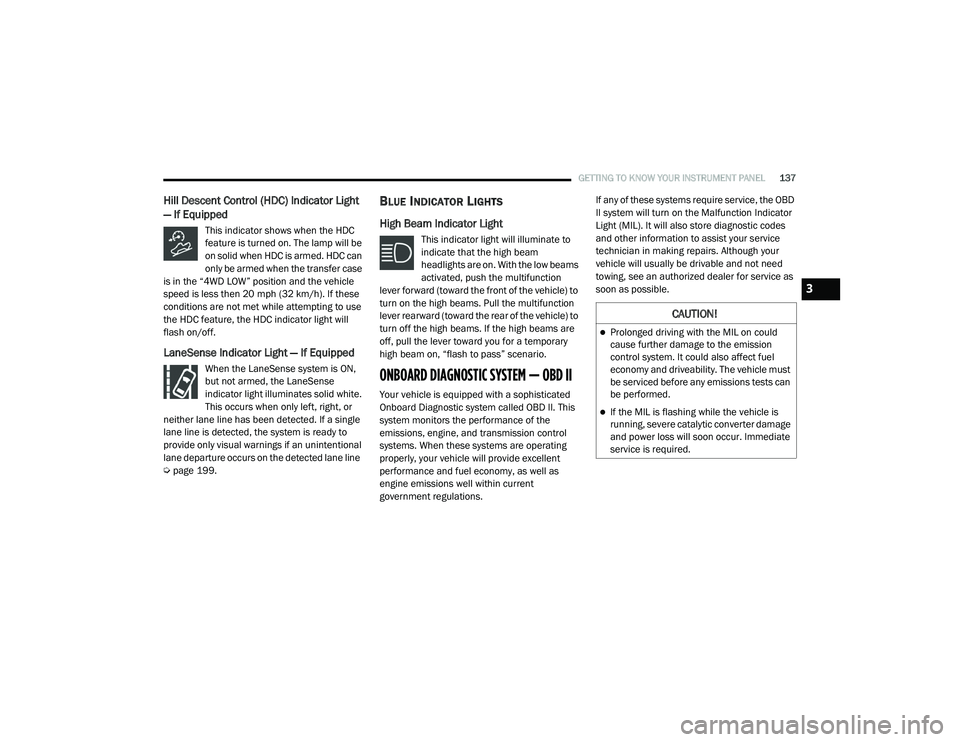
Hill Descent Control (HDC) Indicator Light
— If Equipped
This indicator shows when the HDC
feature is turned on. The lamp will be
on solid when HDC is armed. HDC can
only be armed when the transfer case
is in the “4WD LOW” position and the vehicle
speed is less then 20 mph (32 km/h). If these
conditions are not met while attempting to use
the HDC feature, the HDC indicator light will
flash on/off.
LaneSense Indicator Light — If Equipped
When the LaneSense system is ON,
but not armed, the LaneSense
indicator light illuminates solid white.
This occurs when only left, right, or
neither lane line has been detected. If a single
lane line is detected, the system is ready to
provide only visual warnings if an unintentional
lane departure occurs on the detected lane line
Ú page 199.
BLUE INDICATOR LIGHTS
High Beam Indicator Light
This indicator light will illuminate to
indicate that the high beam
headlights are on. With the low beams
activated, push the multifunction
lever forward (toward the front of the vehicle) to
turn on the high beams. Pull the multifunction
lever rearward (toward the rear of the vehicle) to
turn off the high beams. If the high beams are
off, pull the lever toward you for a temporary
high beam on, “flash to pass” scenario.
ONBOARD DIAGNOSTIC SYSTEM — OBD II
Your vehicle is equipped with a sophisticated
Onboard Diagnostic system called OBD II. This
system monitors the performance of the
emissions, engine, and transmission control
systems. When these systems are operating
properly, your vehicle will provide excellent
performance and fuel economy, as well as
engine emissions well within current
government regulations. If any of these systems require service, the OBD
II system will turn on the Malfunction Indicator
Light (MIL). It will also store diagnostic codes
and other information to assist your service
technician in making repairs. Although your
vehicle will usually be drivable and not need
towing, see an authorized dealer for service as
soon as possible.
CAUTION!
Prolonged driving with the MIL on could
cause further damage to the emission
control system. It could also affect fuel
economy and driveability. The vehicle must
be serviced before any emissions tests can
be performed.
If the MIL is flashing while the vehicle is
running, severe catalytic converter damage
and power loss will soon occur. Immediate
service is required.
3
21_DT_OM_EN_USC_t.book Page 137
Page 153 of 496

STARTING AND OPERATING151
ENGINE BREAK-IN RECOMMENDATIONS —
DIESEL ENGINE
The diesel engine does not require a break-in
period due to its construction. Normal operation
is allowed, providing the following
recommendations are followed:
Warm up the engine before placing it under
load.
Do not operate the engine at idle for
prolonged periods.
Observe vehicle oil pressure and tempera -
ture indicators.
Check the coolant and oil levels frequently.
Vary throttle position at highway speeds
when carrying or towing significant weight.
NOTE:
Light duty operation such as light trailer towing
or no load operation will extend the time before
the engine is at full efficiency. Reduced fuel
economy and power may be seen at this time.
The engine oil installed in the engine at the
factory is a high-quality energy conserving type
lubricant. Oil changes should be consistent with anticipated climate conditions under which
vehicle operations will occur. For the
recommended viscosity and quality grades
Ú
page 475.
NOTE:
NON-DETERGENT OR STRAIGHT MINERAL OILS
MUST NEVER BE USED.
PARKING BRAKE
ELECTRIC PARK BRAKE (EPB)
Your vehicle is equipped with an EPB that offers
simple operation, and some additional features
that make the parking brake more convenient
and useful.
The parking brake is primarily intended to
prevent the vehicle from rolling while parked.
Before leaving the vehicle, make sure that the
parking brake is applied. Also, be certain to
leave the transmission in PARK.
You can engage the parking brake in two ways:
Manually, by applying the parking brake
switch.
Automatically, by enabling the Auto Park
Brake feature in the customer programmable
features section of the Uconnect settings. The parking brake switch is located on the
instrument panel to the left of the steering
wheel (below the headlamp switch).
Electric Park Brake Switch
To apply the parking brake manually, pull up on
the switch momentarily. You may hear a slight
sound from the back of the vehicle while the
parking brake engages. Once the park brake is
fully engaged, the BRAKE telltale light in the
instrument cluster and an indicator on the
switch will illuminate. If your foot is on the brake
pedal while you apply the parking brake, you
may notice a small amount of brake pedal
movement. The parking brake can be applied
even when the ignition switch is OFF but the
BRAKE telltale light will not illuminate, however,
it can only be released when the ignition is in
the ON/RUN mode.
4
21_DT_OM_EN_USC_t.book Page 151
Page 160 of 496

158STARTING AND OPERATING
The following indicators should be used to
ensure that you have properly engaged the
transmission into the PARK position:
Look at the transmission gear position
display and verify that it indicates the PARK
position (P), and is not blinking.
With brake pedal released, verify that the
gear selector will not move out of PARK.
REVERSE (R)
This range is for moving the vehicle backward.
Shift into REVERSE only after the vehicle has
come to a complete stop.
NEUTRAL (N)
Use this range when the vehicle is standing for
prolonged periods with the engine running.
Apply the parking brake and shift the
transmission into PARK if you must exit the
vehicle. DRIVE (D)
This range should be used for most city and
highway driving. It provides the smoothest
upshifts and downshifts, and the best fuel
economy. The transmission automatically
upshifts through all forward gears.
When frequent transmission shifting occurs
(such as when operating the vehicle under
heavy loading conditions, in hilly terrain,
traveling into strong head winds, or while towing
a heavy trailer), select TOW/HAUL mode or use
the Electronic Range Select (ERS) shift control
to select a lower gear range
Úpage 159. Under
these conditions, using a lower gear range will
improve performance and extend transmission
life by reducing excessive shifting and heat
buildup.
Do not leave the key fob in or near the
vehicle (or in a location accessible to chil -
dren), and do not leave the ignition in the
ACC or ON/RUN mode. A child could
operate power windows, other controls, or
move the vehicle.
CAUTION!
DO NOT race the engine when shifting from
PARK or NEUTRAL into another gear range,
as this can damage the drivetrain.
Before moving the transmission gear
selector out of PARK, you must start the
engine, and also press the brake pedal.
Otherwise, damage to the gear selector
could result.
WARNING! (Continued)
WARNING!
Do not coast in NEUTRAL and never turn off
the ignition to coast down a hill. These are
unsafe practices that limit your response to
changing traffic or road conditions. You might
lose control of the vehicle and have a
collision.
CAUTION!
Towing the vehicle, coasting, or driving for any
other reason with the transmission in
NEUTRAL can cause severe transmission
damage.
For Recreational Towing Ú page 231.
For Towing A Disabled Vehicle Ú page 392.
21_DT_OM_EN_USC_t.book Page 158
Page 162 of 496

160STARTING AND OPERATING
Electronic Range Select (ERS)
To exit ERS mode, simply push and hold the +
button until the gear limit display disappears
from the instrument cluster.
When to Use TOW/HAUL Mode
Select TOW/HAUL mode when driving in
conditions such as: driving in hilly areas, towing
a trailer, carrying a heavy load, etc. This mode
will improve performance and reduce the
potential for transmission overheating or failure
due to excessive shifting.
TOW/HAUL Switch
The “TOW/HAUL Indicator Light” will illuminate
in the instrument cluster to indicate that TOW/
HAUL mode has been activated. Pushing the
switch a second time restores normal
operation. Normal operation is always the
default at engine start-up. If TOW/HAUL mode is
desired, the switch must be pushed each time
the engine is started.
1 — Shift Up (+)
2 — Shift Down (–)
WARNING!
Do not downshift for additional engine brak
-
ing on a slippery surface. The drive wheels
could lose their grip and the vehicle could
skid, causing a collision or personal injury.
WARNING!
Do not use the “TOW/HAUL” feature when
driving in icy or slippery conditions. The
increased engine braking can cause the rear
wheels to slide, and the vehicle to swing
around with the possible loss of vehicle con -
trol, which may cause an accident possibly
resulting in personal injury or death.
21_DT_OM_EN_USC_t.book Page 160
Page 163 of 496

STARTING AND OPERATING161
FOUR-WHEEL DRIVE OPERATION — IF
EQUIPPED
FOUR-POSITION ELECTRONICALLY
S
HIFTED TRANSFER CASE — IF
E
QUIPPED
This is an electronic shift transfer case and is
operated by the 4WD Control Switch (Transfer
Case Switch), located on the instrument panel.
Four-Position/On-Demand Transfer Case
This electronically shifted transfer case
provides four mode positions:
Two-Wheel Drive High Range (2WD) — This
range is for normal street and highway
driving on dry hard surfaced roads. Driving the vehicle in 2WD will have greater fuel
economy benefits as the front axle is not
engaged in 2WD.
Four-Wheel Drive High Range (4WD HIGH) —
This range provides torque to the front drive
-
shaft (engages four-wheel drive) which allows
front and rear wheels to spin at the same
speed. This provides additional traction for
loose or slippery road surfaces only.
Four-Wheel Drive Low Range (4WD LOW) —
This range provides low speed four-wheel
drive. It maximizes torque (increased torque
over 4WD HIGH) to the front driveshaft;
allowing front and rear wheels to rotate at the
same speed. This range provides additional
traction and maximum pulling power for
loose or slippery road surfaces only. Do not
exceed 25 mph (40 km/h) in this range.
N (Neutral) — This range disengages both the
front and rear driveshafts from the power -
train. To be used for flat towing behind
another vehicle Ú page 231.
WARNING!
You or others could be injured or killed if
you leave the vehicle unattended with the
transfer case in the N (Neutral) position
without first fully engaging the parking
brake. The transfer case N (Neutral) posi -
tion disengages both the front and rear
drive shaft from the powertrain, and will
allow the vehicle to roll, even if the trans -
mission is in PARK. The parking brake
should always be applied when the driver is
not in the vehicle.
The transmission may not engage PARK if
the vehicle is moving. Always bring the
vehicle to a complete stop before shifting to
PARK, and verify that the transmission gear
position indicator solidly indicates PARK (P)
without blinking. Ensure that the vehicle is
completely stopped, and the PARK position
is properly indicated, before exiting the
vehicle.
4
21_DT_OM_EN_USC_t.book Page 161
Page 164 of 496

162STARTING AND OPERATING
NOTE:
The 4WD High and 4WD Low positions are
designed for loose, slippery road surfaces
only. Driving in the 4WD High and 4WD Low
positions on dry, hard surfaced roads may
cause increased tire wear and damage to the
driveline components.
The transfer case N (Neutral) button is located
in the center of the 4WD Control Switch and is
pushed by using a ballpoint pen or similar
object. The transfer case N (Neutral) position
is to be used for recreational towing only
Úpage 231.
Transfer Case Position Indicator Lights
The Transfer Case Position Indicator Lights
(4WD High and 4WD Low) are located in the
instrument cluster and indicate the current and
desired transfer case selection. When you
select a different transfer case position, the
indicator lights will do the following:
1. The current position indicator light will turn off.
2. The selected position indicator light will flash until the transfer case completes the
shift. 3. When the shift is complete, the indicator
light for the selected position will stop
flashing and remain on.
If the transfer case does not shift into the
desired position, one or more of the following
events may occur:
1. The indicator light for the current position will remain on.
2. The newly selected position indicator light will continue to flash.
3. If the transfer case will not shift, a message
will appear on the cluster stating the 4WD
shift has canceled.
NOTE:
Before retrying a selection, make certain that all
the necessary requirements for selecting a new
transfer case position have been met. To retry
the selection, push the current position, wait
five seconds, and retry selection.
The “SVC 4WD Warning Light” monitors the
electronic shift four-wheel drive system. If this
light remains on after engine start up or
illuminates during driving, it means that the
four-wheel drive system is not functioning
properly and that service is required. NOTE:
Do not attempt to make a shift while only the
front or rear wheels are spinning. This could
cause damage to driveline components.
When operating your vehicle in 4WD Low, the
engine speed is approximately three times that
of the 2WD or 4WD High positions at a given
road speed. Take care not to overspeed the
engine and do not exceed 25 mph (40 km/h).
Proper operation of four-wheel drive vehicles
depends on tires of equal size, type and
circumference on each wheel. Any difference in
tire size can cause damage to the drivetrain.
Because four-wheel drive provides improved
traction, there is a tendency to exceed safe
turning and stopping speeds. Do not go faster
than road conditions permit.
WARNING!
Always engage the parking brake when
powering down the vehicle if the “SVC 4WD
Warning Light” is illuminated. Not engaging
the parking brake may allow the vehicle to roll
which may cause personal injury or death.
21_DT_OM_EN_USC_t.book Page 162
Page 165 of 496

STARTING AND OPERATING163
Shifting Procedure
If any of the requirements to select a new
transfer case position have not been met,
then the transfer case will not shift. The posi -
tion indicator light for the previous position
will remain on and the newly selected posi -
tion indicator light will continue to flash until
all the requirements for the selected position
have been met.
If all the requirements to select a new
transfer case position have been met, then
the current position indicator light will turn off
and the selected position indicator light will
flash until the transfer case completes the
shift. When the shift is complete, the position
indicator light for the selected position will
stop flashing and remain on.
FIVE-POSITION ELECTRONICALLY
S
HIFTED TRANSFER CASE — IF
E
QUIPPED
This is an electronic shift transfer case and is
operated by the 4WD Control Switch (Transfer
Case Switch), which is located on the
instrument panel.
Five-Position/On-Demand Transfer Case
This electronically shifted transfer case
provides five mode positions:
Two-Wheel Drive High Range (2WD) — This
range is for normal street and highway
driving on dry hard surfaced roads. Driving
the vehicle in 2WD will have greater fuel
economy benefits as the front axle is not
engaged in 2WD.
Four-Wheel Drive Automatic High Range
(4WD AUTO) — This range sends power to the
front wheels automatically when the vehicle
senses a loss of traction. This range may be
used during varying road conditions.
Four-Wheel Drive High Range (4WD HIGH) —
This range provides torque to the front drive -
shaft (engages four-wheel drive) which allows
front and rear wheels to spin at the same
speed. This provides additional traction for
loose or slippery road surfaces only.
Four-Wheel Drive Low Range (4WD LOW) —
This range provides low speed four-wheel
drive. It maximizes torque (increased torque
over 4WD HIGH) to the front driveshaft;
allowing front and rear wheels to rotate at the
same speed. This range provides additional
traction and maximum pulling power for
loose or slippery road surfaces only. Do not
exceed 25 mph (40 km/h) in this range.
N (Neutral) — This range disengages both the
front and rear driveshafts from the power -
train. To be used for flat towing behind
another vehicle Ú page 231.
4
21_DT_OM_EN_USC_t.book Page 163
Page 166 of 496

164STARTING AND OPERATING
NOTE:
The 4WD High and 4WD Low positions are
designed for loose, slippery road surfaces
only. Driving in the 4WD High and 4WD Low positions on dry hard surfaced roads may
cause increased tire wear and damage to the
driveline components.
The transfer case N (Neutral) button is
located in the center of the 4WD Control
Switch and is pushed by using a ballpoint pen
or similar object. The transfer case N
(Neutral) position is to be used for recre
-
ational towing only Ú page 231.
Transfer Case Position Indicator Lights
The Transfer Case Position Indicator Lights
(4WD High, 4WD Low, and 4WD Auto) are
located in the instrument cluster and indicate
the current and desired transfer case selection.
When you select a different transfer case
position, the indicator lights will do the
following:
1. The current position indicator light will turn off.
2. The selected position indicator light will flash until the transfer case completes the
shift.
3. When the shift is complete, the indicator light for the selected position will stop
flashing and remain on. If the transfer case does not shift into the
desired position, one or more of the following
events may occur:
1. The indicator light for the current position
will remain on.
2. The newly selected position indicator light will continue to flash.
3. If the transfer case will not shift, there will
be a cluster message stating the 4WD shift
has canceled.
NOTE:
Before retrying a selection, make certain that all
the necessary requirements for selecting a new
transfer case position have been met. To retry
the selection, push the current position, wait
five seconds, and retry selection.
The “SVC 4WD Warning Light” monitors the
electronic shift four-wheel drive system. If this
light remains on after engine start up or
illuminates during driving, it means that the
four-wheel drive system is not functioning
properly and that service is required.
WARNING!
You or others could be injured or killed if
you leave the vehicle unattended with the
transfer case in the N (Neutral) position
without first fully engaging the parking
brake. The transfer case N (Neutral) posi -
tion disengages both the front and rear
drive shaft from the powertrain, and will
allow the vehicle to roll, even if the trans -
mission is in PARK. The parking brake
should always be applied when the driver is
not in the vehicle.
The transmission may not engage PARK if
the vehicle is moving. Always bring the
vehicle to a complete stop before shifting to
PARK, and verify that the transmission gear
position indicator solidly indicates PARK (P)
without blinking. Ensure that the vehicle is
completely stopped, and the PARK position
is properly indicated, before exiting the
vehicle.
21_DT_OM_EN_USC_t.book Page 164
Page 169 of 496

STARTING AND OPERATING167
to Normal Height Mode, push the height
selector switch up once while in Entry/Exit or
drive the vehicle over 15 mph (24 km/h).
Entry/Exit mode may not be available due to
vehicle payload, an instrument cluster
message will be displayed when this occurs
Úpage 114.
NOTE:
Entry/Exit mode may be achieved using your
key fob for easier entry/loading Ú page 17.
The system requires that the ignition be in the
ON/RUN position or the engine running for all
user requested changes. When lowering the
vehicle, all of the doors must be closed. If a door
is opened at any time while the vehicle is
lowering, the change will not be completed until
the open door(s) is closed. This system uses a lifting and lowering pattern
which keeps the headlights from incorrectly
shining into oncoming traffic. When raising the
vehicle, the rear of the vehicle will move up first
and then the front. When lowering the vehicle,
the front will move down first and then the rear.
After the engine is turned off, it may be noticed
that the air suspension system operates briefly;
this is normal. The system is correcting the
position of the vehicle to ensure a proper
appearance.
To assist with changing a spare tire, the air
suspension system has a feature which allows
the automatic leveling to be disabled
Ú
page 114.
NOTE:
If equipped with a touchscreen radio, all
enabling/disabling of air suspension features
must be done through the radio Ú page 237.AIR SUSPENSION MODES
The air suspension system has multiple modes
to protect the system in unique situations. The
engine should be running to change between
Air Suspension Modes.
Automatic AERO Mode
To improve aerodynamics, the air suspension
system has a feature which will put the vehicle
into AERO height automatically Úpage 114.
Automatic Aero Mode may be disabled through
vehicle settings in the Uconnect Radio (if
equipped) Ú page 237.
Tire Jack Mode
To assist with changing a tire, the air
suspension system has a feature which allows
the automatic leveling to be disabled
Ú page 237.
Transport Mode
For towing your vehicle with four wheels off the
road, the air suspension system has a feature
which will put the vehicle into Entry/Exit height
and disable the automatic load leveling system
Ú page 237.
CAUTION!
When in ENTRY/EXIT setting, be aware of your
surroundings, you may not have the
clearance required for certain areas and
vehicle damage may occur.
WARNING!
The air suspension system uses a high
pressure volume of air to operate the system.
To avoid personal injury or damage to the
system, see an authorized dealer for service.
4
21_DT_OM_EN_USC_t.book Page 167
Page 170 of 496

168STARTING AND OPERATING
Wheel Alignment Mode
Before performing a wheel alignment, this
mode must be enabled Úpage 237.
Protection Strategy
In order to “protect” the air suspension system,
the vehicle will disable load leveling as required
(suspension overloaded, battery charge low,
etc.). Load leveling will automatically resume as
soon as system operation requirements are
met. See an authorized dealer if system does
not resume.
NOTE:
For towing with air suspension Ú page 214.
INSTRUMENT CLUSTER DISPLAY
M
ESSAGES
When the appropriate conditions exist, a
message will appear in the instrument cluster
display Ú page 114.
An audible chime will be heard whenever a
system error has been detected.
See an authorized dealer for system service if
normal operation does not resume.
OPERATION
Air Suspension Switch
The indicator lamps 1 through 5 will illuminate
to show the current position of the vehicle.
Flashing indicator lamps will show a position
which the system is working to achieve. When
raising, if multiple indicator lamps are flashing,
the highest flashing indicator lamp is the
position the system is working to achieve. When
lowering, if multiple indicators are flashing, the
lowest solid indicator lamp is the position the
system is working to achieve.
Pushing the height selector up once will move
the suspension one position higher from the
current position, assuming all conditions are
met (i.e. key in ON/RUN position, engine
running, speed below threshold, etc). The height selector switch can be pushed up
multiple times, each push will raise the
requested level by one position up to a
maximum position of OR2 or the highest
position allowed based on current conditions
(i.e. vehicle speed, etc).
Pushing the height selector down once will
move the suspension one position lower from
the current level, assuming all conditions are
met (i.e. key in ON/RUN position, engine
running, doors closed, speed below threshold,
etc). The height selector switch can be pushed
down multiple times, each push will lower the
requested level by one position down to a
minimum of Entry/Exit Mode or the lowest
position allowed based on current conditions
(i.e. vehicle speed, etc.)
Automatic height changes will occur based on
vehicle speed and the current vehicle height.
The indicator lamps and instrument cluster
display messages will operate the same for
automatic changes and user requested
changes.
21_DT_OM_EN_USC_t.book Page 168