4WD RAM 1500 2021 Owners Manual
[x] Cancel search | Manufacturer: RAM, Model Year: 2021, Model line: 1500, Model: RAM 1500 2021Pages: 496, PDF Size: 20.89 MB
Page 16 of 496

14
Service Stop/Start System Warning Light Úpage 133
Service 4WD Warning Light — If Equipped Úpage 133
Cruise Control Fault Warning Light Úpage 133
Yellow Indicator Lights
Forward Collision Warning Off Indicator Light —
If Equipped
Ú page 133
Air Suspension Payload Protection Indicator Light — If Equipped
Úpage 133
Trailer Merge Assist Indicator Light — If Equipped
Ú page 133
TOW/HAUL Indicator Light Úpage 133
Yellow Warning Lights
Cargo Light On Indicator Light
Úpage 133
Air Suspension Off-Road 1 Indicator Light — If Equipped
Ú page 133
Air Suspension Off-Road 2 Indicator Light — If Equipped
Ú page 133
Air Suspension Normal Height Indicator Light — If Equipped
Ú page 134
Air Suspension Aerodynamic Height Indicator Light — If Equipped
Úpage 134
Entry/Exit Indicator Light — If Equipped Úpage 134
Air Suspension Ride Height Raising Indicator Light — If Equipped
Úpage 134
Yellow Indicator Lights
21_DT_OM_EN_USC_t.book Page 14
Page 17 of 496

15
Air Suspension Ride Height Lowering Indicator Light — If Equipped
Úpage 134
Rear Axle Lock Indicator Light Úpage 134
4WD Indicator Light — If Equipped Úpage 134
4WD Low Indicator Light — If Equipped Úpage 134
4WD High Indicator Light — If Equipped Úpage 134
NEUTRAL Indicator Light — If Equipped Úpage 134
Low Diesel Exhaust Fluid (DEF) Indicator Light — If Equipped
Ú page 134
Wait To Start Light — If Equipped Úpage 135
Yellow Indicator Lights
Water In Fuel Indicator Light — If Equipped
Úpage 135
Green Indicator Lights
Adaptive Cruise Control (ACC) Set With Target
Light — If Equipped
Úpage 135
Adaptive Cruise Control (ACC) Set With No
Target Detected Indicator Light — If Equipped
Úpage 135
ECO Mode Indicator Light Úpage 135
Park/Headlight On Indicator Light Úpage 135
LaneSense Indicator Light — If Equipped Úpage 137
Front Fog Indicator Light — If Equipped Úpage 136
Yellow Indicator Lights
1
21_DT_OM_EN_USC_t.book Page 15
Page 18 of 496

16
Turn Signal Indicator Lights Úpage 136
Cruise Control SET Indicator Light — If Equipped With A Premium Instrument Cluster
Úpage 136
Stop/Start Active Indicator Light Úpage 136
4WD AUTO Indicator Light — If Equipped Úpage 136
White Indicator Lights
Adaptive Cruise Control (ACC) Ready Light — If
Equipped
Ú page 136
Cruise Control Ready Indicator Úpage 136
Speed Control SET Indicator Light — If Equipped With Base/Midline Instrument Cluster Display
Úpage 136
Green Indicator Lights
Hill Descent Control (HDC) Indicator Light — If
Equipped
Ú page 137
LaneSense Indicator Light — If Equipped Úpage 137
Blue Indicator Lights
High Beam Indicator Light
Úpage 137
White Indicator Lights
21_DT_OM_EN_USC_t.book Page 16
Page 118 of 496

116GETTING TO KNOW YOUR INSTRUMENT PANEL
DISPLAY MENU ITEMS
Push and release the up or down arrow
button until the desired selectable menu icon is
highlighted in the instrument cluster display.
Speedometer
Push and release the up or down arrow
button until the speedometer menu item is
highlighted in the instrument cluster display.
Push and release the OK button to cycle the
display between mph and km/h.
Vehicle Info
Push and release the up or down arrow
button until the Vehicle Info menu icon is
displayed in the instrument cluster display.
Push and release the left or right arrow
button to scroll through the information
submenus and push and release the OK button
to select or reset the resettable submenus.
Tire Pressure Monitor System
Air Suspension — If Equipped
Coolant Temperature — If Equipped
Trans Temperature (Automatic only)
Oil Temperature
Oil Pressure — If Equipped
Oil Life
Battery Voltage — If Equipped
Gauge Summary — If Equipped
Coolant Temp
Trans Temp
Oil Temp
Oil Pressure
Engine Hours
Off-Road
Push and release the up or down arrow
button until the Off-Road menu icon is displayed
in the instrument cluster display. Push and
release the left or right arrow button to
scroll through the information submenus.
Drivetrain
Front Wheel Angle: displays the graphical
and numerical value of calculated
average front wheel angle from the
steering wheel orientation.
Transfer Case Lock Status: displays
“Lock” graphic only during 4WD High,
4WD High Part Time, 4WD Low status.
Axle Lock And Sway Bar Status (If
Equipped): displays front and rear or rear
only axle locker graphic, and sway bar
connection graphic with text message
(connected or disconnected).
Pitch And Roll
Displays the pitch and roll of the vehicle
in the graphic with the angle number on
the screen.
NOTE:
When vehicle speed becomes too high to
display the pitch and roll, “- -” will display in
place of the numbers, and the graphic will be
greyed out. A message indicating the necessary
speed for the feature to become available will
also display.
Driver Assist — If Equipped
The Driver Assist menu displays the status of
the ACC and LaneSense systems.
Push and release the up or down arrow
button until the Driver Assist menu is displayed
in the instrument cluster display.
21_DT_OM_EN_USC_t.book Page 116
Page 135 of 496

GETTING TO KNOW YOUR INSTRUMENT PANEL133
Service Stop/Start System Warning Light —
If Equipped
This warning light will illuminate when
the Stop/Start system is not
functioning properly and service is
required. Contact an authorized
dealer for service.
Service 4WD Warning Light — If Equipped
This warning light will illuminate to
signal a fault with the 4WD system. If
the light stays on or comes on during
driving, it means that the 4WD system
is not functioning properly and that service is
required. We recommend you drive to the
nearest service center and have the vehicle
serviced immediately.
Cruise Control Fault Warning Light
This warning light will illuminate to
indicate the Cruise Control System is
not functioning properly and service is
required. Contact an authorized
dealer.
YELLOW INDICATOR LIGHTS
Forward Collision Warning Off Indicator
Light — If Equipped
This indicator light illuminates to
indicate that Forward Collision
Warning is off.
Air Suspension Payload Protection
Indicator Light — If Equipped
This indicator light will illuminate to
indicate that the maximum payload
may have been exceeded or load
leveling cannot be achieved at its
current ride height. Protection Mode will
automatically be selected to “protect” the air
suspension system, air suspension adjustment
is limited due to payload.
Trailer Merge Assist Indicator Light — If
Equipped
This indicator light will illuminate to
indicate when Trailer Merge Assist
has been activated Ú page 318.
TOW/HAUL Indicator Light
This indicator light will illuminate
when TOW/HAUL mode is selected.
Cargo Light — If Equipped
This indicator light will illuminate
when the cargo light is activated by
pushing the cargo light button on the
headlight switch.
Air Suspension Off-Road 1 Indicator Light
— If Equipped
This light will illuminate when the air
suspension system is set to the
Off-Road 1 setting Úpage 165.
Air Suspension Off-Road 2 Indicator Light
— If Equipped
This light will illuminate when the air
suspension system is set to the
Off-Road 2 setting Úpage 165.
3
21_DT_OM_EN_USC_t.book Page 133
Page 136 of 496
134GETTING TO KNOW YOUR INSTRUMENT PANEL
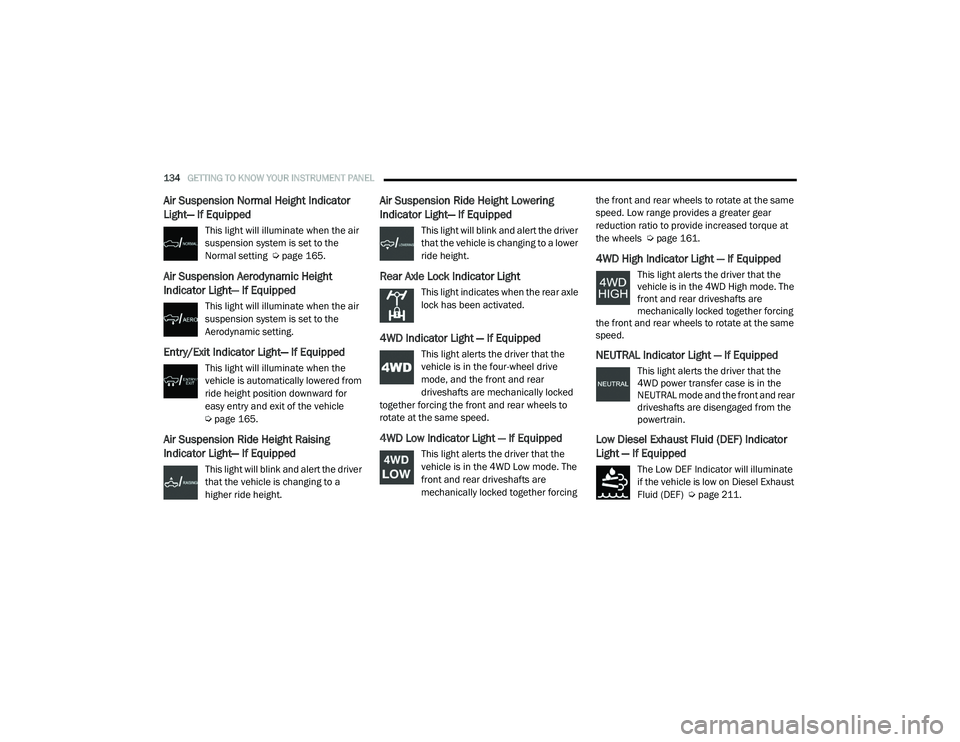
Air Suspension Normal Height Indicator
Light— If Equipped
This light will illuminate when the air
suspension system is set to the
Normal setting Úpage 165.
Air Suspension Aerodynamic Height
Indicator Light— If Equipped
This light will illuminate when the air
suspension system is set to the
Aerodynamic setting.
Entry/Exit Indicator Light— If Equipped
This light will illuminate when the
vehicle is automatically lowered from
ride height position downward for
easy entry and exit of the vehicle
Úpage 165.
Air Suspension Ride Height Raising
Indicator Light— If Equipped
This light will blink and alert the driver
that the vehicle is changing to a
higher ride height.
Air Suspension Ride Height Lowering
Indicator Light— If Equipped
This light will blink and alert the driver
that the vehicle is changing to a lower
ride height.
Rear Axle Lock Indicator Light
This light indicates when the rear axle
lock has been activated.
4WD Indicator Light — If Equipped
This light alerts the driver that the
vehicle is in the four-wheel drive
mode, and the front and rear
driveshafts are mechanically locked
together forcing the front and rear wheels to
rotate at the same speed.
4WD Low Indicator Light — If Equipped
This light alerts the driver that the
vehicle is in the 4WD Low mode. The
front and rear driveshafts are
mechanically locked together forcing the front and rear wheels to rotate at the same
speed. Low range provides a greater gear
reduction ratio to provide increased torque at
the wheels Ú
page 161.
4WD High Indicator Light — If Equipped
This light alerts the driver that the
vehicle is in the 4WD High mode. The
front and rear driveshafts are
mechanically locked together forcing
the front and rear wheels to rotate at the same
speed.
NEUTRAL Indicator Light — If Equipped
This light alerts the driver that the
4WD power transfer case is in the
NEUTRAL mode and the front and rear
driveshafts are disengaged from the
powertrain.
Low Diesel Exhaust Fluid (DEF) Indicator
Light — If Equipped
The Low DEF Indicator will illuminate
if the vehicle is low on Diesel Exhaust
Fluid (DEF) Ú page 211.
21_DT_OM_EN_USC_t.book Page 134
Page 138 of 496
136GETTING TO KNOW YOUR INSTRUMENT PANEL
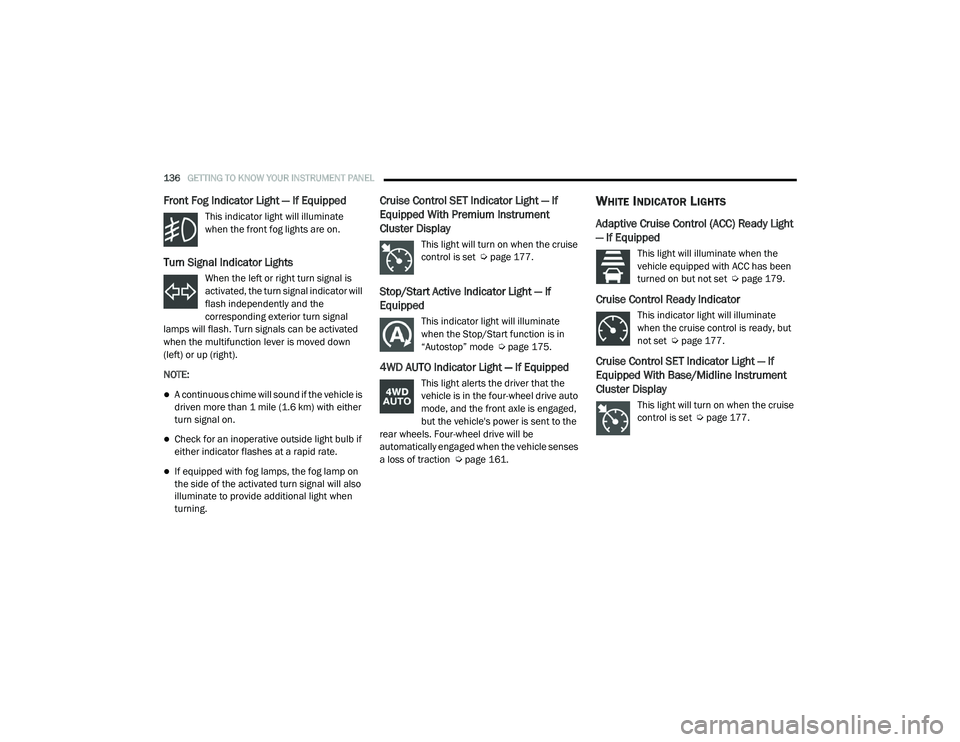
Front Fog Indicator Light — If Equipped
This indicator light will illuminate
when the front fog lights are on.
Turn Signal Indicator Lights
When the left or right turn signal is
activated, the turn signal indicator will
flash independently and the
corresponding exterior turn signal
lamps will flash. Turn signals can be activated
when the multifunction lever is moved down
(left) or up (right).
NOTE:
A continuous chime will sound if the vehicle is
driven more than 1 mile (1.6 km) with either
turn signal on.
Check for an inoperative outside light bulb if
either indicator flashes at a rapid rate.
If equipped with fog lamps, the fog lamp on
the side of the activated turn signal will also
illuminate to provide additional light when
turning.
Cruise Control SET Indicator Light — If
Equipped With Premium Instrument
Cluster Display
This light will turn on when the cruise
control is set Ú page 177.
Stop/Start Active Indicator Light — If
Equipped
This indicator light will illuminate
when the Stop/Start function is in
“Autostop” mode Ú page 175.
4WD AUTO Indicator Light — If Equipped
This light alerts the driver that the
vehicle is in the four-wheel drive auto
mode, and the front axle is engaged,
but the vehicle's power is sent to the
rear wheels. Four-wheel drive will be
automatically engaged when the vehicle senses
a loss of traction Ú page 161.
WHITE INDICATOR LIGHTS
Adaptive Cruise Control (ACC) Ready Light
— If Equipped
This light will illuminate when the
vehicle equipped with ACC has been
turned on but not set Ú page 179.
Cruise Control Ready Indicator
This indicator light will illuminate
when the cruise control is ready, but
not set Úpage 177.
Cruise Control SET Indicator Light — If
Equipped With Base/Midline Instrument
Cluster Display
This light will turn on when the cruise
control is set Ú page 177.
21_DT_OM_EN_USC_t.book Page 136
Page 139 of 496
GETTING TO KNOW YOUR INSTRUMENT PANEL137
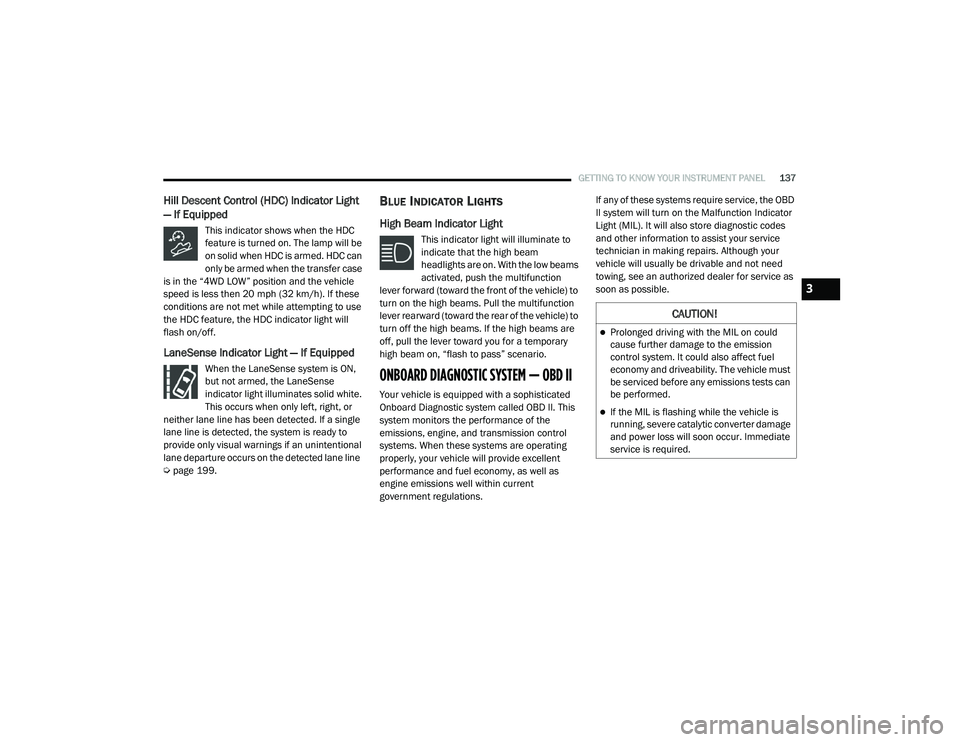
Hill Descent Control (HDC) Indicator Light
— If Equipped
This indicator shows when the HDC
feature is turned on. The lamp will be
on solid when HDC is armed. HDC can
only be armed when the transfer case
is in the “4WD LOW” position and the vehicle
speed is less then 20 mph (32 km/h). If these
conditions are not met while attempting to use
the HDC feature, the HDC indicator light will
flash on/off.
LaneSense Indicator Light — If Equipped
When the LaneSense system is ON,
but not armed, the LaneSense
indicator light illuminates solid white.
This occurs when only left, right, or
neither lane line has been detected. If a single
lane line is detected, the system is ready to
provide only visual warnings if an unintentional
lane departure occurs on the detected lane line
Ú page 199.
BLUE INDICATOR LIGHTS
High Beam Indicator Light
This indicator light will illuminate to
indicate that the high beam
headlights are on. With the low beams
activated, push the multifunction
lever forward (toward the front of the vehicle) to
turn on the high beams. Pull the multifunction
lever rearward (toward the rear of the vehicle) to
turn off the high beams. If the high beams are
off, pull the lever toward you for a temporary
high beam on, “flash to pass” scenario.
ONBOARD DIAGNOSTIC SYSTEM — OBD II
Your vehicle is equipped with a sophisticated
Onboard Diagnostic system called OBD II. This
system monitors the performance of the
emissions, engine, and transmission control
systems. When these systems are operating
properly, your vehicle will provide excellent
performance and fuel economy, as well as
engine emissions well within current
government regulations. If any of these systems require service, the OBD
II system will turn on the Malfunction Indicator
Light (MIL). It will also store diagnostic codes
and other information to assist your service
technician in making repairs. Although your
vehicle will usually be drivable and not need
towing, see an authorized dealer for service as
soon as possible.
CAUTION!
Prolonged driving with the MIL on could
cause further damage to the emission
control system. It could also affect fuel
economy and driveability. The vehicle must
be serviced before any emissions tests can
be performed.
If the MIL is flashing while the vehicle is
running, severe catalytic converter damage
and power loss will soon occur. Immediate
service is required.
3
21_DT_OM_EN_USC_t.book Page 137
Page 144 of 496
142STARTING AND OPERATING
If the vehicle is not in PARK and the driver turns
off the engine, the vehicle may AutoPark.
AutoPark will engage when all of these
conditions are met:
Vehicle is equipped with a rotary shifter and
an 8-speed transmission
Vehicle is not in PARK
Vehicle speed is 1.2 mph (1.9 km/h) or less
Ignition switched from RUN to ACC
NOTE:
For Keyless Enter-N-Go equipped vehicles, the
engine will turn off and the ignition switch will
change to ACC mode. After 30 minutes the igni -
tion switches to OFF automatically, unless the
driver turns the ignition switch OFF.
If the vehicle is not in PARK and the driver exits
the vehicle with the engine running, the vehicle
may AutoPark.
AutoPark will engage when all of these
conditions are met:
Vehicle is equipped with a rotary shifter and
an 8-speed transmission
Vehicle is not in PARK
Vehicle speed is 1.2 mph (1.9 km/h) or less
Driver’s seat belt is unbuckled
Driver’s door is ajar
Brake pedal is not pressed
The message “ AutoPark Engaged Shift to P then
Shift to Gear ” will display in the instrument
cluster.
NOTE:
In some cases the ParkSense graphic will be
displayed in the instrument cluster, causing the
“ AutoPark Engaged Shift to P then Shift to Gear ”
message to not be seen. In these cases, the
gear selector must be returned to “P” to select
desired gear.
If the driver shifts into PARK while moving, the
vehicle may AutoPark.
AutoPark will engage ONLY when vehicle speed
is 1.2 mph (1.9 km/h) or less.
The message “ Vehicle Speed is Too High to
Shift to P ” will be displayed in the instrument
cluster if vehicle speed is above 1.2 mph
(1.9 km/h). 4WD LOW — If Equipped
AutoPark will be disabled when operating the
vehicle in 4WD LOW.
The message “
AutoPark Disabled ” will be
displayed in the instrument cluster.
Additional customer warnings will be given
when all of these conditions are met:
Vehicle is not in PARK
Driver’s door is ajar
Vehicle is in 4WD LOW range
The message “ AutoPark Not Engaged ” will be
displayed in the instrument cluster. A warning
chime will continue until you shift the vehicle
into PARK or the driver’s door is closed.
WARNING!
If vehicle speed is above 1.2 mph (1.9 km/h),
the transmission will default to NEUTRAL until
the vehicle speed drops below 1.2 mph
(1.9 km/h). A vehicle left in the NEUTRAL
position can roll. As an added precaution,
always apply the parking brake when exiting
the vehicle.
21_DT_OM_EN_USC_t.book Page 142
Page 163 of 496

STARTING AND OPERATING161
FOUR-WHEEL DRIVE OPERATION — IF
EQUIPPED
FOUR-POSITION ELECTRONICALLY
S
HIFTED TRANSFER CASE — IF
E
QUIPPED
This is an electronic shift transfer case and is
operated by the 4WD Control Switch (Transfer
Case Switch), located on the instrument panel.
Four-Position/On-Demand Transfer Case
This electronically shifted transfer case
provides four mode positions:
Two-Wheel Drive High Range (2WD) — This
range is for normal street and highway
driving on dry hard surfaced roads. Driving the vehicle in 2WD will have greater fuel
economy benefits as the front axle is not
engaged in 2WD.
Four-Wheel Drive High Range (4WD HIGH) —
This range provides torque to the front drive
-
shaft (engages four-wheel drive) which allows
front and rear wheels to spin at the same
speed. This provides additional traction for
loose or slippery road surfaces only.
Four-Wheel Drive Low Range (4WD LOW) —
This range provides low speed four-wheel
drive. It maximizes torque (increased torque
over 4WD HIGH) to the front driveshaft;
allowing front and rear wheels to rotate at the
same speed. This range provides additional
traction and maximum pulling power for
loose or slippery road surfaces only. Do not
exceed 25 mph (40 km/h) in this range.
N (Neutral) — This range disengages both the
front and rear driveshafts from the power -
train. To be used for flat towing behind
another vehicle Ú page 231.
WARNING!
You or others could be injured or killed if
you leave the vehicle unattended with the
transfer case in the N (Neutral) position
without first fully engaging the parking
brake. The transfer case N (Neutral) posi -
tion disengages both the front and rear
drive shaft from the powertrain, and will
allow the vehicle to roll, even if the trans -
mission is in PARK. The parking brake
should always be applied when the driver is
not in the vehicle.
The transmission may not engage PARK if
the vehicle is moving. Always bring the
vehicle to a complete stop before shifting to
PARK, and verify that the transmission gear
position indicator solidly indicates PARK (P)
without blinking. Ensure that the vehicle is
completely stopped, and the PARK position
is properly indicated, before exiting the
vehicle.
4
21_DT_OM_EN_USC_t.book Page 161