air suspension RAM 1500 2021 Owner's Manual
[x] Cancel search | Manufacturer: RAM, Model Year: 2021, Model line: 1500, Model: RAM 1500 2021Pages: 496, PDF Size: 20.89 MB
Page 235 of 496
STARTING AND OPERATING233
NOTE:
Steps 2 and 3 are requirements that must be
met before pushing the N (Neutral) button,
and must continue to be met until the shift has
been completed. If any of these requirements
are not met before pushing the N (Neutral)
button or are no longer met during the shift,
the N (Neutral) indicator light will flash contin -
uously until all requirements are met or until
the N (Neutral) button is released.
The ignition must be in the ON/RUN mode for
a shift to take place and for the position indi -
cator lights to be operable. If the ignition is
not in the ON/RUN mode, the shift will not
take place and no position indicator lights will
be on or flashing.
A flashing N (Neutral) position indicator light
indicates that shift requirements have not
been met.
If the vehicle is equipped with air suspension,
the engine should be started and left running
for a minimum of 60 seconds (with all the
doors closed) at least once every 24 hours.
This process allows the air suspension to
adjust the vehicle’s ride height to compen -
sate for temperature effects.
Shifting Out Of N (Neutral)
Use the following procedure to prepare your
vehicle for normal usage:
1. Bring the vehicle to a complete stop,
leaving it connected to the tow vehicle.
2. Press and hold the brake pedal.
3. Start the engine. Apply the parking brake. Shift the transmission into NEUTRAL.
4. Using a ballpoint pen or similar object, push and hold the recessed transfer case N
(Neutral) button (at the center of the
transfer case switches).
5. When the N (Neutral) indicator light turns off, release the N (Neutral) button.
6. Turn the engine off. The transmission will automatically select PARK when the engine
is turned off.
7. Release the brake pedal.
8. Disconnect vehicle from the tow vehicle.
9. Press and hold the brake pedal.
10. Start the engine. 11. Release the parking brake.
12. Shift the transmission into DRIVE, release
the brake pedal, and check that the vehicle
operates normally.
NOTE:
Steps 3 and 4 are requirements that must be
met before pushing the button to shift out of
N (Neutral), and must continue to be met
until the shift has been completed. If any of
these requirements are not met before
pushing the button or are no longer met
during the shift, the N (Neutral) indicator light
will flash continuously until all requirements
are met or until the button is released.
The ignition must be in the ON/RUN mode for
a shift to take place and for the position indi -
cator lights to be operable. If the ignition is
not in the ON/RUN mode, the shift will not
take place and no position indicator lights will
be on or flashing.
A flashing N (Neutral) position indicator light
indicates that shift requirements have not
been met.
4
21_DT_OM_EN_USC_t.book Page 233
Page 251 of 496
MULTIMEDIA249
Suspension/Air Suspension — If Equipped
When the Suspension/Air Suspension button is pressed on the touchscreen, the system will display settings related to the vehicle’s air suspension.Headlight Off Delay
This setting will allow you to set the amount of time the headlights remain
on after the vehicle has been turned off. The “+” will increase the amount
of time. The “-” will decrease the amount of time.
Auto Entry/Exit — If Equipped This setting will automatically lower the vehicle ride height for easier
entry and exit of the vehicle.
Setting Name
Description
Setting NameDescription
Sound Horn With Lower This setting will sound the horn when the Lower button is pressed on the
key fob.
Flash Lights With Lower This setting will flash the lights when the Lower button is pressed on the
key fob.
Display Suspension Messages This setting will display suspension messages in the Instrument Cluster
Display. The “All” setting will display all available messages. The
“Warnings Only” setting will only display warning messages.
Aero Mode
This setting will automatically adjust the vehicle ride height depending on
the vehicle speed.
Tire Jack Mode This setting will disable the air suspension system to assist in changing a
spare tire.
Transport Mode This setting will disable the air suspension system for flat towing.
5
21_DT_OM_EN_USC_t.book Page 249
Page 252 of 496
250MULTIMEDIA
AUX Switches — If Equipped
When the AUX Switches button is pressed on the touchscreen, the system displays the options related to the four vehicle AUX switches.Wheel Alignment Mode
This setting must be activated before performing a wheel alignment.
Refer to an authorized dealer for further information.
Four Corner Air Suspension Modes There are three air suspension modes designed to protect the system in
unique situations. Tire Jack Mode is selected to assist in changing a
spare tire. Transport Mode is selected to assist when the vehicle is being
flat bed towed. Wheel Alignment Mode is selected before performing a
wheel alignment. Refer to an authorized dealer for information.
Setting Name
Description
Setting NameDescription
AUX 1-4 This setting will adjust the type and power source for the four vehicle AUX
switches. There are two types: “Latching” and “Momentary”. The power
source for the AUX switches can either be set to run off the “Battery” or
from the “Ignition”. In addition to setting the type and power source, you
can set if the vehicle will recall the previous state at which the AUX
switches were set. The Recalled Last State setting can be set to “On” or
“Off”. Last state conditions are met only if the type is set to Latching and
the power source is set to Ignition.
21_DT_OM_EN_USC_t.book Page 250
Page 311 of 496
MULTIMEDIA309
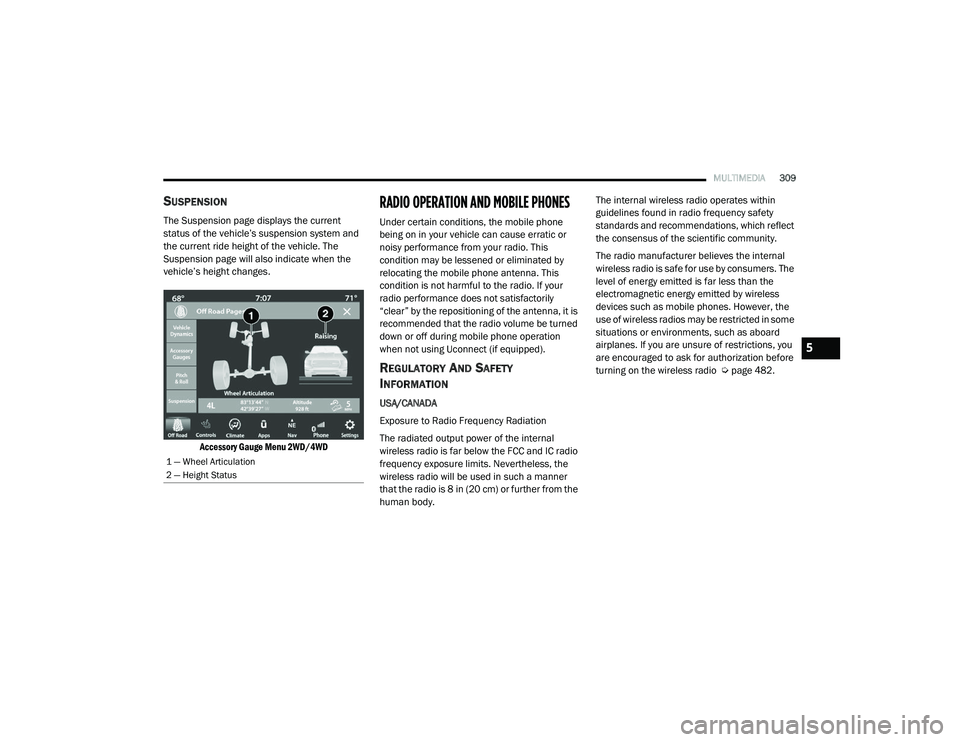
SUSPENSION
The Suspension page displays the current
status of the vehicle’s suspension system and
the current ride height of the vehicle. The
Suspension page will also indicate when the
vehicle’s height changes.
Accessory Gauge Menu 2WD/4WD
RADIO OPERATION AND MOBILE PHONES
Under certain conditions, the mobile phone
being on in your vehicle can cause erratic or
noisy performance from your radio. This
condition may be lessened or eliminated by
relocating the mobile phone antenna. This
condition is not harmful to the radio. If your
radio performance does not satisfactorily
“clear” by the repositioning of the antenna, it is
recommended that the radio volume be turned
down or off during mobile phone operation
when not using Uconnect (if equipped).
REGULATORY AND SAFETY
I
NFORMATION
USA/CANADA
Exposure to Radio Frequency Radiation
The radiated output power of the internal
wireless radio is far below the FCC and IC radio
frequency exposure limits. Nevertheless, the
wireless radio will be used in such a manner
that the radio is 8 in (20 cm) or further from the
human body. The internal wireless radio operates within
guidelines found in radio frequency safety
standards and recommendations, which reflect
the consensus of the scientific community.
The radio manufacturer believes the internal
wireless radio is safe for use by consumers. The
level of energy emitted is far less than the
electromagnetic energy emitted by wireless
devices such as mobile phones. However, the
use of wireless radios may be restricted in some
situations or environments, such as aboard
airplanes. If you are unsure of restrictions, you
are encouraged to ask for authorization before
turning on the wireless radio Ú
page 482.
1 — Wheel Articulation
2 — Height Status
5
21_DT_OM_EN_USC_t.book Page 309
Page 379 of 496

IN CASE OF EMERGENCY377
(Continued)
NOTE:
Your vehicle may be transmitting data as
authorized by the subscriber.
Never place anything on or near the vehicle’s
LTE (voice/data) or 4G (data) and GPS
antennas. You could prevent LTE (voice/
data) or 4G (data) and GPS signal reception,
which can prevent your vehicle from placing
an emergency call. An operable LTE (voice/
data) or 4G (data) network connection and a
GPS signal is required for the SOS Call
system to function properly.
NOTE:
Changes or modifications not expressly
approved by the party responsible for compli -
ance could void the user's authority to operate
the equipment.
JACKING AND TIRE CHANGING
NOTE:
If your vehicle is equipped with an air suspen -
sion system, there is a feature which allows the
automatic leveling to be disabled to assist with
changing a tire. This feature can be activated
through the Uconnect system Ú page 249.
PREPARATIONS FOR JACKING
NOTE:
If your vehicle is equipped with Air Suspension,
you will need to enable Tire Jack Mode in the
Uconnect system Úpage 165 before changing
the tire.
1. Park on a firm, level surface. Avoid ice or slippery areas.
2. Turn on the Hazard Warning Flashers.
3. Apply the parking brake.
4. Shift the transmission into Park (P).
5. Turn the ignition OFF.
WARNING!
Do not attempt to change a tire on the side
of the vehicle close to moving traffic. Pull
far enough off the road to avoid the danger
of being hit when operating the jack or
changing the wheel.
Being under a jacked-up vehicle is
dangerous. The vehicle could slip off the
jack and fall on you. You could be crushed.
Never put any part of your body under a
vehicle that is on a jack. If you need to get
under a raised vehicle, take it to a service
center where it can be raised on a lift.
Never start or run the engine while the
vehicle is on a jack.
The jack is designed to be used as a tool for
changing tires only. The jack should not be
used to lift the vehicle for service purposes.
The vehicle should be jacked on a firm level
surface only. Avoid ice or slippery areas.
WARNING! (Continued)
WARNING!
Do not attempt to change a tire on the side of
the vehicle close to moving traffic. Pull far
enough off the road to avoid being hit when
operating the jack or changing the wheel.
7
21_DT_OM_EN_USC_t.book Page 377
Page 394 of 496
392IN CASE OF EMERGENCY
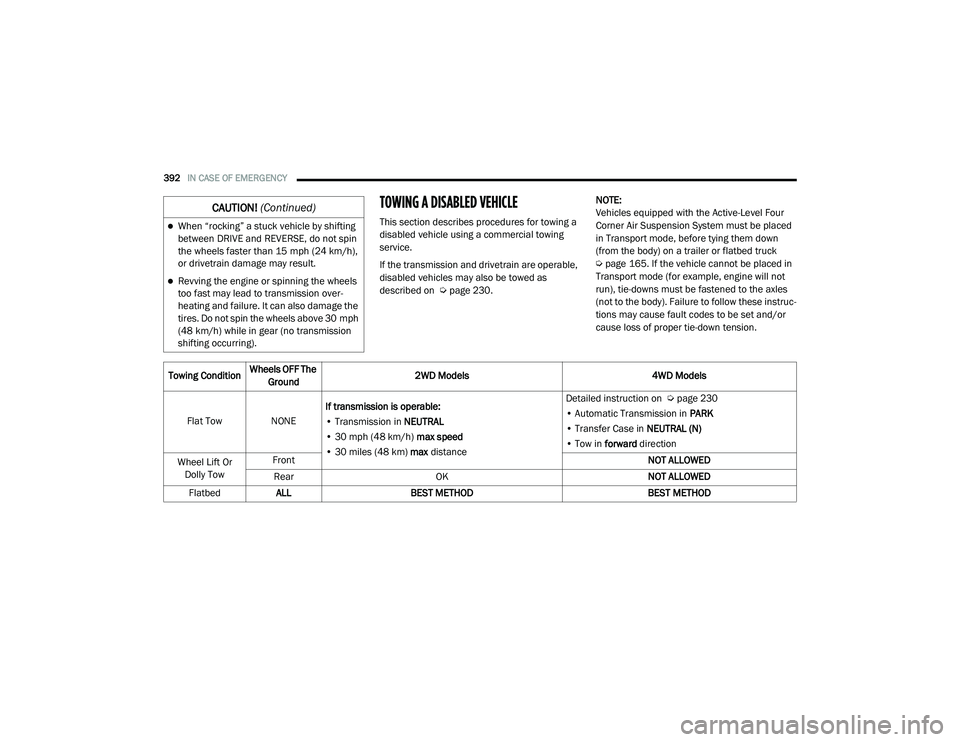
TOWING A DISABLED VEHICLE
This section describes procedures for towing a
disabled vehicle using a commercial towing
service.
If the transmission and drivetrain are operable,
disabled vehicles may also be towed as
described on Úpage 230. NOTE:
Vehicles equipped with the Active-Level Four
Corner Air Suspension System must be placed
in Transport mode, before tying them down
(from the body) on a trailer or flatbed truck
Ú
page 165. If the vehicle cannot be placed in
Transport mode (for example, engine will not
run), tie-downs must be fastened to the axles
(not to the body). Failure to follow these instruc -
tions may cause fault codes to be set and/or
cause loss of proper tie-down tension.When “rocking” a stuck vehicle by shifting
between DRIVE and REVERSE, do not spin
the wheels faster than 15 mph (24 km/h), or drivetrain damage may result.
Revving the engine or spinning the wheels
too fast may lead to transmission over -
heating and failure. It can also damage the
tires. Do not spin the wheels above 30 mph
(48 km/h) while in gear (no transmission
shifting occurring).
CAUTION! (Continued)
Towing Condition Wheels OFF The
Ground 2WD Models
4WD Models
Flat Tow NONE If transmission is operable:
• Transmission in NEUTRAL
• 30 mph (48 km/h) max speed
• 30 miles (48 km) max distance Detailed instruction on
Ú page 230
• Automatic Transmission in PARK
• Transfer Case in NEUTRAL (N)
• Tow in forward direction
Wheel Lift Or Dolly Tow Front
NOT ALLOWED
Rear OK NOT ALLOWED
Flatbed ALL BEST METHOD BEST METHOD
21_DT_OM_EN_USC_t.book Page 392
Page 399 of 496
SERVICING AND MAINTENANCE397
Mileage or time passed (whichever
comes first)
20,000
30,000
40,000
50,000
60,000
70,000
80,000
90,000
100,000
110,000
120,000
130,000
140,000
150,000
Or Years: 2 3 4 5 6 7 8 9 10 11 12 13 14 15
Or Kilometers:
32,000
48,000
64,000
80,000
96,000
112,000
128,000
144,000
160,000
176,000
192,000
208,000
224,000
240,000
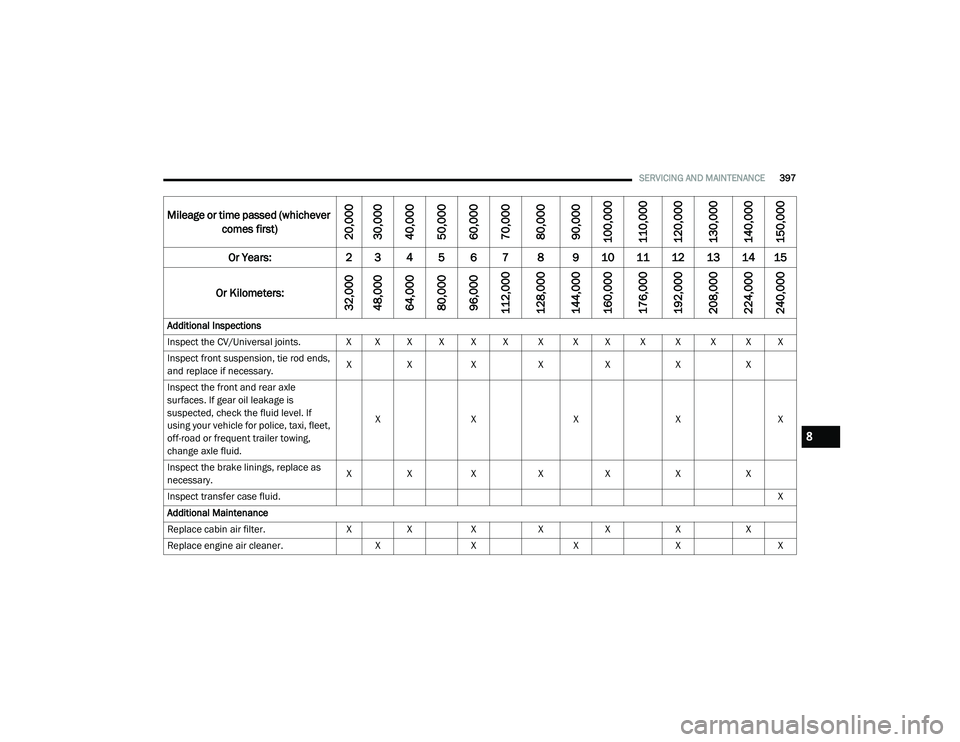
Additional Inspections
Inspect the CV/Universal joints. X X X X X X X X X X X X X X Inspect front suspension, tie rod ends,
and replace if necessary. X
X X XX XX
Inspect the front and rear axle
surfaces. If gear oil leakage is
suspected, check the fluid level. If
using your vehicle for police, taxi, fleet,
off-road or frequent trailer towing,
change axle fluid. X
X XXX
Inspect the brake linings, replace as
necessary. X
X X XX XX
Inspect transfer case fluid. X
Additional Maintenance
Replace cabin air filter. XX X XX XX
Replace engine air cleaner. XX XXX
8
21_DT_OM_EN_USC_t.book Page 397
Page 403 of 496
SERVICING AND MAINTENANCE401
Mileage or time passed (whichever comes first)
10,000
20,000
30,000
40,000
50,000
60,000
70,000
80,000
90,000
100,000
110,000
120,000
130,000
140,000
150,000
Or Years: 1 2 3 4 5 6 7 8 9 10 11 12 13 14 15
Or Kilometers:
16,000
32,000
48,000
64,000
80,000
96,000
112,000
128,000
144,000
160,000
176,000
192,000
208,000
224,000
240,000
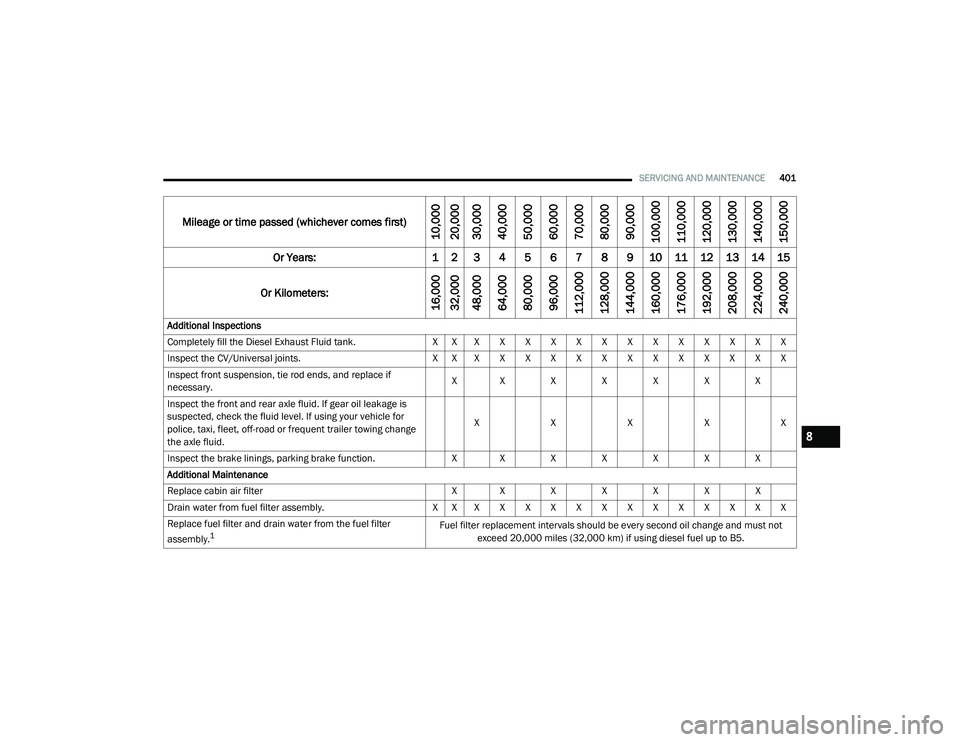
Additional Inspections
Completely fill the Diesel Exhaust Fluid tank. X X X X X X X X X X X X X X X
Inspect the CV/Universal joints. X X X X X X X X X X X X X X X
Inspect front suspension, tie rod ends, and replace if
necessary. X X X X X X X
Inspect the front and rear axle fluid. If gear oil leakage is
suspected, check the fluid level. If using your vehicle for
police, taxi, fleet, off-road or frequent trailer towing change
the axle fluid. X
XXXX
Inspect the brake linings, parking brake function. X X X X X X X
Additional Maintenance
Replace cabin air filter X X X X X X X
Drain water from fuel filter assembly. X X X X X X X X X X X X X X X
Replace fuel filter and drain water from the fuel filter
assembly.
1Fuel filter replacement intervals should be every second oil change and must not exceed 20,000 miles (32,000 km) if using diesel fuel up to B5.
8
21_DT_OM_EN_USC_t.book Page 401
Page 431 of 496
SERVICING AND MAINTENANCE429
F06–10 Amp Red OUTPUT TO UPFITTER PDC — If Equipped
F07 ––Spare
F08 20 Amp Blue –Trailer Tow Backup
F09 –20 Amp Yellow Trailer Stop / Turn Lamp Left
F10 –20 Amp Yellow Trailer Stop / Turn Lamp Right
F11 –15 Amp Blue ID/CLEARANCE LIGHTS — If Equipped
F12 20 Amp Blue –Trailer Tow Park Lamp
F13 ––Spare
F14 –10 Amp Red AC Clutch
F15 –5 Amp Tan Intelligent Battery Sensor (IBS)
F16 ––Spare
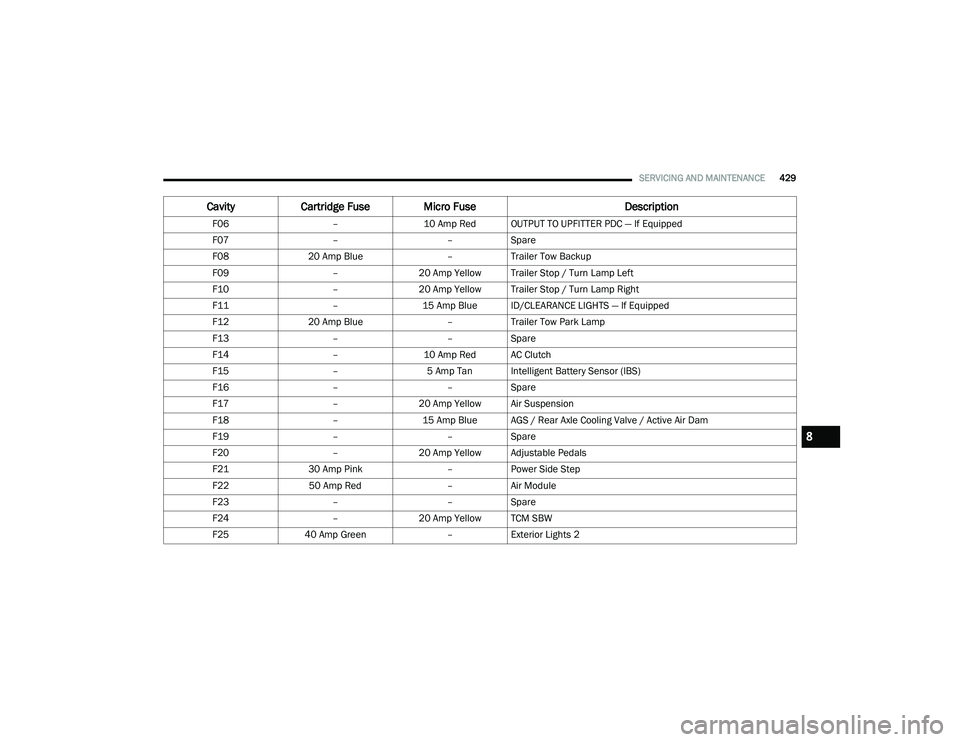
F17 –20 Amp Yellow Air Suspension
F18 –15 Amp Blue AGS / Rear Axle Cooling Valve / Active Air Dam
F19 ––Spare
F20 –20 Amp Yellow Adjustable Pedals
F21 30 Amp Pink –Power Side Step
F22 50 Amp Red –Air Module
F23 ––Spare
F24 –20 Amp Yellow TCM SBW
F25 40 Amp Green –Exterior Lights 2
Cavity Cartridge Fuse Micro Fuse Description
8
21_DT_OM_EN_USC_t.book Page 429
Page 437 of 496
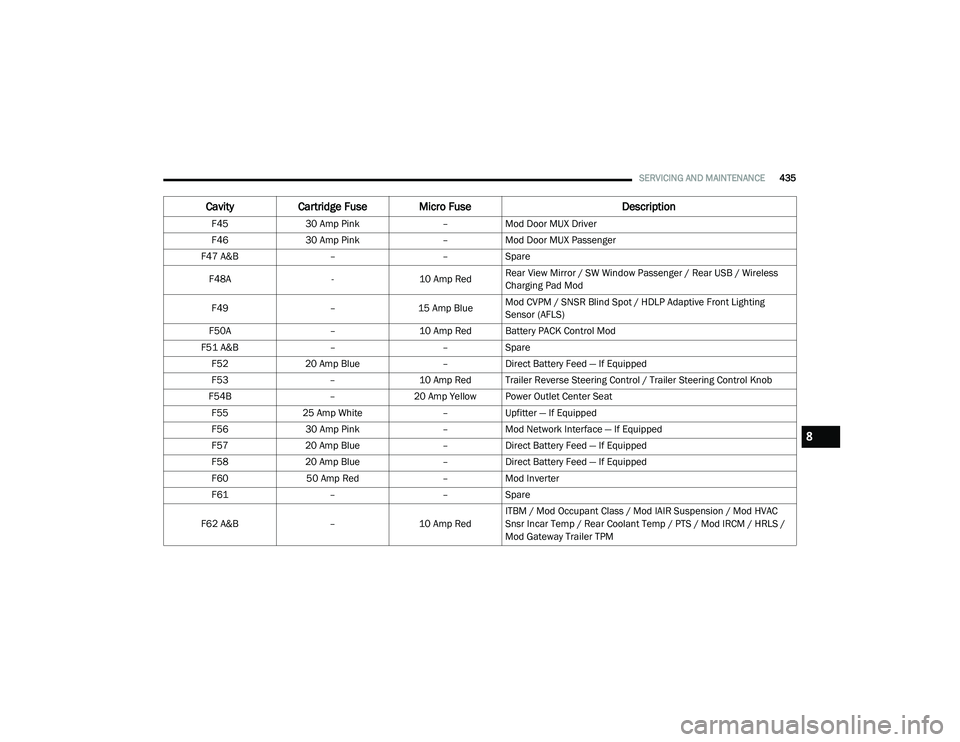
SERVICING AND MAINTENANCE435
F4530 Amp Pink –Mod Door MUX Driver
F46 30 Amp Pink –Mod Door MUX Passenger
F47 A&B ––Spare
F48A -10 Amp RedRear View Mirror / SW Window Passenger / Rear USB / Wireless
Charging Pad Mod
F49 –15 Amp BlueMod CVPM / SNSR Blind Spot / HDLP Adaptive Front Lighting
Sensor (AFLS)
F50A –10 Amp Red Battery PACK Control Mod
F51 A&B ––Spare
F52 20 Amp Blue –Direct Battery Feed — If Equipped
F53 –10 Amp Red Trailer Reverse Steering Control / Trailer Steering Control Knob
F54B –20 Amp Yellow Power Outlet Center Seat
F55 25 Amp White –Upfitter — If Equipped
F56 30 Amp Pink –Mod Network Interface — If Equipped
F57 20 Amp Blue –Direct Battery Feed — If Equipped
F58 20 Amp Blue –Direct Battery Feed — If Equipped
F60 50 Amp Red –Mod Inverter
F61 ––Spare
F62 A&B –10 Amp RedITBM / Mod Occupant Class / Mod IAIR Suspension / Mod HVAC
Snsr Incar Temp / Rear Coolant Temp / PTS / Mod IRCM / HRLS /
Mod Gateway Trailer TPM
Cavity
Cartridge Fuse Micro Fuse Description
8
21_DT_OM_EN_USC_t.book Page 435