brake light RAM 1500 2021 Owner's Manual
[x] Cancel search | Manufacturer: RAM, Model Year: 2021, Model line: 1500, Model: RAM 1500 2021Pages: 496, PDF Size: 20.89 MB
Page 154 of 496
152STARTING AND OPERATING
(Continued)
NOTE:
The EPB fault light will illuminate if the EPB
switch is held for longer than 20 seconds in
either the released or applied position. The light
will extinguish upon releasing the switch.
If the Auto Park Brake feature is enabled, the
parking brake will automatically engage
whenever the transmission is placed into PARK.
If your foot is on the brake pedal, you may notice
a small amount of brake pedal movement while
the parking brake is engaging.
The parking brake will release automatically
when the ignition is ON, the transmission is in
DRIVE or REVERSE, the driver seat belt is
buckled, and an attempt is made to drive away.
To release the parking brake manually, the
ignition switch must be in the ON/RUN mode.
Put your foot on the brake pedal, then push the
parking brake switch down momentarily. You
may hear a slight whirring sound from the back
of the vehicle while the parking brake
disengages. You may also notice a small
amount of movement in the brake pedal. Once
the parking brake is fully disengaged, The
BRAKE telltale light in the instrument cluster
and the LED indicator on the switch will
extinguish.NOTE:
When parking on a hill, it is important to turn the
front wheels toward the curb on a downhill
grade and away from the curb on an uphill
grade. Apply the parking brake before placing
the gear selector in PARK, otherwise the load on
the transmission locking mechanism may make
it difficult to move the gear selector out of PARK.
WARNING!
Never use the PARK position as a substi
-
tute for the parking brake. Always apply the
parking brake fully when parked to guard
against vehicle movement and possible
injury or damage.
When exiting the vehicle, always remove
the key fob from the ignition and lock your
vehicle.
Never leave children alone in a vehicle, or
with access to an unlocked vehicle.
Allowing children to be in a vehicle unat -
tended is dangerous for a number of
reasons. A child or others could be seriously
or fatally injured. Children should be
warned not to touch the parking brake,
brake pedal or the gear selector.
Do not leave the key fob in or near the
vehicle, or in a location accessible to chil -
dren, and do not leave a vehicle equipped
with Keyless Enter-N-Go in the ACC or ON/
RUN mode. A child could operate power
windows, other controls, or move the
vehicle.
Be sure the parking brake is fully disen -
gaged before driving; failure to do so can
lead to brake failure and a collision.
Always fully apply the parking brake when
leaving your vehicle, or it may roll and
cause damage or injury. Also be certain to
leave the transmission in PARK. Failure to
do so may allow the vehicle to roll and
cause damage or injury.
CAUTION!
If the Brake System Warning Light remains on
with the parking brake released, a brake
system malfunction is indicated. Have the
brake system serviced by an authorized
dealer immediately.
WARNING! (Continued)
21_DT_OM_EN_USC_t.book Page 152
Page 155 of 496

STARTING AND OPERATING153
If exceptional circumstances should make it
necessary to engage the parking brake while
the vehicle is in motion, maintain upward
pressure on the EPB switch for as long as
engagement is desired. The BRAKE telltale light
will illuminate, and a continuous chime will
sound. The rear stop lamps will also be
illuminated automatically while the vehicle
remains in motion.
To disengage the parking brake while the
vehicle is in motion, release the switch. If the
vehicle is brought to a complete stop using the
parking brake, when the vehicle reaches
approximately 3 mph, (5 km/h) the parking
brake will remain engaged. In the unlikely event of a malfunction of the EPB
system, a yellow EPB fault light will illuminate.
This may be accompanied by the BRAKE telltale
light flashing. In this event, urgent service of the
EPB system is required. Do not rely on the
parking brake to hold the vehicle stationary.
Auto Park Brake
The Electric Park Brake (EPB) can be
programmed to be applied automatically
whenever the vehicle is at a standstill and the
automatic transmission is placed in PARK. Auto
Park Brake is enabled and disabled by
customer selection through the customer
programmable features section of the Uconnect
Settings Ú
page 245.
Any single Auto Park Brake application can be
bypassed by pushing the EPB switch to the
release position while the transmission is
placed in PARK.
SafeHold
SafeHold is a safety feature of the Electric Park
Brake (EPB) system that will engage the parking
brake automatically if the vehicle is left
unsecured while the ignition is in ON/RUN. The parking brake will automatically engage if
all of the following conditions are met:
The vehicle is at a standstill.
There is no attempt to press the brake pedal
and accelerator pedal.
The seat belt is unbuckled.
The driver door is open.
SafeHold can be temporarily bypassed by
pushing the EPB switch while the driver door is
open. Once manually bypassed, SafeHold will
be enabled again once the vehicle reaches
12 mph (20 km/h) or the ignition is turned to
the OFF position and back to ON again.
Brake Service Mode
We recommend having your brakes serviced by
an authorized dealer. You should only make
repairs for which you have the knowledge and
the right equipment. You should only enter
Brake Service Mode during brake service.
When servicing your rear brakes, it may be
necessary for you or your technician to push the
rear piston into the rear caliper bore. With the
Electric Park Brake (EPB) system, this can only
be done after retracting the EPB actuator.
WARNING!
Driving the vehicle with the parking brake
engaged, or repeated use of the parking
brake to slow the vehicle may cause serious
damage to the brake system. Be sure the
parking brake is fully disengaged before
driving; failure to do so can lead to brake
failure and a collision.
4
21_DT_OM_EN_USC_t.book Page 153
Page 164 of 496

162STARTING AND OPERATING
NOTE:
The 4WD High and 4WD Low positions are
designed for loose, slippery road surfaces
only. Driving in the 4WD High and 4WD Low
positions on dry, hard surfaced roads may
cause increased tire wear and damage to the
driveline components.
The transfer case N (Neutral) button is located
in the center of the 4WD Control Switch and is
pushed by using a ballpoint pen or similar
object. The transfer case N (Neutral) position
is to be used for recreational towing only
Úpage 231.
Transfer Case Position Indicator Lights
The Transfer Case Position Indicator Lights
(4WD High and 4WD Low) are located in the
instrument cluster and indicate the current and
desired transfer case selection. When you
select a different transfer case position, the
indicator lights will do the following:
1. The current position indicator light will turn off.
2. The selected position indicator light will flash until the transfer case completes the
shift. 3. When the shift is complete, the indicator
light for the selected position will stop
flashing and remain on.
If the transfer case does not shift into the
desired position, one or more of the following
events may occur:
1. The indicator light for the current position will remain on.
2. The newly selected position indicator light will continue to flash.
3. If the transfer case will not shift, a message
will appear on the cluster stating the 4WD
shift has canceled.
NOTE:
Before retrying a selection, make certain that all
the necessary requirements for selecting a new
transfer case position have been met. To retry
the selection, push the current position, wait
five seconds, and retry selection.
The “SVC 4WD Warning Light” monitors the
electronic shift four-wheel drive system. If this
light remains on after engine start up or
illuminates during driving, it means that the
four-wheel drive system is not functioning
properly and that service is required. NOTE:
Do not attempt to make a shift while only the
front or rear wheels are spinning. This could
cause damage to driveline components.
When operating your vehicle in 4WD Low, the
engine speed is approximately three times that
of the 2WD or 4WD High positions at a given
road speed. Take care not to overspeed the
engine and do not exceed 25 mph (40 km/h).
Proper operation of four-wheel drive vehicles
depends on tires of equal size, type and
circumference on each wheel. Any difference in
tire size can cause damage to the drivetrain.
Because four-wheel drive provides improved
traction, there is a tendency to exceed safe
turning and stopping speeds. Do not go faster
than road conditions permit.
WARNING!
Always engage the parking brake when
powering down the vehicle if the “SVC 4WD
Warning Light” is illuminated. Not engaging
the parking brake may allow the vehicle to roll
which may cause personal injury or death.
21_DT_OM_EN_USC_t.book Page 162
Page 166 of 496

164STARTING AND OPERATING
NOTE:
The 4WD High and 4WD Low positions are
designed for loose, slippery road surfaces
only. Driving in the 4WD High and 4WD Low positions on dry hard surfaced roads may
cause increased tire wear and damage to the
driveline components.
The transfer case N (Neutral) button is
located in the center of the 4WD Control
Switch and is pushed by using a ballpoint pen
or similar object. The transfer case N
(Neutral) position is to be used for recre
-
ational towing only Ú page 231.
Transfer Case Position Indicator Lights
The Transfer Case Position Indicator Lights
(4WD High, 4WD Low, and 4WD Auto) are
located in the instrument cluster and indicate
the current and desired transfer case selection.
When you select a different transfer case
position, the indicator lights will do the
following:
1. The current position indicator light will turn off.
2. The selected position indicator light will flash until the transfer case completes the
shift.
3. When the shift is complete, the indicator light for the selected position will stop
flashing and remain on. If the transfer case does not shift into the
desired position, one or more of the following
events may occur:
1. The indicator light for the current position
will remain on.
2. The newly selected position indicator light will continue to flash.
3. If the transfer case will not shift, there will
be a cluster message stating the 4WD shift
has canceled.
NOTE:
Before retrying a selection, make certain that all
the necessary requirements for selecting a new
transfer case position have been met. To retry
the selection, push the current position, wait
five seconds, and retry selection.
The “SVC 4WD Warning Light” monitors the
electronic shift four-wheel drive system. If this
light remains on after engine start up or
illuminates during driving, it means that the
four-wheel drive system is not functioning
properly and that service is required.
WARNING!
You or others could be injured or killed if
you leave the vehicle unattended with the
transfer case in the N (Neutral) position
without first fully engaging the parking
brake. The transfer case N (Neutral) posi -
tion disengages both the front and rear
drive shaft from the powertrain, and will
allow the vehicle to roll, even if the trans -
mission is in PARK. The parking brake
should always be applied when the driver is
not in the vehicle.
The transmission may not engage PARK if
the vehicle is moving. Always bring the
vehicle to a complete stop before shifting to
PARK, and verify that the transmission gear
position indicator solidly indicates PARK (P)
without blinking. Ensure that the vehicle is
completely stopped, and the PARK position
is properly indicated, before exiting the
vehicle.
21_DT_OM_EN_USC_t.book Page 164
Page 167 of 496
STARTING AND OPERATING165
NOTE:
Do not attempt to make a shift while only the
front or rear wheels are spinning. This could
cause damage to driveline components.
When operating your vehicle in 4WD Low, the
engine speed is approximately three times that
of the 2WD, 4WD Auto or 4WD High positions
at a given road speed. Take care not to
overspeed the engine and do not exceed
25 mph (40 km/h).
Proper operation of four-wheel drive vehicles
depends on tires of equal size, type and
circumference on each wheel. Any difference in
tire size can cause damage to the drivetrain.
Because four-wheel drive provides improved
traction, there is a tendency to exceed safe
turning and stopping speeds. Do not go faster
than road conditions permit.
Shifting Procedure
If any of the requirements to select a new
transfer case position have not been met,
then the transfer case will not shift. The posi -
tion indicator light for the previous position
will remain on and the newly selected posi -
tion indicator light will continue to flash until
all the requirements for the selected position
have been met.
If all the requirements to select a new
transfer case position have been met, then
the current position indicator light will turn off
and the selected position indicator light will
flash until the transfer case completes the
shift. When the shift is complete, the position
indicator light for the selected position will
stop flashing and remain on.
ACTIVE-LEVEL FOUR CORNER AIR
SUSPENSION SYSTEM — IF EQUIPPED
DESCRIPTION
The air suspension system provides full time
load leveling capability along with the benefit of
being able to adjust vehicle height by using the
toggle switch.
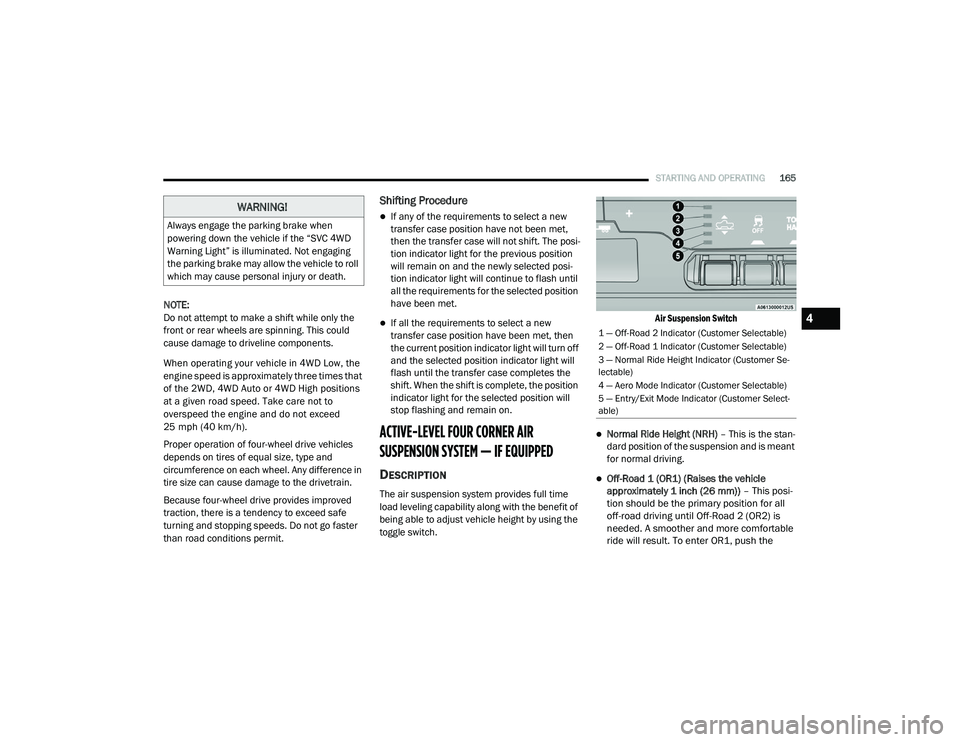
Air Suspension Switch
Normal Ride Height (NRH)
– This is the stan-
dard position of the suspension and is meant
for normal driving.
Off-Road 1 (OR1) (Raises the vehicle
approximately 1 inch (26 mm)) – This posi-
tion should be the primary position for all
off-road driving until Off-Road 2 (OR2) is
needed. A smoother and more comfortable
ride will result. To enter OR1, push the
WARNING!
Always engage the parking brake when
powering down the vehicle if the “SVC 4WD
Warning Light” is illuminated. Not engaging
the parking brake may allow the vehicle to roll
which may cause personal injury or death.
1 — Off-Road 2 Indicator (Customer Selectable)
2 — Off-Road 1 Indicator (Customer Selectable)
3 — Normal Ride Height Indicator (Customer Se -
lectable)
4 — Aero Mode Indicator (Customer Selectable)
5 — Entry/Exit Mode Indicator (Customer Select -
able)
4
21_DT_OM_EN_USC_t.book Page 165
Page 176 of 496

174STARTING AND OPERATING
LIMITED-SLIP DIFFERENTIAL — IF
EQUIPPED
The limited-slip differential provides additional
traction on snow, ice, mud, sand and gravel,
particularly when there is a difference between
the traction characteristics of the surface under
the right and left rear wheels. During normal
driving and cornering, the limited-slip unit
performs similarly to a conventional differential.
On slippery surfaces, however, the differential
delivers more of the driving effort to the rear
wheel having the better traction.
The limited-slip differential is especially helpful
during slippery driving conditions. With both
rear wheels on a slippery surface, a slight
application of the accelerator will supply
maximum traction. When starting with only one
rear wheel on an excessively slippery surface,
slight momentary application of the parking
brake may be necessary to gain maximum
traction. Care should be taken to avoid sudden
accelerations when both rear wheels are on a
slippery surface. This could cause both rear
wheels to spin, and allow the vehicle to slide
sideways on the crowned surface of a road or in
a turn.
POWER STEERING
ELECTRIC POWER STEERING
The electric power steering system will provide
increased vehicle response and ease of
maneuverability. The power steering system
adapts to different driving conditions.
If the steering icon is flashing, it indicates that
the vehicle needs to be taken to the dealer for
service. It is likely the vehicle has lost power
steering assistance.If the steering icon is displayed and the “POWER
STEERING SYSTEM OVER TEMP” message is
displayed on the instrument cluster screen, this
indicates an over temperature condition in the
power steering system. Once driving conditions
are safe, pull over and let the vehicle idle for a
few moments until the icon and message turn
off Ú
page 114.
If the steering icon is displayed and the
“SERVICE POWER STEERING – ASSIST OFF”
message is displayed the instrument cluster
screen, this indicates the vehicle needs to be
taken to the dealer for service Ú page 114.
NOTE:
Even if the power steering assistance is no
longer operational, it is still possible to steer
the vehicle. Under these conditions there will
be a substantial increase in steering effort,
especially at low speeds and during parking
maneuvers.
If the condition persists, see an authorized
dealer for service.
WARNING!
When servicing vehicles equipped with a
limited-slip or locking differential never run
the engine with one rear wheel off the ground
since the vehicle may drive through the rear
wheel remaining on the ground and result in
unintended movement.
21_DT_OM_EN_USC_t.book Page 174
Page 177 of 496

STARTING AND OPERATING175
FUEL SAVER TECHNOLOGY 5.7L ENGINES
ONLY — IF EQUIPPED
This feature offers improved fuel economy by
shutting off four of the engine's eight cylinders
during light load and cruise conditions. The
system is automatic with no driver inputs or
additional driving skills required.
NOTE:
This system may take some time to return to full
functionality after a battery disconnect.
STOP/START SYSTEM — IF EQUIPPED
The Stop/Start function is developed to save
fuel and reduce emissions. The system will stop
the engine automatically during a vehicle stop if
the required conditions are met. Releasing the
brake pedal or shifting out of DRIVE will
automatically restart the engine.
Vehicles equipped with eTorque contain a
heavy duty motor generator and an additional
hybrid electric battery to store energy from
vehicle deceleration for use on engine startup
after a stop as well as providing launch torque
assist.
AUTOSTOP MODE
The Stop/Start feature is enabled after every
normal customer engine start. It will remain in
STOP/START NOT READY until you drive
forward with a vehicle speed greater than
2 mph (3 km/h). At that time, the system will
go into STOP/START READY.
To Activate The Autostop Mode, The Following
Must Occur:
1. The system must be in STOP/START READY
state. A STOP/START READY message will
be displayed in the instrument cluster
within the Stop/Start section
Ú
page 114.
2. The vehicle must be completely stopped.
3. The transmission gear selector must be in DRIVE and the brake pedal pressed.
The engine will shut down, the tachometer will
move to the zero position and the stop/start
telltale will illuminate indicating you are in an
Autostop. While in an Autostop, the Climate
Controls system may automatically adjust
airflow to maintain cabin comfort. Customer
settings will be maintained upon return to an
engine running condition.
POSSIBLE REASONS THE ENGINE DOES
N
OT AUTOSTOP
Prior to engine shut down, the system will check
many safety and comfort conditions to see if
they are fulfilled. In following situations, the
engine will not Autostop:
Driver’s seat belt is not buckled
Driver’s door is not closed
The vehicle is on a steep grade
Cabin heating or cooling is in process and an
acceptable cabin temperature has not been
achieved
HVAC is set to full defrost mode at a high
blower speed
Engine has not reached normal operating
temperature
Engine temperature too high
The battery is charging
The transmission is not in DRIVE
Hood is open
Transfer case is in 4WD LOW
4
21_DT_OM_EN_USC_t.book Page 175
Page 178 of 496

176STARTING AND OPERATING
TOW/HAUL mode is selected
Accelerator pedal input
Excessive 12 Volt loads
It may be possible to operate the vehicle several
consecutive times in extreme conditions and
not meet all criteria to enable an Autostop state.
TO START THE ENGINE WHILE IN
A
UTOSTOP MODE
While in DRIVE, the engine will start when the
brake pedal is released or the throttle pedal is
pressed and the transmission will automatically
reengage upon engine restart.
Conditions That Will Cause The Engine To Start
Automatically While In Autostop Mode
The engine will start automatically when:
The transmission selector is moved from
DRIVE to REVERSE, NEUTRAL, or PARK
To maintain cabin temperature near the
HVAC settings
HVAC is set to full defrost mode
12 Volt demand requires engine restart
Stop/Start OFF switch is pushed
Transfer case is in 4WD LOW
The emissions system override is present
A Stop/Start system error present
Conditions That Force An Automatic Shift To
Park While In Autostop Mode
The engine will not start automatically and the
transmission will be placed in PARK if:
The driver door is open and brake pedal
released
The driver door is open and the driver seat
belt is unbuckled
The engine hood has been opened
A Stop/Start system error present
The engine may then be restarted by moving the
transmission shift selector out of PARK (e.g. to
DRIVE) or, in some cases, only by a KEY START.
The instrument cluster will display a SHIFT OUT
OF PARK message, or a STOP/START KEY
START REQUIRED message, to indicate which
action is required Ú page 114.
TO MANUALLY TURN OFF THE STOP
S
TART SYSTEM
Stop/Start OFF Switch
Push the Stop/Start OFF switch (located on the
switch bank). The light on the switch will
illuminate. The “STOP/START OFF” message
will appear in the instrument cluster display and
the autostop mode will be disabled
Ú page 114.
NOTE:
The Stop/Start system will reset itself back to
the ON mode every time the ignition is turned
OFF and back ON.
21_DT_OM_EN_USC_t.book Page 176
Page 181 of 496
STARTING AND OPERATING179
(Continued)
To Resume Speed
To resume a previously set speed, push the RES
button and release. Resume can be used at any
speed above 20 mph (32 km/h).
To Deactivate
A tap on the brake pedal, pushing the CANC
(cancel) button, or normal brake pressure while
slowing the vehicle will deactivate the Cruise
Control system without erasing the set speed
from memory.
The following conditions will also deactivate the
Cruise Control system without erasing the set
speed from memory:
Vehicle parking brake is applied
Stability event occurs
Gear selector is moved out of DRIVE
Engine overspeed occurs
Pushing the on/off button or placing the ignition
in the OFF position, erases the set speed from
memory.
ADAPTIVE CRUISE CONTROL (ACC) — IF
E
QUIPPED
Adaptive Cruise Control (ACC) increases the
driving convenience provided by Cruise Control
while traveling on highways and major
roadways. However, it is not a safety system
and not designed to prevent collisions. The
Cruise Control function performs differently
Ú page 177.
ACC will allow you to keep Cruise Control
engaged in light to moderate traffic conditions
without the constant need to reset your speed.
ACC utilizes a radar sensor and a forward facing
camera designed to detect a vehicle directly
ahead of you to maintain a set speed.
NOTE:
If the ACC sensor detects a vehicle ahead,
ACC will apply limited braking or acceleration
(not to exceed the original set speed) auto -
matically to maintain a preset following
distance, while matching the speed of the
vehicle ahead.
Any chassis/suspension or tire size modifica -
tions to the vehicle will affect the perfor -
mance of the Adaptive Cruise Control and
Forward Collision Warning system.
Fixed Speed Cruise Control alone (an ACC
distance not set) will not detect vehicles
directly ahead of you. Always be aware of the
mode selected.
WARNING!
Adaptive Cruise Control (ACC) is a conve -
nience system. It is not a substitute for
active driver involvement. It is always the
driver’s responsibility to be attentive of
road, traffic, and weather conditions,
vehicle speed, distance to the vehicle
ahead; and, most importantly, brake opera -
tion to ensure safe operation of the vehicle
under all road conditions. Your complete
attention is always required while driving to
maintain safe control of your vehicle.
Failure to follow these warnings can result
in a collision and death or serious personal
injury.
4
21_DT_OM_EN_USC_t.book Page 179
Page 186 of 496

184STARTING AND OPERATING
When An ACC Distance Is Also Set:
When you use the SET (-) button to decel -
erate, if the engine’s braking power does not
slow the vehicle sufficiently to reach the set
speed, the brake system will automatically
slow the vehicle.
The ACC system decelerates the vehicle to a
full stop when following the vehicle in front. If
your vehicle follows the vehicle in front to a
standstill, after two seconds the driver will
either have to push the RES (resume) button,
or apply the accelerator pedal to reengage
the ACC to the existing set speed.
The ACC system maintains set speed when
driving uphill and downhill. However, a slight
speed change on moderate hills is normal. In
addition, downshifting may occur while
climbing uphill or descending downhill. This
is normal operation and necessary to main -
tain set speed. When driving uphill and down -
hill, the ACC system will cancel if the braking
temperature exceeds normal range (over -
heated).
Setting The Following Distance In ACC
The specified following distance for Adaptive
Cruise Control (ACC) can be set by varying the
distance setting between four bars (longest),
three bars (long), two bars (medium) and one
bar (short). Using this distance setting and the
vehicle speed, ACC calculates and sets the
distance to the vehicle ahead. This distance
setting displays in the instrument cluster
display.
Distance Settings
To increase the distance setting, push the
Distance Increase button and release. Each
time the button is pushed, the distance setting
increases by one bar (longer).
To decrease the distance setting, push the
Distance Decrease button and release. Each
time the button is pushed, the distance setting
decreases by one bar (shorter).
If there is no vehicle ahead, the vehicle will
maintain the set speed. If a slower moving
vehicle is detected in the same lane, the
instrument cluster displays the ACC Set With
Target Detected Indicator Light, and the system
adjusts vehicle speed automatically to maintain
the distance setting, regardless of the set
speed.
The vehicle will then maintain the set distance
until:
The vehicle ahead accelerates to a speed
above the set speed.
The vehicle ahead moves out of your lane or
view of the sensor.
The distance setting is changed.
The system disengages.
1 — Longest Distance Setting (Four Bars)
2 — Long Distance Setting (Three Bars)
3 — Medium Distance Setting (Two Bars)
4 — Short Distance Setting (One Bar)
21_DT_OM_EN_USC_t.book Page 184