lane assist RAM 1500 2021 Owners Manual
[x] Cancel search | Manufacturer: RAM, Model Year: 2021, Model line: 1500, Model: RAM 1500 2021Pages: 496, PDF Size: 20.89 MB
Page 5 of 496
3
UNIVERSAL GARAGE DOOR OPENER
(HOMELINK®) — IF EQUIPPED ...........................49 Before You Begin Programming
HomeLink® .................................................. 49 Erasing All The HomeLink® Channels........ 49
Identifying Whether You Have A Rolling
Code Or Non-Rolling Code Device .............. 49 Programming HomeLink® To A Garage
Door Opener ................................................. 50 Programming HomeLink® To A
Miscellaneous Device.................................. 51 Reprogramming A Single HomeLink®
Button ........................................................... 51 Canadian/Gate Operator Programming ..... 51
EXTERIOR LIGHTS.................................................52
Headlight Switch .......................................... 52
Multifunction Lever ..................................... 53
Daytime Running Lights (DRLs) ................. 53
High/Low Beam Switch ............................... 53
Automatic High Beam Headlamp
Control — If Equipped ................................. 53 Flash-To-Pass ............................................... 54
Automatic Headlights — If Equipped ......... 54
Parking Lights And Panel Lights ................. 54
Automatic Headlights With Wipers ............. 54
Headlight Delay ............................................ 55
Lights-On Reminder ..................................... 55
Fog Lights — If Equipped ............................ 55
Turn Signals ................................................ 55
Lane Change Assist — If Equipped ............. 55 Cargo Lights/Trailer Spotter Lights With
Bed Lights — If Equipped............................. 56 Battery Saver ............................................... 57
INTERIOR LIGHTS ................................................ 57
Courtesy Lights ............................................ 57
Illuminated Entry ......................................... 58
WINDSHIELD WIPERS AND WASHERS............. 58
Windshield Wiper Operation ...................... 58
Rain Sensing Wipers — If Equipped............ 59
CLIMATE CONTROLS ........................................... 60
Automatic Climate Control Descriptions
And Functions .............................................. 60 Manual Climate Control Descriptions And
Functions...................................................... 63 Automatic Temperature Control (ATC) —
If Equipped ................................................... 65 Climate Voice Recognition .......................... 66
Operating Tips ............................................. 66
INTERIOR STORAGE AND EQUIPMENT ............. 68
Storage ......................................................... 68
USB/AUX Control ......................................... 72
Electrical Power Outlets .............................. 74
Power Inverter — If Equipped ..................... 75
Wireless Charging Pad — If Equipped ........ 77
WINDOWS ............................................................ 77
Power Windows............................................ 77
Automatic Window Features ....................... 78
Reset Auto-Up ............................................. 78
Window Lockout Switch .............................. 79 Power Sliding Rear Window —
If Equipped .................................................. 79 Manual Sliding Rear Window —
If Equipped ................................................... 79 Wind Buffeting ............................................ 80
POWER SUNROOF — IF EQUIPPED ....................80
Single Pane Power Sunroof —
If Equipped ................................................... 80 Dual Pane Power Sunroof —
If Equipped ................................................... 82
HOOD .....................................................................84
To Open The Hood ....................................... 84
To Close The Hood....................................... 85
TAILGATE ...............................................................85
Opening ........................................................ 85
Closing.......................................................... 85
Locking Tailgate ........................................... 85
Multifunction Tailgate — If Equipped.......... 85
Tailgate Removal ........................................ 86
Bed Step — If Equipped ............................... 89
PICKUP BOX .........................................................90
Bed Rail Tie-Down System —
If Equipped .................................................. 91
RAMBOX — IF EQUIPPED ....................................92
Locking And Unlocking RamBox ................. 93
RamBox Cargo Storage Bins ....................... 93
RamBox Safety Warning ............................. 94
Bed Divider — If Equipped ........................... 95
21_DT_OM_EN_USC_t.book Page 3
Page 7 of 496
5
AUTOMATIC TRANSMISSION .......................... 154 Ignition Park Interlock ...............................155
Brake/Transmission Shift Interlock
System .......................................................155 Eight-Speed Automatic Transmission.......156
FOUR-WHEEL DRIVE OPERATION —
IF EQUIPPED ...................................................... 161
Four-Position Electronically Shifted
Transfer Case — If Equipped ....................161 Five-Position Electronically Shifted
Transfer Case — If Equipped ....................163
ACTIVE-LEVEL FOUR CORNER AIR
SUSPENSION SYSTEM — IF EQUIPPED ........... 165 Description .................................................165
Air Suspension Modes...............................167
Instrument Cluster Display Messages......168Operation....................................................168
ACTIVE-LEVEL FOUR CORNER AIR
SUSPENSION SYSTEM (REBEL MODELS
ONLY) — IF EQUIPPED ....................................... 169 Description .................................................169
Air Suspension Modes...............................171
Instrument Cluster Display Messages......171Operation....................................................172
AXLE LOCK SYSTEM — IF EQUIPPED .............. 173
LIMITED-SLIP DIFFERENTIAL —
IF EQUIPPED ....................................................... 174
POWER STEERING ............................................. 174 Electric Power Steering ............................174 FUEL SAVER TECHNOLOGY 5.7L ENGINES
ONLY — IF EQUIPPED......................................... 175
STOP/START SYSTEM — IF EQUIPPED ............ 175 Autostop Mode........................................... 175
Possible Reasons The Engine Does Not
Autostop ..................................................... 175 To Start The Engine While In Autostop
Mode........................................................... 176 To Manually Turn Off The Stop Start
System ........................................................ 176 To Manually Turn On The Stop Start
System ........................................................ 177 System Malfunction................................... 177
CRUISE CONTROL SYSTEMS —
IF EQUIPPED ...................................................... 177
Cruise Control — If Equipped..................... 177Adaptive Cruise Control (ACC) —
If Equipped ................................................. 179
PARKSENSE FRONT/REAR PARK ASSIST
SYSTEM — IF EQUIPPED ....................................189
ParkSense Sensors ................................... 190
ParkSense Warning Display ...................... 190
ParkSense Display ..................................... 190
Enabling And Disabling Front And/Or
Rear ParkSense ......................................... 193 Service The ParkSense Park Assist
System ........................................................ 193 Cleaning The ParkSense System.............. 194
ParkSense System Usage Precautions .... 194 PARKSENSE ACTIVE PARK ASSIST
SYSTEM — IF EQUIPPED ................................... 195
Enabling And Disabling The ParkSense
Active Park Assist System ......................... 196 Parallel/Perpendicular Parking Space
Assistance Operation ................................ 197
LANESENSE — IF EQUIPPED ........................... 199
LaneSense Operation................................ 199
Turning LaneSense On Or Off ................... 200
LaneSense Warning Message .................. 200Changing LaneSense Status..................... 202
PARKVIEW REAR BACK UP CAMERA ............. 202
AUX Camera — If Equipped ...................... 204
SURROUND VIEW CAMERA SYSTEM — IF
EQUIPPED ........................................................... 204
AUX Camera — If Equipped ...................... 208
REFUELING THE VEHICLE — GASOLINE
ENGINE ................................................................ 208
REFUELING THE VEHICLE — DIESEL
ENGINE ............................................................... 210
Avoid Using Contaminated Fuel ............... 210Bulk Fuel Storage — Diesel Fuel ............... 210Diesel Exhaust Fluid .................................. 211
Diesel Exhaust Fluid Storage .................... 211Adding Diesel Exhaust Fluid ..................... 211
21_DT_OM_EN_USC_t.book Page 5
Page 57 of 496
GETTING TO KNOW YOUR VEHICLE55
HEADLIGHT DELAY
To assist when exiting the vehicle, the headlight
delay feature will leave the headlights on for up
to 90 seconds. This delay is initiated when the
ignition is placed in the OFF position while the
headlight switch is on, and then the headlight
switch is cycled off. Headlight delay can be
cancelled by either turning the headlight switch
on then off, or by placing the ignition in the ON
position.
NOTE:
This feature can be programmed through the
Uconnect system Úpage 237.
The headlight delay feature is automatically
activated if the headlight switch is left in the
AUTO position when the ignition is placed in
the OFF position.
LIGHTS-ON REMINDER
If the headlights, parking lights, or cargo lights
are left on after the ignition is placed in the OFF
position, the vehicle will chime when the
driver’s door is opened.
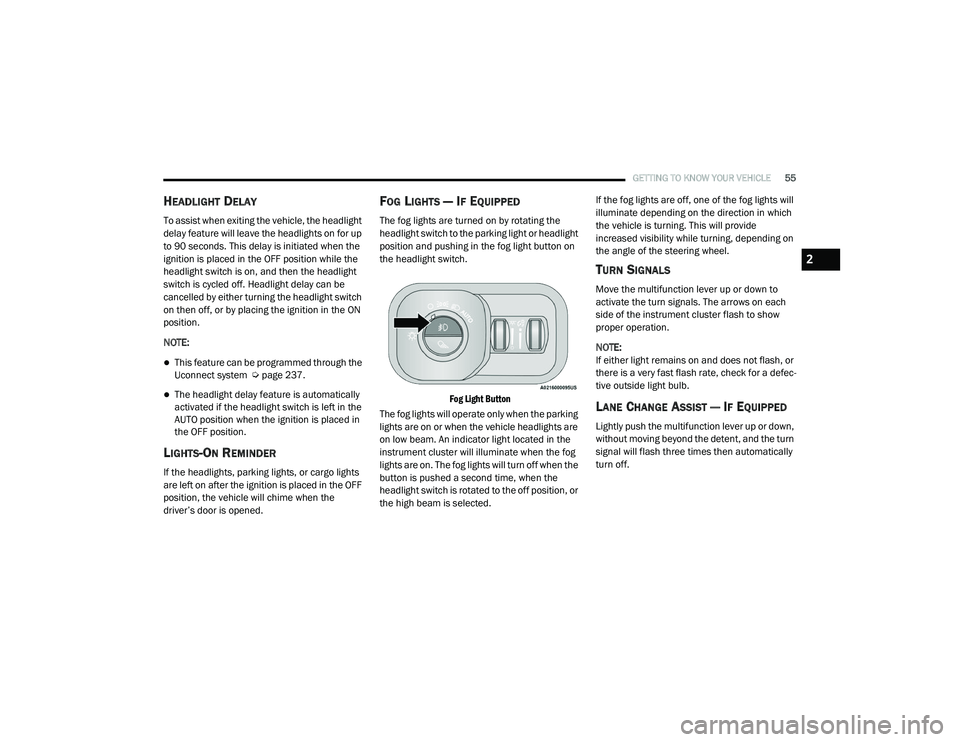
FOG LIGHTS — IF EQUIPPED
The fog lights are turned on by rotating the
headlight switch to the parking light or headlight
position and pushing in the fog light button on
the headlight switch.
Fog Light Button
The fog lights will operate only when the parking
lights are on or when the vehicle headlights are
on low beam. An indicator light located in the
instrument cluster will illuminate when the fog
lights are on. The fog lights will turn off when the
button is pushed a second time, when the
headlight switch is rotated to the off position, or
the high beam is selected. If the fog lights are off, one of the fog lights will
illuminate depending on the direction in which
the vehicle is turning. This will provide
increased visibility while turning, depending on
the angle of the steering wheel.
TURN SIGNALS
Move the multifunction lever up or down to
activate the turn signals. The arrows on each
side of the instrument cluster flash to show
proper operation.
NOTE:
If either light remains on and does not flash, or
there is a very fast flash rate, check for a defec
-
tive outside light bulb.
LANE CHANGE ASSIST — IF EQUIPPED
Lightly push the multifunction lever up or down,
without moving beyond the detent, and the turn
signal will flash three times then automatically
turn off.
2
21_DT_OM_EN_USC_t.book Page 55
Page 118 of 496

116GETTING TO KNOW YOUR INSTRUMENT PANEL
DISPLAY MENU ITEMS
Push and release the up or down arrow
button until the desired selectable menu icon is
highlighted in the instrument cluster display.
Speedometer
Push and release the up or down arrow
button until the speedometer menu item is
highlighted in the instrument cluster display.
Push and release the OK button to cycle the
display between mph and km/h.
Vehicle Info
Push and release the up or down arrow
button until the Vehicle Info menu icon is
displayed in the instrument cluster display.
Push and release the left or right arrow
button to scroll through the information
submenus and push and release the OK button
to select or reset the resettable submenus.
Tire Pressure Monitor System
Air Suspension — If Equipped
Coolant Temperature — If Equipped
Trans Temperature (Automatic only)
Oil Temperature
Oil Pressure — If Equipped
Oil Life
Battery Voltage — If Equipped
Gauge Summary — If Equipped
Coolant Temp
Trans Temp
Oil Temp
Oil Pressure
Engine Hours
Off-Road
Push and release the up or down arrow
button until the Off-Road menu icon is displayed
in the instrument cluster display. Push and
release the left or right arrow button to
scroll through the information submenus.
Drivetrain
Front Wheel Angle: displays the graphical
and numerical value of calculated
average front wheel angle from the
steering wheel orientation.
Transfer Case Lock Status: displays
“Lock” graphic only during 4WD High,
4WD High Part Time, 4WD Low status.
Axle Lock And Sway Bar Status (If
Equipped): displays front and rear or rear
only axle locker graphic, and sway bar
connection graphic with text message
(connected or disconnected).
Pitch And Roll
Displays the pitch and roll of the vehicle
in the graphic with the angle number on
the screen.
NOTE:
When vehicle speed becomes too high to
display the pitch and roll, “- -” will display in
place of the numbers, and the graphic will be
greyed out. A message indicating the necessary
speed for the feature to become available will
also display.
Driver Assist — If Equipped
The Driver Assist menu displays the status of
the ACC and LaneSense systems.
Push and release the up or down arrow
button until the Driver Assist menu is displayed
in the instrument cluster display.
21_DT_OM_EN_USC_t.book Page 116
Page 120 of 496

118GETTING TO KNOW YOUR INSTRUMENT PANEL
Trailer Tow
Push and release the up or down arrow
button until the Trailer Tow menu item is
highlighted in the instrument cluster display.
Push and release the right or left arrow
button to cycle through the following trailer tow
information:
Trip (trailer specific) Distance: Push and hold
the OK button to reset the distance.
Integrated Trailer Brake Module (ITBM):
Braking Output
Trailer Type
ITBM Gain
Trailer Light Check: Push and hold the OK
button to begin the Trailer Light Test
sequence Ú page 225.
Trailer Tire Pressure Monitoring: The Instru-
ment Cluster Display will display the Trailer
Tire Pressure for a connected trailer with
sensors that match the active trailer profile.
When a low tire is present, the low tire value
will be displayed in red, and the affected low
tire will have a red glow. “Trailer Tire Low“ will
be displayed on the center bottom of the
Instrument Cluster Display screen.
Audio
Push and release the up or down arrow
button until the Audio Menu icon/title is
highlighted in the instrument cluster display.
This menu will display the audio source
information, including the Song name, Artist
name, and audio source with an accompanying
graphic.
Phone Call Status
When a call is incoming, a Phone Call Status
pop-up will display on the screen. The pop-up
will remain until the phone is answered or
ignored.
NOTE:
The call status will temporarily replace the
previous media source information displayed
on the screen. When the pop-up is no longer
displayed, the display will return to the last used
screen.
Stored Messages
Push and release the up or down arrow
button until the Messages Menu item is
highlighted. This feature shows the number of
stored warning messages. Push and release the
right or left arrow button to cycle through
stored messages.
Settings
Head-Up Display (HUD)
NOTE:
The HUD feature Settings are available at any
vehicle speed.
Push and release the up or down arrow
button until the Settings Menu icon/title is
highlighted in the instrument cluster display.
Push and release the left or right arrow
button until the HUD Menu icon/title is
highlighted in the instrument cluster
display.Push and release the OK button to enter
HUD. Use the up or down arrow button to
select a setting, then push and release the OK
button to adjust the setting.
ON/OFF
Content and Layout
Simple : Speed, Speed Limit
Standard : Speed, Speed Limit, Naviga-
tion
Advanced : Speed, Speed Limit, Naviga-
tion, Driver Assist (ACC/Cruise, Lane -
Sense, Highway Assist/Highway Assist+),
Gear
21_DT_OM_EN_USC_t.book Page 118
Page 121 of 496

GETTING TO KNOW YOUR INSTRUMENT PANEL119
Custom 1: Speed, Speed Limit
Custom 2: Speed, Speed Limit, Naviga-
tion
Custom 3 : Speed, Speed Limit, Naviga-
tion, Driver Assist (ACC/Cruise, Lane -
Sense, Highway Assist/Highway Assist+)
Custom 4 : Speed, Speed Limit, Naviga-
tion, Driver Assist (ACC/Cruise, Lane -
Sense, Highway Assist/Highway Assist+),
Gear
Display Height
Brightness
NOTE:
The HUD basic settings (Brightness, Display
Height and Non Custom layouts), are controlled
through the Settings Screen in the Instrument
Cluster Ú page 114. Screen Setup Driver Selectable Items
Push and release the
up or down arrow
button until the Settings Menu Icon/Title is
highlighted in the instrument cluster display.
Push and release the OK button to enter the
sub-menus and follow the prompts on the
screen as needed. The Settings feature allows
you to change what information is displayed in
the instrument cluster as well as the location
that information is displayed.
NOTE:
The Settings feature is only available when the
vehicle speed is less than 5 mph.
Upper Left
None
Compass
Outside Temp
Time
Range To Empty
Average Econ
Current Econ
Trip A Distance
Trip B Distance
Trailer Trip – If Equipped
Trailer Brake – If Equipped
Oil Pressure – If Equipped
Coolant Temp – If Equipped
Oil Temperature – If Equipped
Battery Voltage – If Equipped
Transmission Temperature – If Equipped
Oil Life – If Equipped
Upper Center
None
Compass
Outside Temp
Time
Range To Empty
Average Econ
Current Econ
3
21_DT_OM_EN_USC_t.book Page 119
Page 139 of 496
GETTING TO KNOW YOUR INSTRUMENT PANEL137
Hill Descent Control (HDC) Indicator Light
— If Equipped
This indicator shows when the HDC
feature is turned on. The lamp will be
on solid when HDC is armed. HDC can
only be armed when the transfer case
is in the “4WD LOW” position and the vehicle
speed is less then 20 mph (32 km/h). If these
conditions are not met while attempting to use
the HDC feature, the HDC indicator light will
flash on/off.
LaneSense Indicator Light — If Equipped
When the LaneSense system is ON,
but not armed, the LaneSense
indicator light illuminates solid white.
This occurs when only left, right, or
neither lane line has been detected. If a single
lane line is detected, the system is ready to
provide only visual warnings if an unintentional
lane departure occurs on the detected lane line
Ú page 199.
BLUE INDICATOR LIGHTS
High Beam Indicator Light
This indicator light will illuminate to
indicate that the high beam
headlights are on. With the low beams
activated, push the multifunction
lever forward (toward the front of the vehicle) to
turn on the high beams. Pull the multifunction
lever rearward (toward the rear of the vehicle) to
turn off the high beams. If the high beams are
off, pull the lever toward you for a temporary
high beam on, “flash to pass” scenario.
ONBOARD DIAGNOSTIC SYSTEM — OBD II
Your vehicle is equipped with a sophisticated
Onboard Diagnostic system called OBD II. This
system monitors the performance of the
emissions, engine, and transmission control
systems. When these systems are operating
properly, your vehicle will provide excellent
performance and fuel economy, as well as
engine emissions well within current
government regulations. If any of these systems require service, the OBD
II system will turn on the Malfunction Indicator
Light (MIL). It will also store diagnostic codes
and other information to assist your service
technician in making repairs. Although your
vehicle will usually be drivable and not need
towing, see an authorized dealer for service as
soon as possible.
CAUTION!
Prolonged driving with the MIL on could
cause further damage to the emission
control system. It could also affect fuel
economy and driveability. The vehicle must
be serviced before any emissions tests can
be performed.
If the MIL is flashing while the vehicle is
running, severe catalytic converter damage
and power loss will soon occur. Immediate
service is required.
3
21_DT_OM_EN_USC_t.book Page 137
Page 191 of 496

STARTING AND OPERATING189
Stationary Objects And Vehicles
ACC does not react to stationary objects and
stationary vehicles. For example, ACC will not
react in situations where the vehicle you are
following exits your lane and the vehicle ahead
is stopped in your lane. Always be attentive and
ready to apply the brakes if necessary
Úpage 482.
Stationary Object And Stationary Vehicle Example
PARKSENSE FRONT/REAR PARK ASSIST
SYSTEM — IF EQUIPPED
The ParkSense Park Assist system provides
visual and audible indications of the distance
between the rear and/or front fascia/bumper
and a detected obstacle when backing up or
moving forward (e.g. during a parking maneuver). If your vehicle is equipped with the
automatic braking function, the vehicle brakes
may be automatically applied and released
when the vehicle is in REVERSE if the system
detects a possible collision with an obstacle.
NOTE:
The driver can disable the automatic braking
function by turning ParkSense off via the
ParkSense switch. The driver can also over
-
ride automatic braking by changing the gear
or by pressing the gas pedal over 90% of its
capacity during the braking event.
Automatic brakes will not be available if the
vehicle is in 4WD Low.
Automatic brakes will not be available if ESC
is not available.
Automatic brakes will not be available if there
is a faulted condition detected with the Park -
Sense Park Assist system or the Braking
System.
The automatic braking function may only be
applied if the vehicle deceleration is not
enough to avoid colliding with a detected
obstacle.
The automatic braking function may not be
applied fast enough for obstacles that move
toward the rear of the vehicle from the left
and/or right sides.
The automatic braking function can be
enabled/disabled from the Customer
Programmable Features section of the
Uconnect system.
ParkSense will retain its last known configu -
ration state for the automatic braking func -
tion through ignition cycles.
Trailer hitch ball assembly may cause false
braking events if left attached after towing.
The automatic braking function is intended to
assist the driver in avoiding possible collisions
with detected obstacles when backing up in
REVERSE gear.
NOTE:
The system is provided to assist the driver
and not to substitute the driver.
The driver must stay in full control of the
vehicle's acceleration and braking and is
responsible for the vehicle's movements.
4
21_DT_OM_EN_USC_t.book Page 189
Page 201 of 496

STARTING AND OPERATING199
The system will cancel the maneuver if the
vehicle speed exceeds 5 mph (7 km/h)
during active steering guidance into the
parking space. The system will provide a
warning to the driver at 3 mph (5 km/h) that
tells them to slow down. The driver is then
responsible for completing the maneuver if
the system is canceled.
If the system is canceled during the
maneuver for any reason, the driver must
take control of the vehicle.
LANESENSE — IF EQUIPPED
LANESENSE OPERATION
The LaneSense system is operational at speeds
above 37 mph (60 km/h) and below 112 mph
(180 km/h). The LaneSense system uses a
forward looking camera to detect lane markings
and measure vehicle position within the lane
boundaries. When both lane markings are detected and the
driver drifts out of the lane (no turn signal
applied), the LaneSense system provides a
haptic warning in the form of torque applied to
the steering wheel, as well as a visual warning
in the instrument cluster display, to prompt the
driver to remain within the lane boundaries.
The driver may manually override the haptic
warning by applying force into the steering
wheel at any time.
When only a single lane marking is detected
and the driver drifts across the lane marking (no
turn signal applied), the LaneSense system
provides a visual warning through the
instrument cluster display to prompt the driver
to remain within the lane.
When only a single lane marking is detected, a
haptic or a torque warning will not be provided.
NOTE:
When operating conditions have been met, the
LaneSense system will monitor if the driver’s
hands are on the steering wheel and provide an
audible and visual warning to the driver if
removed. The system will cancel if the driver
does not return their hands to the wheel.
WARNING!
Drivers must be careful when performing
parallel or perpendicular parking maneuvers
even when using the ParkSense Active Park
Assist system. Always check carefully behind
and in front of your vehicle, look behind and
in front of you, and be sure to check for
pedestrians, animals, other vehicles,
obstructions, and blind spots before backing
up and moving forward. You are responsible
for safety and must continue to pay attention
to your surroundings. Failure to do so can
result in serious injury or death.
CAUTION!
The ParkSense Active Park Assist system is
only a parking aid and it is unable to recog
-
nize every obstacle, including small obsta -
cles. Parking curbs might be temporarily
detected or not detected at all. Obstacles
located above or below the sensors will not
be detected when they are in close prox -
imity.
The vehicle must be driven slowly when
using the ParkSense Active Park Assist
system in order to be able to stop in time
when an obstacle is detected. It is recom -
mended that the driver looks over his/her
shoulder when using the ParkSense Active
Park Assist system.4
21_DT_OM_EN_USC_t.book Page 199
Page 245 of 496
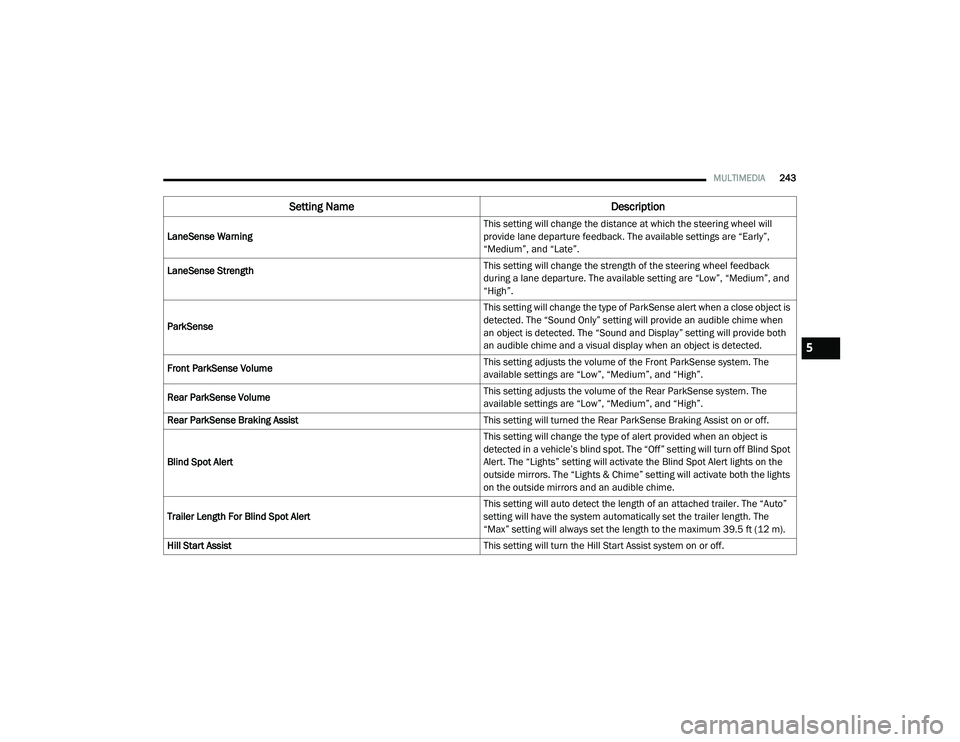
MULTIMEDIA243
LaneSense Warning This setting will change the distance at which the steering wheel will
provide lane departure feedback. The available settings are “Early”,
“Medium”, and “Late”.
LaneSense Strength
This setting will change the strength of the steering wheel feedback
during a lane departure. The available setting are “Low”, “Medium”, and
“High”.
ParkSense This setting will change the type of ParkSense alert when a close object is
detected. The “Sound Only” setting will provide an audible chime when
an object is detected. The “Sound and Display” setting will provide both
an audible chime and a visual display when an object is detected.
Front ParkSense Volume This setting adjusts the volume of the Front ParkSense system. The
available settings are “Low”, “Medium”, and “High”.
Rear ParkSense Volume This setting adjusts the volume of the Rear ParkSense system. The
available settings are “Low”, “Medium”, and “High”.
Rear ParkSense Braking Assist This setting will turned the Rear ParkSense Braking Assist on or off.
Blind Spot Alert This setting will change the type of alert provided when an object is
detected in a vehicle’s blind spot. The “Off” setting will turn off Blind Spot
Alert. The “Lights” setting will activate the Blind Spot Alert lights on the
outside mirrors. The “Lights & Chime” setting will activate both the lights
on the outside mirrors and an audible chime.
Trailer Length For Blind Spot Alert This setting will auto detect the length of an attached trailer. The “Auto”
setting will have the system automatically set the trailer length. The
“Max” setting will always set the length to the maximum 39.5 ft (12 m).
Hill Start Assist This setting will turn the Hill Start Assist system on or off.
Setting NameDescription
5
21_DT_OM_EN_USC_t.book Page 243