engine RAM 1500 2021 Owner's Manual
[x] Cancel search | Manufacturer: RAM, Model Year: 2021, Model line: 1500, Model: RAM 1500 2021Pages: 496, PDF Size: 20.89 MB
Page 55 of 496

GETTING TO KNOW YOUR VEHICLE53
To turn on the headlights, rotate the headlight
switch clockwise. When the headlight switch is
on, the parking lights, taillights, license plate
light and instrument panel lights are also turned
on. To turn off the headlights, rotate the
headlight switch back to the O (off) position.
NOTE:
Your vehicle is equipped with plastic head -
light and fog light (if equipped) lenses that
are lighter and less susceptible to stone
breakage than glass lights. Plastic is not as
scratch resistant as glass and therefore
different lens cleaning procedures must be
followed.
To minimize the possibility of scratching the
lenses and reducing light output, avoid
wiping with a dry cloth. To remove road dirt,
wash with a mild soap solution followed by
rinsing.
MULTIFUNCTION LEVER
The multifunction lever is located on the left
side of the steering column.
Multifunction Lever
DAYTIME RUNNING LIGHTS (DRLS)
The Daytime Running Lights (DRLs) come on
whenever the engine is running, and the low
beams are not on. The lights will remain on until
the ignition is placed in the OFF or ACC position,
or the parking brake is engaged.
NOTE:
For vehicles sold in Canada, the Daytime
Running Lights will automatically deactivate
when the front fog lights are turned on.
If a turn signal is activated, the DRL lamp on
the same side of the vehicle will turn off for
the duration of the turn signal activation.
Once the turn signal is no longer active, the
DRL lamp will illuminate.
If allowed by law in the country in which the
vehicle was purchased, the Daytime Running
Lights can be turned on and off using the
Uconnect system Ú page 237.
HIGH/LOW BEAM SWITCH
Push the multifunction lever toward the
instrument panel to switch the headlights to
high beams. Pulling the multifunction lever
back will turn the low beams on.
AUTOMATIC HIGH BEAM HEADLAMP
C
ONTROL — IF EQUIPPED
The Automatic High Beam Headlamp Control
system provides increased forward lighting at
night by automating high beam control through
the use of a camera mounted on the inside
rearview mirror or a windshield mounted
camera. These cameras detect vehicle specific
light and automatically switch from high beams
to low beams until the approaching vehicle is
out of view.
CAUTION!
Do not use abrasive cleaning components,
solvents, steel wool or other abrasive
materials to clean the lenses.
2
21_DT_OM_EN_USC_t.book Page 53
Page 56 of 496

54GETTING TO KNOW YOUR VEHICLE
NOTE:
The Automatic High Beam Headlamp Control
can be turned on or off by selecting “ON”
under “Auto Dim High Beams” within your
Uconnect Settings Úpage 237, as well as
turning the headlight switch to the AUTO posi -
tion.
Broken, muddy, or obstructed headlights and
taillights of vehicles in the field of view will
cause headlights to remain on longer (closer
to the vehicle). Also, dirt, film, and other
obstructions on the windshield or camera
lens will cause the system to function improp -
erly.
If the windshield or Automatic High Beam
Headlamp Control mirror is replaced, the
mirror must be re-aimed to ensure proper
performance. See a local authorized dealer.
To opt out of the Advanced Auto High Beam
Sensitivity Control (default) and enter
Reduced High Beam Sensitivity Control (not
recommended), toggle the high beam lever
6 full on/off cycles within 10 seconds of
placing the ignition in the ON position. The
system will return to the default setting upon
placing the ignition in the OFF position.
FLASH-TO-PASS
You can signal another vehicle with your
headlights by lightly pulling the multifunction
lever toward you. This will cause the high beam
headlights to turn on, and remain on, until the
lever is released.
AUTOMATIC HEADLIGHTS — IF EQUIPPED
This system automatically turns the headlights
on or off according to ambient light levels. To
turn the system on, rotate the headlight switch
to the AUTO position.
When the system is on, the Headlight Delay
feature is also on. This means the headlights
will stay on for up to 90 seconds after you place
the ignition into the OFF position. To turn the
automatic headlights off, turn the headlight
switch out of the AUTO position.
NOTE:
The engine must be running before the head -
lights will turn on in the Automatic Mode.
PARKING LIGHTS AND PANEL LIGHTS
To turn on the parking lights and instrument
panel lights, rotate the headlight switch
clockwise. To turn off the parking lights, rotate
the headlight switch back to the O (off) position.
AUTOMATIC HEADLIGHTS WITH WIPERS
If your vehicle is equipped with Automatic
Headlights, it also has this
customer-programmable feature. When your
headlights are in the automatic mode and the
engine is running, they will automatically turn
on when the wiper system is on. This feature is
programmable through the Uconnect system
Ú page 237.
If your vehicle is equipped with the Rain Sensing
Wiper system Ú page 59, and it is activated,
the headlights will automatically turn on after
the wipers complete five wipe cycles within
approximately one minute, and they will turn off
approximately four minutes after the wipers
completely stop.
NOTE:
When your headlights come on during the
daytime, the instrument panel lights will auto -
matically dim to the lower nighttime intensity.
21_DT_OM_EN_USC_t.book Page 54
Page 68 of 496

66GETTING TO KNOW YOUR VEHICLE
NOTE:
It is not necessary to move the temperature
settings for cold or hot vehicles. The system
automatically adjusts the temperature,
mode, and blower speed to provide comfort
as quickly as possible.
The temperature can be displayed in US or
Metric units by selecting the US/Metric
customer-programmable feature within
Uconnect Settings Úpage 237.
To provide you with maximum comfort in the
Automatic mode during cold start-ups, the
blower fan will remain on low until the engine
warms up. The blower will increase in speed
and transition into Auto mode.
Manual Operation Override
This system offers a full complement of manual
override features. The AUTO symbol in the front
ATC display will be turned off when the system
is being used in the manual mode.
CLIMATE VOICE RECOGNITION
Adjust vehicle temperatures hands-free and
keep everyone comfortable while you keep
moving ahead. Push the VR button on the steering wheel. After
the beep, say one of the following commands:
“
Set driver temperature to 70 degrees ”
“Set passenger temperature to 70 degrees ”
Did you know: Voice Command for Climate may
only be used to adjust the interior temperature
of your vehicle. Voice Command will not work to
adjust the heated seats or steering wheel if
equipped.
OPERATING TIPS
NOTE:
Refer to the chart at the end of this section for
suggested control settings for various weather
conditions.
Summer Operation
The engine cooling system must be protected
with a high-quality antifreeze coolant to provide
proper corrosion protection and to protect
against engine overheating. OAT coolant
(conforming to MS.90032) is recommended.
Winter Operation
To ensure the best possible heater and
defroster performance, make sure the engine
cooling system is functioning properly and the proper amount, type, and concentration of
coolant is used. Use of the Air Recirculation
mode during Winter months is not
recommended, because it may cause window
fogging.
Vacation/Storage
For information on maintaining the Climate
Control system when the vehicle is being stored
for an extended period of time, see
Ú
page 461.
Window Fogging
Vehicle windows tend to fog on the inside in
mild, rainy, and/or humid weather. To clear the
windows, select Defrost or Mix mode and
increase the front blower speed. Do not use the
Recirculation mode without A/C for long
periods, as fogging may occur.
Outside Air Intake
Make sure the air intake, located directly in
front of the windshield, is free of obstructions,
such as leaves. Leaves collected in the air
intake may reduce airflow, and if they enter the
air distribution box, they could plug the water
drains. In Winter months, make sure the air
intake is clear of ice, slush, and snow.
21_DT_OM_EN_USC_t.book Page 66
Page 69 of 496

GETTING TO KNOW YOUR VEHICLE67
Cabin Air Filter
The Climate Control system filters out dust and
pollen from the air. Contact an authorized
dealer to service your cabin air filter, and to
have it replaced when needed.
Stop/Start System — If Equipped
While in an Autostop, the Climate Control
system may automatically adjust airflow to
maintain cabin comfort. Customer settings will
be maintained upon return to an engine running
condition.
Windshield Wiper De-Icer — If Equipped
The windshield wiper de-icer is a heating
element located at the base of the windshield.
It operates automatically once the following
conditions are met:
Activation By Front Defrost
The wiper de-icer activates automatically
during a cold weather manual start with full
defrost, and when the ambient temperature
is below 33°F (0.6°C) .
Activation By Rear Defrost
The wiper de-icer activates automatically
when the Rear Defrost is operating and the
ambient temperature is below 33°F (0.6°C) .
Activation By Remote Start Operation
When the Remote Start is activated and the
outside ambient temperature is less than
33°F (0.6°C) the windshield wiper de-icer is
activated. Upon exiting Remote Start, the
climate control functions will resume their
previous operation except, if the de-icer is
active, the de-icer timer and operation will
continue.
Operating Tips Chart
WEATHER CONTROL
SETTINGS
Hot Weather And
Vehicle Interior Is Very Hot Set the mode control
to (Panel Mode), (A/C) on, and
blower on high. Roll
down the windows for a minute to flush out
the hot air. Adjust the
controls as needed to achieve comfort.
Warm Weather Turn (A/C) on and
set the mode control to the (Panel Mode)position.
Cool Sunny Operate in
(Bi-Level Mode) position.
Cool & Humid Conditions Set the mode control
to (Floor Mode)
position and turn on (A/C) to keep
windows clear.
Cold Weather Set the mode control
to the (Floor
Mode) position. If
windshield fogging
starts to occur, move the control to the (Mix Mode) position.
WEATHER CONTROL
SETTINGS
2
21_DT_OM_EN_USC_t.book Page 67
Page 77 of 496
GETTING TO KNOW YOUR VEHICLE75
(Continued)
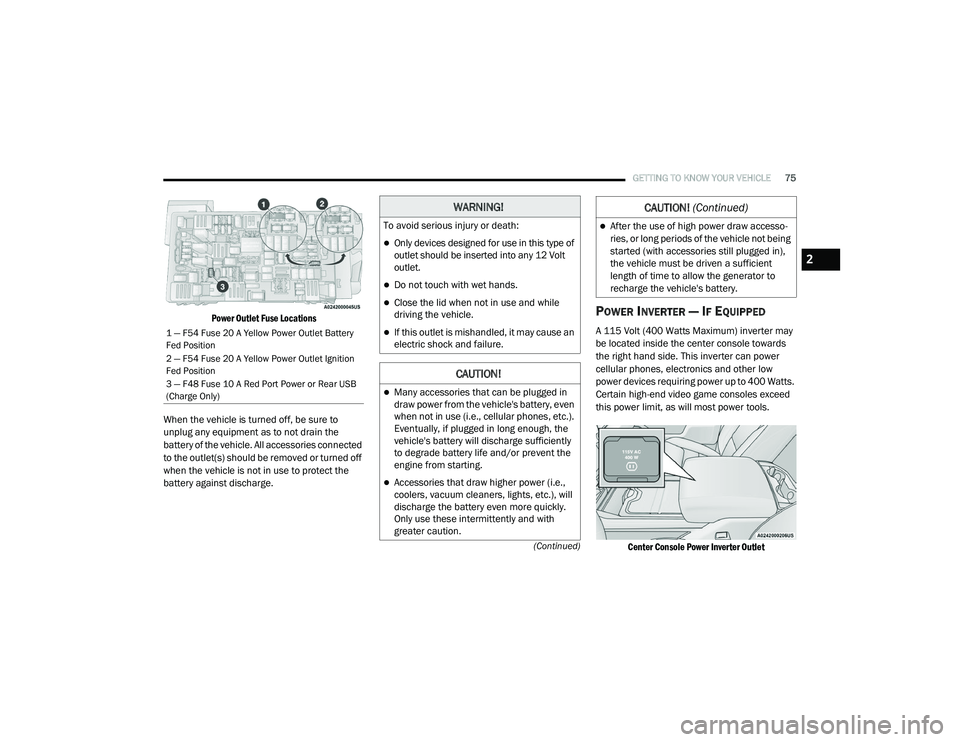
Power Outlet Fuse Locations
When the vehicle is turned off, be sure to
unplug any equipment as to not drain the
battery of the vehicle. All accessories connected
to the outlet(s) should be removed or turned off
when the vehicle is not in use to protect the
battery against discharge.POWER INVERTER — IF EQUIPPED
A 115 Volt (400 Watts Maximum) inverter may
be located inside the center console towards
the right hand side. This inverter can power
cellular phones, electronics and other low
power devices requiring power up to 400 Watts.
Certain high-end video game consoles exceed
this power limit, as will most power tools.
Center Console Power Inverter Outlet
1 — F54 Fuse 20 A Yellow Power Outlet Battery
Fed Position
2 — F54 Fuse 20 A Yellow Power Outlet Ignition
Fed Position
3 — F48 Fuse 10 A Red Port Power or Rear USB
(Charge Only)
WARNING!
To avoid serious injury or death:
Only devices designed for use in this type of
outlet should be inserted into any 12 Volt
outlet.
Do not touch with wet hands.
Close the lid when not in use and while
driving the vehicle.
If this outlet is mishandled, it may cause an
electric shock and failure.
CAUTION!
Many accessories that can be plugged in
draw power from the vehicle's battery, even
when not in use (i.e., cellular phones, etc.).
Eventually, if plugged in long enough, the
vehicle's battery will discharge sufficiently
to degrade battery life and/or prevent the
engine from starting.
Accessories that draw higher power (i.e.,
coolers, vacuum cleaners, lights, etc.), will
discharge the battery even more quickly.
Only use these intermittently and with
greater caution.
After the use of high power draw accesso -
ries, or long periods of the vehicle not being
started (with accessories still plugged in),
the vehicle must be driven a sufficient
length of time to allow the generator to
recharge the vehicle's battery.
CAUTION! (Continued)
2
21_DT_OM_EN_USC_t.book Page 75
Page 107 of 496

GETTING TO KNOW YOUR INSTRUMENT PANEL105
BASE / MIDLINE INSTRUMENT CLUSTER
D
ESCRIPTIONS — GASOLINE
1. Tachometer
Indicates the engine speed in revolutions
per minute (RPM x 1000).
2. Voltmeter
When the vehicle is in the RUN state, the
gauge indicates the electrical system
voltage. The pointer should stay within
the normal range if the battery is
charged. If the pointer moves to either
extreme left or right and remains there
during normal driving, the electrical
system should be serviced.
NOTE:
In vehicles equipped with Stop/Start, a reduced
voltage may be present during an Autostop.
3. Instrument Cluster Display
When the appropriate conditions exist,
this display shows the instrument cluster
display messages Ú page 114.
Instrument Cluster Display/Controls Location
The display always show one of the main
menu item after ignition on.
4. Oil Pressure Gauge
The pointer should always indicate the oil
pressure when the engine is running. A
continuous high or low reading under
normal driving conditions may indicate a
lubrication system malfunction. Imme -
diate service should be obtained from an
authorized dealer.
NOTE:
In vehicles equipped with Stop/Start, an oil
pressure indication of zero is normal during an
Autostop. 5. Speedometer
Indicates vehicle speed.
6. Fuel Gauge
The pointer shows the level of fuel in the
fuel tank when the ignition is in the ON/
RUN position.
The fuel pump symbol points to the
side of the vehicle where the fuel door
is located.
7. Temperature Gauge
The pointer shows engine coolant
temperature. The pointer positioned
within the normal range indicates that
the engine cooling system is operating
satisfactorily.
The pointer will likely indicate a higher
temperature when driving in hot weather,
up mountain grades, or when towing a
trailer. It should not be allowed to exceed
the upper limits of the normal operating
range.
1 – Instrument Cluster Display Controls
2 – Instrument Cluster Display Screen
3
21_DT_OM_EN_USC_t.book Page 105
Page 108 of 496
106GETTING TO KNOW YOUR INSTRUMENT PANEL
WARNING!
A hot engine cooling system is dangerous.
You or others could be badly burned by steam
or boiling coolant. You may want to call an
authorized dealer for service if your vehicle
overheats Úpage 423.
CAUTION!
Driving with a hot engine cooling system
could damage your vehicle. If the
temperature gauge reads “H,” pull over and
stop the vehicle. Idle the vehicle with the air
conditioner turned off until the pointer drops
back into the normal range. If the pointer
remains on the “H,” turn the engine off
immediately and call an authorized dealer for
service.
21_DT_OM_EN_USC_t.book Page 106
Page 110 of 496

108GETTING TO KNOW YOUR INSTRUMENT PANEL
PREMIUM INSTRUMENT CLUSTER
D
ESCRIPTIONS — GASOLINE
1. Tachometer
Indicates the engine speed in revolutions
per minute (RPM x 1000).
2. Instrument Cluster Display
When the appropriate conditions exist,
this display shows the instrument cluster
display messages Ú page 114.
Instrument Cluster Display/Controls Location
The display always show one of the main
menu item after ignition on. 3. Speedometer
Indicates vehicle speed.
4. Fuel Gauge
The pointer shows the level of fuel in the
fuel tank when the ignition is in the ON/
RUN position.
The fuel pump symbol points to the
side of the vehicle where the fuel door
is located.
5. Temperature Gauge
The pointer shows engine coolant
temperature. The pointer positioned
within the normal range indicates that
the engine cooling system is operating
satisfactorily.
The pointer will likely indicate a higher
temperature when driving in hot weather,
up mountain grades, or when towing a
trailer. It should not be allowed to exceed
the upper limits of the normal operating
range.
1 – Instrument Cluster Display Controls
2 – Instrument Cluster Display Screen
WARNING!
A hot engine cooling system is dangerous.
You or others could be badly burned by steam
or boiling coolant. You may want to call an
authorized dealer for service if your vehicle
overheats Ú page 423.
CAUTION!
Driving with a hot engine cooling system
could damage your vehicle. If the
temperature gauge reads “H,” pull over and
stop the vehicle. Idle the vehicle with the air
conditioner turned off until the pointer drops
back into the normal range. If the pointer
remains on the “H,” turn the engine off
immediately and call an authorized dealer for
service.
21_DT_OM_EN_USC_t.book Page 108
Page 112 of 496

110GETTING TO KNOW YOUR INSTRUMENT PANEL
BASE / MIDLINE INSTRUMENT CLUSTER
D
ESCRIPTIONS — DIESEL
1. Tachometer
Indicates the engine speed in revolutions
per minute (RPM x 1000).
2. Engine Coolant Temperature
This gauge shows the engine coolant
temperature. The gauge pointer will likely
show higher temperatures when driving
in hot weather, up mountain grades, or in
heavy stop and go traffic. If the red
Warning Light turns on while driving,
safely bring the vehicle to a stop, and
turn off the engine. DO NOT operate the
vehicle until the cause is corrected.
3. Instrument Cluster Display
When the appropriate conditions exist,
this display shows the instrument cluster
display messages Úpage 114.
Instrument Cluster Display/Controls Location
The display always show one of the main
menu item after ignition on.
4. Oil Pressure Gauge
The pointer should always indicate some
oil pressure when the engine is running.
A continuous high or low reading under
normal driving conditions may indicate a
lubrication system malfunction. Imme -
diate service should be obtained from an
authorized dealer.
WARNING!
A hot engine cooling system is dangerous.
You or others could be badly burned by steam
or boiling coolant. You may want to call an
authorized dealer for service if your vehicle
overheats Ú page 423.
WARNING!
Driving with a hot engine cooling system
could damage your vehicle. If the
temperature gauge reads “H” pull over and
stop the vehicle. Idle the vehicle with the air
conditioner turned off until the pointer drops
back into the normal range. If the pointer
remains on the “H”, turn the engine off
immediately and call an authorized dealer for
service.1 – Instrument Cluster Display Controls
2 – Instrument Cluster Display Screen
21_DT_OM_EN_USC_t.book Page 110
Page 115 of 496

GETTING TO KNOW YOUR INSTRUMENT PANEL113
PREMIUM INSTRUMENT CLUSTER
D
ESCRIPTIONS — DIESEL
1. Tachometer
Indicates the engine speed in revolutions
per minute (RPM x 1000).
2. Instrument Cluster Display
When the appropriate conditions exist,
this display shows the instrument cluster
display messages Ú page 114.
Instrument Cluster Display/Controls Location
The display always show one of the main
menu item after ignition on. 3. Speedometer
Indicates vehicle speed.
4. Fuel Gauge
The pointer shows the level of fuel in the
fuel tank when the ignition switch is in
the ON/RUN position.
The fuel pump symbol points to the
side of the vehicle where the fuel filler
door is located.
5. Diesel Exhaust Fluid (DEF) Gauge
The DEF Gauge displays the actual level
of Diesel Exhaust Fluid in the DEF tank.
DEF is required to maintain normal
vehicle operation and emissions compli -
ance. If something is wrong with the
gauge, a DEF Warning Message or
Malfunction Indicator Light (MIL) will be
displayed Ú page 123.
NOTE:
The DEF tank on these vehicles is designed
with a large amount of full reserve. So the
level sensor will indicate a full reading even
before the tank is completely full. To put it
another way, there’s additional storage capacity in the tank above the Full mark
that’s not represented in the gauge. You may
not see any movement in the reading – even
after driving up to 2,000 miles in some
cases.
The gauge may take up to five seconds to
update after adding a gallon or more of DEF
to the DEF tank. If you have a fault related to
the DEF system, the gauge may not update to
the new level. See an authorized dealer for
service.
The DEF gauge may also not immediately
update after a refill if the temperature of the
DEF fluid is below 12°F (-11°C). The DEF line
heater will possibly warm up the DEF fluid
and allow the gauge to update after a period
of run time. Under very cold conditions, it is
possible that the gauge may not reflect the
new fill level for several drives.
Outside temperature can affect DEF
consumption. In cold conditions, 12°F
(-11°C) and below, the DEF gauge needle
can stay on a fixed position and may not
move for extended periods of time. This is a
normal function of the system.
1 – Instrument Cluster Display Controls
2 – Instrument Cluster Display Screen
3
21_DT_OM_EN_USC_t.book Page 113