oil pressure RAM 1500 2021 Owners Manual
[x] Cancel search | Manufacturer: RAM, Model Year: 2021, Model line: 1500, Model: RAM 1500 2021Pages: 496, PDF Size: 20.89 MB
Page 9 of 496
7
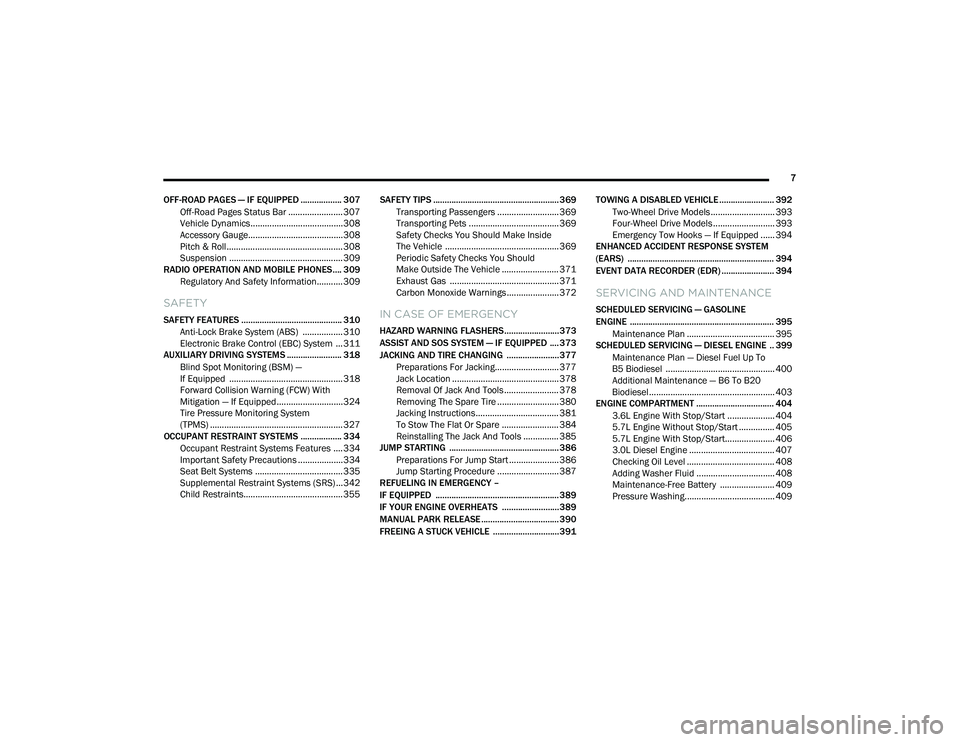
OFF-ROAD PAGES — IF EQUIPPED .................. 307 Off-Road Pages Status Bar .......................307
Vehicle Dynamics.......................................308
Accessory Gauge........................................308
Pitch & Roll .................................................308
Suspension ................................................309
RADIO OPERATION AND MOBILE PHONES.... 309
Regulatory And Safety Information........... 309
SAFETY
SAFETY FEATURES ............................................ 310 Anti-Lock Brake System (ABS) ................. 310
Electronic Brake Control (EBC) System ...311
AUXILIARY DRIVING SYSTEMS ........................ 318
Blind Spot Monitoring (BSM) —
If Equipped ................................................318 Forward Collision Warning (FCW) With
Mitigation — If Equipped............................324 Tire Pressure Monitoring System
(TPMS) ........................................................ 327
OCCUPANT RESTRAINT SYSTEMS .................. 334
Occupant Restraint Systems Features ....334
Important Safety Precautions ...................334Seat Belt Systems ..................................... 335Supplemental Restraint Systems (SRS) ...342Child Restraints..........................................355 SAFETY TIPS ....................................................... 369
Transporting Passengers .......................... 369Transporting Pets ...................................... 369
Safety Checks You Should Make Inside
The Vehicle ................................................ 369 Periodic Safety Checks You Should
Make Outside The Vehicle ........................ 371 Exhaust Gas .............................................. 371
Carbon Monoxide Warnings ...................... 372IN CASE OF EMERGENCY
HAZARD WARNING FLASHERS........................373
ASSIST AND SOS SYSTEM — IF EQUIPPED .... 373
JACKING AND TIRE CHANGING .......................377 Preparations For Jacking........................... 377
Jack Location ............................................. 378
Removal Of Jack And Tools ....................... 378
Removing The Spare Tire .......................... 380Jacking Instructions ................................... 381
To Stow The Flat Or Spare ........................ 384
Reinstalling The Jack And Tools ............... 385
JUMP STARTING ................................................ 386
Preparations For Jump Start ..................... 386Jump Starting Procedure .......................... 387
REFUELING IN EMERGENCY –
IF EQUIPPED ...................................................... 389
IF YOUR ENGINE OVERHEATS .........................389
MANUAL PARK RELEASE .................................. 390
FREEING A STUCK VEHICLE .............................391 TOWING A DISABLED VEHICLE ........................ 392
Two-Wheel Drive Models ........................... 393
Four-Wheel Drive Models .......................... 393
Emergency Tow Hooks — If Equipped ...... 394
ENHANCED ACCIDENT RESPONSE SYSTEM
(EARS) ................................................................ 394
EVENT DATA RECORDER (EDR) ....................... 394
SERVICING AND MAINTENANCE
SCHEDULED SERVICING — GASOLINE
ENGINE ............................................................... 395
Maintenance Plan ..................................... 395
SCHEDULED SERVICING — DIESEL ENGINE .. 399
Maintenance Plan — Diesel Fuel Up To
B5 Biodiesel .............................................. 400 Additional Maintenance — B6 To B20
Biodiesel..................................................... 403
ENGINE COMPARTMENT .................................. 404
3.6L Engine With Stop/Start .................... 404
5.7L Engine Without Stop/Start ............... 4055.7L Engine With Stop/Start..................... 406
3.0L Diesel Engine .................................... 407Checking Oil Level ..................................... 408
Adding Washer Fluid ................................. 408Maintenance-Free Battery ....................... 409Pressure Washing...................................... 409
21_DT_OM_EN_USC_t.book Page 7
Page 14 of 496
12
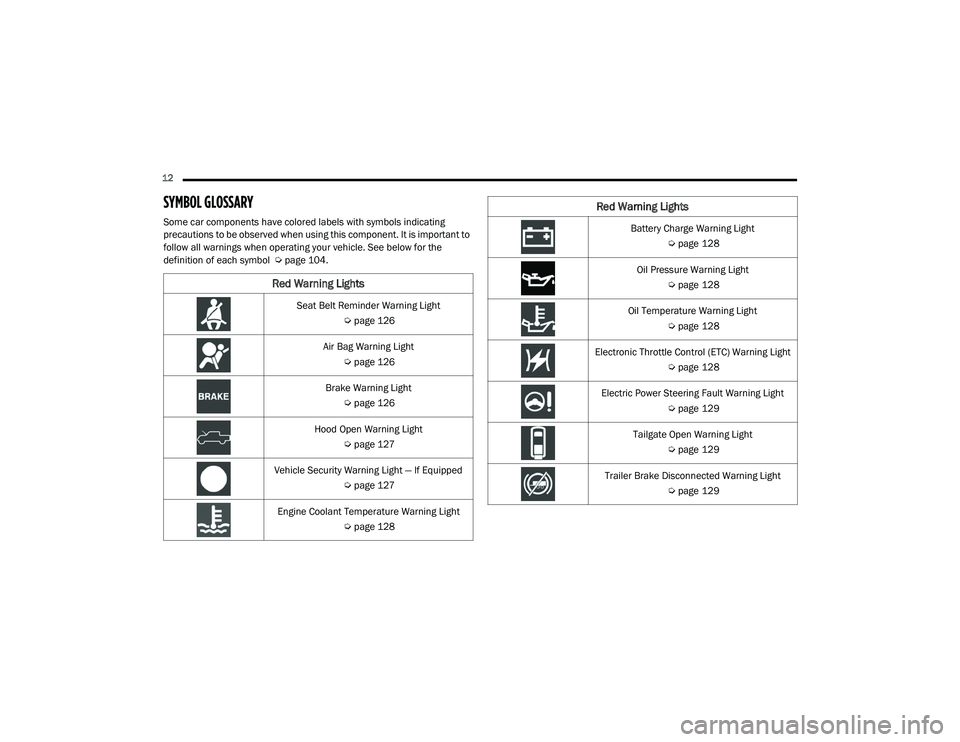
SYMBOL GLOSSARY
Some car components have colored labels with symbols indicating
precautions to be observed when using this component. It is important to
follow all warnings when operating your vehicle. See below for the
definition of each symbol Úpage 104.
Red Warning Lights
Seat Belt Reminder Warning Light
Úpage 126
Air Bag Warning Light Úpage 126
Brake Warning Light Úpage 126
Hood Open Warning Light Úpage 127
Vehicle Security Warning Light — If Equipped Úpage 127
Engine Coolant Temperature Warning Light Úpage 128
Battery Charge Warning Light
Úpage 128
Oil Pressure Warning Light Úpage 128
Oil Temperature Warning Light Úpage 128
Electronic Throttle Control (ETC) Warning Light Úpage 128
Electric Power Steering Fault Warning Light Úpage 129
Tailgate Open Warning Light Úpage 129
Trailer Brake Disconnected Warning Light Úpage 129
Red Warning Lights
21_DT_OM_EN_USC_t.book Page 12
Page 21 of 496
GETTING TO KNOW YOUR VEHICLE19
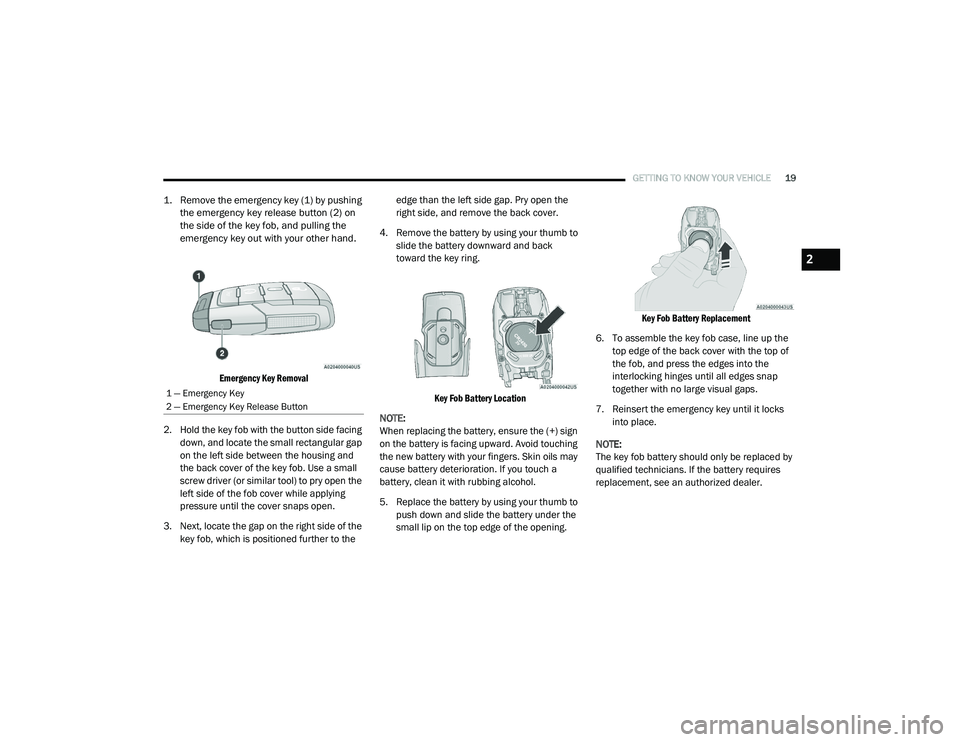
1. Remove the emergency key (1) by pushing
the emergency key release button (2) on
the side of the key fob, and pulling the
emergency key out with your other hand.
Emergency Key Removal
2. Hold the key fob with the button side facing down, and locate the small rectangular gap
on the left side between the housing and
the back cover of the key fob. Use a small
screw driver (or similar tool) to pry open the
left side of the fob cover while applying
pressure until the cover snaps open.
3. Next, locate the gap on the right side of the key fob, which is positioned further to the edge than the left side gap. Pry open the
right side, and remove the back cover.
4. Remove the battery by using your thumb to slide the battery downward and back
toward the key ring.
Key Fob Battery Location
NOTE:
When replacing the battery, ensure the (+) sign
on the battery is facing upward. Avoid touching
the new battery with your fingers. Skin oils may
cause battery deterioration. If you touch a
battery, clean it with rubbing alcohol.
5. Replace the battery by using your thumb to push down and slide the battery under the
small lip on the top edge of the opening.
Key Fob Battery Replacement
6. To assemble the key fob case, line up the top edge of the back cover with the top of
the fob, and press the edges into the
interlocking hinges until all edges snap
together with no large visual gaps.
7. Reinsert the emergency key until it locks into place.
NOTE:
The key fob battery should only be replaced by
qualified technicians. If the battery requires
replacement, see an authorized dealer.
1 — Emergency Key
2 — Emergency Key Release Button
2
21_DT_OM_EN_USC_t.book Page 19
Page 107 of 496

GETTING TO KNOW YOUR INSTRUMENT PANEL105
BASE / MIDLINE INSTRUMENT CLUSTER
D
ESCRIPTIONS — GASOLINE
1. Tachometer
Indicates the engine speed in revolutions
per minute (RPM x 1000).
2. Voltmeter
When the vehicle is in the RUN state, the
gauge indicates the electrical system
voltage. The pointer should stay within
the normal range if the battery is
charged. If the pointer moves to either
extreme left or right and remains there
during normal driving, the electrical
system should be serviced.
NOTE:
In vehicles equipped with Stop/Start, a reduced
voltage may be present during an Autostop.
3. Instrument Cluster Display
When the appropriate conditions exist,
this display shows the instrument cluster
display messages Ú page 114.
Instrument Cluster Display/Controls Location
The display always show one of the main
menu item after ignition on.
4. Oil Pressure Gauge
The pointer should always indicate the oil
pressure when the engine is running. A
continuous high or low reading under
normal driving conditions may indicate a
lubrication system malfunction. Imme -
diate service should be obtained from an
authorized dealer.
NOTE:
In vehicles equipped with Stop/Start, an oil
pressure indication of zero is normal during an
Autostop. 5. Speedometer
Indicates vehicle speed.
6. Fuel Gauge
The pointer shows the level of fuel in the
fuel tank when the ignition is in the ON/
RUN position.
The fuel pump symbol points to the
side of the vehicle where the fuel door
is located.
7. Temperature Gauge
The pointer shows engine coolant
temperature. The pointer positioned
within the normal range indicates that
the engine cooling system is operating
satisfactorily.
The pointer will likely indicate a higher
temperature when driving in hot weather,
up mountain grades, or when towing a
trailer. It should not be allowed to exceed
the upper limits of the normal operating
range.
1 – Instrument Cluster Display Controls
2 – Instrument Cluster Display Screen
3
21_DT_OM_EN_USC_t.book Page 105
Page 112 of 496

110GETTING TO KNOW YOUR INSTRUMENT PANEL
BASE / MIDLINE INSTRUMENT CLUSTER
D
ESCRIPTIONS — DIESEL
1. Tachometer
Indicates the engine speed in revolutions
per minute (RPM x 1000).
2. Engine Coolant Temperature
This gauge shows the engine coolant
temperature. The gauge pointer will likely
show higher temperatures when driving
in hot weather, up mountain grades, or in
heavy stop and go traffic. If the red
Warning Light turns on while driving,
safely bring the vehicle to a stop, and
turn off the engine. DO NOT operate the
vehicle until the cause is corrected.
3. Instrument Cluster Display
When the appropriate conditions exist,
this display shows the instrument cluster
display messages Úpage 114.
Instrument Cluster Display/Controls Location
The display always show one of the main
menu item after ignition on.
4. Oil Pressure Gauge
The pointer should always indicate some
oil pressure when the engine is running.
A continuous high or low reading under
normal driving conditions may indicate a
lubrication system malfunction. Imme -
diate service should be obtained from an
authorized dealer.
WARNING!
A hot engine cooling system is dangerous.
You or others could be badly burned by steam
or boiling coolant. You may want to call an
authorized dealer for service if your vehicle
overheats Ú page 423.
WARNING!
Driving with a hot engine cooling system
could damage your vehicle. If the
temperature gauge reads “H” pull over and
stop the vehicle. Idle the vehicle with the air
conditioner turned off until the pointer drops
back into the normal range. If the pointer
remains on the “H”, turn the engine off
immediately and call an authorized dealer for
service.1 – Instrument Cluster Display Controls
2 – Instrument Cluster Display Screen
21_DT_OM_EN_USC_t.book Page 110
Page 118 of 496

116GETTING TO KNOW YOUR INSTRUMENT PANEL
DISPLAY MENU ITEMS
Push and release the up or down arrow
button until the desired selectable menu icon is
highlighted in the instrument cluster display.
Speedometer
Push and release the up or down arrow
button until the speedometer menu item is
highlighted in the instrument cluster display.
Push and release the OK button to cycle the
display between mph and km/h.
Vehicle Info
Push and release the up or down arrow
button until the Vehicle Info menu icon is
displayed in the instrument cluster display.
Push and release the left or right arrow
button to scroll through the information
submenus and push and release the OK button
to select or reset the resettable submenus.
Tire Pressure Monitor System
Air Suspension — If Equipped
Coolant Temperature — If Equipped
Trans Temperature (Automatic only)
Oil Temperature
Oil Pressure — If Equipped
Oil Life
Battery Voltage — If Equipped
Gauge Summary — If Equipped
Coolant Temp
Trans Temp
Oil Temp
Oil Pressure
Engine Hours
Off-Road
Push and release the up or down arrow
button until the Off-Road menu icon is displayed
in the instrument cluster display. Push and
release the left or right arrow button to
scroll through the information submenus.
Drivetrain
Front Wheel Angle: displays the graphical
and numerical value of calculated
average front wheel angle from the
steering wheel orientation.
Transfer Case Lock Status: displays
“Lock” graphic only during 4WD High,
4WD High Part Time, 4WD Low status.
Axle Lock And Sway Bar Status (If
Equipped): displays front and rear or rear
only axle locker graphic, and sway bar
connection graphic with text message
(connected or disconnected).
Pitch And Roll
Displays the pitch and roll of the vehicle
in the graphic with the angle number on
the screen.
NOTE:
When vehicle speed becomes too high to
display the pitch and roll, “- -” will display in
place of the numbers, and the graphic will be
greyed out. A message indicating the necessary
speed for the feature to become available will
also display.
Driver Assist — If Equipped
The Driver Assist menu displays the status of
the ACC and LaneSense systems.
Push and release the up or down arrow
button until the Driver Assist menu is displayed
in the instrument cluster display.
21_DT_OM_EN_USC_t.book Page 116
Page 121 of 496

GETTING TO KNOW YOUR INSTRUMENT PANEL119
Custom 1: Speed, Speed Limit
Custom 2: Speed, Speed Limit, Naviga-
tion
Custom 3 : Speed, Speed Limit, Naviga-
tion, Driver Assist (ACC/Cruise, Lane -
Sense, Highway Assist/Highway Assist+)
Custom 4 : Speed, Speed Limit, Naviga-
tion, Driver Assist (ACC/Cruise, Lane -
Sense, Highway Assist/Highway Assist+),
Gear
Display Height
Brightness
NOTE:
The HUD basic settings (Brightness, Display
Height and Non Custom layouts), are controlled
through the Settings Screen in the Instrument
Cluster Ú page 114. Screen Setup Driver Selectable Items
Push and release the
up or down arrow
button until the Settings Menu Icon/Title is
highlighted in the instrument cluster display.
Push and release the OK button to enter the
sub-menus and follow the prompts on the
screen as needed. The Settings feature allows
you to change what information is displayed in
the instrument cluster as well as the location
that information is displayed.
NOTE:
The Settings feature is only available when the
vehicle speed is less than 5 mph.
Upper Left
None
Compass
Outside Temp
Time
Range To Empty
Average Econ
Current Econ
Trip A Distance
Trip B Distance
Trailer Trip – If Equipped
Trailer Brake – If Equipped
Oil Pressure – If Equipped
Coolant Temp – If Equipped
Oil Temperature – If Equipped
Battery Voltage – If Equipped
Transmission Temperature – If Equipped
Oil Life – If Equipped
Upper Center
None
Compass
Outside Temp
Time
Range To Empty
Average Econ
Current Econ
3
21_DT_OM_EN_USC_t.book Page 119
Page 122 of 496
120GETTING TO KNOW YOUR INSTRUMENT PANEL
Trip A Distance
Trip B Distance
Trailer Trip – If Equipped
Audio
Speedometer
Menu Title
Upper Right
None
Compass
Outside Temp
Time
Range To Empty
Average Econ
Current Econ
Trip A Distance
Trip B Distance
Trailer Trip – If Equipped
Trailer Brake – If Equipped
Oil Pressure – If Equipped
Coolant Temp – If Equipped
Oil Temperature – If Equipped
Battery Voltage – If Equipped
Transmission Temperature – If Equipped
Oil Life – If Equipped
Left Side – If Equipped
None
Range To Empty
Average Econ
Oil Temp
Transmission Temp
Coolant Temp
Oil Life
Menu Icon
Right Side – If Equipped
None
Range To Empty
Average Econ
Oil Temp
Transmission Temp
Coolant Temp
Oil Life
Menu Icon
Lower Left – If Equipped
None
Compass
Outside Temp
Time
Range To Empty
Average Econ
Current Econ
Trip A Distance
Trip B Distance
Trailer Trip
Trailer Brake
Oil Pressure
Coolant Temperature
Oil Temperature
Battery Voltage
Transmission Temperature
Oil Life
21_DT_OM_EN_USC_t.book Page 120
Page 123 of 496

GETTING TO KNOW YOUR INSTRUMENT PANEL121
Lower Right – If Equipped
None
Compass
Outside Temp
Time
Range To Empty
Average Econ
Current Econ
Trip A Distance
Trip B Distance
Trailer Trip
Trailer Brake
Oil Pressure
Coolant Temperature
Oil Temperature
Battery Voltage
Transmission Temperature
Oil LifeFavorite Menus
Speedometer
Vehicle Info
Driver Assist (show/hide) – If Equipped
Fuel Economy (show/hide)
Trip Info (show/hide)
Stop/Start
Trailer Tow (show/hide)
Audio (show/hide)
(Stored) Messages
Screen Setup
Current Gear
Off
On
Odometer
No Decimal Point
Decimal Point Defaults (Restores All Settings To Default
Settings)
Cancel
Restore
DIESEL PARTICULATE FILTER (DPF)
M
ESSAGES
This engine meets all required diesel engine
emissions standards. To achieve these
emissions standards, your vehicle is equipped
with a state-of-the-art engine and exhaust
system. These systems are seamlessly
integrated into your vehicle and managed by
the Powertrain Control Module (PCM). The PCM
manages engine combustion to allow the
exhaust system’s catalyst to trap and burn
Particulate Matter (PM) pollutants, with no input
or interaction on your part.
WARNING!
A hot exhaust system can start a fire if you
park over materials that can burn, such as
grass or leaves, and those items that come
into contact with your exhaust system. Do not
park or operate your vehicle in areas where
your exhaust system can contact anything
that can burn.
3
21_DT_OM_EN_USC_t.book Page 121
Page 130 of 496

128GETTING TO KNOW YOUR INSTRUMENT PANEL
Engine Coolant Temperature Warning
Light
This warning light warns of an
overheated engine condition. If the
engine coolant temperature is too
high, this indicator will illuminate and
a single chime will sound. If the temperature
reaches the upper limit, a continuous chime will
sound for four minutes or until the engine is
able to cool, whichever comes first.
If the light turns on while driving, safely pull over
and stop the vehicle. If the Air Conditioning (A/
C) system is on, turn it off. Also, shift the
transmission into NEUTRAL (N) and idle the
vehicle. If the temperature reading does not
return to normal, turn the engine off
immediately and call for service Ú page 389.
Battery Charge Warning Light
This warning light will illuminate when
the battery is not charging properly. If
it stays on while the engine is running,
there may be a malfunction with the
charging system. Contact an authorized dealer
as soon as possible.
This indicates a possible problem with the
electrical system or a related component.
Oil Pressure Warning Light
This warning light will illuminate to
indicate low engine oil pressure. If the
light turns on while driving, stop the
vehicle, shut off the engine as soon as
possible, and contact an authorized dealer. A
chime will sound when this light turns on.
Do not operate the vehicle until the cause is
corrected. This light does not indicate how
much oil is in the engine. The engine oil level
must be checked under the hood.
Oil Temperature Warning Light
This warning light will illuminate to
indicate the engine oil temperature is
high. If the light turns on while driving,
stop the vehicle and shut off the
engine as soon as possible. Wait for oil
temperature to return to normal levels.
Electronic Throttle Control (ETC) Warning
Light
This warning light will illuminate to
indicate a problem with the ETC
system. If a problem is detected while
the vehicle is running, the light will
either stay on or flash depending on the nature
of the problem. Cycle the ignition when the vehicle is safely and completely stopped and
the transmission is placed in the PARK position.
The light should turn off. If the light remains on
with the vehicle running, your vehicle will
usually be drivable; however, see an authorized
dealer for service as soon as possible.
NOTE:
This light may turn on if the accelerator and
brake pedals are pressed at the same time.
If the light continues to flash when the vehicle is
running, immediate service is required and you
may experience reduced performance, an
elevated/rough idle, or engine stall and your
vehicle may require towing. The light will come
on when the ignition is placed in the ON/RUN or
ACC/ON/RUN position and remain on briefly as
a bulb check. If the light does not come on
during starting, have the system checked by an
authorized dealer.
21_DT_OM_EN_USC_t.book Page 128