fuel RAM 1500 2021 Owner's Manual
[x] Cancel search | Manufacturer: RAM, Model Year: 2021, Model line: 1500, Model: RAM 1500 2021Pages: 496, PDF Size: 20.89 MB
Page 147 of 496

STARTING AND OPERATING145
NOTE:
A delay of the start, up to five seconds is
possible under very cold conditions. The "Wait
to Start" telltale will be illuminated during the
pre-heat process. When the engine “Wait To
Start” light goes off the engine will automati -
cally crank.
3. The system starts the vehicle. If the vehicle fails to start, the starter will disengage
automatically after 25 seconds.
4. If you wish to stop the cranking of the engine prior to the engine starting, push the
button again.
NOTE:
Normal starting of either a cold or a warm
engine is obtained without pumping or pressing
the accelerator pedal. To Turn Off The Engine Using ENGINE START/
STOP Button
1. Place the gear selector in PARK, then push
and release the ENGINE START/STOP
button. The ignition will return to the OFF
mode.
2. If the gear selector is not in PARK, the ENGINE START/STOP button must be held
for two seconds or three short pushes in a
row with the vehicle speed above 5 mph
(8 km/h) before the engine will shut off. The
ignition will remain in the ACC mode until
the gear selector is in PARK and the button
is pushed twice to the OFF mode.
3. If the gear selector is not in PARK and the ENGINE START/STOP button is pushed
once with the vehicle speed above 5 mph
(8 km/h), the instrument cluster will display
a “Vehicle Not In Park ” message and the
engine will remain running. Never leave a
vehicle out of the PARK position, or it could
roll.
NOTE:
If the gear selector is not in PARK, and the
ENGINE START/STOP button is pushed once
with the vehicle speed below 5 mph (8 km/h), the engine will shut off and the ignition will
remain in the ACC position. If vehicle speed
drops below 1.2 mph (1.9 km/h), the vehicle
may AutoPark Ú
page 141.
ENGINE START/STOP Button Functions — With
Driver’s Foot OFF The Brake Pedal (In PARK Or
NEUTRAL Position)
The ENGINE START/STOP button operates
similar to an ignition switch. It has three modes:
OFF, ACC, and RUN. To change the ignition
modes without starting the vehicle and use the
accessories, follow these directions:
1. Start with the ignition in the OFF mode.
2. Push the ENGINE START/STOP button once to place the ignition to the ACC mode.
3. Push the ENGINE START/STOP button a second time to place the ignition to the RUN
mode.
4. Push the ENGINE START/STOP button a third time to return the ignition to the OFF
mode.
CAUTION!
If the “Water in Fuel Indicator Light” remains
on, DO NOT START the engine before you
drain the water from the fuel filter to avoid
engine damage Ú page 412.4
21_DT_OM_EN_USC_t.book Page 145
Page 149 of 496
STARTING AND OPERATING147
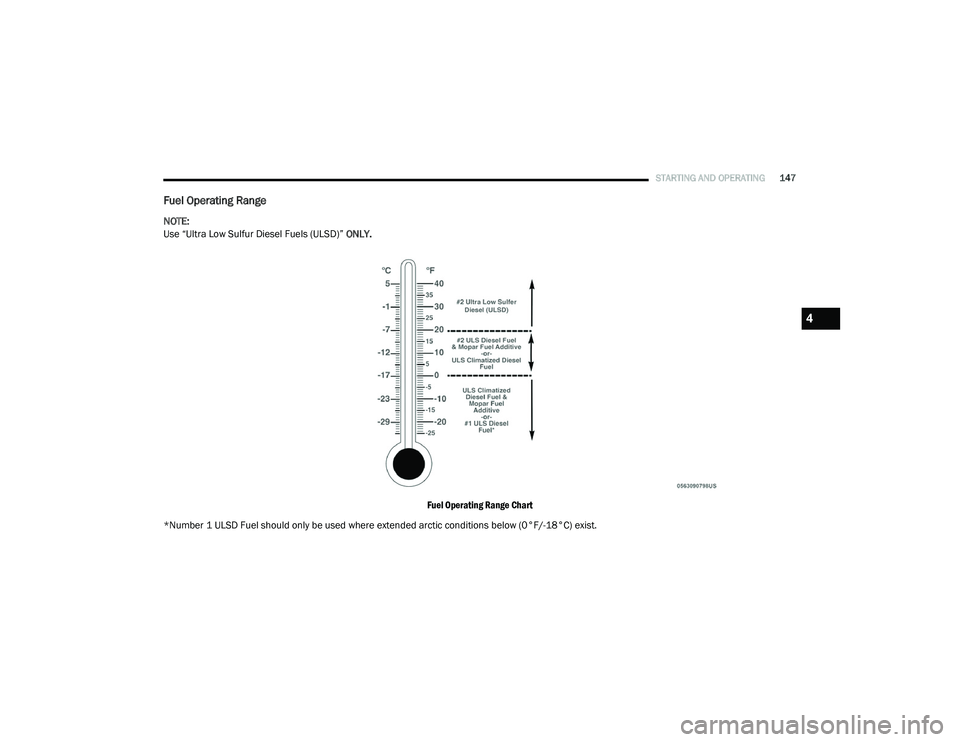
Fuel Operating Range
NOTE:
Use “Ultra Low Sulfur Diesel Fuels (ULSD)” ONLY.
Fuel Operating Range Chart
*Number 1 ULSD Fuel should only be used where extended arctic conditions below (0°F/-18°C) exist.
4
21_DT_OM_EN_USC_t.book Page 147
Page 150 of 496

148STARTING AND OPERATING
NOTE:
Use of Climatized ULSD Fuel or Number
1 ULSD Fuel results in a noticeable decrease
in fuel economy.
Climatized ULSD Fuel is a blend of Number
2 ULSD and Number 1 ULSD Fuels which
reduces the temperature at which wax crys -
tals form in fuel.
The fuel grade should be clearly marked on
the pump at the fuel station.
The engine requires the use of ULSD Fuel.
Use of incorrect fuel could result in engine
and exhaust system damage Ú page 471.
If Climatized or diesel Number 1 ULSD Fuel is
not available, and you are operating below
(20°F/-6°C), in sustained arctic conditions,
Mopar Premium Diesel Fuel Treatment (or
equivalent) is recommended to avoid gelling
(see Fuel Operating Range Chart).
Engine Oil Usage
For the correct engine oil viscosity Úpage 475.
Winter Front Cover
Winter Front Cover
A Winter front or cold weather cover can be
used in ambient temperatures below 32°F
(0°C), especially during extended idle
conditions. This cover is equipped with four
flaps for managing total grille opening in varying
ambient temperatures. If a Winter front or cold
weather cover is to be used the flaps should be
in the full open position to allow air flow to the
cooling module and automatic transmission oil
cooler. When ambient temperatures drop below
0°F (-17°C) the four flaps need to be closed. A
suitable cold weather cover is available from a
Mopar dealer.
Engine Warm-Up
Avoid full throttle operation when the engine is
cold. When starting a cold engine, bring the
engine up to operating speed slowly to allow the
oil pressure to stabilize as the engine warms up.
If temperatures are below 32°F (0°C), operate
the engine at moderate speeds for five minutes
before full loads are applied.
ENGINE IDLING
Avoid prolonged idling, long periods of idling
may be harmful to your engine because
combustion chamber temperatures can drop so
low that the fuel may not burn completely.
Incomplete combustion allows carbon and
varnish to form on piston rings, cylinder head
valves, and injector nozzles. Also, the unburned
fuel can enter the crankcase, diluting the oil
and causing rapid wear to the engine.
STOPPING THE ENGINE
After full load operation, idle the engine for a
few minutes before shutting it down. This idle
period will allow the lubricating oil and coolant
to carry excess heat away from the
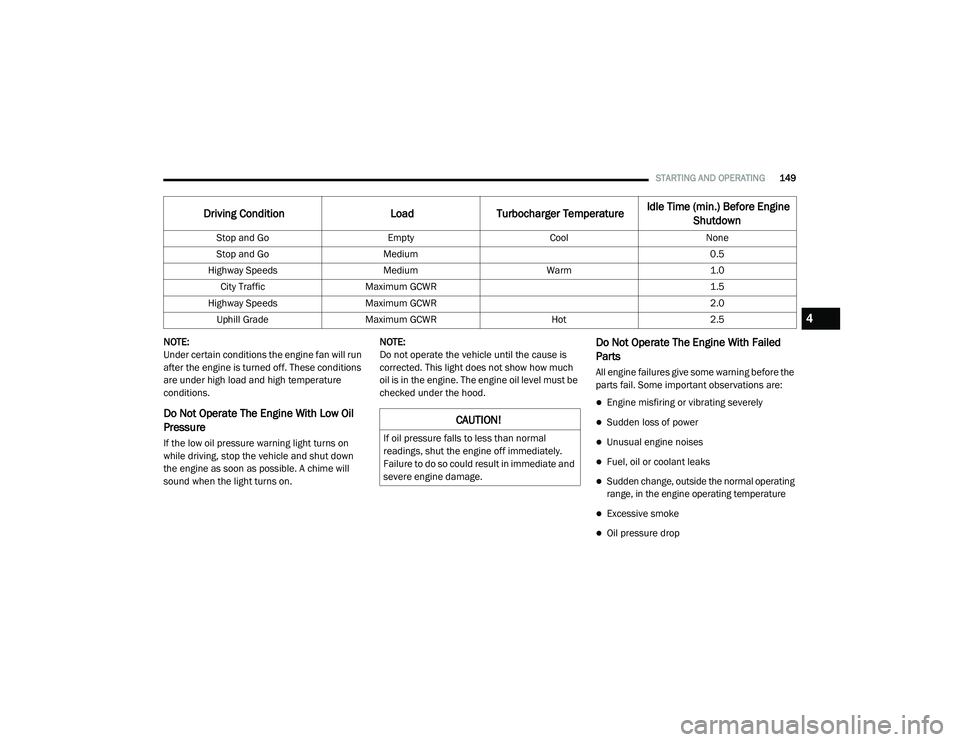
turbocharger. Refer to the following chart for
proper engine shutdown.
21_DT_OM_EN_USC_t.book Page 148
Page 151 of 496
STARTING AND OPERATING149
NOTE:
Under certain conditions the engine fan will run
after the engine is turned off. These conditions
are under high load and high temperature
conditions.
Do Not Operate The Engine With Low Oil
Pressure
If the low oil pressure warning light turns on
while driving, stop the vehicle and shut down
the engine as soon as possible. A chime will
sound when the light turns on. NOTE:
Do not operate the vehicle until the cause is
corrected. This light does not show how much
oil is in the engine. The engine oil level must be
checked under the hood.
Do Not Operate The Engine With Failed
Parts
All engine failures give some warning before the
parts fail. Some important observations are:
Engine misfiring or vibrating severely
Sudden loss of power
Unusual engine noises
Fuel, oil or coolant leaks
Sudden change, outside the normal operating
range, in the engine operating temperature
Excessive smoke
Oil pressure drop
Driving Condition
Load Turbocharger Temperature Idle Time (min.) Before Engine
Shutdown
Stop and Go EmptyCoolNone
Stop and Go Medium 0.5
Highway Speeds MediumWarm 1.0
City Traffic Maximum GCWR 1.5
Highway Speeds Maximum GCWR 2.0
Uphill Grade Maximum GCWR Hot2.5
CAUTION!
If oil pressure falls to less than normal
readings, shut the engine off immediately.
Failure to do so could result in immediate and
severe engine damage.
4
21_DT_OM_EN_USC_t.book Page 149
Page 153 of 496

STARTING AND OPERATING151
ENGINE BREAK-IN RECOMMENDATIONS —
DIESEL ENGINE
The diesel engine does not require a break-in
period due to its construction. Normal operation
is allowed, providing the following
recommendations are followed:
Warm up the engine before placing it under
load.
Do not operate the engine at idle for
prolonged periods.
Observe vehicle oil pressure and tempera -
ture indicators.
Check the coolant and oil levels frequently.
Vary throttle position at highway speeds
when carrying or towing significant weight.
NOTE:
Light duty operation such as light trailer towing
or no load operation will extend the time before
the engine is at full efficiency. Reduced fuel
economy and power may be seen at this time.
The engine oil installed in the engine at the
factory is a high-quality energy conserving type
lubricant. Oil changes should be consistent with anticipated climate conditions under which
vehicle operations will occur. For the
recommended viscosity and quality grades
Ú
page 475.
NOTE:
NON-DETERGENT OR STRAIGHT MINERAL OILS
MUST NEVER BE USED.
PARKING BRAKE
ELECTRIC PARK BRAKE (EPB)
Your vehicle is equipped with an EPB that offers
simple operation, and some additional features
that make the parking brake more convenient
and useful.
The parking brake is primarily intended to
prevent the vehicle from rolling while parked.
Before leaving the vehicle, make sure that the
parking brake is applied. Also, be certain to
leave the transmission in PARK.
You can engage the parking brake in two ways:
Manually, by applying the parking brake
switch.
Automatically, by enabling the Auto Park
Brake feature in the customer programmable
features section of the Uconnect settings. The parking brake switch is located on the
instrument panel to the left of the steering
wheel (below the headlamp switch).
Electric Park Brake Switch
To apply the parking brake manually, pull up on
the switch momentarily. You may hear a slight
sound from the back of the vehicle while the
parking brake engages. Once the park brake is
fully engaged, the BRAKE telltale light in the
instrument cluster and an indicator on the
switch will illuminate. If your foot is on the brake
pedal while you apply the parking brake, you
may notice a small amount of brake pedal
movement. The parking brake can be applied
even when the ignition switch is OFF but the
BRAKE telltale light will not illuminate, however,
it can only be released when the ignition is in
the ON/RUN mode.
4
21_DT_OM_EN_USC_t.book Page 151
Page 160 of 496

158STARTING AND OPERATING
The following indicators should be used to
ensure that you have properly engaged the
transmission into the PARK position:
Look at the transmission gear position
display and verify that it indicates the PARK
position (P), and is not blinking.
With brake pedal released, verify that the
gear selector will not move out of PARK.
REVERSE (R)
This range is for moving the vehicle backward.
Shift into REVERSE only after the vehicle has
come to a complete stop.
NEUTRAL (N)
Use this range when the vehicle is standing for
prolonged periods with the engine running.
Apply the parking brake and shift the
transmission into PARK if you must exit the
vehicle. DRIVE (D)
This range should be used for most city and
highway driving. It provides the smoothest
upshifts and downshifts, and the best fuel
economy. The transmission automatically
upshifts through all forward gears.
When frequent transmission shifting occurs
(such as when operating the vehicle under
heavy loading conditions, in hilly terrain,
traveling into strong head winds, or while towing
a heavy trailer), select TOW/HAUL mode or use
the Electronic Range Select (ERS) shift control
to select a lower gear range
Úpage 159. Under
these conditions, using a lower gear range will
improve performance and extend transmission
life by reducing excessive shifting and heat
buildup.
Do not leave the key fob in or near the
vehicle (or in a location accessible to chil -
dren), and do not leave the ignition in the
ACC or ON/RUN mode. A child could
operate power windows, other controls, or
move the vehicle.
CAUTION!
DO NOT race the engine when shifting from
PARK or NEUTRAL into another gear range,
as this can damage the drivetrain.
Before moving the transmission gear
selector out of PARK, you must start the
engine, and also press the brake pedal.
Otherwise, damage to the gear selector
could result.
WARNING! (Continued)
WARNING!
Do not coast in NEUTRAL and never turn off
the ignition to coast down a hill. These are
unsafe practices that limit your response to
changing traffic or road conditions. You might
lose control of the vehicle and have a
collision.
CAUTION!
Towing the vehicle, coasting, or driving for any
other reason with the transmission in
NEUTRAL can cause severe transmission
damage.
For Recreational Towing Ú page 231.
For Towing A Disabled Vehicle Ú page 392.
21_DT_OM_EN_USC_t.book Page 158
Page 163 of 496

STARTING AND OPERATING161
FOUR-WHEEL DRIVE OPERATION — IF
EQUIPPED
FOUR-POSITION ELECTRONICALLY
S
HIFTED TRANSFER CASE — IF
E
QUIPPED
This is an electronic shift transfer case and is
operated by the 4WD Control Switch (Transfer
Case Switch), located on the instrument panel.
Four-Position/On-Demand Transfer Case
This electronically shifted transfer case
provides four mode positions:
Two-Wheel Drive High Range (2WD) — This
range is for normal street and highway
driving on dry hard surfaced roads. Driving the vehicle in 2WD will have greater fuel
economy benefits as the front axle is not
engaged in 2WD.
Four-Wheel Drive High Range (4WD HIGH) —
This range provides torque to the front drive
-
shaft (engages four-wheel drive) which allows
front and rear wheels to spin at the same
speed. This provides additional traction for
loose or slippery road surfaces only.
Four-Wheel Drive Low Range (4WD LOW) —
This range provides low speed four-wheel
drive. It maximizes torque (increased torque
over 4WD HIGH) to the front driveshaft;
allowing front and rear wheels to rotate at the
same speed. This range provides additional
traction and maximum pulling power for
loose or slippery road surfaces only. Do not
exceed 25 mph (40 km/h) in this range.
N (Neutral) — This range disengages both the
front and rear driveshafts from the power -
train. To be used for flat towing behind
another vehicle Ú page 231.
WARNING!
You or others could be injured or killed if
you leave the vehicle unattended with the
transfer case in the N (Neutral) position
without first fully engaging the parking
brake. The transfer case N (Neutral) posi -
tion disengages both the front and rear
drive shaft from the powertrain, and will
allow the vehicle to roll, even if the trans -
mission is in PARK. The parking brake
should always be applied when the driver is
not in the vehicle.
The transmission may not engage PARK if
the vehicle is moving. Always bring the
vehicle to a complete stop before shifting to
PARK, and verify that the transmission gear
position indicator solidly indicates PARK (P)
without blinking. Ensure that the vehicle is
completely stopped, and the PARK position
is properly indicated, before exiting the
vehicle.
4
21_DT_OM_EN_USC_t.book Page 161
Page 165 of 496

STARTING AND OPERATING163
Shifting Procedure
If any of the requirements to select a new
transfer case position have not been met,
then the transfer case will not shift. The posi -
tion indicator light for the previous position
will remain on and the newly selected posi -
tion indicator light will continue to flash until
all the requirements for the selected position
have been met.
If all the requirements to select a new
transfer case position have been met, then
the current position indicator light will turn off
and the selected position indicator light will
flash until the transfer case completes the
shift. When the shift is complete, the position
indicator light for the selected position will
stop flashing and remain on.
FIVE-POSITION ELECTRONICALLY
S
HIFTED TRANSFER CASE — IF
E
QUIPPED
This is an electronic shift transfer case and is
operated by the 4WD Control Switch (Transfer
Case Switch), which is located on the
instrument panel.
Five-Position/On-Demand Transfer Case
This electronically shifted transfer case
provides five mode positions:
Two-Wheel Drive High Range (2WD) — This
range is for normal street and highway
driving on dry hard surfaced roads. Driving
the vehicle in 2WD will have greater fuel
economy benefits as the front axle is not
engaged in 2WD.
Four-Wheel Drive Automatic High Range
(4WD AUTO) — This range sends power to the
front wheels automatically when the vehicle
senses a loss of traction. This range may be
used during varying road conditions.
Four-Wheel Drive High Range (4WD HIGH) —
This range provides torque to the front drive -
shaft (engages four-wheel drive) which allows
front and rear wheels to spin at the same
speed. This provides additional traction for
loose or slippery road surfaces only.
Four-Wheel Drive Low Range (4WD LOW) —
This range provides low speed four-wheel
drive. It maximizes torque (increased torque
over 4WD HIGH) to the front driveshaft;
allowing front and rear wheels to rotate at the
same speed. This range provides additional
traction and maximum pulling power for
loose or slippery road surfaces only. Do not
exceed 25 mph (40 km/h) in this range.
N (Neutral) — This range disengages both the
front and rear driveshafts from the power -
train. To be used for flat towing behind
another vehicle Ú page 231.
4
21_DT_OM_EN_USC_t.book Page 163
Page 177 of 496

STARTING AND OPERATING175
FUEL SAVER TECHNOLOGY 5.7L ENGINES
ONLY — IF EQUIPPED
This feature offers improved fuel economy by
shutting off four of the engine's eight cylinders
during light load and cruise conditions. The
system is automatic with no driver inputs or
additional driving skills required.
NOTE:
This system may take some time to return to full
functionality after a battery disconnect.
STOP/START SYSTEM — IF EQUIPPED
The Stop/Start function is developed to save
fuel and reduce emissions. The system will stop
the engine automatically during a vehicle stop if
the required conditions are met. Releasing the
brake pedal or shifting out of DRIVE will
automatically restart the engine.
Vehicles equipped with eTorque contain a
heavy duty motor generator and an additional
hybrid electric battery to store energy from
vehicle deceleration for use on engine startup
after a stop as well as providing launch torque
assist.
AUTOSTOP MODE
The Stop/Start feature is enabled after every
normal customer engine start. It will remain in
STOP/START NOT READY until you drive
forward with a vehicle speed greater than
2 mph (3 km/h). At that time, the system will
go into STOP/START READY.
To Activate The Autostop Mode, The Following
Must Occur:
1. The system must be in STOP/START READY
state. A STOP/START READY message will
be displayed in the instrument cluster
within the Stop/Start section
Ú
page 114.
2. The vehicle must be completely stopped.
3. The transmission gear selector must be in DRIVE and the brake pedal pressed.
The engine will shut down, the tachometer will
move to the zero position and the stop/start
telltale will illuminate indicating you are in an
Autostop. While in an Autostop, the Climate
Controls system may automatically adjust
airflow to maintain cabin comfort. Customer
settings will be maintained upon return to an
engine running condition.
POSSIBLE REASONS THE ENGINE DOES
N
OT AUTOSTOP
Prior to engine shut down, the system will check
many safety and comfort conditions to see if
they are fulfilled. In following situations, the
engine will not Autostop:
Driver’s seat belt is not buckled
Driver’s door is not closed
The vehicle is on a steep grade
Cabin heating or cooling is in process and an
acceptable cabin temperature has not been
achieved
HVAC is set to full defrost mode at a high
blower speed
Engine has not reached normal operating
temperature
Engine temperature too high
The battery is charging
The transmission is not in DRIVE
Hood is open
Transfer case is in 4WD LOW
4
21_DT_OM_EN_USC_t.book Page 175
Page 210 of 496
208STARTING AND OPERATING
AUX CAMERA — IF EQUIPPED
Your vehicle may be equipped with one or two
AUX Cameras, which display images from the
trailer on the touchscreen.
Activation
The AUX Camera is activated any of the
following ways:
By first pressing the Backup Camera or
Surround View Camera (if equipped) button
on the touchscreen, followed by the AUX
button located in the upper left corner of the
rearview display
Pressing the AUX button in the Apps menu
Pressing the AUX button when the vehicle is
in REVERSE
If equipped with two AUX Cameras, you can
switch between each camera by pressing the
AUX1 or AUX2 buttons on the Trailer Camera
display. AUX1 Camera Button
AUX2 Camera Button
Deactivation
The AUX Camera is deactivated when the
following situations occur:
The “X” in the upper right corner of the touch -
screen is pressed. This will return the display
back to the previously displayed screen.
The vehicle speed exceeds 8 mph (13 km/h)
for 10 seconds.
The vehicle is shifted into PARK.
The ignition is placed in the OFF position. NOTE:
If the AUX button is pressed and no AUX
Camera is connected, the touchscreen will
display a blue screen along with the message
“Camera System Unavailable.” The screen
can be exited out by pressing the “X” in the
upper right hand corner. This will return the
display back to the previously displayed
screen.
Zoom View is not available with the AUX
Camera feature.
The display will always default to the Trailer
Camera display (AUX 1).
REFUELING THE VEHICLE — GASOLINE
ENGINE
The capless fuel filler is located on the left side
of the vehicle.
The capless system is sealed by two flapper
doors.
CAUTION!
To avoid vehicle damage, Surround View
should only be used as a parking aid. The
Surround View camera is unable to view
every obstacle or object in your drive path.
To avoid vehicle damage, the vehicle must
be driven slowly when using Surround View
to be able to stop in time when an obstacle
is seen. It is recommended that the driver
look frequently over his/her shoulder when
using Surround View.
21_DT_OM_EN_USC_t.book Page 208