fuel RAM 1500 2021 Owner's Guide
[x] Cancel search | Manufacturer: RAM, Model Year: 2021, Model line: 1500, Model: RAM 1500 2021Pages: 496, PDF Size: 20.89 MB
Page 211 of 496
STARTING AND OPERATING209
1. Put the vehicle in PARK and switch the
ignition off.
2. Push the center-rear edge of the fuel filler door (3 o'clock position) and release to
open.
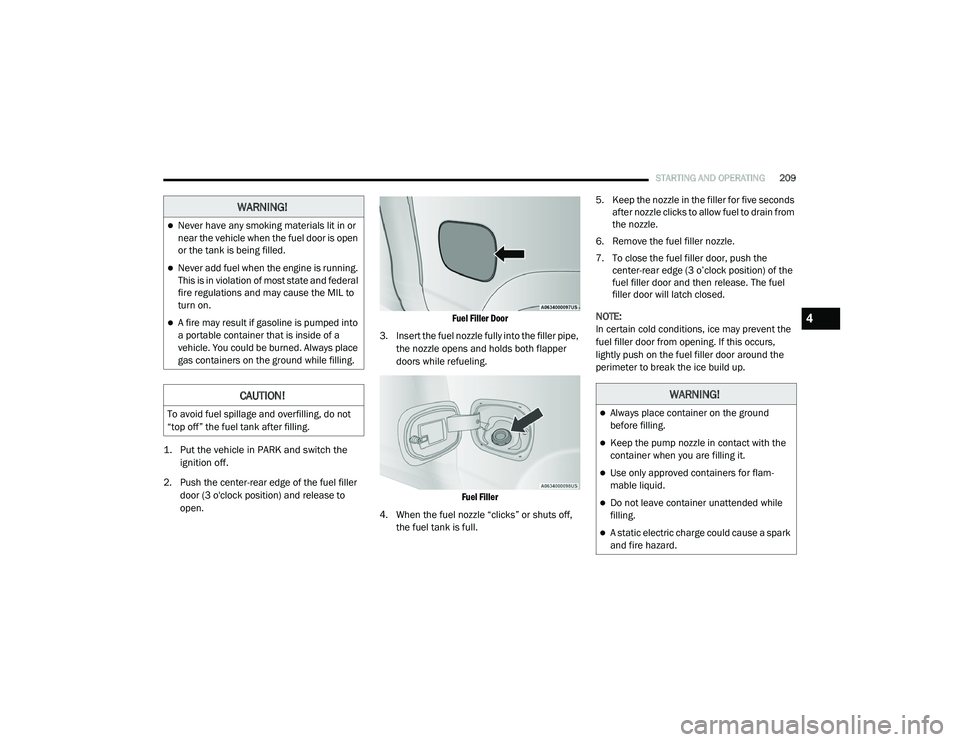
Fuel Filler Door
3. Insert the fuel nozzle fully into the filler pipe, the nozzle opens and holds both flapper
doors while refueling.
Fuel Filler
4. When the fuel nozzle “clicks” or shuts off, the fuel tank is full. 5. Keep the nozzle in the filler for five seconds
after nozzle clicks to allow fuel to drain from
the nozzle.
6. Remove the fuel filler nozzle.
7. To close the fuel filler door, push the center-rear edge (3 o’clock position) of the
fuel filler door and then release. The fuel
filler door will latch closed.
NOTE:
In certain cold conditions, ice may prevent the
fuel filler door from opening. If this occurs,
lightly push on the fuel filler door around the
perimeter to break the ice build up.
WARNING!
Never have any smoking materials lit in or
near the vehicle when the fuel door is open
or the tank is being filled.
Never add fuel when the engine is running.
This is in violation of most state and federal
fire regulations and may cause the MIL to
turn on.
A fire may result if gasoline is pumped into
a portable container that is inside of a
vehicle. You could be burned. Always place
gas containers on the ground while filling.
CAUTION!
To avoid fuel spillage and overfilling, do not
“top off” the fuel tank after filling.
WARNING!
Always place container on the ground
before filling.
Keep the pump nozzle in contact with the
container when you are filling it.
Use only approved containers for flam -
mable liquid.
Do not leave container unattended while
filling.
A static electric charge could cause a spark
and fire hazard.
4
21_DT_OM_EN_USC_t.book Page 209
Page 212 of 496
210STARTING AND OPERATING
REFUELING THE VEHICLE — DIESEL ENGINE
The capless fuel filler is located on the left side
of the vehicle.
The capless system is sealed by two flapper
doors.
1. Put the vehicle in PARK and switch the
ignition off.
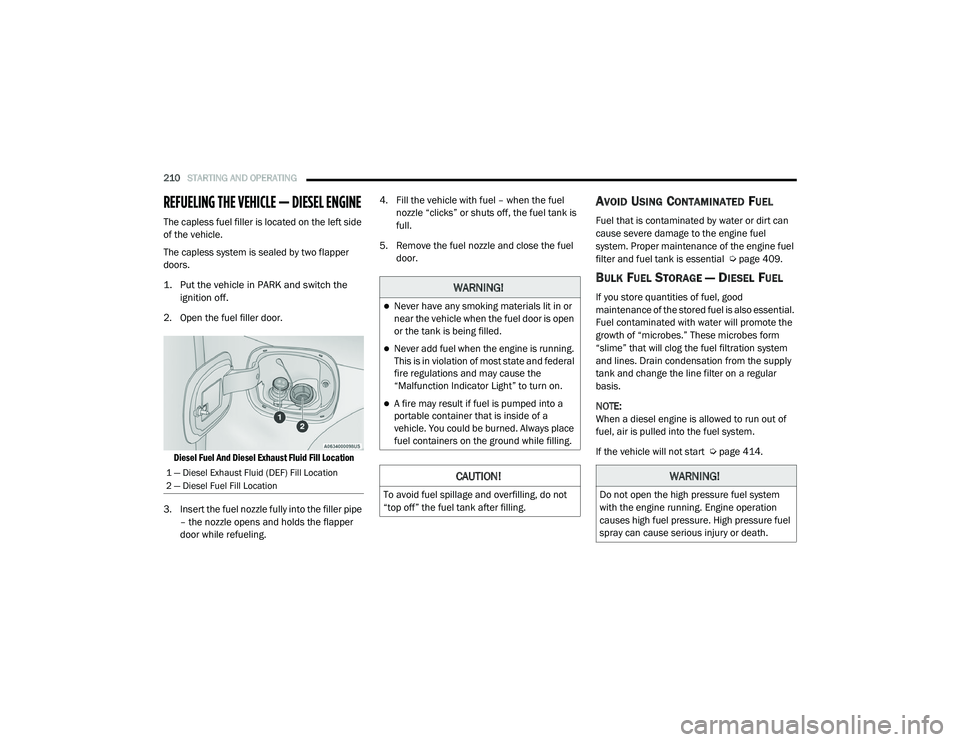
2. Open the fuel filler door.
Diesel Fuel And Diesel Exhaust Fluid Fill Location
3. Insert the fuel nozzle fully into the filler pipe – the nozzle opens and holds the flapper
door while refueling. 4. Fill the vehicle with fuel – when the fuel
nozzle “clicks” or shuts off, the fuel tank is
full.
5. Remove the fuel nozzle and close the fuel door.
AVOID USING CONTAMINATED FUEL
Fuel that is contaminated by water or dirt can
cause severe damage to the engine fuel
system. Proper maintenance of the engine fuel
filter and fuel tank is essential Ú page 409.
BULK FUEL STORAGE — DIESEL FUEL
If you store quantities of fuel, good
maintenance of the stored fuel is also essential.
Fuel contaminated with water will promote the
growth of “microbes.” These microbes form
“slime” that will clog the fuel filtration system
and lines. Drain condensation from the supply
tank and change the line filter on a regular
basis.
NOTE:
When a diesel engine is allowed to run out of
fuel, air is pulled into the fuel system.
If the vehicle will not start Úpage 414.
1 — Diesel Exhaust Fluid (DEF) Fill Location
2 — Diesel Fuel Fill Location
WARNING!
Never have any smoking materials lit in or
near the vehicle when the fuel door is open
or the tank is being filled.
Never add fuel when the engine is running.
This is in violation of most state and federal
fire regulations and may cause the
“Malfunction Indicator Light” to turn on.
A fire may result if fuel is pumped into a
portable container that is inside of a
vehicle. You could be burned. Always place
fuel containers on the ground while filling.
CAUTION!
To avoid fuel spillage and overfilling, do not
“top off” the fuel tank after filling.
WARNING!
Do not open the high pressure fuel system
with the engine running. Engine operation
causes high fuel pressure. High pressure fuel
spray can cause serious injury or death.
21_DT_OM_EN_USC_t.book Page 210
Page 213 of 496
STARTING AND OPERATING211
DIESEL EXHAUST FLUID
Your vehicle is equipped with a Selective
Catalytic Reduction (SCR) system to meet diesel
emissions standards required by the
Environmental Protection Agency.
The purpose of the SCR system is to reduce
levels of oxides of nitrogen (NO
x) emitted from
engines that are harmful to our health and the
environment to a near-zero level. A small
quantity of Diesel Exhaust Fluid (DEF) is
injected into the exhaust upstream of a catalyst
where, when vaporized, converts smog-forming
NO
x into harmless nitrogen (N2) and water
vapor (H
2O), two natural components of the air
we breathe.
DIESEL EXHAUST FLUID STORAGE
Diesel Exhaust Fluid (DEF) is considered a very
stable product with a long shelf life. If DEF is
kept in temperatures between 10° and 90°F
(-12° and 32°C), it will last a minimum of one
year.
DEF may freeze at temperatures at or below
12°F (-11°C). The system has been designed to
operate in this environment. NOTE:
When working with DEF, it is important to know
that:
Any containers or parts that come into
contact with DEF must be DEF compatible
(plastic or stainless steel). Copper, brass,
aluminum, iron or non-stainless steel should
be avoided as they are subject to corrosion
by DEF.
If DEF is spilled, it should be wiped up
completely.
ADDING DIESEL EXHAUST FLUID
The Diesel Exhaust Fluid (DEF) gauge (located
on the instrument cluster) will display the level
of DEF remaining in the tank Ú
page 109.
NOTE:
Driving conditions (altitude, vehicle speed,
load, etc.) will effect the amount of DEF that
is used in your vehicle.
Outside temperature can affect DEF
consumption. In cold conditions, 12°F
(-11°C) and below, the DEF gauge may take
longer to operate as intended. This is a
normal function of the system.
There is an electric heater inside the DEF
tank that automatically works when neces -
sary. And if the DEF supply does freeze, the
truck will operate normally until it thaws.
Diesel Exhaust Fluid (DEF) Fill Procedure
NOTE:
For the correct fluid type Ú page 475.
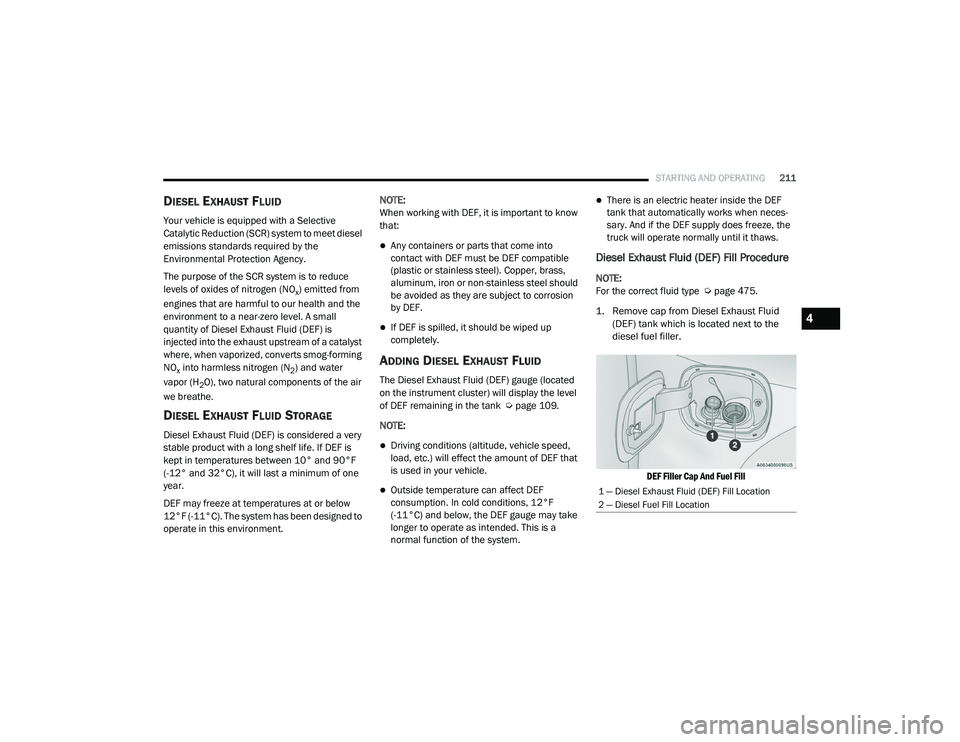
1. Remove cap from Diesel Exhaust Fluid (DEF) tank which is located next to the
diesel fuel filler.
DEF Filler Cap And Fuel Fill
1 — Diesel Exhaust Fluid (DEF) Fill Location
2 — Diesel Fuel Fill Location
4
21_DT_OM_EN_USC_t.book Page 211
Page 214 of 496

212STARTING AND OPERATING
(Continued)
(Continued)
2. Insert DEF fill adapter/nozzle into DEF tank filler neck.
NOTE:
The DEF gauge may take up to five seconds
to update after adding a gallon or more of
(DEF) to the DEF tank. If you have a fault
related to the DEF system, the gauge may not
update to the new level. See an authorized
dealer for service.
The DEF gauge may also not immediately
update after a refill if the temperature of the
DEF fluid is below 12°F (-11°C). The DEF line
heater will possibly warm up the DEF fluid
and allow the gauge to update after a period
of run time. Under very cold conditions, it is
possible that the gauge may not reflect the
new fill level for several drives.
Refilling With Nozzles
You can fill up at any DEF distributor.
Proceed as follows:
Insert the DEF nozzle in the filler, start
refilling and stop refilling at the first
shut-off (the shut-off indicates that the
DEF tank is full). Do not proceed with the
refilling, to prevent spillage of DEF.
Extract the nozzle. Refilling With Containers
Proceed as follows:
Check the expiration date.
Read the advice for use on the label
before pouring the content of the bottle
into the DEF tank.
If systems which cannot be screwed in
(e.g. tanks) are used for refilling, after the
indication appears on the instrument
panel display Ú
page 114 fill the DEF
tank with no more than 2 Gallons (8
liters).
If containers which can be screwed to the
filler are used, the reservoir is full when
the DEF level in the container stops
pouring out. Do not proceed further.
CAUTION!
To avoid DEF spillage, and possible
damage to the DEF tank from overfilling, do
not “top off” the DEF tank after filling.
DO NOT OVERFILL. DEF will freeze below
12ºF (-11ºC). The DEF system is designed
to work in temperatures below the DEF
freezing point, however, if the tank is over -
filled and freezes, the system could be
damaged.
When DEF is spilled, clean the area imme -
diately with water and use an absorbent
material to soak up the spills on the ground.
Do not attempt to start your engine if DEF is
accidentally added to the diesel fuel tank
as it can result in severe damage to your
engine, including but not limited to failure
of the fuel pump and injectors.
CAUTION! (Continued)
21_DT_OM_EN_USC_t.book Page 212
Page 215 of 496

STARTING AND OPERATING213
3. Stop filling the DEF tank immediately when
any of the following happen: DEF stops
flowing from the fill bottle into the DEF tank,
DEF splashes out the filler neck, or a DEF
pump nozzle automatically shuts off.
4. Reinstall cap onto DEF tank.
Filling The Def Tank In Cold Climates
Your vehicle is equipped with an automatic DEF
heating system. This allows the DEF injection
system to operate properly at temperatures below 12°F (-11°C). If your vehicle is not in
operation for an extended period of time with
temperatures below 12°F (-11°C), the DEF in
the tank may freeze. Do not overfill the DEF
tank. If the tank is overfilled and freezes, it
could be damaged.
Extra care should be taken when filling with
portable containers to avoid overfilling. Keep an
eye on the DEF gauge in your instrument
cluster. You may safely add a maximum of
2 gallons (7.6 Liters) when your DEF gauge is
reading at the half mark.
VEHICLE LOADING
GROSS VEHICLE WEIGHT RATING
(GVWR)
The GVWR is the total permissible weight of your
vehicle including driver, passengers, vehicle,
options and cargo. The label also specifies
maximum capacities of front and rear Gross
Axle Weight Rating (GAWR). Total load must be
limited so GVWR and front and rear GAWR are
not exceeded.
PAYLOAD
The payload of a vehicle is defined as the
allowable load weight a truck can carry,
including the weight of the driver, all
passengers, options and cargo.
GROSS AXLE WEIGHT RATING (GAWR)
The GAWR is the maximum permissible load on
the front and rear axles. The load must be
distributed in the cargo area so that the GAWR
of each axle is not exceeded.
Each axle GAWR is determined by the
components in the system with the lowest load
carrying capacity (axle, springs, tires or wheels).
Heavier axles or suspension components
sometimes specified by purchasers for
increased durability does not necessarily
increase the vehicle's GVWR.
TIRE SIZE
The tire size on the Vehicle Certification Label
represents the actual tire size on your vehicle.
Replacement tires must be equal to the load
capacity of this tire size.
Never add anything other than DEF to the
tank – especially any form of hydrocarbon
such as diesel fuel, fuel system additives,
gasoline, or any other petroleum-based
product. Even a very small amount of these,
less than 100 parts per million or less than
1 oz. per 78 gallons (295 liters) will contam -
inate the entire DEF system and will require
replacement. If owners use a container,
funnel or nozzle when refilling the tank, it
should either be new or one that is has only
been used for adding DEF. Mopar provides
an attachable nozzle with its DEF for this
purpose.
CAUTION! (Continued)
4
21_DT_OM_EN_USC_t.book Page 213
Page 216 of 496
214STARTING AND OPERATING
RIM SIZE
This is the rim size that is appropriate for the tire
size listed.
INFLATION PRESSURE
This is the cold tire inflation pressure for your
vehicle for all loading conditions up to full Gross
Axle Weight Rating (GAWR).
CURB WEIGHT
The curb weight of a vehicle is defined as the
total weight of the vehicle with all fluids,
including vehicle fuel, at full capacity
conditions, and with no occupants or cargo
loaded into the vehicle. The front and rear curb
weight values are determined by weighing your
vehicle on a commercial scale before any
occupants or cargo are added.
LOADING
The actual total weight and the weight of the
front and rear of your vehicle at the ground can
best be determined by weighing it when it is
loaded and ready for operation.
The entire vehicle should first be weighed on a
commercial scale to insure that the Gross
Vehicle Weight Rating (GVWR) has not been exceeded. The weight on the front and rear of
the vehicle should then be determined
separately to be sure that the load is properly
distributed over the front and rear axle.
Weighing the vehicle may show that the Gross
Axle Weight Rating (GAWR) of either the front or
rear axles has been exceeded but the total load
is within the specified GVWR. If so, weight must
be shifted from front to rear or rear to front as
appropriate until the specified weight
limitations are met. Store the heavier items
down low and be sure that the weight is
distributed equally. Stow all loose items
securely before driving.
Improper weight distributions can have an
adverse effect on the way your vehicle steers
and handles and the way the brakes operate.
TRAILER TOWING
In this section you will find safety tips and
information on limits to the type of towing you
can reasonably do with your vehicle. Before
towing a trailer, carefully review this information
to tow your load as efficiently and safely as
possible.
To maintain the New Vehicle Limited Warranty
coverage, follow the requirements and
recommendations in this manual concerning
vehicles used for trailer towing.
COMMON TOWING DEFINITIONS
The following trailer towing related definitions
will assist you in understanding the following
information:
Gross Vehicle Weight Rating (GVWR)
The GVWR is the total allowable weight of your
vehicle. This includes driver, passengers, cargo
and tongue weight. The total load must be
limited so that you do not exceed the GVWR
Ú
page 213.CAUTION!
Do not load your vehicle any heavier than the
GVWR or the maximum front and rear GAWR.
If you do, parts on your vehicle can break, or
it can change the way your vehicle handles.
This could cause you to lose control. Also
overloading can shorten the life of your
vehicle.
21_DT_OM_EN_USC_t.book Page 214
Page 229 of 496
STARTING AND OPERATING227
Hazard switch is activated
Any button on the key fob is pushed
Ignition button is pushed
High Beam stalk position is changed
Sequence is canceled in the instrument
cluster
TOWING TIPS
Before towing, practice turning, stopping, and
backing up the trailer in an area located away
from heavy traffic.
Automatic Transmission
The DRIVE range can be selected when towing.
The transmission controls include a drive
strategy to avoid frequent shifting when towing.
However, if frequent shifting does occur while in
DRIVE, select TOW/HAUL mode or select a lower
gear range (using the Electronic Range Select
(ERS) shift control).
NOTE:
Using TOW/HAUL mode or selecting a lower
gear range (using the ERS shift control) while
operating the vehicle under heavy loading
conditions will improve performance and extend transmission life by reducing excessive
shifting and heat build up. This action will also
provide better engine braking.
Tow/Haul Mode
To reduce potential for automatic transmission
overheating, activate TOW/HAUL mode when
driving in hilly areas, or select a lower gear
range (using the (ERS) shift control) on more
severe grades.
Cruise Control — If Equipped
Do not use on hilly terrain or with heavy
loads.
When using the Cruise Control, if you experi
-
ence speed drops greater than 10 mph
(16 km/h), disengage until you can get back
to cruising speed.
Use Cruise Control in flat terrain and with
light loads to maximize fuel efficiency.
Air Suspension System
To aid in attaching/detaching the trailer from
the vehicle, the air suspension system can be
used Ú page 165. NOTE:
The vehicle must remain in the engine running
position while attaching a trailer for proper
leveling of the air suspension system.
SNOWPLOW
Snowplow Prep Packages are available as a
factory installed option. These packages
include components necessary to equip your
vehicle with a snowplow.
NOTE:
Before installation of a snowplow it is highly
recommended that the owner/installer obtain
and follow the recommendations contained
within the current Body Builders Guide. See an
authorized dealer, installer or snowplow manu
-
facturer for this information. There are unique
electrical systems that must be connected to
properly ensure operator safety and prevent
overloading vehicle systems.
4
21_DT_OM_EN_USC_t.book Page 227
Page 237 of 496
STARTING AND OPERATING235
OFF-ROAD DRIVING TIPS
Care should be taken when attempting to climb
steep hills or driving diagonally across a hill or
slope. If natural obstacles force you to travel
diagonally up or down a hill, choose a mild angle
and keep as little side tilt as possible. Keep the
vehicle moving and make turns slowly and
cautiously. If you must back down a hill, back straight down
using REVERSE gear. Never back down in
NEUTRAL or diagonally across the hill.
When driving over sand, mud, and other soft
terrain, shift to low gear and drive steadily.
Apply the accelerator slowly to avoid spinning
the wheels.
Do not reduce the tire pressures for this type of
driving.
After Driving Off-Road
Off-road operation puts more stress on your
vehicle than does most on-road driving. After
going off-road, it is always a good idea to check
for damage. That way you can get any problems
taken care of right away and have your vehicle
ready when you need it.
Completely inspect the underbody of your
vehicle. Check tires, body structure, steering,
suspension, and exhaust system for damage.
Inspect the radiator for mud and debris and
clean as required.
Check threaded fasteners for looseness,
particularly on the chassis, drivetrain compo
-
nents, steering, and suspension. Retighten
them, if required, and torque to the values
specified in the Service Manual.
Check for accumulations of plants or brush.
These things could be a fire hazard. They
might hide damage to fuel lines, brake hoses,
axle pinion seals, and propeller shafts.
After extended operation in mud, sand,
water, or similar dirty conditions, have the
radiator, fan, brake rotors, wheels, brake
linings, and axle yokes inspected and
cleaned as soon as possible.
If you experience unusual vibration after
driving in mud, slush or similar conditions,
check the wheels for impacted material.
Impacted material can cause a wheel imbal-
ance and freeing the wheels of it will correct
the situation.
Driving through standing water may cause
damage to your vehicle’s drivetrain compo -
nents. Always inspect your vehicle’s fluids
(i.e., engine oil, transmission, axle, etc.) for
signs of contamination (i.e., fluid that is
milky or foamy in appearance) after driving
through standing water. Do not continue to
operate the vehicle if any fluid appears
contaminated, as this may result in further
damage. Such damage is not covered by
the New Vehicle Limited Warranty.
Getting water inside your vehicle’s engine
can cause it to lock up and stall out, and
cause serious internal damage to the
engine. Such damage is not covered by the
New Vehicle Limited Warranty.
CAUTION! (Continued)
WARNING!
Abrasive material in any part of the brakes
may cause excessive wear or unpredictable
braking. You might not have full braking
power when you need it to prevent a collision.
If you have been operating your vehicle in
dirty conditions, get your brakes checked and
cleaned as necessary.
4
21_DT_OM_EN_USC_t.book Page 235
Page 241 of 496

MULTIMEDIA239
Keyboard — If Equipped This setting will change the keyboard type on the display. The selectable
keyboards are ABCDEF Keyboard, QWERTY Keyboard, and AZERTY
Keyboard.
Touchscreen Beep This setting will allow you to turn the touchscreen beep on or off.
Control Screen Timeout This setting allows you to set the Control Screen to turn off automatically
after five seconds or stay open until manually closed.
Navigation Next Turn Pop-ups Displayed in Cluster — If Equipped This setting will display navigation prompts in the Instrument Cluster
Display.
Phone Pop-ups Displayed In Cluster This setting will display smartphone notifications and messages in the
Instrument Cluster Display.
Fuel Saver Display This setting will enable fuel saver mode in the Instrument Cluster Display.
Ready To Drive Pop-ups — If Equipped This setting will enable the Ready To Drive Pop-ups in the Instrument
Cluster Display.
Setting Name
Description
5
21_DT_OM_EN_USC_t.book Page 239
Page 242 of 496
240MULTIMEDIA
Units
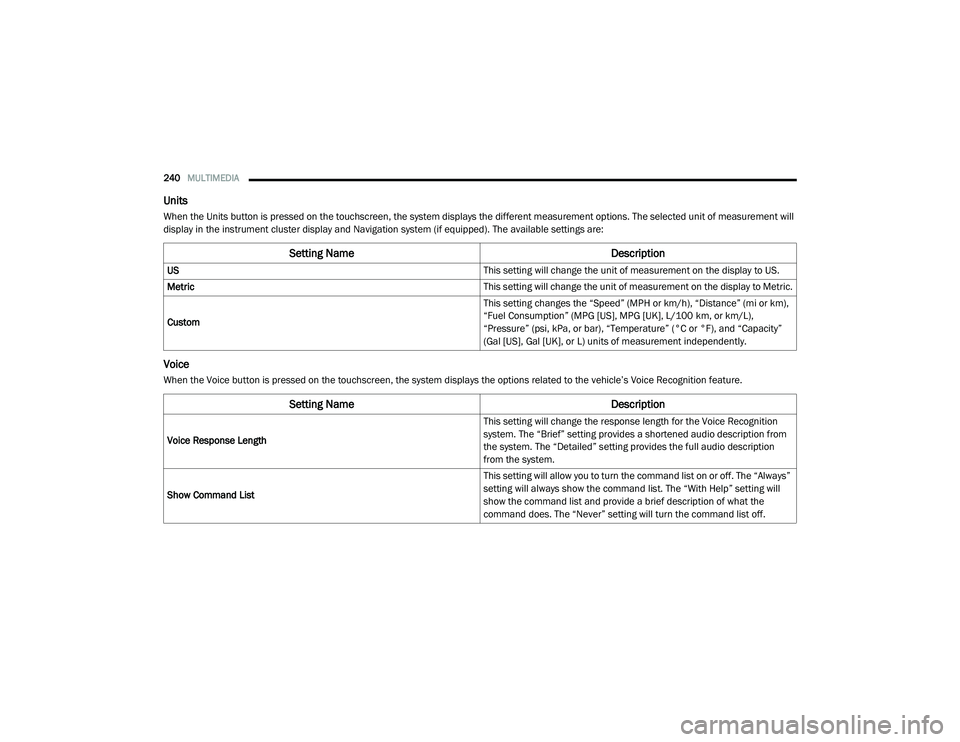
When the Units button is pressed on the touchscreen, the system displays the different measurement options. The selected unit of measurement will
display in the instrument cluster display and Navigation system (if equipped). The available settings are:
Voice
When the Voice button is pressed on the touchscreen, the system displays the options related to the vehicle’s Voice Recognition feature.
Setting Name Description
US This setting will change the unit of measurement on the display to US.
Metric This setting will change the unit of measurement on the display to Metric.
Custom This setting changes the “Speed” (MPH or km/h), “Distance” (mi or km),
“Fuel Consumption” (MPG [US], MPG [UK], L/100 km, or km/L),
“Pressure” (psi, kPa, or bar), “Temperature” (°C or °F), and “Capacity”
(Gal [US], Gal [UK], or L) units of measurement independently.
Setting Name
Description
Voice Response Length This setting will change the response length for the Voice Recognition
system. The “Brief” setting provides a shortened audio description from
the system. The “Detailed” setting provides the full audio description
from the system.
Show Command List This setting will allow you to turn the command list on or off. The “Always”
setting will always show the command list. The “With Help” setting will
show the command list and provide a brief description of what the
command does. The “Never” setting will turn the command list off.
21_DT_OM_EN_USC_t.book Page 240