air condition RAM 1500 2021 Owner's Guide
[x] Cancel search | Manufacturer: RAM, Model Year: 2021, Model line: 1500, Model: RAM 1500 2021Pages: 496, PDF Size: 20.89 MB
Page 252 of 496
250MULTIMEDIA
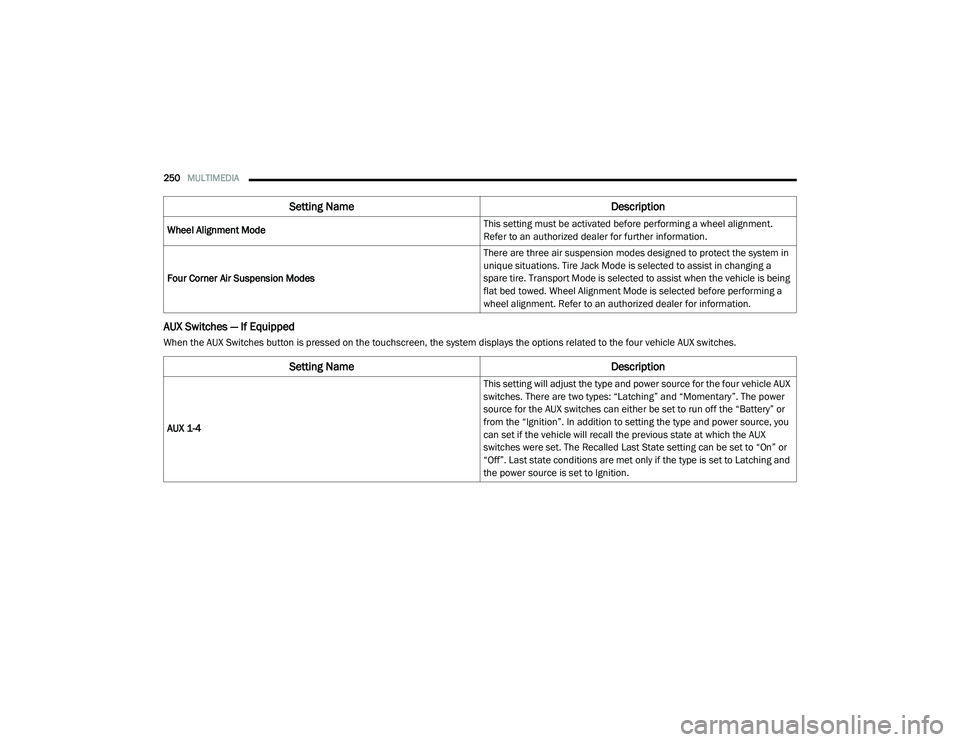
AUX Switches — If Equipped
When the AUX Switches button is pressed on the touchscreen, the system displays the options related to the four vehicle AUX switches.Wheel Alignment Mode
This setting must be activated before performing a wheel alignment.
Refer to an authorized dealer for further information.
Four Corner Air Suspension Modes There are three air suspension modes designed to protect the system in
unique situations. Tire Jack Mode is selected to assist in changing a
spare tire. Transport Mode is selected to assist when the vehicle is being
flat bed towed. Wheel Alignment Mode is selected before performing a
wheel alignment. Refer to an authorized dealer for information.
Setting Name
Description
Setting NameDescription
AUX 1-4 This setting will adjust the type and power source for the four vehicle AUX
switches. There are two types: “Latching” and “Momentary”. The power
source for the AUX switches can either be set to run off the “Battery” or
from the “Ignition”. In addition to setting the type and power source, you
can set if the vehicle will recall the previous state at which the AUX
switches were set. The Recalled Last State setting can be set to “On” or
“Off”. Last state conditions are met only if the type is set to Latching and
the power source is set to Ignition.
21_DT_OM_EN_USC_t.book Page 250
Page 282 of 496
280MULTIMEDIA
NOTE:
It is recommended that you do not store names
in your Favorites phonebook while the vehicle is
in motion.
Number and name recognition rate is optimized
when the entries are not similar. You can say
“O” (letter “O”) for “0” (zero).
Even though international dialing for most
number combinations is supported, some
shortcut dialing number combinations may not
be supported.
Audio Performance
Audio quality is maximized under:
Low-To-Medium Blower Setting
Low-To-Medium Vehicle Speed
Low Road Noise
Smooth Road Surface
Fully Closed Windows
Dry Weather Conditions
Operation From The Driver's Seat Performance such as audio clarity, echo, and
loudness to a large degree rely on the phone
and network, and not the Uconnect Phone.
Echo at the far end can sometimes be reduced
by lowering the in-vehicle audio volume.
Phone Voice Commands
Making and answering hands-free phone calls
is easy with Uconnect. When the Phonebook
button is illuminated on your touchscreen, your
system is ready. Check UconnectPhone.com for
mobile phone compatibility and pairing
instructions.
Push the Phone button and wait for the beep
to say a command. See some examples below:
“ Call John Smith”
“Dial 123 456 7890”
“Redial ” (call previous outgoing phone
number)
“ Call back ” (call previously answered
incoming phone number) Did You Know:
When providing a Voice
Command, push the Phone button and say
“ Call ”, then pronounce the name exactly as it
appears in your phone book. When a contact
has multiple phone numbers, you can say “ Call
John Smith work”.
Voice Text Reply — If Equipped
Uconnect can announce incoming text
messages. Push the VR button or Phone
button and say:
1. “
Listen
” to have the system read an
incoming text message. (Must have
compatible mobile phone paired to
Uconnect system.)
2. “ Reply ” after an incoming text message has
been read.
Listen to the Uconnect prompts. After the
beep, repeat one of the predefined messag -
es and follow the system prompts.
21_DT_OM_EN_USC_t.book Page 280
Page 289 of 496
MULTIMEDIA287
How It Works
1. Push the SOS Call button; the indicator light will turn green indicating a call has
been placed.
NOTE:
In case the SOS Call button is accidentally
pushed, there is a 10-second delay before
the SOS call is placed. The system will
verbally alert you that a call is about to be
made. To cancel the SOS Call connection,
push the SOS Call button on the rearview
mirror or press the Cancel button on the
touchscreen within 10 seconds.
During an SOS Call, the Bluetooth® paired
phone is disconnected so incoming or
outgoing calls will go through your mobile
device versus the hands-free system which is
not available due to the SOS Call.
2. Once a connection between the vehicle and a SiriusXM Guardian™ Customer Care agent is
made, the agent will stay on the line with you.
NOTE:
Calls between the vehicle occupants and the
SiriusXM Guardian™ Customer Care center may
be recorded or monitored for quality assurance purposes. Through your enrollment in and use
of the SiriusXM Guardian™ services, you
consent to being recorded.
SOS Call System Limitations
Vehicles that have been purchased in the US
and that travel into Mexico and Canada may
have limited services. In particular, responses
to SOS calls or other emergency services may
be unavailable or very limited. Vehicles
purchased outside the United States and
Canada are unable to receive SiriusXM
Guardian™ services.
If the SOS Call system detects a malfunction,
any of the following may occur at the time the
malfunction is detected:
The light will continuously be illuminated red.
The screen will display the following message
“Vehicle phone requires service. Please
contact your dealer.”
An in-vehicle audio message will state
“Vehicle phone requires service. Please
contact your dealer.”
Even if the SOS Call system is fully functional,
factors beyond FCA US LLC’s control may
prevent or stop SOS Call system operation. These include, but are not limited to, the
following factors:
The ignition key is in OFF position.
The vehicle’s electrical systems are not
intact.
The vehicle battery loses power or becomes
disconnected during a vehicle crash.
The SOS Call system software and/or hard
-
ware is damaged during a vehicle crash.
LTE (voice/data) or 3G or 4G (data) coverage
and/or GPS signals are unavailable or
obstructed.
Network congestion.
Weather conditions.
Buildings, structures, geographic terrain, or
tunnels.
If your vehicle loses battery power for any
reason (including during or after an accident)
the SOS Call System, among other vehicle
systems, will not operate.
5
21_DT_OM_EN_USC_t.book Page 287
Page 290 of 496
288MULTIMEDIA
(Continued)
(Continued)
Requirements
This feature is available only on vehicles sold
in the US or Canada.
Vehicle must be properly equipped with the
SiriusXM Guardian™ system. Vehicle must be
registered with SiriusXM Guardian™ and
have an active subscription that includes the
applicable feature.
Vehicle must have an operable LTE (voice/
data) or 3G or 4G (data) network connection
compatible with your device.
Vehicle must be powered in the ON/RUN or
ACC (Accessory) position with a properly func -
tioning electrical system.
WARNING!
Never place anything on or near the
vehicle’s LTE (voice/data) or 3G or 4G
(data) and GPS antennas. You could
prevent LTE (voice/data) or 4G (data) and
GPS signal reception, which can prevent
your vehicle from placing an emergency
call.
Do not add any aftermarket electrical equip -
ment to the vehicle’s electrical system. This
may prevent your vehicle from sending a
signal to initiate an emergency call. To avoid
interference that can cause the SOS Call
system to fail, never add aftermarket equip -
ment (e.g., two-way mobile radio, CB radio,
data recorder, etc.) to your vehicle’s elec -
trical system or modify the antennas on your
vehicle. IF YOUR VEHICLE LOSES POWER
FOR ANY REASON (INCLUDING DURING OR
AFTER AN ACCIDENT), NEITHER THE UCON-
NECT APPS NOR THE SIRIUSXM
GUARDIAN™ SERVICES WILL OPERATE.
The Occupant Restraint Controller (ORC)
turns on the Air Bag Warning Light on the
instrument panel if a malfunction in any part
of the air bag system is detected. If the Air Bag
Warning Light is illuminated, the air bag
system may not be working properly and the
SOS Call system may not be able to send a
signal to the SiriusXM Guardian™ Customer
Care center. If the Air Bag Warning Light is illu -
minated, have an authorized dealer service
your vehicle immediately.
WARNING! (Continued)
Ignoring the Rearview Mirror Light could
mean you will not have SOS Call services if
needed. If the Rearview Mirror Light is illu -
minated, have an authorized dealer service
the SOS Call system immediately.
If anyone in the vehicle could be in danger
(e.g., fire or smoke is visible, dangerous
road conditions or location), do not wait for
voice contact from a SiriusXM Guardian™
Customer Care agent. All occupants should
exit the vehicle immediately and move to a
safe location.
Failure to perform scheduled maintenance
and regular inspection of your vehicle may
result in vehicle damage, accident or injury.
WARNING! (Continued)
21_DT_OM_EN_USC_t.book Page 288
Page 311 of 496
MULTIMEDIA309
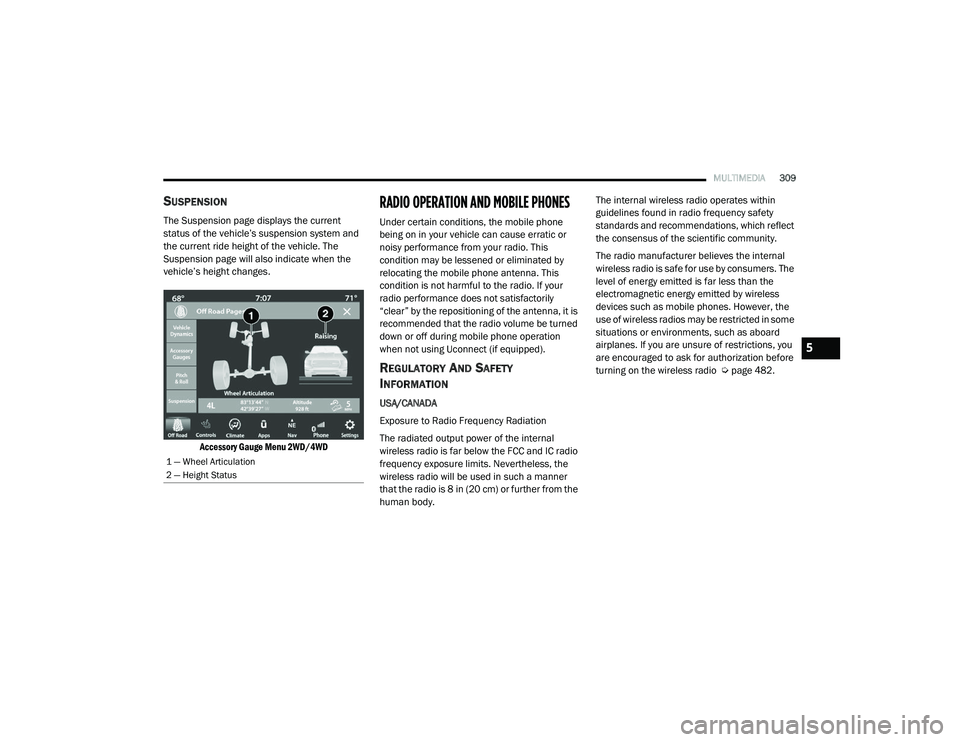
SUSPENSION
The Suspension page displays the current
status of the vehicle’s suspension system and
the current ride height of the vehicle. The
Suspension page will also indicate when the
vehicle’s height changes.
Accessory Gauge Menu 2WD/4WD
RADIO OPERATION AND MOBILE PHONES
Under certain conditions, the mobile phone
being on in your vehicle can cause erratic or
noisy performance from your radio. This
condition may be lessened or eliminated by
relocating the mobile phone antenna. This
condition is not harmful to the radio. If your
radio performance does not satisfactorily
“clear” by the repositioning of the antenna, it is
recommended that the radio volume be turned
down or off during mobile phone operation
when not using Uconnect (if equipped).
REGULATORY AND SAFETY
I
NFORMATION
USA/CANADA
Exposure to Radio Frequency Radiation
The radiated output power of the internal
wireless radio is far below the FCC and IC radio
frequency exposure limits. Nevertheless, the
wireless radio will be used in such a manner
that the radio is 8 in (20 cm) or further from the
human body. The internal wireless radio operates within
guidelines found in radio frequency safety
standards and recommendations, which reflect
the consensus of the scientific community.
The radio manufacturer believes the internal
wireless radio is safe for use by consumers. The
level of energy emitted is far less than the
electromagnetic energy emitted by wireless
devices such as mobile phones. However, the
use of wireless radios may be restricted in some
situations or environments, such as aboard
airplanes. If you are unsure of restrictions, you
are encouraged to ask for authorization before
turning on the wireless radio Ú
page 482.
1 — Wheel Articulation
2 — Height Status
5
21_DT_OM_EN_USC_t.book Page 309
Page 313 of 496

SAFETY311
Anti-Lock Brake System (ABS) Warning
Light
The yellow ABS Warning Light will turn on when
the ignition is placed in the ON/RUN mode and
may stay on for as long as four seconds.
If the ABS Warning Light remains on or comes
on while driving, it indicates that the anti-lock
portion of the brake system is not functioning
and that service is required. However, the
conventional brake system will continue to
operate normally if the ABS Warning Light is on.
If the ABS Warning Light is on, the brake system
should be serviced as soon as possible to
restore the benefits of anti-lock brakes. If the
ABS Warning Light does not come on when the
ignition is placed in the ON/RUN mode, have
the light repaired as soon as possible.
ELECTRONIC BRAKE CONTROL (EBC)
S
YSTEM
Your vehicle is equipped with an advanced
Electronic Brake Control (EBC) system. This
system includes Anti-Lock Brake System (ABS),
Brake Assist System (BAS), Electronic Brake
Force Distribution (EBD), Electronic Roll
Mitigation (ERM), Electronic Stability Control
(ESC), Hill Start Assist (HSA), and Traction Control System (TCS). These systems work
together to enhance both vehicle stability and
control in various driving conditions.
Your vehicle may also be equipped with Trailer
Sway Control (TSC) and Hill Descent Control
(HDC).
Brake Assist System (BAS)
The BAS is designed to optimize the vehicle’s
braking capability during emergency braking
maneuvers. The system detects an emergency
braking situation by sensing the rate and
amount of brake application, and then applies
optimum pressure to the brakes. This can help
reduce braking distances. The BAS
complements the Anti-Lock Brake System
(ABS). Applying the brakes very quickly results
in the best BAS assistance. To receive the
benefit of the system, you must apply
continuous braking pressure during the
stopping sequence (do not “pump” the brakes).
Do not reduce brake pedal pressure unless
braking is no longer desired. Once the brake
pedal is released, the BAS is deactivated.
Brake System Warning Light
The red Brake System Warning Light will turn on
when the ignition is placed in the ON/RUN
mode and may stay on for as long as four
seconds.
If the Brake System Warning Light remains on or
comes on while driving, it indicates that the
brake system is not functioning properly and
that immediate service is required. If the Brake
System Warning Light does not come on when
the ignition is placed in the ON/RUN mode,
have the light repaired as soon as possible.
WARNING!
The Brake Assist System (BAS) cannot
prevent the natural laws of physics from
acting on the vehicle, nor can it increase the
traction afforded by prevailing road
conditions. BAS cannot prevent collisions,
including those resulting from excessive
speed in turns, driving on very slippery
surfaces, or hydroplaning. The capabilities of
a BAS-equipped vehicle must never be
exploited in a reckless or dangerous manner,
which could jeopardize the user's safety or
the safety of others.
6
21_DT_OM_EN_USC_t.book Page 311
Page 334 of 496
332SAFETY
Operation:
The horn will sound once to let the user know
when to stop filling the tire, when it reaches
recommended pressure.
The horn will sound three times if the tire is
overfilled and will continue to sound every
five seconds if the user continues to inflate
the tire.
The horn will sound once again when enough
air is let out to reach proper inflation level.
The horn will also sound three times if the tire
is then underinflated and will continue to
sound every five seconds if the user
continues to deflate the tire.
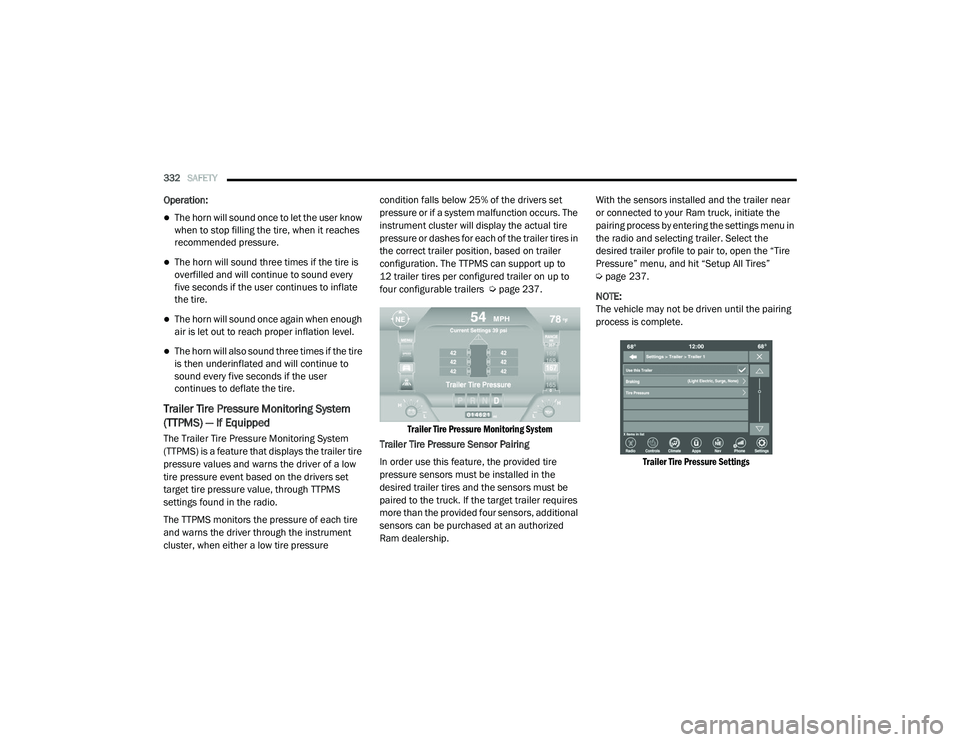
Trailer Tire Pressure Monitoring System
(TTPMS) — If Equipped
The Trailer Tire Pressure Monitoring System
(TTPMS) is a feature that displays the trailer tire
pressure values and warns the driver of a low
tire pressure event based on the drivers set
target tire pressure value, through TTPMS
settings found in the radio.
The TTPMS monitors the pressure of each tire
and warns the driver through the instrument
cluster, when either a low tire pressure condition falls below 25% of the drivers set
pressure or if a system malfunction occurs. The
instrument cluster will display the actual tire
pressure or dashes for each of the trailer tires in
the correct trailer position, based on trailer
configuration. The TTPMS can support up to
12 trailer tires per configured trailer on up to
four configurable trailers Ú
page 237.
Trailer Tire Pressure Monitoring System
Trailer Tire Pressure Sensor Pairing
In order use this feature, the provided tire
pressure sensors must be installed in the
desired trailer tires and the sensors must be
paired to the truck. If the target trailer requires
more than the provided four sensors, additional
sensors can be purchased at an authorized
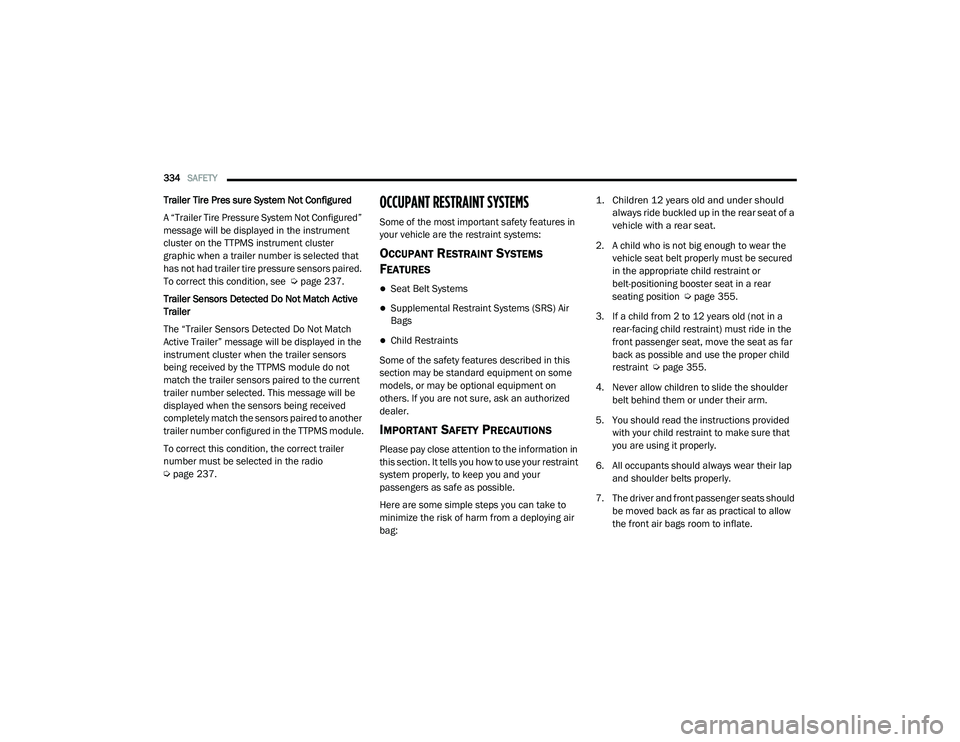
Ram dealership. With the sensors installed and the trailer near
or connected to your Ram truck, initiate the
pairing process by entering the settings menu in
the radio and selecting trailer. Select the
desired trailer profile to pair to, open the “Tire
Pressure” menu, and hit “Setup All Tires”
Ú
page 237.
NOTE:
The vehicle may not be driven until the pairing
process is complete.
Trailer Tire Pressure Settings
21_DT_OM_EN_USC_t.book Page 332
Page 335 of 496

SAFETY333
Trailer Tire Pressure Pairing
Follow the on screen prompts to select the
number of axles (1 - 3), the number of trailer
tires (2, 4, 6, 8, or 12), and the set trailer tire
pressure. The range is selectable anywhere
between 25-125 PSI (172-862 kPa).
Once PSI (kPa) is programmed, the pairing
screen appears. Tire sensors must be paired in
order shown. Starting with Tire 1, deflate tire by
5 PSI (34 kPa) and wait for a horn chirp. It may
take up to three minutes for the chirp to occur,
indicating that the sensor has paired. Repeat
process on each tire, in order, until complete.
Do not exit the pairing screen until process is
complete. If pairing was unsuccessful, a double
horn chirp will sound, and a prompt on the
touchscreen will allow you to retry the
procedure; “Retry” will only appear when setup fails. Each tire must be successfully paired
during a single pairing process to receive the
success screen.
NOTE:
If the pairing process times out after three
minutes of no communication with a sensor, a
double horn chip will occur indicating the
pairing has failed and a message will display on
the radio indicating the process was unsuc
-
cessful. Under certain circumstances, the
double horn chirp may continue to happen
every three minutes indicating the failed
pairing. If this happens, the horn chirping may
be canceled by cycling the ignition button OFF
and then back to RUN position.
Tire Pressure Monitoring Low Pressure
Warnings
When a tire pressure low in one or more of the
active road tires is detected, the instrument
cluster will display a message stating “Trailer
Tire Pressure Low”. The instrument cluster will
then display the TTPMS graphic showing the
pressure values of each tire with the low tire
pressure values in a different color.
Should this occur, you should stop as soon as
possible and inflate the tires with a low pressure condition (those in a different color in the
instrument cluster graphic) to the customer
programmed target tire pressure value as
shown at the top of the TTPMS instrument
cluster graphic. Once the tire(s) are inflated, the
system will automatically update the graphic
display in the instrument cluster, returning to its
original color. The vehicle may need to be driven
for up to 10 minutes above 15 mph (24 km/h)
in order for the TTPMS to receive the updated
information.
Service TTPMS Warning
If a system fault is detected, the instrument
cluster will display a “Trailer Tire Pressure
System Service Required” message for a
minimum of five seconds.
Once the system fault is corrected the "Trailer
Tire Pressure System Service Required"
message will no longer be displayed. The
vehicle may need to be driven for up to
10 minutes above 15 mph (24 km/h) in order
for the TTPMS to receive the trailer tire pressure
information.
6
21_DT_OM_EN_USC_t.book Page 333
Page 336 of 496
334SAFETY
Trailer Tire Pres sure System Not Configured
A “Trailer Tire Pressure System Not Configured”
message will be displayed in the instrument
cluster on the TTPMS instrument cluster
graphic when a trailer number is selected that
has not had trailer tire pressure sensors paired.
To correct this condition, see Ú page 237.
Trailer Sensors Detected Do Not Match Active
Trailer
The “Trailer Sensors Detected Do Not Match
Active Trailer” message will be displayed in the
instrument cluster when the trailer sensors
being received by the TTPMS module do not
match the trailer sensors paired to the current
trailer number selected. This message will be
displayed when the sensors being received
completely match the sensors paired to another
trailer number configured in the TTPMS module.
To correct this condition, the correct trailer
number must be selected in the radio
Ú page 237.OCCUPANT RESTRAINT SYSTEMS
Some of the most important safety features in
your vehicle are the restraint systems:
OCCUPANT RESTRAINT SYSTEMS
F
EATURES
Seat Belt Systems
Supplemental Restraint Systems (SRS) Air
Bags
Child Restraints
Some of the safety features described in this
section may be standard equipment on some
models, or may be optional equipment on
others. If you are not sure, ask an authorized
dealer.
IMPORTANT SAFETY PRECAUTIONS
Please pay close attention to the information in
this section. It tells you how to use your restraint
system properly, to keep you and your
passengers as safe as possible.
Here are some simple steps you can take to
minimize the risk of harm from a deploying air
bag:
1. Children 12 years old and under should
always ride buckled up in the rear seat of a
vehicle with a rear seat.
2. A child who is not big enough to wear the vehicle seat belt properly must be secured
in the appropriate child restraint or
belt-positioning booster seat in a rear
seating position Ú page 355.
3. If a child from 2 to 12 years old (not in a rear-facing child restraint) must ride in the
front passenger seat, move the seat as far
back as possible and use the proper child
restraint Ú page 355.
4. Never allow children to slide the shoulder belt behind them or under their arm.
5. You should read the instructions provided with your child restraint to make sure that
you are using it properly.
6. All occupants should always wear their lap and shoulder belts properly.
7. The driver and front passenger seats should be moved back as far as practical to allow
the front air bags room to inflate.
21_DT_OM_EN_USC_t.book Page 334
Page 338 of 496
336SAFETY
(Continued)
The BeltAlert warning sequence may repeat
based on vehicle speed until the driver and
occupied outboard front seat passenger seat
belts are buckled. The driver should instruct all
occupants to buckle their seat belts.
Change Of Status
If the driver or outboard front seat passenger (if
equipped with outboard front passenger seat
BeltAlert) unbuckles their seat belt while the
vehicle is traveling, the BeltAlert warning
sequence will begin until the seat belts are
buckled again.
The outboard front passenger seat BeltAlert is
not active when the outboard front passenger
seat is unoccupied. BeltAlert may be triggered
when an animal or other items are placed on
the outboard front passenger seat or when the
seat is folded flat (if equipped). It is
recommended that pets be restrained in the
rear seat (if equipped) in pet harnesses or pet
carriers that are secured by seat belts, and
cargo is properly stowed.
BeltAlert can be activated or deactivated by an
authorized dealer. FCA US LLC does not
recommend deactivating BeltAlert.NOTE:
If BeltAlert has been deactivated and the driver
or outboard front seat passenger (if equipped
with outboard front passenger seat BeltAlert) is
unbuckled the Seat Belt Reminder Light will
turn on and remain on until the driver and
outboard front seat passenger seat belts are
buckled.
Lap/Shoulder Belts
All seating positions in your vehicle are
equipped with lap/shoulder belts.
The seat belt webbing retractor will lock only
during very sudden stops or collisions. This
feature allows the shoulder part of the seat belt
to move freely with you under normal
conditions. However, in a collision the seat belt
will lock and reduce your risk of striking the
inside of the vehicle or being thrown out of the
vehicle.
WARNING!
Relying on the air bags alone could lead to
more severe injuries in a collision. The air
bags work with your seat belt to restrain you
properly. In some collisions, the air bags
won’t deploy at all. Always wear your seat
belt even though you have air bags.
In a collision, you and your passengers can
suffer much greater injuries if you are not
properly buckled up. You can strike the inte
-
rior of your vehicle or other passengers, or
you can be thrown out of the vehicle. Always
be sure you and others in your vehicle are
buckled up properly.
It is dangerous to ride in a cargo area,
inside or outside of a vehicle. In a collision,
people riding in these areas are more likely
to be seriously injured or killed.
Do not allow people to ride in any area of
your vehicle that is not equipped with seats
and seat belts.
21_DT_OM_EN_USC_t.book Page 336