keyless entry RAM 1500 2021 Owners Manual
[x] Cancel search | Manufacturer: RAM, Model Year: 2021, Model line: 1500, Model: RAM 1500 2021Pages: 496, PDF Size: 20.89 MB
Page 4 of 496
2
INTRODUCTION
Symbols Key ..........................................................11
WARNINGS AND CAUTIONS ...............................11
VAN CONVERSIONS/CAMPERS ..........................11
VEHICLE MODIFICATIONS/ALTERATIONS .........11
Symbol Glossary ...................................................12
GETTING TO KNOW YOUR VEHICLE
KEYS ......................................................................17
Key Fob......................................................... 17
SENTRY KEY ..........................................................20
IGNITION SWITCH .................................................21
Keyless Enter-N-Go — Ignition ..................... 21
REMOTE START — IF EQUIPPED (GASOLINE) ...22
How To Use Remote Start ........................... 22
To Exit Remote Start Mode ......................... 23
Remote Start Front Defrost Activation — If
Equipped ...................................................... 24 Remote Start Comfort Systems —
If Equipped ................................................... 24 Remote Start Windshield Wiper De-Icer
Activation — If Equipped .............................. 25 Remote Start Abort Message ...................... 25
REMOTE START — IF EQUIPPED (DIESEL) ........25
How To Use Remote Start ........................... 25 VEHICLE SECURITY SYSTEM — IF EQUIPPED .. 26
To Arm The System ...................................... 26
To Disarm The System ................................ 26
Rearming Of The System............................. 27
Security System Manual Override .............. 27
DOORS .................................................................. 27
Manual Door Locks...................................... 27
Power Door Locks — If Equipped ............... 28
Power Side Steps — If Equipped ................. 28
Keyless Enter-N-Go — Passive Entry .......... 28
Automatic Unlock Doors On Exit —
If Equipped ................................................... 30 Automatic Door Locks — If Equipped ......... 30
Child-Protection Door Lock System —
Rear Doors ................................................... 31
STEERING WHEEL ................................................ 31
Tilt/Telescoping Steering Column .............. 31
Heated Steering Wheel — If Equipped ...... 32
DRIVER MEMORY SETTINGS — IF EQUIPPED ... 32
Programming The Memory Feature............ 33
Linking And Unlinking The Key Fob To
Memory ........................................................ 33 Memory Position Recall............................... 34
SEATS ................................................................... 34
Manual Adjustment (Front Seats) — If
Equipped ...................................................... 34 Manual Adjustment (Rear Seats) ............... 36 Power Adjustment (Front Seats) —
If Equipped ................................................... 36 Heated Seats — If Equipped ...................... 38
Ventilated Seats — If Equipped................... 39
Plastic Grocery Bag Retainers ................... 39
Head Restraints ........................................... 40
UCONNECT VOICE RECOGNITION ......................41
Introducing Voice Recognition .................... 41
Basic Voice Commands .............................. 42
Get Started................................................... 43
Additional Information................................. 43
DRIVER ADJUSTABLE PEDALS —
IF EQUIPPED ..........................................................43
MIRRORS ..............................................................44
Inside Rearview Mirror ................................ 44
Outside Mirrors ........................................... 46
Outside Automatic Dimming Mirrors — If
Equipped ...................................................... 47 Power Mirrors............................................... 47
Power Folding Outside Mirrors For
Standard And Trailer Tow — If Equipped .... 47 Trailer Towing Mirrors — If Equipped ......... 48
Heated Mirrors — If Equipped ..................... 48
Tilt Side Mirrors In Reverse —
If Equipped ................................................... 48
21_DT_OM_EN_USC_t.book Page 2
Page 19 of 496

17
GETTING TO KNOW YOUR VEHICLE
KEYS
KEY FOB
Your vehicle is equipped with a key fob which
supports Passive Entry, Remote Keyless Entry
(RKE), Keyless Enter-N-Go (if equipped), and
Remote Start (if equipped). The key fob allows
you to lock or unlock all doors, tailgate, and the
RamBox (if equipped) as well as activate the
Panic Alarm from distances up to approximately
66 ft (20 m). The key fob does not need to be
pointed at the vehicle to activate the system. The
key fob also contains an emergency key, which is
stored in the rear of the key fob.
NOTE:
The key fob’s wireless signal may be blocked if
the key fob is located next to a mobile phone,
laptop, or other electronic device. This may
result in poor performance.
If your vehicle is equipped with a Wireless
Charging Pad, the key fob may not be found if
it is placed within 15 cm (150 mm) of the pad
Ú page 77.
With the ignition in the ON position and the
vehicle moving at 2 mph (4 km/h), all RKE
commands are disabled.
Key Fob
In case the ignition switch does not change with
the push of a button, the key fob may have a low
or fully depleted battery. A low key fob battery
can be verified by referring to the instrument
cluster, which will display directions to follow.
NOTE:
A low key fob battery condition may be indicated
by a message in the instrument cluster display,
or by the LED light on the key fob. If the LED key
fob light no longer illuminates from key fob
button pushes, then the key fob battery requires
replacement.
1 — Unlock
2 — LED Light
3 — Lock
4 — Tailgate Lowering
5 — Remote Start
6 — PANIC
7 — Emergency Key
8 — Air Suspension
2
21_DT_OM_EN_USC_t.book Page 17
Page 22 of 496

20GETTING TO KNOW YOUR VEHICLE
Programming And Requesting Additional
Key Fobs
Programming the key fob may be performed by
an authorized dealer.
NOTE:
Once a key fob is programmed to a vehicle, it
cannot be re-purposed and reprogrammed to
another vehicle.
Only key fobs that are programmed to the
vehicle electronics can be used to start and
operate the vehicle. Once a key fob is
programmed to a vehicle, it cannot be
programmed to any other vehicle.
Duplication of key fobs may be performed at an
authorized dealer. This procedure consists of
programming a blank key fob to the vehicle electronics. A blank key fob is one that has
never been programmed.
NOTE:
When having the Sentry Key Immobilizer system
serviced, bring all vehicle keys with you to an
authorized dealer Ú
page 482.
SENTRY KEY
The Sentry Key Immobilizer system prevents
unauthorized vehicle operation by disabling the
engine. The system does not need to be armed
or activated. Operation is automatic, regardless
of whether the vehicle is locked or unlocked.
The system uses a key fob, keyless push button
ignition and a Radio Frequency (RF) receiver to
prevent unauthorized vehicle operation.
Therefore, only key fobs that are programmed
to the vehicle can be used to start and operate
the vehicle. The system cannot reprogram a key
fob obtained from another vehicle.
After placing the ignition switch in the ON/RUN
position, the vehicle security light will turn on for
three seconds for a bulb check. If the light
remains on after the bulb check, it indicates
that there is a problem with the electronics. In
addition, if the light begins to flash after the
bulb check, it indicates that someone attempted to start the engine with an invalid key
fob. In the event that a valid key fob is used to
start the engine but there is an issue with the
vehicle electronics, the engine will start and
shut off after two seconds.
If the vehicle security light turns on during
normal vehicle operation (vehicle running for
longer than 10 seconds), it indicates that there
is a fault in the electronics. Should this occur,
have the vehicle serviced as soon as possible by
an authorized dealer.
All of the key fobs provided with your new
vehicle have been programmed to the vehicle
electronics Ú
page 482.
WARNING!
Always remove the key fobs from the
vehicle and lock all doors when leaving the
vehicle unattended.
For vehicles equipped with Keyless
Enter-N-Go — Ignition, always remember to
place the ignition in the OFF mode.
CAUTION!
The Sentry Key Immobilizer system is not
compatible with some aftermarket remote
starting systems. Use of these systems may
result in vehicle starting problems and loss of
security protection.
21_DT_OM_EN_USC_t.book Page 20
Page 25 of 496

GETTING TO KNOW YOUR VEHICLE23
To drive the vehicle, push the unlock button,
insert the key into the ignition, and turn to the
ON/RUN position.
NOTE:
With Remote Start, the engine will only run
for 15 minutes.
Remote Start can only be used twice.
If an engine fault is present or fuel level is
low, the vehicle will start and then shut down
in 10 seconds.
The parking lights will turn on and remain on
during Remote Start mode.
For security, power window and power
sunroof operation (if equipped) are disabled
when the vehicle is in the Remote Start
mode.
The ignition must be placed in the ON/RUN
position before the Remote Start sequence
can be repeated for a third cycle. All of the following conditions must be met
before the engine will remote start:
Gear selector in PARK
Doors closed
Hood closed
Hazard switch off
Brake switch inactive (brake pedal not
pushed)
Battery at an acceptable charge level
PANIC button not pushed
Fuel meets minimum requirement
System not disabled from previous remote
start event
Vehicle Security system not active
Malfunction Indicator Light is not illuminated
TO EXIT REMOTE START MODE
To drive the vehicle after starting the Remote
Start system, either push and release the
unlock button on the key fob to unlock the
doors, or unlock the vehicle using Keyless
Enter-N-Go — Passive Entry via the door
handles, and disarm the vehicle security system
(if equipped). Then, prior to the end of the
15 minute cycle, press the brake pedal and
push and release the START/STOP ignition
button.
WARNING!
Do not start or run an engine in a closed
garage or confined area. Exhaust gas
contains Carbon Monoxide (CO) which is
odorless and colorless. Carbon Monoxide is
poisonous and can cause serious injury or
death when inhaled.
Keep key fobs away from children. Opera
-
tion of the Remote Start System, windows,
door locks or other controls could cause
serious injury or death.
2
21_DT_OM_EN_USC_t.book Page 23
Page 26 of 496

24GETTING TO KNOW YOUR VEHICLE
The Remote Start system will turn the engine off
with another push and release of the Remote
Start button on the key fob, or if the engine is
allowed to run for the entire 15 minute cycle.
Once the ignition is placed in the ON/RUN
position, the climate controls will resume the
previously set operations (temperature, blower
control, etc.).
NOTE:
To avoid unintentional shutdowns, the
system will disable for two seconds after
receiving a valid Remote Start request.
For vehicles equipped with the Keyless
Enter-N-Go — Passive Entry feature, the
message “Remote Start Active — Push Start
Button” will display in the instrument cluster
display until you push the START/STOP igni -
tion button.
REMOTE START FRONT DEFROST
A
CTIVATION — IF EQUIPPED
When remote start is active, and the outside
ambient temperature is 40°F (4.5°C) or below,
the system will automatically activate front
defrost for 15 minutes or less. The time is
dependent on the ambient temperature. Once
the timer expires, the system will automatically adjust the settings depending on ambient
conditions. See “Remote Start Comfort Systems
— If Equipped” in the next section for detailed
operation.
REMOTE START COMFORT SYSTEMS —
I
F EQUIPPED
When remote start is activated, the front and
rear defrost will automatically turn on in cold
weather. The heated steering wheel and driver
heated seat feature will turn on if programmed
in the comfort menu screen within Uconnect
Settings Ú page 237. In warm weather, the
driver vented seat feature will automatically
turn on when the remote start is activated and
is programmed in the comfort menu screen.
The vehicle will adjust the climate control
settings depending on the outside ambient
temperature.
Automatic Temperature Control (ATC) — If
Equipped
The climate controls automatically adjust to an
optimal temperature and mode, dependent on
the outside ambient temperature. When the
ignition is placed in the ON/RUN position, the
climate controls will resume their previous
settings. Manual Temperature Control (MTC) — If
Equipped
In ambient temperatures of 40°F (4.5°C) or
below, the climate settings will default to
maximum heat, with fresh air entering the
cabin. If the front defrost timer expires, the
vehicle will enter Mix Mode.
In ambient temperatures from 40°F (4.5°C)
to 78°F (26°C), the climate settings will be
based on the last settings selected by the
driver.
In ambient temperatures of 78°F (26°C) or
above, the climate settings will default to
MAX A/C, Bi-Level mode, with Recirculation
on.
For more information on ATC, MTC, and climate
control settings, see Ú page 60.
NOTE:
These features will stay on through the duration
of remote start, or until the ignition is placed in
the ON/RUN position. The climate control
settings will change, and exit the automatic
defaults, if manually adjusted by the driver
while the vehicle is in remote start mode. This
includes turning the climate controls off using
the OFF button.
21_DT_OM_EN_USC_t.book Page 24
Page 28 of 496
26GETTING TO KNOW YOUR VEHICLE
VEHICLE SECURITY SYSTEM — IF EQUIPPED
The Vehicle Security system monitors the vehicle
doors, hood, tailgate, and the Keyless Enter-N-Go
— Ignition for unauthorized operation. While the
Vehicle Security system is armed, interior
switches for door locks and tailgate release are
disabled. If something triggers the alarm, the
Vehicle Security system will provide the following
audible and visible signals:
The horn will pulse
The turn signals will flash
The vehicle security light in the instrument
cluster will flash
TO ARM THE SYSTEM
Follow these steps to arm the Vehicle Security
system:
1. Make sure the vehicle’s ignition is placed
in the OFF position.
For vehicles equipped with Keyless Entry,
make sure the vehicle’s keyless ignition
system is OFF.
2. Perform one of the following methods to lock the vehicle:
Push the lock button on the interior
power door lock switch with the driver
and/or passenger door open.
Push the lock button on the exterior
Passive Entry door handle with a valid key
fob available in the same exterior zone
Úpage 28.
Push the lock button on the key fob.
3. If any doors are open, close them.
TO DISARM THE SYSTEM
The Vehicle Security system can be disarmed
using any of the following methods:
Push the unlock button on the key fob.
Grab the Passive Entry door handle to unlock
the door Ú page 28.
Cycle the ignition out of the OFF position to
disarm the system.
NOTE:
The driver's door key cylinder cannot arm or
disarm the Vehicle Security system. Use of
the door key cylinder when the system is
armed will sound the alarm when the door is
opened.
The Vehicle Security system remains armed
when the power tailgate (if equipped) is
opened using the tailgate button on the key
fob.
If Passive Entry (if equipped) is used to
unlock the tailgate, the Vehicle Security
system is disarmed and the rest of the
vehicle doors will remain locked unless
“Unlock All Doors 1st Press” is selected in the
Passive Entry settings.
When the Vehicle Security system is armed,
the interior power door lock switches will not
unlock the doors.
WARNING!
Do not start or run an engine in a closed
garage or confined area. Exhaust gas
contains Carbon Monoxide (CO) which is
odorless and colorless. Carbon Monoxide is
poisonous and can cause serious injury or
death when inhaled.
Keep key fobs away from children. Opera -
tion of the Remote Start System, windows,
door locks or other controls could cause
serious injury or death.
21_DT_OM_EN_USC_t.book Page 26
Page 30 of 496
28GETTING TO KNOW YOUR VEHICLE
POWER DOOR LOCKS — IF EQUIPPED
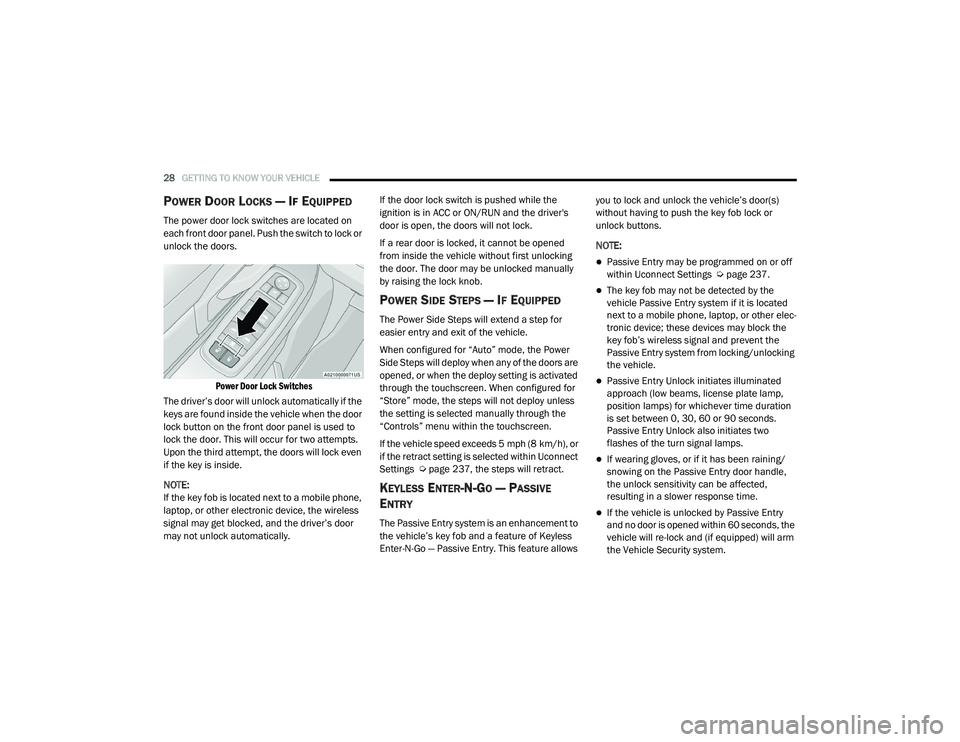
The power door lock switches are located on
each front door panel. Push the switch to lock or
unlock the doors.
Power Door Lock Switches
The driver’s door will unlock automatically if the
keys are found inside the vehicle when the door
lock button on the front door panel is used to
lock the door. This will occur for two attempts.
Upon the third attempt, the doors will lock even
if the key is inside.
NOTE:
If the key fob is located next to a mobile phone,
laptop, or other electronic device, the wireless
signal may get blocked, and the driver’s door
may not unlock automatically. If the door lock switch is pushed while the
ignition is in ACC or ON/RUN and the driver's
door is open, the doors will not lock.
If a rear door is locked, it cannot be opened
from inside the vehicle without first unlocking
the door. The door may be unlocked manually
by raising the lock knob.
POWER SIDE STEPS — IF EQUIPPED
The Power Side Steps will extend a step for
easier entry and exit of the vehicle.
When configured for “Auto” mode, the Power
Side Steps will deploy when any of the doors are
opened, or when the deploy setting is activated
through the touchscreen. When configured for
“Store” mode, the steps will not deploy unless
the setting is selected manually through the
“Controls” menu within the touchscreen.
If the vehicle speed exceeds 5 mph (8 km/h), or
if the retract setting is selected within Uconnect
Settings Ú
page 237, the steps will retract.
KEYLESS ENTER-N-GO — PASSIVE
E
NTRY
The Passive Entry system is an enhancement to
the vehicle’s key fob and a feature of Keyless
Enter-N-Go — Passive Entry. This feature allows you to lock and unlock the vehicle’s door(s)
without having to push the key fob lock or
unlock buttons.
NOTE:
Passive Entry may be programmed on or off
within Uconnect Settings Ú
page 237.
The key fob may not be detected by the
vehicle Passive Entry system if it is located
next to a mobile phone, laptop, or other elec -
tronic device; these devices may block the
key fob’s wireless signal and prevent the
Passive Entry system from locking/unlocking
the vehicle.
Passive Entry Unlock initiates illuminated
approach (low beams, license plate lamp,
position lamps) for whichever time duration
is set between 0, 30, 60 or 90 seconds.
Passive Entry Unlock also initiates two
flashes of the turn signal lamps.
If wearing gloves, or if it has been raining/
snowing on the Passive Entry door handle,
the unlock sensitivity can be affected,
resulting in a slower response time.
If the vehicle is unlocked by Passive Entry
and no door is opened within 60 seconds, the
vehicle will re-lock and (if equipped) will arm
the Vehicle Security system.
21_DT_OM_EN_USC_t.book Page 28
Page 59 of 496
GETTING TO KNOW YOUR VEHICLE57
BATTERY SAVER
Timers are set to both the interior and exterior
lights to protect the life of your vehicle’s battery.
After 10 minutes, if the ignition is OFF and any
door is left open or the dimmer control is
rotated all the way up to the dome light on
position, the interior lights will automatically
turn off.
NOTE:
Battery saver mode is canceled if the ignition is
ON.
If the headlights remain on while the ignition is
placed in the OFF position, the exterior lights will
automatically turn off after eight minutes. If the
headlights are turned on and left on for eight
minutes while the ignition is OFF, the exterior
lights will automatically turn off.
INTERIOR LIGHTS
COURTESY LIGHTS
Courtesy and dome lights are turned on when the
doors are opened or the Dome ON button is
pushed on the overhead console. If your vehicle
is equipped with Remote Keyless Entry and the
unlock button is pushed on the key fob, the courtesy and dome lights will turn on. When a
door is open and the interior lights are on, and
the Dome Defeat button on the overhead
console is pressed, the interior lights will turn off.
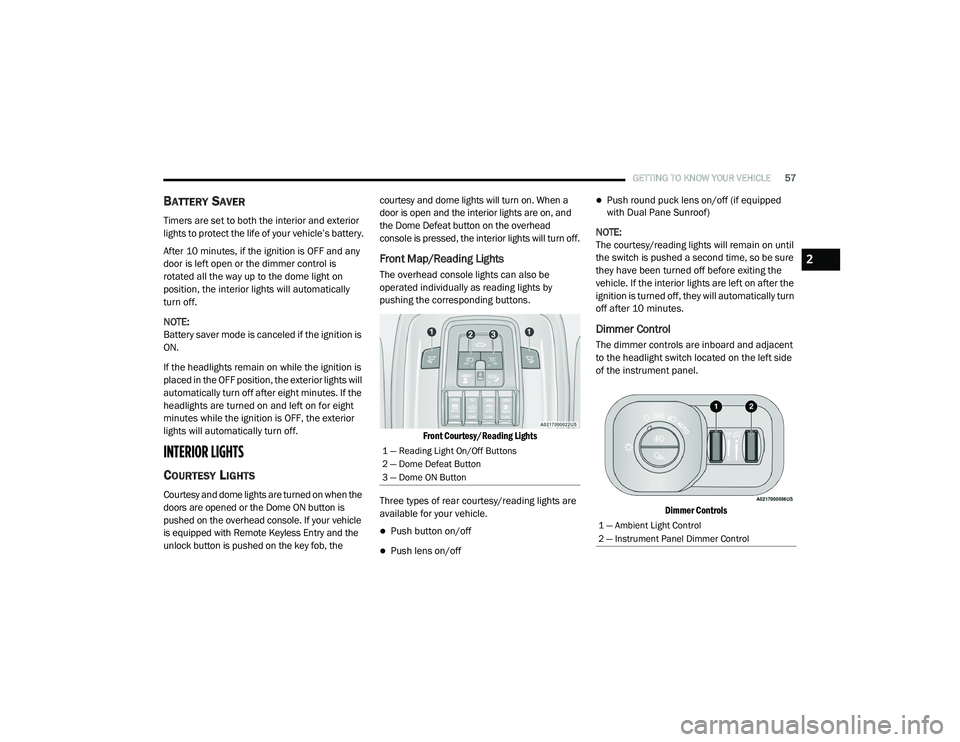
Front Map/Reading Lights
The overhead console lights can also be
operated individually as reading lights by
pushing the corresponding buttons.
Front Courtesy/Reading Lights
Three types of rear courtesy/reading lights are
available for your vehicle.
Push button on/off
Push lens on/off
Push round puck lens on/off (if equipped
with Dual Pane Sunroof)
NOTE:
The courtesy/reading lights will remain on until
the switch is pushed a second time, so be sure
they have been turned off before exiting the
vehicle. If the interior lights are left on after the
ignition is turned off, they will automatically turn
off after 10 minutes.
Dimmer Control
The dimmer controls are inboard and adjacent
to the headlight switch located on the left side
of the instrument panel.
Dimmer Controls
1 — Reading Light On/Off Buttons
2 — Dome Defeat Button
3 — Dome ON Button
1 — Ambient Light Control
2 — Instrument Panel Dimmer Control
2
21_DT_OM_EN_USC_t.book Page 57
Page 249 of 496
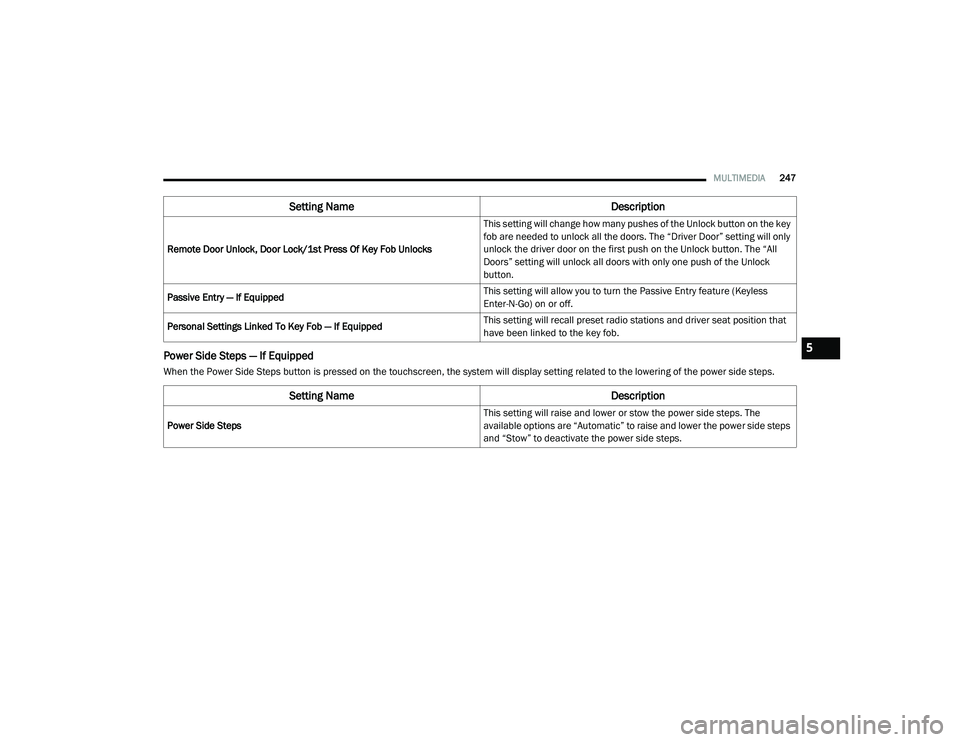
MULTIMEDIA247
Power Side Steps — If Equipped
When the Power Side Steps button is pressed on the touchscreen, the system will display setting related to the lowering of the power side steps.Remote Door Unlock, Door Lock/1st Press Of Key Fob Unlocks
This setting will change how many pushes of the Unlock button on the key
fob are needed to unlock all the doors. The “Driver Door” setting will only
unlock the driver door on the first push on the Unlock button. The “All
Doors” setting will unlock all doors with only one push of the Unlock
button.
Passive Entry — If Equipped This setting will allow you to turn the Passive Entry feature (Keyless
Enter-N-Go) on or off.
Personal Settings Linked To Key Fob — If Equipped This setting will recall preset radio stations and driver seat position that
have been linked to the key fob.
Setting Name
Description
Setting NameDescription
Power Side Steps This setting will raise and lower or stow the power side steps. The
available options are “Automatic” to raise and lower the power side steps
and “Stow” to deactivate the power side steps.
5
21_DT_OM_EN_USC_t.book Page 247
Page 489 of 496

487
J
Jack Location
................................................. 377Jump Starting................................................ 386
K
Key Fob Programming Additional Key Fobs
.............. 20Key Fob Battery Service (Remote Keyless
Entry)............................................................... 18Key Fob Programming (Remote Keyless
Entry)............................................................... 20Keyless Enter-N-Go................................. 28, 143Passive Entry............................................... 28Keys................................................................. 17
L
Lane Change And Turn Signals........................ 55Lane Change Assist......................................... 55LaneSense.................................................... 199Lap/Shoulder Belts....................................... 336Latches.......................................................... 371Hood........................................................... 84Lead Free Gasoline........................................ 468Leaks, Fluid................................................... 371Life Of Tires................................................... 452Light Bulbs........................................... 371, 437
Lights............................................................ 371Air Bag.................................... 126, 342, 369Brake Assist Warning............................... 314Brake Warning.......................................... 126Bulb Replacement.................................... 437Cargo........................................................... 56Center Mounted Stop............................... 442Courtesy/Reading....................................... 57Cruise....................................................... 136Daytime Running......................................... 53Electronic Stability Program (ESP)Indicator............................................... 128Exterior...............................................52, 371Fog........................................................... 441Hazard Warning Flasher........................... 373Headlights............................................ 52, 54High Beam................................................... 53High Beam/Low Beam Select...................... 53Hill Descent Control Indicator................... 315Illuminated Entry......................................... 58Interior......................................................... 57Lights On Reminder..................................... 55Low Fuel................................................... 131Malfunction Indicator (Check Engine)....... 130Park.......................................................... 135Passing........................................................ 54
Seat Belt Reminder.................................. 126Security Alarm.......................................... 127Service...................................................... 437Traction Control........................................ 314Turn Signals............55, 136, 371, 439, 441Warning Instrument ClusterDescriptions................................ 128, 136Limited-Slip Differential....................... 174, 427Load Shed Battery Saver Mode..................... 125Load Shed Battery Saver On......................... 125Load Shed Electrical Load Reduction........... 125Load Shed Intelligent Battery Sensor............ 125Loading Vehicle............................................. 213Tires.......................................................... 447LocksAutomatic Door............................................30Child Protection...........................................31Power Door..................................................28Low Tire Pressure System............................. 327Lubrication, Body.......................................... 418Lug Nuts........................................................ 467Lug Nuts/Bolts.............................................. 467
M
Maintenance.............................................81, 84Maintenance Free Battery............................ 409Maintenance Schedule............... 395, 399, 40011
21_DT_OM_EN_USC_t.book Page 487