brakes RAM 1500 2021 Owner's Guide
[x] Cancel search | Manufacturer: RAM, Model Year: 2021, Model line: 1500, Model: RAM 1500 2021Pages: 496, PDF Size: 20.89 MB
Page 327 of 496
SAFETY325
Forward Collision Warning with Mitigation event
stops the vehicle completely, the system will
hold the vehicle at standstill for two seconds
and then release the brakes.
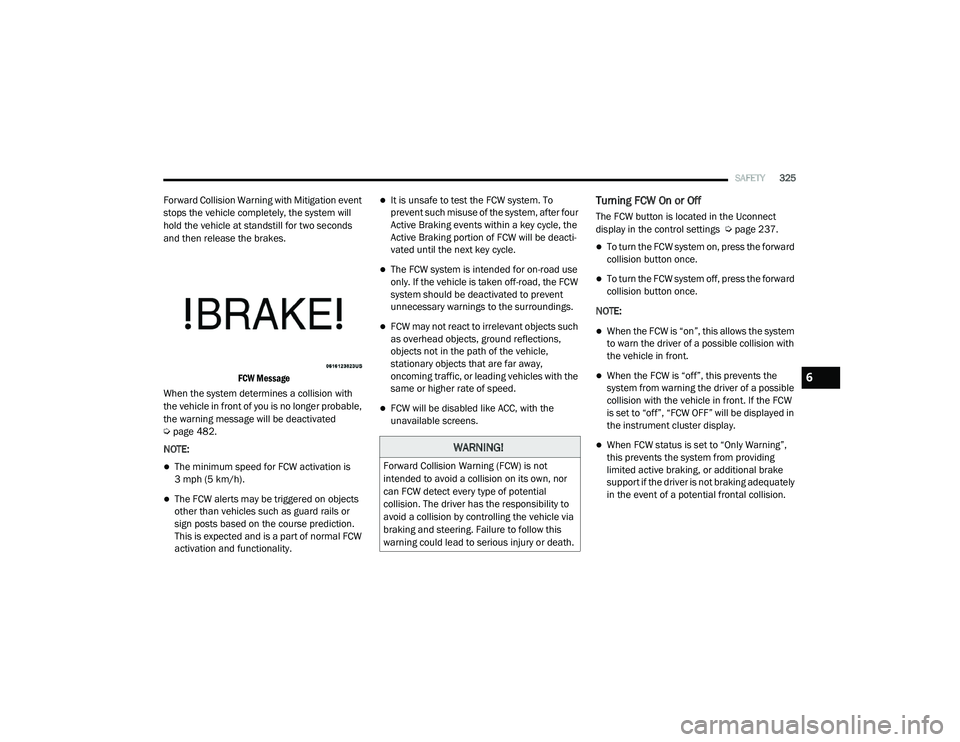
FCW Message
When the system determines a collision with
the vehicle in front of you is no longer probable,
the warning message will be deactivated
Ú page 482.
NOTE:
The minimum speed for FCW activation is
3 mph (5 km/h).
The FCW alerts may be triggered on objects
other than vehicles such as guard rails or
sign posts based on the course prediction.
This is expected and is a part of normal FCW
activation and functionality.
It is unsafe to test the FCW system. To
prevent such misuse of the system, after four
Active Braking events within a key cycle, the
Active Braking portion of FCW will be deacti -
vated until the next key cycle.
The FCW system is intended for on-road use
only. If the vehicle is taken off-road, the FCW
system should be deactivated to prevent
unnecessary warnings to the surroundings.
FCW may not react to irrelevant objects such
as overhead objects, ground reflections,
objects not in the path of the vehicle,
stationary objects that are far away,
oncoming traffic, or leading vehicles with the
same or higher rate of speed.
FCW will be disabled like ACC, with the
unavailable screens.
Turning FCW On or Off
The FCW button is located in the Uconnect
display in the control settings Ú page 237.
To turn the FCW system on, press the forward
collision button once.
To turn the FCW system off, press the forward
collision button once.
NOTE:
When the FCW is “on”, this allows the system
to warn the driver of a possible collision with
the vehicle in front.
When the FCW is “off”, this prevents the
system from warning the driver of a possible
collision with the vehicle in front. If the FCW
is set to “off”, “FCW OFF” will be displayed in
the instrument cluster display.
When FCW status is set to “Only Warning”,
this prevents the system from providing
limited active braking, or additional brake
support if the driver is not braking adequately
in the event of a potential frontal collision.WARNING!
Forward Collision Warning (FCW) is not
intended to avoid a collision on its own, nor
can FCW detect every type of potential
collision. The driver has the responsibility to
avoid a collision by controlling the vehicle via
braking and steering. Failure to follow this
warning could lead to serious injury or death.
6
21_DT_OM_EN_USC_t.book Page 325
Page 329 of 496

SAFETY327
Pedestrian Emergency Braking (PEB) — If
Equipped
PEB is a subsystem of the FCW system that
provides the driver with audible and visual
warnings in the instrument cluster display, and
may apply automatic braking when it detects a
potential frontal collision with a pedestrian.
If a PEB event begins at a speed below 37 mph
(60 km/h), the system may provide braking to
mitigate the potential collision with a
pedestrian. If the PEB event stops the vehicle
completely, the system will hold the vehicle at a
standstill for two seconds and then release the
brakes. When the system determines a collision
with the pedestrian in front of you is no longer
probable, the warning message will be
deactivated.
The minimum speed for PEB activation is 3 mph
(5 km/h). Turning PEB On Or Off
NOTE:
The default status of PEB is “On.” This allows
the system to warn you of a possible frontal
collision with the pedestrian.
The PEB button is located in the Uconnect
display in the controls settings Ú
page 237.
To turn the PEB system off, push the Pedestrian
Emergency Braking button once.
To turn the PEB system back on, push the
Pedestrian Emergency Braking button again.
Changing the PEB status to “Off” deactivates
the system, so no warning or active braking will
be available in case of a possible frontal
collision with the pedestrian. NOTE:
The PEB system will NOT retain the last setting
selected by the driver after ignition shut down.
The system will reset to the default setting when
the vehicle is restarted.
TIRE PRESSURE MONITORING SYSTEM
(TPMS)
TPMS will warn the driver of a low tire pressure
based on the vehicle recommended cold
placard pressure.
NOTE:
The TPMS Warning Light will illuminate in the
instrument cluster and a chime will sound when
tire pressure is low in one or more of the four
active road tires. In addition, the instrument
cluster will display a graphic showing the pres -
sure values of each tire with the low tire pres -
sure values in a different color, or the Uconnect
radio will display a TPMS message; when this
occurs you must increase the tire pressure to
the recommended cold placard pressure in
order for the TPMS Warning Light to turn off.
The tire pressure will vary with temperature by
about 1 psi (7 kPa) for every 12°F (6.5°C). This
means that when the outside temperature
decreases, the tire pressure will decrease. Tire
WARNING!
Pedestrian Emergency Braking (PEB) is not
intended to avoid a collision on its own, nor
can PEB detect every type of potential colli -
sion with a pedestrian. The driver has the
responsibility to avoid a collision by con -
trolling the vehicle via braking and steering.
Failure to follow this warning could lead to
serious injury or death.
6
21_DT_OM_EN_USC_t.book Page 327
Page 391 of 496
IN CASE OF EMERGENCY389
REFUELING IN EMERGENCY – IF EQUIPPED
The fuel filling procedure in case of an
emergency is described on Ú page 208.
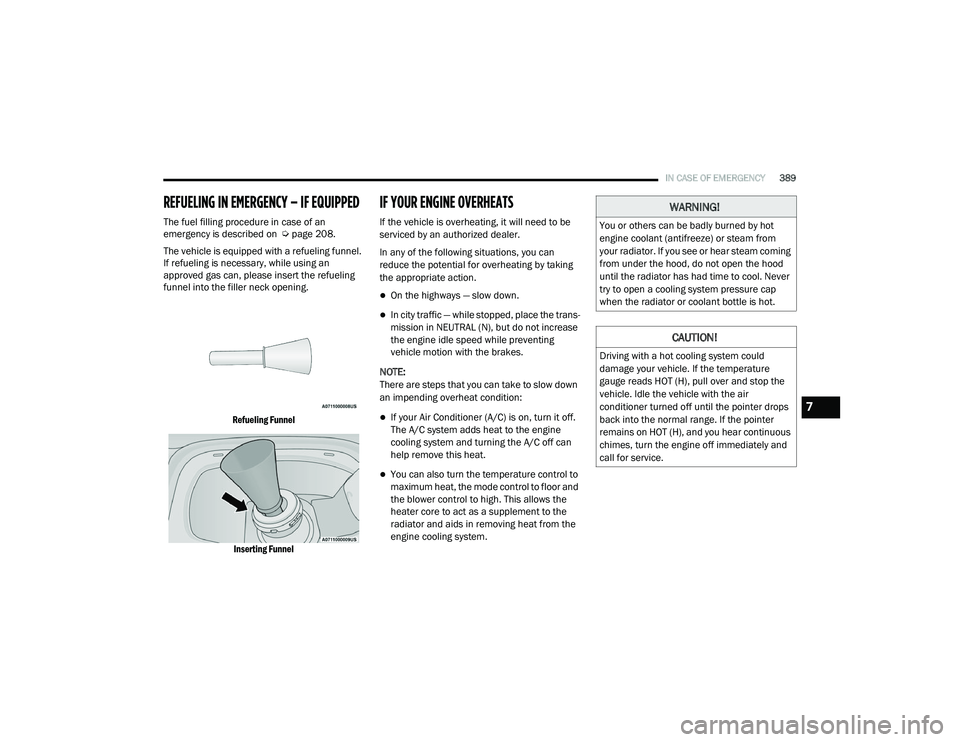
The vehicle is equipped with a refueling funnel.
If refueling is necessary, while using an
approved gas can, please insert the refueling
funnel into the filler neck opening.
Refueling FunnelInserting Funnel
IF YOUR ENGINE OVERHEATS
If the vehicle is overheating, it will need to be
serviced by an authorized dealer.
In any of the following situations, you can
reduce the potential for overheating by taking
the appropriate action.
On the highways — slow down.
In city traffic — while stopped, place the trans -
mission in NEUTRAL (N), but do not increase
the engine idle speed while preventing
vehicle motion with the brakes.
NOTE:
There are steps that you can take to slow down
an impending overheat condition:
If your Air Conditioner (A/C) is on, turn it off.
The A/C system adds heat to the engine
cooling system and turning the A/C off can
help remove this heat.
You can also turn the temperature control to
maximum heat, the mode control to floor and
the blower control to high. This allows the
heater core to act as a supplement to the
radiator and aids in removing heat from the
engine cooling system.
WARNING!
You or others can be badly burned by hot
engine coolant (antifreeze) or steam from
your radiator. If you see or hear steam coming
from under the hood, do not open the hood
until the radiator has had time to cool. Never
try to open a cooling system pressure cap
when the radiator or coolant bottle is hot.
CAUTION!
Driving with a hot cooling system could
damage your vehicle. If the temperature
gauge reads HOT (H), pull over and stop the
vehicle. Idle the vehicle with the air
conditioner turned off until the pointer drops
back into the normal range. If the pointer
remains on HOT (H), and you hear continuous
chimes, turn the engine off immediately and
call for service.
7
21_DT_OM_EN_USC_t.book Page 389
Page 427 of 496
SERVICING AND MAINTENANCE425
(Continued)
and through another hose to the intake
manifold of the engine. This cooling process
enables more efficient burning of fuel resulting
in fewer emissions.
To guarantee optimum performance of the
system, keep the surfaces of the charge air
cooler, condenser and radiator clean and free
of debris. Periodically check the hoses leading
to and from the charge air cooler for cracks or
loose clamps resulting in loss of pressure and
reduced engine performance.
BRAKE SYSTEM
In order to ensure brake system performance,
all brake system components should be
inspected periodically Ú page 395.
Fluid Level Check — Brake Master Cylinder
The fluid level of the brake master cylinder
should be checked whenever the vehicle is
serviced, or immediately if the brake system
warning light is on. If necessary, add fluid to
bring level within the designated marks on the
side of the reservoir of the brake master
cylinder. Be sure to clean the top of the master
cylinder area before removing cap. With disc
brakes, fluid level can be expected to fall as the
brake pads wear. Brake fluid level should be
checked when pads are replaced. If the brake
fluid is abnormally low, check the system for
leaks Úpage 478.
WARNING!
Riding the brakes can lead to brake failure
and possibly a collision. Driving with your foot
resting or riding on the brake pedal can result
in abnormally high brake temperatures,
excessive lining wear, and possible brake
damage. You would not have your full braking
capacity in an emergency.
WARNING!
Use only manufacturer's recommended
brake fluid Ú page 478. Using the wrong
type of brake fluid can severely damage
your brake system and/or impair its perfor -
mance. The proper type of brake fluid for
your vehicle is also identified on the original
factory installed hydraulic master cylinder
reservoir.
To avoid contamination from foreign matter
or moisture, use only new brake fluid or
fluid that has been in a tightly closed
container. Keep the master cylinder reser -
voir cap secured at all times. Brake fluid in
a open container absorbs moisture from
the air resulting in a lower boiling point. This
may cause it to boil unexpectedly during
hard or prolonged braking, resulting in
sudden brake failure. This could result in a
collision.
Overfilling the brake fluid reservoir can
result in spilling brake fluid on hot engine
parts, causing the brake fluid to catch fire.
Brake fluid can also damage painted and
vinyl surfaces, care should be taken to
avoid its contact with these surfaces.
Do not allow petroleum based fluid to
contaminate the brake fluid. Brake seal
components could be damaged, causing
partial or complete brake failure. This could
result in a collision.
WARNING! (Continued)
8
21_DT_OM_EN_USC_t.book Page 425
Page 459 of 496
SERVICING AND MAINTENANCE457
Your wheels are susceptible to deterioration
caused by salt, sodium chloride, magnesium
chloride, calcium chloride, etc., and other road
chemicals used to melt ice or control dust on
dirt roads. Use a soft cloth or sponge and mild
soap to wipe away promptly. Do not use harsh
chemicals or a stiff brush. They can damage the
wheel’s protective coating that helps keep them
from corroding and tarnishing. When cleaning extremely dirty wheels including
excessive brake dust, care must be taken in the
selection of tire and wheel cleaning chemicals
and equipment to prevent damage to the
wheels. Mopar Wheel Treatment or Mopar
Chrome Cleaner or their equivalent is
recommended or select a non-abrasive,
non-acidic cleaner for aluminum or chrome
wheels.NOTE:
If you intend parking or storing your vehicle for
an extended period after cleaning the wheels
with wheel cleaner, drive your vehicle and apply
the brakes to remove the water droplets from
the brake components. This activity will remove
the red rust on the brake rotors and prevent
vehicle vibration when braking.
Dark Vapor Chrome, Black Satin Chrome, or
Low Gloss Clear Coat Wheels
CAUTION!
Avoid products or automatic car washes that
use acidic solutions or strong alkaline
additives or harsh brushes. Many aftermarket
wheel cleaners and automatic car washes
may damage the wheel's protective finish.
Such damage is not covered by the New
Vehicle Limited Warranty. Only car wash soap,
Mopar Wheel Cleaner or equivalent is
recommended.
CAUTION!
Do not use scouring pads, steel wool, a bristle
brush, metal polishes or oven cleaner. These
products may damage the wheel's protective
finish. Such damage is not covered by the
New Vehicle Limited Warranty. Only car wash
soap, Mopar Wheel Cleaner or equivalent is
recommended.CAUTION!
If your vehicle is equipped with these
specialty wheels, DO NOT USE wheel
cleaners, abrasives, or polishing compounds.
They will permanently damage this finish and
such damage is not covered by the New
Vehicle Limited Warranty. HAND WASH ONLY
USING MILD SOAP AND WATER WITH A SOFT
CLOTH. Used on a regular basis; this is all that
is required to maintain this finish.
8
21_DT_OM_EN_USC_t.book Page 457
Page 469 of 496

467
TECHNICAL SPECIFICATIONS
VEHICLE IDENTIFICATION NUMBER
The Vehicle Identification Number (VIN) is found
on the left front corner of the instrument panel,
visible through the windshield.
Vehicle Identification Number
NOTE:
It is illegal to remove or alter the VIN.
BRAKE SYSTEM
If power assist is lost for any reason (for
example, repeated brake applications with the
engine off), the brakes will still function.
However, you will experience a substantial
increase in braking effort to stop the vehicle.
If either the front or rear hydraulic system loses
normal braking capability, the remaining
system will still function with some loss of
overall braking effectiveness. This will be
evident by increased pedal travel during
application, greater pedal force required to slow
or stop, and the “Brake Warning Light” and the
“ABS Warning Light” will activate during brake
use.
WHEEL AND TIRE TORQUE SPECIFICATIONS
Proper lug nut/bolt torque is very important to
ensure that the wheel is properly mounted to
the vehicle. Any time a wheel has been removed
and reinstalled on the vehicle, the lug nuts/
bolts should be torqued using a properly
calibrated torque wrench using a six sided (hex)
deep wall socket.
TORQUE SPECIFICATIONS
**Use only authorized dealer recommended lug nuts/
bolts and clean or remove any dirt or oil before tightening.
Lug Nut/ Bolt
Torque Lug Nut/
Bolt Type **Lug
Nut/Bolt Size Lug Nut/
Bolt
Socket Size
130
Ft-Lbs
(176 N·m) Cone
M14 x
1.50 22 mm
9
21_DT_OM_EN_USC_t.book Page 467