parking brake RAM 1500 2021 Service Manual
[x] Cancel search | Manufacturer: RAM, Model Year: 2021, Model line: 1500, Model: RAM 1500 2021Pages: 496, PDF Size: 20.89 MB
Page 260 of 496
258MULTIMEDIA
SAFETY AND GENERAL INFORMATION
Safety Guidelines
Please read this manual carefully before using
the system. It contains instructions on how to
use the system in a safe and effective manner.
Do NOT attach any object to the touchscreen.
Doing so can result in damage to the
touchscreen.
Please read and follow these safety
precautions. Failure to do so may result in injury
or property damage.
Glance at the screen only when safe to do so.
If prolonged viewing of the screen is required,
park in a safe location and set the parking
brake.
Stop use immediately if a problem occurs.
Failure to do so may cause injury or damage
to the product. See an authorized dealer for
repair.
Ensure the volume level of the system is set
to a level that still allows you to hear outside
traffic and emergency vehicles.
Safe Usage Of The Uconnect System
The Uconnect system is a sophisticated elec -
tronic device. Do not let young children use
the system.
Permanent hearing loss may occur if you play
your music or sound system at loud volumes.
Exercise caution when setting the volume on
the system.
Keep drinks, rain and other sources of mois -
ture away from the system. Besides damage
to the system, moisture can cause electric
shocks as with any electronic device. NOTE:
Many features of this system are speed depen
-
dent. For your own safety, it is not possible to
use some of the touchscreen features while the
vehicle is in motion.
Care And Maintenance
Do not press the touchscreen with any hard
or sharp objects (pen, USB stick, jewelry,
etc.), which could scratch the surface.
Do not spray any liquid or chemicals directly
on the screen! Use a clean and dry microfiber
lens cleaning cloth in order to clean the
touchscreen.
If necessary, use a lint-free cloth dampened
with a cleaning solution, such as isopropyl
alcohol or an isopropyl alcohol and water
solution ratio of 50:50. Be sure to follow the
solvent manufacturer's precautions and
directions Ú page 482.
WARNING!
ALWAYS drive safely with your hands on the
steering wheel. You have full responsibility
and assume all risks related to the use of the
Uconnect features and applications in this
vehicle. Only use Uconnect when it is safe to
do so. Failure to do so may result in an
accident involving serious injury or death.
21_DT_OM_EN_USC_t.book Page 258
Page 317 of 496

SAFETY315
The ESC Activation/Malfunction Indicator Light
starts to flash as soon as the tires lose traction
and the ESC system becomes active. The ESC
Activation/Malfunction Indicator Light also
flashes when TCS is active. If the ESC
Activation/Malfunction Indicator Light begins to
flash during acceleration, ease up on the
accelerator and apply as little throttle as
possible. Be sure to adapt your speed and
driving to the prevailing road conditions.
The ESC OFF Indicator Light indicates
that the Electronic Stability Control
(ESC) is in a reduced mode.
NOTE:
The ESC Activation/Malfunction Indicator
Light and the ESC OFF Indicator Light come
on momentarily each time the ignition is
placed in the ON/RUN mode.
Each time the ignition is placed in the ON/
RUN mode, the ESC system will be on even if
it was turned off previously.
The ESC system will make buzzing or clicking
sounds when it is active. This is normal; the
sounds will stop when ESC becomes inactive
following the maneuver that caused the ESC
activation.
Hill Descent Control (HDC) — If Equipped
HDC is intended for low speed off-road driving
while in 4WD Low. HDC maintains vehicle speed
while descending hills during various driving
situations. HDC controls vehicle speed by
actively controlling the brakes.
HDC Has Three States:
1. Off (feature is not enabled and will not activate).
2. Enabled (feature is enabled and ready but activation conditions are not met, or driver
is actively overriding with brake or throttle
application).
3. Active (feature is enabled and actively controlling vehicle speed).
Enabling HDC
HDC is enabled by pushing the HDC switch, but
the following conditions must also be met to
enable HDC:
Driveline is in 4WD Low.
Vehicle speed is below 5 mph (8 km/h).
The parking brake is released.
The driver door is closed. Activating HDC
Once HDC is enabled it will activate
automatically if driven down a grade of
sufficient magnitude. The set speed for HDC is
selectable by the driver, and can be adjusted by
using the gear shift +/-. The following
summarizes the HDC set speeds:
HDC Target Set Speeds
P = No set speed. HDC may be enabled but
will not activate.
R = 0.6 mph (1 km/h)
N = 1.2 mph (2 km/h)
D = 0.6 mph (1 km/h)
1st = 0.6 mph (1 km/h)
2nd = 1.2 mph (2 km/h)
3rd = 1.8 mph (3 km/h)
4th = 2.5 mph (4 km/h)
5th = 3.1 mph (5 km/h)
6th = 3.7 mph (6 km/h)
7th = 4.3 mph (7 km/h)
8th = 5.0 mph (8 km/h)
9th = 5.6 mph (9 km/h) – If Equipped
6
21_DT_OM_EN_USC_t.book Page 315
Page 318 of 496
316SAFETY
NOTE:
During HDC the +/- shifter input is used for HDC
target speed selection, but will not affect the
gear chosen by the transmission. When actively
controlling HDC the transmission will shift
appropriately for the driver-selected set speed
and corresponding driving conditions.
Driver Override
The driver may override HDC activation with
throttle or brake application at any time.
Deactivating HDC
HDC will be deactivated but remain available if
any of the following conditions occur:
The driver overrides HDC set speed with
throttle or brake application.
The vehicle speed exceeds 20 mph (32 km/h)
but remains below 40 mph (64 km/h).
The vehicle is on a downhill grade of insuffi -
cient magnitude, is on level ground, or is on
an uphill grade.
The vehicle is shifted to PARK. Disabling HDC
HDC will be deactivated and disabled if any of
the following conditions occur:
The driver pushes the HDC switch.
The driveline is shifted out of the 4WD Low.
The parking brake is applied.
The driver door opens.
The vehicle is driven greater than 20 mph
(32 km/h) for greater than 70 seconds.
The vehicle is driven greater than 40 mph
(64 km/h) (HDC exits immediately).
HDC detects excessive brake temperature.
Feedback To The Driver
The instrument cluster has an HDC icon and the
HDC switch has an LED icon, which offers
feedback to the driver about the state HDC is in.
The cluster icon and switch lamp will illumi -
nate and remain on solid when HDC is
enabled or activated. This is the normal oper -
ating condition for HDC.
The cluster icon and switch lamp will flash for
several seconds, then extinguish when the
driver pushes the HDC switch but enable
conditions are not met.
The cluster icon and switch lamp will flash for
several seconds, then extinguish when HDC
disables due to excess speed.
The cluster icon and switch lamp will flash
when HDC deactivates due to overheated
brakes. The flashing will stop and HDC will
activate again once the brakes have cooled
sufficiently.
WARNING!
HDC is only intended to assist the driver in
controlling vehicle speed when descending
hills. The driver must remain attentive to the
driving conditions and is responsible for
maintaining a safe vehicle speed.
21_DT_OM_EN_USC_t.book Page 316
Page 319 of 496
SAFETY317
Hill Start Assist (HSA)
HSA is designed to mitigate roll back from a
complete stop while on an incline. If the driver
releases the brake while stopped on an incline,
HSA will continue to hold the brake pressure for
a short period. If the driver does not apply the
throttle before this time expires, the system will
release brake pressure and the vehicle will roll
down the hill as normal.
The following conditions must be met in order
for HSA to activate:
The feature must be enabled.
The vehicle must be stopped.
The parking brake must be off.
The driver door must be closed.
The vehicle must be on a sufficient grade.
The gear selection must match vehicle uphill
direction (i.e., vehicle facing uphill is in
forward gear; vehicle backing uphill is in
REVERSE gear).
HSA will work in REVERSE gear and all
forward gears. The system will not activate if
the transmission is in PARK or NEUTRAL.
Disabling And Enabling HSA
This feature can be turned on or turned off. To
change the current setting, proceed as follows:
If disabling HSA using Uconnect Settings
Úpage 237.
Towing With HSA
HSA will also provide assistance to mitigate roll
back while towing a trailer.WARNING!
There may be situations where the Hill Start
Assist (HSA) will not activate and slight rolling
may occur, such as on minor hills or with a
loaded vehicle, or while pulling a trailer. HSA
is not a substitute for active driving
involvement. It is always the driver’s
responsibility to be attentive to distance to
other vehicles, people, and objects, and most
importantly brake operation to ensure safe
operation of the vehicle under all road
conditions. Your complete attention is always
required while driving to maintain safe control
of your vehicle. Failure to follow these
warnings can result in a collision or serious
personal injury.
WARNING!
If you use a trailer brake controller with your
trailer, the trailer brakes may be activated
and deactivated with the brake switch. If
so, there may not be enough brake pres -
sure to hold both the vehicle and the trailer
on a hill when the brake pedal is released.
In order to avoid rolling down an incline
while resuming acceleration, manually acti -
vate the trailer brake or apply more vehicle
brake pressure prior to releasing the brake
pedal.
HSA is not a parking brake. Always apply
the parking brake fully when exiting your
vehicle. Also, be certain to place the trans -
mission in PARK.
Failure to follow these warnings can result
in a collision or serious personal injury.
6
21_DT_OM_EN_USC_t.book Page 317
Page 326 of 496

324SAFETY
Trailer length between 30 ft and 39.5 ft (9 m
to 12 m) — Blind spot zone will be adjusted to
Max distance .
NOTE:
Trailer length is determined within +/- 3 ft (1 m)
of actual length. Trailers that are the same size
as the category limit, 10/20/30 ft (3/6/9 m),
could be subject to being placed in the category
above or below the correct one.
Trailer Merge Warning
Trailer Merge Warning is the extension of the
blind spot function to cover the length of the
trailer, plus a safety margin, to warn the driver
when there is a vehicle in the adjacent lane. The
driver is alerted by the illumination of the BSM
warning light located in the outside mirror on
the side the other vehicle is detected on. In
addition, an audible (chime) alert will be heard
and radio volume will be reduced Ú page 322.
NOTE:
The Trailer Merge Alert system DOES NOT
alert the driver about rapidly approaching
vehicles that are outside the detection zones.
The Blind Spot Monitoring (BSM) system may
experience drop outs (blinking on and off) of the side mirror warning indicator lamps when
a motorcycle or any small object remains at
the side of the vehicle for extended periods of
time (more than a couple of seconds).
Crowded areas such as parking lots, neigh
-
borhoods, etc. may lead to an increased
amount of false alerts. This is normal opera -
tion.
FORWARD COLLISION WARNING (FCW)
W
ITH MITIGATION — IF EQUIPPED
FCW with Mitigation provides the driver with
audible warnings, visual warnings (within the
instrument cluster display), and may apply a
brake jerk to warn the driver when it detects a potential frontal collision. The warnings and
limited braking are intended to provide the
driver with enough time to react, avoid or
mitigate the potential collision.
NOTE:
FCW monitors the information from the forward
looking sensors as well as the Electronic Brake
Controller (EBC), to calculate the probability of a
forward collision. When the system determines
that a forward collision is probable, the driver
will be provided with audible and visual warn-
ings as well as a possible brake jerk warning.
If the driver does not take action based upon
these progressive warnings, then the system
will provide a limited level of active braking to
help slow the vehicle and mitigate the potential
forward collision. If the driver reacts to the warn
-
ings by braking and the system determines that
the driver intends to avoid the collision by
braking but has not applied sufficient brake
force, the system will compensate and provide
additional brake force as required.
If a FCW with Mitigation event begins at a speed
below 32 mph (52 km/h), the system may
provide the maximum braking possible to miti -
gate the potential forward collision. If the
WARNING!
The Blind Spot Monitoring system is only an
aid to help detect objects in the blind spot
zones. The BSM system is not designed to
detect pedestrians, bicyclists, or animals.
Even if your vehicle is equipped with the BSM
system, always check your vehicle’s mirrors,
glance over your shoulder, and use your turn
signal before changing lanes. Failure to do so
can result in serious injury or death.
21_DT_OM_EN_USC_t.book Page 324
Page 373 of 496

SAFETY371
PERIODIC SAFETY CHECKS YOU SHOULD
M
AKE OUTSIDE THE VEHICLE
Tires
Examine tires for excessive tread wear and
uneven wear patterns. Check for stones, nails,
glass, or other objects lodged in the tread or
sidewall. Inspect the tread for cuts and cracks.
Inspect sidewalls for cuts, cracks, and bulges.
Check the lug nut/bolt torque for tightness.
Check the tires (including spare) for proper cold
inflation pressure.
Lights
Have someone observe the operation of brake
lights and exterior lights while you work the
controls. Check turn signal and high beam
indicator lights on the instrument panel.
Door Latches
Check for proper closing, latching, and locking.
Fluid Leaks
Check area under the vehicle after overnight
parking for fuel, coolant, oil, or other fluid leaks.
Also, if gasoline fumes are detected or if fuel or
brake fluid leaks are suspected, the cause
should be located and corrected immediately.
EXHAUST GAS The best protection against carbon monoxide
entry into the vehicle body is a properly
maintained engine exhaust system.
Whenever a change is noticed in the sound of
the exhaust system, when exhaust fumes can
be detected inside the vehicle, or when the
underside or rear of the vehicle is damaged,
have an authorized dealer inspect the complete
exhaust system and adjacent body areas for
broken, damaged, deteriorated, or
mispositioned parts. Open seams or loose
connections could permit exhaust fumes to
seep into the passenger compartment. In
addition, inspect the exhaust system each time
the vehicle is raised for lubrication or oil
change. Replace as required.
WARNING!
Exhaust gases can injure or kill. They contain
carbon monoxide (CO), which is colorless and
odorless. Breathing it can make you
unconscious and can eventually poison you.
To avoid breathing (CO), follow these safety
tips:
Do not run the engine in a closed garage or
in confined areas any longer than needed
to move your vehicle in or out of the area.
If you are required to drive with the trunk/
liftgate/rear doors open, make sure that all
windows are closed and the climate control
BLOWER switch is set at high speed. DO
NOT use the recirculation mode.
If it is necessary to sit in a parked vehicle
with the engine running, adjust your
heating or cooling controls to force outside
air into the vehicle. Set the blower at high
speed.
6
21_DT_OM_EN_USC_t.book Page 371
Page 379 of 496

IN CASE OF EMERGENCY377
(Continued)
NOTE:
Your vehicle may be transmitting data as
authorized by the subscriber.
Never place anything on or near the vehicle’s
LTE (voice/data) or 4G (data) and GPS
antennas. You could prevent LTE (voice/
data) or 4G (data) and GPS signal reception,
which can prevent your vehicle from placing
an emergency call. An operable LTE (voice/
data) or 4G (data) network connection and a
GPS signal is required for the SOS Call
system to function properly.
NOTE:
Changes or modifications not expressly
approved by the party responsible for compli -
ance could void the user's authority to operate
the equipment.
JACKING AND TIRE CHANGING
NOTE:
If your vehicle is equipped with an air suspen -
sion system, there is a feature which allows the
automatic leveling to be disabled to assist with
changing a tire. This feature can be activated
through the Uconnect system Ú page 249.
PREPARATIONS FOR JACKING
NOTE:
If your vehicle is equipped with Air Suspension,
you will need to enable Tire Jack Mode in the
Uconnect system Úpage 165 before changing
the tire.
1. Park on a firm, level surface. Avoid ice or slippery areas.
2. Turn on the Hazard Warning Flashers.
3. Apply the parking brake.
4. Shift the transmission into Park (P).
5. Turn the ignition OFF.
WARNING!
Do not attempt to change a tire on the side
of the vehicle close to moving traffic. Pull
far enough off the road to avoid the danger
of being hit when operating the jack or
changing the wheel.
Being under a jacked-up vehicle is
dangerous. The vehicle could slip off the
jack and fall on you. You could be crushed.
Never put any part of your body under a
vehicle that is on a jack. If you need to get
under a raised vehicle, take it to a service
center where it can be raised on a lift.
Never start or run the engine while the
vehicle is on a jack.
The jack is designed to be used as a tool for
changing tires only. The jack should not be
used to lift the vehicle for service purposes.
The vehicle should be jacked on a firm level
surface only. Avoid ice or slippery areas.
WARNING! (Continued)
WARNING!
Do not attempt to change a tire on the side of
the vehicle close to moving traffic. Pull far
enough off the road to avoid being hit when
operating the jack or changing the wheel.
7
21_DT_OM_EN_USC_t.book Page 377
Page 383 of 496

IN CASE OF EMERGENCY381
(Continued)
6. Lift the spare tire with one hand to give clearance to tilt the retainer at the end of
the cable.
Tilting The Retainer Through The Center Of The Wheel
7. Pull the retainer through the center of the wheel.
Pulling The Retainer Through The Center Of The Wheel
NOTE:
The winch mechanism is designed for use with
the extension tubes only. Use of an air wrench
or other power tools is not recommended and
can damage the winch.
JACKING INSTRUCTIONS
Jack Warning Label
WARNING!
Carefully follow these tire changing warnings
to help prevent personal injury or damage to
your vehicle:
Always park on a firm, level surface as far
from the edge of the roadway as possible
before raising the vehicle.
Turn on the Hazard Warning Flashers.
Apply the parking brake firmly and set the
transmission in PARK.
Block the wheel diagonally opposite the
wheel to be raised.
Never start or run the engine with the
vehicle on a jack.
Do not let anyone sit in the vehicle when it
is on a jack.
Do not get under the vehicle when it is on a
jack. If you need to get under a raised
vehicle, take it to a service center where it
can be raised on a lift.
Only use the jack in the positions indicated
and for lifting this vehicle during a tire
change.
If working on or near a roadway, be
extremely careful of motor traffic.
To assure that spare tires, flat or inflated,
are securely stowed, spares must be
stowed with the valve stem facing the
ground.
WARNING!
(Continued)
7
21_DT_OM_EN_USC_t.book Page 381
Page 389 of 496
IN CASE OF EMERGENCY387
Positive Battery Post
See below steps to prepare for jump starting:
1. Apply the parking brake, shift the automatic transmission into PARK and
turn the ignition OFF.
2. Turn off the heater, radio, and all electrical accessories.
3. Pull upward and remove the protective cover over the remote positive (+) battery
post.
4. If using another vehicle to jump start the battery, park the vehicle within the jumper
cables’ reach, apply the parking brake and
make sure the ignition is OFF.
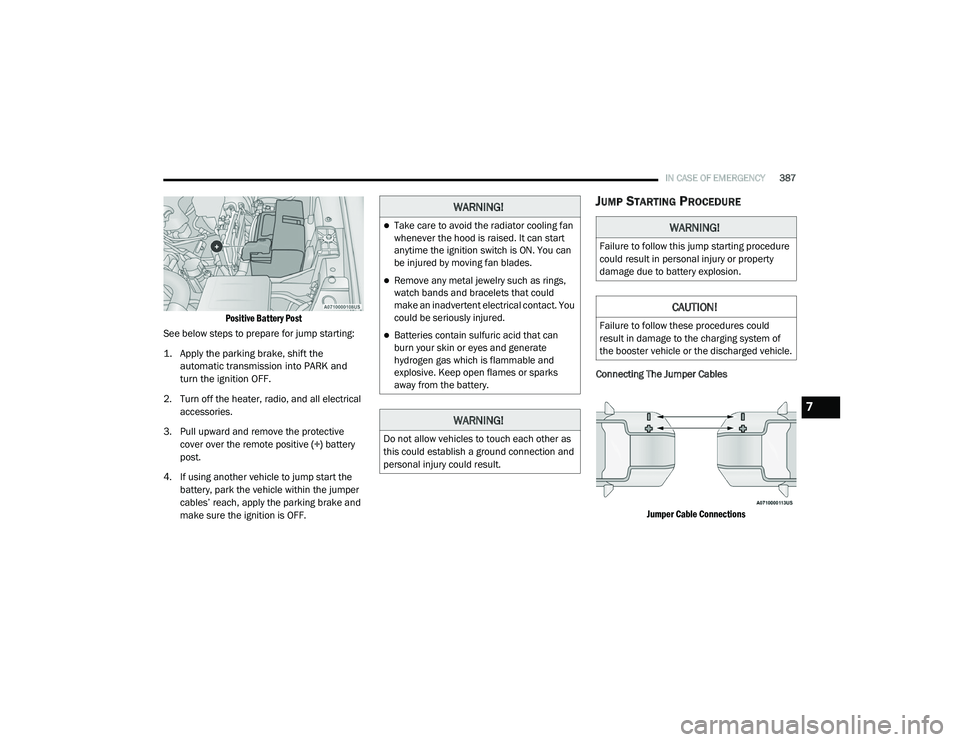
JUMP STARTING PROCEDURE
Connecting The Jumper Cables
Jumper Cable Connections
WARNING!
Take care to avoid the radiator cooling fan
whenever the hood is raised. It can start
anytime the ignition switch is ON. You can
be injured by moving fan blades.
Remove any metal jewelry such as rings,
watch bands and bracelets that could
make an inadvertent electrical contact. You
could be seriously injured.
Batteries contain sulfuric acid that can
burn your skin or eyes and generate
hydrogen gas which is flammable and
explosive. Keep open flames or sparks
away from the battery.
WARNING!
Do not allow vehicles to touch each other as
this could establish a ground connection and
personal injury could result.
WARNING!
Failure to follow this jump starting procedure
could result in personal injury or property
damage due to battery explosion.
CAUTION!
Failure to follow these procedures could
result in damage to the charging system of
the booster vehicle or the discharged vehicle.
7
21_DT_OM_EN_USC_t.book Page 387
Page 392 of 496
390IN CASE OF EMERGENCY
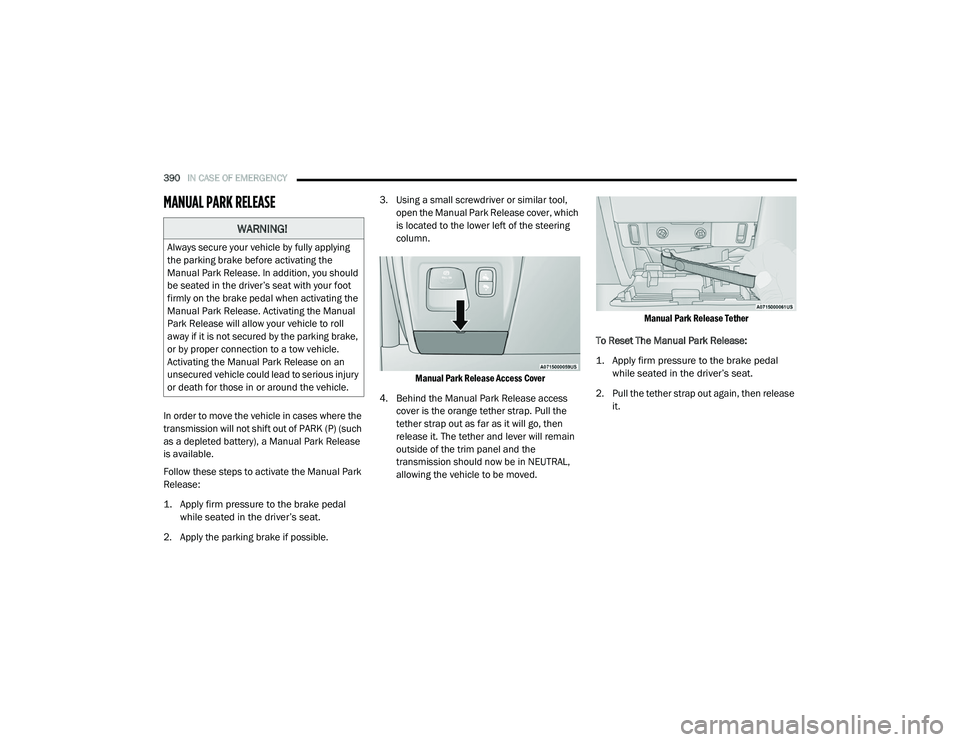
MANUAL PARK RELEASE
In order to move the vehicle in cases where the
transmission will not shift out of PARK (P) (such
as a depleted battery), a Manual Park Release
is available.
Follow these steps to activate the Manual Park
Release:
1. Apply firm pressure to the brake pedal
while seated in the driver’s seat.
2. Apply the parking brake if possible. 3. Using a small screwdriver or similar tool,
open the Manual Park Release cover, which
is located to the lower left of the steering
column.
Manual Park Release Access Cover
4. Behind the Manual Park Release access cover is the orange tether strap. Pull the
tether strap out as far as it will go, then
release it. The tether and lever will remain
outside of the trim panel and the
transmission should now be in NEUTRAL,
allowing the vehicle to be moved.
Manual Park Release Tether
To Reset The Manual Park Release:
1. Apply firm pressure to the brake pedal while seated in the driver’s seat.
2. Pull the tether strap out again, then release it.
WARNING!
Always secure your vehicle by fully applying
the parking brake before activating the
Manual Park Release. In addition, you should
be seated in the driver’s seat with your foot
firmly on the brake pedal when activating the
Manual Park Release. Activating the Manual
Park Release will allow your vehicle to roll
away if it is not secured by the parking brake,
or by proper connection to a tow vehicle.
Activating the Manual Park Release on an
unsecured vehicle could lead to serious injury
or death for those in or around the vehicle.
21_DT_OM_EN_USC_t.book Page 390