parking brake RAM 1500 2021 Owner's Guide
[x] Cancel search | Manufacturer: RAM, Model Year: 2021, Model line: 1500, Model: RAM 1500 2021Pages: 496, PDF Size: 20.89 MB
Page 187 of 496
STARTING AND OPERATING185
The maximum braking applied by ACC is limited;
however, the driver can always apply the brakes
manually, if necessary.
NOTE:
The brake lights will illuminate whenever the
ACC system applies the brakes.
A Proximity Warning will alert the driver if ACC
predicts that its maximum braking level is not
sufficient to maintain the set distance. If this
occurs, a visual alert “BRAKE” will flash in the
instrument cluster display and a chime will
sound while ACC continues to apply its
maximum braking capacity.
NOTE:
The “BRAKE!” Screen in the instrument cluster
display is a warning for the driver to take action
and does not necessarily mean that the
Forward Collision Warning system is applying
the brakes autonomously.
Overtake Aid
When driving with Adaptive Cruise Control (ACC)
engaged, and following a vehicle, the system
will provide an additional acceleration up to the
ACC set speed to assist in passing the vehicle. This additional acceleration is triggered when
the driver utilizes the left turn signal and will
only be active when passing on the left hand
side.
ACC Operation At Stop
If the ACC system brings your vehicle to a
standstill while following the vehicle in front,
your vehicle will resume motion without any
diver intervention if the vehicle in front starts
moving within two seconds.
If the vehicle in front does not start moving
within two seconds of your vehicle coming to a
standstill, the driver will either have to push the
RES (resume) button, or apply the accelerator
pedal to reengage the ACC to the existing set
speed.
NOTE:
After the ACC system holds your vehicle at a
standstill for approximately three consecutive
minutes, the parking brake will be activated,
and the ACC system will be cancelled.
While ACC is holding your vehicle at a standstill,
if the driver seat belt is unbuckled or the driver
door is opened, the parking brake will be
activated, and the ACC system will be cancelled.
Display Warnings And Maintenance
“Wipe Front Radar Sensor In Front Of Vehicle”
Warning
The “ACC/FCW Unavailable Wipe Front Radar
Sensor” warning will display and also a chime
will indicate when conditions temporarily limit
system performance.
This most often occurs at times of poor visibility,
such as in snow or heavy rain. The ACC system
may also become temporarily blinded due to
obstructions, such as mud, dirt or ice. In these
cases, the instrument cluster display will display
“ACC/FCW Unavailable Wipe Front Radar
Sensor” and the system will deactivate.
The “ACC/FCW Unavailable Wipe Front Radar
Sensor” message can sometimes be displayed
while driving in highly reflective areas (i.e. ice
WARNING!
When the ACC system is resumed, the driver
must ensure that there are no pedestrians,
vehicles or objects in the path of the vehicle.
Failure to follow these warnings can result in
a collision and death or serious personal
injury.
4
21_DT_OM_EN_USC_t.book Page 185
Page 191 of 496

STARTING AND OPERATING189
Stationary Objects And Vehicles
ACC does not react to stationary objects and
stationary vehicles. For example, ACC will not
react in situations where the vehicle you are
following exits your lane and the vehicle ahead
is stopped in your lane. Always be attentive and
ready to apply the brakes if necessary
Úpage 482.
Stationary Object And Stationary Vehicle Example
PARKSENSE FRONT/REAR PARK ASSIST
SYSTEM — IF EQUIPPED
The ParkSense Park Assist system provides
visual and audible indications of the distance
between the rear and/or front fascia/bumper
and a detected obstacle when backing up or
moving forward (e.g. during a parking maneuver). If your vehicle is equipped with the
automatic braking function, the vehicle brakes
may be automatically applied and released
when the vehicle is in REVERSE if the system
detects a possible collision with an obstacle.
NOTE:
The driver can disable the automatic braking
function by turning ParkSense off via the
ParkSense switch. The driver can also over
-
ride automatic braking by changing the gear
or by pressing the gas pedal over 90% of its
capacity during the braking event.
Automatic brakes will not be available if the
vehicle is in 4WD Low.
Automatic brakes will not be available if ESC
is not available.
Automatic brakes will not be available if there
is a faulted condition detected with the Park -
Sense Park Assist system or the Braking
System.
The automatic braking function may only be
applied if the vehicle deceleration is not
enough to avoid colliding with a detected
obstacle.
The automatic braking function may not be
applied fast enough for obstacles that move
toward the rear of the vehicle from the left
and/or right sides.
The automatic braking function can be
enabled/disabled from the Customer
Programmable Features section of the
Uconnect system.
ParkSense will retain its last known configu -
ration state for the automatic braking func -
tion through ignition cycles.
Trailer hitch ball assembly may cause false
braking events if left attached after towing.
The automatic braking function is intended to
assist the driver in avoiding possible collisions
with detected obstacles when backing up in
REVERSE gear.
NOTE:
The system is provided to assist the driver
and not to substitute the driver.
The driver must stay in full control of the
vehicle's acceleration and braking and is
responsible for the vehicle's movements.
4
21_DT_OM_EN_USC_t.book Page 189
Page 197 of 496

STARTING AND OPERATING195
PARKSENSE ACTIVE PARK ASSIST SYSTEM
— IF EQUIPPED
The ParkSense Active Park Assist system is
intended to assist the driver during parallel and
perpendicular parking maneuvers by identifying
a proper parking space, providing audible/
visual instructions, and controlling the steering
wheel. The ParkSense Active Park Assist system
is defined as “semi-automatic” since the driver
maintains control of the accelerator, gear
selector and brakes. Depending on the driver's parking maneuver selection, the ParkSense
Active Park Assist system is capable of
maneuvering a vehicle into a parallel or a
perpendicular parking space on either side (i.e.,
driver side or passenger side).
NOTE:
The driver is always responsible for
controlling the vehicle, responsible for any
surrounding objects, and must intervene as
required.
The system is provided to assist the driver
and not to substitute the driver.
During a semi-automatic maneuver, if the
driver touches the steering wheel after being
instructed to remove their hands from the
steering wheel, the system will cancel, and
the driver will be required to manually
complete the parking maneuver.
The system may not work in all conditions
(e.g. environmental conditions such as heavy
rain, snow, etc., or if searching for a parking
space that has surfaces that will absorb the
ultrasonic sensor waves).
WARNING!
Drivers must be careful when backing up
even when using ParkSense. Always check
carefully behind your vehicle, look behind
you, and be sure to check for pedestrians,
animals, other vehicles, obstructions, and
blind spots before backing up. You are
responsible for safety and must continue to
pay attention to your surroundings. Failure
to do so can result in serious injury or
death.
Before using ParkSense, it is strongly
recommended that the ball mount and
hitch ball assembly is disconnected from
the vehicle when the vehicle is not used for
towing. Failure to do so can result in injury
or damage to vehicles or obstacles
because the hitch ball will be much closer
to the obstacle than the rear fascia when
the loudspeaker sounds the continuous
tone. Also, the sensors could detect the ball
mount and hitch ball assembly, depending
on its size and shape, and give a false indi
-
cation that an obstacle is behind the
vehicle, and could cause false braking.
CAUTION!
ParkSense is only a parking aid and it is
unable to recognize every obstacle,
including small obstacles. Parking curbs
might be temporarily detected or not
detected at all. Obstacles located above or
below the sensors will not be detected
when they are in close proximity.
The vehicle must be driven slowly when
using ParkSense in order to be able to stop
in time when an obstacle is detected. It is
recommended that the driver looks over
his/her shoulder when using ParkSense.4
21_DT_OM_EN_USC_t.book Page 195
Page 198 of 496

196STARTING AND OPERATING
New vehicles from the dealership must have
at least 30 miles (48 km) accumulated
before the ParkSense Active Park Assist
system is fully calibrated and performs accu -
rately. This is due to the system’s dynamic
vehicle calibration to improve the perfor -
mance of the feature.
The driver must control the vehicle’s brakes.
The automatic emergency braking feature is
NOT intended to substitute for the driver
during REVERSE maneuvers.
ENABLING AND DISABLING THE
P
ARKSENSE ACTIVE PARK ASSIST
S
YSTEM
The ParkSense Active Park Assist
system can be enabled and disabled
with the ParkSense Active Park Assist
switch, located on the switch panel
below the Uconnect display.
NOTE:
If your vehicle is equipped with a 12-inch
Uconnect display, the ParkSense Active Park
Assist switch is located above the display. To enable or disable the ParkSense Active Park
Assist system, push the ParkSense Active Park
Assist switch once (LED turns on). Pushing the
switch a second time will disable the system
(LED turns off).
The ParkSense Active Park Assist system will
turn off automatically for any of the following
conditions:
Parking maneuver is completed.
Vehicle speed is greater than 18 mph
(30 km/h) when searching for a parking
space.
Vehicle speed is greater than 5 mph (7 km/h)
during active steering guidance into the
parking space.
Steering wheel is touched during active
steering guidance into the parking space.
ParkSense Front/Rear Park Assist switch is
pushed.
Driver's door is opened.
Tailgate is opened.
Electronic Stability Control/Anti-Lock Braking
System intervention.NOTE:
The ParkSense Active Park Assist system will
allow a maximum of eight shifts between DRIVE
and REVERSE. If the maneuver cannot be
completed within eight shifts, the system will
cancel and the instrument cluster display will
instruct the driver to complete the maneuver
manually.
The ParkSense Active Park Assist system will
only operate and search for a parking space
when the following conditions are present:
Gear selector is in DRIVE.
The ignition is in the ON/RUN position.
The ParkSense Active Park Assist switch is
activated.
Driver's door is closed.
Tailgate is closed.
Vehicle speed is less than 15 mph (25 km/h).
The outer surface and the underside of the
front and rear fascias/bumpers are clean
and clear of snow, ice, mud, dirt or other
obstruction.
21_DT_OM_EN_USC_t.book Page 196
Page 200 of 496

198STARTING AND OPERATING
When an available parking space has been
found, and the vehicle is not in position, you will
be instructed to move forward to position the
vehicle for a perpendicular or parallel parking
sequence (depending on the type of maneuver
being performed).
Space Found — Keep Moving Forward
Once the vehicle is in position, you will be
instructed to stop the vehicle’s movement and
remove your hands from the steering wheel.
When the vehicle comes to a standstill (your
hands still removed from the steering wheel),
you will be instructed to place the gear selector
into the REVERSE position.
The system may then instruct the driver to wait
for steering to complete before then instructing
to check surroundings and move backward.
Move Backward Into Parallel Parking Space
Move Backward Into Perpendicular Parking Space
The system may instruct several more gear
shifts (DRIVE and REVERSE), with hands off of
the steering wheel, before instructing the driver
to check surroundings and complete the
parking maneuver. When the vehicle is in the parking position, the
maneuver is complete and the driver will be
instructed to check the vehicle's parking
position, then shift the vehicle into PARK. The
message "Active ParkSense Complete - Check
Parking Position" will be displayed momentarily.
NOTE:
It is the driver's responsibility to use the
brake and accelerator during the semi-auto
-
matic parking maneuver.
It is the driver's responsibility to use the
brake and stop the vehicle. The driver should
check their surroundings and be prepared to
stop the vehicle either when instructed to, or
when driver intervention is required.
When the system instructs the driver to
remove their hands from the steering wheel,
the driver should check their surroundings
and begin to back up slowly.
The ParkSense Active Park Assist system will
allow a maximum of eight shifts between
DRIVE and REVERSE. If the maneuver cannot
be completed within eight shifts, the system
will cancel and the instrument cluster display
will instruct the driver to complete the
maneuver manually.
21_DT_OM_EN_USC_t.book Page 198
Page 222 of 496
220STARTING AND OPERATING
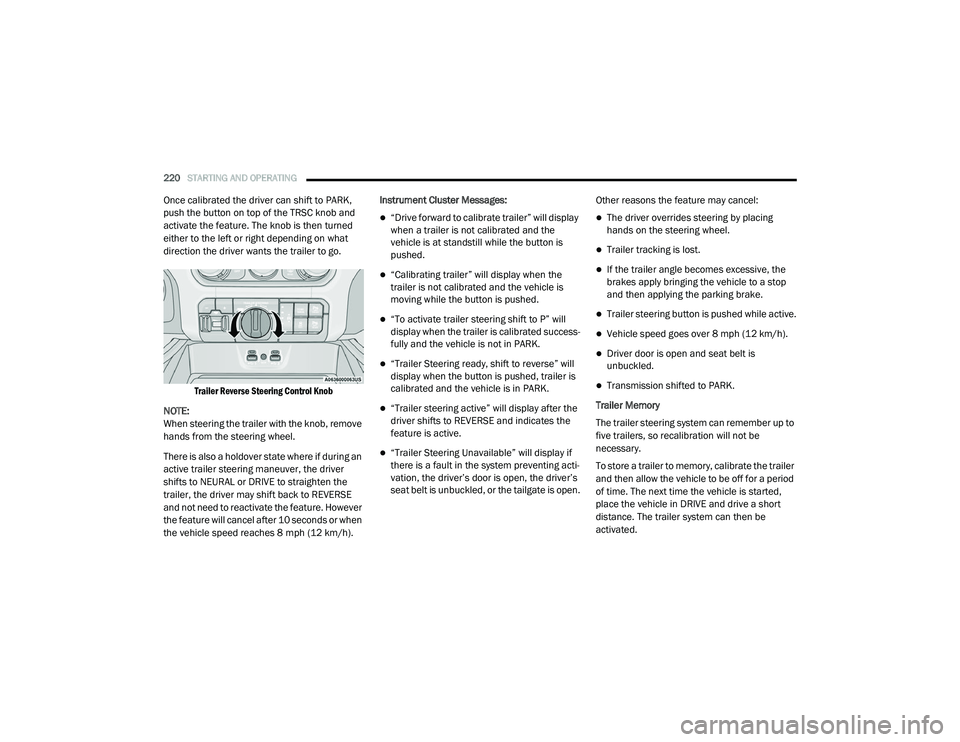
Once calibrated the driver can shift to PARK,
push the button on top of the TRSC knob and
activate the feature. The knob is then turned
either to the left or right depending on what
direction the driver wants the trailer to go.
Trailer Reverse Steering Control Knob
NOTE:
When steering the trailer with the knob, remove
hands from the steering wheel.
There is also a holdover state where if during an
active trailer steering maneuver, the driver
shifts to NEURAL or DRIVE to straighten the
trailer, the driver may shift back to REVERSE
and not need to reactivate the feature. However
the feature will cancel after 10 seconds or when
the vehicle speed reaches 8 mph (12 km/h). Instrument Cluster Messages:
“Drive forward to calibrate trailer” will display
when a trailer is not calibrated and the
vehicle is at standstill while the button is
pushed.
“Calibrating trailer” will display when the
trailer is not calibrated and the vehicle is
moving while the button is pushed.
“To activate trailer steering shift to P” will
display when the trailer is calibrated success
-
fully and the vehicle is not in PARK.
“Trailer Steering ready, shift to reverse” will
display when the button is pushed, trailer is
calibrated and the vehicle is in PARK.
“Trailer steering active” will display after the
driver shifts to REVERSE and indicates the
feature is active.
“Trailer Steering Unavailable” will display if
there is a fault in the system preventing acti -
vation, the driver’s door is open, the driver’s
seat belt is unbuckled, or the tailgate is open. Other reasons the feature may cancel:
The driver overrides steering by placing
hands on the steering wheel.
Trailer tracking is lost.
If the trailer angle becomes excessive, the
brakes apply bringing the vehicle to a stop
and then applying the parking brake.
Trailer steering button is pushed while active.
Vehicle speed goes over 8 mph (12 km/h).
Driver door is open and seat belt is
unbuckled.
Transmission shifted to PARK.
Trailer Memory
The trailer steering system can remember up to
five trailers, so recalibration will not be
necessary.
To store a trailer to memory, calibrate the trailer
and then allow the vehicle to be off for a period
of time. The next time the vehicle is started,
place the vehicle in DRIVE and drive a short
distance. The trailer system can then be
activated.
21_DT_OM_EN_USC_t.book Page 220
Page 224 of 496

222STARTING AND OPERATING
Towing Requirements — Tires
Do not attempt to tow a trailer while using a
compact spare tire.
Do not drive more than 50 mph (80 km/h)
when towing while using a full size spare tire.
Proper tire inflation pressures are essential
to the safe and satisfactory operation of your
vehicle.
Check the trailer tires for proper tire inflation
pressures before trailer usage.
Check for signs of tire wear or visible tire
damage before towing a trailer.
Replacing tires with a higher load carrying
capacity will not increase the vehicle's GVWR
and GAWR limits.
For further information Ú page 443.
Towing Requirements — Trailer Brakes
Do not interconnect the hydraulic brake
system or vacuum system of your vehicle
with that of the trailer.
An electronically actuated trailer brake
controller is required when towing a trailer
with electronically actuated brakes. When
towing a trailer equipped with a hydraulic
surge actuated brake system, an electronic
brake controller is not required.
Trailer brakes are recommended for trailers
over 1,000 lbs (453 kg) and required for
trailers in excess of 2,000 lbs (907 kg).
Vehicles with trailers should not be parked
on a grade. When parking, apply the
parking brake on the tow vehicle. Put the
tow vehicle transmission in PARK. For
four-wheel drive vehicles, make sure the
transfer case is not in NEUTRAL. Always,
block or "chock" the trailer wheels.
GCWR must not be exceeded.
Total weight must be distributed between
the tow vehicle and the trailer such that the
following four ratings are not exceeded :
GVWR
GTW
GAWR
Tongue weight rating for the trailer
hitch utilized.
WARNING! (Continued)WARNING!
Do not connect trailer brakes to your
vehicle's hydraulic brake lines. It can over -
load your brake system and cause it to fail.
You might not have brakes when you need
them and could have an accident.
Towing any trailer will increase your stop -
ping distance. When towing, you should
allow for additional space between your
vehicle and the vehicle in front of you.
Failure to do so could result in an accident.
CAUTION!
If the trailer weighs more than 1,000 lbs
(453 kg) loaded, it should have its own
brakes and they should be of adequate
capacity. Failure to do this could lead to
accelerated brake lining wear, higher brake
pedal effort, and longer stopping distances.
21_DT_OM_EN_USC_t.book Page 222
Page 232 of 496
230STARTING AND OPERATING
RECREATIONAL TOWING (BEHIND MOTORHOME)
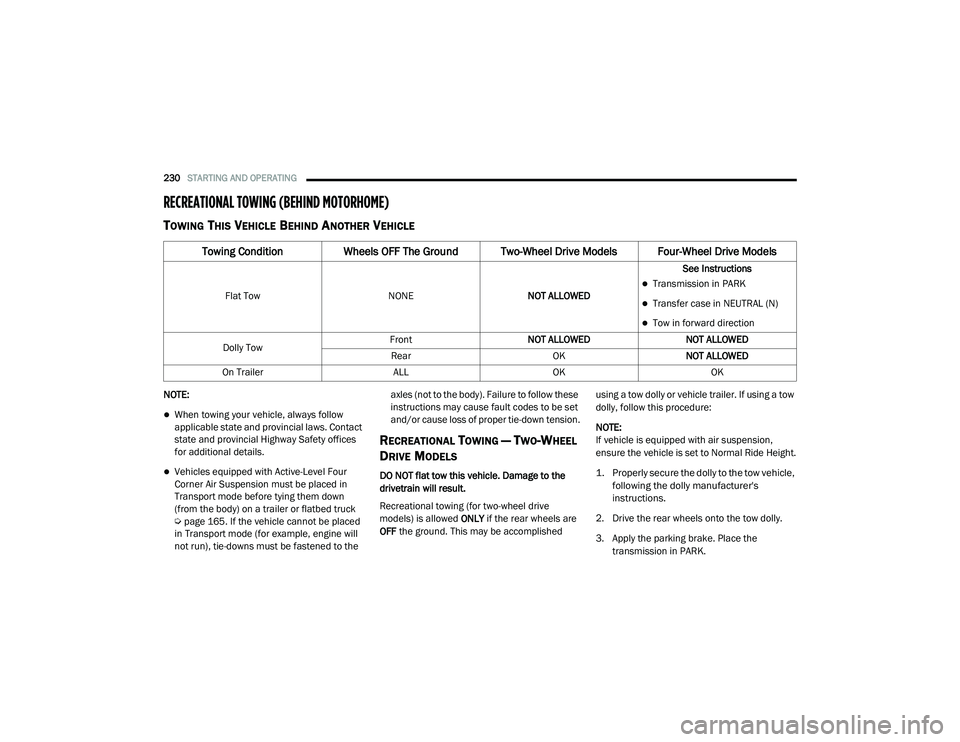
TOWING THIS VEHICLE BEHIND ANOTHER VEHICLE
NOTE:
When towing your vehicle, always follow
applicable state and provincial laws. Contact
state and provincial Highway Safety offices
for additional details.
Vehicles equipped with Active-Level Four
Corner Air Suspension must be placed in
Transport mode before tying them down
(from the body) on a trailer or flatbed truck
Úpage 165. If the vehicle cannot be placed
in Transport mode (for example, engine will
not run), tie-downs must be fastened to the axles (not to the body). Failure to follow these
instructions may cause fault codes to be set
and/or cause loss of proper tie-down tension.
RECREATIONAL TOWING — TWO-WHEEL
D
RIVE MODELS
DO NOT flat tow this vehicle. Damage to the
drivetrain will result.
Recreational towing (for two-wheel drive
models) is allowed ONLY if the rear wheels are
OFF the ground. This may be accomplished using a tow dolly or vehicle trailer. If using a tow
dolly, follow this procedure:
NOTE:
If vehicle is equipped with air suspension,
ensure the vehicle is set to Normal Ride Height.
1. Properly secure the dolly to the tow vehicle,
following the dolly manufacturer's
instructions.
2. Drive the rear wheels onto the tow dolly.
3. Apply the parking brake. Place the transmission in PARK.
Towing Condition Wheels OFF The Ground Two-Wheel Drive Models Four-Wheel Drive Models
Flat Tow NONENOT ALLOWED See InstructionsTransmission in PARK
Transfer case in NEUTRAL (N)
Tow in forward direction
Dolly Tow Front
NOT ALLOWED NOT ALLOWED
Rear OKNOT ALLOWED
On Trailer ALLOKOK
21_DT_OM_EN_USC_t.book Page 230
Page 234 of 496
232STARTING AND OPERATING
Shifting Into N (Neutral)
Use the following procedure to prepare your
vehicle for recreational towing.
1. Bring the vehicle to a complete stop on
level ground, with the engine running.
Apply the parking brake.
2. Press and hold the brake pedal.
3. Shift the transmission to NEUTRAL. The driver's door must be closed (or the driver's
seat belt buckled) so that the transmission
will remain in NEUTRAL when the brake
pedal is released.
NOTE:
If vehicle is equipped with air suspension,
ensure the vehicle is set to Normal Ride Height.
4. Using a ballpoint pen or similar object, push and hold the recessed transfer case N
(Neutral) button (at the center of the
transfer case switches). The N (Neutral)
indicator light will illuminate, and remain lit,
when the shift to N (Neutral) is complete.
After the shift is completed and the N
(Neutral) light stays on, release the N
(Neutral) button.
5. Release the parking brake. 6. Shift the transmission into REVERSE.
7. Release the brake pedal for five seconds
and ensure that there is no vehicle
movement.
8. Repeat steps 6 and 7 with the transmission in DRIVE.
9. Shift the transmission to NEUTRAL. Apply the parking brake. Turn off the engine. For
vehicles with Keyless Enter-N-Go, push and
hold the ENGINE START/STOP button until
the engine shuts off. The transmission will
automatically select PARK when the engine
is turned off.
10. Turn the ignition off.
11. Attach the vehicle to the tow vehicle using a suitable tow bar.
12. Turn the ignition to the ON/RUN mode, but do not start the engine.
13. Release the parking brake.
14. Turn the ignition OFF.
WARNING!
You or others could be injured or killed if you
leave the vehicle unattended with the transfer
case in the N (Neutral) position without first
fully engaging the parking brake. The transfer
case N (Neutral) position disengages both the
front and rear driveshafts from the power -
train and will allow the vehicle to roll, even if
the transmission is in PARK. The parking
brake should always be applied when the
driver is not in the vehicle.
CAUTION!
It is necessary to follow these steps to be cer -
tain that the transfer case is fully in N (Neu -
tral) before recreational towing to prevent
damage to internal parts.
21_DT_OM_EN_USC_t.book Page 232
Page 235 of 496
STARTING AND OPERATING233
NOTE:
Steps 2 and 3 are requirements that must be
met before pushing the N (Neutral) button,
and must continue to be met until the shift has
been completed. If any of these requirements
are not met before pushing the N (Neutral)
button or are no longer met during the shift,
the N (Neutral) indicator light will flash contin -
uously until all requirements are met or until
the N (Neutral) button is released.
The ignition must be in the ON/RUN mode for
a shift to take place and for the position indi -
cator lights to be operable. If the ignition is
not in the ON/RUN mode, the shift will not
take place and no position indicator lights will
be on or flashing.
A flashing N (Neutral) position indicator light
indicates that shift requirements have not
been met.
If the vehicle is equipped with air suspension,
the engine should be started and left running
for a minimum of 60 seconds (with all the
doors closed) at least once every 24 hours.
This process allows the air suspension to
adjust the vehicle’s ride height to compen -
sate for temperature effects.
Shifting Out Of N (Neutral)
Use the following procedure to prepare your
vehicle for normal usage:
1. Bring the vehicle to a complete stop,
leaving it connected to the tow vehicle.
2. Press and hold the brake pedal.
3. Start the engine. Apply the parking brake. Shift the transmission into NEUTRAL.
4. Using a ballpoint pen or similar object, push and hold the recessed transfer case N
(Neutral) button (at the center of the
transfer case switches).
5. When the N (Neutral) indicator light turns off, release the N (Neutral) button.
6. Turn the engine off. The transmission will automatically select PARK when the engine
is turned off.
7. Release the brake pedal.
8. Disconnect vehicle from the tow vehicle.
9. Press and hold the brake pedal.
10. Start the engine. 11. Release the parking brake.
12. Shift the transmission into DRIVE, release
the brake pedal, and check that the vehicle
operates normally.
NOTE:
Steps 3 and 4 are requirements that must be
met before pushing the button to shift out of
N (Neutral), and must continue to be met
until the shift has been completed. If any of
these requirements are not met before
pushing the button or are no longer met
during the shift, the N (Neutral) indicator light
will flash continuously until all requirements
are met or until the button is released.
The ignition must be in the ON/RUN mode for
a shift to take place and for the position indi -
cator lights to be operable. If the ignition is
not in the ON/RUN mode, the shift will not
take place and no position indicator lights will
be on or flashing.
A flashing N (Neutral) position indicator light
indicates that shift requirements have not
been met.
4
21_DT_OM_EN_USC_t.book Page 233