tow RAM 1500 2021 Owners Manual
[x] Cancel search | Manufacturer: RAM, Model Year: 2021, Model line: 1500, Model: RAM 1500 2021Pages: 496, PDF Size: 20.89 MB
Page 4 of 496
2
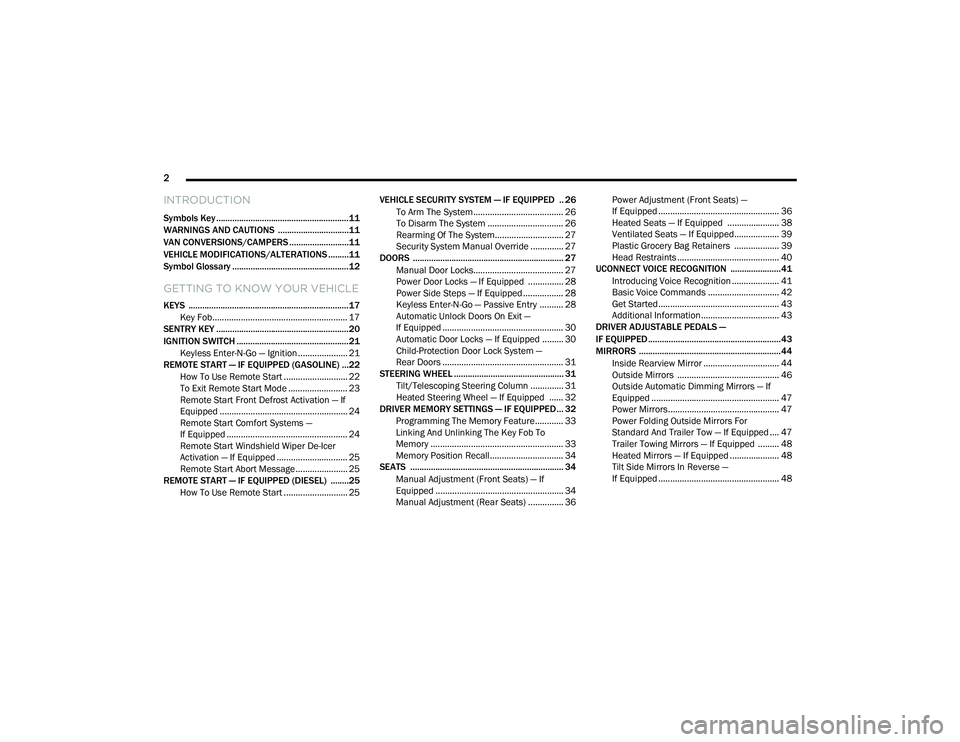
INTRODUCTION
Symbols Key ..........................................................11
WARNINGS AND CAUTIONS ...............................11
VAN CONVERSIONS/CAMPERS ..........................11
VEHICLE MODIFICATIONS/ALTERATIONS .........11
Symbol Glossary ...................................................12
GETTING TO KNOW YOUR VEHICLE
KEYS ......................................................................17
Key Fob......................................................... 17
SENTRY KEY ..........................................................20
IGNITION SWITCH .................................................21
Keyless Enter-N-Go — Ignition ..................... 21
REMOTE START — IF EQUIPPED (GASOLINE) ...22
How To Use Remote Start ........................... 22
To Exit Remote Start Mode ......................... 23
Remote Start Front Defrost Activation — If
Equipped ...................................................... 24 Remote Start Comfort Systems —
If Equipped ................................................... 24 Remote Start Windshield Wiper De-Icer
Activation — If Equipped .............................. 25 Remote Start Abort Message ...................... 25
REMOTE START — IF EQUIPPED (DIESEL) ........25
How To Use Remote Start ........................... 25 VEHICLE SECURITY SYSTEM — IF EQUIPPED .. 26
To Arm The System ...................................... 26
To Disarm The System ................................ 26
Rearming Of The System............................. 27
Security System Manual Override .............. 27
DOORS .................................................................. 27
Manual Door Locks...................................... 27
Power Door Locks — If Equipped ............... 28
Power Side Steps — If Equipped ................. 28
Keyless Enter-N-Go — Passive Entry .......... 28
Automatic Unlock Doors On Exit —
If Equipped ................................................... 30 Automatic Door Locks — If Equipped ......... 30
Child-Protection Door Lock System —
Rear Doors ................................................... 31
STEERING WHEEL ................................................ 31
Tilt/Telescoping Steering Column .............. 31
Heated Steering Wheel — If Equipped ...... 32
DRIVER MEMORY SETTINGS — IF EQUIPPED ... 32
Programming The Memory Feature............ 33
Linking And Unlinking The Key Fob To
Memory ........................................................ 33 Memory Position Recall............................... 34
SEATS ................................................................... 34
Manual Adjustment (Front Seats) — If
Equipped ...................................................... 34 Manual Adjustment (Rear Seats) ............... 36 Power Adjustment (Front Seats) —
If Equipped ................................................... 36 Heated Seats — If Equipped ...................... 38
Ventilated Seats — If Equipped................... 39
Plastic Grocery Bag Retainers ................... 39
Head Restraints ........................................... 40
UCONNECT VOICE RECOGNITION ......................41
Introducing Voice Recognition .................... 41
Basic Voice Commands .............................. 42
Get Started................................................... 43
Additional Information................................. 43
DRIVER ADJUSTABLE PEDALS —
IF EQUIPPED ..........................................................43
MIRRORS ..............................................................44
Inside Rearview Mirror ................................ 44
Outside Mirrors ........................................... 46
Outside Automatic Dimming Mirrors — If
Equipped ...................................................... 47 Power Mirrors............................................... 47
Power Folding Outside Mirrors For
Standard And Trailer Tow — If Equipped .... 47 Trailer Towing Mirrors — If Equipped ......... 48
Heated Mirrors — If Equipped ..................... 48
Tilt Side Mirrors In Reverse —
If Equipped ................................................... 48
21_DT_OM_EN_USC_t.book Page 2
Page 8 of 496
6
VEHICLE LOADING ............................................. 213 Gross Vehicle Weight Rating (GVWR) ......213Payload .......................................................213Gross Axle Weight Rating (GAWR) ............213
Tire Size ......................................................213
Rim Size......................................................214
Inflation Pressure ......................................214
Curb Weight................................................214
Loading .......................................................214
TRAILER TOWING .............................................. 214
Common Towing Definitions .....................214Trailer Hitch Type and Maximum Trailer
Weight.........................................................218 Trailer Towing Weights (Maximum Trailer
Weight Ratings) ..........................................218 Trailer And Tongue Weight ........................ 219Trailer Reverse Steering Control ...............219
Towing Requirements ...............................221
Towing Tips ................................................227
SNOWPLOW ...................................................... 227
Before Plowing ........................................... 228
Snowplow Prep Package Model
Availability .................................................. 228 Over The Road Operation With Snowplow
Attached .....................................................229 Operating Tips ............................................229
General Maintenance ................................229 RECREATIONAL TOWING (BEHIND
MOTORHOME) ...................................................230
Towing This Vehicle Behind Another
Vehicle ........................................................ 230 Recreational Towing — Two-Wheel Drive
Models ........................................................ 230 Recreational Towing — Four-Wheel Drive
Models ........................................................ 231
DRIVING TIPS ...................................................... 234
Driving On Slippery Surfaces ................... 234
Driving Through Water .............................. 234
Off-Road Driving Tips ................................. 235
MULTIMEDIA
UCONNECT SYSTEMS .......................................236
CYBERSECURITY ............................................... 236
UCONNECT SETTINGS ........................................ 237Customer Programmable Features .......... 237
HEAD-UP DISPLAY (HUD) .................................. 254
UCONNECT INTRODUCTION ..............................256
System Overview ....................................... 256Safety And General Information ............... 258
UCONNECT MODES ............................................259
Steering Wheel Audio Controls ................ 259
Radio Mode ............................................... 259Media Mode .............................................. 268
Phone Mode .............................................. 271 CONNECTED VEHICLE SERVICES —
IF EQUIPPED ...................................................... 282
Is My Vehicle Connected? ......................... 282
Introduction To Connected Vehicle
Services ..................................................... 282 Getting Started With Connected Vehicle
Services ..................................................... 284 Using SiriusXM Guardian™ ...................... 286
Manage My SiriusXM Guardian™
Account ...................................................... 301
CONNECTED SERVICES FAQs ......................... 301
Connected Services SOS FAQs ................ 301
Connected Services Remote Door Lock/
Unlock FAQs .............................................. 302 Connected Services Roadside
Assistance FAQs ....................................... 302 Connected Services Send & Go FAQs ..... 302Connected Services Vehicle Finder
FAQs .......................................................... 303 Connected Services Stolen Vehicle
Assistance FAQs ....................................... 303 Connected Services Remote Vehicle
Start FAQs ................................................. 303 Connected Services Remote Horn &
Lights FAQs ................................................ 304 Connected Services Account FAQs........... 304
Data Collection & Privacy .......................... 306
21_DT_OM_EN_USC_t.book Page 6
Page 9 of 496
7
OFF-ROAD PAGES — IF EQUIPPED .................. 307 Off-Road Pages Status Bar .......................307
Vehicle Dynamics.......................................308
Accessory Gauge........................................308
Pitch & Roll .................................................308
Suspension ................................................309
RADIO OPERATION AND MOBILE PHONES.... 309
Regulatory And Safety Information........... 309
SAFETY
SAFETY FEATURES ............................................ 310 Anti-Lock Brake System (ABS) ................. 310
Electronic Brake Control (EBC) System ...311
AUXILIARY DRIVING SYSTEMS ........................ 318
Blind Spot Monitoring (BSM) —
If Equipped ................................................318 Forward Collision Warning (FCW) With
Mitigation — If Equipped............................324 Tire Pressure Monitoring System
(TPMS) ........................................................ 327
OCCUPANT RESTRAINT SYSTEMS .................. 334
Occupant Restraint Systems Features ....334
Important Safety Precautions ...................334Seat Belt Systems ..................................... 335Supplemental Restraint Systems (SRS) ...342Child Restraints..........................................355 SAFETY TIPS ....................................................... 369
Transporting Passengers .......................... 369Transporting Pets ...................................... 369
Safety Checks You Should Make Inside
The Vehicle ................................................ 369 Periodic Safety Checks You Should
Make Outside The Vehicle ........................ 371 Exhaust Gas .............................................. 371
Carbon Monoxide Warnings ...................... 372IN CASE OF EMERGENCY
HAZARD WARNING FLASHERS........................373
ASSIST AND SOS SYSTEM — IF EQUIPPED .... 373
JACKING AND TIRE CHANGING .......................377 Preparations For Jacking........................... 377
Jack Location ............................................. 378
Removal Of Jack And Tools ....................... 378
Removing The Spare Tire .......................... 380Jacking Instructions ................................... 381
To Stow The Flat Or Spare ........................ 384
Reinstalling The Jack And Tools ............... 385
JUMP STARTING ................................................ 386
Preparations For Jump Start ..................... 386Jump Starting Procedure .......................... 387
REFUELING IN EMERGENCY –
IF EQUIPPED ...................................................... 389
IF YOUR ENGINE OVERHEATS .........................389
MANUAL PARK RELEASE .................................. 390
FREEING A STUCK VEHICLE .............................391 TOWING A DISABLED VEHICLE ........................ 392
Two-Wheel Drive Models ........................... 393
Four-Wheel Drive Models .......................... 393
Emergency Tow Hooks — If Equipped ...... 394
ENHANCED ACCIDENT RESPONSE SYSTEM
(EARS) ................................................................ 394
EVENT DATA RECORDER (EDR) ....................... 394
SERVICING AND MAINTENANCE
SCHEDULED SERVICING — GASOLINE
ENGINE ............................................................... 395
Maintenance Plan ..................................... 395
SCHEDULED SERVICING — DIESEL ENGINE .. 399
Maintenance Plan — Diesel Fuel Up To
B5 Biodiesel .............................................. 400 Additional Maintenance — B6 To B20
Biodiesel..................................................... 403
ENGINE COMPARTMENT .................................. 404
3.6L Engine With Stop/Start .................... 404
5.7L Engine Without Stop/Start ............... 4055.7L Engine With Stop/Start..................... 406
3.0L Diesel Engine .................................... 407Checking Oil Level ..................................... 408
Adding Washer Fluid ................................. 408Maintenance-Free Battery ....................... 409Pressure Washing...................................... 409
21_DT_OM_EN_USC_t.book Page 7
Page 16 of 496

14
Service Stop/Start System Warning Light Úpage 133
Service 4WD Warning Light — If Equipped Úpage 133
Cruise Control Fault Warning Light Úpage 133
Yellow Indicator Lights
Forward Collision Warning Off Indicator Light —
If Equipped
Ú page 133
Air Suspension Payload Protection Indicator Light — If Equipped
Úpage 133
Trailer Merge Assist Indicator Light — If Equipped
Ú page 133
TOW/HAUL Indicator Light Úpage 133
Yellow Warning Lights
Cargo Light On Indicator Light
Úpage 133
Air Suspension Off-Road 1 Indicator Light — If Equipped
Ú page 133
Air Suspension Off-Road 2 Indicator Light — If Equipped
Ú page 133
Air Suspension Normal Height Indicator Light — If Equipped
Ú page 134
Air Suspension Aerodynamic Height Indicator Light — If Equipped
Úpage 134
Entry/Exit Indicator Light — If Equipped Úpage 134
Air Suspension Ride Height Raising Indicator Light — If Equipped
Úpage 134
Yellow Indicator Lights
21_DT_OM_EN_USC_t.book Page 14
Page 21 of 496
GETTING TO KNOW YOUR VEHICLE19
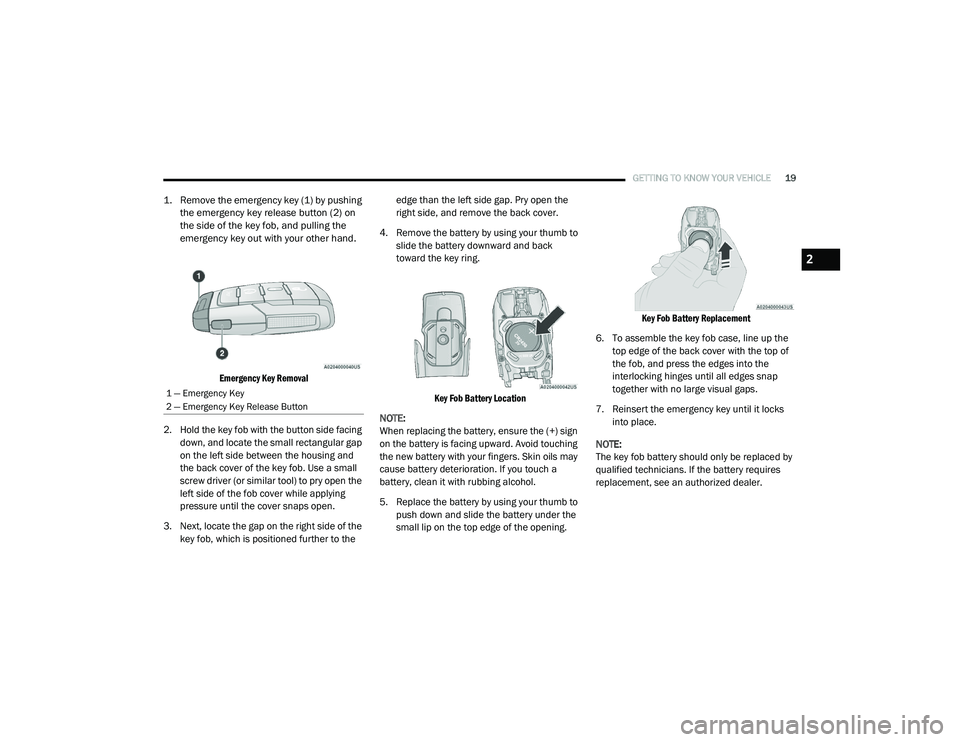
1. Remove the emergency key (1) by pushing
the emergency key release button (2) on
the side of the key fob, and pulling the
emergency key out with your other hand.
Emergency Key Removal
2. Hold the key fob with the button side facing down, and locate the small rectangular gap
on the left side between the housing and
the back cover of the key fob. Use a small
screw driver (or similar tool) to pry open the
left side of the fob cover while applying
pressure until the cover snaps open.
3. Next, locate the gap on the right side of the key fob, which is positioned further to the edge than the left side gap. Pry open the
right side, and remove the back cover.
4. Remove the battery by using your thumb to slide the battery downward and back
toward the key ring.
Key Fob Battery Location
NOTE:
When replacing the battery, ensure the (+) sign
on the battery is facing upward. Avoid touching
the new battery with your fingers. Skin oils may
cause battery deterioration. If you touch a
battery, clean it with rubbing alcohol.
5. Replace the battery by using your thumb to push down and slide the battery under the
small lip on the top edge of the opening.
Key Fob Battery Replacement
6. To assemble the key fob case, line up the top edge of the back cover with the top of
the fob, and press the edges into the
interlocking hinges until all edges snap
together with no large visual gaps.
7. Reinsert the emergency key until it locks into place.
NOTE:
The key fob battery should only be replaced by
qualified technicians. If the battery requires
replacement, see an authorized dealer.
1 — Emergency Key
2 — Emergency Key Release Button
2
21_DT_OM_EN_USC_t.book Page 19
Page 33 of 496
GETTING TO KNOW YOUR VEHICLE31
CHILD-PROTECTION DOOR LOCK
S
YSTEM — REAR DOORS
To provide a safer environment for small
children riding in the rear seats, the rear doors
are equipped with a Child-Protection Door Lock
system.
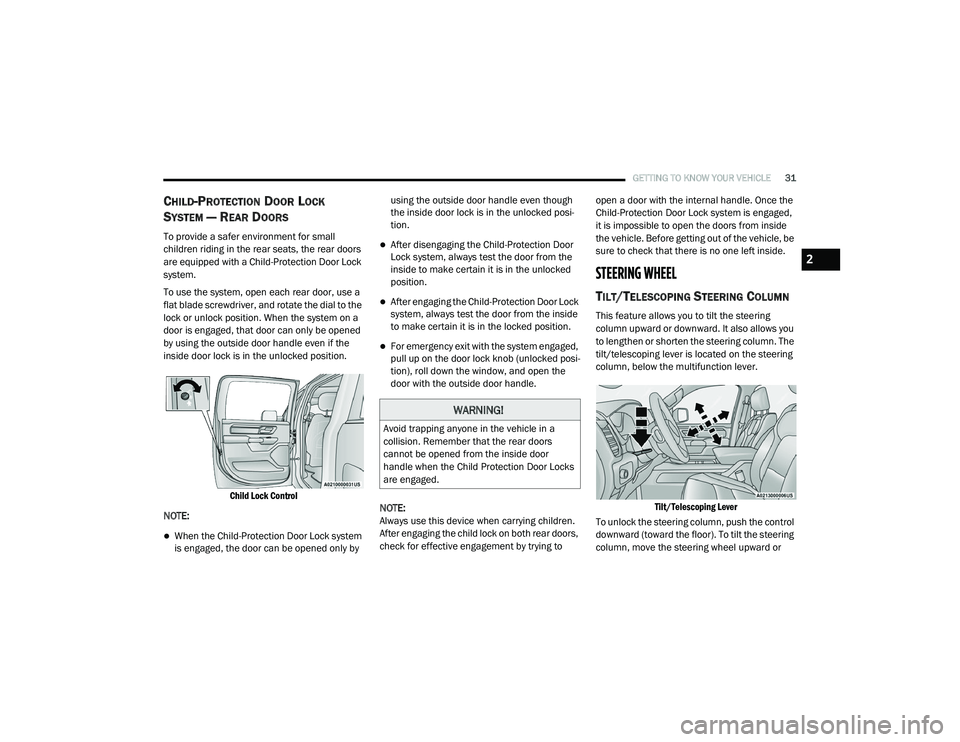
To use the system, open each rear door, use a
flat blade screwdriver, and rotate the dial to the
lock or unlock position. When the system on a
door is engaged, that door can only be opened
by using the outside door handle even if the
inside door lock is in the unlocked position.
Child Lock Control
NOTE:
When the Child-Protection Door Lock system
is engaged, the door can be opened only by using the outside door handle even though
the inside door lock is in the unlocked posi
-
tion.
After disengaging the Child-Protection Door
Lock system, always test the door from the
inside to make certain it is in the unlocked
position.
After engaging the Child-Protection Door Lock
system, always test the door from the inside
to make certain it is in the locked position.
For emergency exit with the system engaged,
pull up on the door lock knob (unlocked posi -
tion), roll down the window, and open the
door with the outside door handle.
NOTE:
Always use this device when carrying children.
After engaging the child lock on both rear doors,
check for effective engagement by trying to open a door with the internal handle. Once the
Child-Protection Door Lock system is engaged,
it is impossible to open the doors from inside
the vehicle. Before getting out of the vehicle, be
sure to check that there is no one left inside.
STEERING WHEEL
TILT/TELESCOPING STEERING COLUMN
This feature allows you to tilt the steering
column upward or downward. It also allows you
to lengthen or shorten the steering column. The
tilt/telescoping lever is located on the steering
column, below the multifunction lever.
Tilt/Telescoping Lever
To unlock the steering column, push the control
downward (toward the floor). To tilt the steering
column, move the steering wheel upward or
WARNING!
Avoid trapping anyone in the vehicle in a
collision. Remember that the rear doors
cannot be opened from the inside door
handle when the Child Protection Door Locks
are engaged.
2
21_DT_OM_EN_USC_t.book Page 31
Page 42 of 496
40GETTING TO KNOW YOUR VEHICLE
HEAD RESTRAINTS
Head restraints are designed to reduce the risk
of injury by restricting head movement in the
event of a rear impact. Head restraints should
be adjusted so that the top of the head restraint
is located above the top of your ear.
NOTE:
Do not reverse the head restraints (making the
rear of the head restraint face forward) in an
attempt to gain additional clearance to the back
of your head.
Front Head Restraints
Your vehicle is equipped with front four-way
driver and passenger head restraints.
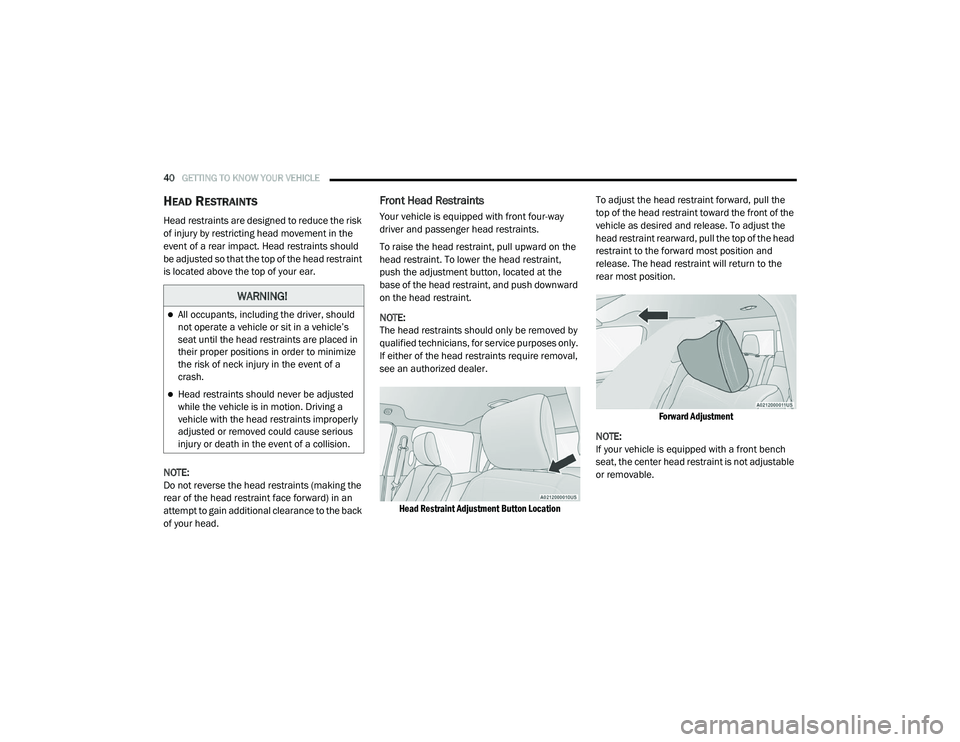
To raise the head restraint, pull upward on the
head restraint. To lower the head restraint,
push the adjustment button, located at the
base of the head restraint, and push downward
on the head restraint.
NOTE:
The head restraints should only be removed by
qualified technicians, for service purposes only.
If either of the head restraints require removal,
see an authorized dealer.
Head Restraint Adjustment Button Location
To adjust the head restraint forward, pull the
top of the head restraint toward the front of the
vehicle as desired and release. To adjust the
head restraint rearward, pull the top of the head
restraint to the forward most position and
release. The head restraint will return to the
rear most position.
Forward Adjustment
NOTE:
If your vehicle is equipped with a front bench
seat, the center head restraint is not adjustable
or removable.
WARNING!
All occupants, including the driver, should
not operate a vehicle or sit in a vehicle’s
seat until the head restraints are placed in
their proper positions in order to minimize
the risk of neck injury in the event of a
crash.
Head restraints should never be adjusted
while the vehicle is in motion. Driving a
vehicle with the head restraints improperly
adjusted or removed could cause serious
injury or death in the event of a collision.
21_DT_OM_EN_USC_t.book Page 40
Page 45 of 496
GETTING TO KNOW YOUR VEHICLE43
GET STARTED
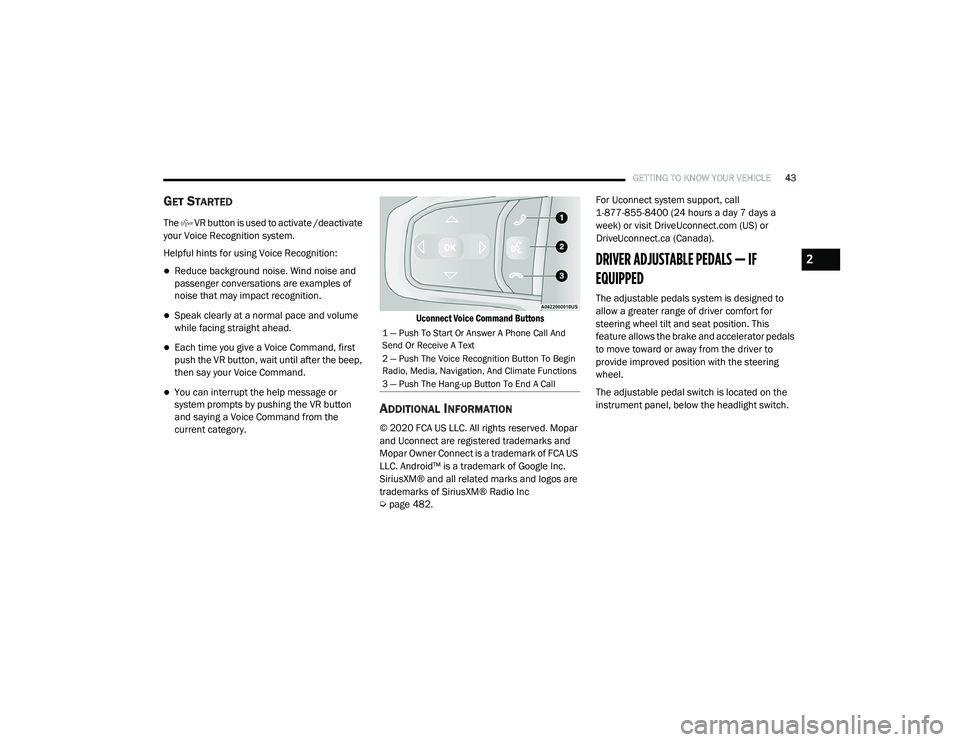
The VR button is used to activate /deactivate
your Voice Recognition system.
Helpful hints for using Voice Recognition:
Reduce background noise. Wind noise and
passenger conversations are examples of
noise that may impact recognition.
Speak clearly at a normal pace and volume
while facing straight ahead.
Each time you give a Voice Command, first
push the VR button, wait until after the beep,
then say your Voice Command.
You can interrupt the help message or
system prompts by pushing the VR button
and saying a Voice Command from the
current category.
Uconnect Voice Command Buttons
ADDITIONAL INFORMATION
© 2020 FCA US LLC. All rights reserved. Mopar
and Uconnect are registered trademarks and
Mopar Owner Connect is a trademark of FCA US
LLC. Android™ is a trademark of Google Inc.
SiriusXM® and all related marks and logos are
trademarks of SiriusXM® Radio Inc
Ú
page 482. For Uconnect system support, call
1-877-855-8400 (24 hours a day 7 days a
week) or visit DriveUconnect.com (US) or
DriveUconnect.ca (Canada).
DRIVER ADJUSTABLE PEDALS — IF
EQUIPPED
The adjustable pedals system is designed to
allow a greater range of driver comfort for
steering wheel tilt and seat position. This
feature allows the brake and accelerator pedals
to move toward or away from the driver to
provide improved position with the steering
wheel.
The adjustable pedal switch is located on the
instrument panel, below the headlight switch.
1 — Push To Start Or Answer A Phone Call And
Send Or Receive A Text
2 — Push The Voice Recognition Button To Begin
Radio, Media, Navigation, And Climate Functions
3 — Push The Hang-up Button To End A Call
2
21_DT_OM_EN_USC_t.book Page 43
Page 46 of 496

44GETTING TO KNOW YOUR VEHICLE
Adjustable Pedals Switch
The pedals can be adjusted with the ignition
placed in the OFF position.
The pedals cannot be adjusted when the
vehicle is in REVERSE or when the Cruise
Control system or Adaptive Cruise Control
system is on. The following messages will
appear in the instrument cluster display if the
pedals are attempted to be adjusted when
the system is locked out: “Adjustable Pedal
Disabled — Cruise Control Engaged” or
“Adjustable Pedal Disabled — Vehicle In
Reverse”.
NOTE:
Always adjust the pedals to a position that
allows full movement of the pedal.
Further small adjustments may be necessary
to find the best possible seat/pedal position.
For vehicles equipped with Driver Memory
Settings Úpage 32, you can use your key fob
or the memory switch on the driver’s door
trim panel to return the adjustable pedals to
pre-programmed positions.
MIRRORS
INSIDE REARVIEW MIRROR
Manual Mirror — If Equipped
The mirror head can be adjusted up, down, left,
and right. The mirror should be adjusted to
center on the view through the rear window.
Headlight glare from vehicles behind you can be
reduced by moving the small control under the
mirror to the night position (toward the rear of
the vehicle). The mirror should be adjusted
while set in the day position (toward the
windshield).
Adjusting Rearview Mirror
WARNING!
Do not adjust the pedals while the vehicle is
moving. You could lose control and have an
accident. Always adjust the pedals while the
vehicle is parked.
CAUTION!
Do not place any article under the adjustable
pedals or impede its ability to move, as it may
cause damage to the pedal controls. Pedal
travel may become limited if movement is
stopped by an obstruction in the adjustable
pedal's path.
21_DT_OM_EN_USC_t.book Page 44
Page 47 of 496
GETTING TO KNOW YOUR VEHICLE45
Automatic Dimming Mirror — If Equipped
The rearview mirror can be adjusted up, down,
left, and right. The mirror should be adjusted to
center on the view through the rear window.
This mirror automatically adjusts for headlight
glare from vehicles behind you.
NOTE:
The Automatic Dimming Mirror feature is
disabled when the vehicle is in REVERSE to
improve the driver’s rear view.
The Automatic Dimming feature can be turned
on or off through the touchscreen.
Automatic Dimming Mirror
Digital Rearview Mirror — If Equipped
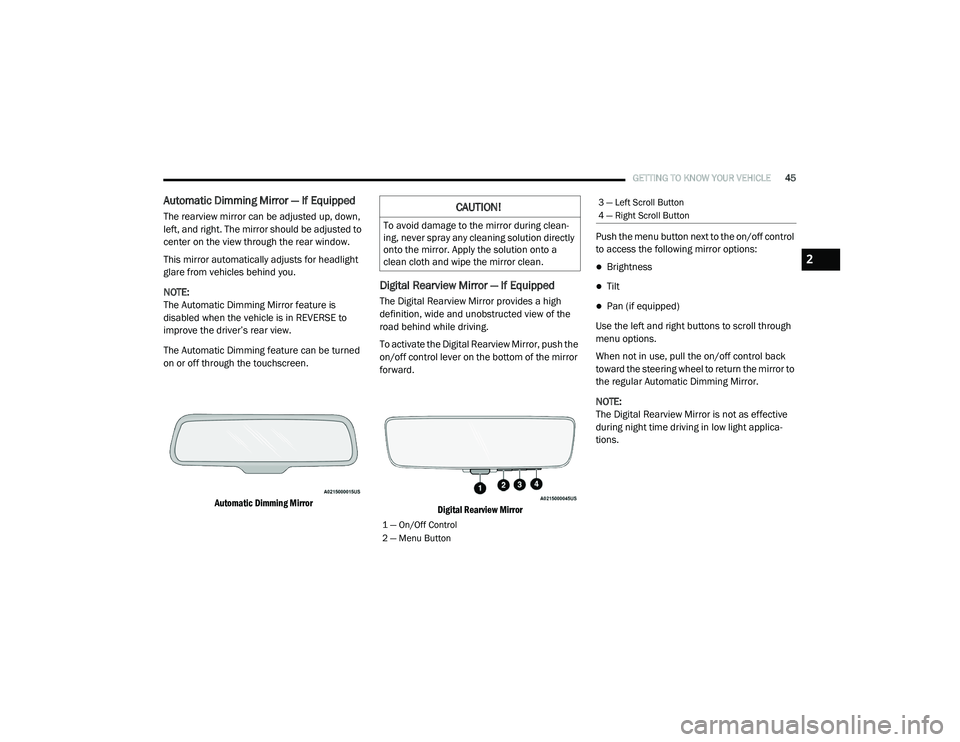
The Digital Rearview Mirror provides a high
definition, wide and unobstructed view of the
road behind while driving.
To activate the Digital Rearview Mirror, push the
on/off control lever on the bottom of the mirror
forward.
Digital Rearview Mirror
Push the menu button next to the on/off control
to access the following mirror options:
Brightness
Tilt
Pan (if equipped)
Use the left and right buttons to scroll through
menu options.
When not in use, pull the on/off control back
toward the steering wheel to return the mirror to
the regular Automatic Dimming Mirror.
NOTE:
The Digital Rearview Mirror is not as effective
during night time driving in low light applica-
tions.
CAUTION!
To avoid damage to the mirror during clean -
ing, never spray any cleaning solution directly
onto the mirror. Apply the solution onto a
clean cloth and wipe the mirror clean.
1 — On/Off Control
2 — Menu Button
3 — Left Scroll Button
4 — Right Scroll Button
2
21_DT_OM_EN_USC_t.book Page 45