radio RAM 1500 2022 User Guide
[x] Cancel search | Manufacturer: RAM, Model Year: 2022, Model line: 1500, Model: RAM 1500 2022Pages: 496, PDF Size: 18.03 MB
Page 54 of 496

52GETTING TO KNOW YOUR VEHICLE
PROGRAMMING HOMELINK® TO A
M
ISCELLANEOUS DEVICE
The procedure on how to program HomeLink® to a
miscellaneous device follows the same procedure
as programming to a garage door opener
Ú page 51. Be sure to determine if the device has
a rolling code, or non-rolling code before beginning
the programming process.
NOTE:Canadian Radio Frequency (RF) laws require trans -
mitter signals to time-out (or quit) after several
seconds of transmission, which may not be long
enough for HomeLink® to pick up the signal during
programming. Similar to this Canadian law, some
U.S. gate operators are designed to time-out in the
same manner. The procedure may need to be
performed multiple times to successfully pair the
device to your HomeLink® buttons.
REPROGRAMMING A SINGLE
H
OMELINK® BUTTON
To reprogram a single HomeLink® button that has
been previously trained, without erasing all the
channels, follow the procedure below. Be sure to
determine whether the new device you want to
program the HomeLink® button to has a rolling
code, or non-rolling code.
1. Place the ignition in the ON/RUN position,
without starting the engine.
2. Push and hold the desired HomeLink® button until the HomeLink® indicator light begins to
flash after 20 seconds. Do not release the
button.
3. Without releasing the button , proceed with
Step 2 in “Programming HomeLink® To A
Garage Door Opener” Ú page 51, and follow
all remaining steps.
CANADIAN/GATE OPERATOR
P
ROGRAMMING
For programming transmitters in Canada/United
States that require the transmitter signals to
“time-out” after several seconds of transmission:
Canadian Radio Frequency (RF) laws require
transmitter signals to time-out (or quit) after
several seconds of transmission, which may not be
long enough for HomeLink® to pick up the signal
during programming. Similar to this Canadian law,
some U.S. gate operators are designed to time-out
in the same manner. It may be helpful to unplug the device during the
cycling process to prevent possible overheating of
the garage door or gate motor.
1. Place the ignition in the ON/RUN position.
NOTE:For vehicles equipped with Keyless Enter ‘n Go™,
place the ignition in the RUN position. Make sure
while programming HomeLink® with the engine on
that your vehicle is outside of your garage, or that
the garage door remains open at all times.
2. Place the hand-held transmitter 1 to 3 inches
(3 to 8 cm) away from the HomeLink® button
you wish to program while keeping the
HomeLink® indicator light in view.
3. Continue to push and hold the HomeLink® button while you push and release (cycle) your
hand-held transmitter every two seconds until
HomeLink® has successfully accepted the
frequency signal. The indicator light will flash
slowly and then rapidly when fully trained.
4. Watch for the HomeLink® indicator to change flash rates. When it changes, it is
programmed. It may take up to 30 seconds or
longer in rare cases. The garage door may
open and close while you are programming.
22_DT_OM_EN_USC_t.book Page 52
Page 64 of 496

62GETTING TO KNOW YOUR VEHICLE
RAIN SENSING WIPERS — IF EQUIPPED
This feature senses rain or snowfall on the
windshield and automatically activates the wipers.
Rotate the end of the multifunction lever to one of
four detent positions to activate this feature.
The sensitivity of the system can be adjusted with
the multifunction lever. Wiper delay position one is
the least sensitive, and wiper delay detent position
four is the most sensitive.
Wiper delay position three should be used for
normal rain conditions.
Positions one and two can be used if the driver
desires less wiper sensitivity. Position four can be
used if the driver desires more sensitivity. Place
the wiper switch in the O (off) position when not
using the system.
NOTE:
The Rain Sensing feature will not operate when
the wiper switch is in the low or high-speed posi -
tion.
The Rain Sensing feature may not function prop -
erly when ice, or dried salt water is present on
the windshield.
Use of Rain-X or products containing wax or sili-
cone may reduce Rain Sensing performance.
The Rain Sensing feature can be turned on and
off using the Uconnect system Ú page 234.The Rain Sensing system has protection features
for the wiper blades and arms, and will not operate
under the following conditions:
Low Ambient Temperature
— When the ignition
is first placed in the ON position, the Rain
Sensing system will not operate until the wiper
switch is moved, vehicle speed is greater than
3 mph (5 km/h), or the outside temperature is
greater than 32°F (0°C).
Transmission In NEUTRAL Position — When the
ignition is ON, and the automatic transmission
is in the NEUTRAL position, the Rain Sensing
system will not operate until the wiper switch is
moved, vehicle speed is greater than 3 mph
(5 km/h), or the gear selector is moved out of
the NEUTRAL position.
Remote Start Mode Inhibit — On vehicles
equipped with a Remote Start system, Rain
Sensing wipers are not operational when the
vehicle is in the Remote Start mode.
CLIMATE CONTROLS
The Climate Control system allows you to regulate
the temperature, air flow, and direction of air
circulating throughout the vehicle. The controls are
located on the touchscreen, and on the sides of
the touchscreen or on the instrument panel below
the radio.
AUTOMATIC CLIMATE CONTROL
D
ESCRIPTIONS AND FUNCTIONS
Uconnect 5 or 5 NAV With 8.4-inch Display Automatic
Temperature Controls
Uconnect 5 NAV With 12-inch Display Automatic Temperature Controls
22_DT_OM_EN_USC_t.book Page 62
Page 77 of 496
GETTING TO KNOW YOUR VEHICLE75
USB/AUX CONTROL
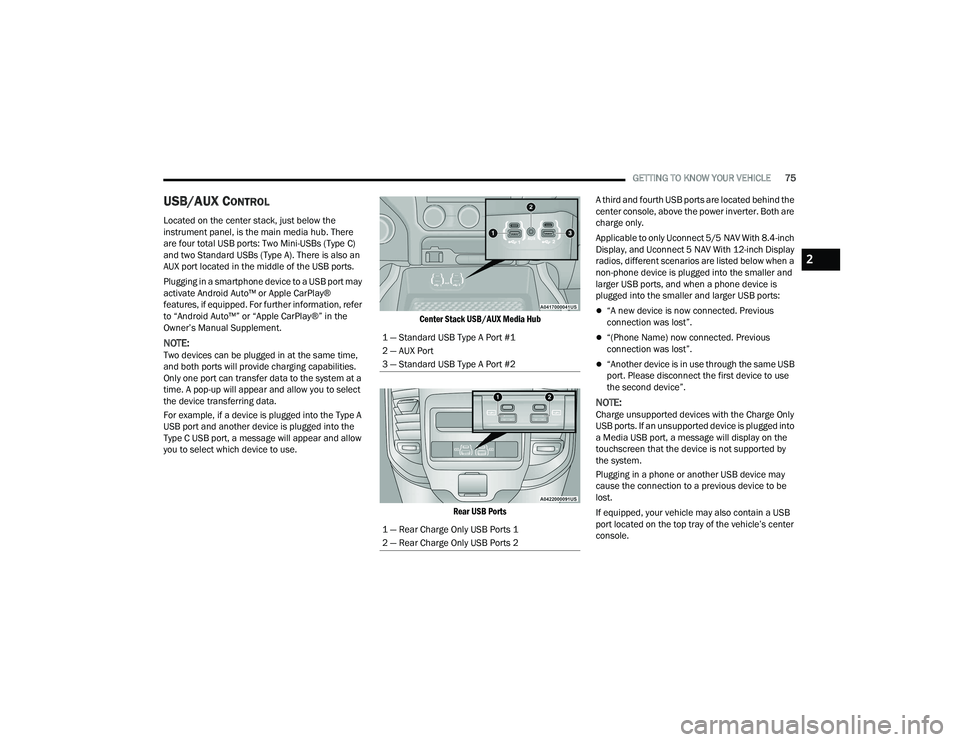
Located on the center stack, just below the
instrument panel, is the main media hub. There
are four total USB ports: Two Mini-USBs (Type C)
and two Standard USBs (Type A). There is also an
AUX port located in the middle of the USB ports.
Plugging in a smartphone device to a USB port may
activate Android Auto™ or Apple CarPlay®
features, if equipped. For further information, refer
to “Android Auto™” or “Apple CarPlay®” in the
Owner’s Manual Supplement.
NOTE:Two devices can be plugged in at the same time,
and both ports will provide charging capabilities.
Only one port can transfer data to the system at a
time. A pop-up will appear and allow you to select
the device transferring data.
For example, if a device is plugged into the Type A
USB port and another device is plugged into the
Type C USB port, a message will appear and allow
you to select which device to use.
Center Stack USB/AUX Media Hub
Rear USB Ports
A third and fourth USB ports are located behind the
center console, above the power inverter. Both are
charge only.
Applicable to only Uconnect 5/5 NAV With 8.4-inch
Display, and Uconnect 5 NAV With 12-inch Display
radios, different scenarios are listed below when a
non-phone device is plugged into the smaller and
larger USB ports, and when a phone device is
plugged into the smaller and larger USB ports:
“A new device is now connected. Previous
connection was lost”.
“(Phone Name) now connected. Previous
connection was lost”.
“Another device is in use through the same USB
port. Please disconnect the first device to use
the second device”.
NOTE:Charge unsupported devices with the Charge Only
USB ports. If an unsupported device is plugged into
a Media USB port, a message will display on the
touchscreen that the device is not supported by
the system.
Plugging in a phone or another USB device may
cause the connection to a previous device to be
lost.
If equipped, your vehicle may also contain a USB
port located on the top tray of the vehicle’s center
console.
1 — Standard USB Type A Port #1
2 — AUX Port
3 — Standard USB Type A Port #2
1 — Rear Charge Only USB Ports 1
2 — Rear Charge Only USB Ports 2
2
22_DT_OM_EN_USC_t.book Page 75
Page 129 of 496

GETTING TO KNOW YOUR INSTRUMENT PANEL127
BATTERY SAVER ON/BATTERY SAVER
M
ODE MESSAGE — ELECTRICAL LOAD
R
EDUCTION ACTIONS — IF EQUIPPED
This vehicle is equipped with an Intelligent Battery
Sensor (IBS) to perform additional monitoring of
the electrical system and status of the vehicle
battery.
In cases when the IBS detects charging system
failure, or the vehicle battery conditions are
deteriorating, electrical load reduction actions will
take place to extend the driving time and distance
of the vehicle. This is done by reducing power to or
turning off non-essential electrical loads.
Load reduction is only active when the engine is
running. It will display a message if there is a risk
of battery depletion to the point where the vehicle
may stall due to lack of electrical supply, or will not
restart after the current drive cycle.
When load reduction is activated, the message
“Battery Saver On Some Systems May Have
Reduced Power” will appear in the instrument
cluster. These messages indicate the vehicle battery has a
low state of charge and continues to lose electrical
charge at a rate that the charging system cannot
sustain.NOTE:
The charging system is independent from load
reduction. The charging system performs a diag
-
nostic on the charging system continuously.
If the Battery Charge Warning Light is on it may
indicate a problem with the charging system
Ú page 129.
The electrical loads that may be switched off
(if equipped), and vehicle functions which can be
affected by load reduction:
Heated Seats / Vented Seats / Heated Wheel
Rear Defroster And Heated Mirrors
HVAC System
115 Volts AC Power Inverter System
Audio and Telematics System
Loss of the battery charge may indicate one or
more of the following conditions:
The charging system cannot deliver enough
electrical power to the vehicle system because
the electrical loads are larger than the capability
of charging system. The charging system is still
functioning properly.
Turning on all possible vehicle electrical loads
(e.g. HVAC to max settings, exterior and interior
lights, overloaded power outlets +12 Volts,
115 Volts AC, USB ports) during certain driving
conditions (city driving, towing, frequent stop -
ping).
Installing options like additional lights, upfitter
electrical accessories, audio systems, alarms
and similar devices.
Unusual driving cycles (short trips separated by
long parking periods).
The vehicle was parked for an extended period
of time (weeks, months).
The battery was recently replaced and was not
charged completely.
The battery was discharged by an electrical load
left on when the vehicle was parked.
The battery was used for an extended period
with the engine not running to supply radio,
lights, chargers, +12 Volt portable appliances
like vacuum cleaners, game consoles and
similar devices.
3
22_DT_OM_EN_USC_t.book Page 127
Page 168 of 496
![RAM 1500 2022 User Guide
166STARTING AND OPERATING
Aero Height (Lowers the vehicle approximately
0.6 inch [15 mm]) – This position provides
improved aerodynamics by lowering the vehicle.
The vehicle will automatica](/img/34/59196/w960_59196-167.png "RAM 1500 2022 User Guide
166STARTING AND OPERATING
Aero Height (Lowers the vehicle approximately
0.6 inch [15 mm]) – This position provides
improved aerodynamics by lowering the vehicle.
The vehicle will automatica")
166STARTING AND OPERATING
Aero Height (Lowers the vehicle approximately
0.6 inch [15 mm]) – This position provides
improved aerodynamics by lowering the vehicle.
The vehicle will automatically enter Automatic
Aero Mode when the vehicle speed remains
between 62 mph (100 km/h) and 66 mph
(106 km/h) for greater than 20 seconds or if the
vehicle speed exceeds 66 mph (106 km/h). The
vehicle will return to NRH from Aero Mode if the
vehicle speed remains between 30 mph
(48 km/h) and 35 mph (56 km/h) for greater
than 20 seconds or if the vehicle speed falls
below 30 mph (48 km/h).
NOTE:
Automatic Aero mode will be disabled if a
trailer is detected to prevent shifting loads.
Speed thresholds for raising/lowering the
vehicle automatically at higher speeds only
apply if Automatic Aero Mode is enabled in
your Uconnect Radio settings.
To enter Aero Height manually push the height
selector switch down once from NRH at any
vehicle speed. To return to NRH push the height
selector switch up once while vehicle speed is
less than 56 mph (90 km/h).
NOTE:Automatic Aero Mode may be disabled through
vehicle settings in the instrument cluster display
Ú page 114 or through your Uconnect Radio (if
equipped) Ú page 234.
Entry/Exit Height (Lowers the vehicle approxi -
mately 2 inches [51 mm]) – This position lowers
the vehicle for easier passenger entry and exit
as well as lowering the vehicle for easier loading
and unloading of cargo. To enter Entry/Exit
Mode, push the height selector switch down
once from the NRH while the vehicle speed is
below 33 mph (53 km/h). Once the vehicle
speed goes below 15 mph (24 km/h) the
vehicle height will begin to lower. If the vehicle
speed remains between 15 mph (24 km/h) and
25 mph (40 km/h) for greater than 60 seconds,
or the vehicle speed exceeds 25 mph (40 km/h)
the Entry/Exit change will be canceled. To return
to Normal Height Mode, push the height
selector switch up once while in Entry/Exit or
drive the vehicle over 15 mph (24 km/h).
NOTE:Entry/Exit Height may be achieved using the
Remote Lowering feature on your key fob for easier
entry/loading Ú page 19. The system requires that the ignition be in the ON/
RUN position or the engine running for all user
requested changes. When lowering the vehicle, all
of the doors must be closed. If a door is opened at
any time while the vehicle is lowering, the change
will not be completed until the open door(s) is
closed.
This system uses a lifting and lowering pattern
which keeps the headlights from incorrectly
shining into oncoming traffic. When raising the
vehicle, the rear of the vehicle will move up first
and then the front. When lowering the vehicle, the
front will move down first and then the rear.
After the engine is turned off, it may be noticed that
the air suspension system operates briefly; this is
normal. The system is correcting the position of the
vehicle to ensure a proper appearance.
To assist with changing a spare tire, the air
suspension system has a feature which allows the
automatic leveling to be disabled Ú
page 114.
CAUTION!
When in ENTRY/EXIT Height, be aware of your
surroundings, you may not have the clearance
required for certain areas and vehicle damage
may occur.
22_DT_OM_EN_USC_t.book Page 166
Page 169 of 496
STARTING AND OPERATING167
NOTE:Default Ride Height:
Select Aero Height or Normal Ride Height as the
default for all vehicle speeds and operation.
This is the selected height that the suspension
will level for speed changes (e.g. raising from
Entry/Exit Height at speed, lowering from Off
Road Height at speed, etc.).
Default ride height can be changed by manually
adjusting the Air Suspension switch to Normal
Ride Height or Aero Ride Height and staying in
the selected height for 2.5 seconds. It will be
stored as the default ride height and the height
will be maintained until a new default ride
height is selected.
If equipped with a touchscreen radio, all enabling/
disabling of air suspension features must be done
through the radio Ú page 234.
AIR SUSPENSION MODES
The air suspension system has multiple modes to
protect the system in unique situations. The engine
should be running to change between Air
Suspension Modes.
Automatic Areo Mode
To improve aerodynamics, the air suspension
system has a feature which will put the vehicle into
Aeroheight automatically at higher speeds
Úpage 114.
Automatic Aero Mode may be disabled through
vehicle settings in the Uconnect Radio (if
equipped) Ú page 234.
Tire Jack Mode
To assist with changing a tire, the air suspension
system has a feature which allows the automatic
leveling to be disabled Ú page 234.
Transport Mode
For towing your vehicle with four wheels off the
road, the air suspension system has a feature
which will put the vehicle into Entry/Exit height and
disable the automatic load leveling system
Ú page 234. Wheel Alignment Mode
Before performing a wheel alignment, this mode
must be enabled which will put the vehicle into
NRH and disable automatic leveling Ú
page 234.
Protection Strategy
In order to protect the air suspension system, the
vehicle will disable load leveling as required
(suspension overloaded, battery charge low, etc.).
Load leveling will automatically resume as soon as
system operation requirements are met. See an
authorized dealer if system does not resume.
NOTE:For towing with air suspension Ú page 212.
INSTRUMENT CLUSTER DISPLAY
M
ESSAGES
When the appropriate conditions exist, a message
will appear in the instrument cluster display
Ú page 114.
An audible chime will be heard whenever a system
error has been detected.
See an authorized dealer for system service if
normal operation does not resume.
WARNING!
The air suspension system uses a high pressure
volume of air to operate the system. To avoid
personal injury or damage to the system, see an
authorized dealer for service.
4
22_DT_OM_EN_USC_t.book Page 167
Page 172 of 496
170STARTING AND OPERATING
NOTE:
Automatic Aero mode will be disabled if a
trailer is detected to prevent shifting loads.
Speed thresholds for raising or lowering the
vehicle only apply if Automatic Aero Mode is
enabled through vehicle settings on your
Uconnect Radio.
To enter Aero Height manually push the
height selector switch down once from NRH
at any vehicle speed. To return to NRH push
the height selector switch up once while
vehicle speed is less than 56 mph (90 km/
h).
Automatic Aero Mode may be disabled
through vehicle settings on your Uconnect
Radio.
Entry/Exit Height (Lowers the vehicle approxi -
mately 3 inches [73 mm]) – This position lowers
the vehicle for easier passenger entry and exit
as well as lowering the vehicle for easier loading
and unloading of cargo. To enter Entry/Exit
Mode, push the height selector switch down
twice from the NRH while the vehicle speed is
below 33 mph (53 km/h). Once the vehicle
speed goes below 15 mph (24 km/h) the
vehicle height will begin to lower. If the vehicle
speed remains between 15 mph (24 km/h) and
25 mph (40 km/h) for greater than 60 seconds,
or the vehicle speed exceeds 25 mph (40 km/h)
the Entry/Exit change will be canceled. To return to Normal Height Mode, push the height
selector switch up twice while in Entry/Exit or
drive the vehicle over 15 mph (24 km/h). Entry/
Exit Height may not be available due to vehicle
payload, an instrument cluster display message
will be shown when this occurs Ú
page 114.
The system requires that the ignition be in the ON/
RUN position or the engine running for all user
requested changes. When lowering the vehicle, all
of the doors must be closed. If a door is opened at
any time while the vehicle is lowering, the change
will not be completed until the open door(s) is
closed.
This system uses a lifting and lowering pattern
which keeps the headlights from incorrectly
shining into oncoming traffic. When raising the
vehicle, the rear of the vehicle will move up first
and then the front. When lowering the vehicle, the
front will move down first and then the rear.
After the engine is turned off, it may be noticed that
the air suspension system operates briefly; this is
normal. The system is correcting the position of the
vehicle to ensure a proper appearance. To assist with changing a spare tire, the air
suspension system has a feature which allows the
automatic leveling to be disabled Ú
page 234.
NOTE:Default Ride Height:
Select Aero Height or Normal Ride Height as the
default for all vehicle speeds and operation.
This is the selected height that the suspension
will level for speed changes (e.g. raising from
Entry/Exit Height at speed, lowering from Off
Road Height at speed, etc.).
Default ride height can be changed by manually
adjusting the Air Suspension switch to Normal
Ride Height or Aero Ride Height and staying in
the selected height for 2.5 seconds. It will be
stored as the default ride height and the height
will be maintained until a new default ride
height is selected.
If equipped with a touchscreen radio, all enabling/
disabling of air suspension features must be done
through the radio Ú page 234.
CAUTION!
When in ENTRY/EXIT Height, be aware of your
surroundings, you may not have the clearance
required for certain areas and vehicle damage
may occur.
WARNING!
The air suspension system uses a high pressure
volume of air to operate the system. To avoid
personal injury or damage to the system, see an
authorized dealer for service.
22_DT_OM_EN_USC_t.book Page 170
Page 191 of 496
STARTING AND OPERATING189
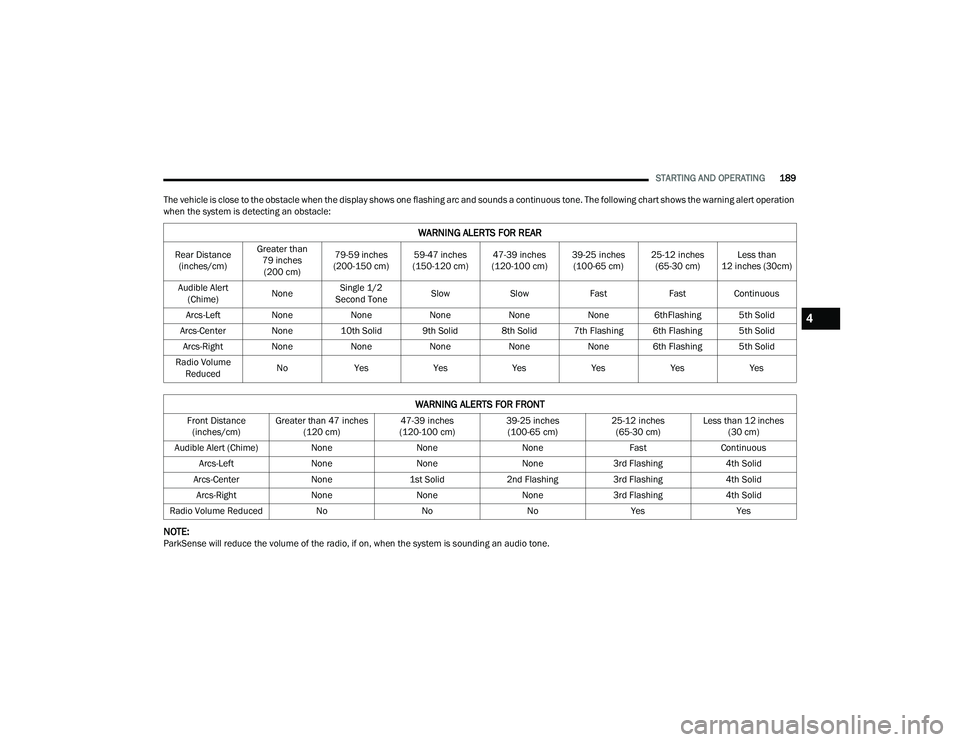
The vehicle is close to the obstacle when the display shows one flashing arc and sounds a continuous tone. The following chart shows the warning alert operation
when the system is detecting an obstacle:
NOTE:ParkSense will reduce the volume of the radio, if on, when the system is sounding an audio tone.
WARNING ALERTS FOR REAR
Rear Distance (inches/cm) Greater than
79 inches (200 cm) 79-59 inches
(200-150 cm) 59-47 inches
(150-120 cm) 47-39 inches
(120-100 cm) 39-25 inches
(100-65 cm) 25-12 inches
(65-30 cm) Less than
12 inches (30cm)
Audible Alert (Chime) NoneSingle 1/2
Second Tone Slow
Slow FastFastContinuous
Arcs-Left NoneNoneNoneNoneNone 6thFlashing 5th Solid
Arcs-Center None 10th Solid 9th Solid 8th Solid 7th Flashing 6th Flashing 5th Solid
Arcs-Right NoneNoneNoneNoneNone 6th Flashing 5th Solid
Radio Volume Reduced No
Yes YesYesYesYesYes
WARNING ALERTS FOR FRONT
Front Distance
(inches/cm) Greater than 47 inches
(120 cm) 47-39 inches
(120-100 cm) 39-25 inches
(100-65 cm) 25-12 inches
(65-30 cm) Less than 12 inches
(30 cm)
Audible Alert (Chime) NoneNoneNone FastContinuous
Arcs-Left NoneNoneNone3rd Flashing 4th Solid
Arcs-Center None1st Solid2nd Flashing 3rd Flashing 4th Solid
Arcs-Right NoneNoneNone3rd Flashing 4th Solid
Radio Volume Reduced NoNoNoYes Yes
4
22_DT_OM_EN_USC_t.book Page 189
Page 193 of 496

STARTING AND OPERATING191
PARKSENSE SYSTEM USAGE
P
RECAUTIONS
NOTE:
Ensure that the front and rear fascias/bumpers
are free of snow, ice, mud, dirt and debris to
keep the ParkSense system operating properly.
Jackhammers, large trucks, and other vibra -
tions could affect the performance of Park -
Sense.
When you turn Front or Rear ParkSense off, the
instrument cluster display will show a vehicle
graphic of the Front or Rear ParkSense on/off
state for two seconds. Furthermore, once you
turn Front or Rear ParkSense off, it remains off
until you turn it on again, even if you cycle the
ignition.
When you move the gear selector to the
REVERSE position and Front or Rear ParkSense
is turned off, the instrument cluster display will
show a vehicle graphic with "OFF" in the corre -
sponding side. This vehicle graphic will be
displayed for as long as the vehicle is in
REVERSE.
ParkSense, when on, will reduce the volume of
the radio when it is sounding a tone.
Clean the ParkSense sensors regularly, taking
care not to scratch or damage them. The
sensors must not be covered with ice, snow,
slush, mud, dirt or debris. Failure to do so can
result in the system not working properly. The
ParkSense system might not detect an obstacle
behind or in front of the fascia/bumper, or it
could provide a false indication that an obstacle
is behind or in front of the fascia/bumper.
Use the ParkSense switch to turn the ParkSense
system off if obstacles such as bicycle carriers,
trailer hitches, etc. are placed near the rear
fascia/bumper. Failure to do so can result in the
system misinterpreting a close obstacle as a
sensor problem, causing the “PARKSENSE
UNAVAILABLE SERVICE REQUIRED” message to
be appear in the instrument cluster display.
ParkSense should be disabled when the tailgate
is in the lowered or open position. A lowered tail -
gate could provide a false indication that an
obstacle is behind the vehicle and could also
cause a false braking event.
The Rear ParkSense system will automatically
disable when the system detects that a trailer
with trailer brakes has been connected to the
Integrated Trailer Brake Module.
The Front ParkSense system will automatically
disable if a snow plow has been connected to
the vehicle.
WARNING!
Drivers must be careful when backing up even
when using ParkSense. Always check carefully
behind your vehicle, look behind you, and be
sure to check for pedestrians, animals, other
vehicles, obstructions, and blind spots before
backing up. You are responsible for safety and
must continue to pay attention to your
surroundings. Failure to do so can result in
serious injury or death.
Before using ParkSense, it is strongly recom -
mended that the ball mount and hitch ball
assembly be disconnected from the vehicle
when the vehicle is not used for towing.
Failure to do so can result in injury or damage
to vehicles or obstacles because the hitch ball
will be much closer to the obstacle than the
rear fascia/bumper when the vehicle sounds
the continuous tone. Also, the sensors could
detect the ball mount and hitch ball assembly,
depending on its size and shape, and give a
false indication that an obstacle is behind the
vehicle, and could cause false braking.
4
22_DT_OM_EN_USC_t.book Page 191
Page 201 of 496
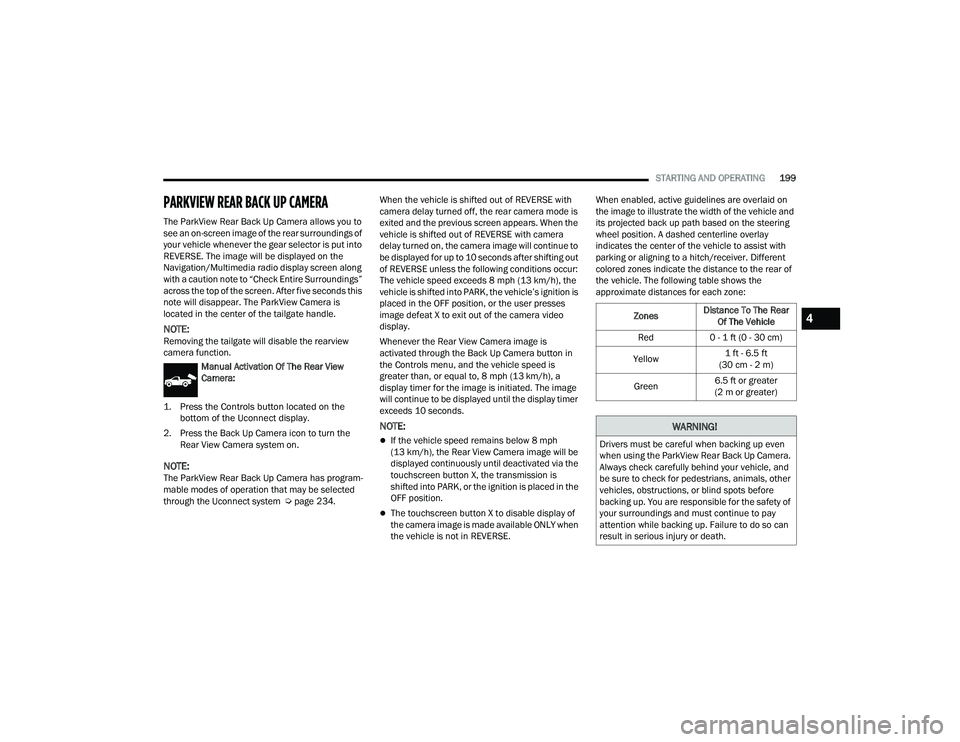
STARTING AND OPERATING199
PARKVIEW REAR BACK UP CAMERA
The ParkView Rear Back Up Camera allows you to
see an on-screen image of the rear surroundings of
your vehicle whenever the gear selector is put into
REVERSE. The image will be displayed on the
Navigation/Multimedia radio display screen along
with a caution note to “Check Entire Surroundings”
across the top of the screen. After five seconds this
note will disappear. The ParkView Camera is
located in the center of the tailgate handle.
NOTE:Removing the tailgate will disable the rearview
camera function.
Manual Activation Of The Rear View
Camera:
1. Press the Controls button located on the bottom of the Uconnect display.
2. Press the Back Up Camera icon to turn the Rear View Camera system on.
NOTE:The ParkView Rear Back Up Camera has program -
mable modes of operation that may be selected
through the Uconnect system Ú page 234.When the vehicle is shifted out of REVERSE with
camera delay turned off, the rear camera mode is
exited and the previous screen appears. When the
vehicle is shifted out of REVERSE with camera
delay turned on, the camera image will continue to
be displayed for up to 10 seconds after shifting out
of REVERSE unless the following conditions occur:
The vehicle speed exceeds 8 mph (13 km/h), the
vehicle is shifted into PARK, the vehicle’s ignition is
placed in the OFF position, or the user presses
image defeat X to exit out of the camera video
display.
Whenever the Rear View Camera image is
activated through the Back Up Camera button in
the Controls menu, and the vehicle speed is
greater than, or equal to, 8 mph (13 km/h), a
display timer for the image is initiated. The image
will continue to be displayed until the display timer
exceeds 10 seconds.
NOTE:
If the vehicle speed remains below 8 mph
(13 km/h), the Rear View Camera image will be
displayed continuously until deactivated via the
touchscreen button X, the transmission is
shifted into PARK, or the ignition is placed in the
OFF position.
The touchscreen button X to disable display of
the camera image is made available ONLY when
the vehicle is not in REVERSE. When enabled, active guidelines are overlaid on
the image to illustrate the width of the vehicle and
its projected back up path based on the steering
wheel position. A dashed centerline overlay
indicates the center of the vehicle to assist with
parking or aligning to a hitch/receiver. Different
colored zones indicate the distance to the rear of
the vehicle. The following table shows the
approximate distances for each zone:
Zones
Distance To The Rear
Of The Vehicle
Red 0 - 1 ft (0 - 30 cm)
Yellow 1 ft - 6.5 ft
(30 cm - 2 m)
Green 6.5 ft or greater
(2 m or greater)
WARNING!
Drivers must be careful when backing up even
when using the ParkView Rear Back Up Camera.
Always check carefully behind your vehicle, and
be sure to check for pedestrians, animals, other
vehicles, obstructions, or blind spots before
backing up. You are responsible for the safety of
your surroundings and must continue to pay
attention while backing up. Failure to do so can
result in serious injury or death.
4
22_DT_OM_EN_USC_t.book Page 199