radio RAM 1500 2022 Workshop Manual
[x] Cancel search | Manufacturer: RAM, Model Year: 2022, Model line: 1500, Model: RAM 1500 2022Pages: 496, PDF Size: 18.03 MB
Page 322 of 496
320SAFETY
The BSM detection zone covers approximately one
lane width on both sides of the vehicle 12 ft
(3.8 m). The zone length starts at the outside
rearview mirror and extends approximately 10 ft
(3 m) beyond the rear fascia/bumper of the
vehicle. The BSM system monitors the detection
zones on both sides of the vehicle when the vehicle
speed reaches approximately 6 mph (10 km/h) or
higher and will alert the driver of vehicles in these
areas.
NOTE:
The BSM system DOES NOT alert the driver
about rapidly approaching vehicles that are
outside the detection zones.
BSM may experience dropouts (blinking on and
off) of the side mirror warning indicator lamps
when a motorcycle or any small object remains
at the side of the vehicle for extended periods of
time (more than a couple of seconds).
The BSM system can become blocked if snow, ice,
mud, or other road contaminations accumulate on
the rear fascia/bumper where the radar sensors
are located. The system may also detect blockage
if the vehicle is operated in areas with extremely
low radar returns such as a desert or parallel to a
large elevation drop. If blockage is detected, a
“Blind Spot Temporarily Unavailable, Wipe Rear
Corners” message will display in the cluster, both
mirror lights will illuminate, and BSM and RCP
alerts will not occur. This is normal operation. The system will automatically recover and resume
function when the condition clears. To minimize
system blockage, do not block the area of the rear
fascia/bumper where the radar sensors are
located with foreign objects (bumper stickers,
bicycle racks, etc.) and keep it clear of road
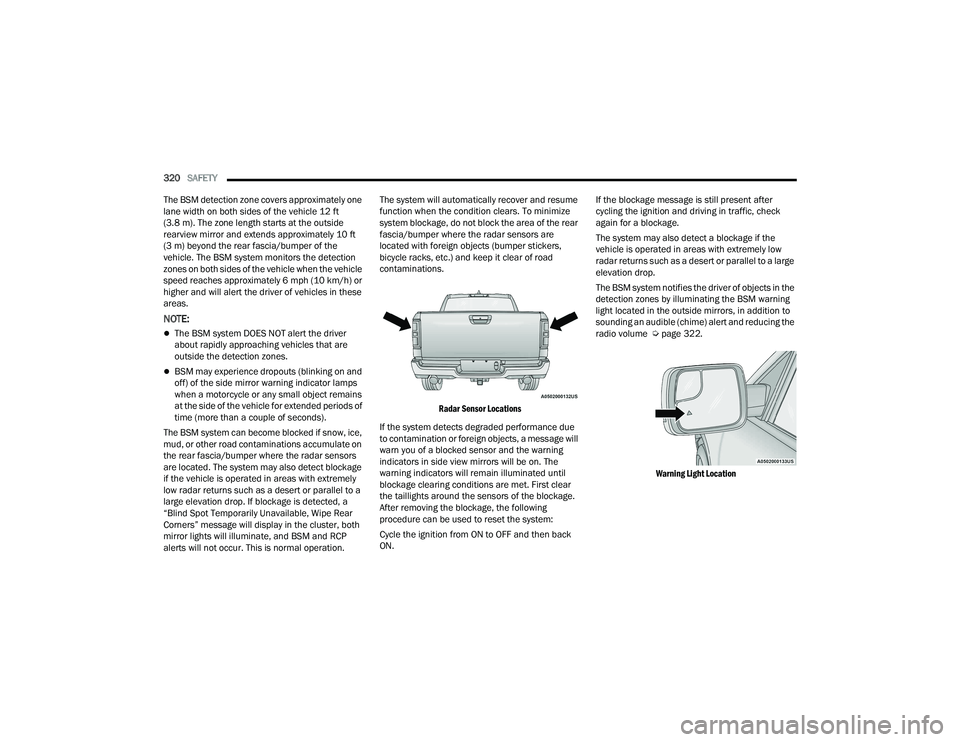
contaminations.
Radar Sensor Locations
If the system detects degraded performance due
to contamination or foreign objects, a message will
warn you of a blocked sensor and the warning
indicators in side view mirrors will be on. The
warning indicators will remain illuminated until
blockage clearing conditions are met. First clear
the taillights around the sensors of the blockage.
After removing the blockage, the following
procedure can be used to reset the system:
Cycle the ignition from ON to OFF and then back
ON. If the blockage message is still present after
cycling the ignition and driving in traffic, check
again for a blockage.
The system may also detect a blockage if the
vehicle is operated in areas with extremely low
radar returns such as a desert or parallel to a large
elevation drop.
The BSM system notifies the driver of objects in the
detection zones by illuminating the BSM warning
light located in the outside mirrors, in addition to
sounding an audible (chime) alert and reducing the
radio volume Ú
page 322.
Warning Light Location
22_DT_OM_EN_USC_t.book Page 320
Page 324 of 496

322SAFETY
The BSM system will not alert you of objects that
are traveling in the opposite direction of the vehicle
in adjacent lanes Ú page 480.
Opposing Traffic
For information on how Blind Spot Monitoring
functions when pulling a trailer Ú page 323.
Rear Cross Path (RCP)
RCP is intended to aid the driver when backing out
of parking spaces where their vision of oncoming
vehicles may be blocked. Proceed slowly and
cautiously out of the parking space until the rear
end of the vehicle is exposed. The RCP system will
then have a clear view of the cross traffic, and if an
oncoming vehicle is detected, alert the driver.
RCP Detection Zones
RCP monitors the rear detection zones on both
sides of the vehicle, for objects that are moving
toward the side of the vehicle with a minimum
speed of approximately 3 mph (5 km/h), to objects
moving a maximum of approximately 20 mph
(32 km/h), such as in parking lot situations.
When RCP is on and the vehicle is in REVERSE (R),
the driver is alerted using both the visual and
audible alarms, including reducing the radio
volume.
NOTE:In a parking lot situation, oncoming vehicles can be
blocked by vehicles parked on either side. If the
sensors are blocked by other structures or
vehicles, the system will not be able to alert the
driver.
Blind Spot Modes
Blind Spot has three selectable modes of
operation that are available in the Uconnect
system.
WARNING!
The Blind Spot Monitoring system is only an aid
to help detect objects in the blind spot zones.
The BSM system is not designed to detect
pedestrians, bicyclists, or animals. Even if your
vehicle is equipped with the BSM system, always
check your vehicle’s mirrors, glance over your
shoulder, and use your turn signal before
changing lanes. Failure to do so can result in
serious injury or death.
WARNING!
Rear Cross Path Detection (RCP) is not a backup
aid system. It is intended to be used to help a
driver detect an oncoming vehicle in a parking
lot situation. Drivers must be careful when
backing up, even when using RCP. Always check
carefully behind your vehicle, look behind you,
and be sure to check for pedestrians, animals,
other vehicles, obstructions, and blind spots
before backing up. Failure to do so can result in
serious injury or death.
22_DT_OM_EN_USC_t.book Page 322
Page 325 of 496
SAFETY323
Blind Spot Alert Lights Only
When operating in Blind Spot Alert mode, the BSM
system will provide a visual alert in the appropriate
side view mirror based on a detected object.
However, when the system is operating in Rear
Cross Path (RCP) mode, the system will respond
with both visual and audible alerts when a
detected object is present. Whenever an audible
alert is requested, the radio is muted.
Blind Spot Alert Lights/Chime
When operating in Blind Spot Alert Lights/Chime
mode, the BSM system will provide a visual alert in
the appropriate side view mirror based on a
detected object. If the turn signal is then activated,
and it corresponds to an alert present on that side
of the vehicle, an audible chime will also be
sounded. Whenever a turn signal and detected
object are present on the same side at the same
time, both the visual and audible alerts will be
issued. In addition to the audible alert the radio (if
on) will also be muted.
NOTE:Whenever an audible alert is requested by the
BSM system, the radio is also muted. When the system is in RCP, the system shall
respond with both visual and audible alerts when a
detected object is present. Whenever an audible
alert is requested, the radio is also muted.
Turn/hazard signal status is ignored; the RCP state
always requests the chime.
Blind Spot Alert Off
When the BSM system is turned off there will be no
visual or audible alerts from either the BSM, RCP,
or Trailer Merge Assist systems.
NOTE:The BSM system will store the current operating
mode when the vehicle is shut off. Each time the
vehicle is started the previously stored mode will
be recalled and used.
Trailer Merge Assist — If Equipped
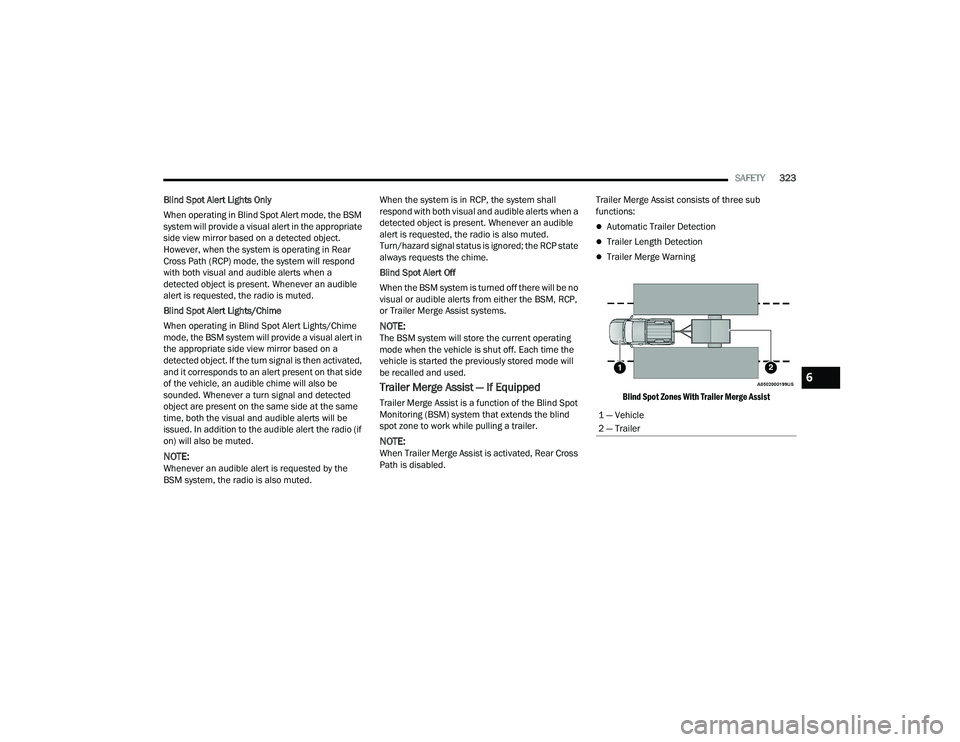
Trailer Merge Assist is a function of the Blind Spot
Monitoring (BSM) system that extends the blind
spot zone to work while pulling a trailer.
NOTE:When Trailer Merge Assist is activated, Rear Cross
Path is disabled.
Trailer Merge Assist consists of three sub
functions:
Automatic Trailer Detection
Trailer Length Detection
Trailer Merge Warning
Blind Spot Zones With Trailer Merge Assist
1 — Vehicle
2 — Trailer
6
22_DT_OM_EN_USC_t.book Page 323
Page 327 of 496

SAFETY325
Trailer length will be identified and placed into one
of the following categories:
Trailer length up to 10 ft (3 m) — Blind spot zone
will be adjusted to 10 ft (3 m) .
Trailer length between 10 ft to 20 ft (3 m to 6 m) — Blind spot zone will be adjusted to 20 ft
(6 m) .
Trailer length between 20 ft to 30 ft (6 m to 9 m) — Blind spot zone will be adjusted to 30 ft
(9 m) .
Trailer length between 30 ft and 39.5 ft (9 m to
12 m) — Blind spot zone will be adjusted to Max
distance .
NOTE:Trailer length is determined within +/- 3 ft (1 m) of
actual length. Trailers that are the same size as the
category limit, 10/20/30 ft (3/6/9 m), could be
subject to being placed in the category above or
below the correct one.
Trailer Merge Warning
Trailer Merge Warning is the extension of the blind
spot function to cover the length of the trailer, plus
a safety margin, to warn the driver when there is a
vehicle in the adjacent lane. The driver is alerted by
the illumination of the BSM warning light located in the outside mirror on the side the other vehicle is
detected on. In addition, an audible (chime) alert
will be heard and radio volume will be reduced
Ú
page 322.
NOTE:
The Trailer Merge Alert system DOES NOT alert
the driver about rapidly approaching vehicles
that are outside the detection zones.
The Blind Spot Monitoring (BSM) system may
experience drop outs (blinking on and off) of the
side mirror warning indicator lamps when a
motorcycle or any small object remains at the
side of the vehicle for extended periods of time
(more than a couple of seconds).
Crowded areas such as parking lots, neighbor -
hoods, etc. may lead to an increased amount of
false alerts. This is normal operation.
FORWARD COLLISION WARNING (FCW)
W
ITH MITIGATION — IF EQUIPPED
FCW with Mitigation provides the driver with
audible warnings, visual warnings (within the
instrument cluster display), and may apply a brake
jerk to warn the driver when it detects a potential
frontal collision. The warnings and limited braking
are intended to provide the driver with enough time
to react, avoid or mitigate the potential collision.
NOTE:FCW monitors the information from the forward
looking sensors as well as the Electronic Brake
Controller (EBC), to calculate the probability of a
forward collision. When the system determines
that a forward collision is probable, the driver will
be provided with audible and visual warnings as
well as a possible brake jerk warning.
If the driver does not take action based upon these
progressive warnings, then the system will provide
a limited level of active braking to help slow the
vehicle and mitigate the potential forward collision.
If the driver reacts to the warnings by braking and
the system determines that the driver intends to
avoid the collision by braking but has not applied
sufficient brake force, the system will compensate
and provide additional brake force as required.
WARNING!
The Blind Spot Monitoring system is only an aid
to help detect objects in the blind spot zones.
The BSM system is not designed to detect
pedestrians, bicyclists, or animals. Even if your
vehicle is equipped with the BSM system, always
check your vehicle’s mirrors, glance over your
shoulder, and use your turn signal before
changing lanes. Failure to do so can result in
serious injury or death.
6
22_DT_OM_EN_USC_t.book Page 325
Page 330 of 496

328SAFETY
If a PEB event begins at a speed below 37 mph
(60 km/h), the system may provide braking to
mitigate the potential collision with a pedestrian. If
the PEB event stops the vehicle completely, the
system will hold the vehicle at a standstill for two
seconds and then release the brakes. When the
system determines a collision with the pedestrian
in front of you is no longer probable, the warning
message will be deactivated.
The minimum speed for PEB activation is 3 mph
(5 km/h). Turning PEB On Or Off
NOTE:The default status of PEB is “On.” This allows the
system to warn you of a possible frontal collision
with the pedestrian.
The PEB button is located in the Uconnect display
in the controls settings Ú
page 234.
To turn the PEB system off, push the Pedestrian
Emergency Braking button once.
To turn the PEB system back on, push the
Pedestrian Emergency Braking button again.
Changing the PEB status to “Off” deactivates the
system, so no warning or active braking will be
available in case of a possible frontal collision with
the pedestrian.
NOTE:The PEB system will retain the last setting selected
by the driver after ignition shut down.
TIRE PRESSURE MONITORING SYSTEM
(TPMS)
TPMS will warn the driver of a low tire pressure
based on the vehicle recommended cold placard
pressure.
NOTE:The TPMS Warning Light will illuminate in the
instrument cluster and a chime will sound when
tire pressure is low in one or more of the four active
road tires. In addition, the instrument cluster will
display a graphic showing the pressure values of
each tire with the low tire pressure values in a
different color, or the Uconnect radio will display a
TPMS message; when this occurs you must
increase the tire pressure to the recommended
cold placard pressure in order for the TPMS
Warning Light to turn off.
The tire pressure will vary with temperature by
about 1 psi (7 kPa) for every 12°F (6.5°C). This
means that when the outside temperature
decreases, the tire pressure will decrease. Tire
pressure should always be set based on cold
inflation tire pressure. This is defined as the tire
pressure after the vehicle has not been driven for
at least three hours, or driven less than 1 mile
(1.6 km) after a three hour period. The cold tire
inflation pressure must not exceed the maximum
inflation pressure molded into the tire sidewall.
The tire pressure will also increase as the vehicle
is driven — this is normal and there should be no
adjustment for this increased pressure.
See Ú page 444 on how to properly inflate the
vehicle’s tires.
WARNING!
Pedestrian Emergency Braking (PEB) is not
intended to avoid a collision on its own, nor can
PEB detect every type of potential collision with
a pedestrian. The driver has the responsibility to
avoid a collision by controlling the vehicle via
braking and steering. Failure to follow this
warning could lead to serious injury or death.
22_DT_OM_EN_USC_t.book Page 328
Page 333 of 496

SAFETY331
NOTE:When filling warm tires, the tire pressure may need
to be increased up to an additional 4 psi (28 kPa)
above the recommended cold placard pressure in
order to turn the Tire Pressure Monitoring System
Warning Light off.
Service TPMS Warning
If a system fault is detected, the Tire Pressure
Monitoring System (TPMS) Warning Light will flash
on and off for 75 seconds and then remain on
solid. The system fault will also sound a chime. In
addition, the instrument cluster will display a
"SERVICE TPM SYSTEM" message for a minimum
of five seconds and then display dashes (--) in
place of the pressure value to indicate which
sensor is not being received.
If the ignition switch is cycled, this sequence will
repeat, providing the system fault still exists. If the
system fault no longer exists, the Tire Pressure
Monitoring System Warning Light will no longer
flash, and the "SERVICE TPM SYSTEM" message
will no longer display, and a pressure value will
display in place of the dashes. A system fault can
occur due to any of the following:
Signal interference due to electronic devices or
driving next to facilities emitting the same radio
frequencies as the Tire Pressure Monitoring
System sensors
Installing aftermarket window tinting that
contains materials that may block radio wave
signals
Accumulation of snow or ice around the wheels
or wheel housings
Using tire chains on the vehicle
Using wheels/tires not equipped with TPMS
sensors
A system fault may occur due to an incorrect TPMS
sensor location condition. When a system fault
occurs due to an incorrect TPMS sensor location,
the Tire Pressure Monitoring System (TPMS)
Warning Light will flash on and off for 75 seconds
and then remain on solid. The system fault will also
sound a chime. In addition, the instrument cluster
will display a Tire Pressure Temporarily Unavailable
message in place of the tire pressure display
screen. If the ignition switch is cycled, this
sequence will repeat, providing the system fault
still exists. If the system fault no longer exists, the
“Tire Pressure Monitoring System Warning Light”
will no longer flash and the tire pressure display
screen will be displayed showing the tire pressure
values the correct locations. Vehicles With Non-Matching Full Size Spare Or
Compact Spare
The non-matching full size spare or compact
spare tire does not have a TPMS sensor. There
-
fore, the TPMS will not monitor the pressure in
the non-matching full size spare or compact
spare tire.
If you install the non-matching full size spare or
compact spare tire in place of a road tire that
has a pressure below the low-pressure warning
limit, upon the next ignition switch cycle, the Tire
Pressure Monitoring System (TPMS) Warning
Light and a “LOW TIRE” message will remain on
and a chime will sound. In addition, the graphic
in the instrument cluster will still display a pres -
sure value in a different color and an “Inflate to
XX” message.
After driving the vehicle for up to 20 minutes
above 15 mph (24 km/h), the Tire Pressure
Monitoring System (TPMS) Warning Light will
flash on and off for 75 seconds and then remain
on solid. In addition, the instrument cluster will
display a "SERVICE TPM SYSTEM" message for a
minimum of five seconds and then display
dashes (--) in place of the pressure value.
6
22_DT_OM_EN_USC_t.book Page 331
Page 334 of 496
332SAFETY
For each subsequent ignition switch cycle, a
chime will sound, the Tire Pressure Monitoring
System (TPMS) Warning Light will flash on and
off for 75 seconds and then remain on solid,
and the instrument cluster will display a
"SERVICE TPM SYSTEM" message for a
minimum of five seconds and then display
dashes (--) in place of the pressure value.
Once you repair or replace the original road tire
and reinstall it on the vehicle in place of the
non-matching full size spare or compact spare,
the TPMS will update automatically. In addition,
the Tire Pressure Monitoring System (TPMS)
Warning Light will turn off and the graphic in the
instrument cluster will display a new pressure
value instead of dashes (--), as long as no tire
pressure is below the low-pressure warning limit
in any of the four active road tires. The vehicle
may need to be driven for up to 20 minutes
above 15 mph (24 km/h) in order for the TPMS
to receive this information.
Tire Fill Alert
This feature notifies the user when the placard tire
pressure is attained while inflating or deflating the
tire.
You may choose to disable or enable the Tire Fill
Alert feature through use of the Uconnect Settings
in the radio.
NOTE:
Only one tire can be filled at a time when using
the Tire Fill Alert system.
The Tire Fill Alert feature cannot be entered if an
existing TPMS fault is set to “active” or if the
system is in deactivation mode (if equipped).
The system will be activated when a positive
increase in tire pressure is detected by the TPMS
while inflating the tire. The ignition must be in the
RUN mode, with the transmission in PARK.
NOTE:It is not required to have the engine running to
enter Tire Fill Alert mode.
The hazard lamps will come on to confirm the
vehicle is in Tire Fill Alert mode.
When Tire Fill Alert mode is entered, the tire
pressure display screen will be displayed in the
instrument cluster.
If the hazard lamps do not come on while inflating
the tire, the TPMS sensor may be out of range
preventing the TPMS sensor signal from being
received. In this case, the vehicle may need to be
moved either forward or backward slightly to exit
the null spot. Operation:
The horn will sound once to let the user know
when to stop filling the tire, when it reaches
recommended pressure.
The horn will sound three times if the tire is over
-
filled and will continue to sound every five
seconds if the user continues to inflate the tire.
The horn will sound once again when enough air
is let out to reach proper inflation level.
The horn will also sound three times if the tire is
then underinflated and will continue to sound
every five seconds if the user continues to
deflate the tire.
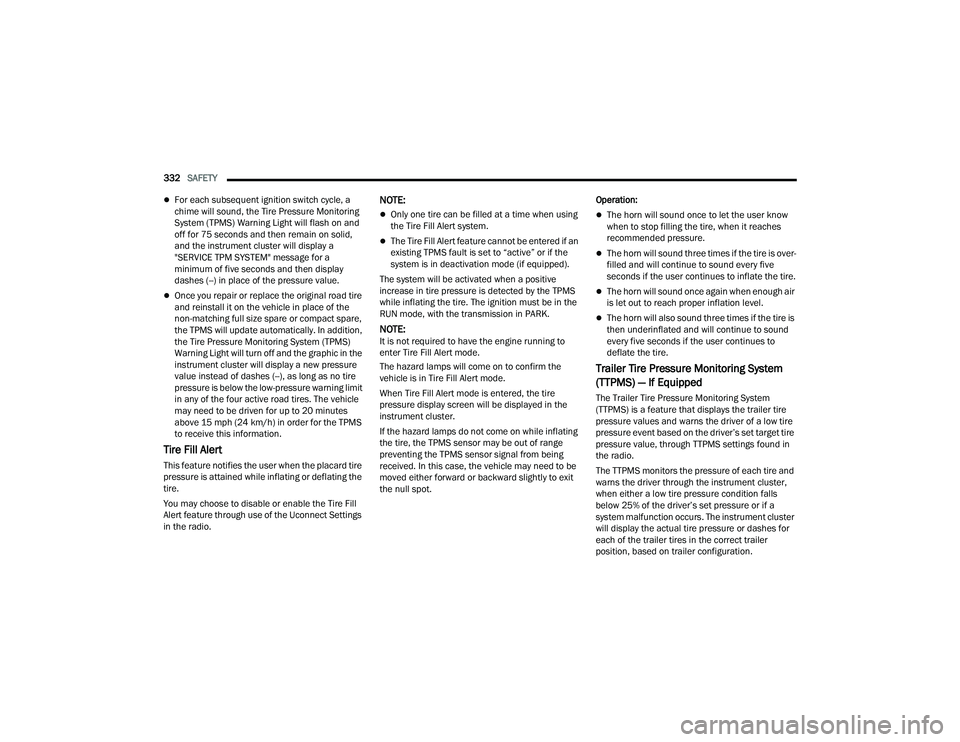
Trailer Tire Pressure Monitoring System
(TTPMS) — If Equipped
The Trailer Tire Pressure Monitoring System
(TTPMS) is a feature that displays the trailer tire
pressure values and warns the driver of a low tire
pressure event based on the driver’s set target tire
pressure value, through TTPMS settings found in
the radio.
The TTPMS monitors the pressure of each tire and
warns the driver through the instrument cluster,
when either a low tire pressure condition falls
below 25% of the driver’s set pressure or if a
system malfunction occurs. The instrument cluster
will display the actual tire pressure or dashes for
each of the trailer tires in the correct trailer
position, based on trailer configuration.
22_DT_OM_EN_USC_t.book Page 332
Page 335 of 496

SAFETY333
The TTPMS can support up to 12 trailer tires per
configured trailer on up to four configurable trailers
Ú page 234.
Trailer Tire Pressure Monitoring System
Trailer Tire Pressure Sensor Pairing
In order use this feature, the provided tire pressure
sensors must be installed in the desired trailer
tires and the sensors must be paired to the truck.
If the target trailer requires more than the provided
four sensors, additional sensors can be purchased
at an authorized Ram dealership.
With the sensors installed and the trailer near or
connected to your Ram truck, initiate the pairing
process by entering the settings menu in the radio
and selecting trailer. Select the desired trailer
profile to pair to, open the “Tire Pressure” menu,
and hit “Setup All Tires” Ú page 234.
NOTE:The vehicle may not be driven until the pairing
process is complete.
Trailer Tire Pressure Settings
Trailer Tire Pressure Pairing
Follow the on screen prompts to select the number
of axles (1 - 3), the number of trailer tires (2, 4, 6,
8, or 12), and the set trailer tire pressure. The
range is selectable anywhere between 25-125 psi
(172-862 kPa).
Once psi (kPa) is programmed, the pairing screen
appears. Tire sensors must be paired in order
shown. Starting with Tire 1, deflate tire by 5 psi (34
kPa) and wait for a horn chirp. It may take up to
three minutes for the chirp to occur, indicating that
the sensor has paired. Repeat process on each
tire, in order, until complete. Do not exit the pairing
screen until process is complete. If pairing was
unsuccessful, a double horn chirp will sound, and
a prompt on the touchscreen will allow you to retry
the procedure; “Retry” will only appear when setup
fails. Each tire must be successfully paired during
a single pairing process to receive the success
screen.
NOTE:If the pairing process times out after three minutes
of no communication with a sensor, a double horn
chip will occur indicating the pairing has failed and
a message will display on the radio indicating the
process was unsuccessful. Under certain circum
-
stances, the double horn chirp may continue to
happen every three minutes indicating the failed
pairing. If this happens, the horn chirping may be
canceled by cycling the ignition button OFF and
then back to RUN position.
6
22_DT_OM_EN_USC_t.book Page 333
Page 336 of 496
334SAFETY
Tire Pressure Monitoring System Low Pressure
Warnings
When a tire pressure low in one or more of the
active road tires is detected, the instrument cluster
will display a message stating “Trailer Tire
Pressure Low”. The instrument cluster will then
display the TTPMS graphic showing the pressure
values of each tire with the low tire pressure values
in a different color.
Should this occur, you should stop as soon as
possible and inflate the tires with a low pressure
condition (those in a different color in the
instrument cluster graphic) to the customer
programmed target tire pressure value as shown
at the top of the TTPMS instrument cluster graphic.
Once the tire(s) are inflated, the system will
automatically update the graphic display in the
instrument cluster, returning to its original color.
The vehicle may need to be driven for up to
10 minutes above 15 mph (24 km/h) in order for
the TTPMS to receive the updated information.
Service TTPMS Warning
If a system fault is detected, the instrument cluster
will display a “Trailer Tire Pressure System Service
Required” message for a minimum of five seconds. Once the system fault is corrected the "Trailer Tire
Pressure System Service Required" message will
no longer be displayed. The vehicle may need to be
driven for up to 10 minutes above 15 mph
(24 km/h) in order for the TTPMS to receive the
trailer tire pressure information.
Trailer Tire Pressure System Not Configured
A “Trailer Tire Pressure System Not Configured”
message will be displayed in the instrument
cluster on the TTPMS instrument cluster graphic
when a trailer number is selected that has not had
trailer tire pressure sensors paired. To correct this
condition, see Ú
page 234.
Trailer Sensors Detected Do Not Match Active
Trailer
The “Trailer Sensors Detected Do Not Match Active
Trailer” message will be displayed in the
instrument cluster when the trailer sensors being
received by the TTPMS module do not match the
trailer sensors paired to the current trailer number
selected. This message will be displayed when the
sensors being received completely match the
sensors paired to another trailer number
configured in the TTPMS module.
To correct this condition, the correct trailer number
must be selected in the radio Ú page 234.
OCCUPANT RESTRAINT SYSTEMS
Some of the most important safety features in your
vehicle are the restraint systems:
OCCUPANT RESTRAINT SYSTEMS
F
EATURES
Seat Belt Systems
Supplemental Restraint Systems (SRS) Air Bags
Child Restraints
Some of the safety features described in this
section may be standard equipment on some
models, or may be optional equipment on others. If
you are not sure, ask an authorized dealer.
IMPORTANT SAFETY PRECAUTIONS
Please pay close attention to the information in
this section. It tells you how to use your restraint
system properly, to keep you and your passengers
as safe as possible.
22_DT_OM_EN_USC_t.book Page 334
Page 351 of 496

SAFETY349
Knee Impact Bolsters
The Knee Impact Bolsters help protect the knees
of the driver and front passenger, and position the
front occupants for improved interaction with the
front air bags.
Supplemental Side Air Bags
Supplemental Seat-Mounted Side Air Bags (SABs)
This vehicle is equipped with Supplemental
Seat-Mounted Side Air Bags (SABs).
Supplemental Seat-Mounted Side Air Bags (SABs)
are located in the outboard side of the front seats.
The SABs are marked with “SRS AIRBAG” or
“AIRBAG” on a label or on the seat trim on the
outboard side of the seats.
The SABs may help to reduce the risk of occupant
injury during certain side impacts, in addition to
the injury reduction potential provided by the seat
belts and body structure.
Supplemental Seat-Mounted Side Air Bag Label
When the SAB deploys, it opens the seam on the
outboard side of the seatback’s trim cover. The
inflating SAB deploys through the seat seam into
the space between the occupant and the door. The
SAB moves at a very high speed and with such a
high force that it could injure occupants if they are
not seated properly, or if items are positioned in
the area where the SAB inflates. Children are at an
even greater risk of injury from a deploying air bag. Supplemental Side Air Bag Inflatable Curtains
(SABICs)
This vehicle is equipped with Supplemental Side
Air Bag Inflatable Curtains (SABICs).
Supplemental Side Air Bag Inflatable Curtains
(SABICs) are located above the side windows. The
trim covering the SABICs is labeled “SRS AIRBAG”
or “AIRBAG.”
Supplemental Side Air Bag Inflatable Curtain (SABIC) Label Location
SABICs may help reduce the risk of head and other
injuries to front and rear seat outboard occupants
in certain side impacts, in addition to the injury
reduction potential provided by the seat belts and
body structure.
WARNING!
Do not drill, cut, or tamper with the knee
impact bolsters in any way.
Do not mount any accessories to the knee
impact bolsters such as alarm lights, stereos,
citizen band radios, etc.
WARNING!
Do not use accessory seat covers or place
objects between you and the Side Air Bags; the
performance could be adversely affected and/or
objects could be pushed into you, causing
serious injury.
6
22_DT_OM_EN_USC_t.book Page 349