4WD RAM 1500 2022 Owner's Manual
[x] Cancel search | Manufacturer: RAM, Model Year: 2022, Model line: 1500, Model: RAM 1500 2022Pages: 496, PDF Size: 18.03 MB
Page 188 of 496

186STARTING AND OPERATING
NARROW VEHICLES
Some narrow vehicles traveling near the outer
edges of the lane or edging into the lane are not
detected until they have moved fully into the lane.
There may not be sufficient distance to the vehicle
ahead.
Narrow Vehicle Example
STATIONARY OBJECTS AND VEHICLES
ACC does not react to stationary objects or
vehicles. For example, ACC will not react in
situations where the vehicle you are following exits
your lane and the vehicle ahead is stopped in your
lane. It will consider this stopped vehicle a stationary object as it did not previously detect
movement from it. Always be attentive and ready
to apply the brakes if necessary.
Stationary Object And Stationary Vehicle Example
PARKSENSE FRONT/REAR PARK ASSIST
SYSTEM — IF EQUIPPED
The ParkSense Park Assist system provides visual
and audible indications of the distance between
the rear and/or front fascia/bumper and a
detected obstacle when backing up or moving
forward (e.g. during a parking maneuver). If your
vehicle is equipped with the automatic braking
function, the vehicle brakes may be automatically
applied and released when the vehicle is in
REVERSE if the system detects a possible collision
with an obstacle.
NOTE:
The driver can disable the automatic braking
function by turning ParkSense off via the Park -
Sense switch. The driver can also override auto -
matic braking by changing the gear or by
pressing the gas pedal over 90% of its capacity
during the braking event.
Automatic brakes will not be available if the
vehicle is in 4WD Low.
Automatic brakes will not be available if there is
a fault in the brake module.
Automatic brakes will not be available if there is
a faulted condition detected with the ParkSense
Park Assist system or the Braking System.
The automatic braking function may only be
applied if the vehicle deceleration is not enough
to avoid colliding with a detected obstacle.
The automatic braking function may not be
applied fast enough for obstacles that move
toward the rear of the vehicle from the left and/
or right sides.
The automatic braking function can be
enabled/disabled from the Customer Program -
mable Features section of the Uconnect system.
22_DT_OM_EN_USC_t.book Page 186
Page 195 of 496
STARTING AND OPERATING193
The ParkSense Active Park Assist system will turn
off automatically for any of the following
conditions:
Parking maneuver is completed.
Vehicle speed is greater than 18 mph (30 km/h)
when searching for a parking space.
Vehicle speed is greater than 5 mph (7 km/h) during active steering guidance into the parking
space.
Steering wheel is touched during active steering
guidance into the parking space.
ParkSense Front/Rear Park Assist switch is
pushed.
Driver's door is opened.
Tailgate is opened.
Electronic Stability Control/Anti-Lock Braking
System intervention.
Vehicle is in 4WD Low.
Axle Locker is active.
Trailer is connected.
Trailer Reverse Steering Control (TRSC) is
active.
Snow plow is connected.
NOTE:The ParkSense Active Park Assist system will allow
a maximum of eight shifts between DRIVE and
REVERSE. If the maneuver cannot be completed within eight shifts, the system will cancel and the
instrument cluster display will instruct the driver to
complete the maneuver manually.
The ParkSense Active Park Assist system will only
operate and search for a parking space when the
following conditions are present:
Gear selector is in DRIVE.
The ignition is in the ON/RUN position.
The ParkSense Active Park Assist switch is acti
-
vated.
Driver's door is closed.
Tailgate is closed.
Vehicle speed is less than 15 mph (25 km/h).
The outer surface and the underside of the front
and rear fascias/bumpers are clean and clear
of snow, ice, mud, dirt or other obstruction.
NOTE:If the vehicle is driven above approximately
15 mph (25 km/h), the instrument cluster display
will instruct the driver to slow down. If the vehicle
is driven above approximately 18 mph (30 km/h),
the system will cancel. The driver must then reac -
tivate the system by pushing the ParkSense Active
Park Assist switch.
When pushed, the LED on the ParkSense Active
Park Assist switch will blink momentarily, and then
the LED will turn off if any of the above conditions
are not present.
PARALLEL/PERPENDICULAR PARKING
S
PACE ASSISTANCE OPERATION
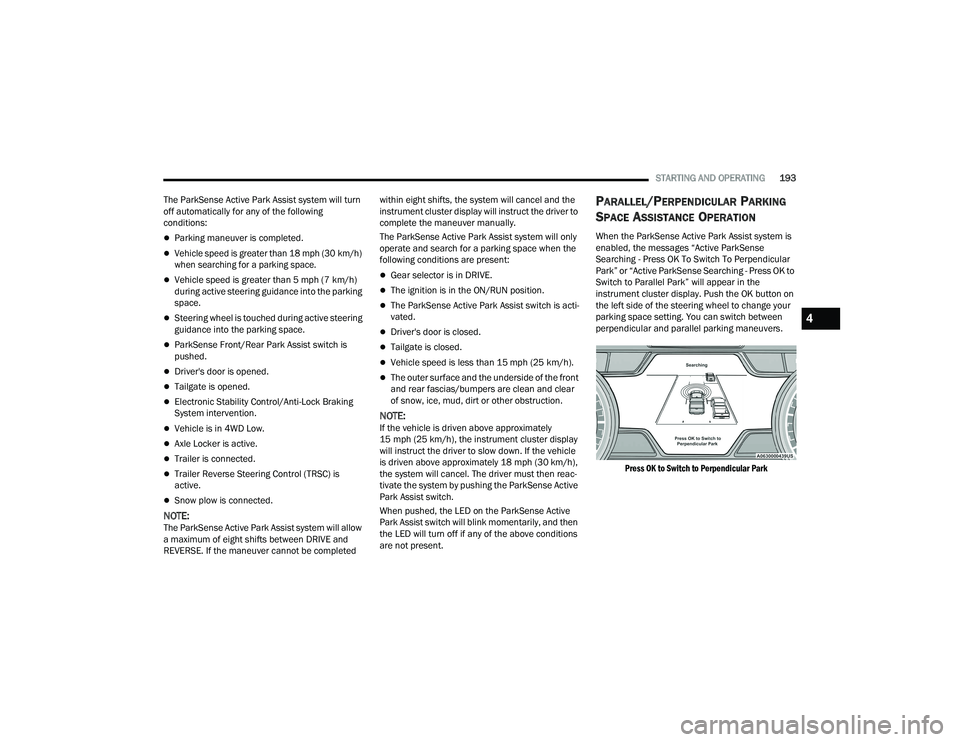
When the ParkSense Active Park Assist system is
enabled, the messages “Active ParkSense
Searching - Press OK To Switch To Perpendicular
Park” or “Active ParkSense Searching - Press OK to
Switch to Parallel Park” will appear in the
instrument cluster display. Push the OK button on
the left side of the steering wheel to change your
parking space setting. You can switch between
perpendicular and parallel parking maneuvers.
Press OK to Switch to Perpendicular Park
4
22_DT_OM_EN_USC_t.book Page 193
Page 205 of 496
STARTING AND OPERATING203
For information on Auxiliary Cameras (if equipped),
see Ú page 206.
FORWARD FACING CAMERA WITH TIRE
L
INES — IF EQUIPPED
The Forward Facing Camera displays a front view
image of the road ahead, along with tire lines to
guide the driver when driving on narrow roads. Tire
lines can be activated/deactivated through the
Uconnect Settings.
Activation
The Forward Facing Camera can be activated in
the following ways:
Pressing the Forward Facing Camera button in
the Controls screen or Apps menu
Pressing the Forward Facing Camera button
located in the upper left corner of the Back Up
camera display
Once activated, the camera image will remain on
as long as the vehicle speed is below 8 mph
(13 km/h).
Deactivation
The Forward Facing Camera is deactivated in the
following conditions:
The vehicle exceeds 8 mph (13 km/h), except
when vehicle is in 4WD Low.
The X button on the display is pressed.
The vehicle is shifted into PARK.
The ignition is placed in the OFF position.
NOTE:If the vehicle is in 4WD Low, the Forward Facing
Camera image will be displayed until the X button
is pressed or the ignition is placed in the OFF
position.
TRAILER CAMERAS — IF EQUIPPED
TRAILER SURROUND VIEW CAMERA
S
YSTEM — IF EQUIPPED
The Trailer Surround View Camera system allows
you to see an on-screen image of the surroundings
and the Top View of a trailer using four mountable
cameras. This occurs whenever the More Cams
soft button is selected, or when enabled through
the Uconnect system. The image will be displayed
on the Uconnect display along with a caution note
“Check Entire Surroundings”. After five seconds,
this note will disappear.
NOTE:
Trailer Surround View Camera kit is only avail -
able for vehicles equipped with the Surround
View Camera system.
The Trailer Surround View Camera system has
programmable settings that may be selected
through the Uconnect system Ú page 234.
WARNING!
Drivers must be careful when backing up even
when using the Surround View Camera. Always
check carefully behind your vehicle, and be sure
to check for pedestrians, animals, other
vehicles, obstructions, or blind spots before
backing up. You are responsible for the safety of
your surroundings and must continue to pay
attention while backing up. Failure to do so can
result in serious injury or death.
CAUTION!
To avoid vehicle damage, Surround View
should only be used as a parking aid. The
Surround View camera is unable to view every
obstacle or object in your drive path.
To avoid vehicle damage, the vehicle must be
driven slowly when using Surround View to be
able to stop in time when an obstacle is seen.
It is recommended that the driver look
frequently over his/her shoulder when using
Surround View.
4
22_DT_OM_EN_USC_t.book Page 203
Page 228 of 496
226STARTING AND OPERATING
BEFORE PLOWING
Check the hydraulic system for leaks and proper
fluid level.
Check the mounting bolts and nuts for proper
tightness.
Check the runners and cutting edge for exces -
sive wear. The cutting edge should be ¼ to
½ inches (6 cm to 1.2 cm) above ground in
snow plowing position.
Check that snowplow lighting is connected and
functioning properly.
SNOWPLOW PREP PACKAGE MODEL
A
VAILABILITY
For Information about snowplow applications visit
www.ramtrucks.com or refer to the current Body
Builder’s Guide.
1. The maximum number of occupants in the
truck should not exceed two.
2. The total GVWR, Front GAWR or the Rear GAWR should never be exceeded.
3. Cargo capacity will be reduced by the addition of options or passengers, etc.
The loaded vehicle weight, including the snowplow
system, all aftermarket accessories, driver,
passengers, options, and cargo, must not exceed
either the Gross Vehicle Weight (GVWR) or Gross Axle Weight (GAWR) ratings. These weights
are specified on the Safety Compliance
Certification Label on the driver's side door
opening.
NOTE:Detach the snowplow when transporting
passengers.
Vehicle front end wheel alignment was set to
specifications at the factory without consideration
for the weight of the plow. Front end toe-in should
be checked and reset if necessary at the beginning
and end of the snowplow season. This will help
prevent uneven tire wear.
The blade should be lowered whenever the vehicle
is parked.
Maintain and operate your vehicle and snowplow
equipment following the recommendations
provided by the specific snowplow manufacturer.
OVER THE ROAD OPERATION WITH
S
NOWPLOW ATTACHED
The blade restricts air flow to the radiator and
causes the engine to operate at higher than
normal temperatures. Therefore, when
transporting the plow, angle the blade completely
and position it as low as road or surface conditions
permit. Do not exceed 40 mph (64 km/h). The
operator should always maintain a safe stopping
distance and allow adequate passing clearance.
OPERATING TIPS
Under ideal snow plowing conditions, 20 mph
(32 km/h) should be maximum operating speed.
The operator should be familiar with the area and
surface to be cleaned. Reduce speed and use
extreme caution when plowing unfamiliar areas or
under poor visibility.
GENERAL MAINTENANCE
Snowplows should be maintained in accordance
with the plow manufacturer's instructions.
Keep all snowplow electrical connections and
battery terminals clean and free of corrosion.
When plowing snow, to avoid transmission and
drivetrain damage, the following precautions
should be observed:
Operate with transfer case in 4WD LOW when
plowing small or congested areas where speeds
are not likely to exceed 15 mph (24 km/h).
At higher speeds operate in 4WD HIGH.
Vehicles with automatic transmissions should
use 4WD LOW when plowing deep or heavy
snow for extended periods of time to avoid
transmission overheating.
Do not shift the transmission unless the engine
has returned to idle and wheels have stopped.
Make a practice of stepping on the brake pedal
while shifting the transmission.
22_DT_OM_EN_USC_t.book Page 226
Page 230 of 496

228STARTING AND OPERATING
(Continued)
RECREATIONAL TOWING — TWO-WHEEL
D
RIVE MODELS
DO NOT flat tow this vehicle. Damage to the
drivetrain will result.
Recreational towing (for two-wheel drive models) is
allowed ONLY if the rear wheels are OFF the
ground. This may be accomplished using a tow
dolly or vehicle trailer. If using a tow dolly, follow
this procedure:
NOTE:If vehicle is equipped with air suspension, ensure
the vehicle is set to Normal Ride Height.
1. Properly secure the dolly to the tow vehicle, following the dolly manufacturer's
instructions.
2. Drive the rear wheels onto the tow dolly.
3. Apply the parking brake. Place the transmission in PARK.
4. Properly secure the rear wheels to the dolly, following the dolly manufacturer's instructions.
5. Turn the ignition OFF.
6. Install a suitable clamping device, designed for towing, to secure the front wheels in the
straight position.
RECREATIONAL TOWING —
F
OUR-WHEEL DRIVE MODELS
NOTE:The transfer case must be shifted into N (Neutral)
for recreational towing. The transmission must be
shifted into PARK for recreational towing. Refer to
the following for the proper transfer case N
(Neutral) shifting procedure for your vehicle.
CAUTION!
Towing with the rear wheels on the ground will
cause severe transmission damage. Damage
from improper towing is not covered under the
New Vehicle Limited Warranty.
CAUTION!
DO NOT dolly tow any 4WD vehicle. Towing
with only one set of wheels on the ground
(front or rear) will cause severe transmission
and/or transfer case damage. Tow with all
four wheels either ON the ground, or OFF the
ground (using a vehicle trailer).
Tow only in the forward direction. Towing this
vehicle backwards can cause severe damage
to the transfer case.
Before recreational towing, the transfer case
must be in N (Neutral). To be certain the
transfer case is fully in N (Neutral), perform
the procedure outlined under “Shifting Into
N (Neutral)”. Internal transmission damage
will result, if the transfer case is not in N
(Neutral) during towing.
The transmission must be in PARK for recre -
ational towing.
Ensure that the Electric Park Brake is
released, and remains released, while being
towed.
Towing this vehicle in violation of the above
requirements can cause severe transmission
and/or transfer case damage. Damage from
improper towing is not covered under the New
Vehicle Limited Warranty.
Do not disconnect the rear driveshaft because
fluid will leak from the transfer case, causing
damage to internal parts.
Do not use a fascia/bumper-mounted
clamp-on tow bar on your vehicle. The fascia/
bumper face bar will be damaged.
CAUTION!
22_DT_OM_EN_USC_t.book Page 228
Page 308 of 496

306MULTIMEDIA
Engine
Press the Left and Right Arrow buttons on the
bottom of the touchscreen to cycle between the
Dyno and Engine pages.
When selected, this screen displays the following
values:
Vehicle Speed: Shows the actual vehicle speed.
Engine Power: Shows the instantaneous power.
Engine Torque : Shows the instantaneous
torque.
Boost Pressure : Shows the actual engine boost
pressure.
Gear : Shows the current (or pending) operating
gear of the vehicle.
VEHICLE DYNAMICS
The Vehicle Dynamics page displays information
concerning the vehicle’s drivetrain.
Steering Angle — If Equipped
Steering Angle utilizes the steering angle sensor to
calculate the degree of the steering relative to zero
(straight ahead) reference angle. The zero degree
reference angle measurement indicates the actual
front tire steering angle. Transfer Case
This feature will be active when the vehicle is in
4WD HIGH, 4WD AUTO, Neutral, or 4WD LOW.
NOTE:A lock symbol will only be present on the Transfer
Case button when the vehicle is in 4WD LOW.
Rear Axle Locker
This feature will allow you to lock and unlock the
rear axle. To change the status, push the AXLE
LOCK button.
OFF-ROAD PAGES — IF EQUIPPED
Your vehicle may be equipped with Off-Road Pages
which display vehicle information related to the
drivetrain, transfer case, and coolant/oil gauges.
To access Off-Road Pages, press the Vehicle
button on the touchscreen, select the Off-Road
Pages tab, and then select the Off-Road button on
the main screen. Off-Road Pages can also be
accessed through the app drawer.
Off-Road Button
22_DT_OM_EN_USC_t.book Page 306
Page 309 of 496
MULTIMEDIA307
OFF-ROAD PAGES STATUS BAR
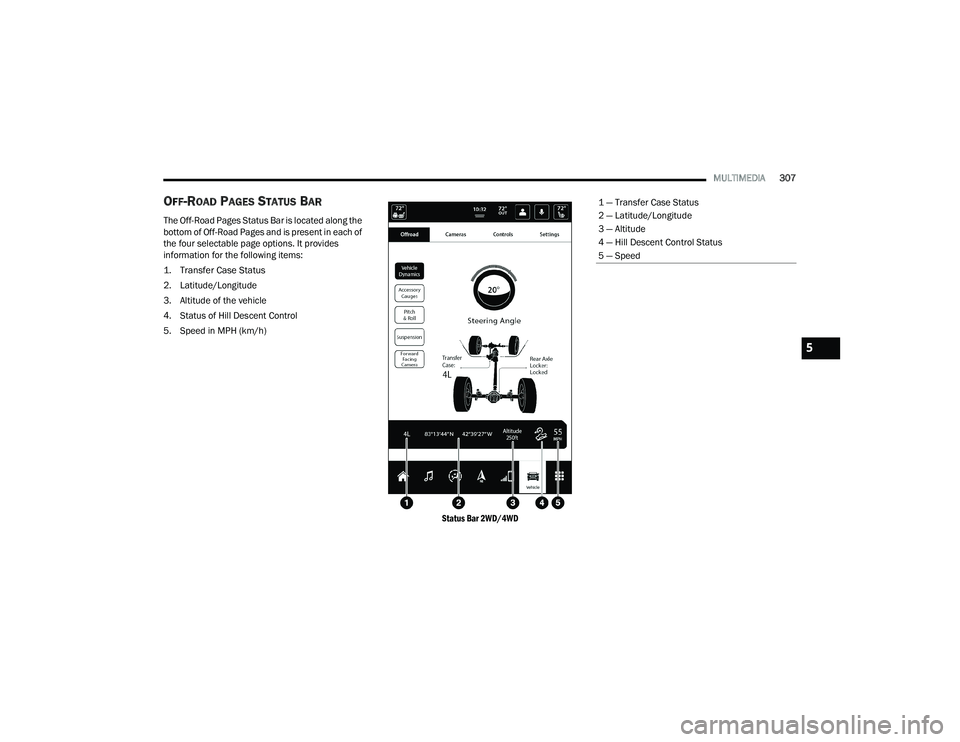
The Off-Road Pages Status Bar is located along the
bottom of Off-Road Pages and is present in each of
the four selectable page options. It provides
information for the following items:
1. Transfer Case Status
2. Latitude/Longitude
3. Altitude of the vehicle
4. Status of Hill Descent Control
5. Speed in MPH (km/h)
Status Bar 2WD/4WD
1 — Transfer Case Status
2 — Latitude/Longitude
3 — Altitude
4 — Hill Descent Control Status
5 — Speed
5
22_DT_OM_EN_USC_t.book Page 307
Page 310 of 496
308MULTIMEDIA
VEHICLE DYNAMICS
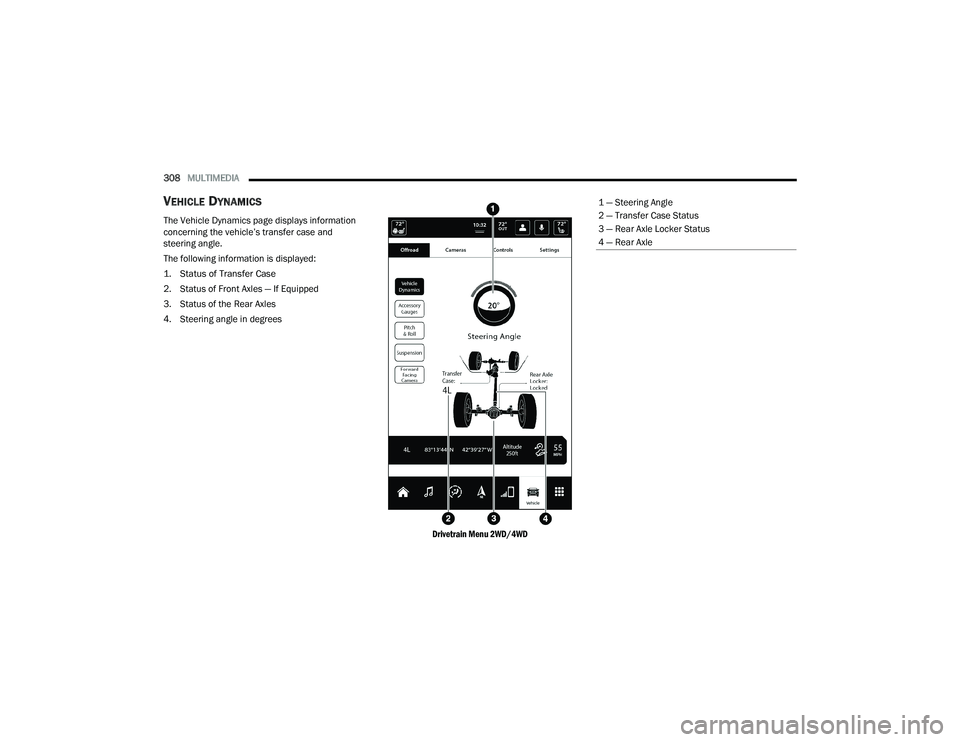
The Vehicle Dynamics page displays information
concerning the vehicle’s transfer case and
steering angle.
The following information is displayed:
1. Status of Transfer Case
2. Status of Front Axles — If Equipped
3. Status of the Rear Axles
4. Steering angle in degrees
Drivetrain Menu 2WD/4WD
1 — Steering Angle
2 — Transfer Case Status
3 — Rear Axle Locker Status
4 — Rear Axle
22_DT_OM_EN_USC_t.book Page 308
Page 311 of 496
MULTIMEDIA309
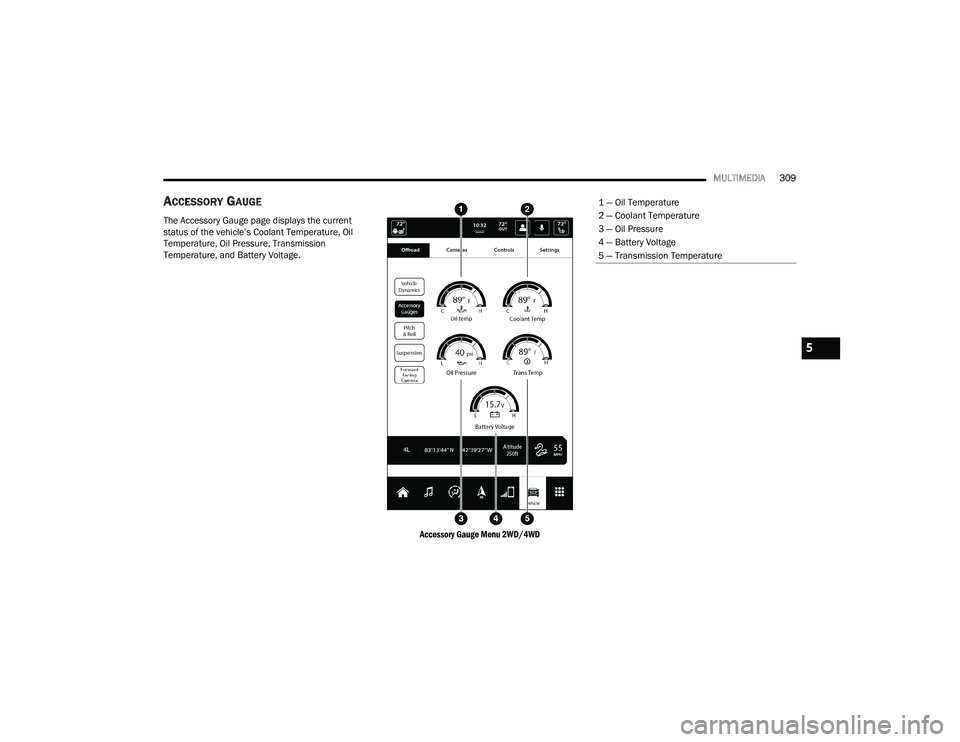
ACCESSORY GAUGE
The Accessory Gauge page displays the current
status of the vehicle’s Coolant Temperature, Oil
Temperature, Oil Pressure, Transmission
Temperature, and Battery Voltage.
Accessory Gauge Menu 2WD/4WD
1 — Oil Temperature
2 — Coolant Temperature
3 — Oil Pressure
4 — Battery Voltage
5 — Transmission Temperature
5
22_DT_OM_EN_USC_t.book Page 309
Page 312 of 496
310MULTIMEDIA
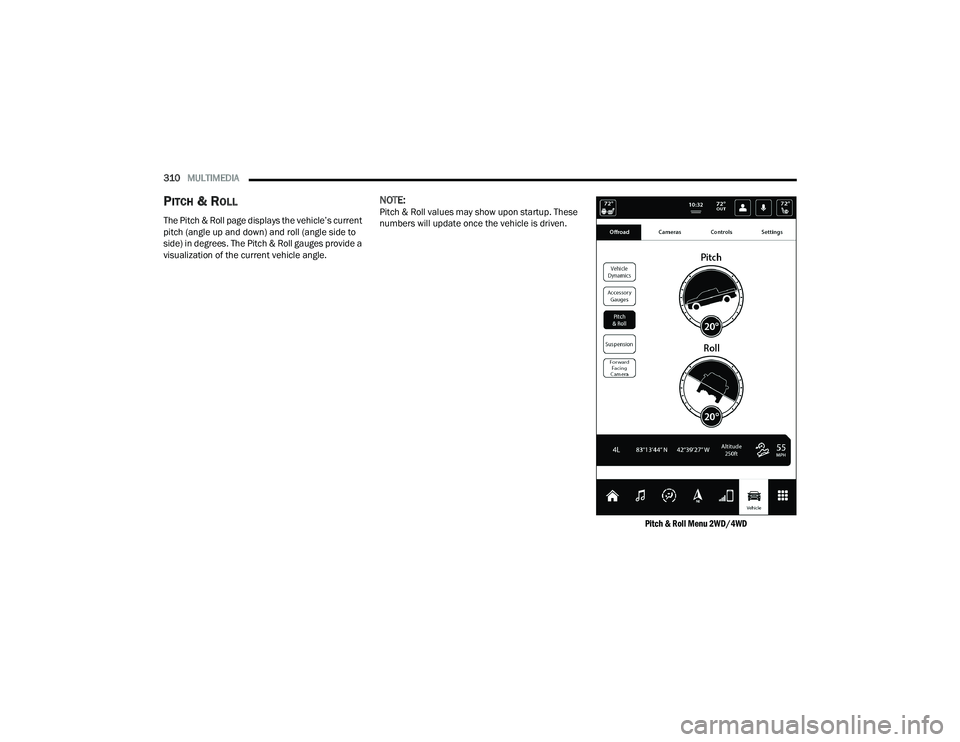
PITCH & ROLL
The Pitch & Roll page displays the vehicle’s current
pitch (angle up and down) and roll (angle side to
side) in degrees. The Pitch & Roll gauges provide a
visualization of the current vehicle angle.
NOTE:Pitch & Roll values may show upon startup. These
numbers will update once the vehicle is driven.
Pitch & Roll Menu 2WD/4WD
22_DT_OM_EN_USC_t.book Page 310