air condition RAM 1500 2022 Owner's Manual
[x] Cancel search | Manufacturer: RAM, Model Year: 2022, Model line: 1500, Model: RAM 1500 2022Pages: 496, PDF Size: 18.03 MB
Page 137 of 496
GETTING TO KNOW YOUR INSTRUMENT PANEL135
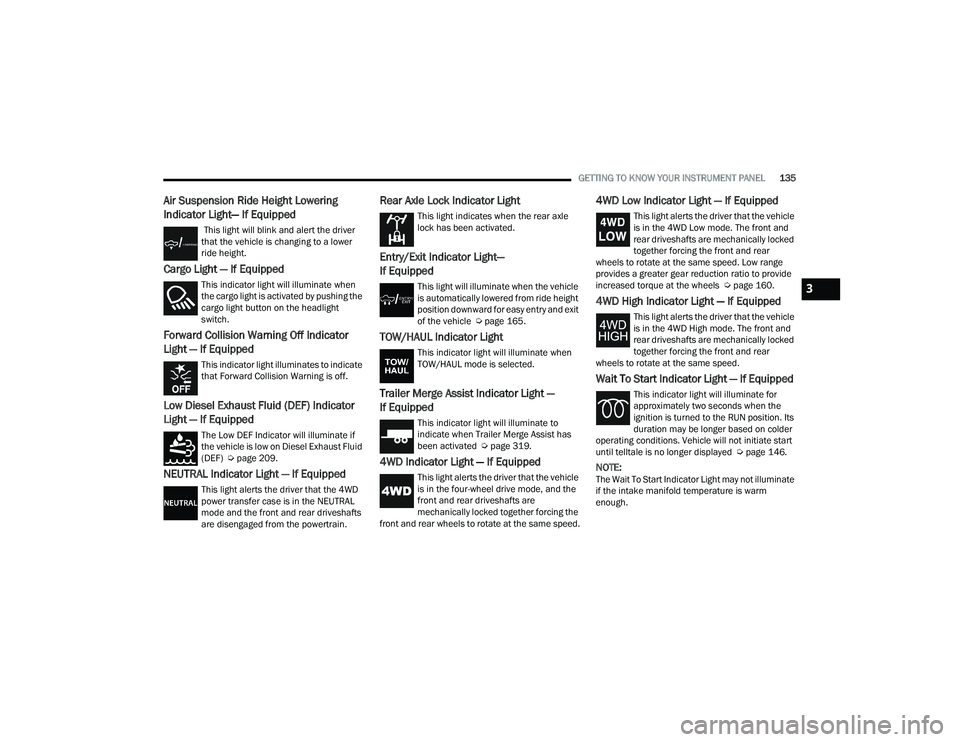
Air Suspension Ride Height Lowering
Indicator Light— If Equipped
This light will blink and alert the driver
that the vehicle is changing to a lower
ride height.
Cargo Light — If Equipped
This indicator light will illuminate when
the cargo light is activated by pushing the
cargo light button on the headlight
switch.
Forward Collision Warning Off Indicator
Light — If Equipped
This indicator light illuminates to indicate
that Forward Collision Warning is off.
Low Diesel Exhaust Fluid (DEF) Indicator
Light — If Equipped
The Low DEF Indicator will illuminate if
the vehicle is low on Diesel Exhaust Fluid
(DEF) Úpage 209.
NEUTRAL Indicator Light — If Equipped
This light alerts the driver that the 4WD
power transfer case is in the NEUTRAL
mode and the front and rear driveshafts
are disengaged from the powertrain.
Rear Axle Lock Indicator Light
This light indicates when the rear axle
lock has been activated.
Entry/Exit Indicator Light—
If Equipped
This light will illuminate when the vehicle
is automatically lowered from ride height
position downward for easy entry and exit
of the vehicle Ú page 165.
TOW/HAUL Indicator Light
This indicator light will illuminate when
TOW/HAUL mode is selected.
Trailer Merge Assist Indicator Light —
If Equipped
This indicator light will illuminate to
indicate when Trailer Merge Assist has
been activated Ú page 319.
4WD Indicator Light — If Equipped
This light alerts the driver that the vehicle
is in the four-wheel drive mode, and the
front and rear driveshafts are
mechanically locked together forcing the
front and rear wheels to rotate at the same speed.
4WD Low Indicator Light — If Equipped
This light alerts the driver that the vehicle
is in the 4WD Low mode. The front and
rear driveshafts are mechanically locked
together forcing the front and rear
wheels to rotate at the same speed. Low range
provides a greater gear reduction ratio to provide
increased torque at the wheels Ú page 160.
4WD High Indicator Light — If Equipped
This light alerts the driver that the vehicle
is in the 4WD High mode. The front and
rear driveshafts are mechanically locked
together forcing the front and rear
wheels to rotate at the same speed.
Wait To Start Indicator Light — If Equipped
This indicator light will illuminate for
approximately two seconds when the
ignition is turned to the RUN position. Its
duration may be longer based on colder
operating conditions. Vehicle will not initiate start
until telltale is no longer displayed Ú page 146.
NOTE:The Wait To Start Indicator Light may not illuminate
if the intake manifold temperature is warm
enough.
3
22_DT_OM_EN_USC_t.book Page 135
Page 145 of 496

STARTING AND OPERATING143
(Continued)
If the driver shifts into PARK while moving, the
vehicle may AutoPark.
AutoPark will engage
ONLY when vehicle speed is
1.2 mph (1.9 km/h) or less.
The message “ Vehicle Speed is Too High to Shift to
P” will be displayed in the instrument cluster if
vehicle speed is above 1.2 mph (1.9 km/h).
4WD LOW — If Equipped
AutoPark will be disabled when operating the
vehicle in 4WD LOW.
The message “ AutoPark Disabled ” will be
displayed in the instrument cluster.
Additional customer warnings will be given when
all of these conditions are met:
Vehicle is not in PARK
Driver’s door is ajar
Vehicle is in 4WD LOW The message “
AutoPark Not Engaged” will be
displayed in the instrument cluster. A warning
chime will continue until you shift the vehicle into
PARK or the driver’s door is closed.
ALWAYS DO A VISUAL CHECK
that your vehicle is in
PARK by looking for the "P" in the instrument
cluster display and near the gear selector. As an
added precaution, always apply the parking brake
when exiting the vehicle.
IF ENGINE FAILS TO START
If the engine fails to start after you have followed
the “Normal Starting” procedure, it may be
flooded. Push the accelerator pedal all the way to
the floor and hold it there while the engine is
cranking. This should clear any excess fuel in case
the engine is flooded.
The starter motor will engage automatically, run for
10 seconds, and then disengage. Once this occurs,
release the accelerator pedal and the brake pedal,
wait 10 to 15 seconds, then repeat the “Normal
Starting” procedure. If the engine has been flooded, it may start to run,
but not have enough power to continue running
when the ignition button/key is released. If this
occurs, continue cranking with the accelerator
pedal pushed all the way to the floor. Release the
accelerator pedal and the ignition button/key once
the engine is running smoothly.
WARNING!
If vehicle speed is above 1.2 mph (1.9 km/h), the
transmission will default to NEUTRAL until the
vehicle speed drops below 1.2 mph (1.9 km/h).
A vehicle left in the NEUTRAL position can roll. As
an added precaution, always apply the parking
brake when exiting the vehicle.
WARNING!
Never pour fuel or other flammable liquid into
the throttle body air inlet opening in an
attempt to start the vehicle. This could result
in flash fire causing serious personal injury.
Do not attempt to push or tow your vehicle to
get it started. Vehicles equipped with an auto -
matic transmission cannot be started this
way. Unburned fuel could enter the catalytic
converter and once the engine has started,
ignite and damage the converter and vehicle.
If the vehicle has a discharged battery,
booster cables may be used to obtain a start
from a booster battery or the battery in
another vehicle. This type of start can be
dangerous if done improperly Ú page 384.
CAUTION!
To prevent damage to the starter, do not crank
the engine for more than 10 seconds at a time.
Wait 10 to 15 seconds before trying again.
WARNING!
4
22_DT_OM_EN_USC_t.book Page 143
Page 149 of 496

STARTING AND OPERATING147
Winter Front Cover
Winter Front Cover
A Winter front or cold weather cover can be used in
ambient temperatures below 32°F (0°C),
especially during extended idle conditions. This
cover is equipped with four flaps for managing
total grille opening in varying ambient
temperatures. If a Winter front or cold weather
cover is to be used the flaps should be in the full
open position to allow air flow to the cooling
module and automatic transmission oil cooler.
When ambient temperatures drop below 0°F
(-17°C) the four flaps need to be closed. A suitable
cold weather cover is available from a Mopar®
dealer.
Engine Warm-Up
Avoid full throttle operation when the engine is
cold. When starting a cold engine, bring the engine
up to operating speed slowly to allow the oil
pressure to stabilize as the engine warms up.
If temperatures are below 32°F (0°C), operate the
engine at moderate speeds for five minutes before
full loads are applied.
ENGINE IDLING
Avoid prolonged idling. Long periods of idling may
be harmful to your engine because combustion
chamber temperatures can drop so low that the
fuel may not burn completely. Incomplete
combustion allows carbon and varnish to form on
piston rings, cylinder head valves, turbochargers,
and injector nozzles. Also, the unburned fuel can
enter the crankcase, diluting the oil and causing
rapid wear to the engine.
4
22_DT_OM_EN_USC_t.book Page 147
Page 169 of 496
STARTING AND OPERATING167
NOTE:Default Ride Height:
Select Aero Height or Normal Ride Height as the
default for all vehicle speeds and operation.
This is the selected height that the suspension
will level for speed changes (e.g. raising from
Entry/Exit Height at speed, lowering from Off
Road Height at speed, etc.).
Default ride height can be changed by manually
adjusting the Air Suspension switch to Normal
Ride Height or Aero Ride Height and staying in
the selected height for 2.5 seconds. It will be
stored as the default ride height and the height
will be maintained until a new default ride
height is selected.
If equipped with a touchscreen radio, all enabling/
disabling of air suspension features must be done
through the radio Ú page 234.
AIR SUSPENSION MODES
The air suspension system has multiple modes to
protect the system in unique situations. The engine
should be running to change between Air
Suspension Modes.
Automatic Areo Mode
To improve aerodynamics, the air suspension
system has a feature which will put the vehicle into
Aeroheight automatically at higher speeds
Úpage 114.
Automatic Aero Mode may be disabled through
vehicle settings in the Uconnect Radio (if
equipped) Ú page 234.
Tire Jack Mode
To assist with changing a tire, the air suspension
system has a feature which allows the automatic
leveling to be disabled Ú page 234.
Transport Mode
For towing your vehicle with four wheels off the
road, the air suspension system has a feature
which will put the vehicle into Entry/Exit height and
disable the automatic load leveling system
Ú page 234. Wheel Alignment Mode
Before performing a wheel alignment, this mode
must be enabled which will put the vehicle into
NRH and disable automatic leveling Ú
page 234.
Protection Strategy
In order to protect the air suspension system, the
vehicle will disable load leveling as required
(suspension overloaded, battery charge low, etc.).
Load leveling will automatically resume as soon as
system operation requirements are met. See an
authorized dealer if system does not resume.
NOTE:For towing with air suspension Ú page 212.
INSTRUMENT CLUSTER DISPLAY
M
ESSAGES
When the appropriate conditions exist, a message
will appear in the instrument cluster display
Ú page 114.
An audible chime will be heard whenever a system
error has been detected.
See an authorized dealer for system service if
normal operation does not resume.
WARNING!
The air suspension system uses a high pressure
volume of air to operate the system. To avoid
personal injury or damage to the system, see an
authorized dealer for service.
4
22_DT_OM_EN_USC_t.book Page 167
Page 170 of 496
168STARTING AND OPERATING
OPERATION
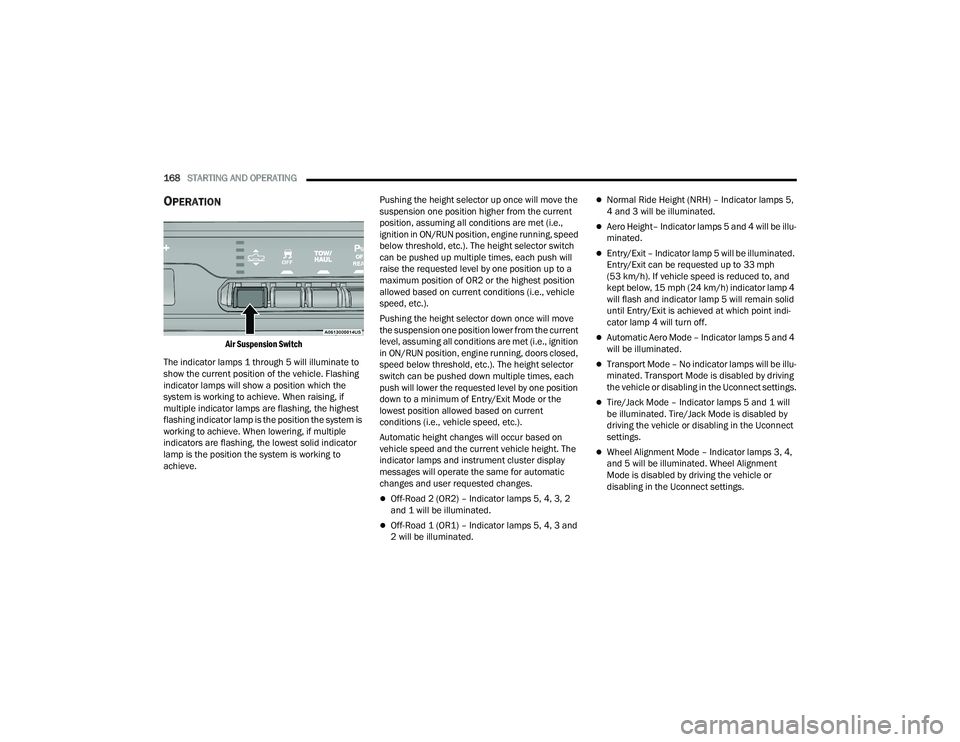
Air Suspension Switch
The indicator lamps 1 through 5 will illuminate to
show the current position of the vehicle. Flashing
indicator lamps will show a position which the
system is working to achieve. When raising, if
multiple indicator lamps are flashing, the highest
flashing indicator lamp is the position the system is
working to achieve. When lowering, if multiple
indicators are flashing, the lowest solid indicator
lamp is the position the system is working to
achieve. Pushing the height selector up once will move the
suspension one position higher from the current
position, assuming all conditions are met (i.e.,
ignition in ON/RUN position, engine running, speed
below threshold, etc.). The height selector switch
can be pushed up multiple times, each push will
raise the requested level by one position up to a
maximum position of OR2 or the highest position
allowed based on current conditions (i.e., vehicle
speed, etc.).
Pushing the height selector down once will move
the suspension one position lower from the current
level, assuming all conditions are met (i.e., ignition
in ON/RUN position, engine running, doors closed,
speed below threshold, etc.). The height selector
switch can be pushed down multiple times, each
push will lower the requested level by one position
down to a minimum of Entry/Exit Mode or the
lowest position allowed based on current
conditions (i.e., vehicle speed, etc.).
Automatic height changes will occur based on
vehicle speed and the current vehicle height. The
indicator lamps and instrument cluster display
messages will operate the same for automatic
changes and user requested changes.
Off-Road 2 (OR2) – Indicator lamps 5, 4, 3, 2
and 1 will be illuminated.
Off-Road 1 (OR1) – Indicator lamps 5, 4, 3 and
2 will be illuminated.
Normal Ride Height (NRH) – Indicator lamps 5,
4 and 3 will be illuminated.
Aero Height– Indicator lamps 5 and 4 will be illu
-
minated.
Entry/Exit – Indicator lamp 5 will be illuminated.
Entry/Exit can be requested up to 33 mph
(53 km/h). If vehicle speed is reduced to, and
kept below, 15 mph (24 km/h) indicator lamp 4 will flash and indicator lamp 5 will remain solid
until Entry/Exit is achieved at which point indi -
cator lamp 4 will turn off.
Automatic Aero Mode – Indicator lamps 5 and 4
will be illuminated.
Transport Mode – No indicator lamps will be illu -
minated. Transport Mode is disabled by driving
the vehicle or disabling in the Uconnect settings.
Tire/Jack Mode – Indicator lamps 5 and 1 will
be illuminated. Tire/Jack Mode is disabled by
driving the vehicle or disabling in the Uconnect
settings.
Wheel Alignment Mode – Indicator lamps 3, 4,
and 5 will be illuminated. Wheel Alignment
Mode is disabled by driving the vehicle or
disabling in the Uconnect settings.
22_DT_OM_EN_USC_t.book Page 168
Page 173 of 496

STARTING AND OPERATING171
AIR SUSPENSION MODES
The air suspension system has multiple modes to
protect the system in unique situations:
Automatic Aero Mode
To improve aerodynamics, the air suspension
system has a feature which will put the vehicle into
Aero height automatically at higher speeds
Úpage 114.
Tire Jack Mode
To assist with changing a tire, the air suspension
system has a feature which allows the automatic
leveling to be disabled Ú page 234.
Transport Mode
For towing your vehicle with four wheels off the
road, the air suspension system has a feature
which will put the vehicle into Entry/Exit height and
disable the automatic load leveling system
Ú page 234.
Wheel Alignment Mode
Before performing a wheel alignment, this mode
must be enabled which moves the vehicle to
normal ride height and disables the automatic
leveling Ú page 234.
Protection Strategy
In order to protect the air suspension system, the
vehicle will disable load leveling as required
(suspension overloaded, battery charge low, etc.). Load leveling will automatically resume as soon as
system operation requirements are met. See an
authorized dealer if system does not resume.
NOTE:For towing with air suspension Ú
page 212.
INSTRUMENT CLUSTER DISPLAY
M
ESSAGES
When the appropriate conditions exist, a message
will appear in the instrument cluster display
Ú page 114.
An audible chime will be heard whenever a system
error has been detected.
See an authorized dealer for system service if
normal operation does not resume.
OPERATION
Air Suspension Switch
The indicator lamps 1 through 4 will illuminate to
show the current position of the vehicle. Flashing
indicator lamps will show a position which the
system is working to achieve. When raising or
lowering, the flashing indicator lamp is the position
the system is working to achieve.
Pushing the height selector switch up once will
move the suspension one position higher from the
current position, assuming all conditions are met
(i.e., key in ON/RUN position, engine running,
speed below threshold, etc.). The height selector
switch can be pushed up multiple times, each push
will raise the requested level by one position up to
a maximum position of OR or the highest position
allowed based on current conditions (i.e., vehicle
speed, etc.).
Pushing the height selector switch down once will
move the suspension one position lower from the
current level, assuming all conditions are met (i.e.,
key in ON/RUN position, engine running, doors
closed, speed below threshold, etc.). The height
selector switch can be pushed down multiple
times, each push will lower the requested level by
one position down to a minimum of Entry/Exit
Mode or the lowest position allowed based on
current conditions (i.e., vehicle speed, etc.).
4
22_DT_OM_EN_USC_t.book Page 171
Page 176 of 496

174STARTING AND OPERATING
NOTE:
Even if the power steering assistance is no
longer operational, it is still possible to steer the
vehicle. Under these conditions there will be a
substantial increase in steering effort, espe -
cially at low speeds and during parking maneu -
vers.
If the condition persists, see an authorized
dealer for service.
FUEL SAVER TECHNOLOGY 5.7L ENGINES
ONLY — IF EQUIPPED
This feature offers improved fuel economy by
shutting off four of the engine's eight cylinders
during light load and cruise conditions. The system
is automatic with no driver inputs or additional
driving skills required.
NOTE:This system may take some time to return to full
functionality after a battery disconnect.
STOP/START SYSTEM — IF EQUIPPED
The Stop/Start function, included with eTorque
equipped vehicles, is developed to save fuel and
reduce emissions. The system will stop the engine
automatically as the vehicle decelerates at low
speeds if the required conditions are met. Releasing the brake pedal or shifting out of DRIVE
will automatically restart the engine.
Vehicles equipped with eTorque contain a
heavy-duty motor generator and an additional
hybrid electric battery to store energy from vehicle
deceleration used to expand engine off energy
storage and for engine startup after a stop, as well
as providing engine torque assist when conditions
are met to enable this.
AUTOSTOP MODE
The Stop/Start feature is enabled after every
normal customer engine start. It will remain in
STOP/START NOT READY until you drive forward
with a vehicle speed greater than 2 mph (3 km/h).
At that time, the system will go into STOP/START
READY and if all other conditions are met, the
system may go into STOP/START AUTOSTOP
ACTIVE Autostop mode.
To Activate The Autostop Mode, The Following
Must Occur:
1. The system must be in STOP/START READY
state. A STOP/START READY message will be
displayed in the instrument cluster within the
Stop/Start section
Ú
page 114.
2. The vehicle must be decelerating and likely coming to a complete stop.
3. The transmission gear selector must be in DRIVE and the brake pedal pressed. The engine will shut down, the tachometer will
move to the zero position and the stop/start
telltale will illuminate indicating you are in an
Autostop. While in an Autostop, the Climate
Controls system may automatically adjust airflow
to maintain cabin comfort. Customer settings will
be maintained upon return to an engine running
condition.
POSSIBLE REASONS THE ENGINE DOES
N
OT AUTOSTOP
Prior to engine shut down, the system will check
many safety and comfort conditions to see if they
are fulfilled. In following situations, the engine will
not Autostop:
Driver’s seat belt is not buckled
Driver’s door is not closed
The vehicle is on a steep grade
Cabin heating or cooling is in process and an
acceptable cabin temperature has not been
achieved
HVAC is set to full defrost mode at a high blower
speed
Engine has not reached normal operating
temperature
Engine or exhaust temperature is too high
The battery is charging
22_DT_OM_EN_USC_t.book Page 174
Page 207 of 496
STARTING AND OPERATING205
Top View
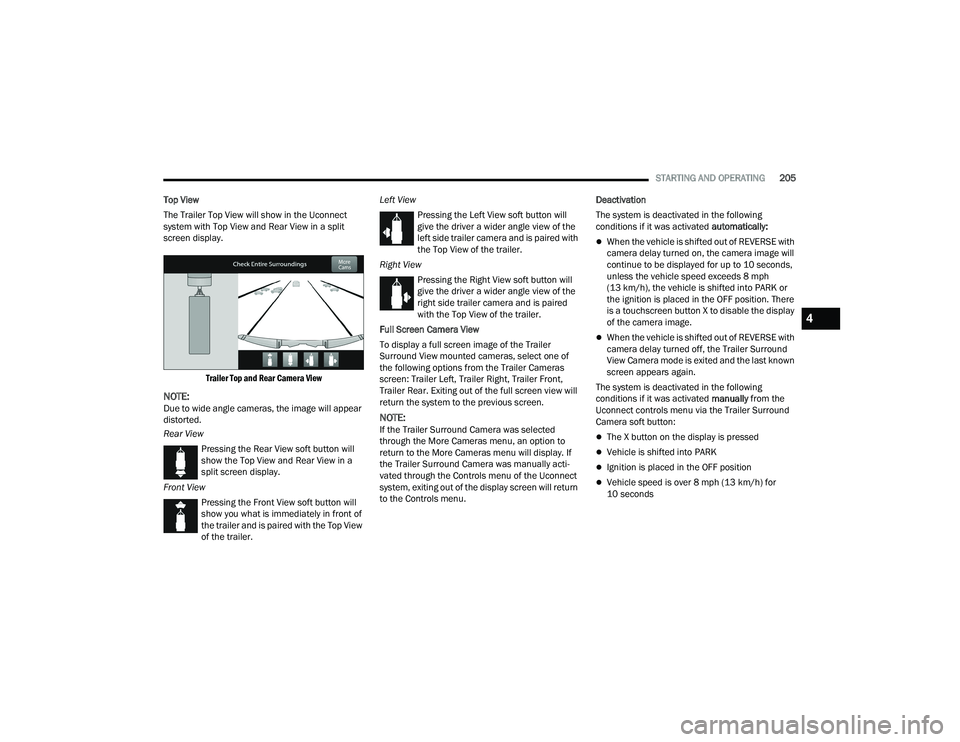
The Trailer Top View will show in the Uconnect
system with Top View and Rear View in a split
screen display.
Trailer Top and Rear Camera View
NOTE:Due to wide angle cameras, the image will appear
distorted.
Rear ViewPressing the Rear View soft button will
show the Top View and Rear View in a
split screen display.
Front View Pressing the Front View soft button will
show you what is immediately in front of
the trailer and is paired with the Top View
of the trailer. Left View
Pressing the Left View soft button will
give the driver a wider angle view of the
left side trailer camera and is paired with
the Top View of the trailer.
Right View Pressing the Right View soft button will
give the driver a wider angle view of the
right side trailer camera and is paired
with the Top View of the trailer.
Full Screen Camera View
To display a full screen image of the Trailer
Surround View mounted cameras, select one of
the following options from the Trailer Cameras
screen: Trailer Left, Trailer Right, Trailer Front,
Trailer Rear. Exiting out of the full screen view will
return the system to the previous screen.NOTE:If the Trailer Surround Camera was selected
through the More Cameras menu, an option to
return to the More Cameras menu will display. If
the Trailer Surround Camera was manually acti-
vated through the Controls menu of the Uconnect
system, exiting out of the display screen will return
to the Controls menu. Deactivation
The system is deactivated in the following
conditions if it was activated
automatically:
When the vehicle is shifted out of REVERSE with
camera delay turned on, the camera image will
continue to be displayed for up to 10 seconds,
unless the vehicle speed exceeds 8 mph
(13 km/h), the vehicle is shifted into PARK or
the ignition is placed in the OFF position. There
is a touchscreen button X to disable the display
of the camera image.
When the vehicle is shifted out of REVERSE with
camera delay turned off, the Trailer Surround
View Camera mode is exited and the last known
screen appears again.
The system is deactivated in the following
conditions if it was activated manually from the
Uconnect controls menu via the Trailer Surround
Camera soft button:
The X button on the display is pressed
Vehicle is shifted into PARK
Ignition is placed in the OFF position
Vehicle speed is over 8 mph (13 km/h) for
10 seconds
4
22_DT_OM_EN_USC_t.book Page 205
Page 211 of 496

STARTING AND OPERATING209
BULK FUEL STORAGE — DIESEL FUEL
If you store quantities of fuel, good maintenance of
the stored fuel is also essential. Fuel contaminated
with water will promote the growth of “microbes.”
These microbes form “slime” that will clog the fuel
filtration system and lines. Drain condensation
from the supply tank and change the line filter on
a regular basis.
NOTE:When a diesel engine is allowed to run out of fuel,
air is pulled into the fuel system.
If the vehicle will not start Úpage 414.
DIESEL EXHAUST FLUID
Your vehicle is equipped with a Selective Catalytic
Reduction (SCR) system to meet diesel emissions
standards required by the Environmental
Protection Agency. The purpose of the SCR system is to reduce levels
of oxides of nitrogen (NO
x) emitted from engines
that are harmful to our health and the environment
to a near-zero level. A small quantity of Diesel
Exhaust Fluid (DEF) is injected into the exhaust
upstream of a catalyst where, when vaporized,
converts smog-forming NO
x into harmless
nitrogen (N
2) and water vapor (H2O), two natural
components of the air we breathe.
DIESEL EXHAUST FLUID STORAGE
Diesel Exhaust Fluid (DEF) is considered a very
stable product with a long shelf life. If DEF is kept
in temperatures between 10° and 90°F (-12° and
32°C), it will last a minimum of one year.
DEF may freeze at temperatures at or below 12°F
(-11°C). The system has been designed to operate
in this environment.
NOTE:When working with DEF, it is important to know
that:
Any containers or parts that come into contact
with DEF must be DEF compatible (plastic or
stainless steel). Copper, brass, aluminum, iron
or non-stainless steel should be avoided as they
are subject to corrosion by DEF.
If DEF is spilled, it should be wiped up
completely.
ADDING DIESEL EXHAUST FLUID
The Diesel Exhaust Fluid (DEF) gauge (located on
the instrument cluster) will display the level of DEF
remaining in the tank Ú page 110.
NOTE:
Driving conditions (altitude, vehicle speed, load,
etc.) will effect the amount of DEF that is used in
your vehicle.
Outside temperature can affect DEF consump -
tion. In cold conditions, 12°F (-11°C) and
below, the DEF gauge may take longer to
operate as intended. This is a normal function of
the system.
There is an electric heater inside the DEF tank
that automatically works when necessary. If the
DEF supply does freeze, the truck will operate
normally until it thaws.WARNING!
Do not open the high pressure fuel system with
the engine running. Engine operation causes
high fuel pressure. High pressure fuel spray can
cause serious injury or death.
4
22_DT_OM_EN_USC_t.book Page 209
Page 217 of 496

STARTING AND OPERATING215
RECOMMENDED DISTRIBUTION HITCH
ADJUSTMENT
Towing With Air Suspension — If Equipped
1. Verify that the vehicle is at the normal ride
height.
NOTE:The vehicle must remain in the engine run position
with all doors closed while attaching a trailer for
proper leveling of the air suspension system.
2. Position the truck to be ready to connect to the trailer (do not connect the trailer).
3. Enable tire jack mode through the instrument cluster or touchscreen radio settings. Tire jack
mode will be canceled and the procedure must
be restarted if the vehicle is driven at speeds
above 5 mph (8 km/h).
4. Measure the height from the top of the front wheel opening on the fender to ground; this is
height H1.
Measuring Height (H)
5. Attach the trailer to the vehicle without the weight-distributing bars connected.
6. Measure the height from the top of the front wheel opening on the fender to the ground;
this is height H2.
7. Install and adjust the tension in the weight-distributing bars per the
manufacturer’s recommendations so that the
height of the front fender is approximately
(H2-H1)/3+H1 (about 1/3 the difference
between H2 and H1 above normal ride height
[H1]). 8. Use the instrument cluster or touchscreen
radio settings and switch off tire jack mode.
Make sure the truck returns to normal ride
height. Perform a visual inspection of the
trailer and weight-distributing hitch to confirm
the manufacturer’s recommendations have
been met.
9. The truck can now be driven.
NOTE:For all towing conditions, we recommend towing
with Tow/Haul mode engaged.
Measurement Example Example Height (mm)
H1
925
H2 946
H2-H1 21
(H2-H1)/3 7
(H2-H1)/3 + H1 932
4
22_DT_OM_EN_USC_t.book Page 215