mirror RAM 1500 2022 Owners Manual
[x] Cancel search | Manufacturer: RAM, Model Year: 2022, Model line: 1500, Model: RAM 1500 2022Pages: 496, PDF Size: 18.03 MB
Page 4 of 496
2
INTRODUCTION
SYMBOLS KEY ........................................................ 11
VAN CONVERSIONS/CAMPERS ........................... 11
CONSUMER INFORMATION — TRUCK-CAMPER
LOADING ................................................................. 11
VEHICLE MODIFICATIONS/ALTERATIONS ......... 13
SYMBOL GLOSSARY.............................................. 13
GETTING TO KNOW YOUR VEHICLE
KEYS ....................................................................... 19 Key Fob .............................................................19
SENTRY KEY ........................................................... 22
IGNITION SWITCH ................................................. 23
Keyless Enter ‘n Go™ Ignition .........................23
REMOTE START — IF EQUIPPED (GASOLINE) .... 24
How To Use Remote Start ................................25
To Exit Remote Start Mode ..............................25
Remote Start Front Defrost Activation —
If Equipped........................................................26
Remote Start Comfort Systems —
If Equipped........................................................26
Remote Start Windshield Wiper De–Icer
Activation — If Equipped ..................................26
Remote Start Abort Message ..........................26 REMOTE START — IF EQUIPPED (DIESEL) .........27
How To Use Remote Start................................27
VEHICLE SECURITY SYSTEM — IF EQUIPPED .....27
To Arm The System ..........................................28
To Disarm The System .....................................28
Rearming Of The System .................................28
Security System Manual Override ...................28
DOORS ....................................................................28
Manual Door Locks ..........................................28
Power Door Locks — If Equipped ....................29
Power Side Steps — If Equipped .....................30
Keyless Enter ‘n Go™ — Passive Entry............30
Automatic Unlock Doors On Exit —
If Equipped........................................................32
Automatic Door Locks — If Equipped ..............32
Child-Protection Door Lock System —
Rear Doors ........................................................32
STEERING WHEEL ..................................................33
Tilt/Telescoping Steering Column ...................33
Heated Steering Wheel — If Equipped ............34
DRIVER MEMORY SETTINGS — IF EQUIPPED .....34
Programming The Memory Feature ................35
Linking And Unlinking The Key Fob
To Memory ........................................................35
Memory Position Recall ...................................35 SEATS ...................................................................... 35
Manual Adjustment (Front Seats) —
If Equipped .......................................................36
Manual Adjustment (Rear Seats).................... 37
Power Adjustment (Front Seats) —
If Equipped .......................................................38
Heated Seats — If Equipped ........................... 39
Ventilated Seats — If Equipped .......................40
Plastic Grocery Bag Retainers ........................ 41
Head Restraints ............................................... 41
UCONNECT VOICE RECOGNITION —
IF EQUIPPED ........................................................... 43
Introducing Voice Recognition ........................ 43
Basic Voice Commands ................................... 43
Get Started .......................................................43
Additional Information ..................................... 44
DRIVER ADJUSTABLE PEDALS —
IF EQUIPPED ........................................................... 44
MIRRORS ................................................................ 45
Inside Rearview Mirror..................................... 45
Illuminated Vanity Mirror ................................. 46
Outside Mirrors ................................................ 47
Outside Automatic Dimming Mirrors —
If Equipped .......................................................47
Power Mirrors ................................................... 48
22_DT_OM_EN_USC_t.book Page 2
Page 5 of 496
3
Power Folding Outside Mirrors For
Standard And Trailer Tow — If Equipped.........48
Trailer Towing Mirrors — If Equipped...............49
Heated Mirrors — If Equipped..........................49
Tilt Side Mirrors In Reverse — If Equipped......49
UNIVERSAL GARAGE DOOR OPENER
(HOMELINK®) — IF EQUIPPED ............................ 49
Before You Begin Programming
HomeLink®.......................................................50
Erasing All The HomeLink® Channels ............50
Identifying Whether You Have A Rolling
Code Or Non-Rolling Code Device ...................50
Programming HomeLink® To A Garage
Door Opener .....................................................51
Programming HomeLink® To A
Miscellaneous Device ......................................52
Reprogramming A Single HomeLink®
Button ...............................................................52
Canadian/Gate Operator Programming .........52
Security .............................................................53
Troubleshooting Tips ........................................53
EXTERIOR LIGHTS.................................................. 54
Headlight Switch...............................................54
Multifunction Lever .........................................55
Daytime Running Lights (DRLs) ......................55
High/Low Beam Switch ...................................55 Automatic High Beam Headlamp
Control — If Equipped ......................................55
Flash-To-Pass ...................................................55
Automatic Headlights — If Equipped ..............56
Parking Lights And Panel Lights ......................56
Automatic Headlights With Wipers .................56
Headlight Delay ................................................56
Lights-On Reminder .........................................56
Fog Lights — If Equipped .................................57
Turn Signals ......................................................57
Lane Change Assist — If Equipped ..................57
Cargo Lights/Trailer Spotter Lights/
Trailer Hitch Light With Bed Lights —
If Equipped........................................................57
Battery Saver ....................................................59
INTERIOR LIGHTS ..................................................59
Courtesy Lights .................................................59
Illuminated Entry .............................................60
WINDSHIELD WIPERS AND WASHERS............... 61
Windshield Wiper Operation ............................61
Rain Sensing Wipers — If Equipped ................62
CLIMATE CONTROLS .............................................62
Automatic Climate Control
Descriptions And Functions ............................62
Manual Climate Control Descriptions And
Functions .........................................................65 Automatic Temperature Control (ATC) —
If Equipped .......................................................67
Climate Voice Recognition — If Equipped ....... 68
Operating Tips .................................................68
INTERIOR STORAGE AND EQUIPMENT ............... 69
Storage ............................................................. 69
USB/AUX Control .............................................. 75
Electrical Power Outlets................................... 76
Power Inverter — If Equipped .......................... 77
Wireless Charging Pad — If Equipped ............. 79
WINDOWS ............................................................. 79
Power Windows ................................................ 79
Automatic Window Features ........................... 80
Reset Auto-Up .................................................. 80
Window Lockout Switch ................................... 81
Power Sliding Rear Window — If Equipped ..... 81
Manual Sliding Rear Window —
If Equipped .......................................................81
Wind Buffeting .................................................81
POWER SUNROOF — IF EQUIPPED ..................... 82
Single Pane Power Sunroof — If Equipped ..... 82
Dual Pane Power Sunroof — If Equipped........ 83
HOOD....................................................................... 85
To Open The Hood............................................ 85
To Close The Hood ........................................... 86
22_DT_OM_EN_USC_t.book Page 3
Page 36 of 496

34GETTING TO KNOW YOUR VEHICLE
HEATED STEERING WHEEL —
I
F EQUIPPED
The steering wheel contains a heating
element that helps warm your hands in
cold weather. The heated steering wheel
has only one temperature setting. Once
the heated steering wheel has been turned on, it
will stay on until the operator turns it off. The
heated steering wheel may not turn on when it is
already warm.
The heated steering wheel button is located on the
center of the instrument panel below the radio
screen, and within the Climate or Controls screen
of the touchscreen.
Press the heated steering wheel button once to
turn the heating element on.
Press the heated steering wheel button a
second time to turn the heating element off.
NOTE:The engine must be running for the heated
steering wheel to operate.
For information on use with the Remote Start
system, see Ú page 26.
DRIVER MEMORY SETTINGS — IF EQUIPPED
This feature allows the driver to save up to two
different memory profiles for easy recall through a
memory switch. Each memory profile saves
desired position settings for the following features:
Driver’s seat
Easy Entry/Exit seat operation (if equipped)
Adjustable pedals (if equipped)
Side mirrors
NOTE:Your vehicle is equipped with two key fobs, each
can be linked to either memory position 1 or 2.
The driver memory settings switch is located on the
driver door, next to the door handle, and consists
of three buttons:
The set (S) button, which is used to activate the
memory save function.
The (1) and (2) buttons which are used to recall
either of two saved memory profiles.
Memory Settings Switch
WARNING!
Persons who are unable to feel pain to the
skin because of advanced age, chronic illness,
diabetes, spinal cord injury, medication,
alcohol use, exhaustion, or other physical
conditions must exercise care when using the
steering wheel heater. It may cause burns
even at low temperatures, especially if used
for long periods.
Do not place anything on the steering wheel
that insulates against heat, such as a blanket
or steering wheel covers of any type or mate -
rial. This may cause the steering wheel heater
to overheat.
22_DT_OM_EN_USC_t.book Page 34
Page 37 of 496

GETTING TO KNOW YOUR VEHICLE35
PROGRAMMING THE MEMORY FEATURE
To create a new memory profile, perform the
following:
NOTE:Saving a new memory profile will erase the
selected profile from memory.
1. Place the vehicle’s ignition in the ON/RUN
position (do not start the engine).
2. Adjust all memory profile settings to desired preferences (i.e., driver’s seat, outside mirrors,
adjustable pedals (if equipped), and radio
station presets).
3. Push the set (S) button on the memory switch, and then push the desired memory button
(1 or 2) within five seconds. The instrument
cluster display will display which memory
position has been set.
NOTE:Memory profiles can be set without the vehicle in
PARK, but the vehicle must be in PARK to recall a
memory profile.
LINKING AND UNLINKING THE KEY FOB
T
O MEMORY
Your key fob can be programmed to recall one of
two saved memory profiles.
NOTE:Before programming your key fob you must select
the “Personal Settings Linked to Key Fob” feature
through the Uconnect system Ú page 234.
To program your key fob, perform the following:
1. Place the vehicle’s ignition in the OFF position.
2. Select a desired memory profile 1 or 2.
3. Once the profile has been recalled, push and release the set (S) button on the memory
switch.
4. Push and release button (1) or (2) accordingly. “Memory Profile Set” (1 or 2) will display in the
instrument cluster.
5. Push and release the lock button on the key fob within 10 seconds.
NOTE:Your key fob can be unlinked from your memory
settings by pushing the set (S) button, followed by
pushing the unlock button on the key fob within
10 seconds.
MEMORY POSITION RECALL
NOTE:If a recall is attempted when the vehicle is not in
PARK, a message will display in the instrument
cluster display. To recall the memory settings for driver one or two,
push the desired memory button number (1 or 2)
or the unlock button on the key fob linked to the
desired memory position.
A recall can be canceled by pushing any of the
memory buttons (S, 1, or 2) during a recall. When
a recall is canceled, the driver seat will stop
moving. A delay of one second will occur before
another recall can be selected.
SEATS
Seats are a part of the Occupant Restraint system
of the vehicle.
WARNING!
It is dangerous to ride in a cargo area, inside
or outside of a vehicle. In a collision, people
riding in these areas are more likely to be seri
-
ously injured or killed.
Do not allow people to ride in any area of your
vehicle that is not equipped with seats and
seat belts. In a collision, people riding in these
areas are more likely to be seriously injured or
killed.
Be sure everyone in your vehicle is in a seat
and using a seat belt properly.
2
22_DT_OM_EN_USC_t.book Page 35
Page 47 of 496
GETTING TO KNOW YOUR VEHICLE45
For vehicles equipped with Driver Memory
Settings Úpage 34, you can use your key fob or
the memory switch on the driver’s door trim
panel to return the adjustable pedals to
pre-programmed positions.MIRRORS
INSIDE REARVIEW MIRROR
Manual Mirror — If Equipped
The mirror head can be adjusted up, down, left,
and right. The mirror should be adjusted to center
on the view through the rear window.
Headlight glare from vehicles behind you can be
reduced by moving the small control under the
mirror to the night position (toward the rear of the
vehicle). The mirror should be adjusted while set in
the day position (toward the windshield).
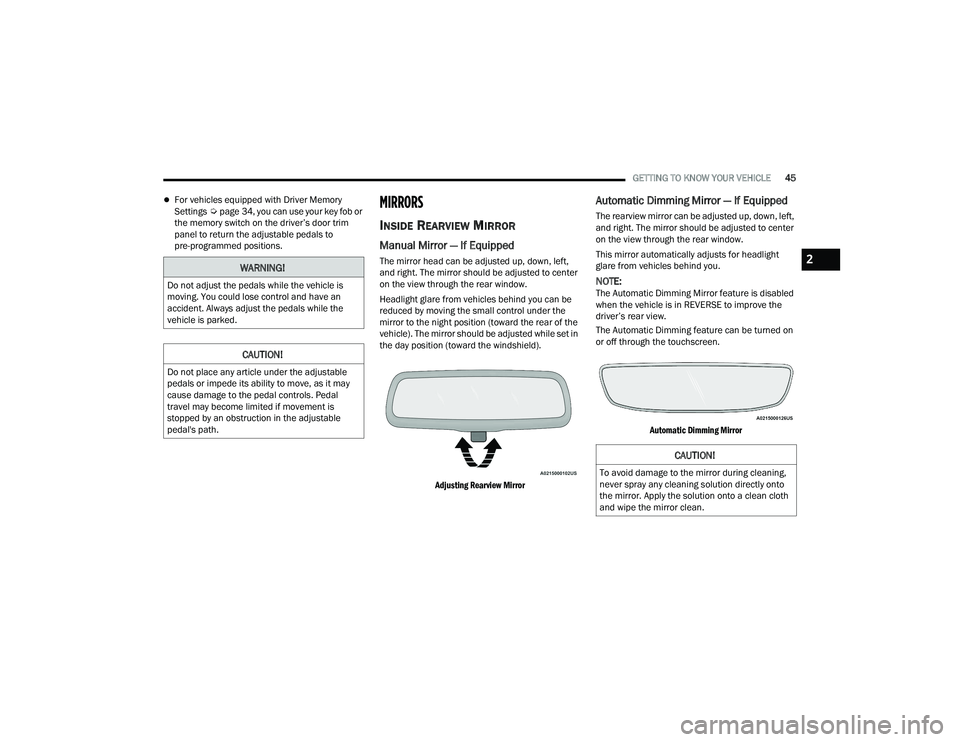
Adjusting Rearview Mirror
Automatic Dimming Mirror — If Equipped
The rearview mirror can be adjusted up, down, left,
and right. The mirror should be adjusted to center
on the view through the rear window.
This mirror automatically adjusts for headlight
glare from vehicles behind you.
NOTE:The Automatic Dimming Mirror feature is disabled
when the vehicle is in REVERSE to improve the
driver’s rear view.
The Automatic Dimming feature can be turned on
or off through the touchscreen.
Automatic Dimming Mirror
WARNING!
Do not adjust the pedals while the vehicle is
moving. You could lose control and have an
accident. Always adjust the pedals while the
vehicle is parked.
CAUTION!
Do not place any article under the adjustable
pedals or impede its ability to move, as it may
cause damage to the pedal controls. Pedal
travel may become limited if movement is
stopped by an obstruction in the adjustable
pedal's path.
CAUTION!
To avoid damage to the mirror during cleaning,
never spray any cleaning solution directly onto
the mirror. Apply the solution onto a clean cloth
and wipe the mirror clean.
2
22_DT_OM_EN_USC_t.book Page 45
Page 48 of 496

46GETTING TO KNOW YOUR VEHICLE
Digital Rearview Mirror — If Equipped
The Digital Rearview Mirror provides a high
definition, wide and unobstructed view of the road
behind while driving.
Position the mirror in the regular Automatic
Dimming Mirror mode, then activate the Digital
Rearview Mirror mode.
To activate the Digital Rearview Mirror, pull the
on/off control lever on the bottom of the mirror
rearward toward the driver.
Digital Rearview Mirror
Push the menu button next to the on/off control/
toggle to access the following mirror options:Brightness
Tilt
Pan (if equipped)
Use the left and right buttons to scroll through
menu options.
When not in use, push the on/off forward toward
the windshield to return the mirror to the regular
Automatic Dimming Mirror.
NOTE:The Digital Rearview Mirror is not as effective
during nighttime driving in low light applications
due to low ambient light levels. In the event that it
provides the user with less than expected vision,
the mirror can be reverted to a normal reflective
Automatic Dimming Mirror by pushing the control/
toggle forward in the vehicle and putting the mirror
into Automatic Dimming Mirror mode.
ILLUMINATED VANITY MIRROR
To access an illuminated vanity mirror, flip down
one of the visors and lift the cover.
Lift Cover For Illuminated Mirror
1 — On/Off Control/Toggle
2 — Menu Button
3 — Left Scroll Button
4 — Right Scroll Button
22_DT_OM_EN_USC_t.book Page 46
Page 49 of 496
GETTING TO KNOW YOUR VEHICLE47
“Slide-On-Rod” Features Of Sun Visor —
If Equipped
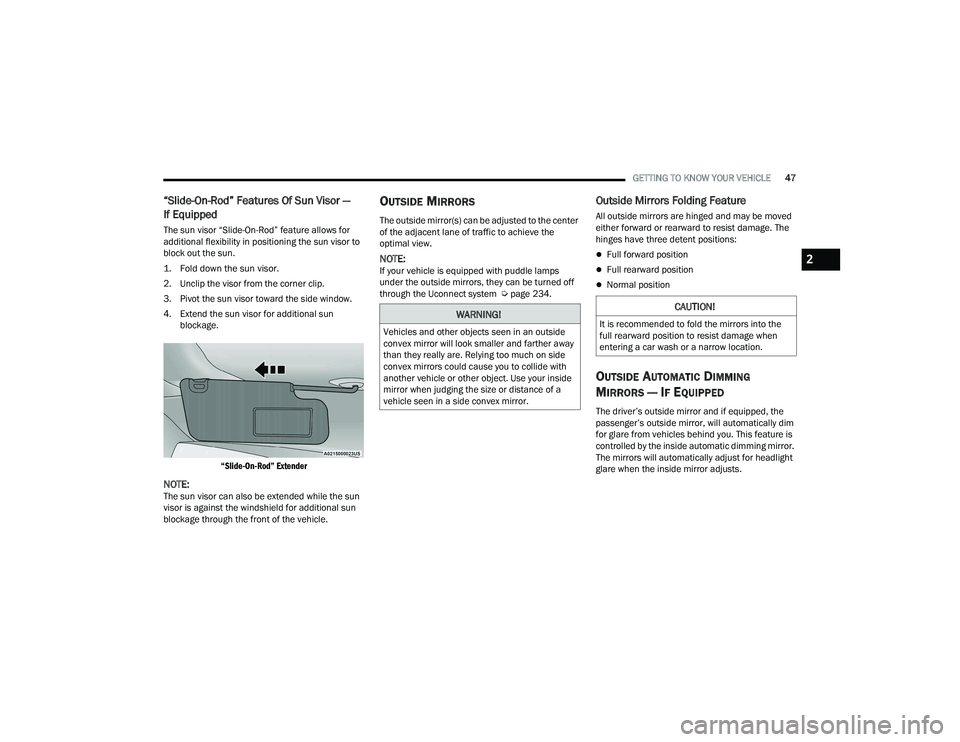
The sun visor “Slide-On-Rod” feature allows for
additional flexibility in positioning the sun visor to
block out the sun.
1. Fold down the sun visor.
2. Unclip the visor from the corner clip.
3. Pivot the sun visor toward the side window.
4. Extend the sun visor for additional sun
blockage.
“Slide-On-Rod” Extender
NOTE:The sun visor can also be extended while the sun
visor is against the windshield for additional sun
blockage through the front of the vehicle.
OUTSIDE MIRRORS
The outside mirror(s) can be adjusted to the center
of the adjacent lane of traffic to achieve the
optimal view.
NOTE:If your vehicle is equipped with puddle lamps
under the outside mirrors, they can be turned off
through the Uconnect system Ú page 234.
Outside Mirrors Folding Feature
All outside mirrors are hinged and may be moved
either forward or rearward to resist damage. The
hinges have three detent positions:
Full forward position
Full rearward position
Normal position
OUTSIDE AUTOMATIC DIMMING
M
IRRORS — IF EQUIPPED
The driver’s outside mirror and if equipped, the
passenger’s outside mirror, will automatically dim
for glare from vehicles behind you. This feature is
controlled by the inside automatic dimming mirror.
The mirrors will automatically adjust for headlight
glare when the inside mirror adjusts.
WARNING!
Vehicles and other objects seen in an outside
convex mirror will look smaller and farther away
than they really are. Relying too much on side
convex mirrors could cause you to collide with
another vehicle or other object. Use your inside
mirror when judging the size or distance of a
vehicle seen in a side convex mirror.
CAUTION!
It is recommended to fold the mirrors into the
full rearward position to resist damage when
entering a car wash or a narrow location.
2
22_DT_OM_EN_USC_t.book Page 47
Page 50 of 496
48GETTING TO KNOW YOUR VEHICLE
POWER MIRRORS
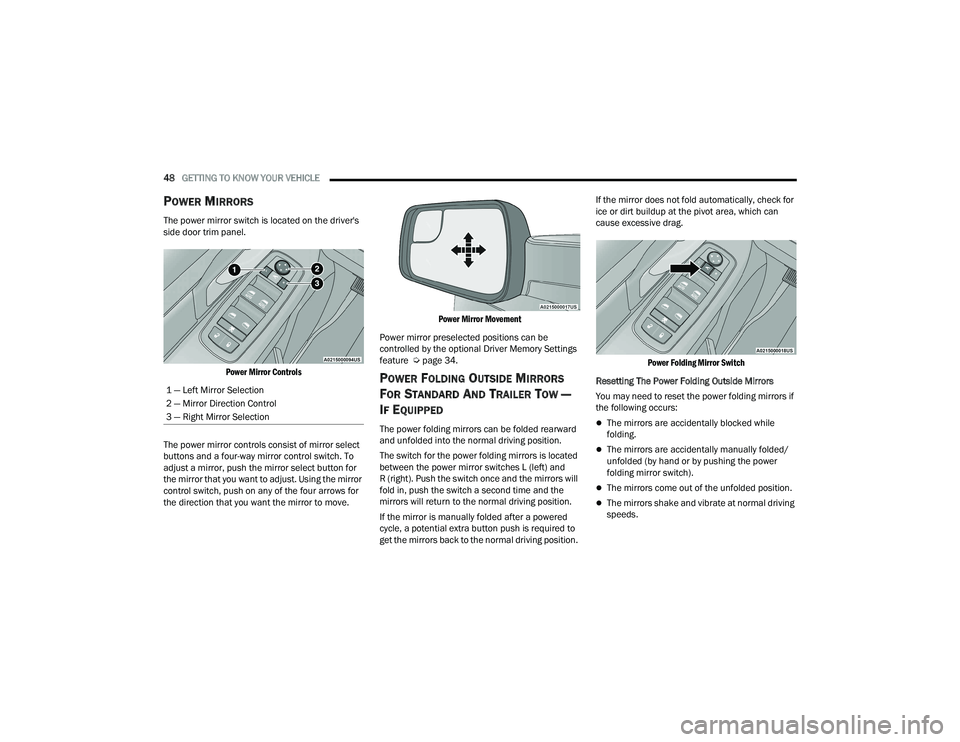
The power mirror switch is located on the driver's
side door trim panel.
Power Mirror Controls
The power mirror controls consist of mirror select
buttons and a four-way mirror control switch. To
adjust a mirror, push the mirror select button for
the mirror that you want to adjust. Using the mirror
control switch, push on any of the four arrows for
the direction that you want the mirror to move.
Power Mirror Movement
Power mirror preselected positions can be
controlled by the optional Driver Memory Settings
feature Ú page 34.
POWER FOLDING OUTSIDE MIRRORS
F
OR STANDARD AND TRAILER TOW —
I
F EQUIPPED
The power folding mirrors can be folded rearward
and unfolded into the normal driving position.
The switch for the power folding mirrors is located
between the power mirror switches L (left) and
R (right). Push the switch once and the mirrors will
fold in, push the switch a second time and the
mirrors will return to the normal driving position.
If the mirror is manually folded after a powered
cycle, a potential extra button push is required to
get the mirrors back to the normal driving position. If the mirror does not fold automatically, check for
ice or dirt buildup at the pivot area, which can
cause excessive drag.
Power Folding Mirror Switch
Resetting The Power Folding Outside Mirrors
You may need to reset the power folding mirrors if
the following occurs:The mirrors are accidentally blocked while
folding.
The mirrors are accidentally manually folded/
unfolded (by hand or by pushing the power
folding mirror switch).
The mirrors come out of the unfolded position.
The mirrors shake and vibrate at normal driving
speeds.
1 — Left Mirror Selection
2 — Mirror Direction Control
3 — Right Mirror Selection
22_DT_OM_EN_USC_t.book Page 48
Page 51 of 496

GETTING TO KNOW YOUR VEHICLE49
To reset the power folding mirrors: Fold and unfold
them by pushing the button (this may require
multiple attempts). This resets them to their
normal driving position.
TRAILER TOWING MIRRORS —
I
F EQUIPPED
These mirrors are designed with an adjustable
mirror head to provide a greater vision range when
towing extra-wide loads. To change position
inboard or outboard, the mirror head should be
rotated (flipped in or out).
Trailer Towing Position
NOTE:Fold the trailer towing mirrors prior to entering an
automated car wash. A small blindspot mirror is located next to the main
mirror and can be adjusted manually.
Blindspot Mirror
HEATED MIRRORS — IF EQUIPPED
These mirrors are heated to melt frost or
ice. This feature will be activated
whenever you turn on the rear window
defroster (if equipped) Ú page 62.
TILT SIDE MIRRORS IN REVERSE —
I
F EQUIPPED
This feature provides automatic outside mirror
positioning which will assist with the driver’s
ground visibility. The outside mirrors will move
slightly downward from the present position
when the vehicle is shifted into REVERSE. The outside mirrors will then return to the original
position when the vehicle is shifted out of
REVERSE. If the vehicle is equipped with Driver
Memory Settings, this feature will be linked to the
programmable settings.
NOTE:The Tilt Side Mirrors In Reverse feature can be
turned on and off using the Uconnect system
Ú
page 234.
UNIVERSAL GARAGE DOOR OPENER
(HOMELINK®) — IF EQUIPPED
HomeLink® Buttons
2
22_DT_OM_EN_USC_t.book Page 49
Page 57 of 496
GETTING TO KNOW YOUR VEHICLE55
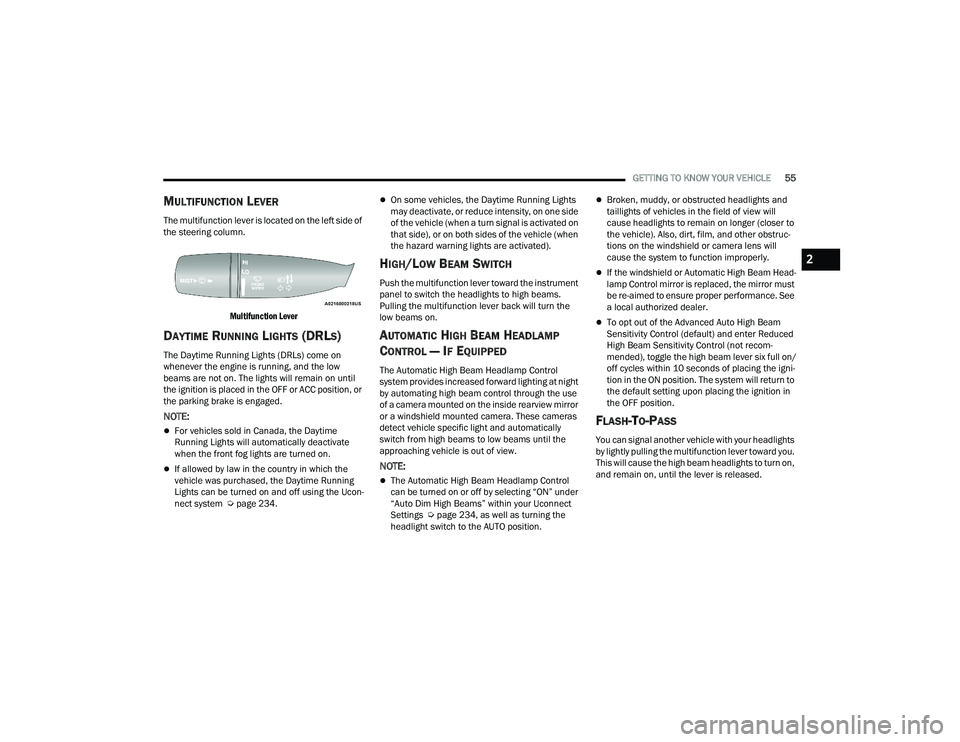
MULTIFUNCTION LEVER
The multifunction lever is located on the left side of
the steering column.
Multifunction Lever
DAYTIME RUNNING LIGHTS (DRLS)
The Daytime Running Lights (DRLs) come on
whenever the engine is running, and the low
beams are not on. The lights will remain on until
the ignition is placed in the OFF or ACC position, or
the parking brake is engaged.
NOTE:
For vehicles sold in Canada, the Daytime
Running Lights will automatically deactivate
when the front fog lights are turned on.
If allowed by law in the country in which the
vehicle was purchased, the Daytime Running
Lights can be turned on and off using the Ucon -
nect system Ú page 234.
On some vehicles, the Daytime Running Lights
may deactivate, or reduce intensity, on one side
of the vehicle (when a turn signal is activated on
that side), or on both sides of the vehicle (when
the hazard warning lights are activated).
HIGH/LOW BEAM SWITCH
Push the multifunction lever toward the instrument
panel to switch the headlights to high beams.
Pulling the multifunction lever back will turn the
low beams on.
AUTOMATIC HIGH BEAM HEADLAMP
C
ONTROL — IF EQUIPPED
The Automatic High Beam Headlamp Control
system provides increased forward lighting at night
by automating high beam control through the use
of a camera mounted on the inside rearview mirror
or a windshield mounted camera. These cameras
detect vehicle specific light and automatically
switch from high beams to low beams until the
approaching vehicle is out of view.
NOTE:
The Automatic High Beam Headlamp Control
can be turned on or off by selecting “ON” under
“Auto Dim High Beams” within your Uconnect
Settings Ú page 234, as well as turning the
headlight switch to the AUTO position.
Broken, muddy, or obstructed headlights and
taillights of vehicles in the field of view will
cause headlights to remain on longer (closer to
the vehicle). Also, dirt, film, and other obstruc -
tions on the windshield or camera lens will
cause the system to function improperly.
If the windshield or Automatic High Beam Head -
lamp Control mirror is replaced, the mirror must
be re-aimed to ensure proper performance. See
a local authorized dealer.
To opt out of the Advanced Auto High Beam
Sensitivity Control (default) and enter Reduced
High Beam Sensitivity Control (not recom -
mended), toggle the high beam lever six full on/
off cycles within 10 seconds of placing the igni -
tion in the ON position. The system will return to
the default setting upon placing the ignition in
the OFF position.
FLASH-TO-PASS
You can signal another vehicle with your headlights
by lightly pulling the multifunction lever toward you.
This will cause the high beam headlights to turn on,
and remain on, until the lever is released.
2
22_DT_OM_EN_USC_t.book Page 55