transmission RAM 1500 2022 Owner's Guide
[x] Cancel search | Manufacturer: RAM, Model Year: 2022, Model line: 1500, Model: RAM 1500 2022Pages: 496, PDF Size: 18.03 MB
Page 162 of 496
160STARTING AND OPERATING
Transmission shifting will be more noticeable
when AutoStick is enabled.
The system may revert to automatic shift mode
if a fault or overheat condition is detected.
NOTE:When Selec-Speed or Hill Descent Control is
enabled, AutoStick is not active.
To disengage AutoStick, return the gear selector to
the DRIVE position, or press and hold the “+”
paddle shifter (and the gear selector is already in
DRIVE) until "D" is once again indicated in the
instrument cluster. You can shift in or out of
AutoStick at any time without taking your foot off
the accelerator pedal.
When to Use TOW/HAUL Mode
Select TOW/HAUL mode when driving in conditions
such as: driving in hilly areas, towing a trailer,
carrying a heavy load, etc. This mode will improve
performance and reduce the potential for
transmission overheating or failure due to
excessive shifting.
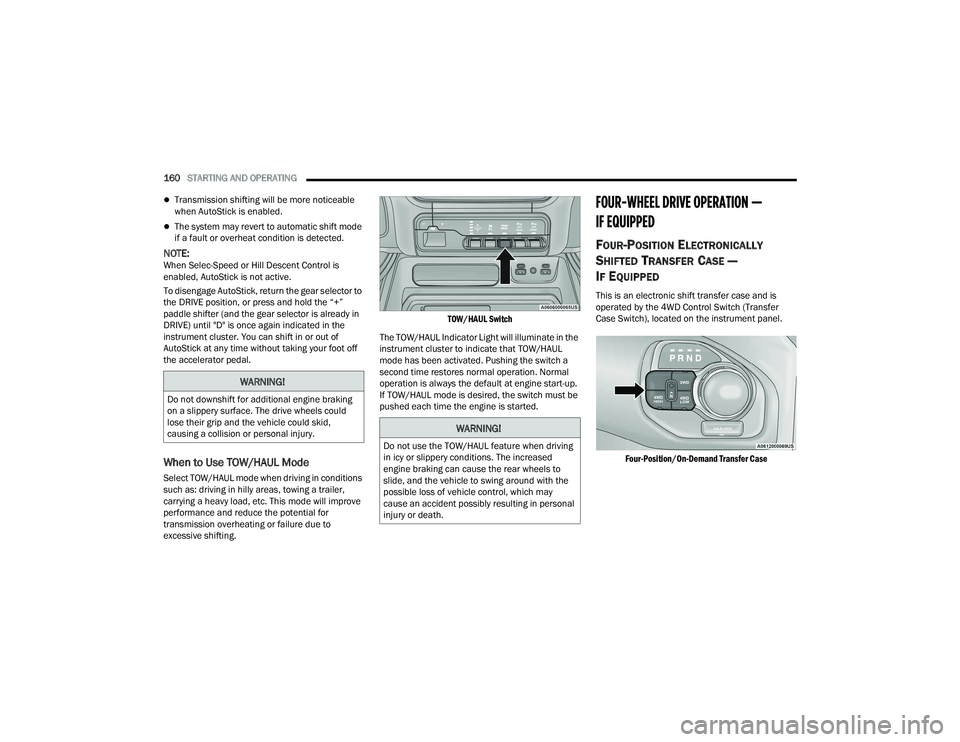
TOW/HAUL Switch
The TOW/HAUL Indicator Light will illuminate in the
instrument cluster to indicate that TOW/HAUL
mode has been activated. Pushing the switch a
second time restores normal operation. Normal
operation is always the default at engine start-up.
If TOW/HAUL mode is desired, the switch must be
pushed each time the engine is started.
FOUR-WHEEL DRIVE OPERATION —
IF EQUIPPED
FOUR-POSITION ELECTRONICALLY
S
HIFTED TRANSFER CASE —
I
F EQUIPPED
This is an electronic shift transfer case and is
operated by the 4WD Control Switch (Transfer
Case Switch), located on the instrument panel.
Four-Position/On-Demand Transfer Case
WARNING!
Do not downshift for additional engine braking
on a slippery surface. The drive wheels could
lose their grip and the vehicle could skid,
causing a collision or personal injury.
WARNING!
Do not use the TOW/HAUL feature when driving
in icy or slippery conditions. The increased
engine braking can cause the rear wheels to
slide, and the vehicle to swing around with the
possible loss of vehicle control, which may
cause an accident possibly resulting in personal
injury or death.
22_DT_OM_EN_USC_t.book Page 160
Page 163 of 496

STARTING AND OPERATING161
This electronically shifted transfer case provides
four positions:
Two-Wheel Drive High Range (2WD) — This
range is for normal street and highway driving
on dry hard surfaced roads. Driving the vehicle
in 2WD will have greater fuel economy benefits
as the front axle is not engaged in 2WD.
Four-Wheel Drive High Range (4WD HIGH) —
This range provides torque to the front drive -
shaft (engages four-wheel drive) which allows
front and rear wheels to spin at the same speed.
This provides additional traction for loose or
slippery road surfaces only.
Four-Wheel Drive Low Range (4WD LOW) — This
range provides low speed four-wheel drive. It
maximizes torque (increased torque over 4WD
HIGH) to the front driveshaft; allowing front and
rear wheels to rotate at the same speed. This
range provides additional traction and
maximum pulling power for loose or slippery
road surfaces only. Do not exceed 25 mph
(40 km/h) in this range.
N (Neutral) — This range disengages both the
front and rear driveshafts from the powertrain.
To be used for flat towing behind another
vehicle Ú page 228.
NOTE:
The 4WD HIGH and 4WD LOW positions are
designed for loose, slippery road surfaces only.
Driving in the 4WD HIGH and 4WD LOW posi -
tions on dry, hard surfaced roads may cause
increased tire wear and damage to the driveline
components.
The transfer case N (Neutral) button is located
in the center of the 4WD Control Switch and is
pushed by using a ballpoint pen or similar
object. The transfer case N (Neutral) position is
to be used for recreational towing only
Ú page 228.
Transfer Case Position Indicator Lights
The Transfer Case Position Indicator Lights (4WD
HIGH and 4WD LOW) are located in the instrument
cluster and indicate the current and desired
transfer case selection. When you select a
different transfer case position, the indicator lights
will do the following:
1. The current position indicator light will turn off.
2. The selected position indicator light will flash until the transfer case completes the shift.
3. When the shift is complete, the indicator light for the selected position will stop flashing and
remain on.
If the transfer case does not shift into the desired
position, one or more of the following events may
occur:
1. The indicator light for the current position will remain on.
2. The newly selected position indicator light will continue to flash.WARNING!
You or others could be injured or killed if you
leave the vehicle unattended with the transfer
case in the N (Neutral) position without first
fully engaging the parking brake. The transfer
case N (Neutral) position disengages both the
front and rear drive shaft from the powertrain,
and will allow the vehicle to roll, even if the
transmission is in PARK. The parking brake
should always be applied when the driver is
not in the vehicle.
The transmission may not engage PARK if the
vehicle is moving. Always bring the vehicle to a
complete stop before shifting to PARK, and
verify that the transmission gear position indi -
cator solidly indicates PARK (P) without
blinking. Ensure that the vehicle is completely
stopped, and the PARK position is properly
indicated, before exiting the vehicle.
4
22_DT_OM_EN_USC_t.book Page 161
Page 165 of 496

STARTING AND OPERATING163
(Continued)
Five-Position/On-Demand Transfer Case — GT Models
This electronically shifted transfer case provides
five positions:
Two-Wheel Drive High Range (2WD) — This
range is for normal street and highway driving
on dry hard surfaced roads. Driving the vehicle
in 2WD will have greater fuel economy benefits
as the front axle is not engaged in 2WD.
Four-Wheel Drive Automatic High Range (4WD
AUTO) — This range sends power to the front
wheels automatically when the vehicle senses a
loss of traction. This range may be used during
varying road conditions.
Four-Wheel Drive High Range (4WD HIGH) —
This range provides torque to the front drive -
shaft (engages four-wheel drive) which allows
front and rear wheels to spin at the same speed.
This provides additional traction for loose or
slippery road surfaces only.
Four-Wheel Drive Low Range (4WD LOW) — This
range provides low speed four-wheel drive. It
maximizes torque (increased torque over 4WD
HIGH) to the front driveshaft; allowing front and
rear wheels to rotate at the same speed. This
range provides additional traction and
maximum pulling power for loose or slippery
road surfaces only. Do not exceed 25 mph
(40 km/h) in this range.
N (Neutral) — This range disengages both the
front and rear driveshafts from the powertrain.
To be used for flat towing behind another
vehicle Ú page 228.
NOTE:
The 4WD HIGH and 4WD LOW positions are
designed for loose, slippery road surfaces only.
Driving in the 4WD HIGH and 4WD LOW posi -
tions on dry hard surfaced roads may cause
increased tire wear and damage to the driveline
components.
The transfer case N (Neutral) button is located
in the center of the 4WD Control Switch and is
pushed by using a ballpoint pen or similar
object. The transfer case N (Neutral) position is
to be used for recreational towing only
Ú page 228.
WARNING!
You or others could be injured or killed if you
leave the vehicle unattended with the transfer
case in the N (Neutral) position without first
fully engaging the parking brake. The transfer
case N (Neutral) position disengages both the
front and rear drive shaft from the powertrain,
and will allow the vehicle to roll, even if the
transmission is in PARK. The parking brake
should always be applied when the driver is
not in the vehicle.
The transmission may not engage PARK if the
vehicle is moving. Always bring the vehicle to a
complete stop before shifting to PARK, and
verify that the transmission gear position indi -
cator solidly indicates PARK (P) without
blinking. Ensure that the vehicle is completely
stopped, and the PARK position is properly
indicated, before exiting the vehicle.
WARNING!
4
22_DT_OM_EN_USC_t.book Page 163
Page 176 of 496

174STARTING AND OPERATING
NOTE:
Even if the power steering assistance is no
longer operational, it is still possible to steer the
vehicle. Under these conditions there will be a
substantial increase in steering effort, espe -
cially at low speeds and during parking maneu -
vers.
If the condition persists, see an authorized
dealer for service.
FUEL SAVER TECHNOLOGY 5.7L ENGINES
ONLY — IF EQUIPPED
This feature offers improved fuel economy by
shutting off four of the engine's eight cylinders
during light load and cruise conditions. The system
is automatic with no driver inputs or additional
driving skills required.
NOTE:This system may take some time to return to full
functionality after a battery disconnect.
STOP/START SYSTEM — IF EQUIPPED
The Stop/Start function, included with eTorque
equipped vehicles, is developed to save fuel and
reduce emissions. The system will stop the engine
automatically as the vehicle decelerates at low
speeds if the required conditions are met. Releasing the brake pedal or shifting out of DRIVE
will automatically restart the engine.
Vehicles equipped with eTorque contain a
heavy-duty motor generator and an additional
hybrid electric battery to store energy from vehicle
deceleration used to expand engine off energy
storage and for engine startup after a stop, as well
as providing engine torque assist when conditions
are met to enable this.
AUTOSTOP MODE
The Stop/Start feature is enabled after every
normal customer engine start. It will remain in
STOP/START NOT READY until you drive forward
with a vehicle speed greater than 2 mph (3 km/h).
At that time, the system will go into STOP/START
READY and if all other conditions are met, the
system may go into STOP/START AUTOSTOP
ACTIVE Autostop mode.
To Activate The Autostop Mode, The Following
Must Occur:
1. The system must be in STOP/START READY
state. A STOP/START READY message will be
displayed in the instrument cluster within the
Stop/Start section
Ú
page 114.
2. The vehicle must be decelerating and likely coming to a complete stop.
3. The transmission gear selector must be in DRIVE and the brake pedal pressed. The engine will shut down, the tachometer will
move to the zero position and the stop/start
telltale will illuminate indicating you are in an
Autostop. While in an Autostop, the Climate
Controls system may automatically adjust airflow
to maintain cabin comfort. Customer settings will
be maintained upon return to an engine running
condition.
POSSIBLE REASONS THE ENGINE DOES
N
OT AUTOSTOP
Prior to engine shut down, the system will check
many safety and comfort conditions to see if they
are fulfilled. In following situations, the engine will
not Autostop:
Driver’s seat belt is not buckled
Driver’s door is not closed
The vehicle is on a steep grade
Cabin heating or cooling is in process and an
acceptable cabin temperature has not been
achieved
HVAC is set to full defrost mode at a high blower
speed
Engine has not reached normal operating
temperature
Engine or exhaust temperature is too high
The battery is charging
22_DT_OM_EN_USC_t.book Page 174
Page 177 of 496

STARTING AND OPERATING175
The transmission is not in DRIVE
Hood is open
Transfer case is in 4WD LOW
TOW/HAUL mode is selected
Accelerator pedal input
Excessive 12 Volt loads
Brake application is adequate to obtain and
maintain a stop
It may be possible to operate the vehicle several
consecutive times in extreme conditions and not
meet all criteria to enable an Autostop state.
TO START THE ENGINE WHILE IN
A
UTOSTOP MODE
While in DRIVE, the engine will start when the
brake pedal is released or the throttle pedal is
pressed and the transmission will automatically
reengage upon engine restart.
Conditions That Will Cause The Engine To Start
Automatically While In Autostop Mode
The engine will start automatically when:
The transmission selector is moved from DRIVE
to REVERSE, NEUTRAL, or PARK
To maintain cabin temperature near the HVAC
settings
HVAC is set to full defrost mode
12 Volt demand requires engine restart
Stop/Start OFF switch is pushed
Transfer case is in 4WD LOW
The emissions system override is present
A Stop/Start system error is present
Conditions That Force An Automatic Shift To Park
While In Autostop Mode
The engine will not start automatically and the
transmission will be placed in PARK if:
The driver door is open and brake pedal
released
The driver door is open and the driver seat belt
is unbuckled
The engine hood has been opened
A Stop/Start system error is present
The engine may then be restarted by moving the
transmission shift selector out of PARK (e.g., to
DRIVE) or, in some cases, only by a key start. The
instrument cluster will display a “SHIFT OUT OF
PARK” message, or a “STOP/START KEY START
REQUIRED” message, to indicate which action is
required Ú page 114.
TO MANUALLY TURN OFF THE STOP/
S
TART SYSTEM
Stop/Start OFF Switch
Push the Stop/Start OFF switch (located on the
switch bank). The light on the switch will illuminate.
The “STOP/START OFF” message will appear in the
instrument cluster display and the Autostop mode
will be disabled Ú page 114.
NOTE:The Stop/Start system will reset itself back to the
ON position every time the ignition is turned OFF
and back ON.
TO MANUALLY TURN ON THE STOP/
S
TART SYSTEM
Push the Stop/Start OFF switch (located on the
switch bank). The light on the switch will turn off.
4
22_DT_OM_EN_USC_t.book Page 175
Page 179 of 496
STARTING AND OPERATING177
To Set A Desired Speed
Turn the Cruise Control on.
When the vehicle has reached the desired speed,
push the SET (+) or SET (-) button and release.
Release the accelerator and the vehicle will
operate at the selected speed.
NOTE:The vehicle should be traveling at a steady speed
and on level ground before pushing the SET (+) or
SET (-) button.
To Vary The Speed Setting
To Increase Or Decrease The Set Speed
After setting a speed, you can increase the set
speed by pushing the SET (+) button, or decrease
speed by pushing the SET (-) button.
U.S. Speed (mph)
Pushing the SET (+) , or SET (-) button once will
result in a 1 mph speed adjustment. Each
subsequent tap of the button results in an
adjustment of 1 mph.
If the button is continually pushed, the set
speed will continue to adjust in 5 mph incre -
ments until the button is released. The new set
speed is reflected in the instrument cluster
display. Metric Speed (km/h)
Pushing the SET (+)
, or SET (-) button once will
result in a 1 km/h speed adjustment. Each
subsequent tap of the button results in an
adjustment of 1 km/h.
If the button is continually pushed, the set
speed will continue to adjust in 10 km/h incre -
ments until the button is released. The new set
speed is reflected in the instrument cluster
display.
NOTE:When you override and push the SET (+) or SET (-)
button, the new set speed will be the current speed
of the vehicle.
To Accelerate For Passing
While the Cruise Control is set, press the
accelerator to pass as you would normally. When
the pedal is released, the vehicle will return to the
set speed.
USING CRUISE CONTROL ON HILLS
The transmission may downshift on hills to
maintain the vehicle set speed.
The Cruise Control system maintains speed up and
down hills. A slight speed change on moderate hills
is normal. On steep hills, a greater speed loss or
gain may occur so it may be preferable to drive
without Cruise Control.
To Resume Speed
To resume a previously set speed, push the RES
button and release. Resume can be used at any
speed above 20 mph (32 km/h).
To Deactivate
A tap on the brake pedal, pushing the CANC
(cancel) button, or normal brake pressure while
slowing the vehicle will deactivate the Cruise
Control system without erasing the set speed from
memory.
The following conditions will also deactivate the
Cruise Control system without erasing the set
speed from memory:
Vehicle parking brake is applied
Stability event occurs
Gear selector is moved out of DRIVE
Engine overspeed occurs
WARNING!
Cruise Control can be dangerous where the
system cannot maintain a constant speed. Your
vehicle could go too fast for the conditions, and
you could lose control and have an accident. Do
not use Cruise Control in heavy traffic or on
roads that are winding, icy, snow-covered or
slippery.
4
22_DT_OM_EN_USC_t.book Page 177
Page 181 of 496

STARTING AND OPERATING179
Adaptive Cruise Control (ACC) Operation
The buttons on the right side of the steering wheel
operate the Adaptive Cruise Control system.
Adaptive Cruise Control Buttons
Adaptive Cruise Control (ACC) Menu
The instrument cluster display will show the
current ACC system settings. The information it
displays depends on ACC system status.
Push the Adaptive Cruise Control (ACC) on/off
button until one of the following appears in the
instrument cluster display: Adaptive Cruise Control Off
When ACC is deactivated, the display will read
“Adaptive Cruise Control Off.”
Adaptive Cruise Control Ready
When ACC is activated, but the vehicle speed
setting has not been selected, the display will read
“Adaptive Cruise Control Ready.”
Adaptive Cruise Control Set
When the SET (+) or the SET (-) button is pushed,
the display will read “ACC SET.”
When ACC is set, the set speed will show in the
instrument cluster display.
The ACC screen may display once again if any of
the following ACC activity occurs:
System Cancel
Driver Override
System Off
ACC Proximity Warning
ACC Unavailable Warning
The instrument cluster display will return to the last
display selected after five seconds of no ACC
display activity.
Activating Adaptive Cruise Control (ACC)
The minimum set speed for the ACC system is
20 mph (32 km/h).
When the system is turned on and in the ready
state, the instrument cluster display will read
“ACC Ready.”
When the system is off, the instrument cluster
display will read “Adaptive Cruise Control (ACC)
Off.”
NOTE:You cannot engage ACC under the following condi -
tions:
When in 4WD Low
When the brakes are applied
When the parking brake is applied
When the automatic transmission is in PARK,
REVERSE or NEUTRAL
When the vehicle speed is below the minimum
speed range
When the brakes are overheated
When the driver’s door is open at low speeds
When the driver’s seat belt is unbuckled at low
speeds
When there is a stationary vehicle in front of
your vehicle in close proximity
When Electronic Stability Control (ESC) Full Off
mode is active
1 — Distance Setting Increase
2 — Adaptive Cruise Control (ACC) On/Off
3 — Distance Setting Decrease
4
22_DT_OM_EN_USC_t.book Page 179
Page 201 of 496
STARTING AND OPERATING199
PARKVIEW REAR BACK UP CAMERA
The ParkView Rear Back Up Camera allows you to
see an on-screen image of the rear surroundings of
your vehicle whenever the gear selector is put into
REVERSE. The image will be displayed on the
Navigation/Multimedia radio display screen along
with a caution note to “Check Entire Surroundings”
across the top of the screen. After five seconds this
note will disappear. The ParkView Camera is
located in the center of the tailgate handle.
NOTE:Removing the tailgate will disable the rearview
camera function.
Manual Activation Of The Rear View
Camera:
1. Press the Controls button located on the bottom of the Uconnect display.
2. Press the Back Up Camera icon to turn the Rear View Camera system on.
NOTE:The ParkView Rear Back Up Camera has program -
mable modes of operation that may be selected
through the Uconnect system Ú page 234.When the vehicle is shifted out of REVERSE with
camera delay turned off, the rear camera mode is
exited and the previous screen appears. When the
vehicle is shifted out of REVERSE with camera
delay turned on, the camera image will continue to
be displayed for up to 10 seconds after shifting out
of REVERSE unless the following conditions occur:
The vehicle speed exceeds 8 mph (13 km/h), the
vehicle is shifted into PARK, the vehicle’s ignition is
placed in the OFF position, or the user presses
image defeat X to exit out of the camera video
display.
Whenever the Rear View Camera image is
activated through the Back Up Camera button in
the Controls menu, and the vehicle speed is
greater than, or equal to, 8 mph (13 km/h), a
display timer for the image is initiated. The image
will continue to be displayed until the display timer
exceeds 10 seconds.
NOTE:
If the vehicle speed remains below 8 mph
(13 km/h), the Rear View Camera image will be
displayed continuously until deactivated via the
touchscreen button X, the transmission is
shifted into PARK, or the ignition is placed in the
OFF position.
The touchscreen button X to disable display of
the camera image is made available ONLY when
the vehicle is not in REVERSE. When enabled, active guidelines are overlaid on
the image to illustrate the width of the vehicle and
its projected back up path based on the steering
wheel position. A dashed centerline overlay
indicates the center of the vehicle to assist with
parking or aligning to a hitch/receiver. Different
colored zones indicate the distance to the rear of
the vehicle. The following table shows the
approximate distances for each zone:
Zones
Distance To The Rear
Of The Vehicle
Red 0 - 1 ft (0 - 30 cm)
Yellow 1 ft - 6.5 ft
(30 cm - 2 m)
Green 6.5 ft or greater
(2 m or greater)
WARNING!
Drivers must be careful when backing up even
when using the ParkView Rear Back Up Camera.
Always check carefully behind your vehicle, and
be sure to check for pedestrians, animals, other
vehicles, obstructions, or blind spots before
backing up. You are responsible for the safety of
your surroundings and must continue to pay
attention while backing up. Failure to do so can
result in serious injury or death.
4
22_DT_OM_EN_USC_t.book Page 199
Page 221 of 496
STARTING AND OPERATING219
(Continued)
Instrument Cluster Messages:
“Calibrate Trailer ” will display when a trailer
is not calibrated and the vehicle is at a standstill
while the button is pushed.
“Calibrating Trailer” will display when the trailer
is not calibrated and the vehicle is moving while
the button is pushed.
“To Activate Trailer Steering Shift To P” will
display when the trailer is calibrated success
-
fully, the TRSC activation button is pushed and
the vehicle is not in PARK.
“Trailer Steering Ready, Shift To Reverse” will
display when the button is pushed, trailer is cali -
brated and the vehicle is in PARK.
“Trailer Steering Active” will display after the
driver shifts to REVERSE and indicates the
feature is active.
“Trailer Steering Unavailable” will display if
there is a fault in the system preventing activa -
tion, the driver’s door is open, the driver’s seat
belt is unbuckled, or the tailgate is open. Other reasons the feature may cancel:
The driver overrides steering by placing hands
on the steering wheel.
Trailer tracking is lost.
If the trailer angle becomes excessive, the
brakes apply bringing the vehicle to a stop and
then applying the parking brake.
Trailer steering button is pushed while active.
Vehicle speed goes over 8 mph (12 km/h).
Driver door is open and seat belt is unbuckled.
Transmission shifted to PARK.
Trailer Memory
The trailer steering system will automatically retain
the calibration of the previous five trailers
connected, so recalibration will not be necessary
when hooking up. The next time the vehicle is
started, place the vehicle in DRIVE and drive a
short distance. The TRSC system can then be
activated.
NOTE:Trailers may look different during day and night
conditions. In such cases, the trailer may need to
recalibrate. Some trailers (such as boat trailers) will need to
recalibrate while loaded and unloaded.
NOTE:
The system may not detect a trailer in low light
conditions. In sunny conditions, the perfor
-
mance may be degraded as shadows pass over
the trailer.
The driver is always responsible for safe opera -
tion of truck and trailer.
The driver is always in control of the truck as
well as the trailer and is responsible for
controlling the throttle and brakes.
The system may not function when the camera
lens is blocked, blurred (covered with water,
snow, ice, dirt, etc) and will not work unless the
tailgate is upright and fully latched.
TOWING REQUIREMENTS
To promote proper break-in of your new vehicle
drivetrain components, the following guidelines
are recommended.
CAUTION!
Do not tow a trailer at all during the first
500 miles (805 km) the new vehicle is driven.
The engine, axle or other parts could be
damaged.
4
22_DT_OM_EN_USC_t.book Page 219
Page 222 of 496
220STARTING AND OPERATING
(Continued)
Perform the maintenance listed in the Scheduled
Servicing section for the proper maintenance
intervals
Úpage 393. When towing a trailer, never
exceed the GAWR or GCWR ratings.
Towing Requirements — Tires
Do not attempt to tow a trailer while using a
compact spare tire.
Do not drive more than 50 mph (80 km/h) when
towing while using a full size spare tire.
Proper tire inflation pressures are essential to
the safe and satisfactory operation of your
vehicle.
Check the trailer tires for proper tire inflation
pressures before trailer usage.
Check for signs of tire wear or visible tire
damage before towing a trailer.
Replacing tires with a higher load carrying
capacity will not increase the vehicle's GVWR
and GAWR limits.
For further information Ú page 444.
Towing Requirements — Trailer Brakes
Do not interconnect the hydraulic brake system
or vacuum system of your vehicle with that of
the trailer.
An electronically actuated trailer brake
controller is required when towing a trailer with
electronically actuated brakes. When towing a
trailer equipped with a hydraulic surge actuated
brake system, an electronic brake controller is
not required.
Then, during the first 500 miles (805 km) that
a trailer is towed, do not drive over 50 mph
(80 km/h) and do not make starts at full
throttle. This helps the engine and other parts
of the vehicle wear in at the heavier loads.
WARNING!
Make certain that the load is secured in the
trailer and will not shift during travel. When
trailering cargo that is not fully secured,
dynamic load shifts can occur that may be
difficult for the driver to control. You could lose
control of your vehicle and have a collision.
When hauling cargo or towing a trailer, do not
overload your vehicle or trailer. Overloading
can cause a loss of control, poor performance
or damage to brakes, axle, engine, transmis -
sion, steering, suspension, chassis structure
or tires.
CAUTION!
Safety chains must always be used between
your vehicle and trailer. Always connect the
chains to the hook retainers of the vehicle
hitch. Cross the chains under the trailer
tongue and allow enough slack for turning
corners.
Vehicles with trailers should not be parked on
a grade. When parking, apply the parking
brake on the tow vehicle. Put the tow vehicle
transmission in PARK. For four-wheel drive
vehicles, make sure the transfer case is not in
NEUTRAL. Always, block or "chock" the trailer
wheels.
GCWR must not be exceeded.
Total weight must be distributed between the
tow vehicle and the trailer such that the
following four ratings are not exceeded :
GVWR
GTW
GAWR
Tongue weight rating for the trailer hitch
utilized.
WARNING!
22_DT_OM_EN_USC_t.book Page 220