seats RAM 1500 2022 Owners Manual
[x] Cancel search | Manufacturer: RAM, Model Year: 2022, Model line: 1500, Model: RAM 1500 2022Pages: 496, PDF Size: 18.03 MB
Page 4 of 496
2
INTRODUCTION
SYMBOLS KEY ........................................................ 11
VAN CONVERSIONS/CAMPERS ........................... 11
CONSUMER INFORMATION — TRUCK-CAMPER
LOADING ................................................................. 11
VEHICLE MODIFICATIONS/ALTERATIONS ......... 13
SYMBOL GLOSSARY.............................................. 13
GETTING TO KNOW YOUR VEHICLE
KEYS ....................................................................... 19 Key Fob .............................................................19
SENTRY KEY ........................................................... 22
IGNITION SWITCH ................................................. 23
Keyless Enter ‘n Go™ Ignition .........................23
REMOTE START — IF EQUIPPED (GASOLINE) .... 24
How To Use Remote Start ................................25
To Exit Remote Start Mode ..............................25
Remote Start Front Defrost Activation —
If Equipped........................................................26
Remote Start Comfort Systems —
If Equipped........................................................26
Remote Start Windshield Wiper De–Icer
Activation — If Equipped ..................................26
Remote Start Abort Message ..........................26 REMOTE START — IF EQUIPPED (DIESEL) .........27
How To Use Remote Start................................27
VEHICLE SECURITY SYSTEM — IF EQUIPPED .....27
To Arm The System ..........................................28
To Disarm The System .....................................28
Rearming Of The System .................................28
Security System Manual Override ...................28
DOORS ....................................................................28
Manual Door Locks ..........................................28
Power Door Locks — If Equipped ....................29
Power Side Steps — If Equipped .....................30
Keyless Enter ‘n Go™ — Passive Entry............30
Automatic Unlock Doors On Exit —
If Equipped........................................................32
Automatic Door Locks — If Equipped ..............32
Child-Protection Door Lock System —
Rear Doors ........................................................32
STEERING WHEEL ..................................................33
Tilt/Telescoping Steering Column ...................33
Heated Steering Wheel — If Equipped ............34
DRIVER MEMORY SETTINGS — IF EQUIPPED .....34
Programming The Memory Feature ................35
Linking And Unlinking The Key Fob
To Memory ........................................................35
Memory Position Recall ...................................35 SEATS ...................................................................... 35
Manual Adjustment (Front Seats) —
If Equipped .......................................................36
Manual Adjustment (Rear Seats).................... 37
Power Adjustment (Front Seats) —
If Equipped .......................................................38
Heated Seats — If Equipped ........................... 39
Ventilated Seats — If Equipped .......................40
Plastic Grocery Bag Retainers ........................ 41
Head Restraints ............................................... 41
UCONNECT VOICE RECOGNITION —
IF EQUIPPED ........................................................... 43
Introducing Voice Recognition ........................ 43
Basic Voice Commands ................................... 43
Get Started .......................................................43
Additional Information ..................................... 44
DRIVER ADJUSTABLE PEDALS —
IF EQUIPPED ........................................................... 44
MIRRORS ................................................................ 45
Inside Rearview Mirror..................................... 45
Illuminated Vanity Mirror ................................. 46
Outside Mirrors ................................................ 47
Outside Automatic Dimming Mirrors —
If Equipped .......................................................47
Power Mirrors ................................................... 48
22_DT_OM_EN_USC_t.book Page 2
Page 10 of 496
8
TOWING A DISABLED VEHICLE .......................... 390 Two-Wheel Drive Models............................... 391
Four-Wheel Drive Models.............................. 392Emergency Tow Hooks — If Equipped .......... 392
ENHANCED ACCIDENT RESPONSE SYSTEM
(EARS) .................................................................. 392
EVENT DATA RECORDER (EDR) ......................... 392
SERVICING AND MAINTENANCE
SCHEDULED SERVICING — GASOLINE
ENGINE ................................................................. 393
Maintenance Plan ......................................... 394
SCHEDULED SERVICING — DIESEL
ENGINE ................................................................. 398
Maintenance Plan — Diesel Fuel Up To B5
Biodiesel ....................................................... 399
Additional Maintenance — B6 To B20
Biodiesel ........................................................ 402
ENGINE COMPARTMENT .................................... 403
3.6L Engine With Stop/Start ........................ 403
5.7L Engine Without Stop/Start ................... 404
5.7L Engine With Stop/Start ........................ 405
3.0L Diesel Engine ........................................ 406
Checking Oil Level ......................................... 407
Adding Washer Fluid ..................................... 407
Maintenance-Free Battery ............................ 408
Pressure Washing ......................................... 408 VEHICLE MAINTENANCE..................................... 408
Engine Oil — Gas Engine .............................. 409Engine Oil Filter ............................................ 409
Engine Air Cleaner Filter ............................... 410
Draining Fuel/Water Separator
Filter — Diesel Engine ................................... 412Underbody Mounted Fuel Filter
Replacement — Diesel Engine...................... 413Priming If The Engine Has Run Out
Of Fuel — Diesel Engine ................................ 414Intervention Regeneration Strategy —
Message Process Flow (Diesel Engine) ....... 414
Diesel Exhaust Fluid...................................... 415
Air Conditioner Maintenance........................ 415
Accessory Drive Belt Inspection ................... 418Body Lubrication ........................................... 418Windshield Wiper Blades.............................. 419Exhaust System ............................................ 420
Cooling System ............................................. 421Charge Air Cooler — Inter-Cooler
(Diesel Engine) .............................................. 424
Brake System ............................................... 425
Automatic Transmission .............................. 426Rear Axle And 4x4 Front Driving Axle
Fluid Level...................................................... 427
Transfer Case ................................................ 427Fuses.............................................................. 427
Bulb Replacement......................................... 438 TIRES ..................................................................... 444
Tire Safety Information ................................. 444
Tires — General Information ......................... 451
Tire Types....................................................... 455Spare Tires — If Equipped............................. 455Wheel And Wheel Trim Care......................... 457
Snow Traction Devices ................................. 458
Tire Rotation Recommendations ................ 460
DEPARTMENT OF TRANSPORTATION
UNIFORM TIRE QUALITY GRADES .................... 460
Treadwear...................................................... 460
Traction Grades ............................................. 461Temperature Grades..................................... 461
STORING THE VEHICLE ....................................... 461
BODYWORK .......................................................... 461
Protection From Atmospheric Agents .......... 461
Body And Underbody Maintenance ............. 462
Preserving The Bodywork ............................. 462
INTERIORS ........................................................... 464
Seats And Fabric Parts ................................. 464
Plastic And Coated Parts .............................. 465
Leather Surfaces........................................... 465
Glass Surfaces ............................................. 465
22_DT_OM_EN_USC_t.book Page 8
Page 25 of 496
GETTING TO KNOW YOUR VEHICLE23
The system uses a key fob, keyless push button
ignition and a Radio Frequency (RF) receiver to
prevent unauthorized vehicle operation. Therefore,
only key fobs that are programmed to the vehicle
can be used to start and operate the vehicle. The
system cannot reprogram a key fob obtained from
another vehicle.
After placing the ignition in the ON/RUN position,
the Vehicle Security Light will turn on for three
seconds for a bulb check. If the light remains on
after the bulb check, it indicates that there is a
problem with the electronics. In addition, if the light
begins to flash after the bulb check, it indicates
that someone attempted to start the engine with
an invalid key fob. In the event that a valid key fob
is used to start the engine but there is an issue
with the vehicle electronics, the engine will start
and shut off after two seconds.
If the Vehicle Security Light turns on during normal
vehicle operation (vehicle running for longer than
10 seconds), it indicates that there is a fault in the
electronics. Should this occur, have the vehicle
serviced as soon as possible by an authorized
dealer. All of the key fobs provided with your new vehicle
have been programmed to the vehicle electronics
Ú
page 480.
IGNITION SWITCH
KEYLESS ENTER ‘N GO™ IGNITION
This feature allows the driver to operate the
ignition switch with the push of a button as long as
the key fob is in the passenger compartment.
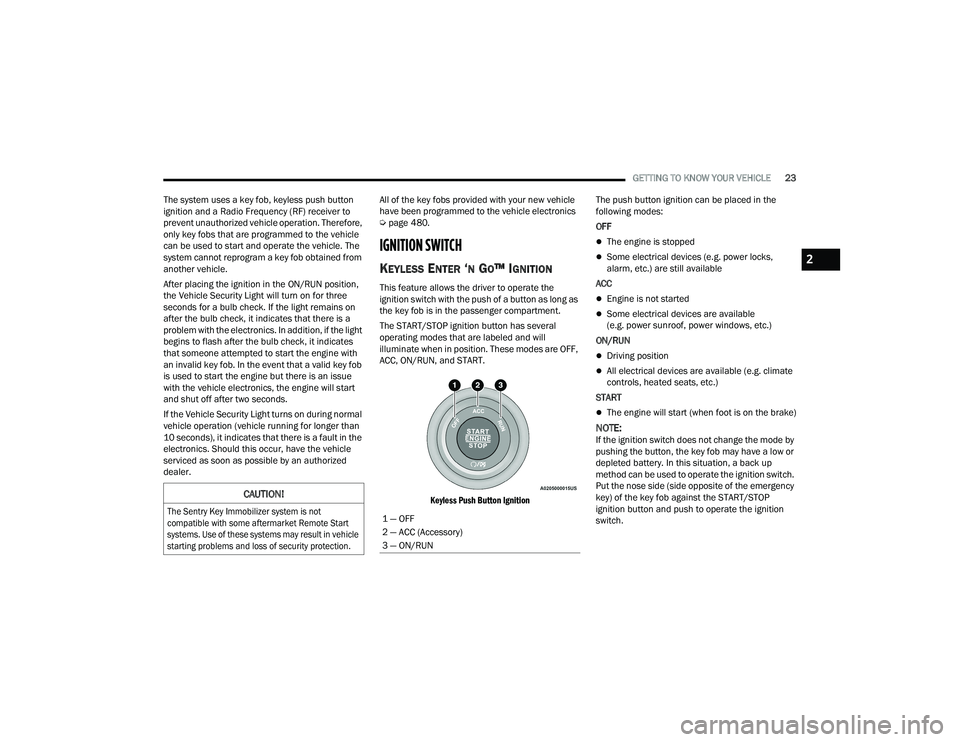
The START/STOP ignition button has several
operating modes that are labeled and will
illuminate when in position. These modes are OFF,
ACC, ON/RUN, and START.
Keyless Push Button Ignition
The push button ignition can be placed in the
following modes:
OFF
The engine is stopped
Some electrical devices (e.g. power locks,
alarm, etc.) are still available
ACC
Engine is not started
Some electrical devices are available
(e.g. power sunroof, power windows, etc.)
ON/RUN
Driving position
All electrical devices are available (e.g. climate
controls, heated seats, etc.)
START
The engine will start (when foot is on the brake)
NOTE:If the ignition switch does not change the mode by
pushing the button, the key fob may have a low or
depleted battery. In this situation, a back up
method can be used to operate the ignition switch.
Put the nose side (side opposite of the emergency
key) of the key fob against the START/STOP
ignition button and push to operate the ignition
switch.
CAUTION!
The Sentry Key Immobilizer system is not
compatible with some aftermarket Remote Start
systems. Use of these systems may result in vehicle
starting problems and loss of security protection.
1 — OFF
2 — ACC (Accessory)
3 — ON/RUN
2
22_DT_OM_EN_USC_t.book Page 23
Page 34 of 496

32GETTING TO KNOW YOUR VEHICLE
NOTE:
After pushing the door handle button, you must
wait two seconds before you can lock or unlock
the doors, using either Passive Entry door
handle. This is done to allow you to check if the
vehicle is locked by pulling the door handle
without the vehicle unlocking.
If Passive Entry is disabled using the Uconnect
Settings, the key protection described in
"Frequency Operated Button Integrated Key
(FOBIK-Safe)" remains active/functional.
The Passive Entry system will not operate if the
key fob battery is depleted.
The LED light on the key fob will not blink if
the key fob battery is low or fully depleted,
but a low key fob battery condition will still
support the Passive Entry system function -
ality. When the key fob battery is low, the
instrument cluster will display a message
indicating that the key fob battery is low
Ú page 480.
AUTOMATIC UNLOCK DOORS ON EXIT —
I
F EQUIPPED
The doors will unlock automatically on vehicles
with power door locks after the following sequence
of actions:
1. The Automatic Unlock Doors On Exit feature is
enabled within the Uconnect system.
2. All doors are closed.
3. The gear selector was not in PARK, then is placed in PARK.
4. Any door is opened.
AUTOMATIC DOOR LOCKS —
I
F EQUIPPED
The auto door lock feature default condition is
enabled. When enabled, the door locks will lock
automatically when the vehicle's speed exceeds
15 mph (24 km/h). The auto door lock feature is
enabled/disabled in the Uconnect Settings
Ú page 234.
CHILD-PROTECTION DOOR LOCK
S
YSTEM — REAR DOORS
To provide a safer environment for small children
riding in the rear seats, the rear doors are equipped
with a Child-Protection Door Lock system.
To use the system, open each rear door, use a flat
blade screwdriver, and rotate the dial to the lock or
unlock position. When the system on a door is
engaged, that door can only be opened by using
the outside door handle even if the inside door lock
is in the unlocked position.
Child Lock Control
22_DT_OM_EN_USC_t.book Page 32
Page 37 of 496

GETTING TO KNOW YOUR VEHICLE35
PROGRAMMING THE MEMORY FEATURE
To create a new memory profile, perform the
following:
NOTE:Saving a new memory profile will erase the
selected profile from memory.
1. Place the vehicle’s ignition in the ON/RUN
position (do not start the engine).
2. Adjust all memory profile settings to desired preferences (i.e., driver’s seat, outside mirrors,
adjustable pedals (if equipped), and radio
station presets).
3. Push the set (S) button on the memory switch, and then push the desired memory button
(1 or 2) within five seconds. The instrument
cluster display will display which memory
position has been set.
NOTE:Memory profiles can be set without the vehicle in
PARK, but the vehicle must be in PARK to recall a
memory profile.
LINKING AND UNLINKING THE KEY FOB
T
O MEMORY
Your key fob can be programmed to recall one of
two saved memory profiles.
NOTE:Before programming your key fob you must select
the “Personal Settings Linked to Key Fob” feature
through the Uconnect system Ú page 234.
To program your key fob, perform the following:
1. Place the vehicle’s ignition in the OFF position.
2. Select a desired memory profile 1 or 2.
3. Once the profile has been recalled, push and release the set (S) button on the memory
switch.
4. Push and release button (1) or (2) accordingly. “Memory Profile Set” (1 or 2) will display in the
instrument cluster.
5. Push and release the lock button on the key fob within 10 seconds.
NOTE:Your key fob can be unlinked from your memory
settings by pushing the set (S) button, followed by
pushing the unlock button on the key fob within
10 seconds.
MEMORY POSITION RECALL
NOTE:If a recall is attempted when the vehicle is not in
PARK, a message will display in the instrument
cluster display. To recall the memory settings for driver one or two,
push the desired memory button number (1 or 2)
or the unlock button on the key fob linked to the
desired memory position.
A recall can be canceled by pushing any of the
memory buttons (S, 1, or 2) during a recall. When
a recall is canceled, the driver seat will stop
moving. A delay of one second will occur before
another recall can be selected.
SEATS
Seats are a part of the Occupant Restraint system
of the vehicle.
WARNING!
It is dangerous to ride in a cargo area, inside
or outside of a vehicle. In a collision, people
riding in these areas are more likely to be seri
-
ously injured or killed.
Do not allow people to ride in any area of your
vehicle that is not equipped with seats and
seat belts. In a collision, people riding in these
areas are more likely to be seriously injured or
killed.
Be sure everyone in your vehicle is in a seat
and using a seat belt properly.
2
22_DT_OM_EN_USC_t.book Page 35
Page 38 of 496
36GETTING TO KNOW YOUR VEHICLE
MANUAL ADJUSTMENT (FRONT SEATS) —
I
F EQUIPPED
Manual Front Seat Forward/Rearward
Adjustment
Both front seats are adjustable forward or
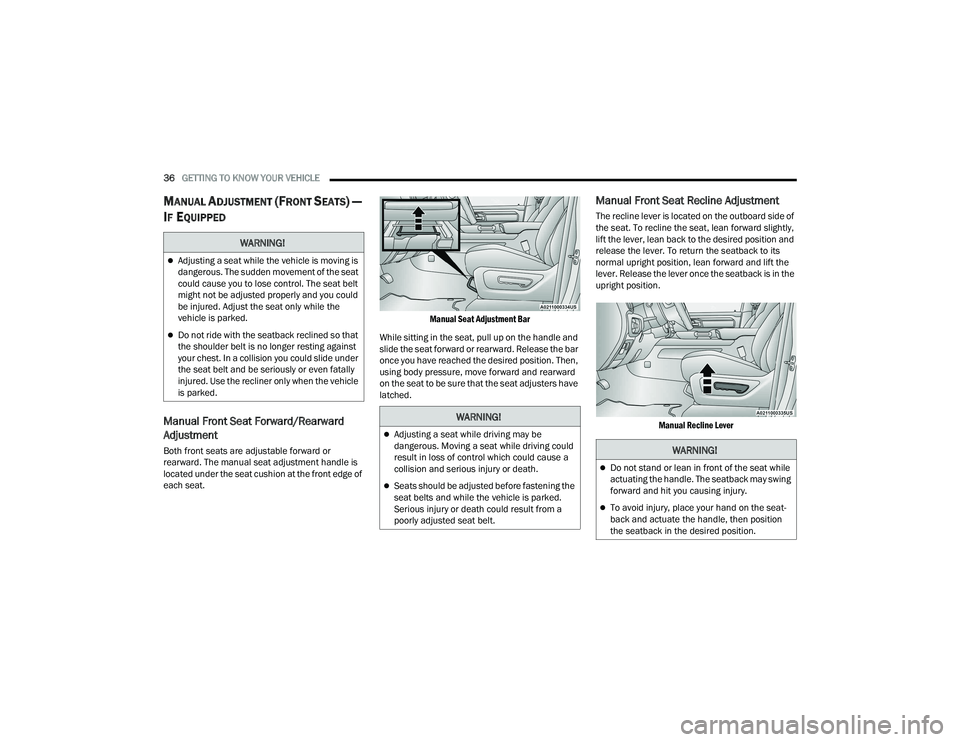
rearward. The manual seat adjustment handle is
located under the seat cushion at the front edge of
each seat.
Manual Seat Adjustment Bar
While sitting in the seat, pull up on the handle and
slide the seat forward or rearward. Release the bar
once you have reached the desired position. Then,
using body pressure, move forward and rearward
on the seat to be sure that the seat adjusters have
latched.
Manual Front Seat Recline Adjustment
The recline lever is located on the outboard side of
the seat. To recline the seat, lean forward slightly,
lift the lever, lean back to the desired position and
release the lever. To return the seatback to its
normal upright position, lean forward and lift the
lever. Release the lever once the seatback is in the
upright position.
Manual Recline Lever
WARNING!
Adjusting a seat while the vehicle is moving is
dangerous. The sudden movement of the seat
could cause you to lose control. The seat belt
might not be adjusted properly and you could
be injured. Adjust the seat only while the
vehicle is parked.
Do not ride with the seatback reclined so that
the shoulder belt is no longer resting against
your chest. In a collision you could slide under
the seat belt and be seriously or even fatally
injured. Use the recliner only when the vehicle
is parked.
WARNING!
Adjusting a seat while driving may be
dangerous. Moving a seat while driving could
result in loss of control which could cause a
collision and serious injury or death.
Seats should be adjusted before fastening the
seat belts and while the vehicle is parked.
Serious injury or death could result from a
poorly adjusted seat belt.
WARNING!
Do not stand or lean in front of the seat while
actuating the handle. The seatback may swing
forward and hit you causing injury.
To avoid injury, place your hand on the seat -
back and actuate the handle, then position
the seatback in the desired position.
22_DT_OM_EN_USC_t.book Page 36
Page 39 of 496
GETTING TO KNOW YOUR VEHICLE37
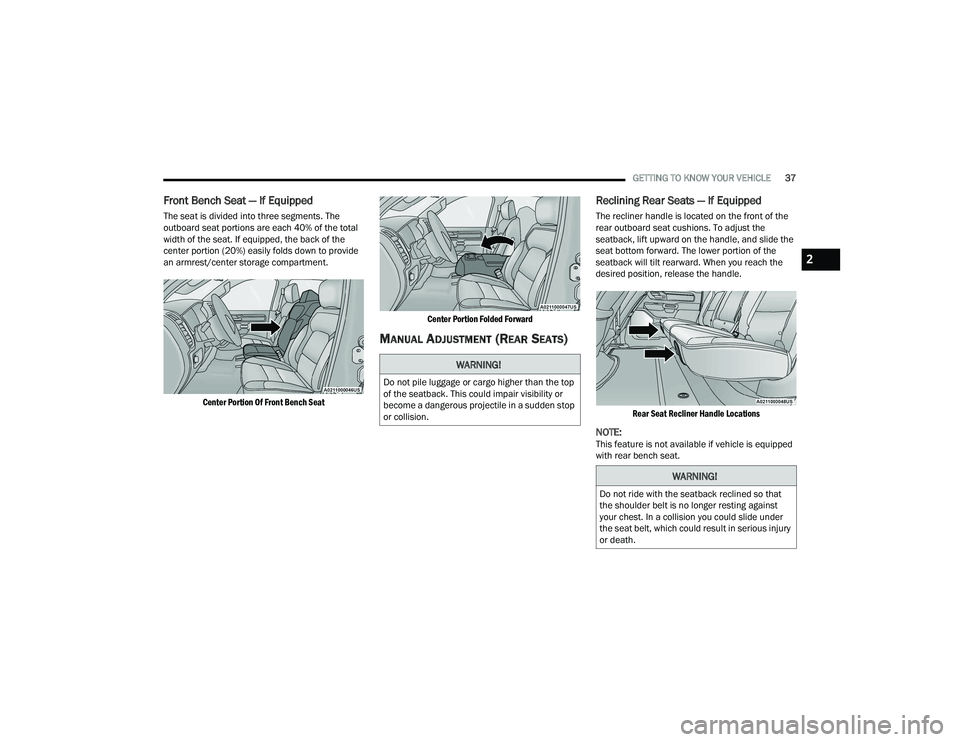
Front Bench Seat — If Equipped
The seat is divided into three segments. The
outboard seat portions are each 40% of the total
width of the seat. If equipped, the back of the
center portion (20%) easily folds down to provide
an armrest/center storage compartment.
Center Portion Of Front Bench Seat Center Portion Folded Forward
MANUAL ADJUSTMENT (REAR SEATS)
Reclining Rear Seats — If Equipped
The recliner handle is located on the front of the
rear outboard seat cushions. To adjust the
seatback, lift upward on the handle, and slide the
seat bottom forward. The lower portion of the
seatback will tilt rearward. When you reach the
desired position, release the handle.
Rear Seat Recliner Handle Locations
NOTE:This feature is not available if vehicle is equipped
with rear bench seat.
WARNING!
Do not pile luggage or cargo higher than the top
of the seatback. This could impair visibility or
become a dangerous projectile in a sudden stop
or collision.
WARNING!
Do not ride with the seatback reclined so that
the shoulder belt is no longer resting against
your chest. In a collision you could slide under
the seat belt, which could result in serious injury
or death.
2
22_DT_OM_EN_USC_t.book Page 37
Page 40 of 496
38GETTING TO KNOW YOUR VEHICLE
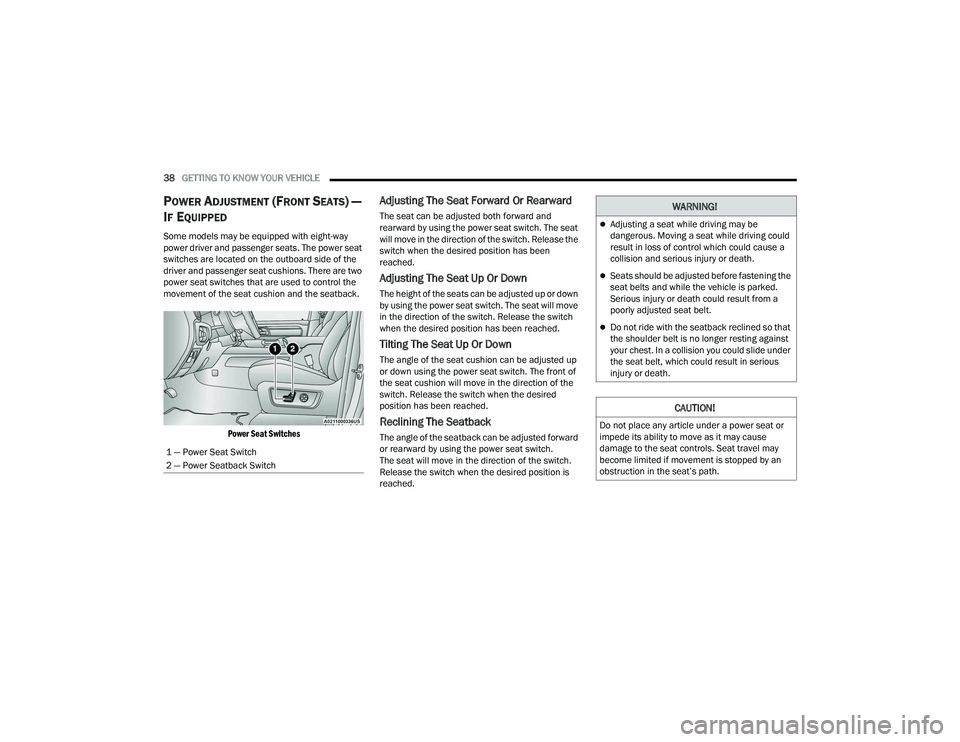
POWER ADJUSTMENT (FRONT SEATS) —
I
F EQUIPPED
Some models may be equipped with eight-way
power driver and passenger seats. The power seat
switches are located on the outboard side of the
driver and passenger seat cushions. There are two
power seat switches that are used to control the
movement of the seat cushion and the seatback.
Power Seat Switches
Adjusting The Seat Forward Or Rearward
The seat can be adjusted both forward and
rearward by using the power seat switch. The seat
will move in the direction of the switch. Release the
switch when the desired position has been
reached.
Adjusting The Seat Up Or Down
The height of the seats can be adjusted up or down
by using the power seat switch. The seat will move
in the direction of the switch. Release the switch
when the desired position has been reached.
Tilting The Seat Up Or Down
The angle of the seat cushion can be adjusted up
or down using the power seat switch. The front of
the seat cushion will move in the direction of the
switch. Release the switch when the desired
position has been reached.
Reclining The Seatback
The angle of the seatback can be adjusted forward
or rearward by using the power seat switch.
The seat will move in the direction of the switch.
Release the switch when the desired position is
reached.
1 — Power Seat Switch
2 — Power Seatback Switch
WARNING!
Adjusting a seat while driving may be
dangerous. Moving a seat while driving could
result in loss of control which could cause a
collision and serious injury or death.
Seats should be adjusted before fastening the
seat belts and while the vehicle is parked.
Serious injury or death could result from a
poorly adjusted seat belt.
Do not ride with the seatback reclined so that
the shoulder belt is no longer resting against
your chest. In a collision you could slide under
the seat belt, which could result in serious
injury or death.
CAUTION!
Do not place any article under a power seat or
impede its ability to move as it may cause
damage to the seat controls. Seat travel may
become limited if movement is stopped by an
obstruction in the seat’s path.
22_DT_OM_EN_USC_t.book Page 38
Page 41 of 496

GETTING TO KNOW YOUR VEHICLE39
Power Lumbar — If Equipped
Vehicles equipped with power driver or passenger
seats may also be equipped with a 2-way or a
4-way power lumbar adjustment. The power
lumbar switch is located on the outboard side of
the power seat. Push the switch forward to
increase the lumbar support. Push the switch
rearward to decrease the lumbar support. If
equipped with a 4-way adjustment, pushing
upward or downward on the switch will raise and
lower the position of the support.
Power Lumbar Switch
Easy Entry/Exit Seat — If Equipped
This feature provides automatic driver’s seat
positioning to enhance driver mobility when
entering and exiting the vehicle.
The distance the driver’s seat moves depends on
where you have the driver’s seat positioned when
you place the vehicle’s ignition in the OFF position.
When you place the vehicle’s ignition in the
OFF position, the driver’s seat will move about
2.4 inches (6 cm) rearward if the driver’s seat
position is greater than or equal to 2.7 inches
(6.77 cm) forward of the rear stop. The seat will
return to its previously set position when you
place the ignition into the ACC or ON/RUN posi -
tion.
When you remove the key fob from the ignition,
the driver’s seat will move to a position
0.3 inches (0.77 cm) forward of the rear stop if
the driver’s seat position is between 0.9 inches
and 2.7 inches (2.27 cm and 6.77 cm) forward
of the rear stop. The seat will return to its previ -
ously set position when you place the ignition to
the ACC or ON/RUN position.
The Easy Entry/Easy Exit feature is disabled
when the driver’s seat position is less than
0.9 inches (2.27 cm) forward of the rear stop. At
this position, there is no benefit to the driver by
moving the seat for Easy Exit or Easy Entry. When enabled in Uconnect Settings, Easy Entry
and Easy Exit positions are stored in each memory
setting profile Ú
page 34.
NOTE:The Easy Entry/Exit feature is enabled or disabled
through the programmable features in the
Uconnect system Ú page 234.
HEATED SEATS — IF EQUIPPED
WARNING!
Persons who are unable to feel pain to the
skin because of advanced age, chronic illness,
diabetes, spinal cord injury, medication,
alcohol use, exhaustion or other physical
condition must exercise care when using the
seat heater. It may cause burns even at low
temperatures, especially if used for long
periods of time.
Do not place anything on the seat or seatback
that insulates against heat, such as a blanket
or cushion. This may cause the seat heater to
overheat. Sitting in a seat that has been over -
heated could cause serious burns due to the
increased surface temperature of the seat.
2
22_DT_OM_EN_USC_t.book Page 39
Page 42 of 496

40GETTING TO KNOW YOUR VEHICLE
Front Heated Seats — If Equipped
The heated seat control buttons are
located on the center stack below the
radio screen, or within the Uconnect
system.
Push the heated seat button once to turn the
HI setting on.
Push the heated seat button a second time to
turn the MED setting on.
Push the heated seat button a third time to turn
the LO setting on.
Push the heated seat button a fourth time to
turn the heating elements off.
NOTE:
Once a heat setting is selected, heat will be felt
within two to five minutes.
The engine must be running for the heated
seats to operate.
The level of heat selected will stay on until the
operator changes it.
For information on use with the Remote Start
system, see Ú page 26.
Rear Heated Seats — If Equipped
On some models, the two rear outboard
seats may be equipped with heated
seats. There are two heated seat
switches that allow the rear passengers
to operate the seats independently. The heated
seat switches for each heater are located on the
rear of the center console.
You can choose from HI, MED, LO, or OFF heat
settings. Indicator lights in each switch indicate the
level of heat in use.
Push the heated seat button once to turn the
HI setting on.
Push the heated seat button a second time to
turn the MED setting on.
Push the heated seat button a third time to turn
the LO setting on.
Push the heated seat button a fourth time to
turn the heating elements off.
NOTE:The level of heat selected will stay on until the
operator changes it.
VENTILATED SEATS — IF EQUIPPED
Front Ventilated Seats
The ventilated seat control buttons are
located on the center stack below the
radio screen, or within the Uconnect
system. The fans operate at three
speeds, HI, MED and LO.
Press the ventilated seat button once to
choose HI.
Press the ventilated seat button a second time
to choose MED.
Press the ventilated seat button a third time to
choose LO.
Press the ventilated seat button a fourth time to
turn the ventilation off.
NOTE:The engine must be running for the ventilated
seats to operate.
For information on use with the Remote Start
system, see Ú page 26.
22_DT_OM_EN_USC_t.book Page 40