change time RAM 1500 2023 User Guide
[x] Cancel search | Manufacturer: RAM, Model Year: 2023, Model line: 1500, Model: RAM 1500 2023Pages: 416, PDF Size: 20.59 MB
Page 106 of 416
104GETTING TO KNOW YOUR INSTRUMENT PANEL
Settings
Head Up Display (HUD) – If Equipped
NOTE:The HUD feature Settings are available at any vehicle
speed Úpage 105.
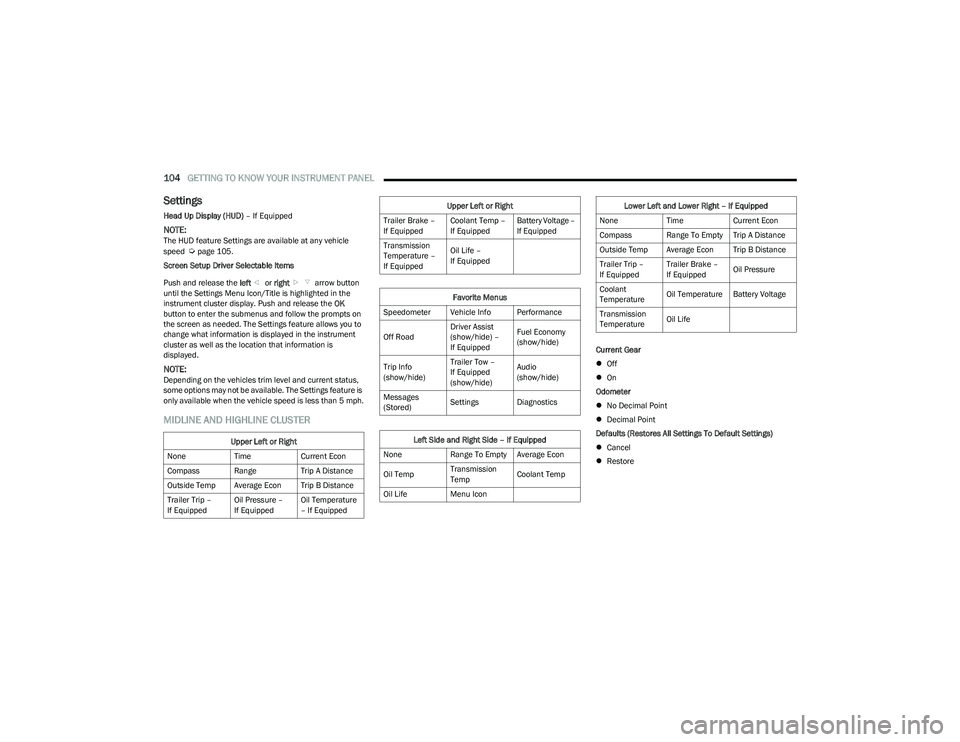
Screen Setup Driver Selectable Items
Push and release the left or right arrow button
until the Settings Menu Icon/Title is highlighted in the
instrument cluster display. Push and release the OK
button to enter the submenus and follow the prompts on
the screen as needed. The Settings feature allows you to
change what information is displayed in the instrument
cluster as well as the location that information is
displayed.
NOTE:Depending on the vehicles trim level and current status,
some options may not be available. The Settings feature is
only available when the vehicle speed is less than 5 mph.
MIDLINE AND HIGHLINE CLUSTER
Current Gear
Off
On
Odometer
No Decimal Point
Decimal Point
Defaults (Restores All Settings To Default Settings)
Cancel
Restore
Upper Left or Right
None TimeCurrent Econ
Compass Range Trip A Distance
Outside Temp Average Econ Trip B Distance
Trailer Trip –
If Equipped Oil Pressure –
If EquippedOil Temperature
– If Equipped
Trailer Brake –
If EquippedCoolant Temp –
If EquippedBattery Voltage –
If Equipped
Transmission
Temperature –
If Equipped Oil Life –
If Equipped
Favorite Menus
Speedometer Vehicle Info Performance
Off Road Driver Assist
(show/hide) –
If EquippedFuel Economy
(show/hide)
Trip Info
(show/hide) Trailer Tow –
If Equipped
(show/hide)Audio
(show/hide)
Messages
(Stored) Settings Diagnostics
Left Side and Right Side – If Equipped
None Range To Empty Average Econ
Oil Temp Transmission
TempCoolant Temp
Oil Life Menu Icon
Upper Left or Right
Lower Left and Lower Right – If Equipped
None TimeCurrent Econ
Compass Range To Empty Trip A Distance
Outside Temp Average Econ Trip B Distance
Trailer Trip –
If Equipped Trailer Brake –
If Equipped
Oil Pressure
Coolant
Temperature Oil Temperature Battery Voltage
Transmission
Temperature Oil Life
23_DT_OM_EN_USC_t.book Page 104
Page 121 of 416
STARTING AND OPERATING119
To Turn Off The Engine Using The ENGINE START/STOP
Button
1. Place the gear selector in PARK, then push and
release the ENGINE START/STOP button. The
ignition will return to the OFF position.
2. If the gear selector is not in PARK, the ENGINE START/STOP button must be held for two seconds or
three short pushes in a row with the vehicle speed
above 5 mph (8 km/h) before the engine will shut off.
The ignition will remain in the ACC position until the
gear selector is in PARK and the button is pushed
twice to the OFF position.
3. If the gear selector is not in PARK and the ENGINE START/STOP button is pushed once with the vehicle
speed above 5 mph (8 km/h), the instrument cluster will display a “ Vehicle Not In Park ” message and the
engine will remain running. Never leave a vehicle out
of the PARK position, or it could roll.
NOTE:If the gear selector is not in PARK, and the ENGINE
START/STOP button is pushed once with the vehicle speed
below 5 mph (8 km/h), the engine will shut off and the
ignition will remain in the ACC position. If vehicle speed
drops below 1.2 mph (1.9 km/h), the vehicle may
AutoPark
Úpage 119. ENGINE START/STOP Button Functions — With Driver’s
Foot Off The Brake Pedal (In PARK Or NEUTRAL Position)
The ENGINE START/STOP button operates similar to an
ignition switch. It has three positions: OFF, ACC, and
ON/RUN. To change the ignition positions without starting
the vehicle and use the accessories, follow these
directions:
1. Start with the ignition in the OFF position.
2. Push the ENGINE START/STOP button once to place
the ignition to the ACC position.
3. Push the ENGINE START/STOP button a second time to place the ignition to the ON/RUN position.
4. Push the ENGINE START/STOP button a third time to return the ignition to the OFF position.
AUTOPARK
AutoPark is a supplemental feature to assist with placing
the vehicle in PARK should the situations on the following
pages occur. It is a back-up system and should not be
relied upon as the primary method by which the driver
shifts the vehicle into PARK.
The conditions under which AutoPark will engage are
outlined on the following pages. If the vehicle is not in PARK and the driver turns off the
engine, the vehicle may AutoPark.
AutoPark will engage when all of these conditions are met:
Vehicle is equipped with a rotary shifter and an 8-speed
transmission
Vehicle is not in PARK
Vehicle speed is 1.2 mph (1.9 km/h) or less
Ignition is switched from ON/RUN to ACC
NOTE:For Keyless Enter ‘n Go™ equipped vehicles, the engine
will turn off and the ignition switch will change to ACC
position. After 30 minutes the ignition switches to OFF
automatically, unless the driver turns the ignition
switch OFF.
WARNING!
Driver inattention could lead to failure to place the
vehicle in PARK. ALWAYS DO A VISUAL CHECK that
your vehicle is in PARK by verifying that a solid (not
blinking) “P” is indicated in the instrument cluster
display and near the gear selector. If the “P” indicator
is blinking, your vehicle is not in PARK. As an added
precaution, always apply the parking brake when
exiting the vehicle.
AutoPark is a supplemental feature. It is not
designed to replace the need to shift your vehicle
into PARK. It is a back up system and should not be
relied upon as the primary method by which the
driver shifts the vehicle into PARK.
4
23_DT_OM_EN_USC_t.book Page 119
Page 137 of 416
STARTING AND OPERATING135
The vehicle will return to NRH from Aero Mode if the
vehicle speed remains between 30 mph (48 km/h)
and 35 mph (56 km/h) for greater than 20 seconds or
if the vehicle speed falls below 30 mph (48 km/h).
NOTE:
Automatic Aero mode will be disabled if a trailer is
detected to prevent shifting loads.
Speed thresholds for raising/lowering the vehicle
automatically at higher speeds only apply if
Automatic Aero Mode is enabled in your Uconnect
Radio settings.
To enter Aero Height manually push the height selector
switch down once from NRH at any vehicle speed. To
return to NRH push the height selector switch up once
while vehicle speed is less than 56 mph (90 km/h).
NOTE:Automatic Aero Mode may be disabled through vehicle
settings in the instrument cluster display Úpage 98 or
through your Uconnect Radio (if equipped) Úpage 191.
Entry/Exit Height (Lowers the vehicle approximately
2 inches [51 mm]) – This position lowers the vehicle
for easier passenger entry and exit as well as lowering
the vehicle for easier loading and unloading of cargo.
To enter Entry/Exit Mode, push the height selector
switch down once from the NRH while the vehicle
speed is below 33 mph (53 km/h). Once the vehicle
speed goes below 15 mph (24 km/h) the vehicle
height will begin to lower. If the vehicle speed remains
between 15 mph (24 km/h) and 25 mph (40 km/h) for
greater than 60 seconds, or the vehicle speed exceeds
25 mph (40 km/h) the Entry/Exit change will be canceled. To return to Normal Height Mode, push the height
selector switch up once while in Entry/Exit or drive the
vehicle over 15 mph (24 km/h).
NOTE:Entry/Exit Height may be achieved using the Remote
Lowering feature on your key fob for easier entry/loading
Úpage 16.
The system requires that the ignition be in the ON/RUN
position or the engine running for all user requested
changes. When lowering the vehicle, all of the doors must
be closed. If a door is opened at any time while the vehicle
is lowering, the change will not be completed until the
open door(s) is closed.
This system uses a lifting and lowering pattern which
keeps the headlights from incorrectly shining into
oncoming traffic. When raising the vehicle, the rear of the
vehicle will move up first and then the front. When
lowering the vehicle, the front will move down first and
then the rear.
After the engine is turned off, it may be noticed that the air
suspension system operates briefly; this is normal. The
system is correcting the position of the vehicle to ensure a
proper appearance.
To assist with changing a spare tire, the air suspension
system has a feature which allows the automatic leveling
to be disabled
Úpage 98. Default Ride Height:
Select Aero Height or Normal Ride Height as the default
for all vehicle speeds and operation. This is the
selected height that the suspension will level for speed
changes (e.g. raising from Entry/Exit Height at speed,
lowering from Off-Road Height at speed, etc.).
Default ride height can be changed by manually
adjusting the Air Suspension switch to Normal Ride
Height or Aero Ride Height and staying in the selected
height for 2.5 seconds. It will be stored as the default
ride height and the height will be maintained until a
new default ride height is selected.
NOTE:If equipped with a touchscreen radio, all enabling/
disabling of air suspension features must be done through
the radio
Úpage 191.
AIR SUSPENSION MODES
The air suspension system has multiple modes to protect
the system in unique situations. The engine should be
running to change between Air Suspension Modes.
CAUTION!
When in Entry/Exit Height, be aware of your
surroundings, you may not have the clearance required
for certain areas and vehicle damage may occur.
WARNING!
The air suspension system uses a high pressure
volume of air to operate the system. To avoid personal
injury or damage to the system, see an authorized
dealer for service.
4
23_DT_OM_EN_USC_t.book Page 135
Page 138 of 416

136STARTING AND OPERATING
Automatic Aero Mode
To improve aerodynamics, the air suspension system has
a feature which will put the vehicle into Aero Height
automatically at higher speeds
Úpage 98.
Automatic Aero Mode may be disabled through vehicle
settings in the Uconnect Radio (if equipped)
Úpage 191.
Tire Jack Mode
To assist with changing a tire, the air suspension system
has a feature which allows the automatic leveling to be
disabled
Úpage 191.
Transport Mode
For towing your vehicle with four wheels off the road, the
air suspension system has a feature which will put the
vehicle into Entry/Exit height and disable the automatic
load leveling system
Úpage 191.
Wheel Alignment Mode
Before performing a wheel alignment, this mode must be
enabled which will put the vehicle into NRH and disable
automatic leveling
Úpage 191.
Protection Strategy
In order to protect the air suspension system, the vehicle
will disable load leveling as required (suspension
overloaded, battery charge low, etc.). Load leveling will
automatically resume as soon as system operation
requirements are met. See an authorized dealer if system
does not resume.
NOTE:For towing with air suspension Úpage 173.
INSTRUMENT CLUSTER DISPLAY
M
ESSAGES
When the appropriate conditions exist, a message will
appear in the instrument cluster display Úpage 98.
An audible chime will be heard whenever a system error
has been detected.
See an authorized dealer for system service if normal
operation does not resume.
OPERATION
Air Suspension Switch
The indicator lamps 1 through 5 will illuminate to show the
current position of the vehicle. Flashing indicator lamps
will show a position which the system is working to
achieve. When raising, if multiple indicator lamps are
flashing, the highest flashing indicator lamp is the position
the system is working to achieve.
When lowering, if multiple indicators are flashing, the
lowest solid indicator lamp is the position the system is
working to achieve. Pushing the height selector up once will move the
suspension one position higher from the current position,
assuming all conditions are met (i.e., ignition in ON/RUN
position, engine running, speed below threshold, etc.).
The height selector switch can be pushed up multiple
times, each push will raise the requested level by one
position up to a maximum position of OR2 or the highest
position allowed based on current conditions
(i.e., vehicle speed, etc.).
Pushing the height selector down once will move the
suspension one position lower from the current level,
assuming all conditions are met (i.e., ignition in ON/RUN
position, engine running, doors closed, speed below
threshold, etc.). The height selector switch can be pushed
down multiple times, each push will lower the requested
level by one position down to a minimum of Entry/Exit
Mode or the lowest position allowed based on current
conditions (i.e., vehicle speed, etc.).
Automatic height changes will occur based on vehicle
speed and the current vehicle height. The indicator lamps
and instrument cluster display messages will operate the
same for automatic changes and user requested changes.
Off-Road 2 (OR2) – Indicator lamps 5, 4, 3, 2 and 1 will
be illuminated.
Off-Road 1 (OR1) – Indicator lamps 5, 4, 3 and 2 will be
illuminated.
Normal Ride Height (NRH) – Indicator lamps 5, 4 and 3
will be illuminated.
23_DT_OM_EN_USC_t.book Page 136
Page 140 of 416
![RAM 1500 2023 User Guide
138STARTING AND OPERATING
Entry/Exit Height (Lowers the vehicle approximately
3 inches [73 mm]) – This position lowers the vehicle
for easier passenger entry and exit as well as lowering
t](/img/34/59197/w960_59197-139.png "RAM 1500 2023 User Guide
138STARTING AND OPERATING
Entry/Exit Height (Lowers the vehicle approximately
3 inches [73 mm]) – This position lowers the vehicle
for easier passenger entry and exit as well as lowering
t")
138STARTING AND OPERATING
Entry/Exit Height (Lowers the vehicle approximately
3 inches [73 mm]) – This position lowers the vehicle
for easier passenger entry and exit as well as lowering
the vehicle for easier loading and unloading of cargo.
To enter Entry/Exit Mode, push the height selector
switch down twice from the NRH while the vehicle
speed is below 33 mph (53 km/h). Once the vehicle
speed goes below 15 mph (24 km/h) the vehicle
height will begin to lower. If the vehicle speed remains
between 15 mph (24 km/h) and 25 mph (40 km/h) for
greater than 60 seconds, or the vehicle speed exceeds
25 mph (40 km/h) the Entry/Exit change will be canceled. To return to Normal Height Mode, push the
height selector switch up twice while in Entry/Exit or
drive the vehicle over 15 mph (24 km/h). Entry/Exit Height may not be available due to vehicle payload, an
instrument cluster display message is shown when this
occurs
Úpage 98.
The system requires that the ignition be in the ON/RUN
position or the engine running for all user requested
changes. When lowering the vehicle, all of the doors must
be closed. If a door is opened at any time while the vehicle
is lowering, the change will not be completed until the
open door(s) is closed. This system uses a lifting and lowering pattern which
keeps the headlights from incorrectly shining into
oncoming traffic. When raising the vehicle, the rear of the
vehicle will move up first and then the front. When
lowering the vehicle, the front will move down first and
then the rear.
After the engine is turned off, it may be noticed that the air
suspension system operates briefly; this is normal.
The system is correcting the position of the vehicle to
ensure a proper appearance.
To assist with changing a spare tire, the air suspension
system has a feature which allows the automatic leveling
to be disabled
Úpage 191.
Default Ride Height:
Select Aero Height or Normal Ride Height as the default
for all vehicle speeds and operation. This is the
selected height that the suspension will level for speed
changes (e.g. raising from Entry/Exit Height at speed,
lowering from Off-Road Height at speed, etc.).
Default ride height can be changed by manually
adjusting the Air Suspension switch to Normal Ride
Height or Aero Ride Height and staying in the selected
height for 2.5 seconds. It will be stored as the default
ride height and the height will be maintained until a
new default ride height is selected.
NOTE:If equipped with a touchscreen radio, all enabling/
disabling of air suspension features must be done through
the radio
Úpage 191.
AIR SUSPENSION MODES
The air suspension system has multiple modes to protect
the system in unique situations:
Automatic Aero Mode
To improve aerodynamics, the air suspension system has
a feature which will put the vehicle into Aero height
automatically at higher speeds
Úpage 98.
Tire Jack Mode
To assist with changing a tire, the air suspension system
has a feature which allows the automatic leveling to be
disabled
Úpage 191.
Transport Mode
For towing your vehicle with four wheels off the road, the
air suspension system has a feature which will put the
vehicle into Entry/Exit height and disable the automatic
load leveling system
Úpage 191.
CAUTION!
When in Entry/Exit Height, be aware of your
surroundings, you may not have the clearance required
for certain areas and vehicle damage may occur.
WARNING!
The air suspension system uses a high pressure
volume of air to operate the system. To avoid personal
injury or damage to the system, see an authorized
dealer for service.
23_DT_OM_EN_USC_t.book Page 138
Page 141 of 416

STARTING AND OPERATING139
Wheel Alignment Mode
Before performing a wheel alignment, this mode must be
enabled which moves the vehicle to normal ride height
and disables the automatic leveling
Úpage 191.
Protection Strategy
In order to protect the air suspension system, the vehicle
will disable load leveling as required (suspension
overloaded, battery charge low, etc.). Load leveling will
automatically resume as soon as system operation
requirements are met. See an authorized dealer if system
does not resume.
NOTE:For towing with air suspension Úpage 173.
INSTRUMENT CLUSTER DISPLAY
M
ESSAGES
When the appropriate conditions exist, a message will
appear in the instrument cluster display Úpage 98.
An audible chime will be heard whenever a system error
has been detected.
See an authorized dealer for system service if normal
operation does not resume.
OPERATION
Air Suspension Switch
The indicator lamps 1 through 4 will illuminate to show the
current position of the vehicle. Flashing indicator lamps
will show a position which the system is working to
achieve. When raising or lowering, the flashing indicator
lamp is the position the system is working to achieve.
Pushing the height selector switch up once will move the
suspension one position higher from the current position,
assuming all conditions are met (i.e., key in ON/RUN
position, engine running, speed below threshold, etc.).
The height selector switch can be pushed up multiple
times, each push will raise the requested level by one
position up to a maximum position of OR or the highest
position allowed based on current conditions
(i.e., vehicle speed, etc.). Pushing the height selector switch down once will move
the suspension one position lower from the current level,
assuming all conditions are met (i.e., key in ON/RUN
position, engine running, doors closed, speed below
threshold, etc.). The height selector switch can be pushed
down multiple times, each push will lower the requested
level by one position down to a minimum of Entry/Exit
Mode or the lowest position allowed based on current
conditions (i.e., vehicle speed, etc.).
Automatic height changes will occur based on vehicle
speed and the current vehicle height. The indicator lamps
and instrument cluster display messages will operate the
same for automatic changes and user requested changes.
Off-Road 1 (OR1) – Indicator lamps 4, 3, 2, and 1 will
be illuminated.
Normal Ride Height (NRH) – Indicator lamps 4, 3, and
2 will be illuminated.
Aero Height– Indicator lamps 4 and 3 will be
illuminated.
Entry/Exit – Indicator lamp 4 will be illuminated.
Entry/Exit can be requested up to 33 mph (53 km/h).
If vehicle speed is reduced to, and kept below, 15 mph
(24 km/h) indicator lamp 3 will flash and indicator
lamp 4 will remain solid until Entry/Exit is achieved at
which point indicator lamp 3 will turn off.
Automatic Aero Mode – Indicator lamps 5 and 4 will be
illuminated.
Transport Mode – No indicator lamps will be illumi -
nated. Transport Mode is disabled by driving the
vehicle or disabling through the Uconnect settings.
4
23_DT_OM_EN_USC_t.book Page 139
Page 146 of 416
144STARTING AND OPERATING
To Activate
Push the on/off button to activate the Cruise Control.
The Cruise Control Indicator Light in the instrument cluster
display will illuminate. To turn the system off, push the
on/off button a second time. The Cruise Control Indicator
Light will turn off. The system should be turned off when
not in use.
To Set A Desired Speed
Turn the Cruise Control on.
When the vehicle has reached the desired speed, push
the SET (+) or SET (-) button and release. Release the
accelerator and the vehicle will operate at the selected
speed.
NOTE:The vehicle should be traveling at a steady speed and on
level ground before pushing the SET (+) or SET (-) button.
To Vary The Speed Setting
To Increase Or Decrease The Set Speed
After setting a speed, you can increase the set speed by
pushing the SET (+) button, or decrease speed by pushing
the SET (-) button.
U.S. Speed (mph)
Pushing the SET (+), or SET (-) button once will result in
a 1 mph speed adjustment. Each subsequent tap of
the button results in an adjustment of 1 mph.
If the button is continually pushed, the set speed will
continue to adjust in 5 mph increments until the button
is released. The new set speed is reflected in the instru -
ment cluster display.
Metric Speed (km/h)
Pushing the SET (+), or SET (-) button once will result in
a 1 km/h speed adjustment. Each subsequent tap of
the button results in an adjustment of 1 km/h.
If the button is continually pushed, the set speed will
continue to adjust in 10 km/h increments until the
button is released. The new set speed is reflected in
the instrument cluster display.
NOTE:When you override and push the SET (+) or SET (-) button,
the new set speed will be the current speed of the vehicle.
To Accelerate For Passing
While the Cruise Control is set, press the accelerator to
pass as you would normally. When the pedal is released,
the vehicle will return to the set speed.
USING CRUISE CONTROL ON HILLS
The transmission may downshift on hills to maintain the
vehicle set speed.
The Cruise Control system maintains speed up and down
hills. A slight speed change on moderate hills is normal.
On steep hills, a greater speed loss or gain may occur so it
may be preferable to drive without Cruise Control.
To Resume Speed
To resume a previously set speed, push the RES button
and release. Resume can be used at any speed above
20 mph (32 km/h).
WARNING!
Cruise Control can be dangerous where the system
cannot maintain a constant speed. Your vehicle could
go too fast for the conditions, and you could lose control
and have an accident. Do not use Cruise Control in
heavy traffic or on roads that are winding, icy,
snow-covered or slippery.
WARNING!
Leaving the Cruise Control system on when not in use is
dangerous. You could accidentally set the system or
cause it to go faster than you want. You could lose
control and have an accident. Always ensure the system
is off when you are not using it.
WARNING!
Cruise Control can be dangerous where the system
cannot maintain a constant speed. Your vehicle could
go too fast for the conditions, and you could lose control
and have an accident. Do not use Cruise Control in
heavy traffic or on roads that are winding, icy,
snow-covered or slippery.
23_DT_OM_EN_USC_t.book Page 144
Page 151 of 416

STARTING AND OPERATING149
Distance Settings
To increase the distance setting, push the Distance
Increase button and release. Each time the button is
pushed, the distance setting increases by one bar (longer).
To decrease the distance setting, push the Distance
Decrease button and release. Each time the button is
pushed, the distance setting decreases by one bar
(shorter).
If there is no vehicle ahead, the vehicle will maintain the
set speed. If a slower moving vehicle is detected in the
same lane, the instrument cluster displays the ACC Set
With Target Detected Indicator Light, and the system
adjusts vehicle speed automatically to maintain the
distance setting, regardless of the set speed. The vehicle will then maintain the set distance until:
The vehicle ahead accelerates to a speed above the
set speed.
The vehicle ahead moves out of your lane or view of the
sensor.
The distance setting is changed.
The system disengages.
The maximum braking applied by ACC is limited; however,
the driver can always apply the brakes manually, if
necessary.
NOTE:The brake lights will illuminate whenever the ACC system
applies the brakes.
A Proximity Warning will alert the driver if ACC predicts that
its maximum braking level is not sufficient to maintain the
set distance. If this occurs, a visual alert “BRAKE!” will
flash in the instrument cluster display and a chime will
sound while ACC continues to apply its maximum braking
capacity.
NOTE:The “BRAKE!” screen in the instrument cluster display is a
warning for the driver to take action and does not mean
that the Forward Collision Warning system is applying the
brakes autonomously.
Overtake Aid
When driving with Adaptive Cruise Control (ACC) engaged,
and following a vehicle, the system will provide an
additional acceleration up to the ACC set speed to assist
in passing the vehicle. This additional acceleration is
triggered when the driver utilizes the left turn signal and
will only be active when passing on the left hand side.
ACC Operation At Stop
In the event that the ACC system brings your vehicle to a
standstill while following the vehicle in front, if the vehicle
in front starts moving within two seconds of your vehicle
coming to a standstill, your vehicle will resume motion
without the need for any driver action.
If the vehicle in front does not start moving within two
seconds of your vehicle coming to a standstill, the driver
will either have to push the RES (resume) button, or apply
the accelerator pedal to reengage the ACC to the existing
set speed.
NOTE:After the ACC system holds your vehicle at a standstill for
approximately three consecutive minutes, the parking
brake will be activated, and the ACC system will be
canceled.
While ACC is holding your vehicle at a standstill, if the
driver seat belt is unbuckled or the driver door is opened,
the parking brake will be activated, and the ACC system
will be canceled.
1 — Longest Distance Setting (Four Bars)
2 — Medium Distance Setting (Two Bars)
3 — Long Distance Setting (Three Bars)
4 — Short Distance Setting (One Bar)
WARNING!
When the ACC system is resumed, the driver must
ensure that there are no pedestrians, vehicles or
objects in the path of the vehicle. Failure to follow these
warnings can result in a collision and death or serious
personal injury.
4
23_DT_OM_EN_USC_t.book Page 149
Page 164 of 416
162STARTING AND OPERATING
Left Lane Departure — Only Left Lane Detected
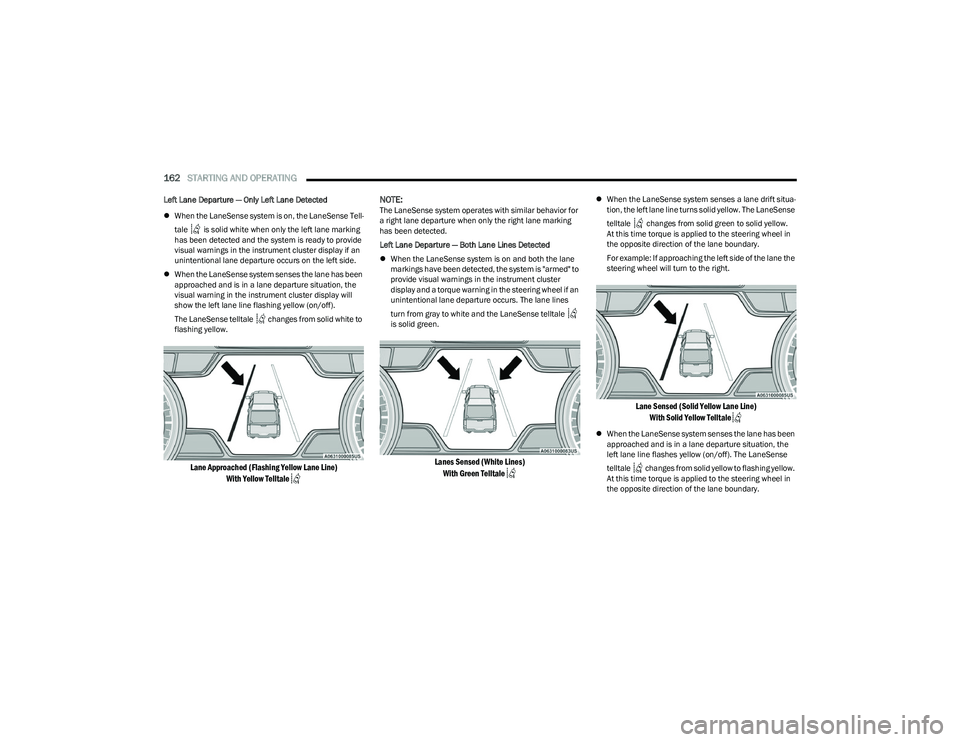
When the LaneSense system is on, the LaneSense Tell -
tale is solid white when only the left lane marking
has been detected and the system is ready to provide
visual warnings in the instrument cluster display if an
unintentional lane departure occurs on the left side.
When the LaneSense system senses the lane has been
approached and is in a lane departure situation, the
visual warning in the instrument cluster display will
show the left lane line flashing yellow (on/off).
The LaneSense telltale changes from solid white to
flashing yellow.
Lane Approached (Flashing Yellow Lane Line)
With Yellow Telltale
NOTE:
The LaneSense system operates with similar behavior for
a right lane departure when only the right lane marking
has been detected.
Left Lane Departure — Both Lane Lines Detected
When the LaneSense system is on and both the lane
markings have been detected, the system is "armed" to
provide visual warnings in the instrument cluster
display and a torque warning in the steering wheel if an
unintentional lane departure occurs. The lane lines
turn from gray to white and the LaneSense telltale
is solid green.
Lanes Sensed (White Lines)
With Green Telltale
When the LaneSense system senses a lane drift situa -
tion, the left lane line turns solid yellow. The LaneSense
telltale changes from solid green to solid yellow.
At this time torque is applied to the steering wheel in
the opposite direction of the lane boundary.
For example: If approaching the left side of the lane the
steering wheel will turn to the right.
Lane Sensed (Solid Yellow Lane Line)
With Solid Yellow Telltale
When the LaneSense system senses the lane has been
approached and is in a lane departure situation, the
left lane line flashes yellow (on/off). The LaneSense
telltale changes from solid yellow to flashing yellow.
At this time torque is applied to the steering wheel in
the opposite direction of the lane boundary.
23_DT_OM_EN_USC_t.book Page 162
Page 168 of 416
166STARTING AND OPERATING
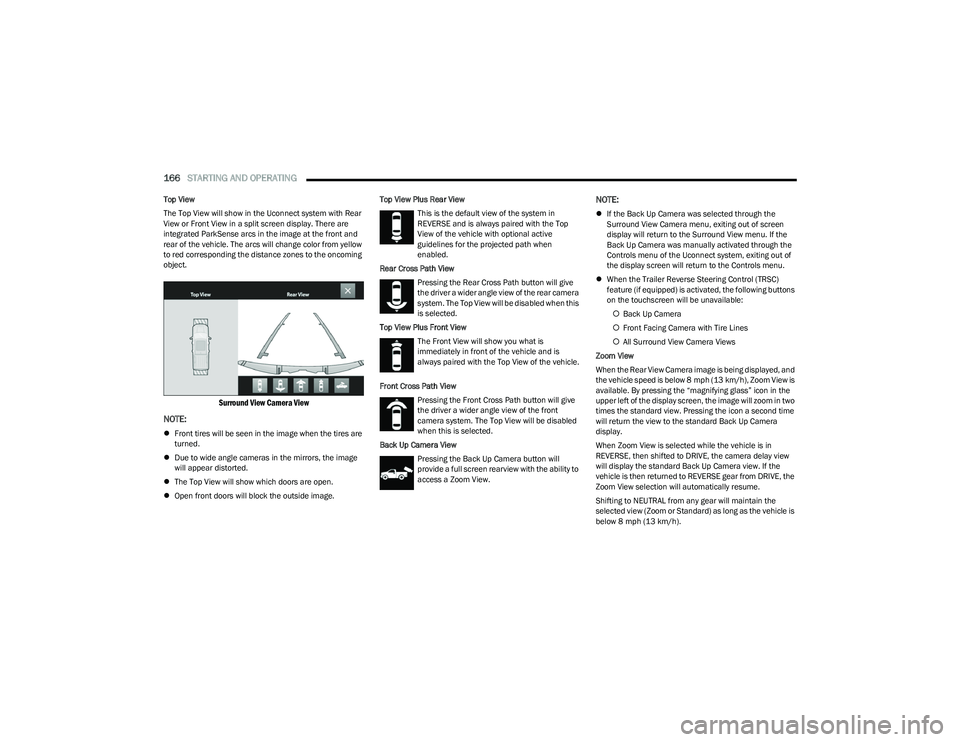
Top View
The Top View will show in the Uconnect system with Rear
View or Front View in a split screen display. There are
integrated ParkSense arcs in the image at the front and
rear of the vehicle. The arcs will change color from yellow
to red corresponding the distance zones to the oncoming
object.
Surround View Camera View
NOTE:
Front tires will be seen in the image when the tires are
turned.
Due to wide angle cameras in the mirrors, the image
will appear distorted.
The Top View will show which doors are open.
Open front doors will block the outside image. Top View Plus Rear View
This is the default view of the system in
REVERSE and is always paired with the Top
View of the vehicle with optional active
guidelines for the projected path when
enabled.
Rear Cross Path View Pressing the Rear Cross Path button will give
the driver a wider angle view of the rear camera
system. The Top View will be disabled when this
is selected.
Top View Plus Front View The Front View will show you what is
immediately in front of the vehicle and is
always paired with the Top View of the vehicle.
Front Cross Path View Pressing the Front Cross Path button will give
the driver a wider angle view of the front
camera system. The Top View will be disabled
when this is selected.
Back Up Camera View Pressing the Back Up Camera button will
provide a full screen rearview with the ability to
access a Zoom View.
NOTE:
If the Back Up Camera was selected through the
Surround View Camera menu, exiting out of screen
display will return to the Surround View menu. If the
Back Up Camera was manually activated through the
Controls menu of the Uconnect system, exiting out of
the display screen will return to the Controls menu.
When the Trailer Reverse Steering Control (TRSC)
feature (if equipped) is activated, the following buttons
on the touchscreen will be unavailable:
Back Up Camera
Front Facing Camera with Tire Lines
All Surround View Camera Views
Zoom View
When the Rear View Camera image is being displayed, and
the vehicle speed is below 8 mph (13 km/h), Zoom View is
available. By pressing the “magnifying glass” icon in the
upper left of the display screen, the image will zoom in two
times the standard view. Pressing the icon a second time
will return the view to the standard Back Up Camera
display.
When Zoom View is selected while the vehicle is in
REVERSE, then shifted to DRIVE, the camera delay view
will display the standard Back Up Camera view. If the
vehicle is then returned to REVERSE gear from DRIVE, the
Zoom View selection will automatically resume.
Shifting to NEUTRAL from any gear will maintain the
selected view (Zoom or Standard) as long as the vehicle is
below 8 mph (13 km/h).
23_DT_OM_EN_USC_t.book Page 166