change time RAM 1500 2023 Owner's Guide
[x] Cancel search | Manufacturer: RAM, Model Year: 2023, Model line: 1500, Model: RAM 1500 2023Pages: 416, PDF Size: 20.59 MB
Page 209 of 416
MULTIMEDIA207
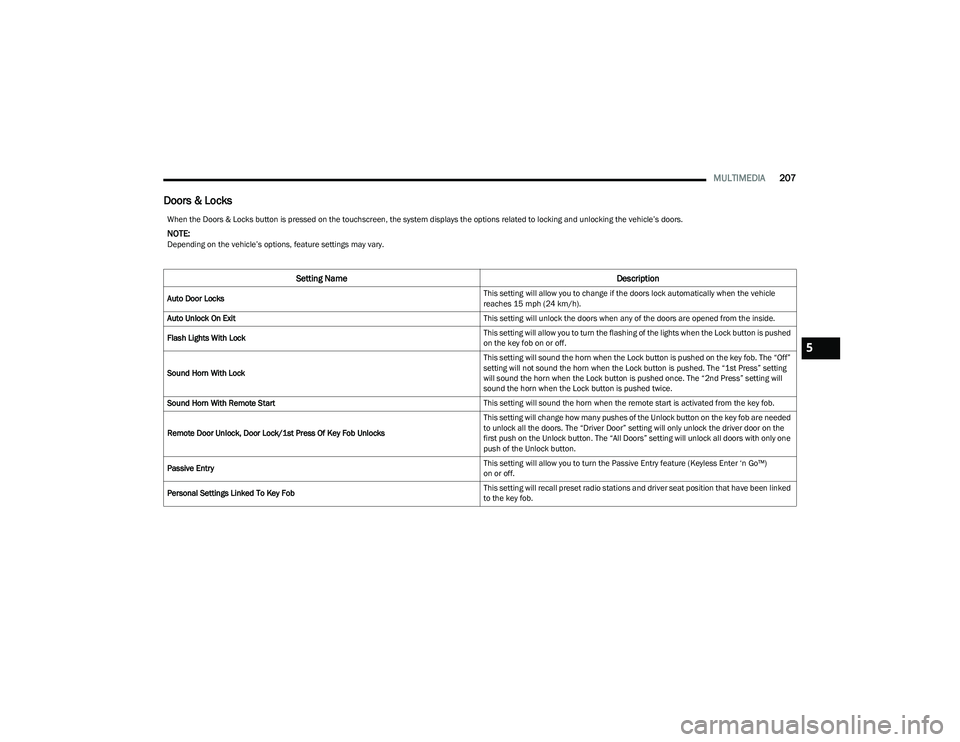
Doors & Locks
When the Doors & Locks button is pressed on the touchscreen, the system displays the options related to locking and unlocking the vehicle’s doors.
NOTE:Depending on the vehicle’s options, feature settings may vary.
Setting Name Description
Auto Door Locks This setting will allow you to change if the doors lock automatically when the vehicle
reaches 15 mph (24 km/h).
Auto Unlock On Exit This setting will unlock the doors when any of the doors are opened from the inside.
Flash Lights With Lock This setting will allow you to turn the flashing of the lights when the Lock button is pushed
on the key fob on or off.
Sound Horn With Lock This setting will sound the horn when the Lock button is pushed on the key fob. The “Off”
setting will not sound the horn when the Lock button is pushed. The “1st Press” setting
will sound the horn when the Lock button is pushed once. The “2nd Press” setting will
sound the horn when the Lock button is pushed twice.
Sound Horn With Remote Start This setting will sound the horn when the remote start is activated from the key fob.
Remote Door Unlock, Door Lock/1st Press Of Key Fob Unlocks This setting will change how many pushes of the Unlock button on the key fob are needed
to unlock all the doors. The “Driver Door” setting will only unlock the driver door on the
first push on the Unlock button. The “All Doors” setting will unlock all doors with only one
push of the Unlock button.
Passive Entry This setting will allow you to turn the Passive Entry feature (Keyless Enter ‘n Go™)
on or off.
Personal Settings Linked To Key Fob This setting will recall preset radio stations and driver seat position that have been linked
to the key fob.
5
23_DT_OM_EN_USC_t.book Page 207
Page 213 of 416
MULTIMEDIA211
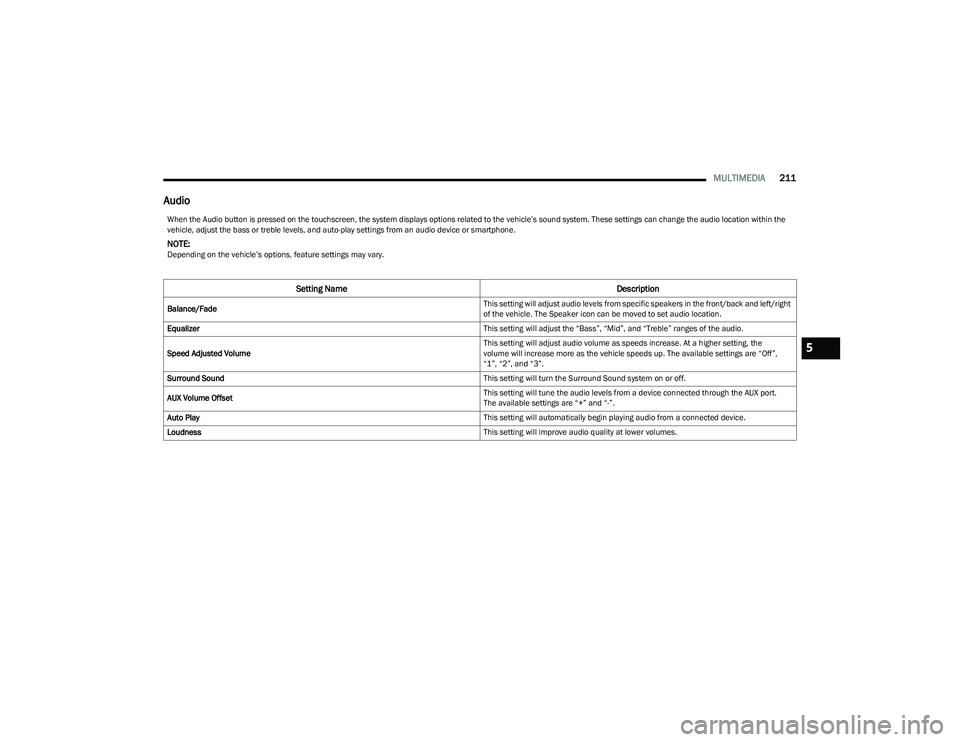
Audio
When the Audio button is pressed on the touchscreen, the system displays options related to the vehicle’s sound system. These settings can change the audio location within the
vehicle, adjust the bass or treble levels, and auto-play settings from an audio device or smartphone.
NOTE:Depending on the vehicle’s options, feature settings may vary.
Setting Name Description
Balance/Fade This setting will adjust audio levels from specific speakers in the front/back and left/right
of the vehicle. The Speaker icon can be moved to set audio location.
Equalizer This setting will adjust the “Bass”, “Mid”, and “Treble” ranges of the audio.
Speed Adjusted Volume This setting will adjust audio volume as speeds increase. At a higher setting, the
volume will increase more as the vehicle speeds up. The available settings are “Off”,
“1”, “2”, and “3”.
Surround Sound This setting will turn the Surround Sound system on or off.
AUX Volume Offset This setting will tune the audio levels from a device connected through the AUX port.
The available settings are “+” and “-”.
Auto Play This setting will automatically begin playing audio from a connected device.
Loudness This setting will improve audio quality at lower volumes.
5
23_DT_OM_EN_USC_t.book Page 211
Page 216 of 416
214MULTIMEDIA
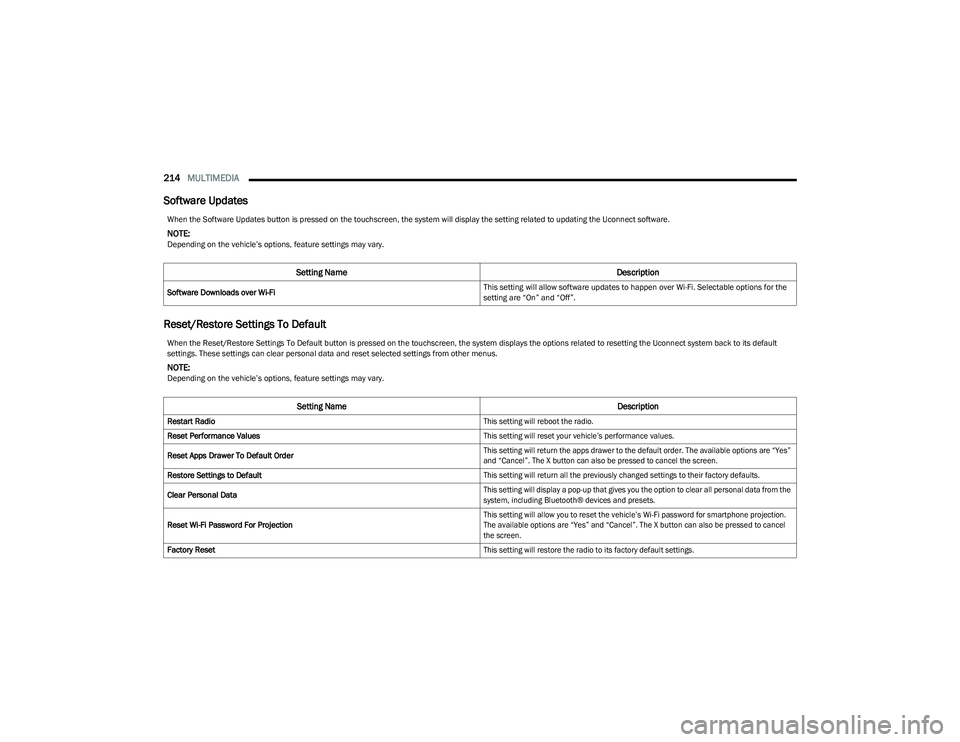
Software Updates
Reset/Restore Settings To Default
When the Software Updates button is pressed on the touchscreen, the system will display the setting related to updating the Uconnect software.
NOTE:Depending on the vehicle’s options, feature settings may vary.
Setting Name Description
Software Downloads over Wi-Fi This setting will allow software updates to happen over Wi-Fi. Selectable options for the
setting are “On” and “Off”.
When the Reset/Restore Settings To Default button is pressed on the touchscreen, the system displays the options related to resetting the Uconnect system back to its default
settings. These settings can clear personal data and reset selected settings from other menus.
NOTE:Depending on the vehicle’s options, feature settings may vary.
Setting Name
Description
Restart Radio
This setting will reboot the radio.
Reset Performance Values
This setting will reset your vehicle’s performance values.
Reset Apps Drawer To Default Order
This setting will return the apps drawer to the default order. The available options are “Yes”
and “Cancel”. The X button can also be pressed to cancel the screen.
Restore Settings to Default
This setting will return all the previously changed settings to their factory defaults.
Clear Personal Data
This setting will display a pop-up that gives you the option to clear all personal data from the
system, including Bluetooth® devices and presets.
Reset Wi-Fi Password For Projection
This setting will allow you to reset the vehicle’s Wi-Fi password for smartphone projection.
The available options are “Yes” and “Cancel”. The X button can also be pressed to cancel
the screen.
Factory Reset
This setting will restore the radio to its factory default settings.
23_DT_OM_EN_USC_t.book Page 214
Page 222 of 416
220MULTIMEDIA
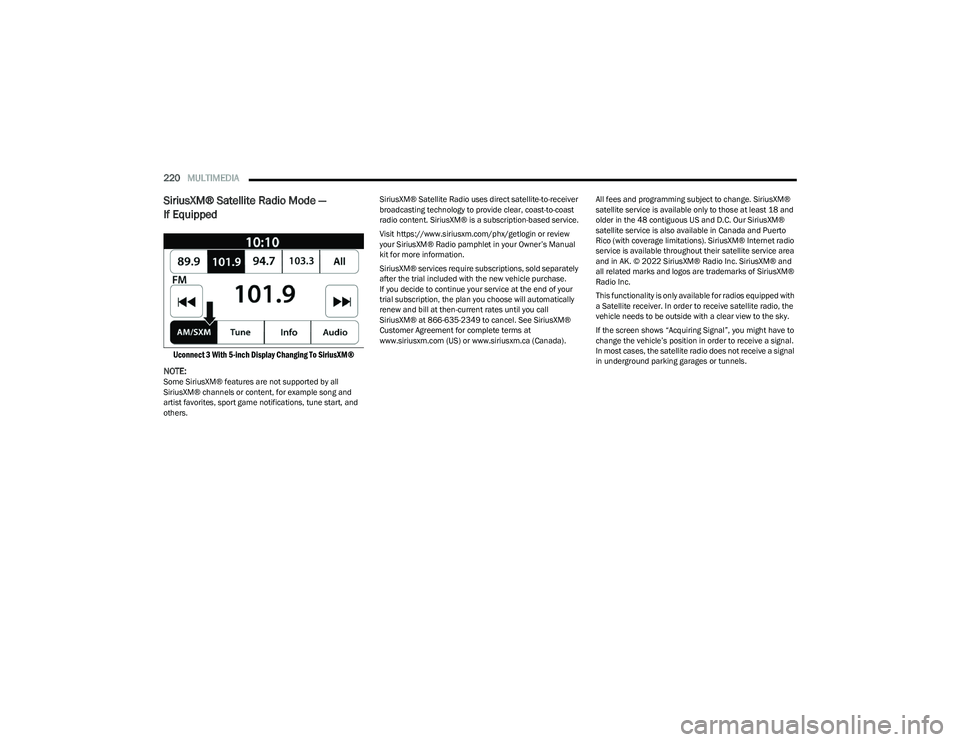
SiriusXM® Satellite Radio Mode —
If Equipped
Uconnect 3 With 5-inch Display Changing To SiriusXM®
NOTE:
Some SiriusXM® features are not supported by all
SiriusXM® channels or content, for example song and
artist favorites, sport game notifications, tune start, and
others. SiriusXM® Satellite Radio uses direct satellite-to-receiver
broadcasting technology to provide clear, coast-to-coast
radio content. SiriusXM® is a subscription-based service.
Visit https://www.siriusxm.com/phx/getlogin or review
your SiriusXM® Radio pamphlet in your Owner’s Manual
kit for more information.
SiriusXM® services require subscriptions, sold separately
after the trial included with the new vehicle purchase.
If you decide to continue your service at the end of your
trial subscription, the plan you choose will automatically
renew and bill at then-current rates until you call
SiriusXM® at 866-635-2349 to cancel. See SiriusXM®
Customer Agreement for complete terms at
www.siriusxm.com (US) or www.siriusxm.ca (Canada).
All fees and programming subject to change. SiriusXM®
satellite service is available only to those at least 18 and
older in the 48 contiguous US and D.C. Our SiriusXM®
satellite service is also available in Canada and Puerto
Rico (with coverage limitations). SiriusXM® Internet radio
service is available throughout their satellite service area
and in AK. © 2022 SiriusXM® Radio Inc. SiriusXM® and
all related marks and logos are trademarks of SiriusXM®
Radio Inc.
This functionality is only available for radios equipped with
a Satellite receiver. In order to receive satellite radio, the
vehicle needs to be outside with a clear view to the sky.
If the screen shows “Acquiring Signal”, you might have to
change the vehicle’s position in order to receive a signal.
In most cases, the satellite radio does not receive a signal
in underground parking garages or tunnels.
23_DT_OM_EN_USC_t.book Page 220
Page 229 of 416
MULTIMEDIA227
Controlling The Auxiliary Device
Auxiliary Mode (AUX) is entered by inserting an AUX device
using a cable with a 3.5 mm audio jack into the AUX port
Another way is by pushing the MEDIA button on the
faceplate, selecting the Source button, and then the AUX
button.
NOTE:The radio unit is acting as the amplifier for audio output
from the Auxiliary device. Therefore, if the volume control
on the Auxiliary device is set too low, there will be insuffi -
cient audio signal for the radio unit to play the music on
the device.
Seek Up /Seek Down
In USB Mode, press the Seek Up button on the
touchscreen for the next selection on the USB device.
Press and release the Seek Down button on the
touchscreen to return to the beginning of the current
selection, or to return to the beginning of the previous
selection if the USB device is within the first three seconds
of the current selection.
In Bluetooth® Mode, press and release the Seek Up
button on the touchscreen for the next selection on the
Bluetooth® device. Press and release the Seek Down
button on the touchscreen to return to the beginning of
the current selection, or return to the beginning of the
previous selection if the Bluetooth® device is within the
first second of the current selection. Browse
In USB Mode, press the Browse button on the touchscreen
to display the browse window. In USB Mode, the left side
of the browse window displays a list of ways you can
browse through the contents of the USB device.
If supported by the device, you can browse by Folder,
Artist, Playlist, Album, Song, etc. Press the desired button
on the touchscreen on the left side of the screen. The
center of the browse window shows items and their
sub-functions, which can be scrolled through by pressing
the Up and Down buttons to the right. The TUNE/SCROLL
knob can also be used to scroll.
On the Uconnect 3 With 5-inch Display, rotate the
ENTER/BROWSE button on the faceplate or press the
Browse button on the touchscreen to scroll through and
select a desired track on the device. Press the Exit button
on the touchscreen if you wish to cancel the Browse
function.
Media Mode
In USB Mode, press the Media button on the touchscreen
to select the desired audio source: USB.
In Bluetooth® Mode, press the Media button on the
touchscreen to select the desired audio source:
Bluetooth®.
In AUX Mode, press the Media button on the touchscreen
to select the desired audio source: AUX.
Repeat
In USB Mode, press the Repeat button on the touchscreen
to toggle the repeat functionality. The Repeat button on
the touchscreen is highlighted when active. The Radio will
continue to play the current track, repeatedly, as long as
the repeat is active. Press the Repeat button again to
enter Repeat All. The radio will continue to play all the
current tracks, repeatedly, as long as the repeat function
is active. To cancel Repeat, press the Repeat button a
third time.
Shuffle
In USB Mode, press the Shuffle button on the touchscreen
to play the selections on the USB device in random order
to provide an interesting change of pace. Press the Shuffle
button on the touchscreen a second time to turn this
feature off.
Audio
Audio settings can be accessed by pressing the Audio
button
Úpage 218.
Info
In USB Mode, press the Info button on the touchscreen to
display the current track information. Press the Info or X
button on the touchscreen a second time to cancel this
feature.
5
23_DT_OM_EN_USC_t.book Page 227
Page 230 of 416
228MULTIMEDIA
Tracks
In USB Mode, press the Tracks button on the touchscreen
to display a pop-up with the Song List. The song currently
playing is indicated by an arrow and lines above and below
the song title. When in the Tracks List screen you can
rotate the TUNE/SCROLL knob to highlight a track
(indicated by the line above and below the track name)
and then push the ENTER/BROWSE knob to start playing
that track.
In Bluetooth® Mode, if the Bluetooth® device supports
this feature, press the Tracks button on the touchscreen
to display a pop-up with the Song List. The currently
playing song is indicated by a red arrow and lines above
and below the song title.
Pressing the Tracks button on the touchscreen while the
pop-up is displayed will close the pop-up.
MEDIA VOICE COMMANDS
Uconnect offers connections via USB, Bluetooth®, and
auxiliary (AUX) ports. Voice operation is only available for
connected USB and AUX devices.
Push the VR button located on the steering wheel.
After the beep, say one of the following commands and
follow the prompts to switch your media source or choose
an artist:
“Change source to Bluetooth®”
“Change source to AUX”
“Change source to USB”
“Play artist Beethoven”; “ Play album Greatest Hits”;
“ Play song Moonlight Sonata”; “ Play genre Classical” Did You Know:
Press the Browse button on the
touchscreen to see all of the music on your USB device.
Your Voice Command must match exactly how the artist,
album, song, and genre information is displayed.
PHONE MODE
Overview
Uconnect Phone is a voice-activated, hands-free,
in-vehicle communications system. It allows you to dial a
phone number with your mobile phone.
The feature supports the following:
Voice Activated Features
Hands-Free dialing via Voice (“Call John Smith Mobile”
or “Dial 248-555-1212”).
Hands-Free text-to-speech listening of your incoming
SMS messages.
Hands-Free Text Message Replying: Forward one of
18 predefined SMS messages to incoming calls/text
messages.
Redialing last dialed numbers (“Redial”).
Calling Back the last incoming call number
(“Call Back”).
Viewing call logs on screen (“Show Incoming Calls,”
“Show Outgoing Calls,” “Show Missed Calls,” or “Show
Recent Calls”).
Searching Contacts phone number
(“Search for John Smith Mobile”). Screen Activated Features
Dialing via Keypad using touchscreen.
Viewing and Calling contacts from Phonebooks
displayed on the touchscreen.
Setting Favorite Contact phone numbers so they are
easily accessible on the Main Phone screen.
Viewing and Calling contacts from Recent Call logs.
Reviewing your recent Incoming SMS Messages.
Pairing up to 10 phones/audio devices for easy access
to connect to them quickly.
NOTE:Your phone must be capable of SMS messaging via Blue -
tooth® for messaging features to work properly.
Your mobile phone’s audio is transmitted through your
vehicle’s audio system; the system will automatically mute
your radio when using the Uconnect Phone.
For Uconnect customer support:
US visit UconnectPhone.com or call 877-855-8400
Canada visit UconnectPhone.com or call
800-465-2001 (English) or (French) call
800-387-9983
Uconnect Phone allows you to transfer calls between the
system and your mobile phone as you enter or exit your
vehicle and enables you to mute the system's microphone
for private conversation.
23_DT_OM_EN_USC_t.book Page 228
Page 234 of 416
232MULTIMEDIA
PHONEBOOK DOWNLOAD (AUTOMATIC
PHONEBOOK TRANSFER FROM MOBILE
PHONE) — IF EQUIPPED
If supported by your phone, Uconnect Phone has the
ability to download contact names and number entries
from the mobile phone’s phonebook. Specific Bluetooth®
Phones with Phonebook Access Profile may support this
feature. Your mobile phone may receive a pop-up asking
for permission for the Uconnect system to access your
messages and contacts. Selecting “Ok” or “Allow” will sync
your contacts with the Uconnect system.
See the Uconnect website, UconnectPhone.com, for
supported phones.
To call a name from a downloaded mobile phonebook
Úpage 235.
Automatic download and update of a phonebook, if
supported, begins as soon as the Bluetooth® wireless
phone connection is made to the Uconnect Phone, for
example, after you start the vehicle.
A maximum of 5,000 contact names with four numbers
per contact will be downloaded and updated every time
a phone is connected to the Uconnect Phone.
Depending on the maximum number of entries down -
loaded, there may be a short delay before the latest
downloaded names can be used. Until then, if avail -
able, the previously downloaded phonebook is avail -
able for use.
Only the phonebook of the currently connected mobile
phone is accessible.
This downloaded phonebook cannot be edited or
deleted on the Uconnect Phone. These can only be
edited on the mobile phone. The changes are trans -
ferred and updated to Uconnect Phone on the next
phone connection.
MANAGING YOUR FAVORITES — IF EQUIPPED
There are two ways you can add an entry to your favorites:
1. After loading the mobile phonebook, press the Favorites button on the touchscreen, and then press
one of the +Add Favorite Contact buttons that
appears on the list.
2. After loading the mobile phonebook, select “Contacts” from the Phone main screen, and then
select the appropriate number. Press the Down Arrow
button or the Settings Gear button next to the
selected number to display the option’s pop-up. In the
pop-up, select “Add to Favorites”.
NOTE:If the Favorites list is full, you will be asked to remove an
existing favorite.
TO REMOVE A FAVORITE — IF EQUIPPED
1. To remove a Favorite, select “Favorites” from the Phone main screen.
2. Next, select the Down Arrow icon or the Settings Gear icon next to the contact you want to remove from your
favorites. This will bring up the options for that
Favorite contact.
3. Deselect the Star icon to delete the Favorite.
Phone Call Features
The following features can be accessed through the
Uconnect Phone if the feature(s) are available and
supported by Bluetooth® on your mobile service plan.
For example, if your mobile service plan provides
three-way calling, this feature can be accessed through
the Uconnect Phone. Check with your mobile service
provider for the features that you have.
Here are the phone options with Uconnect:
Redial
Dial by pressing in the number
Voice Commands (Dial by Saying a Name, Call by
Saying a Phonebook Name, Redial or Call Back)
Favorites
Mobile Phonebook
Recent Call Log
SMS Message Viewer
23_DT_OM_EN_USC_t.book Page 232
Page 238 of 416

236MULTIMEDIA
Voice Text Reply — If Equipped
Uconnect can announce incoming text messages. Push
the VR button or Phone button and say:
1. “
Listen
” to have the system read an incoming text
message. (Must have compatible mobile phone
paired to Uconnect system.)
2. “ Reply” after an incoming text message has been
read.
Listen to the Uconnect prompts. After the beep, re -
peat one of the predefined messages and follow the
system prompts.NOTE:Only use the numbering listed in the provided table.
Otherwise, the system will not transpose the message.
Did You Know: Your mobile phone must have the full
implementation of the Message Access Profile (MAP) to
take advantage of this feature. For details about MAP, visit
UconnectPhone.com.
Apple® iPhone® iOS 5 or later supports reading incoming
text messages only. For further information on how to
enable this feature on your Apple® iPhone®, refer to your
iPhone® “User Manual”.
Did You Know: Voice Text Reply is not compatible with
iPhone®, but if your vehicle is equipped with Siri® Eyes
Free, you can use your voice to send a text message.
Siri® Eyes Free — If Equipped
When used with your Apple® iPhone® connected to your
vehicle via Bluetooth®, Siri lets you use your voice to send
text messages, select media, place phone calls and much
more. Siri uses your natural language to understand what
you mean and responds back to confirm your requests.
The system is designed to keep your eyes on the road and
your hands on the wheel by letting Siri help you perform
useful tasks.
To enable Siri, push and hold, then release the Uconnect
Voice Recognition (VR) button on the steering wheel. After
you hear a double beep, you can ask Siri to play podcasts
and music, get directions, read text messages, and many
other useful requests.BLUETOOTH® COMMUNICATION LINK
Mobile phones may lose connection to the Uconnect
Phone. When this happens, the connection can generally
be re-established by restarting the mobile phone. Your
mobile phone is recommended to remain in Bluetooth®
ON Mode.
POWER-UP
After switching the ignition key from OFF to either the
ON/RUN or ACC position, or after a language change, you
must wait at least 15 seconds prior to using the system
Úpage 402.
CONNECTED VEHICLE SERVICES —
IF EQUIPPED
IS MY VEHICLE CONNECTED?
If equipped, vehicles with an ASSIST and an SOS button
are connected vehicles. These buttons will be located on
either the rearview mirror or overhead console, depending
on the vehicle. If these buttons are present in your vehicle,
you have a connected radio and can take advantage of the
many connected vehicle features.
For further information about the ASSIST and SOS buttons
Úpage 314.
PRE-DEFINED VOICE TEXT REPLY RESPONSES
Yes. Stuck in traffic. See you later.
No. Start without
me. I’ll be late.
Okay. Where are you? I will be 5
minutes late.
Call me.
Are you there
yet?
I’ll call you later. I need
directions. See you in 5
I’m on my way.
Can’t talk right
now.
I’m lost. Thanks.
23_DT_OM_EN_USC_t.book Page 236
Page 248 of 416
246MULTIMEDIA
Once the 4G Wi-Fi Hotspot is purchased, you can change
its name and the password by selecting the Wi-Fi Hotspot
App and pressing the Setup Wi-Fi Hotspot button. You can
also view the connected devices from the app screen by
pressing the View Connected Devices button.
NOTE:A SiriusXM Guardian™ subscription is not required in order
to purchase and use 4G Wi-Fi Hotspot. For more infor -
mation on setting up a Wi-Fi connection, visit https://
myvehicle.att.com.
Stolen Vehicle Assistance — If Equipped
Description
If your vehicle is stolen, the SiriusXM Guardian™ Customer
Care agent may be able to locate the stolen vehicle and
work with law enforcement to help recover it. How It Works
1. If your vehicle is stolen, contact local law enforcement as soon as possible. They will work
with you to file a stolen vehicle report.
2. Next, inform SiriusXM Guardian™ Customer Care that your vehicle has been stolen.
The SiriusXM Guardian™ Customer Care Agent will
ask for the stolen vehicle report number (as issued by
your local law enforcement). If you have downloaded
the Vehicle Branded App, you can push the Settings
menu button on your device, select “Help”, and then
select “SiriusXM Guardian™ Customer Care” to make
the call.
3. SiriusXM Guardian™ Customer Care will authenticate that you are the owner of the vehicle and contact the
law enforcement with whom you filed the stolen
vehicle report.
4. SiriusXM Guardian™ Customer Care will work with your local law enforcement to locate the vehicle. You
will be contacted by law enforcement if your vehicle is
recovered. While the investigation is ongoing, you
should also contact your insurance company to
inform it of the situation. Requirements
Vehicle must be properly equipped with the Uconnect
system.
Vehicle must have an operable LTE (voice/data) or 4G
(data) network connection compatible with your device.
Vehicle must be registered with SiriusXM Guardian™
and have an active subscription that includes the
applicable feature.
NOTE:Not all features of SiriusXM Guardian™ are available
everywhere at all times, particularly in remote or enclosed
areas.
Monthly Vehicle Health Report —
If Equipped
Description
Monthly Vehicle Health Report is a Uconnect service
through which a summary of the performance of your
vehicle’s key systems will be sent to you every month so
you can stay on top of your vehicle’s maintenance needs.
This is provided as a convenience to you and does not
substitute for regular maintenance to your vehicle.
In order to provide the Monthly Vehicle Health Report, the
Uconnect system in your vehicle may collect and transmit
vehicle data to SiriusXM Guardian™ and to FCA, such as
your vehicle’s health and performance, your vehicle’s
location, your utilization of the features in your vehicle,
and other data.
WARNING!
Always drive safely with your hands on the steering
wheel and obey all applicable laws. You have full
responsibility and assume all risks related to the use of
the features and applications in this vehicle. Only use
the features and applications in this vehicle when it is
safe to do so. Failure to comply may result in an
accident involving in serious injury or death.
23_DT_OM_EN_USC_t.book Page 246
Page 257 of 416

MULTIMEDIA255
The friction circle display shows instantaneous G-Force as
a highlight and previous G-Force as dots within the circle.
The system records previous G-Force for three minutes.
If there are multiple samples at a given point, the color of
the dot will darken from blue to red. Vectors more frequent
will show in red; infrequent vectors will show in blue.
Pitch & Roll
The G-Force page displays the vehicle’s current pitch
(angle up and down) and roll (angle side to side) in
degrees. The Pitch & Roll gauges provide a visualization of
the current vehicle angle.
DYNAMOMETER (DYNO)/ENGINE
Dynamometer (Dyno)
The system will start drawing graphs for Power and Torque
(top chart) and Engine Speed (bottom chart). The graph
will fill from the left side of the x-axis and fill to the right
side of the x-axis (based on History time selected). Once
the right side of the page is reached, the graph will scroll
with the right side always being the most recent recorded
sample. The following options can be selected:
Pressing the STOP button will freeze the graph.
Selecting “Play” will clear the graph and restart the
process.
Press the + or - button to change the history of the
graph. The selectable options are “30”, “60”, “90”, and
“120” seconds. The graph will expand or constrict
depending on the setting selected.
Select the “Gear” display setting to turn the graph gear
markers on or off.
NOTE:The Gear On/Off feature will only display if your vehicle is
equipped with an Automatic Transmission.
Engine
Press the Left and Right Arrow buttons on the bottom of
the touchscreen to cycle between the Dyno and Engine
pages.
When selected, this screen displays the following values:
Vehicle Speed : Shows the actual vehicle speed.
Engine Power : Shows the instantaneous power.
Engine Torque: Shows the instantaneous torque.
Boost Pressure : Shows the actual engine boost pres -
sure.
Gear : Shows the current (or pending) operating gear of
the vehicle.
VEHICLE DYNAMICS
The Vehicle Dynamics page displays information
concerning the vehicle’s drivetrain.
Steering Angle — If Equipped
Steering Angle utilizes the steering angle sensor to
calculate the degree of the steering relative to zero
(straight ahead) reference angle. The zero degree
reference angle measurement indicates the actual front
tire steering angle.
Transfer Case
This feature will be active when the vehicle is in 4WD
HIGH, 4WD AUTO, Neutral, or 4WD LOW.
NOTE:A lock symbol will only be present on the Transfer Case
button when the vehicle is in 4WD LOW.
Rear Axle Locker
This feature will allow you to lock and unlock the rear axle.
To change the status, push the AXLE LOCK button.
5
23_DT_OM_EN_USC_t.book Page 255