height RAM 1500 2023 User Guide
[x] Cancel search | Manufacturer: RAM, Model Year: 2023, Model line: 1500, Model: RAM 1500 2023Pages: 416, PDF Size: 20.59 MB
Page 140 of 416
![RAM 1500 2023 User Guide
138STARTING AND OPERATING
Entry/Exit Height (Lowers the vehicle approximately
3 inches [73 mm]) – This position lowers the vehicle
for easier passenger entry and exit as well as lowering
t](/img/34/59197/w960_59197-139.png "RAM 1500 2023 User Guide
138STARTING AND OPERATING
Entry/Exit Height (Lowers the vehicle approximately
3 inches [73 mm]) – This position lowers the vehicle
for easier passenger entry and exit as well as lowering
t")
138STARTING AND OPERATING
Entry/Exit Height (Lowers the vehicle approximately
3 inches [73 mm]) – This position lowers the vehicle
for easier passenger entry and exit as well as lowering
the vehicle for easier loading and unloading of cargo.
To enter Entry/Exit Mode, push the height selector
switch down twice from the NRH while the vehicle
speed is below 33 mph (53 km/h). Once the vehicle
speed goes below 15 mph (24 km/h) the vehicle
height will begin to lower. If the vehicle speed remains
between 15 mph (24 km/h) and 25 mph (40 km/h) for
greater than 60 seconds, or the vehicle speed exceeds
25 mph (40 km/h) the Entry/Exit change will be canceled. To return to Normal Height Mode, push the
height selector switch up twice while in Entry/Exit or
drive the vehicle over 15 mph (24 km/h). Entry/Exit Height may not be available due to vehicle payload, an
instrument cluster display message is shown when this
occurs
Úpage 98.
The system requires that the ignition be in the ON/RUN
position or the engine running for all user requested
changes. When lowering the vehicle, all of the doors must
be closed. If a door is opened at any time while the vehicle
is lowering, the change will not be completed until the
open door(s) is closed. This system uses a lifting and lowering pattern which
keeps the headlights from incorrectly shining into
oncoming traffic. When raising the vehicle, the rear of the
vehicle will move up first and then the front. When
lowering the vehicle, the front will move down first and
then the rear.
After the engine is turned off, it may be noticed that the air
suspension system operates briefly; this is normal.
The system is correcting the position of the vehicle to
ensure a proper appearance.
To assist with changing a spare tire, the air suspension
system has a feature which allows the automatic leveling
to be disabled
Úpage 191.
Default Ride Height:
Select Aero Height or Normal Ride Height as the default
for all vehicle speeds and operation. This is the
selected height that the suspension will level for speed
changes (e.g. raising from Entry/Exit Height at speed,
lowering from Off-Road Height at speed, etc.).
Default ride height can be changed by manually
adjusting the Air Suspension switch to Normal Ride
Height or Aero Ride Height and staying in the selected
height for 2.5 seconds. It will be stored as the default
ride height and the height will be maintained until a
new default ride height is selected.
NOTE:If equipped with a touchscreen radio, all enabling/
disabling of air suspension features must be done through
the radio
Úpage 191.
AIR SUSPENSION MODES
The air suspension system has multiple modes to protect
the system in unique situations:
Automatic Aero Mode
To improve aerodynamics, the air suspension system has
a feature which will put the vehicle into Aero height
automatically at higher speeds
Úpage 98.
Tire Jack Mode
To assist with changing a tire, the air suspension system
has a feature which allows the automatic leveling to be
disabled
Úpage 191.
Transport Mode
For towing your vehicle with four wheels off the road, the
air suspension system has a feature which will put the
vehicle into Entry/Exit height and disable the automatic
load leveling system
Úpage 191.
CAUTION!
When in Entry/Exit Height, be aware of your
surroundings, you may not have the clearance required
for certain areas and vehicle damage may occur.
WARNING!
The air suspension system uses a high pressure
volume of air to operate the system. To avoid personal
injury or damage to the system, see an authorized
dealer for service.
23_DT_OM_EN_USC_t.book Page 138
Page 141 of 416

STARTING AND OPERATING139
Wheel Alignment Mode
Before performing a wheel alignment, this mode must be
enabled which moves the vehicle to normal ride height
and disables the automatic leveling
Úpage 191.
Protection Strategy
In order to protect the air suspension system, the vehicle
will disable load leveling as required (suspension
overloaded, battery charge low, etc.). Load leveling will
automatically resume as soon as system operation
requirements are met. See an authorized dealer if system
does not resume.
NOTE:For towing with air suspension Úpage 173.
INSTRUMENT CLUSTER DISPLAY
M
ESSAGES
When the appropriate conditions exist, a message will
appear in the instrument cluster display Úpage 98.
An audible chime will be heard whenever a system error
has been detected.
See an authorized dealer for system service if normal
operation does not resume.
OPERATION
Air Suspension Switch
The indicator lamps 1 through 4 will illuminate to show the
current position of the vehicle. Flashing indicator lamps
will show a position which the system is working to
achieve. When raising or lowering, the flashing indicator
lamp is the position the system is working to achieve.
Pushing the height selector switch up once will move the
suspension one position higher from the current position,
assuming all conditions are met (i.e., key in ON/RUN
position, engine running, speed below threshold, etc.).
The height selector switch can be pushed up multiple
times, each push will raise the requested level by one
position up to a maximum position of OR or the highest
position allowed based on current conditions
(i.e., vehicle speed, etc.). Pushing the height selector switch down once will move
the suspension one position lower from the current level,
assuming all conditions are met (i.e., key in ON/RUN
position, engine running, doors closed, speed below
threshold, etc.). The height selector switch can be pushed
down multiple times, each push will lower the requested
level by one position down to a minimum of Entry/Exit
Mode or the lowest position allowed based on current
conditions (i.e., vehicle speed, etc.).
Automatic height changes will occur based on vehicle
speed and the current vehicle height. The indicator lamps
and instrument cluster display messages will operate the
same for automatic changes and user requested changes.
Off-Road 1 (OR1) – Indicator lamps 4, 3, 2, and 1 will
be illuminated.
Normal Ride Height (NRH) – Indicator lamps 4, 3, and
2 will be illuminated.
Aero Height– Indicator lamps 4 and 3 will be
illuminated.
Entry/Exit – Indicator lamp 4 will be illuminated.
Entry/Exit can be requested up to 33 mph (53 km/h).
If vehicle speed is reduced to, and kept below, 15 mph
(24 km/h) indicator lamp 3 will flash and indicator
lamp 4 will remain solid until Entry/Exit is achieved at
which point indicator lamp 3 will turn off.
Automatic Aero Mode – Indicator lamps 5 and 4 will be
illuminated.
Transport Mode – No indicator lamps will be illumi -
nated. Transport Mode is disabled by driving the
vehicle or disabling through the Uconnect settings.
4
23_DT_OM_EN_USC_t.book Page 139
Page 153 of 416
STARTING AND OPERATING151
SERVICE ACC/FCW WARNING
If the system turns off, and the instrument cluster displays
“ACC/FCW Unavailable Service Required” or “Cruise/FCW
Unavailable Service Required”, there may be an internal
system fault or a temporary malfunction that limits ACC
functionality. Although the vehicle is still drivable under
normal conditions, ACC will be temporarily unavailable.
If this occurs, try activating ACC again later, following an
ignition cycle. If the problem persists, see an authorized
dealer.
Precautions While Driving With ACC
NOTE:
Aftermarket add-ons such as snowplows, lift kits, and
brush/grille bars can hinder module performance.
Ensure the radar/camera has no obstructions in the
field of view.
Height modifications can limit module performance
and functionality.
Do not put stickers or easy passes over the camera/
radar field of view.
Any modifications to the vehicle that may obstruct the
field of view of the radar/camera are not recom -
mended.
In certain driving situations, ACC may have detection
issues. In these cases, ACC may brake late or
unexpectedly. The driver needs to stay alert and may need
to intervene. The following are examples of these types of
situations:
TOWING A TRAILER
ACC while towing a trailer is recommended only with an
Integrated Trailer Brake Controller. Aftermarket trailer
brake controllers will not activate the trailer brakes when
ACC is braking.
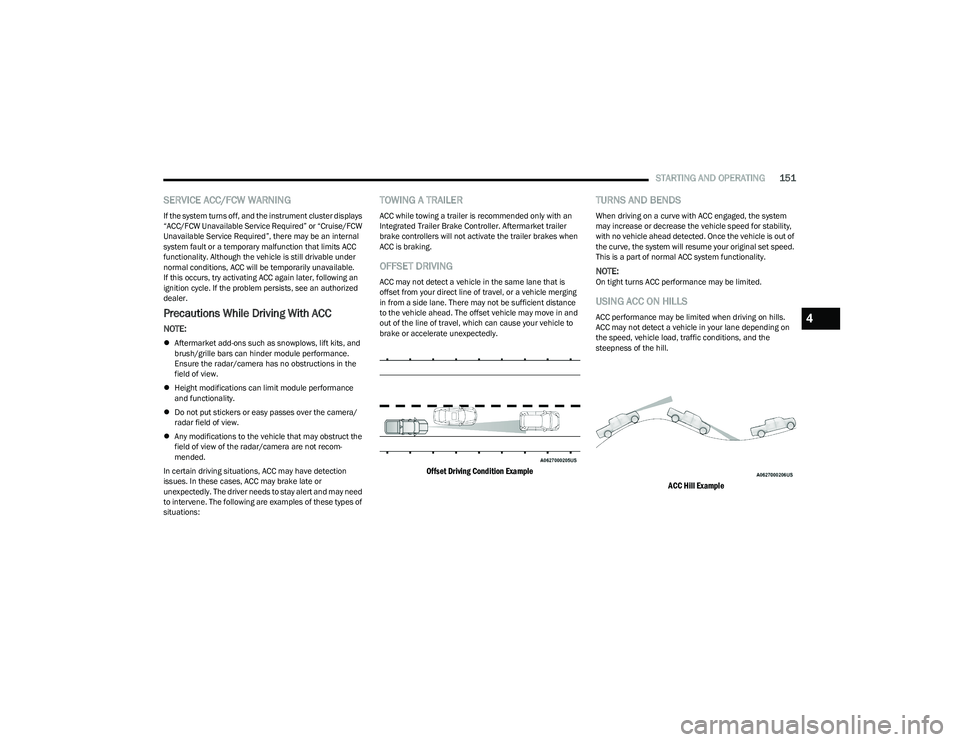
OFFSET DRIVING
ACC may not detect a vehicle in the same lane that is
offset from your direct line of travel, or a vehicle merging
in from a side lane. There may not be sufficient distance
to the vehicle ahead. The offset vehicle may move in and
out of the line of travel, which can cause your vehicle to
brake or accelerate unexpectedly.
Offset Driving Condition Example
TURNS AND BENDS
When driving on a curve with ACC engaged, the system
may increase or decrease the vehicle speed for stability,
with no vehicle ahead detected. Once the vehicle is out of
the curve, the system will resume your original set speed.
This is a part of normal ACC system functionality.
NOTE:On tight turns ACC performance may be limited.
USING ACC ON HILLS
ACC performance may be limited when driving on hills.
ACC may not detect a vehicle in your lane depending on
the speed, vehicle load, traffic conditions, and the
steepness of the hill.
ACC Hill Example
4
23_DT_OM_EN_USC_t.book Page 151
Page 170 of 416
168STARTING AND OPERATING
Deactivation
The Forward Facing Camera is deactivated in the following
conditions:
The vehicle exceeds 8 mph (13 km/h), except when
vehicle is in 4WD Low.
The touchscreen X button is pressed.
The vehicle is shifted into PARK.
The ignition is placed in the OFF position.
NOTE:If the vehicle is in 4WD Low, the Forward Facing Camera
image will be displayed until the touchscreen X button is
pressed or the ignition is placed in the OFF position.
TRAILER CAMERAS — IF EQUIPPED
TRAILER SURROUND VIEW CAMERA
S
YSTEM — IF EQUIPPED
The Trailer Surround View Camera system allows you to
see an on-screen image of the surroundings and the Top
View of a trailer using four mountable cameras. This
occurs whenever the More Cams button is selected, or
when enabled through the Uconnect system. The image
will be displayed on the Uconnect display along with a
caution note “Check Entire Surroundings”. After five
seconds, this note will disappear.
NOTE:
Trailer Surround View Camera kit is only available for
vehicles equipped with the Surround View Camera
system.
The Trailer Surround View Camera system has
programmable settings that may be selected through
the Uconnect system
Úpage 191.
Set Up
The Trailer Surround View Camera system includes an
installation kit with a Trailer Surround View Module and
four Trailer Surround View Cameras that must be installed
on your trailer prior to connecting to your vehicle. See the
installation instructions included with the Trailer Surround
View installation kit for more information. Once the Trailer
Surround View Module and cameras are installed and the
trailer is connected to the vehicle via the 12-way
connector, the settings Trailer Surround Camera settings
can be accessed. The Trailer Surround Camera settings
can be accessed through Uconnect Settings by pressing
the Trailer button in the Trailer Settings or the Camera
Settings. The system requires input of the trailer
dimensions prior to use of the system.
NOTE:
If a trailer is connected but the trailer dimensions have
not been entered in the Trailer Surround settings page,
the system will default to the settings page.
If a trailer is not connected and any button is selected,
a message will appear: “Connect Trailer Equipped With
Trailer Surround View System”. Inputting Trailer Values
For the Trailer Surround View Camera system to function,
all fields must be entered. When a value is needed the
screen will display “Required”.
Activation
The Trailer Surround Camera can be activated through the
Uconnect system when the vehicle is in PARK, NEUTRAL,
OR DRIVE.
When the vehicle is shifted into REVERSE, Surround View
Camera showing the Top View and Back Up Camera is the
default view of the system. Press the More Cams button
and press the Trailer tab to access the Trailer Cameras.
Press Trailer Surround Camera button to access Top View
and Rear View of the trailer.
If the camera delay is turned on, the camera image will
display for up to 10 seconds after shifting out of REVERSE.
The camera image will not display for 10 seconds if the
vehicle speed exceeds 8 mph (13 km/h), the vehicle is
shifted into PARK, or the ignition is placed in the OFF
position. The touchscreen X button disables the display of
the camera image.
Setting
Description
Trailer Length Input the total length of the
trailer
Trailer Width Input the total width of the
trailer
Camera Height Input the height of the
mounted camera
23_DT_OM_EN_USC_t.book Page 168
Page 175 of 416

STARTING AND OPERATING173
TRAILER TOWING
In this section you will find safety tips and information on
limits to the type of towing you can reasonably do with your
vehicle. Before towing a trailer, carefully review this
information to tow your load as efficiently and safely as
possible.
To maintain the New Vehicle Limited Warranty coverage,
follow the requirements and recommendations in this
manual concerning vehicles used for trailer towing.
COMMON TOWING DEFINITIONS
The following trailer towing related definitions will assist
you in understanding the following information:
Gross Vehicle Weight Rating (GVWR)
The GVWR is the total allowable weight of your vehicle.
This includes driver, passengers, cargo and tongue
weight. The total load must be limited so that you do not
exceed the GVWR
Úpage 172.
Gross Trailer Weight (GTW)
The GTW is the weight of the trailer plus the weight of all
cargo, consumables and equipment (permanent or
temporary) loaded in or on the trailer in its “loaded and
ready for operation” condition.
The recommended way to measure GTW is to put your fully
loaded trailer on a vehicle scale. The entire weight of the
trailer must be supported by the scale.
Gross Combination Weight Rating (GCWR)
The GCWR is the total allowable weight of your vehicle and
trailer when weighed in combination.
Gross Axle Weight Rating (GAWR)
The GAWR is the maximum capacity of the front and rear
axles. Distribute the load over the front and rear axles
evenly. Make sure that you do not exceed either front or
rear GAWR
Úpage 172.
Tongue Weight (TW)
The TW is the downward force exerted on the hitch ball by
the trailer. You must consider this as part of the load on
your vehicle.
Trailer Frontal Area
The frontal area is the maximum height multiplied by the
maximum width of the front of a trailer.
Trailer Sway Control (TSC)
The TSC can be a mechanical telescoping link that can be
installed between the hitch receiver and the trailer tongue
that typically provides adjustable friction associated with
the telescoping motion to dampen any unwanted trailer
swaying motions while traveling.
The electronic TSC (If equipped) recognizes a swaying
trailer and automatically applies individual wheel brakes
and/or reduces engine power to attempt to eliminate the
trailer sway.
Weight-Carrying Hitch
A weight-carrying hitch supports the trailer tongue weight,
just as if it were luggage located at a hitch ball or some
other connecting point of the vehicle. These kinds of
hitches are commonly used to tow small and medium
sized trailers.
WARNING!
If the gross trailer weight is 5,000 lb (2,267 kg) or
more, it is recommended to use a weight-distributing
hitch to ensure stable handling of your vehicle. If you
use a standard weight-carrying hitch, you could lose
control of your vehicle and cause a collision.
WARNING!
It is important that you do not exceed the maximum
front or rear GAWR. A dangerous driving condition can
result if either rating is exceeded. You could lose control
of the vehicle and have a collision.
4
23_DT_OM_EN_USC_t.book Page 173
Page 177 of 416
STARTING AND OPERATING175
RECOMMENDED DISTRIBUTION HITCH
ADJUSTMENT
Towing With Air Suspension — If Equipped
1. Verify that the vehicle is at the normal ride height.
NOTE:The vehicle must remain in the engine run position with all
doors closed while attaching a trailer for proper leveling of
the air suspension system.
2. Position the truck to be ready to connect to the trailer
(do not connect the trailer).
3. Enable tire jack mode through the instrument cluster or touchscreen radio settings. Tire jack mode will be
canceled and the procedure must be restarted if the
vehicle is driven at speeds above 5 mph (8 km/h).
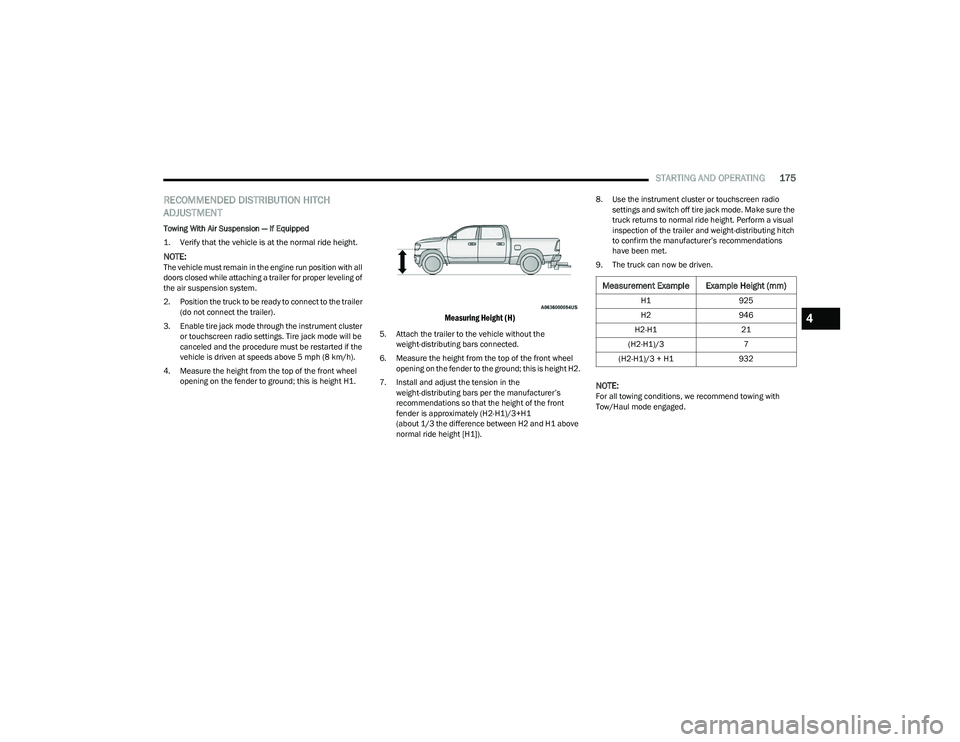
4. Measure the height from the top of the front wheel opening on the fender to ground; this is height H1.
Measuring Height (H)
5. Attach the trailer to the vehicle without the weight-distributing bars connected.
6. Measure the height from the top of the front wheel opening on the fender to the ground; this is height H2.
7. Install and adjust the tension in the weight-distributing bars per the manufacturer’s
recommendations so that the height of the front
fender is approximately (H2-H1)/3+H1
(about 1/3 the difference between H2 and H1 above
normal ride height [H1]). 8. Use the instrument cluster or touchscreen radio
settings and switch off tire jack mode. Make sure the
truck returns to normal ride height. Perform a visual
inspection of the trailer and weight-distributing hitch
to confirm the manufacturer’s recommendations
have been met.
9. The truck can now be driven.
NOTE:For all towing conditions, we recommend towing with
Tow/Haul mode engaged.
Measurement Example Example Height (mm)
H1 925
H2 946
H2-H1 21
(H2-H1)/3 7
(H2-H1)/3 + H1 932
4
23_DT_OM_EN_USC_t.book Page 175
Page 186 of 416

184STARTING AND OPERATING
TOWING TIPS
Before towing, practice turning, stopping, and backing up
the trailer in an area located away from heavy traffic.
Automatic Transmission
The DRIVE range can be selected when towing. The
transmission controls include a drive strategy to avoid
frequent shifting when towing. However, if frequent
shifting does occur while in DRIVE, select TOW/HAUL
mode or select a lower gear range (using the Electronic
Range Select (ERS) shift control).
NOTE:Using TOW/HAUL mode or selecting a lower gear range
(using the ERS shift control) while operating the vehicle
under heavy loading conditions will improve performance
and extend transmission life by reducing excessive
shifting and heat build up. This action will also provide
better engine braking.
Tow/Haul Mode
To reduce potential for automatic transmission
overheating, activate TOW/HAUL mode when driving in
hilly areas, or select a lower gear range (using the (ERS)
shift control) on more severe grades.
Cruise Control — If Equipped
Do not use on hilly terrain or with heavy loads.
When using the Cruise Control, if you experience speed
drops greater than 10 mph (16 km/h), disengage until
you can get back to cruising speed.
Use Cruise Control in flat terrain and with light loads to
maximize fuel efficiency.
Air Suspension System
To aid in attaching/detaching the trailer from the vehicle,
the air suspension system can be used Úpage 134.
Selecting Tow/Haul or connecting a trailer with an
Integrated Trailer Brake Module (ITBM) will disable
Automatic Aero mode to avoid height changes while
towing and shifting loads or tongue weights.
NOTE:The vehicle must remain in the engine running position
while attaching a trailer for proper leveling of the air
suspension system.
SNOWPLOW
Snowplow Prep Packages are available as a factory
installed option. These packages include components
necessary to equip your vehicle with a snowplow.
NOTE:Before installation of a snowplow it is highly recom -
mended that the owner/installer obtain and follow the
recommendations contained within the current Body
Builder’s Guide. See an authorized dealer, installer or
snowplow manufacturer for this information. There are
unique electrical systems that must be connected to
properly ensure operator safety and prevent overloading
vehicle systems.
WARNING!
Attaching a snowplow to this vehicle could adversely
affect performance of the airbag system in a collision.
Do not expect that the airbag will perform as described
earlier in this manual.
CAUTION!
The “Lamp Out” indicator could illuminate if exterior
lamps are not properly installed.
23_DT_OM_EN_USC_t.book Page 184
Page 188 of 416

186STARTING AND OPERATING
RECREATIONAL TOWING (BEHIND MOTORHOME)
TOWING THIS VEHICLE BEHIND ANOTHER VEHICLE
NOTE:
When towing your vehicle, always follow applicable
state and provincial laws. Contact state and provincial
Highway Safety offices for additional details.
Vehicles equipped with Active-Level Four Corner Air
Suspension must be placed in Transport mode before
tying them down (from the body) on a trailer or flatbed
truck
Úpage 134. If the vehicle cannot be placed in
Transport mode (for example, engine will not run),
tie-downs must be fastened to the axles (not to the
body). Failure to follow these instructions may cause
fault codes to be set and/or cause loss of proper
tie-down tension.
RECREATIONAL TOWING — TWO-WHEEL
D
RIVE MODELS
DO NOT flat tow this vehicle. Damage to the drivetrain will
result.
Recreational towing (for two-wheel drive models) is
allowed ONLY if the rear wheels are OFF the ground.
This may be accomplished using a tow dolly or vehicle
trailer. If using a tow dolly, follow this procedure:
NOTE:If vehicle is equipped with air suspension, ensure the
vehicle is set to Normal Ride Height.
1. Properly secure the dolly to the tow vehicle, following the dolly manufacturer's instructions.
2. Drive the rear wheels onto the tow dolly. 3. Apply the parking brake. Place the transmission
in PARK.
4. Properly secure the rear wheels to the dolly, following the dolly manufacturer's instructions.
5. Turn the ignition OFF.
6. Install a suitable clamping device, designed for towing, to secure the front wheels in the straight
position.
Towing Condition Wheels OFF The Ground Two-Wheel Drive Models Four-Wheel Drive Models
Flat TowNONENOT ALLOWED See Instructions
Transmission in PARK
Transfer case in N (Neutral)
Tow in forward direction
Dolly Tow Front
NOT ALLOWED NOT ALLOWED
Rear OK NOT ALLOWED
On Trailer ALLOK OK
CAUTION!
Towing with the rear wheels on the ground will cause
severe transmission damage. Damage from improper
towing is not covered under the New Vehicle Limited
Warranty.
23_DT_OM_EN_USC_t.book Page 186
Page 189 of 416

STARTING AND OPERATING187
(Continued)
RECREATIONAL TOWING —
F
OUR-WHEEL DRIVE MODELS
NOTE:The transfer case must be shifted into N (Neutral) for
recreational towing. The transmission must be shifted into
PARK for recreational towing. Refer to the following for the
proper transfer case N (Neutral) shifting procedure for
your vehicle.
Shifting Into N (Neutral)
Use the following procedure to prepare your vehicle for
recreational towing.
1. Bring the vehicle to a complete stop on level ground,
with the engine running. Apply the parking brake.
2. Press and hold the brake pedal.
3. Shift the transmission to NEUTRAL. The driver's door must be closed (or the driver's seat belt buckled) so
that the transmission will remain in NEUTRAL when
the brake pedal is released.
NOTE:If vehicle is equipped with air suspension, ensure the
vehicle is set to Normal Ride Height.
4. Using a ballpoint pen or similar object, push and hold the recessed transfer case N (Neutral) button (at the
center of the transfer case switches). The N (Neutral)
indicator light will illuminate, and remain lit, when the
shift to N (Neutral) is complete. After the shift is
completed and the N (Neutral) light stays on, release
the N (Neutral) button.
CAUTION!
DO NOT dolly tow any 4WD vehicle. Towing with only
one set of wheels on the ground (front or rear) will
cause severe transmission and/or transfer case
damage. Tow with all four wheels either ON the
ground, or OFF the ground (using a vehicle trailer).
Tow only in the forward direction. Towing this vehicle
backwards can cause severe damage to the transfer
case.
Before recreational towing, the transfer case must
be in N (Neutral). To be certain the transfer case is
fully in N (Neutral), perform the procedure outlined
under “Shifting Into N (Neutral)”. Internal transmis -
sion damage will result, if the transfer case is not in
N (Neutral) during towing.
The transmission must be in PARK for recreational
towing.
Ensure that the Electric Park Brake is released, and
remains released, while being towed.
Towing this vehicle in violation of the above require -
ments can cause severe transmission and/or
transfer case damage. Damage from improper
towing is not covered under the New Vehicle Limited
Warranty.
Do not disconnect the rear driveshaft because fluid
will leak from the transfer case, causing damage to
internal parts.
Do not use a fascia/bumper-mounted clamp-on tow
bar on your vehicle. The fascia/bumper face bar will
be damaged.
WARNING!
You or others could be injured or killed if you leave the
vehicle unattended with the transfer case in the N
(Neutral) position without first fully engaging the
parking brake. The transfer case N (Neutral) position
disengages both the front and rear driveshafts from the
powertrain and will allow the vehicle to roll, even if the
transmission is in PARK. The parking brake should
always be applied when the driver is not in the vehicle.
CAUTION!CAUTION!
It is necessary to follow these steps to be certain that
the transfer case is fully in N (Neutral) before
recreational towing to prevent damage to internal parts.
4
23_DT_OM_EN_USC_t.book Page 187
Page 190 of 416

188STARTING AND OPERATING
5. Release the parking brake.
6. Shift the transmission into REVERSE.
7. Release the brake pedal for five seconds and ensure
that there is no vehicle movement.
8. Repeat steps 6 and 7 with the transmission in DRIVE.
9. Shift the transmission to NEUTRAL. Apply the parking brake. Turn off the engine. For vehicles with Keyless
Enter ‘n Go™, push and hold the ENGINE START/
STOP button until the engine shuts off. The
transmission will automatically select PARK when the
engine is turned off.
10. Turn the ignition off.
11. Attach the vehicle to the tow vehicle using a suitable tow bar.
12. Turn the ignition to the ON/RUN mode, but do not start the engine.
13. Release the parking brake.
14. Turn the ignition OFF.NOTE:
Steps 2 and 3 are requirements that must be met
before pushing the N (Neutral) button, and must
continue to be met until the shift has been completed.
If any of these requirements are not met before
pushing the N (Neutral) button or are no longer met
during the shift, the N (Neutral) indicator light will flash
continuously until all requirements are met or until the
N (Neutral) button is released.
The ignition must be in the ON/RUN mode for a shift to
take place and for the position indicator lights to be
operable. If the ignition is not in the ON/RUN mode, the
shift will not take place and no position indicator lights
will be on or flashing.
A flashing N (Neutral) position indicator light indicates
that shift requirements have not been met.
If the vehicle is equipped with air suspension, the
engine should be started and left running for a
minimum of 60 seconds (with all the doors closed) at
least once every 24 hours. This process allows the air
suspension to adjust the vehicle’s ride height to
compensate for temperature effects.
Shifting Out Of N (Neutral)
Use the following procedure to prepare your vehicle for
normal usage:
1. Bring the vehicle to a complete stop, leaving it
connected to the tow vehicle.
2. Press and hold the brake pedal.
3. Start the engine. Apply the parking brake. Shift the transmission into NEUTRAL.
4. Using a ballpoint pen or similar object, push and hold the recessed transfer case N (Neutral) button
(at the center of the transfer case switches).
5. When the N (Neutral) indicator light turns off, release the N (Neutral) button.
6. Turn the engine off. The transmission will automat -
ically select PARK when the engine is turned off.
7. Release the brake pedal.
23_DT_OM_EN_USC_t.book Page 188