lights RAM 1500 2023 Owners Manual
[x] Cancel search | Manufacturer: RAM, Model Year: 2023, Model line: 1500, Model: RAM 1500 2023Pages: 416, PDF Size: 20.59 MB
Page 5 of 416
3
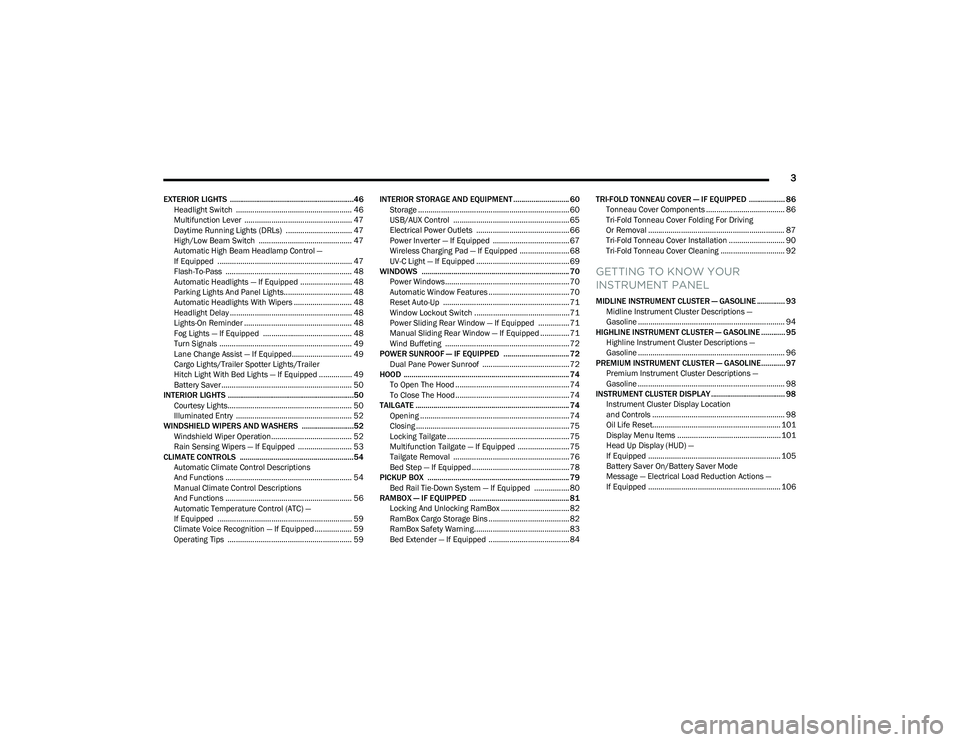
EXTERIOR LIGHTS ..............................................................46Headlight Switch ........................................................ 46
Multifunction Lever .................................................... 47
Daytime Running Lights (DRLs) ................................ 47
High/Low Beam Switch ............................................. 47
Automatic High Beam Headlamp Control —
If Equipped ................................................................. 47
Flash-To-Pass ............................................................. 48
Automatic Headlights — If Equipped ......................... 48
Parking Lights And Panel Lights................................. 48
Automatic Headlights With Wipers ............................ 48
Headlight Delay ........................................................... 48
Lights-On Reminder .................................................... 48
Fog Lights — If Equipped ........................................... 48
Turn Signals ................................................................ 49
Lane Change Assist — If Equipped............................. 49
Cargo Lights/Trailer Spotter Lights/Trailer
Hitch Light With Bed Lights — If Equipped ................ 49
Battery Saver ............................................................... 50
INTERIOR LIGHTS ...............................................................50 Courtesy Lights............................................................ 50
Illuminated Entry ........................................................ 52
WINDSHIELD WIPERS AND WASHERS ..........................52 Windshield Wiper Operation....................................... 52
Rain Sensing Wipers — If Equipped .......................... 53
CLIMATE CONTROLS .........................................................54 Automatic Climate Control Descriptions
And Functions ............................................................. 54
Manual Climate Control Descriptions
And Functions ............................................................. 56
Automatic Temperature Control (ATC) —
If Equipped ................................................................. 59
Climate Voice Recognition — If Equipped .................. 59
Operating Tips ............................................................ 59 INTERIOR STORAGE AND EQUIPMENT ............................ 60
Storage ......................................................................... 60
USB/AUX Control ........................................................ 65
Electrical Power Outlets ............................................. 66
Power Inverter — If Equipped ..................................... 67
Wireless Charging Pad — If Equipped ........................ 68
UV-C Light — If Equipped ............................................. 69
WINDOWS .......................................................................... 70 Power Windows............................................................ 70
Automatic Window Features ....................................... 70
Reset Auto-Up ............................................................. 71
Window Lockout Switch ..............................................71
Power Sliding Rear Window — If Equipped ............... 71
Manual Sliding Rear Window — If Equipped .............. 71
Wind Buffeting ............................................................ 72
POWER SUNROOF — IF EQUIPPED ................................. 72 Dual Pane Power Sunroof .......................................... 72
HOOD ................................................................................... 74 To Open The Hood .......................................................74
To Close The Hood .......................................................74
TAILGATE ............................................................................. 74 Opening ........................................................................ 74
Closing .......................................................................... 75
Locking Tailgate ........................................................... 75
Multifunction Tailgate — If Equipped ......................... 75
Tailgate Removal ........................................................ 76
Bed Step — If Equipped ............................................... 78
PICKUP BOX ....................................................................... 79 Bed Rail Tie-Down System — If Equipped ................. 80
RAMBOX — IF EQUIPPED .................................................. 81 Locking And Unlocking RamBox ................................. 82
RamBox Cargo Storage Bins ....................................... 82
RamBox Safety Warning..............................................83
Bed Extender — If Equipped ....................................... 84 TRI-FOLD TONNEAU COVER — IF EQUIPPED .................. 86
Tonneau Cover Components ...................................... 86
Tri-Fold Tonneau Cover Folding For Driving
Or Removal .................................................................. 87
Tri-Fold Tonneau Cover Installation ........................... 90
Tri-Fold Tonneau Cover Cleaning ............................... 92
GETTING TO KNOW YOUR
INSTRUMENT PANEL
MIDLINE INSTRUMENT CLUSTER — GASOLINE .............. 93 Midline Instrument Cluster Descriptions —
Gasoline ....................................................................... 94
HIGHLINE INSTRUMENT CLUSTER — GASOLINE ............ 95 Highline Instrument Cluster Descriptions —
Gasoline ....................................................................... 96
PREMIUM INSTRUMENT CLUSTER — GASOLINE............ 97 Premium Instrument Cluster Descriptions —
Gasoline ....................................................................... 98
INSTRUMENT CLUSTER DISPLAY ..................................... 98 Instrument Cluster Display Location
and Controls ................................................................ 98
Oil Life Reset.............................................................. 101
Display Menu Items .................................................. 101
Head Up Display (HUD) —
If Equipped ................................................................ 105
Battery Saver On/Battery Saver Mode
Message — Electrical Load Reduction Actions —
If Equipped ................................................................ 106
23_DT_OM_EN_USC_t.book Page 3
Page 6 of 416
4
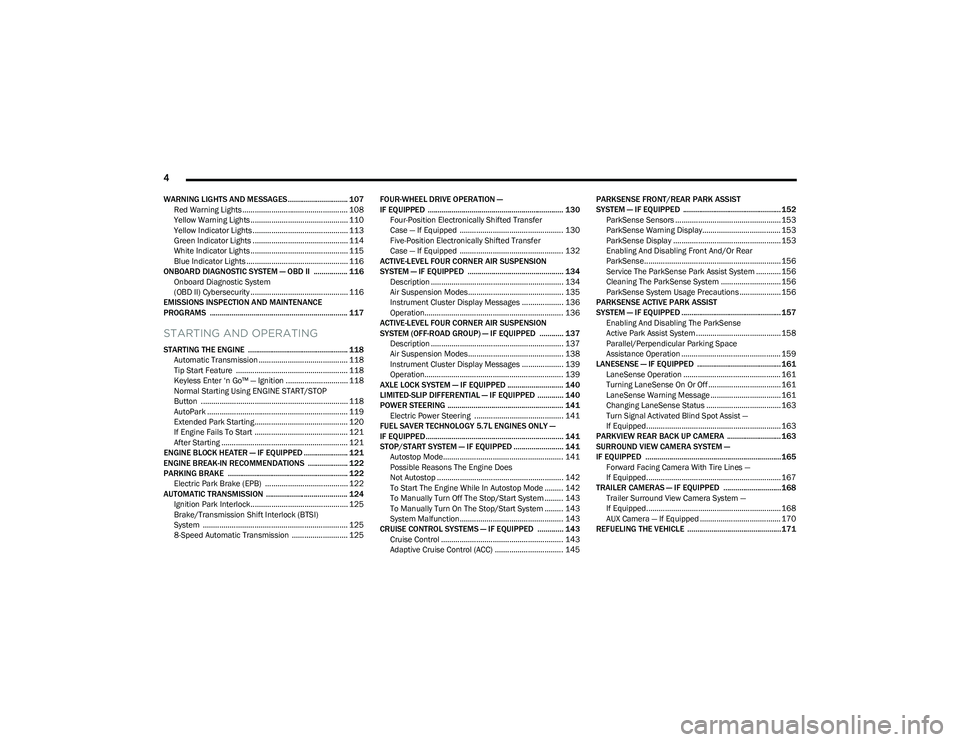
WARNING LIGHTS AND MESSAGES.............................. 107
Red Warning Lights ................................................... 108
Yellow Warning Lights ............................................... 110Yellow Indicator Lights .............................................. 113
Green Indicator Lights .............................................. 114
White Indicator Lights ............................................... 115Blue Indicator Lights ................................................. 116
ONBOARD DIAGNOSTIC SYSTEM — OBD II ................. 116 Onboard Diagnostic System
(OBD II) Cybersecurity ............................................... 116
EMISSIONS INSPECTION AND MAINTENANCE
PROGRAMS ..................................................................... 117
STARTING AND OPERATING
STARTING THE ENGINE .................................................. 118 Automatic Transmission ........................................... 118
Tip Start Feature ...................................................... 118Keyless Enter ‘n Go™ — Ignition .............................. 118
Normal Starting Using ENGINE START/STOP
Button ....................................................................... 118
AutoPark .................................................................... 119Extended Park Starting............................................. 120
If Engine Fails To Start ............................................. 121
After Starting ............................................................. 121
ENGINE BLOCK HEATER — IF EQUIPPED ...................... 121
ENGINE BREAK-IN RECOMMENDATIONS .................... 122
PARKING BRAKE ............................................................ 122 Electric Park Brake (EPB) ........................................ 122
AUTOMATIC TRANSMISSION ......................................... 124 Ignition Park Interlock............................................... 125Brake/Transmission Shift Interlock (BTSI)
System ...................................................................... 125
8-Speed Automatic Transmission ........................... 125 FOUR-WHEEL DRIVE OPERATION —
IF EQUIPPED .................................................................... 130
Four-Position Electronically Shifted Transfer
Case — If Equipped .................................................. 130Five-Position Electronically Shifted Transfer
Case — If Equipped .................................................. 132
ACTIVE-LEVEL FOUR CORNER AIR SUSPENSION
SYSTEM — IF EQUIPPED ................................................ 134 Description ................................................................ 134Air Suspension Modes.............................................. 135
Instrument Cluster Display Messages .................... 136
Operation................................................................... 136
ACTIVE-LEVEL FOUR CORNER AIR SUSPENSION
SYSTEM (OFF-ROAD GROUP) — IF EQUIPPED ............ 137 Description ................................................................ 137Air Suspension Modes.............................................. 138
Instrument Cluster Display Messages .................... 139
Operation................................................................... 139
AXLE LOCK SYSTEM — IF EQUIPPED ............................ 140
LIMITED-SLIP DIFFERENTIAL — IF EQUIPPED ............. 140
POWER STEERING .......................................................... 141 Electric Power Steering ........................................... 141
FUEL SAVER TECHNOLOGY 5.7L ENGINES ONLY —
IF EQUIPPED ..................................................................... 141
STOP/START SYSTEM — IF EQUIPPED ......................... 141 Autostop Mode.......................................................... 141
Possible Reasons The Engine Does
Not Autostop ............................................................. 142
To Start The Engine While In Autostop Mode ......... 142
To Manually Turn Off The Stop/Start System ......... 143
To Manually Turn On The Stop/Start System ......... 143
System Malfunction.................................................. 143
CRUISE CONTROL SYSTEMS — IF EQUIPPED ............. 143 Cruise Control ........................................................... 143
Adaptive Cruise Control (ACC) ................................. 145 PARKSENSE FRONT/REAR PARK ASSIST
SYSTEM — IF EQUIPPED ................................................. 152
ParkSense Sensors ................................................... 153
ParkSense Warning Display...................................... 153ParkSense Display .................................................... 153
Enabling And Disabling Front And/Or Rear
ParkSense.................................................................. 156
Service The ParkSense Park Assist System ............ 156
Cleaning The ParkSense System ............................. 156
ParkSense System Usage Precautions .................... 156
PARKSENSE ACTIVE PARK ASSIST
SYSTEM — IF EQUIPPED .................................................. 157 Enabling And Disabling The ParkSense
Active Park Assist System ......................................... 158
Parallel/Perpendicular Parking Space
Assistance Operation ................................................ 159
LANESENSE — IF EQUIPPED .......................................... 161 LaneSense Operation ............................................... 161Turning LaneSense On Or Off ................................... 161
LaneSense Warning Message .................................. 161
Changing LaneSense Status .................................... 163
Turn Signal Activated Blind Spot Assist —
If Equipped................................................................. 163
PARKVIEW REAR BACK UP CAMERA ........................... 163
SURROUND VIEW CAMERA SYSTEM —
IF EQUIPPED ....................................................................165 Forward Facing Camera With Tire Lines —
If Equipped................................................................. 167
TRAILER CAMERAS — IF EQUIPPED ............................. 168 Trailer Surround View Camera System —
If Equipped................................................................. 168
AUX Camera — If Equipped ....................................... 170
REFUELING THE VEHICLE ...............................................171
23_DT_OM_EN_USC_t.book Page 4
Page 7 of 416
5
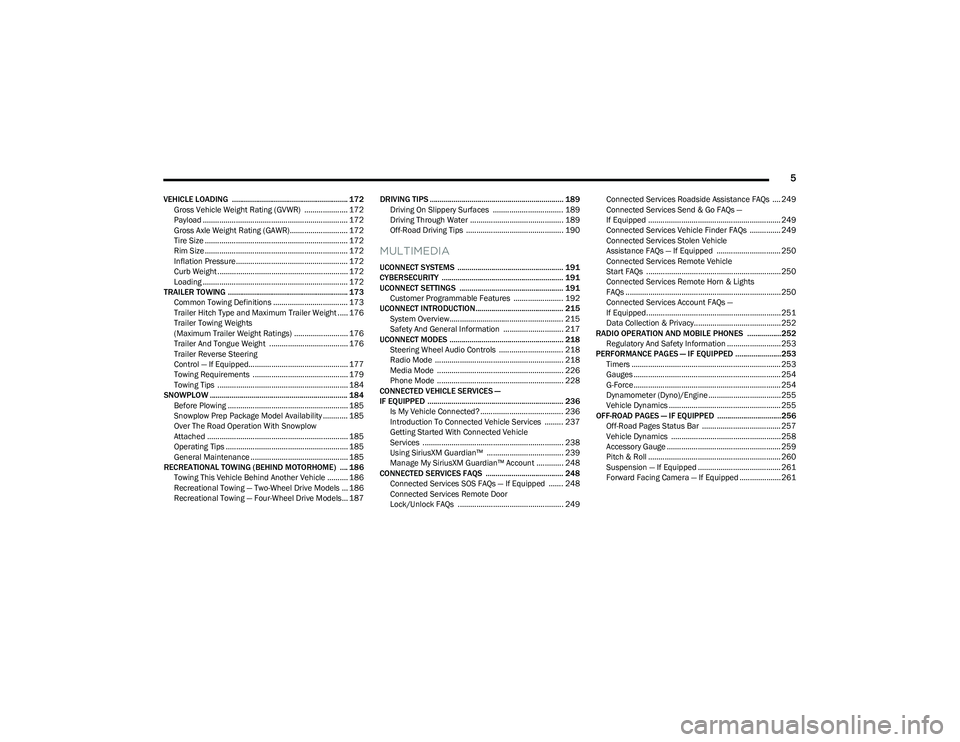
VEHICLE LOADING .......................................................... 172Gross Vehicle Weight Rating (GVWR) ..................... 172
Payload ...................................................................... 172
Gross Axle Weight Rating (GAWR)............................ 172
Tire Size ..................................................................... 172Rim Size ..................................................................... 172Inflation Pressure ...................................................... 172Curb Weight ............................................................... 172
Loading ...................................................................... 172
TRAILER TOWING ............................................................ 173 Common Towing Definitions .................................... 173
Trailer Hitch Type and Maximum Trailer Weight ..... 176Trailer Towing Weights
(Maximum Trailer Weight Ratings) .......................... 176Trailer And Tongue Weight ...................................... 176
Trailer Reverse Steering
Control — If Equipped................................................ 177Towing Requirements .............................................. 179
Towing Tips ............................................................... 184
SNOWPLOW ..................................................................... 184 Before Plowing .......................................................... 185
Snowplow Prep Package Model Availability ............ 185Over The Road Operation With Snowplow
Attached .................................................................... 185Operating Tips ........................................................... 185
General Maintenance ............................................... 185
RECREATIONAL TOWING (BEHIND MOTORHOME) .... 186 Towing This Vehicle Behind Another Vehicle .......... 186
Recreational Towing — Two-Wheel Drive Models ... 186
Recreational Towing — Four-Wheel Drive Models... 187 DRIVING TIPS ................................................................... 189
Driving On Slippery Surfaces .................................. 189
Driving Through Water ............................................. 189
Off-Road Driving Tips ............................................... 190
MULTIMEDIA
UCONNECT SYSTEMS ..................................................... 191
CYBERSECURITY ............................................................. 191
UCONNECT SETTINGS .................................................... 191 Customer Programmable Features ........................ 192
UCONNECT INTRODUCTION............................................ 215 System Overview....................................................... 215
Safety And General Information ............................. 217
UCONNECT MODES ......................................................... 218 Steering Wheel Audio Controls ............................... 218
Radio Mode .............................................................. 218
Media Mode ............................................................. 226
Phone Mode ............................................................. 228
CONNECTED VEHICLE SERVICES —
IF EQUIPPED .................................................................... 236 Is My Vehicle Connected? ........................................ 236
Introduction To Connected Vehicle Services ......... 237
Getting Started With Connected Vehicle
Services .................................................................... 238
Using SiriusXM Guardian™ ..................................... 239
Manage My SiriusXM Guardian™ Account ............. 248
CONNECTED SERVICES FAQS ....................................... 248 Connected Services SOS FAQs — If Equipped ....... 248Connected Services Remote Door
Lock/Unlock FAQs ................................................... 249 Connected Services Roadside Assistance FAQs .... 249
Connected Services Send & Go FAQs —
If Equipped ................................................................ 249
Connected Services Vehicle Finder FAQs ............... 249
Connected Services Stolen Vehicle
Assistance FAQs — If Equipped ............................... 250Connected Services Remote Vehicle
Start FAQs ................................................................. 250
Connected Services Remote Horn & Lights
FAQs ........................................................................... 250Connected Services Account FAQs —
If Equipped................................................................. 251
Data Collection & Privacy.......................................... 252
RADIO OPERATION AND MOBILE PHONES .................252 Regulatory And Safety Information .......................... 253
PERFORMANCE PAGES — IF EQUIPPED .......................253 Timers ........................................................................ 253
Gauges ....................................................................... 254
G-Force ....................................................................... 254
Dynamometer (Dyno)/Engine ................................... 255
Vehicle Dynamics ...................................................... 255
OFF-ROAD PAGES — IF EQUIPPED ................................256 Off-Road Pages Status Bar ...................................... 257Vehicle Dynamics ..................................................... 258Accessory Gauge ....................................................... 259
Pitch & Roll ................................................................ 260
Suspension — If Equipped ........................................ 261Forward Facing Camera — If Equipped .................... 261
23_DT_OM_EN_USC_t.book Page 5
Page 13 of 416
11
When the truck is used to carry a slide-in camper, the total cargo load of the truck consists
of the manufacturer’s camper weight figure, the weight of installed additional camper
equipment not included in the manufacturer’s camper weight figure, the weight of camper
cargo, and the weight of passengers in the camper. The total cargo load should not exceed
the truck’s cargo weight rating and the camper’s CG should fall within the truck’s
recommended CG zone when installed.
Secure loose items to prevent weight shifts that could affect the balance of your vehicle.
When the truck camper is loaded, drive to a scale and weigh the front and rear wheels
separately, to determine axle loads. Individual axle loads should not exceed either of the
Gross Axle Weight Ratings (GAWR). The total of the axle loads should not exceed the Gross
Vehicle Weight Rating (GVWR). If weight ratings are exceeded, move or remove items to
get the total weight below the ratings.
NOTE:These ratings are also provided on the Vehicle Certification Label located on the driver’s
side B-pillar. See Úpage 172 for more information.
For any additional instructions, please contact your conversion/camper manufacturer or
an authorized dealer.
VEHICLE MODIFICATIONS/ALTERATIONS
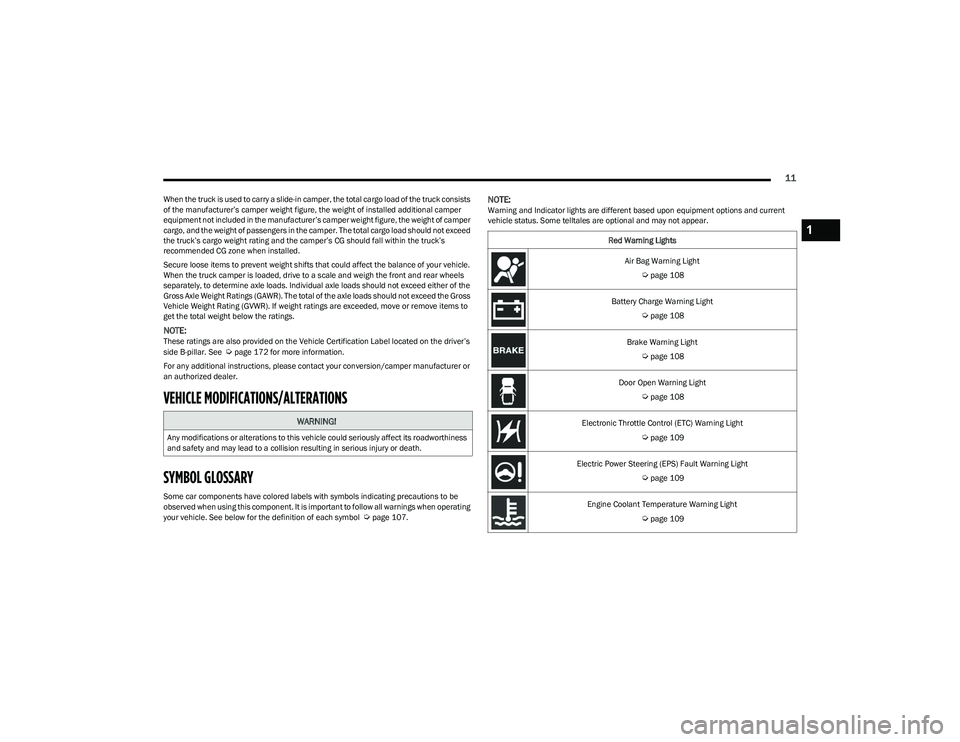
SYMBOL GLOSSARY
Some car components have colored labels with symbols indicating precautions to be
observed when using this component. It is important to follow all warnings when operating
your vehicle. See below for the definition of each symbol
Úpage 107.
NOTE:Warning and Indicator lights are different based upon equipment options and current
vehicle status. Some telltales are optional and may not appear.
WARNING!
Any modifications or alterations to this vehicle could seriously affect its roadworthiness
and safety and may lead to a collision resulting in serious injury or death.
Red Warning Lights
Air Bag Warning Light
Úpage 108
Battery Charge Warning Light
Úpage 108
Brake Warning Light
Úpage 108
Door Open Warning Light
Úpage 108
Electronic Throttle Control (ETC) Warning Light
Úpage 109
Electric Power Steering (EPS) Fault Warning Light
Úpage 109
Engine Coolant Temperature Warning Light
Úpage 109
1
23_DT_OM_EN_USC_t.book Page 11
Page 14 of 416
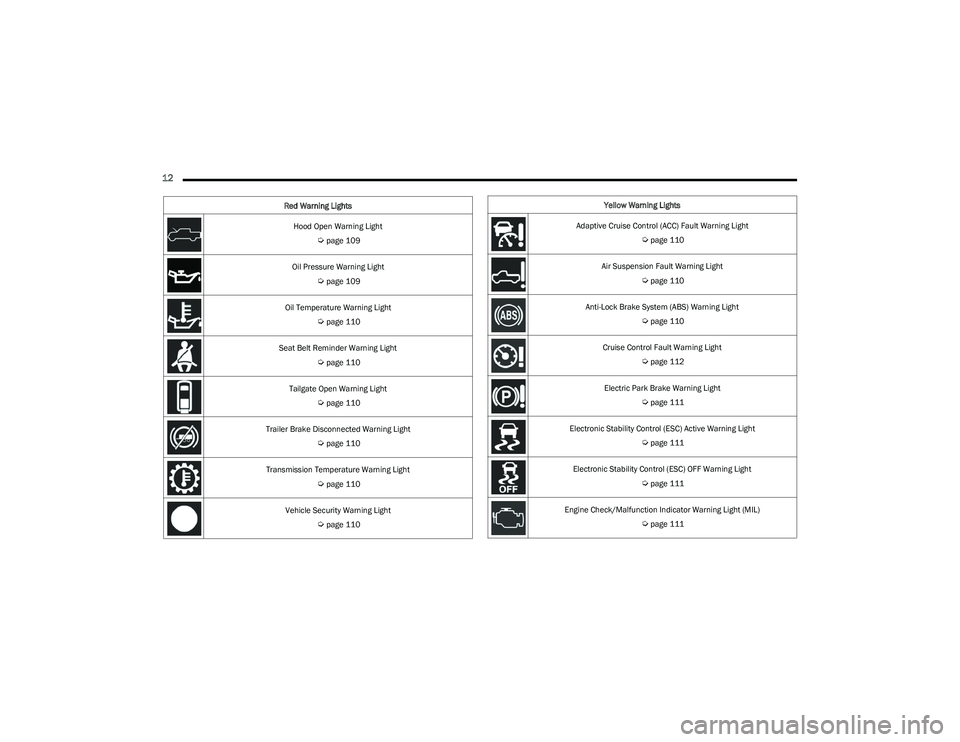
12
Hood Open Warning Light
Úpage 109
Oil Pressure Warning Light
Úpage 109
Oil Temperature Warning Light
Úpage 110
Seat Belt Reminder Warning Light
Úpage 110
Tailgate Open Warning Light
Úpage 110
Trailer Brake Disconnected Warning Light
Úpage 110
Transmission Temperature Warning Light
Úpage 110
Vehicle Security Warning Light
Úpage 110
Red Warning Lights
Yellow Warning Lights
Adaptive Cruise Control (ACC) Fault Warning Light
Úpage 110
Air Suspension Fault Warning Light
Úpage 110
Anti-Lock Brake System (ABS) Warning Light
Úpage 110
Cruise Control Fault Warning Light
Úpage 112
Electric Park Brake Warning Light
Úpage 111
Electronic Stability Control (ESC) Active Warning Light
Úpage 111
Electronic Stability Control (ESC) OFF Warning Light
Úpage 111
Engine Check/Malfunction Indicator Warning Light (MIL)
Úpage 111
23_DT_OM_EN_USC_t.book Page 12
Page 15 of 416
13
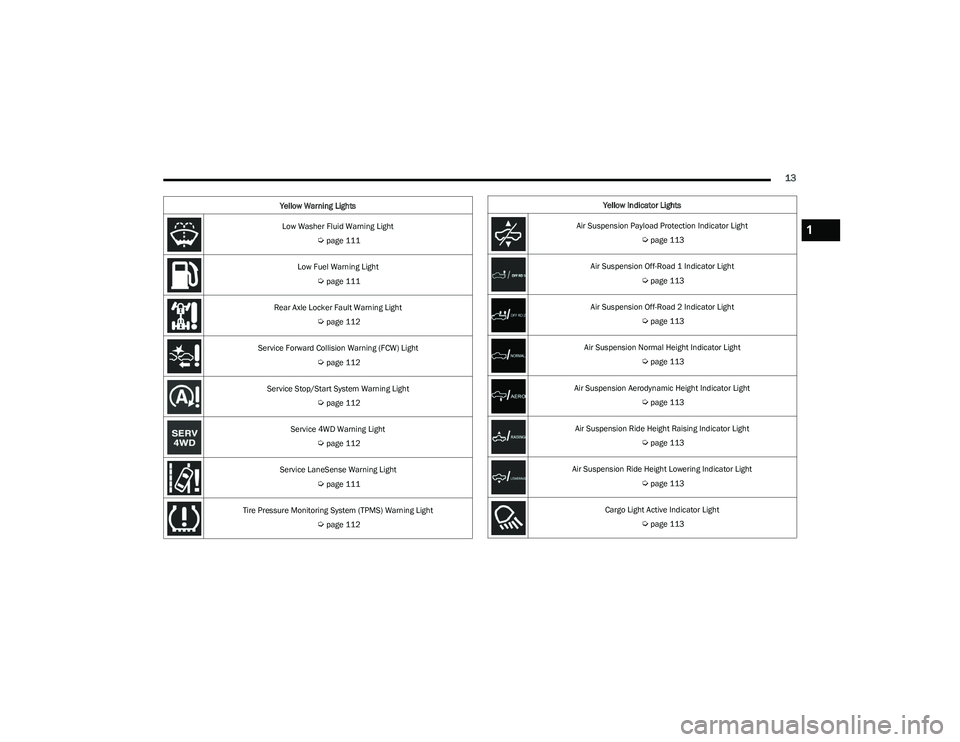
Low Washer Fluid Warning Light
Úpage 111
Low Fuel Warning Light
Úpage 111
Rear Axle Locker Fault Warning Light
Úpage 112
Service Forward Collision Warning (FCW) Light
Úpage 112
Service Stop/Start System Warning Light
Úpage 112
Service 4WD Warning Light
Úpage 112
Service LaneSense Warning Light
Úpage 111
Tire Pressure Monitoring System (TPMS) Warning Light
Úpage 112
Yellow Warning Lights
Yellow Indicator Lights
Air Suspension Payload Protection Indicator Light
Úpage 113
Air Suspension Off-Road 1 Indicator Light
Úpage 113
Air Suspension Off-Road 2 Indicator Light
Úpage 113
Air Suspension Normal Height Indicator Light
Úpage 113
Air Suspension Aerodynamic Height Indicator Light
Úpage 113
Air Suspension Ride Height Raising Indicator Light
Úpage 113
Air Suspension Ride Height Lowering Indicator Light
Úpage 113
Cargo Light Active Indicator Light
Úpage 113
1
23_DT_OM_EN_USC_t.book Page 13
Page 16 of 416
14
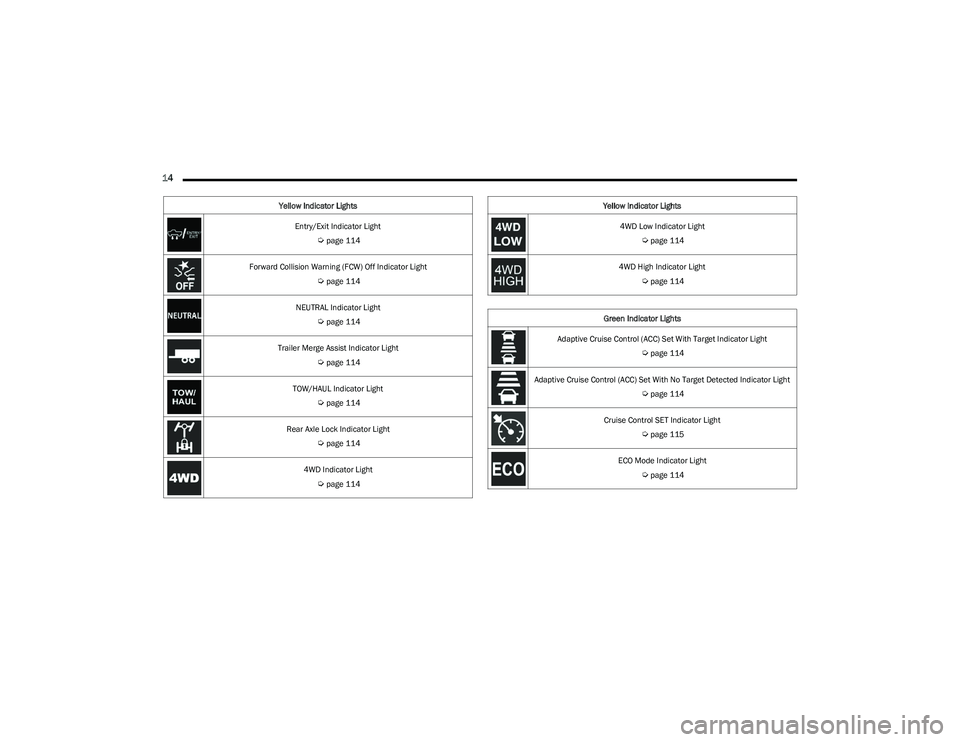
Entry/Exit Indicator Light
Úpage 114
Forward Collision Warning (FCW) Off Indicator Light
Úpage 114
NEUTRAL Indicator Light
Úpage 114
Trailer Merge Assist Indicator Light
Úpage 114
TOW/HAUL Indicator Light
Úpage 114
Rear Axle Lock Indicator Light
Úpage 114
4WD Indicator Light
Úpage 114
Yellow Indicator Lights
4WD Low Indicator Light
Úpage 114
4WD High Indicator Light
Úpage 114
Green Indicator Lights
Adaptive Cruise Control (ACC) Set With Target Indicator Light
Úpage 114
Adaptive Cruise Control (ACC) Set With No Target Detected Indicator Light
Úpage 114
Cruise Control SET Indicator Light
Úpage 115
ECO Mode Indicator Light
Úpage 114
Yellow Indicator Lights
23_DT_OM_EN_USC_t.book Page 14
Page 17 of 416
15
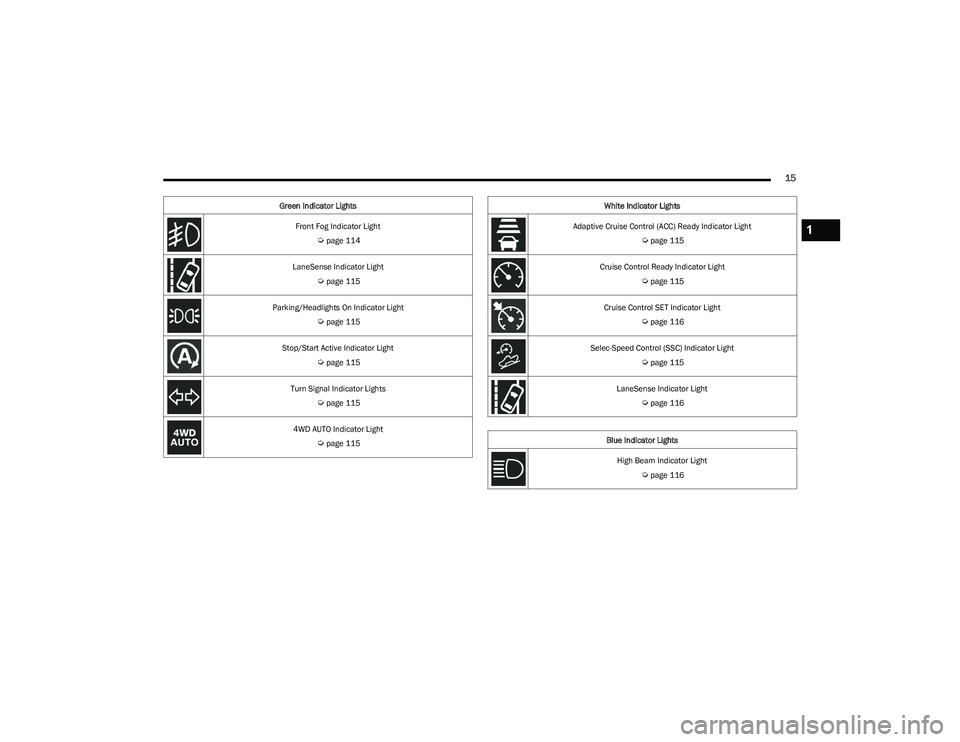
Front Fog Indicator Light
Úpage 114
LaneSense Indicator Light
Úpage 115
Parking/Headlights On Indicator Light
Úpage 115
Stop/Start Active Indicator Light
Úpage 115
Turn Signal Indicator Lights
Úpage 115
4WD AUTO Indicator Light
Úpage 115
Green Indicator Lights
White Indicator Lights
Adaptive Cruise Control (ACC) Ready Indicator Light
Úpage 115
Cruise Control Ready Indicator Light
Úpage 115
Cruise Control SET Indicator Light
Úpage 116
Selec-Speed Control (SSC) Indicator Light
Úpage 115
LaneSense Indicator Light
Úpage 116
Blue Indicator Lights High Beam Indicator Light
Úpage 116
1
23_DT_OM_EN_USC_t.book Page 15
Page 19 of 416
GETTING TO KNOW YOUR VEHICLE17
Using The Panic Feature
To turn the Panic feature on or off, push the Panic button
on the key fob. When the Panic feature is activated, the
turn signals will flash, the horn may pulse on and off
(if equipped with horn alarm), and the interior lights will
turn on.
The Panic feature will stay on for three minutes unless you
turn it off by either pushing the Panic button a second time
or driving the vehicle at a speed of 15 mph (24 km/h) or
greater.
NOTE:
The interior lights will turn off if you place the ignition in
the ON/RUN position while the Panic feature is
activated. However, the exterior lights and horn
(if equipped with horn alarm) will remain on.
You may need to be less than 35 ft (11 m) from the
vehicle when using the key fob to turn off the Panic
feature due to the radio frequency noises emitted by
the system.
Key Left Vehicle Feature
If a valid key fob is no longer detected inside the vehicle
while the vehicle’s ignition system is in the ON/RUN or
START position, the message “Key Fob Has Left The
Vehicle” will be shown in the instrument cluster display
along with an interior chime. An exterior audible and visual
alert will also be activated to warn the driver.
The vehicle’s horn will rapidly chirp three times along with
a single flash of the vehicle’s exterior lights.
NOTE:
The doors have to be open and then closed in order for
the vehicle to detect a key fob; the Key Left Vehicle
feature will not activate until all of the doors are closed.
These alerts will not be activated in situations where
the vehicle’s engine is left running with the key fob
inside.
Air Suspension (Remote Lowering Of The
Vehicle) — If Equipped
For easy entry and loading, your vehicle can be
lowered by pushing the key fob air suspension
lowering button two times. When air
suspension lowering is requested using the key
fob, the vehicle will send a series of chirps and flashes to
alert the customer that the operation has begun and will
continue these alerts until it successfully lowers.
The following conditions must be met for the vehicle to
lower remotely:
The vehicle must not already be in Entry/Exit ride
height.
The vehicle battery must be fully charged.
All doors must be closed.
The key fob must be out of the vehicle.
Gear selector must be in PARK.
NOTE:Ensure the vehicle is clear of all objects, pets, and people
prior to remote lowering. Canceling Remote Lowering
Vehicle lowering can be canceled at anytime. When
vehicle lowering is canceled, the vehicle will raise to the
next defined level and lock out the remote lowering
feature for five seconds until a new request is made.
To cancel vehicle lowering, push the key fob air
suspension lowering button one time during the lowering
process. When vehicle lowering is canceled, the horn will
chirp two times and the turn signal lamps will flash four
times. Once raising is completed, the horn will chirp
one time.
NOTE:More information on air suspension is provided later in
this manual, see Úpage 134.
Replacing The Battery In The Key Fob
The replacement battery model is one CR2450 battery.
NOTE:
Customers are recommended to use a battery
obtained from Mopar®. Aftermarket coin battery
dimensions may not meet the original OEM coin battery
dimensions.
Perchlorate Material — special handling may apply. See
www.dtsc.ca.gov/hazardouswaste/perchlorate for
further information.
2
23_DT_OM_EN_USC_t.book Page 17
Page 23 of 416

GETTING TO KNOW YOUR VEHICLE21
NOTE:
The key fob may not be detected by the vehicle Keyless
Enter ‘n Go™ system if it is located next to a mobile
phone, laptop or other electronic device; these devices
may block the key fob’s wireless signal and prevent the
Keyless Enter ‘n Go™ system from starting the vehicle.
For more information on normal engine starting, see
Úpage 118.
When opening the driver's door and the ignition is in
the ON/RUN position (engine not running), a chime will
sound to remind you to place the ignition in the OFF
position. In addition to the chime, the message “Igni-
tion or Accessory ON” will display in the cluster.
REMOTE START — IF EQUIPPED
This system uses the key fob to start the engine
conveniently from outside the vehicle while still
maintaining security. The system has a range
of approximately 328 ft (100 m).
Remote Start is used to defrost windows in cold weather
and to reach a comfortable climate in all ambient
conditions before the customer enters the vehicle.
NOTE:Obstructions between the vehicle and key fob may reduce
this range Úpage 402.
HOW TO USE REMOTE START
Push and release the Remote Start button on the key fob
twice within five seconds. The vehicle doors will lock, the
parking lights will flash, and the horn will chirp twice
(if programmed). Then, the engine will start, and the
vehicle will remain in the Remote Start mode for a
15 minute cycle.
Pushing the Remote Start button a third time shuts the
engine off. To drive the vehicle, push the unlock button, and place the
ignition in the ON/RUN position.
NOTE:
With Remote Start, the engine will only run for
15 minutes.
Remote Start can only be used twice.
If an engine fault is present or fuel level is low, the
vehicle will start and then shut down in 10 seconds.
The parking lights will turn on and remain on during
Remote Start mode.
For security, power window and power sunroof opera -
tion (if equipped) are disabled when the vehicle is in
the Remote Start mode.
The ignition must be placed in the ON/RUN position
before the Remote Start sequence can be repeated for
a third cycle.
All of the following conditions must be met before the
engine will remote start:
Gear selector in PARK
Doors closed
Hood closed
Hazard switch off
Brake switch inactive (brake pedal not pressed)
Battery at an acceptable charge level
CAUTION!
An unlocked vehicle is an invitation for thieves. Always
remove key fob from the vehicle and lock all doors
when leaving the vehicle unattended.
WARNING!
Do not start or run an engine in a closed garage or
confined area. Exhaust gas contains carbon
monoxide (CO) which is odorless and colorless.
Carbon monoxide is poisonous and can cause
serious injury or death when inhaled.
Keep key fobs away from children. Operation of the
Remote Start system, windows, door locks or other
controls could cause serious injury or death.2
23_DT_OM_EN_USC_t.book Page 21