tailgate RAM 1500 2023 User Guide
[x] Cancel search | Manufacturer: RAM, Model Year: 2023, Model line: 1500, Model: RAM 1500 2023Pages: 416, PDF Size: 20.59 MB
Page 81 of 416
GETTING TO KNOW YOUR VEHICLE79
NOTE:Once the spring load is overcome, the bed step will extend
out quickly, so be sure to stand in a position that will avoid
coming into contact with the step as it extends.
To stow the bed step back under the tailgate, push the bed
step forward with your foot until the bed step is retracted
by the spring load.
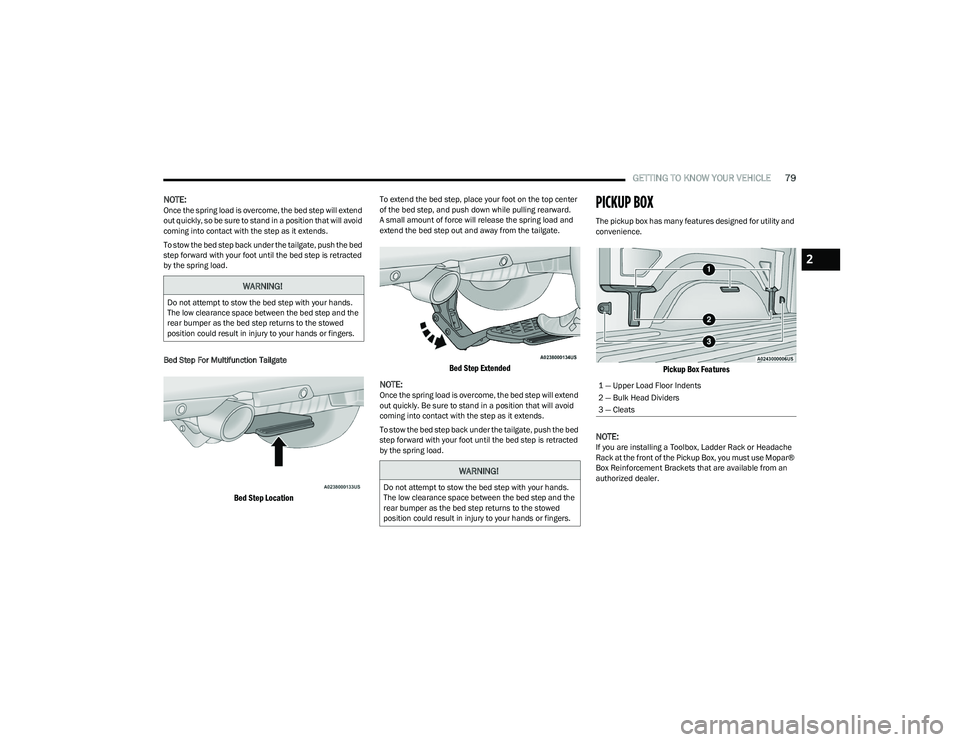
Bed Step For Multifunction Tailgate
Bed Step Location
To extend the bed step, place your foot on the top center
of the bed step, and push down while pulling rearward.
A small amount of force will release the spring load and
extend the bed step out and away from the tailgate.
Bed Step Extended
NOTE:
Once the spring load is overcome, the bed step will extend
out quickly. Be sure to stand in a position that will avoid
coming into contact with the step as it extends.
To stow the bed step back under the tailgate, push the bed
step forward with your foot until the bed step is retracted
by the spring load.
PICKUP BOX
The pickup box has many features designed for utility and
convenience.
Pickup Box Features
NOTE:
If you are installing a Toolbox, Ladder Rack or Headache
Rack at the front of the Pickup Box, you must use Mopar®
Box Reinforcement Brackets that are available from an
authorized dealer.
WARNING!
Do not attempt to stow the bed step with your hands.
The low clearance space between the bed step and the
rear bumper as the bed step returns to the stowed
position could result in injury to your hands or fingers.
WARNING!
Do not attempt to stow the bed step with your hands.
The low clearance space between the bed step and the
rear bumper as the bed step returns to the stowed
position could result in injury to your hands or fingers.
1 — Upper Load Floor Indents
2 — Bulk Head Dividers
3 — Cleats
2
23_DT_OM_EN_USC_t.book Page 79
Page 84 of 416
82GETTING TO KNOW YOUR VEHICLE
LOCKING AND UNLOCKING RAMBOX
Push and release the lock or unlock button on the key fob
to lock and unlock all doors, the tailgate and the RamBox
Úpage 16. To unlatch the storage bin manually, insert the
emergency key into the keyhole and turn clockwise.
Always return the key to the upright (vertical) position
before removing it from the keyhole.
RAMBOX CARGO STORAGE BINS
Cargo storage bins are located on both sides of the pickup
box. The cargo storage bins provide watertight, lockable,
illuminated storage for up to 150 lb (68 kg) of evenly
distributed cargo.
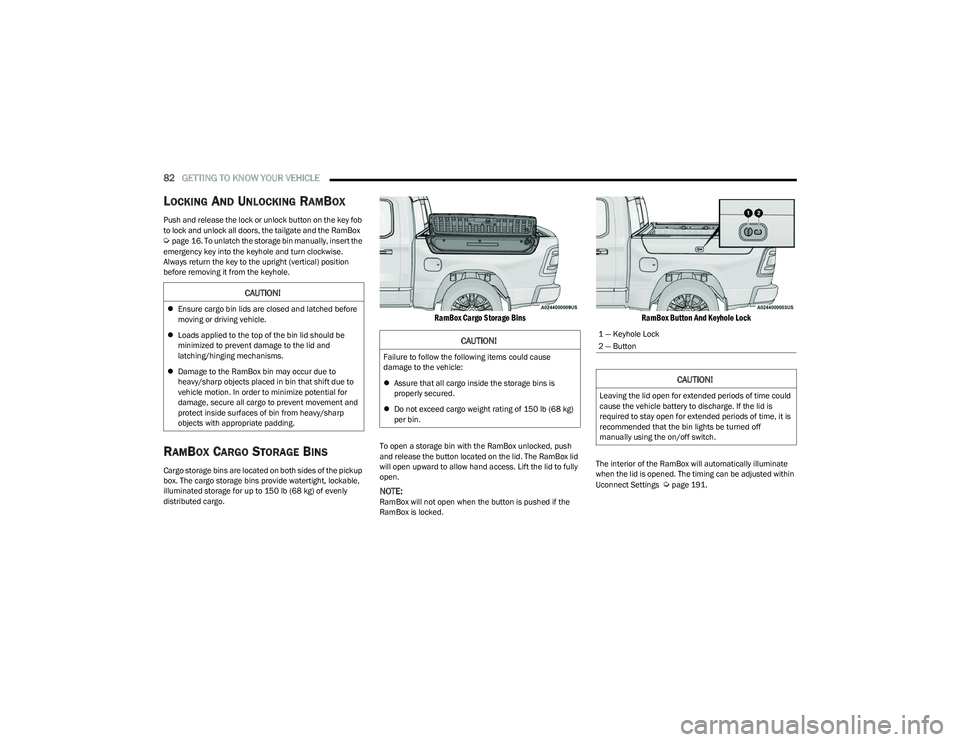
RamBox Cargo Storage Bins
To open a storage bin with the RamBox unlocked, push
and release the button located on the lid. The RamBox lid
will open upward to allow hand access. Lift the lid to fully
open.
NOTE:RamBox will not open when the button is pushed if the
RamBox is locked.
RamBox Button And Keyhole Lock
The interior of the RamBox will automatically illuminate
when the lid is opened. The timing can be adjusted within
Uconnect Settings
Úpage 191.
CAUTION!
Ensure cargo bin lids are closed and latched before
moving or driving vehicle.
Loads applied to the top of the bin lid should be
minimized to prevent damage to the lid and
latching/hinging mechanisms.
Damage to the RamBox bin may occur due to
heavy/sharp objects placed in bin that shift due to
vehicle motion. In order to minimize potential for
damage, secure all cargo to prevent movement and
protect inside surfaces of bin from heavy/sharp
objects with appropriate padding.
CAUTION!
Failure to follow the following items could cause
damage to the vehicle:
Assure that all cargo inside the storage bins is
properly secured.
Do not exceed cargo weight rating of 150 lb (68 kg)
per bin.
1 — Keyhole Lock
2 — Button
CAUTION!
Leaving the lid open for extended periods of time could
cause the vehicle battery to discharge. If the lid is
required to stay open for extended periods of time, it is
recommended that the bin lights be turned off
manually using the on/off switch.
23_DT_OM_EN_USC_t.book Page 82
Page 87 of 416
GETTING TO KNOW YOUR VEHICLE85
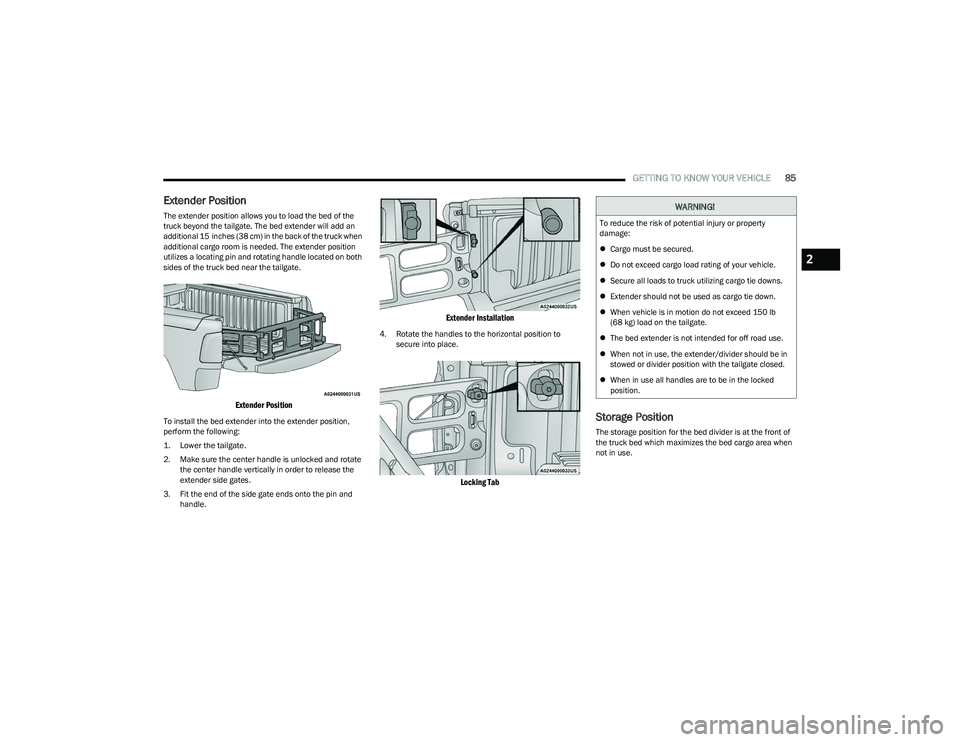
Extender Position
The extender position allows you to load the bed of the
truck beyond the tailgate. The bed extender will add an
additional 15 inches (38 cm) in the back of the truck when
additional cargo room is needed. The extender position
utilizes a locating pin and rotating handle located on both
sides of the truck bed near the tailgate.
Extender Position
To install the bed extender into the extender position,
perform the following:
1. Lower the tailgate.
2. Make sure the center handle is unlocked and rotate
the center handle vertically in order to release the
extender side gates.
3. Fit the end of the side gate ends onto the pin and handle.
Extender Installation
4. Rotate the handles to the horizontal position to secure into place.
Locking Tab
Storage Position
The storage position for the bed divider is at the front of
the truck bed which maximizes the bed cargo area when
not in use.
WARNING!
To reduce the risk of potential injury or property
damage:
Cargo must be secured.
Do not exceed cargo load rating of your vehicle.
Secure all loads to truck utilizing cargo tie downs.
Extender should not be used as cargo tie down.
When vehicle is in motion do not exceed 150 lb
(68 kg) load on the tailgate.
The bed extender is not intended for off road use.
When not in use, the extender/divider should be in
stowed or divider position with the tailgate closed.
When in use all handles are to be in the locked
position.
2
23_DT_OM_EN_USC_t.book Page 85
Page 89 of 416
GETTING TO KNOW YOUR VEHICLE87
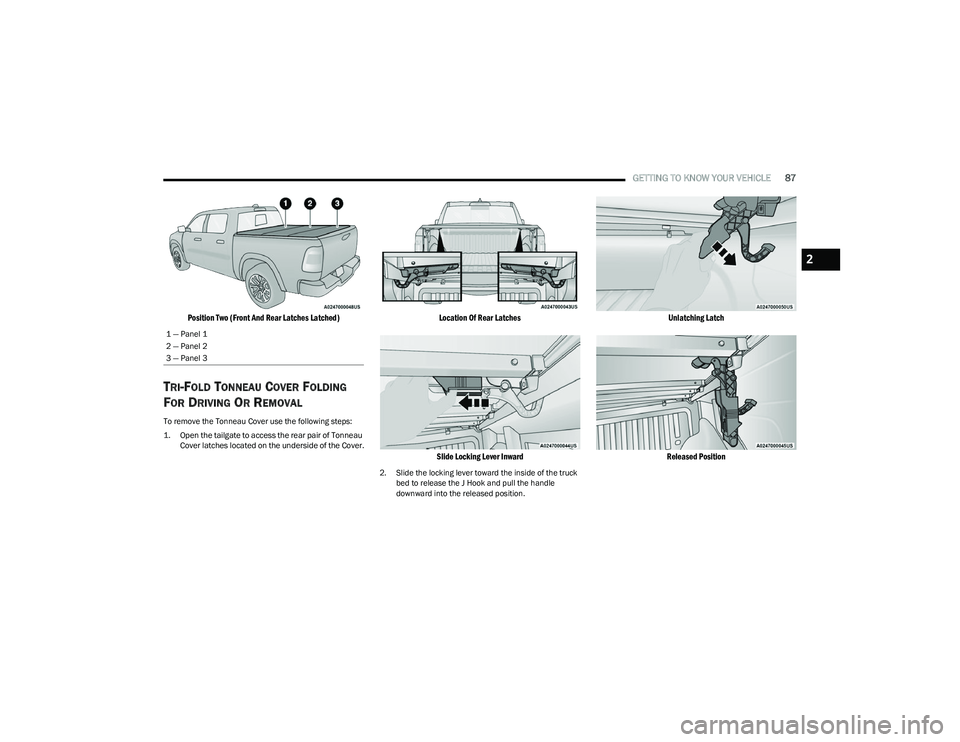
Position Two (Front And Rear Latches Latched)
TRI-FOLD TONNEAU COVER FOLDING
F
OR DRIVING OR REMOVAL
To remove the Tonneau Cover use the following steps:
1. Open the tailgate to access the rear pair of Tonneau
Cover latches located on the underside of the Cover.
Location Of Rear Latches
Slide Locking Lever Inward
2. Slide the locking lever toward the inside of the truck bed to release the J Hook and pull the handle
downward into the released position.
Unlatching Latch
Released Position
1 — Panel 1
2 — Panel 2
3 — Panel 3
2
23_DT_OM_EN_USC_t.book Page 87
Page 112 of 416
110GETTING TO KNOW YOUR INSTRUMENT PANEL
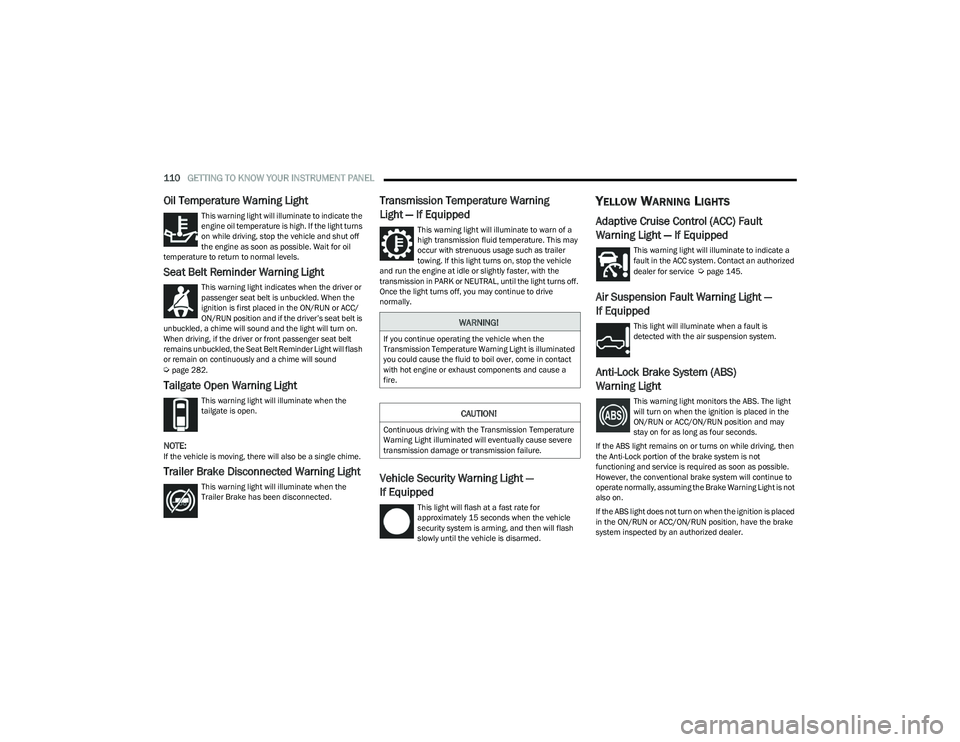
Oil Temperature Warning Light
This warning light will illuminate to indicate the
engine oil temperature is high. If the light turns
on while driving, stop the vehicle and shut off
the engine as soon as possible. Wait for oil
temperature to return to normal levels.
Seat Belt Reminder Warning Light
This warning light indicates when the driver or
passenger seat belt is unbuckled. When the
ignition is first placed in the ON/RUN or ACC/
ON/RUN position and if the driver’s seat belt is
unbuckled, a chime will sound and the light will turn on.
When driving, if the driver or front passenger seat belt
remains unbuckled, the Seat Belt Reminder Light will flash
or remain on continuously and a chime will sound
Úpage 282.
Tailgate Open Warning Light
This warning light will illuminate when the
tailgate is open.
NOTE:If the vehicle is moving, there will also be a single chime.
Trailer Brake Disconnected Warning Light
This warning light will illuminate when the
Trailer Brake has been disconnected.
Transmission Temperature Warning
Light — If Equipped
This warning light will illuminate to warn of a
high transmission fluid temperature. This may
occur with strenuous usage such as trailer
towing. If this light turns on, stop the vehicle
and run the engine at idle or slightly faster, with the
transmission in PARK or NEUTRAL, until the light turns off.
Once the light turns off, you may continue to drive
normally.
Vehicle Security Warning Light —
If Equipped
This light will flash at a fast rate for
approximately 15 seconds when the vehicle
security system is arming, and then will flash
slowly until the vehicle is disarmed.
YELLOW WARNING LIGHTS
Adaptive Cruise Control (ACC) Fault
Warning Light — If Equipped
This warning light will illuminate to indicate a
fault in the ACC system. Contact an authorized
dealer for service
Úpage 145.
Air Suspension Fault Warning Light —
If Equipped
This light will illuminate when a fault is
detected with the air suspension system.
Anti-Lock Brake System (ABS)
Warning Light
This warning light monitors the ABS. The light
will turn on when the ignition is placed in the
ON/RUN or ACC/ON/RUN position and may
stay on for as long as four seconds.
If the ABS light remains on or turns on while driving, then
the Anti-Lock portion of the brake system is not
functioning and service is required as soon as possible.
However, the conventional brake system will continue to
operate normally, assuming the Brake Warning Light is not
also on.
If the ABS light does not turn on when the ignition is placed
in the ON/RUN or ACC/ON/RUN position, have the brake
system inspected by an authorized dealer.
WARNING!
If you continue operating the vehicle when the
Transmission Temperature Warning Light is illuminated
you could cause the fluid to boil over, come in contact
with hot engine or exhaust components and cause a
fire.
CAUTION!
Continuous driving with the Transmission Temperature
Warning Light illuminated will eventually cause severe
transmission damage or transmission failure.
23_DT_OM_EN_USC_t.book Page 110
Page 159 of 416

STARTING AND OPERATING157
When you move the gear selector to the REVERSE posi -
tion and Front or Rear ParkSense is turned off, the
instrument cluster display will show a vehicle graphic
with "OFF" in the corresponding side. This vehicle
graphic will be displayed for as long as the vehicle is in
REVERSE.
ParkSense, when on, will reduce the volume of the
radio when it is sounding a tone.
Clean the ParkSense sensors regularly, taking care not
to scratch or damage them. The sensors must not be
covered with ice, snow, slush, mud, dirt or debris.
Failure to do so can result in the system not working
properly. The ParkSense system might not detect an
obstacle behind or in front of the fascia/bumper, or it
could provide a false indication that an obstacle is
behind or in front of the fascia/bumper.
Use the ParkSense switch to turn the ParkSense
system off if obstacles such as bicycle carriers, trailer
hitches, etc. are placed near the rear fascia/bumper.
Failure to do so can result in the system misinter -
preting a close obstacle as a sensor problem, causing
the “PARKSENSE UNAVAILABLE SERVICE REQUIRED”
message to be appear in the instrument cluster
display.
ParkSense should be disabled when the tailgate is in
the lowered or open position. A lowered tailgate could
provide a false indication that an obstacle is behind the
vehicle and could also cause a false braking event.
The Rear ParkSense system will automatically disable
when the system detects that a trailer with trailer
brakes has been connected to the Integrated Trailer
Brake Module.
The Front ParkSense system will automatically disable
if a snowplow has been connected to the vehicle.
PARKSENSE ACTIVE PARK ASSIST
SYSTEM — IF EQUIPPED
The ParkSense Active Park Assist system is intended to
assist the driver during parallel and perpendicular parking
maneuvers by identifying a proper parking space,
providing audible/visual instructions through the
instrument cluster display, and controlling the steering
wheel. The ParkSense Active Park Assist system is defined
as “semi-automatic” since the driver maintains control of
the accelerator, gear selector and brakes. Depending on
the driver's parking maneuver selection, the ParkSense
Active Park Assist system is capable of maneuvering a
vehicle into a parallel or a perpendicular parking space on
either side (i.e., driver side or passenger side).
WARNING!
Drivers must be careful when backing up even when
using ParkSense. Always check carefully behind your
vehicle, look behind you, and be sure to check for
pedestrians, animals, other vehicles, obstructions,
and blind spots before backing up. You are respon -
sible for safety and must continue to pay attention to
your surroundings. Failure to do so can result in
serious injury or death.
Before using ParkSense, it is strongly recommended
that the ball mount and hitch ball assembly be
disconnected from the vehicle when the vehicle is
not used for towing. Failure to do so can result in
injury or damage to vehicles or obstacles because
the hitch ball will be much closer to the obstacle than
the rear fascia/bumper when the vehicle sounds the
continuous tone. Also, the sensors could detect the
ball mount and hitch ball assembly, depending on its
size and shape, and give a false indication that an
obstacle is behind the vehicle, and could cause false
braking.
CAUTION!
ParkSense is only a parking aid and it is unable to
recognize every obstacle, including small obstacles.
Parking curbs might be temporarily detected or not
detected at all. Obstacles located above or below the
sensors will not be detected when they are in close
proximity.
The vehicle must be driven slowly when using Park -
Sense in order to be able to stop in time when an
obstacle is detected. It is recommended that the
driver looks over his/her shoulder when using Park -
Sense.
4
23_DT_OM_EN_USC_t.book Page 157
Page 160 of 416

158STARTING AND OPERATING
NOTE:
The driver is always responsible for controlling the
vehicle, responsible for any surrounding objects, and
must intervene as required.
The system is provided to assist the driver and not to
substitute the driver.
During a semi-automatic maneuver, if the driver
touches the steering wheel after being instructed to
remove their hands from the steering wheel, the
system will cancel, and the driver will be required to
manually complete the parking maneuver.
The system may not work in all conditions
(e.g. environmental conditions such as heavy rain,
snow, etc., or if searching for a parking space that has
surfaces that will absorb the ultrasonic sensor waves).
New vehicles from the dealership must have at least
30 miles (48 km) accumulated before the ParkSense
Active Park Assist system is fully calibrated and
performs accurately. This is due to the system’s
dynamic vehicle calibration to improve the perfor -
mance of the feature.
The driver must control the vehicle’s brakes. The auto -
matic emergency braking feature is NOT intended to
substitute for the driver during REVERSE maneuvers.ENABLING AND DISABLING THE
P
ARKSENSE ACTIVE PARK ASSIST
S
YSTEM
The ParkSense Active Park Assist system can
be enabled and disabled with the ParkSense
Active Park Assist switch, located on the switch
panel below the Uconnect display.
NOTE:If your vehicle is equipped with a 12-inch Uconnect
display, the ParkSense Active Park Assist switch is located
above the display.
To enable or disable the ParkSense Active Park Assist
system, push the ParkSense Active Park Assist switch
once (LED turns on). Pushing the switch a second time will
disable the system (LED turns off).
The ParkSense Active Park Assist system will turn off
automatically for any of the following conditions:
Parking maneuver is completed.
Vehicle speed is greater than 18 mph (30 km/h) when
searching for a parking space.
Vehicle speed is greater than 5 mph (7 km/h) during
active steering guidance into the parking space.
Steering wheel is touched during active steering guid -
ance into the parking space.
ParkSense Front/Rear Park Assist switch is pushed.
Driver's door is opened.
Tailgate is opened.
Electronic Stability Control/Anti-Lock Braking System
intervention.
Vehicle is in 4WD Low.
Axle Locker is active.
Trailer is connected.
Trailer Reverse Steering Control (TRSC) is active.
Snowplow is connected.
NOTE:The ParkSense Active Park Assist system will allow a
maximum of eight shifts between DRIVE and REVERSE. If
the maneuver cannot be completed within eight shifts, the
system will cancel and the instrument cluster display will
instruct the driver to complete the maneuver manually.
The ParkSense Active Park Assist system will only operate
and search for a parking space when the following
conditions are present:
Gear selector is in DRIVE.
The ignition is in the ON/RUN position.
The ParkSense Active Park Assist switch is activated.
Driver's door is closed.
Tailgate is closed.
Vehicle speed is less than 15 mph (25 km/h).
The outer surface and the underside of the front and
rear fascias/bumpers are clean and clear of snow, ice,
mud, dirt or other obstruction.
NOTE:If the vehicle is driven above approximately 15 mph
(25 km/h), the instrument cluster display will instruct the
driver to slow down. If the vehicle is driven above approxi -
mately 18 mph (30 km/h), the system will cancel. The driver must then reactivate the system by pushing the
ParkSense Active Park Assist switch.
23_DT_OM_EN_USC_t.book Page 158
Page 165 of 416
STARTING AND OPERATING163
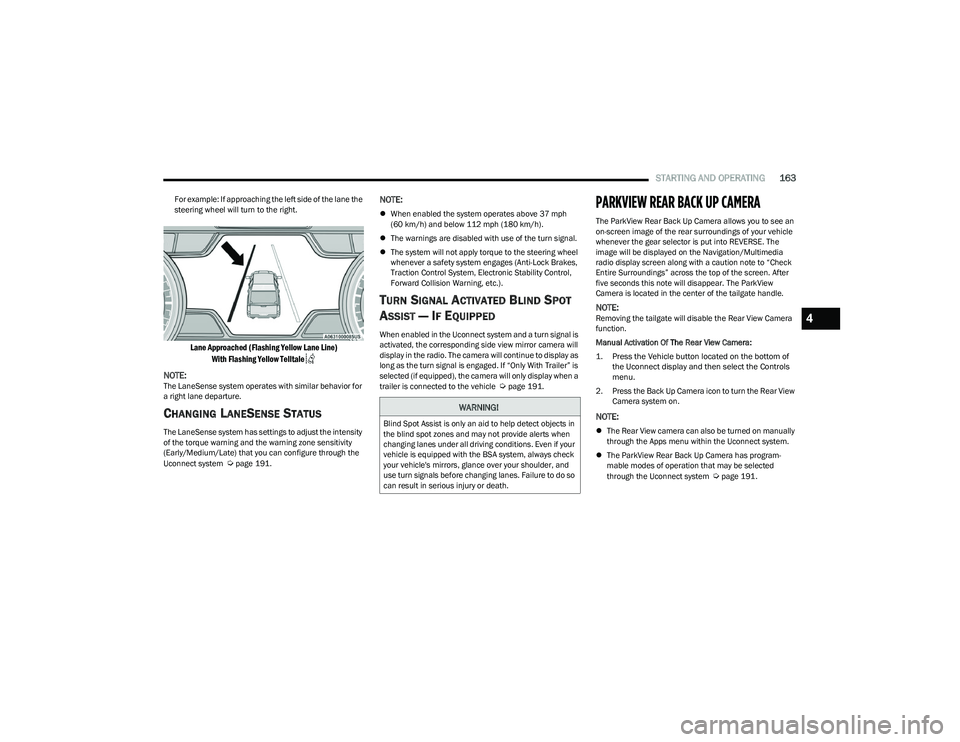
For example: If approaching the left side of the lane the
steering wheel will turn to the right.
Lane Approached (Flashing Yellow Lane Line)
With Flashing Yellow Telltale
NOTE:
The LaneSense system operates with similar behavior for
a right lane departure.
CHANGING LANESENSE STATUS
The LaneSense system has settings to adjust the intensity
of the torque warning and the warning zone sensitivity
(Early/Medium/Late) that you can configure through the
Uconnect system
Úpage 191.
NOTE:
When enabled the system operates above 37 mph
(60 km/h) and below 112 mph (180 km/h).
The warnings are disabled with use of the turn signal.
The system will not apply torque to the steering wheel
whenever a safety system engages (Anti-Lock Brakes,
Traction Control System, Electronic Stability Control,
Forward Collision Warning, etc.).
TURN SIGNAL ACTIVATED BLIND SPOT
A
SSIST — IF EQUIPPED
When enabled in the Uconnect system and a turn signal is
activated, the corresponding side view mirror camera will
display in the radio. The camera will continue to display as
long as the turn signal is engaged. If “Only With Trailer” is
selected (if equipped), the camera will only display when a
trailer is connected to the vehicle
Úpage 191.
PARKVIEW REAR BACK UP CAMERA
The ParkView Rear Back Up Camera allows you to see an
on-screen image of the rear surroundings of your vehicle
whenever the gear selector is put into REVERSE. The
image will be displayed on the Navigation/Multimedia
radio display screen along with a caution note to “Check
Entire Surroundings” across the top of the screen. After
five seconds this note will disappear. The ParkView
Camera is located in the center of the tailgate handle.
NOTE:Removing the tailgate will disable the Rear View Camera
function.
Manual Activation Of The Rear View Camera:
1. Press the Vehicle button located on the bottom of
the Uconnect display and then select the Controls
menu.
2. Press the Back Up Camera icon to turn the Rear View Camera system on.
NOTE:
The Rear View camera can also be turned on manually
through the Apps menu within the Uconnect system.
The ParkView Rear Back Up Camera has program -
mable modes of operation that may be selected
through the Uconnect system
Úpage 191.
WARNING!
Blind Spot Assist is only an aid to help detect objects in
the blind spot zones and may not provide alerts when
changing lanes under all driving conditions. Even if your
vehicle is equipped with the BSA system, always check
your vehicle's mirrors, glance over your shoulder, and
use turn signals before changing lanes. Failure to do so
can result in serious injury or death.
4
23_DT_OM_EN_USC_t.book Page 163
Page 167 of 416
STARTING AND OPERATING165
When Zoom View is selected while the vehicle is in
REVERSE, then shifted to DRIVE, the camera delay view
will display the standard Back Up Camera view. If the
vehicle is then returned to REVERSE gear from DRIVE, the
Zoom View selection will automatically resume.
NOTE:The Zoom View button and AUX button (if equipped) will
not be available when the vehicle is shifted into REVERSE
and the Trailer Reverse Steering Control (TRSC) feature
(if equipped) is activated.
Shifting to NEUTRAL from any gear will maintain the
selected view (Zoom or Standard) as long as the vehicle is
below 8 mph (13 km/h).
If the vehicle is in PARK, Zoom View is available until the
gear selector is placed in DRIVE or REVERSE and speeds
are at or above 8 mph (13 km/h).
NOTE:
If the vehicle is in DRIVE, NEUTRAL, or REVERSE, and
speed is greater than or equal to 8 mph (13 km/h),
Zoom View is unavailable and the icon will appear grey.
While in Zoom View, the guidelines will not be visible.
For information on Auxiliary Cameras (if equipped), see
Úpage 170.
SURROUND VIEW CAMERA SYSTEM —
IF EQUIPPED
The Surround View Camera system allows you to see an
on-screen image of the surroundings and the Top View of
your vehicle. This occurs whenever the gear selector is in
REVERSE or when enabled through the Uconnect system.
The Top View of the vehicle will also show if any doors are
open. The image will be displayed on the touchscreen
along with a caution note “Check Entire Surroundings”.
After five seconds, this note will disappear. The Surround
View Camera system is comprised of four cameras located
in the front grille, rear tailgate and side mirrors.
NOTE:
Removing the tailgate will disable the Rear View
Camera function.
The Surround View Camera system has programmable
settings that may be selected through the Uconnect
system
Úpage 191.
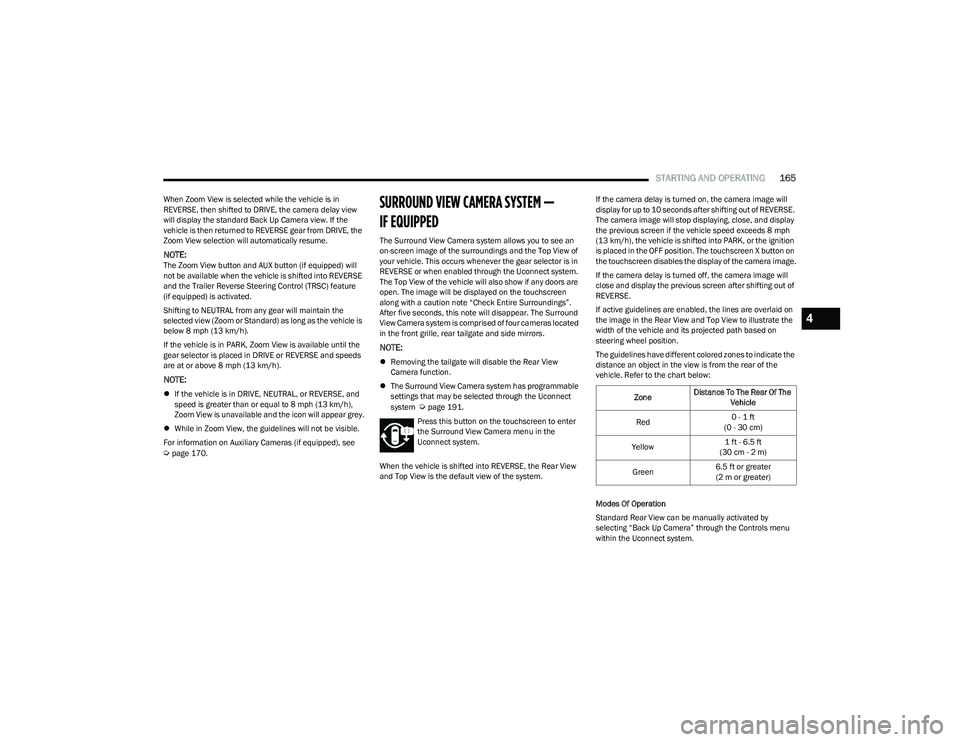
Press this button on the touchscreen to enter
the Surround View Camera menu in the
Uconnect system.
When the vehicle is shifted into REVERSE, the Rear View
and Top View is the default view of the system. If the camera delay is turned on, the camera image will
display for up to 10 seconds after shifting out of REVERSE.
The camera image will stop displaying, close, and display
the previous screen if the vehicle speed exceeds 8 mph
(13 km/h), the vehicle is shifted into PARK, or the ignition
is placed in the OFF position. The touchscreen X button on
the touchscreen disables the display of the camera image.
If the camera delay is turned off, the camera image will
close and display the previous screen after shifting out of
REVERSE.
If active guidelines are enabled, the lines are overlaid on
the image in the Rear View and Top View to illustrate the
width of the vehicle and its projected path based on
steering wheel position.
The guidelines have different colored zones to indicate the
distance an object in the view is from the rear of the
vehicle. Refer to the chart below:
Modes Of Operation
Standard Rear View can be manually activated by
selecting “Back Up Camera” through the Controls menu
within the Uconnect system.Zone
Distance To The Rear Of The
Vehicle
Red 0 - 1 ft
(0 - 30 cm)
Yellow 1 ft - 6.5 ft
(30 cm - 2 m)
Green 6.5 ft or greater
(2 m or greater)
4
23_DT_OM_EN_USC_t.book Page 165
Page 180 of 416
178STARTING AND OPERATING
Using TRSC
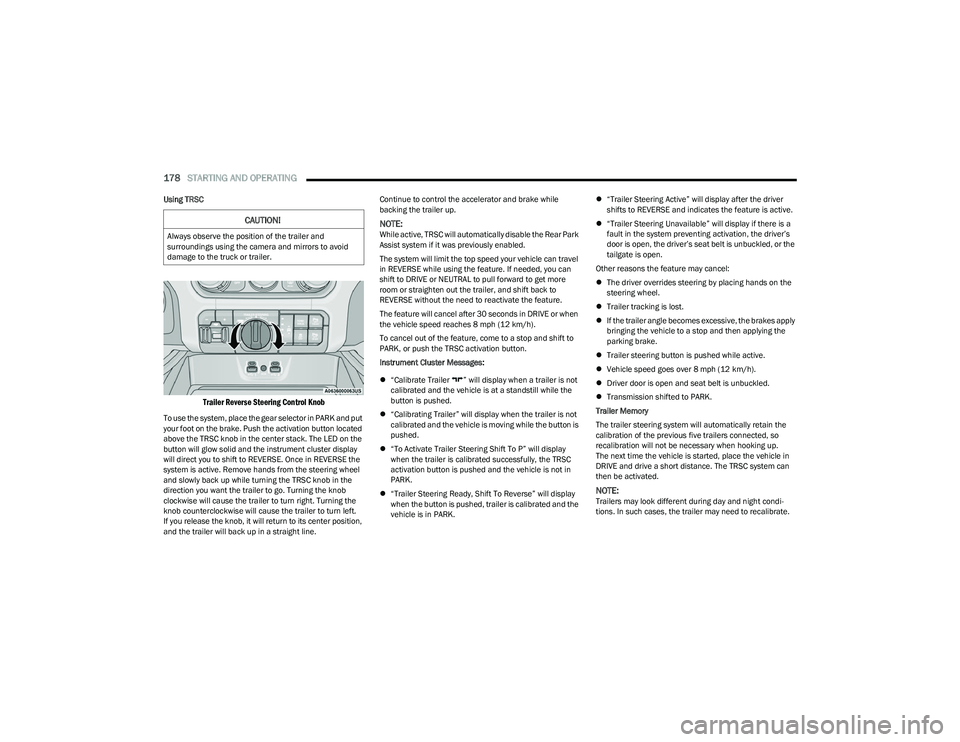
Trailer Reverse Steering Control Knob
To use the system, place the gear selector in PARK and put
your foot on the brake. Push the activation button located
above the TRSC knob in the center stack. The LED on the
button will glow solid and the instrument cluster display
will direct you to shift to REVERSE. Once in REVERSE the
system is active. Remove hands from the steering wheel
and slowly back up while turning the TRSC knob in the
direction you want the trailer to go. Turning the knob
clockwise will cause the trailer to turn right. Turning the
knob counterclockwise will cause the trailer to turn left.
If you release the knob, it will return to its center position,
and the trailer will back up in a straight line. Continue to control the accelerator and brake while
backing the trailer up.
NOTE:While active, TRSC will automatically disable the Rear Park
Assist system if it was previously enabled.
The system will limit the top speed your vehicle can travel
in REVERSE while using the feature. If needed, you can
shift to DRIVE or NEUTRAL to pull forward to get more
room or straighten out the trailer, and shift back to
REVERSE without the need to reactivate the feature.
The feature will cancel after 30 seconds in DRIVE or when
the vehicle speed reaches 8 mph (12 km/h).
To cancel out of the feature, come to a stop and shift to
PARK, or push the TRSC activation button.
Instrument Cluster Messages:
“Calibrate Trailer ” will display when a trailer is not
calibrated and the vehicle is at a standstill while the
button is pushed.
“Calibrating Trailer” will display when the trailer is not
calibrated and the vehicle is moving while the button is
pushed.
“To Activate Trailer Steering Shift To P” will display
when the trailer is calibrated successfully, the TRSC
activation button is pushed and the vehicle is not in
PARK.
“Trailer Steering Ready, Shift To Reverse” will display
when the button is pushed, trailer is calibrated and the
vehicle is in PARK.
“Trailer Steering Active” will display after the driver
shifts to REVERSE and indicates the feature is active.
“Trailer Steering Unavailable” will display if there is a
fault in the system preventing activation, the driver’s
door is open, the driver’s seat belt is unbuckled, or the
tailgate is open.
Other reasons the feature may cancel:
The driver overrides steering by placing hands on the
steering wheel.
Trailer tracking is lost.
If the trailer angle becomes excessive, the brakes apply
bringing the vehicle to a stop and then applying the
parking brake.
Trailer steering button is pushed while active.
Vehicle speed goes over 8 mph (12 km/h).
Driver door is open and seat belt is unbuckled.
Transmission shifted to PARK.
Trailer Memory
The trailer steering system will automatically retain the
calibration of the previous five trailers connected, so
recalibration will not be necessary when hooking up.
The next time the vehicle is started, place the vehicle in
DRIVE and drive a short distance. The TRSC system can
then be activated.
NOTE:Trailers may look different during day and night condi -
tions. In such cases, the trailer may need to recalibrate.
CAUTION!
Always observe the position of the trailer and
surroundings using the camera and mirrors to avoid
damage to the truck or trailer.
23_DT_OM_EN_USC_t.book Page 178