trailer RAM 1500 2023 User Guide
[x] Cancel search | Manufacturer: RAM, Model Year: 2023, Model line: 1500, Model: RAM 1500 2023Pages: 416, PDF Size: 20.59 MB
Page 52 of 416
50GETTING TO KNOW YOUR VEHICLE
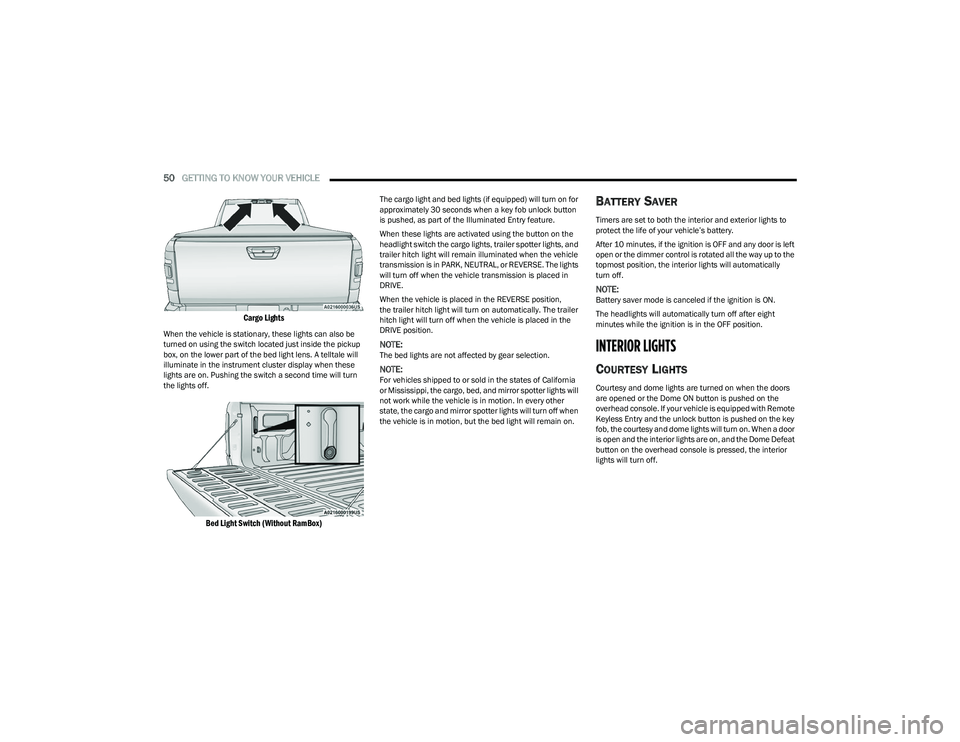
Cargo Lights
When the vehicle is stationary, these lights can also be
turned on using the switch located just inside the pickup
box, on the lower part of the bed light lens. A telltale will
illuminate in the instrument cluster display when these
lights are on. Pushing the switch a second time will turn
the lights off.
Bed Light Switch (Without RamBox)
The cargo light and bed lights (if equipped) will turn on for
approximately 30 seconds when a key fob unlock button
is pushed, as part of the Illuminated Entry feature.
When these lights are activated using the button on the
headlight switch the cargo lights, trailer spotter lights, and
trailer hitch light will remain illuminated when the vehicle
transmission is in PARK, NEUTRAL, or REVERSE. The lights
will turn off when the vehicle transmission is placed in
DRIVE.
When the vehicle is placed in the REVERSE position,
the trailer hitch light will turn on automatically. The trailer
hitch light will turn off when the vehicle is placed in the
DRIVE position.
NOTE:The bed lights are not affected by gear selection.
NOTE:For vehicles shipped to or sold in the states of California
or Mississippi, the cargo, bed, and mirror spotter lights will
not work while the vehicle is in motion. In every other
state, the cargo and mirror spotter lights will turn off when
the vehicle is in motion, but the bed light will remain on.
BATTERY SAVER
Timers are set to both the interior and exterior lights to
protect the life of your vehicle’s battery.
After 10 minutes, if the ignition is OFF and any door is left
open or the dimmer control is rotated all the way up to the
topmost position, the interior lights will automatically
turn off.
NOTE:Battery saver mode is canceled if the ignition is ON.
The headlights will automatically turn off after eight
minutes while the ignition is in the OFF position.
INTERIOR LIGHTS
COURTESY LIGHTS
Courtesy and dome lights are turned on when the doors
are opened or the Dome ON button is pushed on the
overhead console. If your vehicle is equipped with Remote
Keyless Entry and the unlock button is pushed on the key
fob, the courtesy and dome lights will turn on. When a door
is open and the interior lights are on, and the Dome Defeat
button on the overhead console is pressed, the interior
lights will turn off.
23_DT_OM_EN_USC_t.book Page 50
Page 96 of 416
94GETTING TO KNOW YOUR INSTRUMENT PANEL
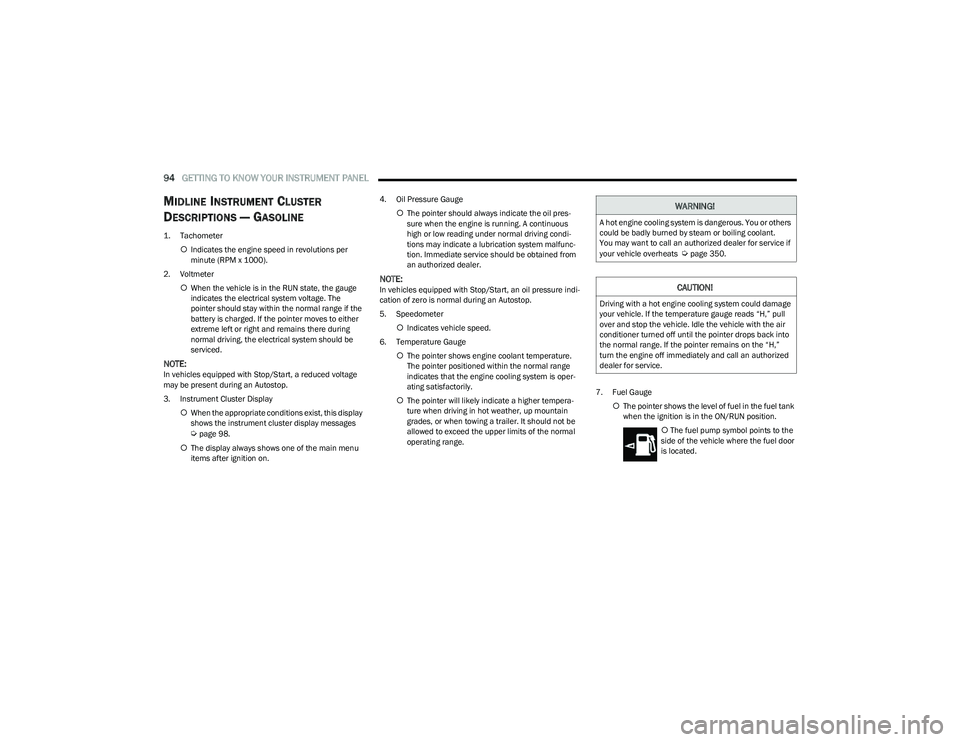
MIDLINE INSTRUMENT CLUSTER
D
ESCRIPTIONS — GASOLINE
1. Tachometer
Indicates the engine speed in revolutions per
minute (RPM x 1000).
2. Voltmeter When the vehicle is in the RUN state, the gauge
indicates the electrical system voltage. The
pointer should stay within the normal range if the
battery is charged. If the pointer moves to either
extreme left or right and remains there during
normal driving, the electrical system should be
serviced.
NOTE:In vehicles equipped with Stop/Start, a reduced voltage
may be present during an Autostop.
3. Instrument Cluster Display
When the appropriate conditions exist, this display
shows the instrument cluster display messages
Úpage 98.
The display always shows one of the main menu
items after ignition on. 4. Oil Pressure Gauge
The pointer should always indicate the oil pres -
sure when the engine is running. A continuous
high or low reading under normal driving condi -
tions may indicate a lubrication system malfunc -
tion. Immediate service should be obtained from
an authorized dealer.
NOTE:In vehicles equipped with Stop/Start, an oil pressure indi -
cation of zero is normal during an Autostop.
5. Speedometer
Indicates vehicle speed.
6. Temperature Gauge The pointer shows engine coolant temperature.
The pointer positioned within the normal range
indicates that the engine cooling system is oper -
ating satisfactorily.
The pointer will likely indicate a higher tempera -
ture when driving in hot weather, up mountain
grades, or when towing a trailer. It should not be
allowed to exceed the upper limits of the normal
operating range. 7. Fuel Gauge
The pointer shows the level of fuel in the fuel tank
when the ignition is in the ON/RUN position.
The fuel pump symbol points to the
side of the vehicle where the fuel door
is located.
WARNING!
A hot engine cooling system is dangerous. You or others
could be badly burned by steam or boiling coolant.
You may want to call an authorized dealer for service if
your vehicle overheats
Úpage 350.
CAUTION!
Driving with a hot engine cooling system could damage
your vehicle. If the temperature gauge reads “H,” pull
over and stop the vehicle. Idle the vehicle with the air
conditioner turned off until the pointer drops back into
the normal range. If the pointer remains on the “H,”
turn the engine off immediately and call an authorized
dealer for service.
23_DT_OM_EN_USC_t.book Page 94
Page 98 of 416
96GETTING TO KNOW YOUR INSTRUMENT PANEL
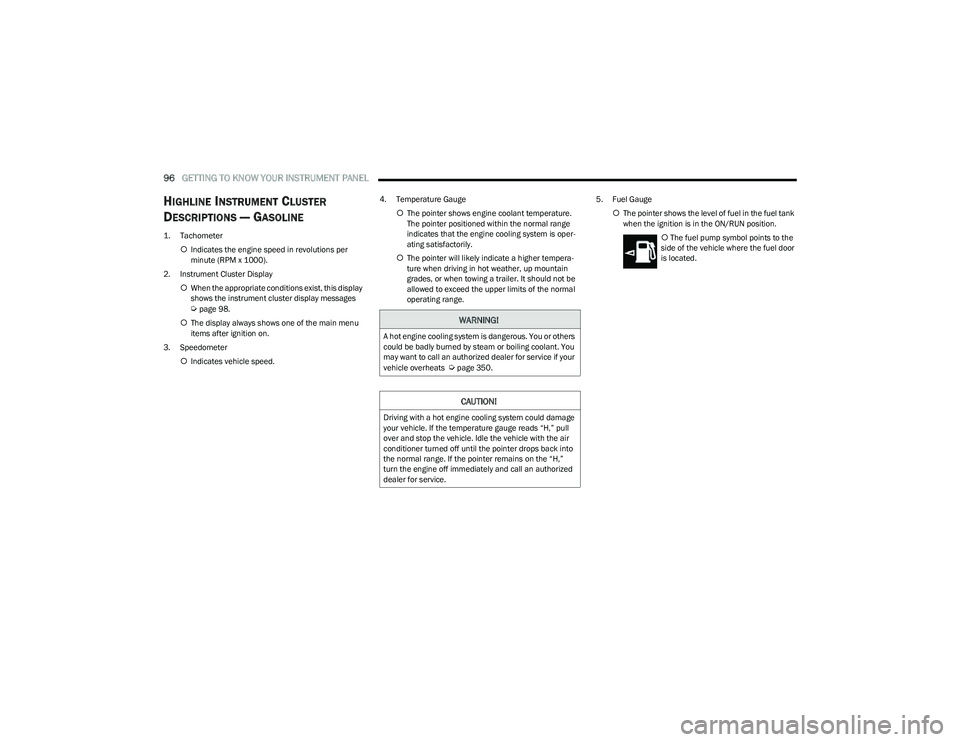
HIGHLINE INSTRUMENT CLUSTER
D
ESCRIPTIONS — GASOLINE
1. Tachometer
Indicates the engine speed in revolutions per
minute (RPM x 1000).
2. Instrument Cluster Display When the appropriate conditions exist, this display
shows the instrument cluster display messages
Úpage 98.
The display always shows one of the main menu
items after ignition on.
3. Speedometer Indicates vehicle speed. 4. Temperature Gauge
The pointer shows engine coolant temperature.
The pointer positioned within the normal range
indicates that the engine cooling system is oper -
ating satisfactorily.
The pointer will likely indicate a higher tempera -
ture when driving in hot weather, up mountain
grades, or when towing a trailer. It should not be
allowed to exceed the upper limits of the normal
operating range. 5. Fuel Gauge
The pointer shows the level of fuel in the fuel tank
when the ignition is in the ON/RUN position.
The fuel pump symbol points to the
side of the vehicle where the fuel door
is located.WARNING!
A hot engine cooling system is dangerous. You or others
could be badly burned by steam or boiling coolant. You
may want to call an authorized dealer for service if your
vehicle overheats
Úpage 350.
CAUTION!
Driving with a hot engine cooling system could damage
your vehicle. If the temperature gauge reads “H,” pull
over and stop the vehicle. Idle the vehicle with the air
conditioner turned off until the pointer drops back into
the normal range. If the pointer remains on the “H,”
turn the engine off immediately and call an authorized
dealer for service.
23_DT_OM_EN_USC_t.book Page 96
Page 100 of 416
98GETTING TO KNOW YOUR INSTRUMENT PANEL
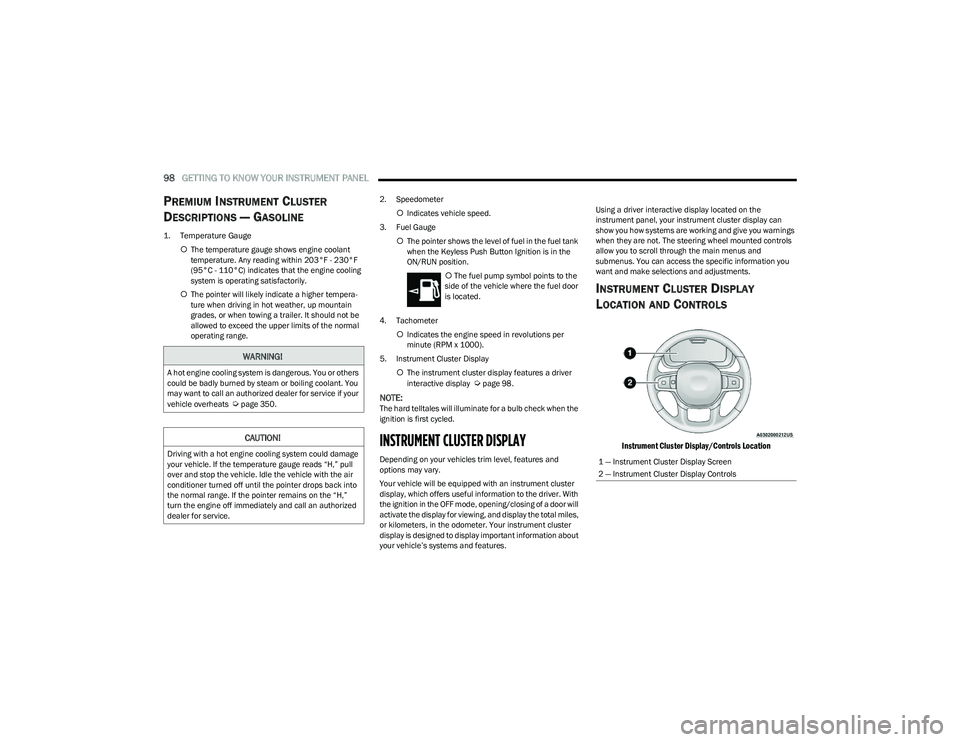
PREMIUM INSTRUMENT CLUSTER
D
ESCRIPTIONS — GASOLINE
1. Temperature Gauge
The temperature gauge shows engine coolant
temperature. Any reading within 203°F - 230°F
(95°C - 110°C) indicates that the engine cooling
system is operating satisfactorily.
The pointer will likely indicate a higher tempera -
ture when driving in hot weather, up mountain
grades, or when towing a trailer. It should not be
allowed to exceed the upper limits of the normal
operating range. 2. Speedometer
Indicates vehicle speed.
3. Fuel Gauge The pointer shows the level of fuel in the fuel tank
when the Keyless Push Button Ignition is in the
ON/RUN position.
The fuel pump symbol points to the
side of the vehicle where the fuel door
is located.
4. Tachometer Indicates the engine speed in revolutions per
minute (RPM x 1000).
5. Instrument Cluster Display The instrument cluster display features a driver
interactive display
Úpage 98.
NOTE:The hard telltales will illuminate for a bulb check when the
ignition is first cycled.
INSTRUMENT CLUSTER DISPLAY
Depending on your vehicles trim level, features and
options may vary.
Your vehicle will be equipped with an instrument cluster
display, which offers useful information to the driver. With
the ignition in the OFF mode, opening/closing of a door will
activate the display for viewing, and display the total miles,
or kilometers, in the odometer. Your instrument cluster
display is designed to display important information about
your vehicle’s systems and features. Using a driver interactive display located on the
instrument panel, your instrument cluster display can
show you how systems are working and give you warnings
when they are not. The steering wheel mounted controls
allow you to scroll through the main menus and
submenus. You can access the specific information you
want and make selections and adjustments.
INSTRUMENT CLUSTER DISPLAY
L
OCATION AND CONTROLS
Instrument Cluster Display/Controls Location
WARNING!
A hot engine cooling system is dangerous. You or others
could be badly burned by steam or boiling coolant. You
may want to call an authorized dealer for service if your
vehicle overheats
Úpage 350.
CAUTION!
Driving with a hot engine cooling system could damage
your vehicle. If the temperature gauge reads “H,” pull
over and stop the vehicle. Idle the vehicle with the air
conditioner turned off until the pointer drops back into
the normal range. If the pointer remains on the “H,”
turn the engine off immediately and call an authorized
dealer for service.1 — Instrument Cluster Display Screen
2 — Instrument Cluster Display Controls
23_DT_OM_EN_USC_t.book Page 98
Page 102 of 416
100GETTING TO KNOW YOUR INSTRUMENT PANEL
For Screen Setup:
OK button allows user to enter menu and submenus.
Within each submenu layer, the left and Right
arrow buttons will allow the user to select the item of
interest.
Pushing the OK button makes the selection and a
confirmation screen will appear (returning the user to
the first page of the submenu).
Pushing the up arrow button will exit each submenu
layer and return to the main menu.
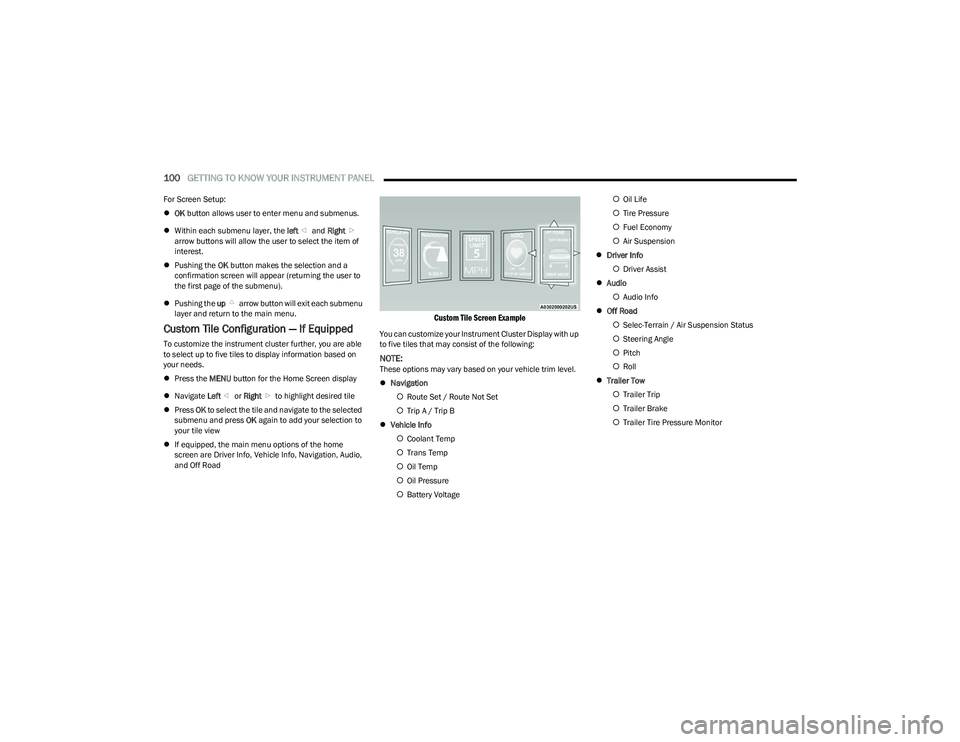
Custom Tile Configuration — If Equipped
To customize the instrument cluster further, you are able
to select up to five tiles to display information based on
your needs.
Press the MENU button for the Home Screen display
Navigate Left or Right to highlight desired tile
Press OK to select the tile and navigate to the selected
submenu and press OK again to add your selection to
your tile view
If equipped, the main menu options of the home
screen are Driver Info, Vehicle Info, Navigation, Audio,
and Off Road
Custom Tile Screen Example
You can customize your Instrument Cluster Display with up
to five tiles that may consist of the following:
NOTE:These options may vary based on your vehicle trim level.
Navigation
Route Set / Route Not Set
Trip A / Trip B
Vehicle Info
Coolant Temp
Trans Temp
Oil Temp
Oil Pressure
Battery Voltage
Oil Life
Tire Pressure
Fuel Economy
Air Suspension
Driver Info
Driver Assist
Audio
Audio Info
Off Road
Selec-Terrain / Air Suspension Status
Steering Angle
Pitch
Roll
Trailer Tow
Trailer Trip
Trailer Brake
Trailer Tire Pressure Monitor
23_DT_OM_EN_USC_t.book Page 100
Page 105 of 416
GETTING TO KNOW YOUR INSTRUMENT PANEL103
Trip Info
Push and release the up or down arrow button until
the Trip menu item is highlighted in the instrument cluster
display. Push and release the right or left arrow
button to enter the submenus of Trip A and Trip B. The Trip
A or Trip B information will display the following:
Distance
Average Fuel Economy
Elapsed Time
Push and hold OK button to reset all information.
Navigation — If Equipped
Push and release the up or down arrow button until
the Navigation display title is highlighted in the instrument
cluster display, “Hold OK to Start Route” will display when
no active route is set. “Hold OK to Cancel Route” will
display when active route is set. Use the left or right
arrow button to zoom in or out on the display
Úpage 191.
Stop/Start — If Equipped
Push and release the up or down arrow button until
the Stop/Start icon/title is highlighted in the instrument
cluster display. The screen will display the Stop/Start
status.
Trailer Tow — If Equipped
Push and release the up or down arrow button until
the Trailer Tow menu item is highlighted in the instrument
cluster display. Push and release the right or left
arrow button to cycle through the following trailer tow
information:
Trip (trailer specific) Distance: Push and hold the OK
button to reset the distance.
Integrated Trailer Brake Module (ITBM):
Braking Output
Trailer Type
ITBM Gain
Trailer Tire Pressure Monitoring: The Instrument
Cluster Display will display the Trailer Tire Pressure for
a connected trailer with sensors that match the active
trailer profile. When a low tire is present, the low tire
value will be displayed in red, and the affected low tire
will have a red glow. “Trailer Tire Low“ will be displayed
on the center bottom of the Instrument Cluster Display
screen.
Trailer Light Check — If Equipped: Push and hold the OK
button to begin the Trailer Light Test sequence
Úpage 182.
Audio
Push and release the up or down arrow button until
the Audio Menu icon/title is highlighted in the instrument
cluster display. This menu will display the audio source
information, including the Song name, Artist name, and
audio source with an accompanying graphic.
Phone Call Status
When a call is incoming, a Phone Call Status pop-up will
display on the screen. The pop-up will remain until the
phone is answered or ignored.
NOTE:The call status will temporarily replace the previous media
source information displayed on the screen. When the
pop-up is no longer displayed, the display will return to the
last used screen.
Stored Messages
Push and release the up or down arrow button until
the Messages Menu item is highlighted. This feature
shows the number of stored warning messages Example:
“Oil Change Required”. Push and release the right or
left arrow button to cycle through stored messages.
3
23_DT_OM_EN_USC_t.book Page 103
Page 106 of 416
104GETTING TO KNOW YOUR INSTRUMENT PANEL
Settings
Head Up Display (HUD) – If Equipped
NOTE:The HUD feature Settings are available at any vehicle
speed Úpage 105.
Screen Setup Driver Selectable Items
Push and release the left or right arrow button
until the Settings Menu Icon/Title is highlighted in the
instrument cluster display. Push and release the OK
button to enter the submenus and follow the prompts on
the screen as needed. The Settings feature allows you to
change what information is displayed in the instrument
cluster as well as the location that information is
displayed.
NOTE:Depending on the vehicles trim level and current status,
some options may not be available. The Settings feature is
only available when the vehicle speed is less than 5 mph.
MIDLINE AND HIGHLINE CLUSTER
Current Gear
Off
On
Odometer
No Decimal Point
Decimal Point
Defaults (Restores All Settings To Default Settings)
Cancel
Restore
Upper Left or Right
None TimeCurrent Econ
Compass Range Trip A Distance
Outside Temp Average Econ Trip B Distance
Trailer Trip –
If Equipped Oil Pressure –
If EquippedOil Temperature
– If Equipped
Trailer Brake –
If EquippedCoolant Temp –
If EquippedBattery Voltage –
If Equipped
Transmission
Temperature –
If Equipped Oil Life –
If Equipped
Favorite Menus
Speedometer Vehicle Info Performance
Off Road Driver Assist
(show/hide) –
If EquippedFuel Economy
(show/hide)
Trip Info
(show/hide) Trailer Tow –
If Equipped
(show/hide)Audio
(show/hide)
Messages
(Stored) Settings Diagnostics
Left Side and Right Side – If Equipped
None Range To Empty Average Econ
Oil Temp Transmission
TempCoolant Temp
Oil Life Menu Icon
Upper Left or Right
Lower Left and Lower Right – If Equipped
None TimeCurrent Econ
Compass Range To Empty Trip A Distance
Outside Temp Average Econ Trip B Distance
Trailer Trip –
If Equipped Trailer Brake –
If Equipped
Oil Pressure
Coolant
Temperature Oil Temperature Battery Voltage
Transmission
Temperature Oil Life
23_DT_OM_EN_USC_t.book Page 104
Page 107 of 416
GETTING TO KNOW YOUR INSTRUMENT PANEL105
PREMIUM CLUSTER
Display Style
Modern
Traditional
Current Gear
Off
On
Odometer
No Decimal Point
Decimal Point
Hide Fuel Gauge
Hide Range
Show Range
Defaults (Restores All Settings To Default Settings)
Restore
Cancel
HEAD UP DISPLAY (HUD) —
I
F EQUIPPED
Use this QR code to access your digital
experience.
NOTE:The HUD feature Settings are available
at any vehicle speed. Some infor -
mation like speed limit or Driver Assist
may not appear on the HUD unless
your vehicle is equipped Traffic Sign
Assist or Driver Assist systems. Push and release the
up or down arrow button until
the Settings Menu icon/title is highlighted in the
instrument cluster display. Push and release the left or
right arrow button until the HUD Menu icon/title is
highlighted in the instrument cluster display. Push and
release the OK button to enter HUD. Use the up or
down arrow button to select a setting, then push and
release the OK button to adjust the setting.
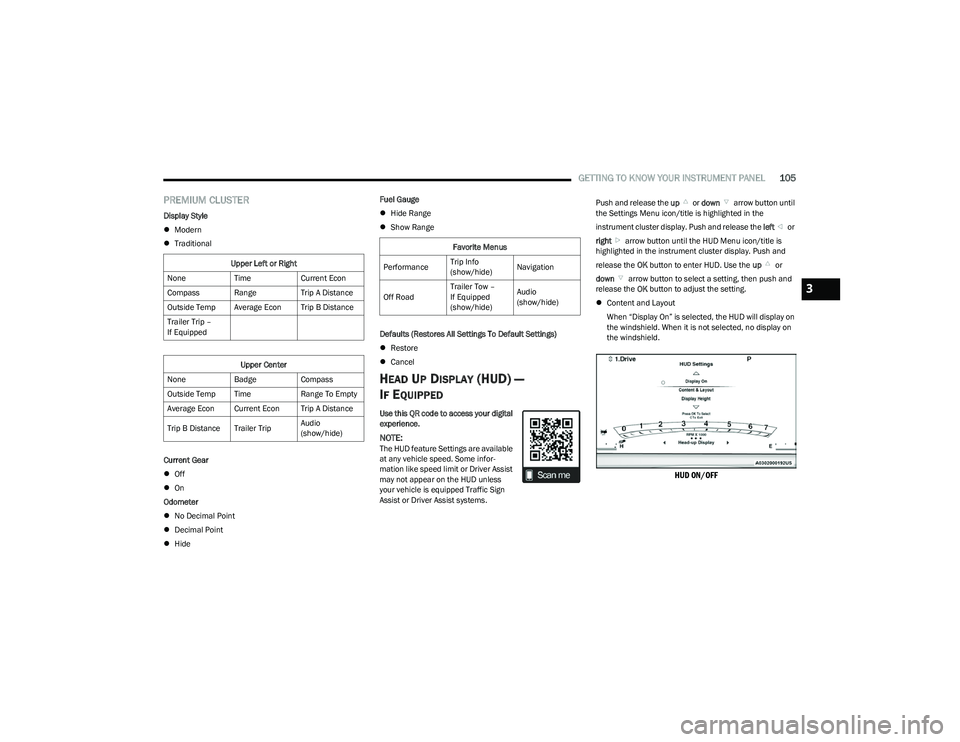
Content and Layout
When “Display On” is selected, the HUD will display on
the windshield. When it is not selected, no display on
the windshield.
HUD ON/OFF
Upper Left or Right
None TimeCurrent Econ
Compass Range Trip A Distance
Outside Temp Average Econ Trip B Distance
Trailer Trip –
If Equipped
Upper Center
None BadgeCompass
Outside Temp Time Range To Empty
Average Econ Current Econ Trip A Distance
Trip B Distance Trailer Trip Audio
(show/hide)
Favorite Menus
Performance Trip Info
(show/hide)Navigation
Off Road Trailer Tow –
If Equipped
(show/hide)Audio
(show/hide)
3
23_DT_OM_EN_USC_t.book Page 105
Page 112 of 416
110GETTING TO KNOW YOUR INSTRUMENT PANEL
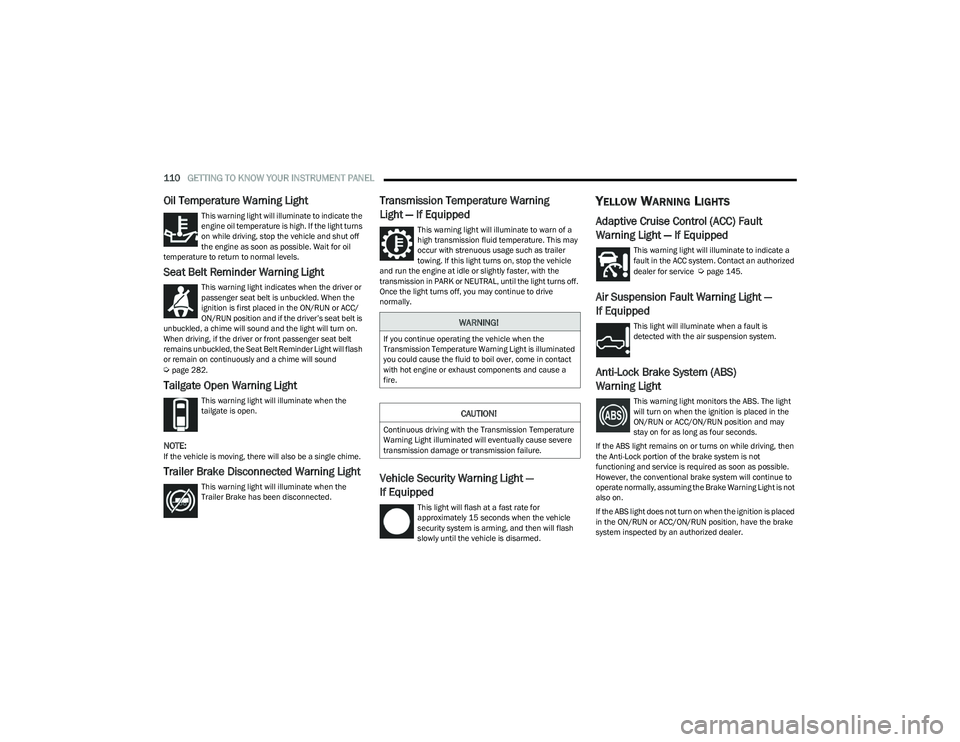
Oil Temperature Warning Light
This warning light will illuminate to indicate the
engine oil temperature is high. If the light turns
on while driving, stop the vehicle and shut off
the engine as soon as possible. Wait for oil
temperature to return to normal levels.
Seat Belt Reminder Warning Light
This warning light indicates when the driver or
passenger seat belt is unbuckled. When the
ignition is first placed in the ON/RUN or ACC/
ON/RUN position and if the driver’s seat belt is
unbuckled, a chime will sound and the light will turn on.
When driving, if the driver or front passenger seat belt
remains unbuckled, the Seat Belt Reminder Light will flash
or remain on continuously and a chime will sound
Úpage 282.
Tailgate Open Warning Light
This warning light will illuminate when the
tailgate is open.
NOTE:If the vehicle is moving, there will also be a single chime.
Trailer Brake Disconnected Warning Light
This warning light will illuminate when the
Trailer Brake has been disconnected.
Transmission Temperature Warning
Light — If Equipped
This warning light will illuminate to warn of a
high transmission fluid temperature. This may
occur with strenuous usage such as trailer
towing. If this light turns on, stop the vehicle
and run the engine at idle or slightly faster, with the
transmission in PARK or NEUTRAL, until the light turns off.
Once the light turns off, you may continue to drive
normally.
Vehicle Security Warning Light —
If Equipped
This light will flash at a fast rate for
approximately 15 seconds when the vehicle
security system is arming, and then will flash
slowly until the vehicle is disarmed.
YELLOW WARNING LIGHTS
Adaptive Cruise Control (ACC) Fault
Warning Light — If Equipped
This warning light will illuminate to indicate a
fault in the ACC system. Contact an authorized
dealer for service
Úpage 145.
Air Suspension Fault Warning Light —
If Equipped
This light will illuminate when a fault is
detected with the air suspension system.
Anti-Lock Brake System (ABS)
Warning Light
This warning light monitors the ABS. The light
will turn on when the ignition is placed in the
ON/RUN or ACC/ON/RUN position and may
stay on for as long as four seconds.
If the ABS light remains on or turns on while driving, then
the Anti-Lock portion of the brake system is not
functioning and service is required as soon as possible.
However, the conventional brake system will continue to
operate normally, assuming the Brake Warning Light is not
also on.
If the ABS light does not turn on when the ignition is placed
in the ON/RUN or ACC/ON/RUN position, have the brake
system inspected by an authorized dealer.
WARNING!
If you continue operating the vehicle when the
Transmission Temperature Warning Light is illuminated
you could cause the fluid to boil over, come in contact
with hot engine or exhaust components and cause a
fire.
CAUTION!
Continuous driving with the Transmission Temperature
Warning Light illuminated will eventually cause severe
transmission damage or transmission failure.
23_DT_OM_EN_USC_t.book Page 110
Page 116 of 416
114GETTING TO KNOW YOUR INSTRUMENT PANEL
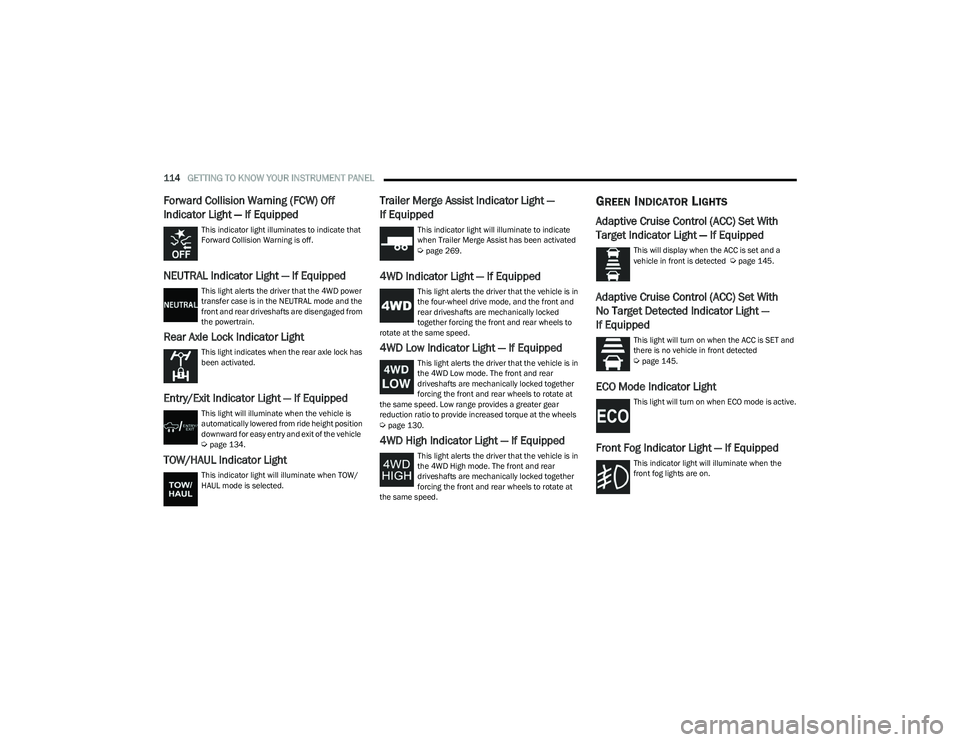
Forward Collision Warning (FCW) Off
Indicator Light — If Equipped
This indicator light illuminates to indicate that
Forward Collision Warning is off.
NEUTRAL Indicator Light — If Equipped
This light alerts the driver that the 4WD power
transfer case is in the NEUTRAL mode and the
front and rear driveshafts are disengaged from
the powertrain.
Rear Axle Lock Indicator Light
This light indicates when the rear axle lock has
been activated.
Entry/Exit Indicator Light — If Equipped
This light will illuminate when the vehicle is
automatically lowered from ride height position
downward for easy entry and exit of the vehicle
Úpage 134.
TOW/HAUL Indicator Light
This indicator light will illuminate when TOW/
HAUL mode is selected.
Trailer Merge Assist Indicator Light —
If Equipped
This indicator light will illuminate to indicate
when Trailer Merge Assist has been activated
Úpage 269.
4WD Indicator Light — If Equipped
This light alerts the driver that the vehicle is in
the four-wheel drive mode, and the front and
rear driveshafts are mechanically locked
together forcing the front and rear wheels to
rotate at the same speed.
4WD Low Indicator Light — If Equipped
This light alerts the driver that the vehicle is in
the 4WD Low mode. The front and rear
driveshafts are mechanically locked together
forcing the front and rear wheels to rotate at
the same speed. Low range provides a greater gear
reduction ratio to provide increased torque at the wheels
Úpage 130.
4WD High Indicator Light — If Equipped
This light alerts the driver that the vehicle is in
the 4WD High mode. The front and rear
driveshafts are mechanically locked together
forcing the front and rear wheels to rotate at
the same speed.
GREEN INDICATOR LIGHTS
Adaptive Cruise Control (ACC) Set With
Target Indicator Light — If Equipped
This will display when the ACC is set and a
vehicle in front is detected Úpage 145.
Adaptive Cruise Control (ACC) Set With
No Target Detected Indicator Light —
If Equipped
This light will turn on when the ACC is SET and
there is no vehicle in front detected
Úpage 145.
ECO Mode Indicator Light
This light will turn on when ECO mode is active.
Front Fog Indicator Light — If Equipped
This indicator light will illuminate when the
front fog lights are on.
23_DT_OM_EN_USC_t.book Page 114