ECU Ram 2500 2019 User Guide
[x] Cancel search | Manufacturer: RAM, Model Year: 2019, Model line: 2500, Model: Ram 2500 2019Pages: 696, PDF Size: 13.89 MB
Page 35 of 696

GETTING TO KNOW YOUR VEHICLE 33
described arming sequences has occurred, the vehicle secu-
rity alarm will arm regardless of whether you are in the
vehicle or not. If you remain in the vehicle and open a door,
the alarm will sound. If this occurs, disarm the vehicle secu-
rity alarm.
If the vehicle security alarm is armed and the battery
becomes disconnected, the vehicle security alarm will
remain armed when the battery is reconnected; the exterior
lights will flash, and the horn will sound. If this occurs,
disarm the vehicle security alarm.
Rearming Of The System
If something triggers the alarm, and no action is taken to
disarm it, the vehicle security alarm will turn the horn off
after 29 seconds, 5 seconds between cycles, up to 8 cycles if
the trigger remains active and then the vehicle security alarm
will rearm itself.
Security System Manual Override
The vehicle security alarm will not arm/disarm if you lock/
unlock the doors using the manual door lock plunger.
DOORS
Manual Door Locks
Front and rear doors may be locked by moving the lock knob
down. The lock knobs will unlock when the interior handle
is used to open the doors.Door Lock Knob
Front doors may be opened with the inside door handle
without lifting the lock knob.
Doors locked before closing will remain locked when closed.2
Page 36 of 696
34 GETTING TO KNOW YOUR VEHICLE
(Continued)
The emergency key will unlock the driver door lock on your
vehicle.
WARNING!
• Do not leave children or animals inside parked vehicles in hot weather. Interior heat build-up may cause
serious injury or death.
• For personal security and safety in the event of an colli -
sion, lock the vehicle doors as you drive as well as
when you park and leave the vehicle.
• Before exiting a vehicle, always shift the automatic transmission into PARK, apply the parking brake, turn
the vehicle OFF, remove the key fobs from vehicle, and
lock all doors. and lock your vehicle.
• Never leave children alone in a vehicle, or with access to an unlocked vehicle. Leaving children in a vehicle
unattended is dangerous for a number of reasons. A
child or others could be seriously or fatally injured.
Children should be warned not to touch the parking
brake, brake pedal or the gear selector.
• Allowing children to be in a vehicle unattended isdangerous for a number of reasons. A child or others
could be seriously or fatally injured. Children should
be warned not to touch the parking brake, brake pedal
or the gear selector.
• Do not leave the key fob in or near the vehicle, or in a location accessible to children, and do not leave the
ignition of a vehicle equipped with Keyless
Enter-N-Go in the ACC or ON/RUN mode. A child
could operate power windows, other controls, or move
the vehicle.
WARNING! (Continued)
Page 38 of 696

36 GETTING TO KNOW YOUR VEHICLE
Keyless Enter-N-Go — Passive Entry
The Passive Entry system is an enhancement to the vehicle’s
Remote Keyless Entry system and a feature of Keyless
Enter-N-Go. This feature allows you to lock and unlock the
vehicle’s door(s) without having to push the key fob lock or
unlock buttons.
NOTE:
• Passive Entry may be programmed ON/OFF. Refer to “Ucon-
nect Settings” in “Multimedia” for further information.
• If wearing gloves on your hands, or if it has been raining/ snowing on the Passive Entry door handle, the unlock sensi -
tivity can be affected, resulting in a slower response time.
• If the vehicle is unlocked by Passive Entry and no door is opened within 60 seconds, the vehicle will re-lock and if
equipped will arm the security alarm.
• The vehicles security alarm can be armed/disarmed by pushing the passive entry key fob lock/unlock buttons (if
equipped).
• The key fob may not be able to be detected by the vehicle passive entry system if it is located next to a mobile phone,
laptop or other electronic device; these devices may block
the key fob's wireless signal and prevent the passive entry
handle from locking/unlocking the vehicle. To Unlock From The Driver's Side:
With a valid Passive Entry key fob within 5 ft (1.5 m) of the
driver door handle, grab the front driver door handle to
unlock the driver's door automatically. The interior door
panel lock knob will raise when the door is unlocked.
Grab The Door Handle To Unlock
NOTE:
If “Unlock All Doors 1st Press” is programmed, all doors will
unlock when you grab hold of the front driver’s door handle.
To select between “Unlock Driver Door 1st Press” and
“Unlock All Doors 1st Press,” refer to “Uconnect Settings” in
“Multimedia” for further information.
Page 56 of 696
54 GETTING TO KNOW YOUR VEHICLE
Rear Head Restraint Removal
To remove the head restraint, push the adjustment button
and the release button while pulling upward on the whole
assembly. To reinstall the head restraint, put the head
restraint posts into the holes and adjust it to the appropriate
height.
NOTE:
To remove outboard restraints, the rear seat bottom must be
folded up.
STEERING WHEEL
Tilt Steering Column
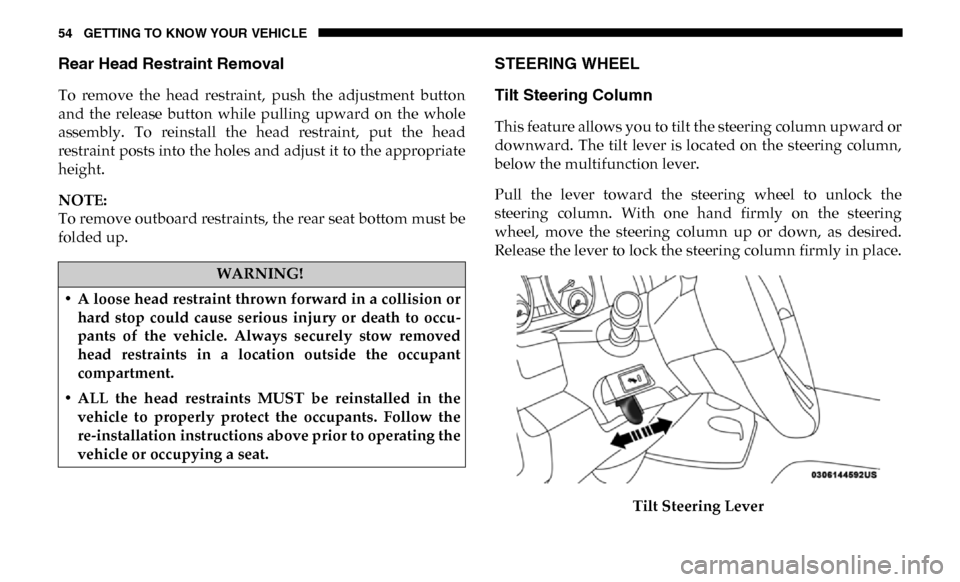
This feature allows you to tilt the steering column upward or
downward. The tilt lever is located on the steering column,
below the multifunction lever.
Pull the lever toward the steering wheel to unlock the
steering column. With one hand firmly on the steering
wheel, move the steering column up or down, as desired.
Release the lever to lock the steering column firmly in place.Tilt Steering Lever
WARNING!
• A loose head restraint thrown forward in a collision or hard stop could cause serious injury or death to occu -
pants of the vehicle. Always securely stow removed
head restraints in a location outside the occupant
compartment.
• ALL the head restraints MUST be reinstalled in the vehicle to properly protect the occupants. Follow the
re-installation instructions above prior to operating the
vehicle or occupying a seat.
Page 100 of 696

98 GETTING TO KNOW YOUR VEHICLE
Opening Sunroof
Express
Push the switch rearward and release it within one-half
second. The sunroof and sunshade will open automatically
and stop when the full open position is reached. This is called
“Express Open.” During Express Open operation, any other
actuation of the sunroof switch will stop the sunroof.
Manual Mode
To open the sunroof, push and hold the switch rearward. The
sunroof will move rearward and automatically stop at full
open position. Any release of the switch will stop the move-
ment. The sunroof and sunshade will remain in a partially
opened condition until the sunroof switch is pushed again.WARNING!
• Never leave children unattended in a vehicle, or with access to an unlocked vehicle. Never leave the key fob
in or near the vehicle, or in a location accessible to chil -
dren. Do not leave the ignition of a vehicle equipped
with Keyless Enter-N-Go in the ACC or ON/RUN
mode. Occupants, particularly unattended children,
can become entrapped by the power sunroof while
operating the power sunroof switch. Such entrapment
may result in serious injury or death.
• In a collision, there is a greater risk of being thrown from a vehicle with an open sunroof. You could also be
seriously injured or killed. Always fasten your seat belt
properly and make sure all passengers are also properly
secured.
• Do not allow small children to operate the sunroof. Never allow your fingers, other body parts, or any
object, to project through the sunroof opening. Injury
may result.
Page 101 of 696

GETTING TO KNOW YOUR VEHICLE 99
Closing Sunroof
Express
Push the switch forward and release it within one-half
second and the sunroof will close automatically from any
position. The sunroof will close fully and stop automatically.
This is called “Express Close.” During Express Close opera-
tion, any other actuation of the switch will stop the sunroof.
Manual Mode
To close the sunroof, push and hold the switch forward. The
sunroof will move forward and automatically stop at full
closed position. Any release of the switch will stop the move -
ment and the sunroof will remain in a partially closed condi -
tion until the sunroof switch is pushed again.
Wind Buffeting
Wind buffeting can be described as the perception of pres -
sure on the ears or a helicopter-type sound in the ears. Your
vehicle may exhibit wind buffeting with the windows down,
or the sunroof (if equipped) in certain open or partially open
positions. This is a normal occurrence and can be minimized.
If the buffeting occurs with the rear windows open, then
open the front and rear windows together to minimize the buffeting. If the buffeting occurs with the sunroof open,
adjust the sunroof opening to minimize the buffeting or open
any window.
Sunshade Operation
The sunshade can be opened manually. However, the
sunshade will open automatically as the sunroof opens.
NOTE:
The sunshade cannot be closed if the sunroof is open.
Pinch Protect Feature
This feature will detect an obstruction in the closing of the
sunroof during the Express Close operation. If an obstruction
in the path of the sunroof is detected, the sunroof will auto
-
matically retract. Remove the obstruction if this occurs.
NOTE:
If three consecutive sunroof close attempts result in Pinch
Protect reversals, Pinch Protect will disable and the sunroof
must be closed in Manual Mode.
2
Page 105 of 696
GETTING TO KNOW YOUR VEHICLE 103
Closing
To close the tailgate, push it upward until both sides are
latched.
NOTE:
Pull back on the tailgate firmly after closing to ensure it is
securely latched.
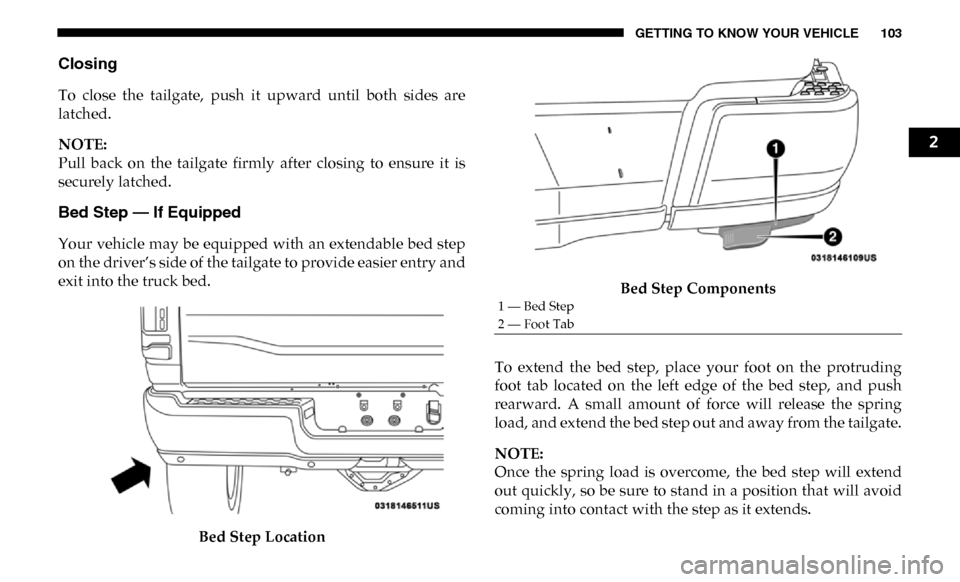
Bed Step — If Equipped
Your vehicle may be equipped with an extendable bed step
on the driver’s side of the tailgate to provide easier entry and
exit into the truck bed.Bed Step Location Bed Step Components
To extend the bed step, place your foot on the protruding
foot tab located on the left edge of the bed step, and push
rearward. A small amount of force will release the spring
load, and extend the bed step out and away from the tailgate.
NOTE:
Once the spring load is overcome, the bed step will extend
out quickly, so be sure to stand in a position that will avoid
coming into contact with the step as it extends.
1 — Bed Step
2 — Foot Tab
2
Page 106 of 696
104 GETTING TO KNOW YOUR VEHICLE
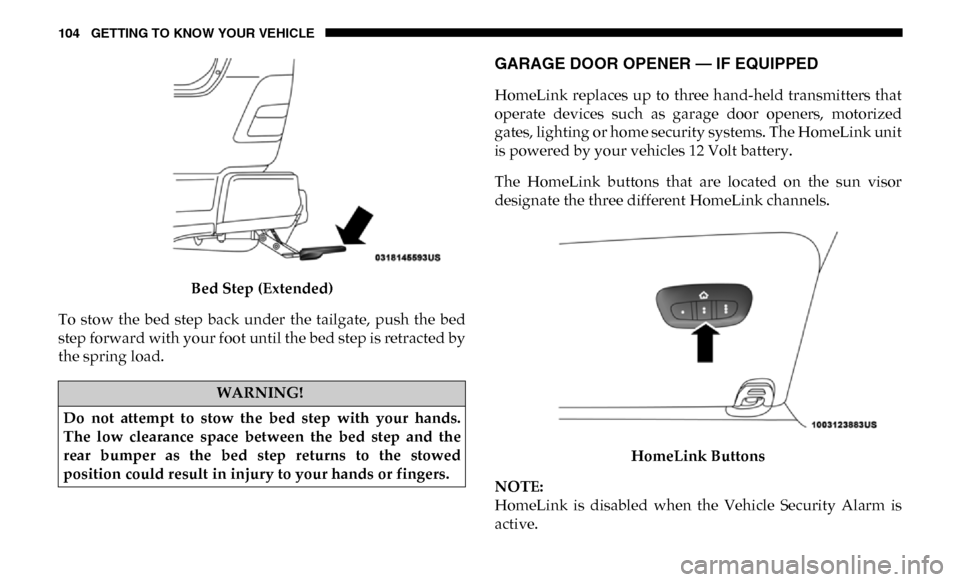
Bed Step (Extended)
To stow the bed step back under the tailgate, push the bed
step forward with your foot until the bed step is retracted by
the spring load.
GARAGE DOOR OPENER — IF EQUIPPED
HomeLink replaces up to three hand-held transmitters that
operate devices such as garage door openers, motorized
gates, lighting or home security systems. The HomeLink unit
is powered by your vehicles 12 Volt battery.
The HomeLink buttons that are located on the sun visor
designate the three different HomeLink channels.
HomeLink Buttons
NOTE:
HomeLink is disabled when the Vehicle Security Alarm is
active.
WARNING!
Do not attempt to stow the bed step with your hands.
The low clearance space between the bed step and the
rear bumper as the bed step returns to the stowed
position could result in injury to your hands or fingers.
Page 112 of 696

110 GETTING TO KNOW YOUR VEHICLE
Using HomeLink
To operate, push and release the programmed HomeLink
button. Activation will now occur for the programmed device
(i.e. garage door opener, gate operator, security system, entry
door lock, home/office lighting, etc.) The hand-held transmitter
of the device may also be used at any time.
Security
It is advised to erase all channels before you sell or turn in
your vehicle.
To do this, push and hold the two outside buttons for 20
seconds until the orange indicator flashes. Note that all chan-
nels will be erased. Individual channels cannot be erased.
The HomeLink Universal Transceiver is disabled when the
Vehicle Security Alarm is active.
Troubleshooting Tips
If you are having trouble programming HomeLink, here are
some of the most common solutions:
• Replace the battery in the Garage Door Opener hand-held transmitter. • Push the LEARN button on the Garage Door Opener to
complete the training for a Rolling Code.
• Did you unplug the device for programming and remember to plug it back in?
If you have any problems, or require assistance, please call
toll-free1-800-355-3515 or, on the Internet at HomeLink.com
for information or assistance.
General Information
The following regulatory statement applies to all Radio
Frequency (RF) devices equipped in this vehicle:
This device complies with Part 15 of the FCC Rules and with
Innovation, Science and Economic Development Canada
license-exempt RSS standard(s). Operation is subject to the
following two conditions:
1. This device may not cause harmful interference, and
2. This device must accept any interference received, including interference that may cause undesired operation.
NOTE:
Changes or modifications not expressly approved by the
party responsible for compliance could void the user’s
authority to operate the equipment.
Page 120 of 696

118 GETTING TO KNOW YOUR VEHICLE
NOTE:
The front seat may have to be moved forward to fully open
the lid.Opened Storage Bin
Each storage bin also contains two hooks for securing cargo.
These hooks should be used to secure loads safely when the
vehicle is moving. In-Floor Storage Bin Hooks
NOTE:
The maximum load limit for each hook is 250 lbs (113 kg).