ECU Ram 2500 2019 Owner's Guide
[x] Cancel search | Manufacturer: RAM, Model Year: 2019, Model line: 2500, Model: Ram 2500 2019Pages: 696, PDF Size: 13.89 MB
Page 123 of 696

GETTING TO KNOW YOUR VEHICLE 121
Load Floor In Open Position
4. Reverse the procedure to store the load floor.
Positioning The Load Floor For Storage Access Under The
Seat
1. Lift the 60/40 seat cushion(s) to the upward position.
2. Unsnap the securing snap located at either side of the load floor.
3. Lift the load floor up to access storage under the load floor. Crew Cab — If Equipped
Load Floor Securing Straps/Crew Cab
4. Reverse the procedure to put the load floor back in the secured down position before you operate the vehicle.
WARNING!
Do not drive with the load floor in the up position.
When stopping fast or in an accident, the load floor
could move to the down position causing serious injury.
2
Page 124 of 696

122 GETTING TO KNOW YOUR VEHICLE
Below Rear Seat Storage (Crew Cab)
The Crew Cab models provide additional storage under the
rear seats. Lift the seats to access the storage compartment.
To open the storage compartments, unsnap the securing
snap located at either side of the load floor and lift upward
on the fold flat lid.Crew Cab Storage
NOTE:
For more information on storage and the fold flat floor, refer
to “Fold Flat Load Floor” in this section.Cupholders
Front Seat Cupholders
For vehicles equipped with a center console, two cupholders
are located in front of the console storage bin.
Front Cupholders
NOTE:
If the vehicle is equipped with a premium center console
with double (tandem) doors, push the front bin door to
access the cupholders.
Page 136 of 696

134 GETTING TO KNOW YOUR VEHICLE
RAMBOX — IF EQUIPPED
The RamBox system is an integrated pickup box storage and
cargo management system consisting of three features:
• Integrated box side storage bins
• Cargo divider
• Bed rail tie-down system
RamBox Integrated Box Side Storage Bins
Cargo storage bins are located on both sides of the pickup
box. The cargo storage bins provide watertight, lockable,
illuminated storage for up to 300 lbs (136 kg) of evenly
distributed cargo.RamBox Cargo Storage Bins
CAUTION!
Failure to follow the following items could cause
damage to the vehicle:
• Assure that all cargo inside the storage bins is properly secured.
• Do not exceed cargo weight rating of 300 lbs (136 kg) for 2500 and 3500 series vehicles per bin.
Page 138 of 696
136 GETTING TO KNOW YOUR VEHICLE
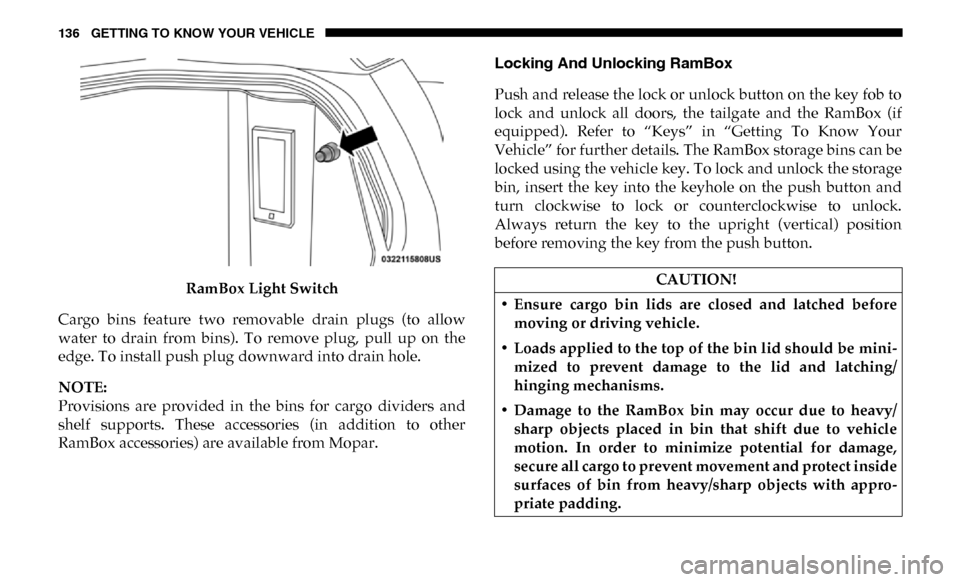
RamBox Light Switch
Cargo bins feature two removable drain plugs (to allow
water to drain from bins). To remove plug, pull up on the
edge. To install push plug downward into drain hole.
NOTE:
Provisions are provided in the bins for cargo dividers and
shelf supports. These accessories (in addition to other
RamBox accessories) are available from Mopar. Locking And Unlocking RamBox
Push and release the lock or unlock button on the key fob to
lock and unlock all doors, the tailgate and the RamBox (if
equipped). Refer to “Keys” in “Getting To Know Your
Vehicle” for further details. The RamBox storage bins can be
locked using the vehicle key. To lock and unlock the storage
bin, insert the key into the keyhole on the push button and
turn clockwise to lock or counterclockwise to unlock.
Always return the key to the upright (vertical) position
before removing the key from the push button.CAUTION!
• Ensure cargo bin lids are closed and latched before moving or driving vehicle.
• Loads applied to the top of the bin lid should be mini -
mized to prevent damage to the lid and latching/
hinging mechanisms.
• Damage to the RamBox bin may occur due to heavy/ sharp objects placed in bin that shift due to vehicle
motion. In order to minimize potential for damage,
secure all cargo to prevent movement and protect inside
surfaces of bin from heavy/sharp objects with appro -
priate padding.
Page 139 of 696

GETTING TO KNOW YOUR VEHICLE 137
RamBox Safety Warning
Carefully follow these warnings to help prevent personal
injury or damage to your vehicle:RamBox Storage Bin Cover Emergency Release Lever —
If Equipped
As a security measure, a Storage Bin Cover Emergency
Release is built into the storage bin cover latching mecha
-
nism.
Storage Bin Cover Emergency Release Lever
NOTE:
In the event of an individual being locked inside the storage
bin, the storage bin cover can be opened from inside of the
bin by pulling on the glow-in-the-dark lever attached to the
storage bin cover latching mechanism.
WARNING!
• Always close the storage bin covers when your vehicle is unattended.
• Do not allow children to have access to the storage bins. Once in the storage bin, young children may not be able
to escape. If trapped in the storage bin, children can die
from suffocation or heat stroke.
• In an accident, serious injury could result if the storage bin covers are not properly latched.
• Do not drive the vehicle with the storage bin covers open.
• Keep the storage bin covers closed and latched while the vehicle is in motion.
• Do not use a storage bin latch as a tie down.2
Page 142 of 696
140 GETTING TO KNOW YOUR VEHICLE
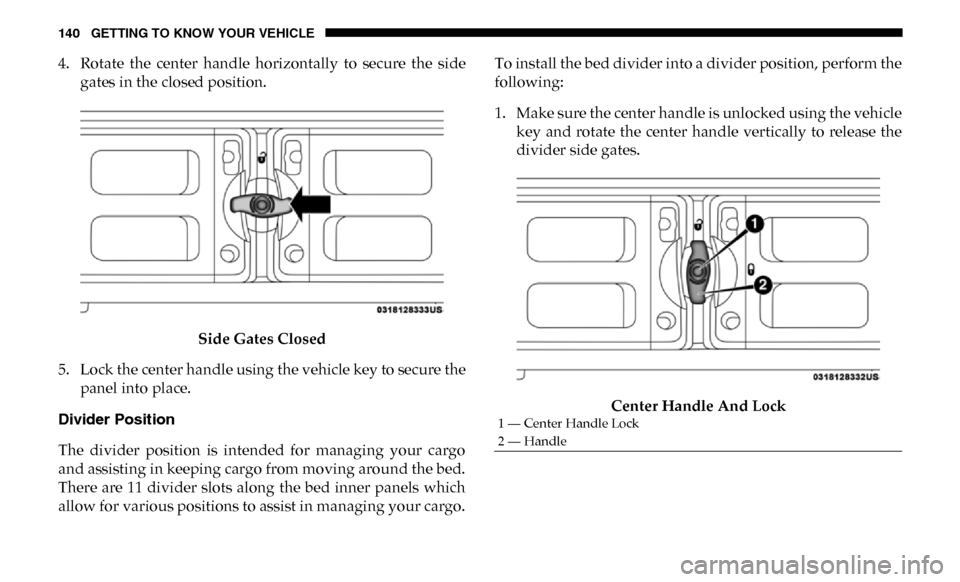
4. Rotate the center handle horizontally to secure the sidegates in the closed position.
Side Gates Closed
5. Lock the center handle using the vehicle key to secure the panel into place.
Divider Position
The divider position is intended for managing your cargo
and assisting in keeping cargo from moving around the bed.
There are 11 divider slots along the bed inner panels which
allow for various positions to assist in managing your cargo. To install the bed divider into a divider position, perform the
following:
1. Make sure the center handle is unlocked using the vehicle
key and rotate the center handle vertically to release the
divider side gates.
Center Handle And Lock
1 — Center Handle Lock
2 — Handle
Page 143 of 696

GETTING TO KNOW YOUR VEHICLE 141
2. With the side gates open, position the divider so theoutboard ends align with the intended slots in the sides of
the bed.
Aligning Gate To Slots
3. Rotate the side gates closed so that the outboard ends are secured into the intended slots of the bed. 4. Rotate the center handle horizontally to secure the side
gates in the closed position.
Side Gates Closed
5. Lock the center handle to secure the panel into place.
2
Page 144 of 696
142 GETTING TO KNOW YOUR VEHICLE
Bed Rail Tie-Down System
NOTE:
This feature is available for vehicles both equipped, or not
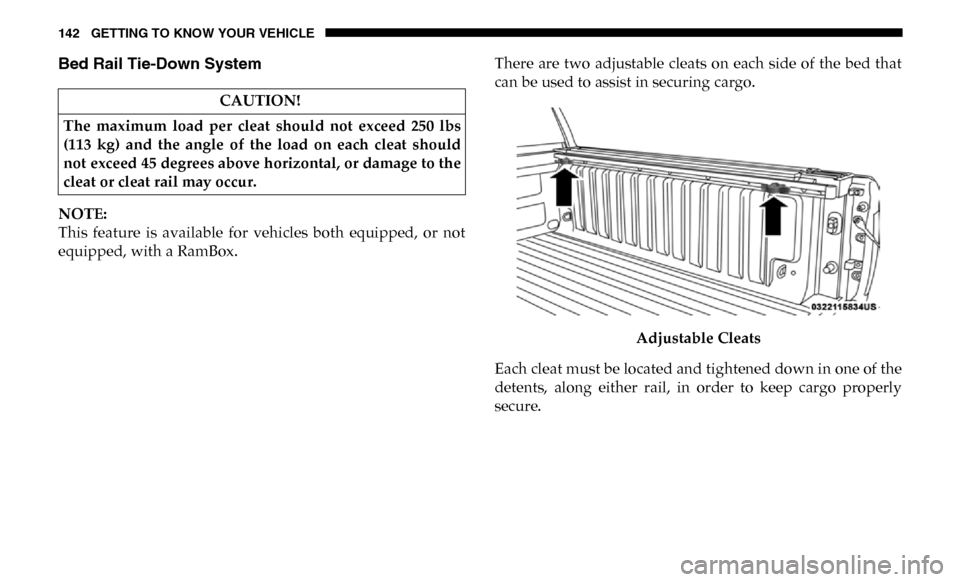
equipped, with a RamBox.There are two adjustable cleats on each side of the bed that
can be used to assist in securing cargo.
Adjustable Cleats
Each cleat must be located and tightened down in one of the
detents, along either rail, in order to keep cargo properly
secure.
CAUTION!
The maximum load per cleat should not exceed 250 lbs
(113 kg) and the angle of the load on each cleat should
not exceed 45 degrees above horizontal, or damage to the
cleat or cleat rail may occur.
Page 149 of 696

GETTING TO KNOW YOUR VEHICLE 147
TRI-FOLD TONNEAU COVER — IF EQUIPPED
Your vehicle may be equipped with a Tri-Fold Tonneau
Cover which consists of different features:
• Easy Tri-Fold cover
• Tonneau fore aft locator
• Crosscar inside bed locator
• Front and rear clamps
• Stowage strap
• Locking capability
NOTE:
The Tonneau Cover can be folded up and secured at the front
of the box without removing it completely.
Tri-Fold Tonneau Cover Removal
To remove the Tonneau Cover, follow the next steps:
1. Open the tailgate to gain access to the rear pair ofTonneau Cover clamps located on the underside of the
cover (left and right side).
Clamped Position
NOTE:
If clamp wire is damaged replace immediately.
2
Page 181 of 696
GETTING TO KNOW YOUR INSTRUMENT PANEL 179
What to do when an electrical load reduction action
message is present (“Battery Saver On” or “Battery Saver
Mode”)
During a trip:
• Reduce power to unnecessary loads if possible:•Turn off redundant lights (interior or exterior).
•Check what may be plugged in to power outlets +12V,115V AC, USB ports.
•Check HVAC settings (blower, temperature).
•Check the audio settings (volume).
After a trip:
• Check if any aftermarket equipment was installed (addi -
tional lights, upfitter electrical accessories, audio systems,
alarms) and review specifications if any (load and Ignition
Off Draw currents).
• Evaluate the latest driving cycles (distance, driving time and parking time).
• The vehicle should have service performed if the message is still present during consecutive trips and the evaluation
of the vehicle and driving pattern did not help to identify
the cause.WARNING LIGHTS AND MESSAGES
The warning/indicator lights will illuminate in the instru-
ment panel together with a dedicated message and/or
acoustic signal when applicable. These indications are indic -
ative and precautionary and as such must not be considered
as exhaustive. Always refer to the information in this chapter
in the event of a failure indication. All active telltales will
display first if applicable. The system check menu may
appear different based upon equipment options and current
vehicle status. Some telltales are optional and may not
appear.
Red Warning Lights
— Seat Belt Reminder Warning Light
This warning light indicates when the driver or passenger
seat belt is unbuckled. When the ignition is first placed in the
ON/RUN or ACC/ON/RUN position and if the driver’s
seat belt is unbuckled, a chime will sound and the light will
turn on. When driving, if the driver or front passenger seat
belt remains unbuckled, the Seat Belt Reminder Light will
flash or remain on continuously and a chime will sound.
Refer to “Occupant Restraint Systems” in “Safety” for
further information.
3