trailer Ram 2500 2019 User Guide
[x] Cancel search | Manufacturer: RAM, Model Year: 2019, Model line: 2500, Model: Ram 2500 2019Pages: 696, PDF Size: 13.89 MB
Page 174 of 696

172 GETTING TO KNOW YOUR INSTRUMENT PANEL
Stored Messages
Push and release the up or down arrow button until the
Messages Menu item is highlighted. This feature shows the
number of stored warning messages. Push and release the
right or left arrow buttons to cycle through stored messages.
Screen Setup Menu Item
Push and release the up or down arrow button until the
Screen Setup menu item is highlighted in the instrument
cluster display. Push and release the right arrow button to
enter the Screen Setup submenu. The Screen Setup feature
allows you to change what information is displayed in the
instrument cluster as well as the location that information is
displayed.
Current Gear
• Off (Default Setting)
• On
Odometer
• Unit Without Decimal (Default Setting)
• Unit With Decimal Favorite Menu
• Speedometer
• Vehicle Info
• Driver Assist (Show/Hide) — If Equipped
• Fuel Economy (Show/Hide)
• Trip Info (Show/Hide)
• Trailer Tow (Show/Hide)
• Audio (Show/Hide)
• Messages
• Screen Setup
• Commercial Settings — If Equipped
NOTE:
Menus with (Show/Hide) can push the
OK button to choose
whether to show or hide this menu in the instrument cluster
display.
Page 175 of 696

GETTING TO KNOW YOUR INSTRUMENT PANEL 173
Upper Left
• None
• Compass (Default Setting) — If Equipped
• Outside Temp — If Equipped
• Time
• Range To Empty
• Average MPG
• Current MPG
• Trip A Distance
• Trip B Distance
• Trailer Trip — If Equipped
• Trailer Brake — If Equipped
• Oil Pressure — If Equipped
• Coolant Temperature — If Equipped
• Oil Temperature — If Equipped
• Battery Voltage — If Equipped
• Transmission Temperature — If Equipped
• Oil Life — If Equipped• Exhaust Brake — If Equipped
• Turbo Boost — If Equipped
• Fuel Filter Life — If Equipped
Upper Center
• None
• Compass
• Outside Temp
• Time
• Range To Empty
• Average MPG
• Current MPG
• Trip A Distance
• Trip B Distance
• Trailer Trip
• Audio
• Speedometer (Default Setting)
• Menu Title
3
Page 176 of 696

174 GETTING TO KNOW YOUR INSTRUMENT PANEL
Upper Right
• None
• Compass — If Equipped
• Outside Temp (Default Setting) — If Equipped
• Time
• Range To Empty
• Average MPG
• Current MPG
• Trip A Distance
• Trip B Distance
• Trailer Trip — If Equipped
• Trailer Brake — If Equipped
• Oil Pressure — If Equipped
• Coolant Temperature — If Equipped
• Oil Temperature — If Equipped
• Battery Voltage — If Equipped• Transmission Temperature — If Equipped
• Oil Life — If Equipped
• Exhaust Brake — If Equipped
• Turbo Boost — If Equipped
• Fuel Filter Life — If Equipped
Left Side — If Equipped
• None
• Range
• Average MPG
• Menu Icon (Default Setting)
• Coolant Temperature
• Oil Temperature
• Transmission Temperature
• Oil Life
• Fuel Filter Life — If Equipped
Page 177 of 696

GETTING TO KNOW YOUR INSTRUMENT PANEL 175
Right Side — If Equipped
• None
• Range (Default Setting)
• Average MPG
• Menu Icon
• Coolant Temperature
• Oil Temperature
• Transmission Temperature
• Oil Life
• Fuel Filter Life — If Equipped
Lower Left — If Equipped
• None
• Compass
• Outside Temp
• Time
• Range To Empty• Average MPG
• Current MPG
• Trip A Distance
• Trip B Distance
• Trailer Trip
• Trailer Brake
• Oil Pressure
• Coolant Temperature
• Oil Temperature
• Battery Voltage (Default Setting)
• Transmission Temperature
• Oil Life
• Exhaust Brake — If Equipped
• Turbo Boost — If Equipped
• Fuel Filter Life — If Equipped
3
Page 178 of 696

176 GETTING TO KNOW YOUR INSTRUMENT PANEL
Lower Right — If Equipped
• None
• Compass
• Outside Temp
• Time
• Range To Empty
• Average MPG
• Current MPG
• Trip A Distance
• Trip B Distance
• Trailer Trip
• Trailer Brake
• Oil Pressure (Default Setting)• Coolant Temperature
• Oil Temperature
• Battery Voltage
• Transmission Temperature
• Oil Life
• Exhaust Brake — If Equipped
• Turbo Boost — If Equipped
• Fuel Filter Life — If Equipped
Restore Defaults
• Cancel (Default Setting)
• Ok
Page 185 of 696
GETTING TO KNOW YOUR INSTRUMENT PANEL 183
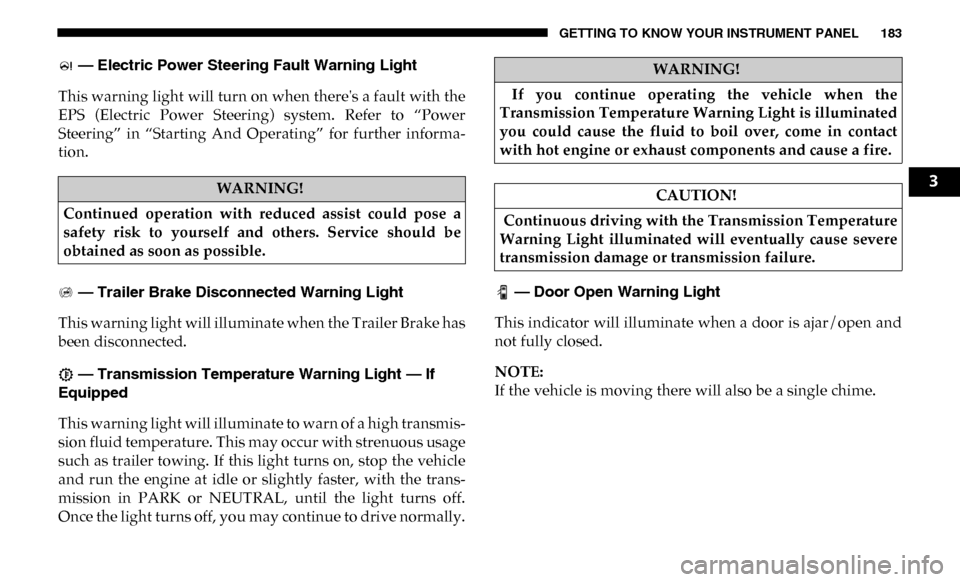
— Electric Power Steering Fault Warning Light
This warning light will turn on when there's a fault with the
EPS (Electric Power Steering) system. Refer to “Power
Steering” in “Starting And Operating” for further informa -
tion.
— Trailer Brake Disconnected Warning Light
This warning light will illuminate when the Trailer Brake has
been disconnected.
— Transmission Temperature Warning Light — If
Equipped
This warning light will illuminate to warn of a high transmis -
sion fluid temperature. This may occur with strenuous usage
such as trailer towing. If this light turns on, stop the vehicle
and run the engine at idle or slightly faster, with the trans -
mission in PARK or NEUTRAL, until the light turns off.
Once the light turns off, you may continue to drive normally. — Door Open Warning Light
This indicator will illuminate when a door is ajar/open and
not fully closed.
NOTE:
If the vehicle is moving there will also be a single chime.
WARNING!
Continued operation with reduced assist could pose a
safety risk to yourself and others. Service should be
obtained as soon as possible.
WARNING!
If you continue operating the vehicle when the
Transmission Temperature Warning Light is illuminated
you could cause the fluid to boil over, come in contact
with hot engine or exhaust components and cause a fire.
CAUTION!
Continuous driving with the Transmission Temperature
Warning Light illuminated will eventually cause severe
transmission damage or transmission failure.
3
Page 191 of 696
GETTING TO KNOW YOUR INSTRUMENT PANEL 189
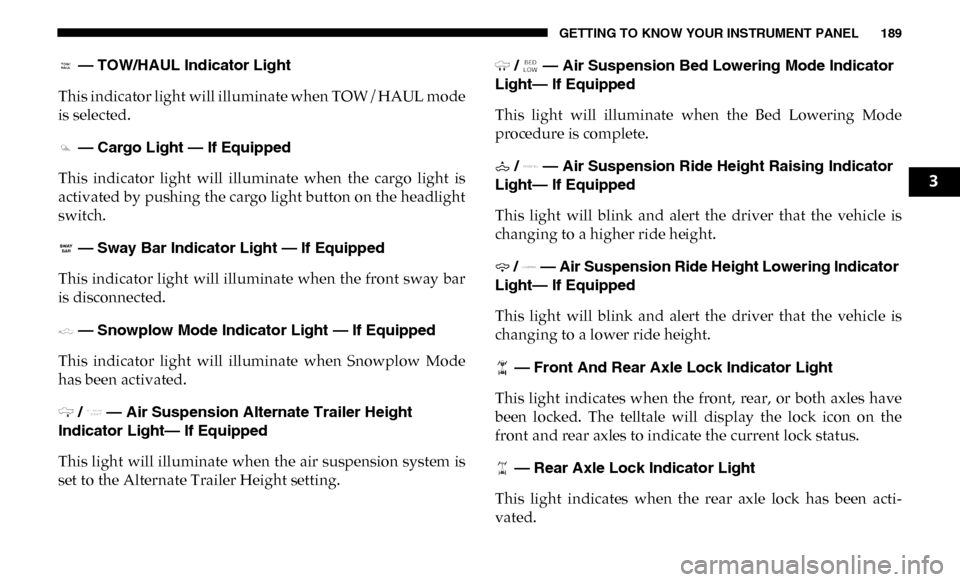
— TOW/HAUL Indicator Light
This indicator light will illuminate when TOW/HAUL mode
is selected.
— Cargo Light — If Equipped
This indicator light will illuminate when the cargo light is
activated by pushing the cargo light button on the headlight
switch.
— Sway Bar Indicator Light — If Equipped
This indicator light will illuminate when the front sway bar
is disconnected.
— Snowplow Mode Indicator Light — If Equipped
This indicator light will illuminate when Snowplow Mode
has been activated.
/ — Air Suspension Alternate Trailer Height
Indicator Light— If Equipped
This light will illuminate when the air suspension system is
set to the Alternate Trailer Height setting. / — Air Suspension Bed Lowering Mode Indicator
Light— If Equipped
This light will illuminate when the Bed Lowering Mode
procedure is complete.
/ — Air Suspension Ride Height Raising Indicator
Light— If Equipped
This light will blink and alert the driver that the vehicle is
changing to a higher ride height.
/ — Air Suspension Ride Height Lowering Indicator
Light— If Equipped
This light will blink and alert the driver that the vehicle is
changing to a lower ride height.
— Front And Rear Axle Lock Indicator Light
This light indicates when the front, rear, or both axles have
been locked. The telltale will display the lock icon on the
front and rear axles to indicate the current lock status.
— Rear Axle Lock Indicator Light
This light indicates when the rear axle lock has been acti -
vated.
3
Page 198 of 696

196 SAFETY
ABS is designed to function with the OEM tires. Modification
may result in degraded ABS performance.
Anti-Lock Brake Warning Light
The yellow “Anti-Lock Brake Warning Light” will turn on
when the ignition is turned to the ON/RUN mode and may
stay on for as long as four seconds.
If the “Anti-Lock Brake Warning Light” remains on or comes on
while driving, it indicates that the anti-lock portion of the brake
system is not functioning and that service is required. However,
the conventional brake system will continue to operate normally
if the “Anti-Lock Brake Warning Light” is on.
If the “Anti-Lock Brake Warning Light” is on, the brake
system should be serviced as soon as possible to restore the
benefits of anti-lock brakes. If the “Anti-Lock Brake Warning
Light” does not come on when the ignition is turned to the
ON/RUN mode, have the light repaired as soon as possible.
Electronic Brake Control System
Your vehicle is equipped with an advanced Electronic Brake
Control system (EBC). This system includes Electronic Brake
Force Distribution (EBD), Anti-Lock Brake System (ABS),
Brake Assist System (BAS), Hill Start Assist (HSA), Traction
Control System (TCS), Electronic Stability Control (ESC),
and Electronic Roll Mitigation (ERM). These systems work
together to enhance both vehicle stability and control in
various driving conditions.
Your vehicle may also be equipped with Trailer Sway
Control (TSC) and Hill Descent Control (HDC).
• The ABS cannot prevent the natural laws of physics
from acting on the vehicle, nor can it increase braking
or steering efficiency beyond that afforded by the
condition of the vehicle brakes and tires or the traction
afforded.
• The ABS cannot prevent collisions, including those resulting from excessive speed in turns, following
another vehicle too closely, or hydroplaning.
• The capabilities of an ABS equipped vehicle must never be exploited in a reckless or dangerous manner
that could jeopardize the user’s safety or the safety of
others.
WARNING! (Continued)
Page 200 of 696

198 SAFETY
Hill Start Assist (HSA)
The HSA system is designed to mitigate roll back from a
complete stop while on an incline. If the driver releases the
brake while stopped on an incline, HSA will continue to hold
the brake pressure for a short period. If the driver does not
apply the throttle before this time expires, the system will
release brake pressure and the vehicle will roll down the hill
as normal.
The following conditions must be met in order for HSA to
activate:
• The feature must be enabled.
• The vehicle must be stopped.
• Park brake must be off.
• Driver door must be closed.
• The vehicle must be on a sufficient grade.• The gear selection must match vehicle uphill direction (i.e.,
vehicle facing uphill is in forward gear; vehicle backing
uphill is in REVERSE gear).
• HSA will work in REVERSE gear and all forward gears. The system will not activate if the transmission is in PARK
or NEUTRAL. For vehicles equipped with a manual trans -
mission, if the clutch is pressed, HSA will remain active.
WARNING!
There may be situations where the Hill Start Assist
(HSA) will not activate and slight rolling may occur,
such as on minor hills or with a loaded vehicle, or while
pulling a trailer. HSA is not a substitute for active
driving involvement. It is always the driver’s
responsibility to be attentive to distance to other
vehicles, people, and objects, and most importantly
brake operation to ensure safe operation of the vehicle
under all road conditions. Your complete attention is
always required while driving to maintain safe control of
your vehicle. Failure to follow these warnings can result
in a collision or serious personal injury.
Page 201 of 696

SAFETY 199
Towing With HSA
HSA will also provide assistance to mitigate roll back while
towing a trailer.Disabling And Enabling HSA
This feature can be turned on or turned off. To change the
current setting, proceed as follows:
• If disabling HSA using your instrument cluster display,
refer to “Instrument Cluster Display” in “Getting To Know
Your Instrument Panel” for further information.
• If disabling HSA using Uconnect Settings, refer to “Ucon -
nect Settings” in “Multimedia” for further information.
For vehicles not equipped with an instrument cluster
display, perform the following steps:
1. Center the steering wheel (front wheels pointing straight forward).
2. Shift the transmission into PARK.
3. Apply the parking brake.
4. Start the engine.
5. Rotate the steering wheel slightly more than one-half turn to the left.
WARNING!
• If you use a trailer brake controller with your trailer, the trailer brakes may be activated and deactivated with
the brake switch. If so, there may not be enough brake
pressure to hold both the vehicle and the trailer on a
hill when the brake pedal is released. In order to avoid
rolling down an incline while resuming acceleration,
manually activate the trailer brake or apply more
vehicle brake pressure prior to releasing the brake
pedal.
• HSA is not a parking brake. Always apply the parking brake fully when exiting your vehicle. Also, be certain
to place the transmission in PARK.
• Failure to follow these warnings can result in a colli -
sion or serious personal injury.
4