door lock Ram 2500 2019 Owner's Guide
[x] Cancel search | Manufacturer: RAM, Model Year: 2019, Model line: 2500, Model: Ram 2500 2019Pages: 696, PDF Size: 13.89 MB
Page 257 of 696
SAFETY 255
cool water. For nose or throat irritation, move to fresh air.
If the irritation continues, see your doctor. If these particles
settle on your clothing, follow the garment manufacturer’s
instructions for cleaning.
Do not drive your vehicle after the air bags have deployed. If
you are involved in another collision, the air bags will not be
in place to protect you.
NOTE:
• Air bag covers may not be obvious in the interior trim, but they will open during air bag deployment.
• After any collision, the vehicle should be taken to an authorized dealer immediately. Enhanced Accident Response System
In the event of an impact, if the communication network
remains intact, and the power remains intact, depending on
the nature of the event, the ORC will determine whether to
have the Enhanced Accident Response System perform the
following functions:
• Cut off fuel to the engine (If Equipped)
• Cut off battery power to the electric motor (If Equipped)
• Flash hazard lights as long as the battery has power
• Turn on the interior lights, which remain on as long as the
battery has power or for 15 minutes from the intervention
of the Enhanced Accident Response System.
• Unlock the power door locks.
Your vehicle may also be designed to perform any of these
other functions in response to the Enhanced Accident
Response System:
• Turn off the Fuel Filter Heater, Turn off the HVAC Blower Motor, Close the HVAC Circulation Door
WARNING!
Deployed air bags and seat belt pretensioners cannot
protect you in another collision. Have the air bags, seat
belt pretensioners, and the seat belt retractor assemblies
replaced by an authorized dealer immediately. Also,
have the Occupant Restraint Controller System serviced
as well.4
Page 291 of 696
SAFETY 289
Periodic Safety Checks You Should Make Outside
The Vehicle
Tires
Examine tires for excessive tread wear and uneven wear
patterns. Check for stones, nails, glass, or other objects
lodged in the tread or sidewall. Inspect the tread for cuts and
cracks. Inspect sidewalls for cuts, cracks, and bulges. Check
the wheel bolts for tightness. Check the tires (including
spare) for proper cold inflation pressure.
Lights
Have someone observe the operation of brake lights and
exterior lights while you work the controls. Check turn
signal and high beam indicator lights on the instrument
panel.
Door Latches
Check for proper closing, latching, and locking.
Fluid Leaks
Check area under the vehicle after overnight parking for
fuel, coolant, oil, or other fluid leaks. Also, if gasoline fumes
are detected or if fuel, or brake fluid leaks are suspected. The
cause should be located and corrected immediately.
• ALWAYS make sure objects cannot fall or slide into the
driver’s side floor area when the vehicle is moving.
Objects can become trapped under accelerator, brake,
or clutch pedals and could cause a loss of vehicle
control.
• NEVER place any objects under the floor mat (e.g., towels, keys, etc.). These objects could change the posi -
tion of the floor mat and may cause interference with
the accelerator, brake, or clutch pedals.
• If the vehicle carpet has been removed and re-installed, always properly attach carpet to the floor and check the
floor mat fasteners are secure to the vehicle carpet.
Fully depress each pedal to check for interference with
the accelerator, brake, or clutch pedals then re-install
the floor mats.
• It is recommended to only use mild soap and water to clean your floor mats. After cleaning, always check
your floor mat has been properly installed and is
secured to your vehicle using the floor mat fasteners by
lightly pulling mat.
WARNING! (Continued)
4
Page 364 of 696

362 STARTING AND OPERATING
To Cancel
The following conditions cancel the system:
• The brake pedal is applied.
• The CANC (cancel) button is pushed.
• An Anti-Lock Brake System (ABS) event occurs.
• The gear selector is removed from the DRIVE position.
• The Electronic Stability Control/Traction Control System(ESC/TCS) activates.
• The vehicle parking brake is applied.
• Driver seatbelt is unbuckled at low speeds.
• Driver door is opened at low speeds.
• A Trailer Sway Control (TSC) event occurs.
• The driver switches ESC to full-off mode.
• The braking temperature exceeds normal range (overheated).
To Turn Off
The system will turn off and clear the set speed in memory if:
• The Adaptive Cruise Control (ACC) on/off button is pushed. • The Normal (Fixed Speed) Cruise Control on/off button is
pushed.
• The ignition is turned OFF.
• You switch to Four-Wheel Drive Low.
To Resume
If there is a set speed in memory push the RES (+) button and
then remove your foot from the accelerator pedal. The instru-
ment cluster display will display the last set speed.
NOTE:
• If your vehicle stays at standstill for longer than two seconds, the driver will have to push the RES (+) button to
reengage the ACC to the existing set speed.
• ACC cannot be resumed if there is a stationary vehicle in-front of your vehicle in close proximity.
WARNING!
The Resume function should only be used if traffic and road
conditions permit. Resuming a set speed that is too high or
too low for prevailing traffic and road conditions could
cause the vehicle to accelerate or decelerate too sharply for
safe operation. Failure to follow these warnings can result in
a collision and death or serious personal injury.
Page 410 of 696
408 STARTING AND OPERATING
REFUELING THE VEHICLE — GAS ENGINE
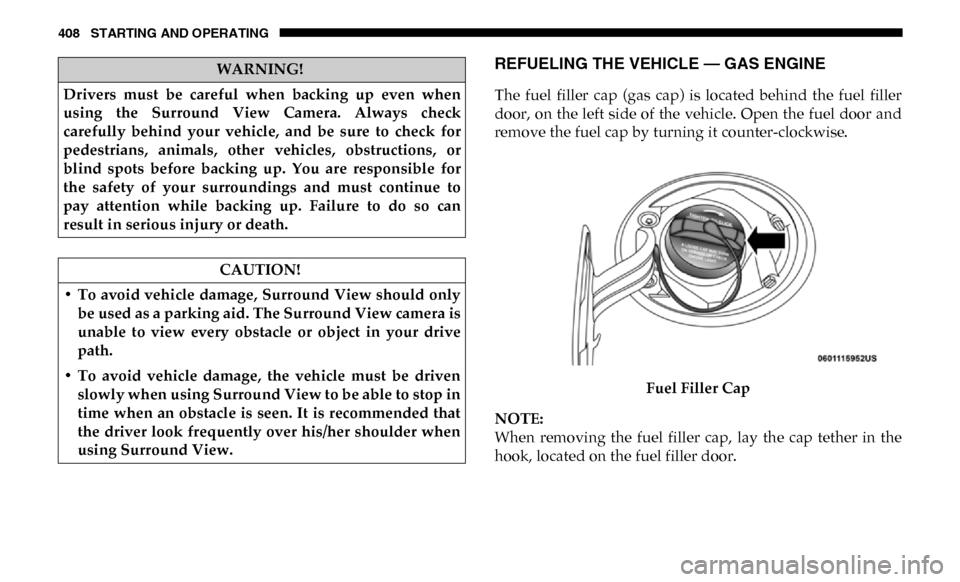
The fuel filler cap (gas cap) is located behind the fuel filler
door, on the left side of the vehicle. Open the fuel door and
remove the fuel cap by turning it counter-clockwise.Fuel Filler Cap
NOTE:
When removing the fuel filler cap, lay the cap tether in the
hook, located on the fuel filler door.
WARNING!
Drivers must be careful when backing up even when
using the Surround View Camera. Always check
carefully behind your vehicle, and be sure to check for
pedestrians, animals, other vehicles, obstructions, or
blind spots before backing up. You are responsible for
the safety of your surroundings and must continue to
pay attention while backing up. Failure to do so can
result in serious injury or death.
CAUTION!
• To avoid vehicle damage, Surround View should only be used as a parking aid. The Surround View camera is
unable to view every obstacle or object in your drive
path.
• To avoid vehicle damage, the vehicle must be driven slowly when using Surround View to be able to stop in
time when an obstacle is seen. It is recommended that
the driver look frequently over his/her shoulder when
using Surround View.
Page 462 of 696

460 IN CASE OF EMERGENCY
F1920 Amp Blue (DS 1500
LD Diesel)
30 Amp Pink
(Cummins Diesel) –
SCR – If Equipped
F20 30 Amp Pink –Passenger Door Module
F21 30 Amp Pink –Drive Train Control Module
F22 20 Amp Blue –Engine Control Module GPEC / Heavy Duty /
Other – If Equipped
F22 25 Amp White
(Cummins Diesel) –
PCM – If Equipped
F23 30 Amp Pink –CBC Feed # 1
F24 30 Amp Pink –Driver Door Module
F25 30 Amp Pink –Front Wiper
F26 30 Amp Pink –Antilock Brakes / Stability Control Module /
Valves – If Equipped (DS 1500 Only)
F28 20 Amp Blue –Trailer Tow Backup Lights – If Equipped
F29 20 Amp Blue –Trailer Tow Parking Lights – If Equipped
F30 30 Amp Pink –Trailer Tow Receptacle / Trailer Tow (Separate
E-Brake)/Trailer Tow (BUX)
Cavity
Cartridge Fuse Micro Fuse Description
Page 519 of 696

SERVICING AND MAINTENANCE 517
• Belt broken (note: identify and correct problem before newbelt is installed)
• Noise (objectionable squeal, squeak, or rumble is heard or felt while drive belt is in operation)
Some conditions can be caused by a faulty component such
as a belt pulley. Belt pulleys should be carefully inspected for
damage and proper alignment.
Belt replacement on some models requires the use of special
tools, we recommend having your vehicle serviced at an
authorized dealer.
Body Lubrication
Locks and all body pivot points, including such items as seat
tracks, door hinge pivot points and rollers, liftgate, tailgate,
decklid, sliding doors and hood hinges, should be lubricated
periodically with a lithium based grease, such as Mopar
Spray White Lube to assure quiet, easy operation and to
protect against rust and wear. Prior to the application of any
lubricant, the parts concerned should be wiped clean to
remove dust and grit; after lubricating excess oil and grease
should be removed. Particular attention should also be given
to hood latching components to ensure proper function. When performing other underhood services, the hood latch,
release mechanism and safety catch should be cleaned and
lubricated.
The external lock cylinders should be lubricated twice a year,
preferably in the Fall and Spring. Apply a small amount of a
high quality lubricant, such as Mopar Lock Cylinder Lubri
-
cant directly into the lock cylinder.
Windshield Wiper Blades
Clean the rubber edges of the wiper blades and the wind -
shield periodically with a sponge or soft cloth and a mild
nonabrasive cleaner. This will remove accumulations of salt
or road film.
Operation of the wipers on dry glass for long periods may
cause deterioration of the wiper blades. Always use washer
fluid when using the wipers to remove salt or dirt from a dry
windshield.
Avoid using the wiper blades to remove frost or ice from the
windshield. Keep the blade rubber out of contact with petro -
leum products such as engine oil, gasoline, etc.
7
Page 580 of 696
578 MULTIMEDIA
UCONNECT SETTINGS
The Uconnect system uses a combination of buttons on the
touchscreen and buttons on the faceplate located on the
center of the instrument panel that allows you to access and
change the customer programmable features. Many features
can vary by vehicle.
Uconnect 3 Settings
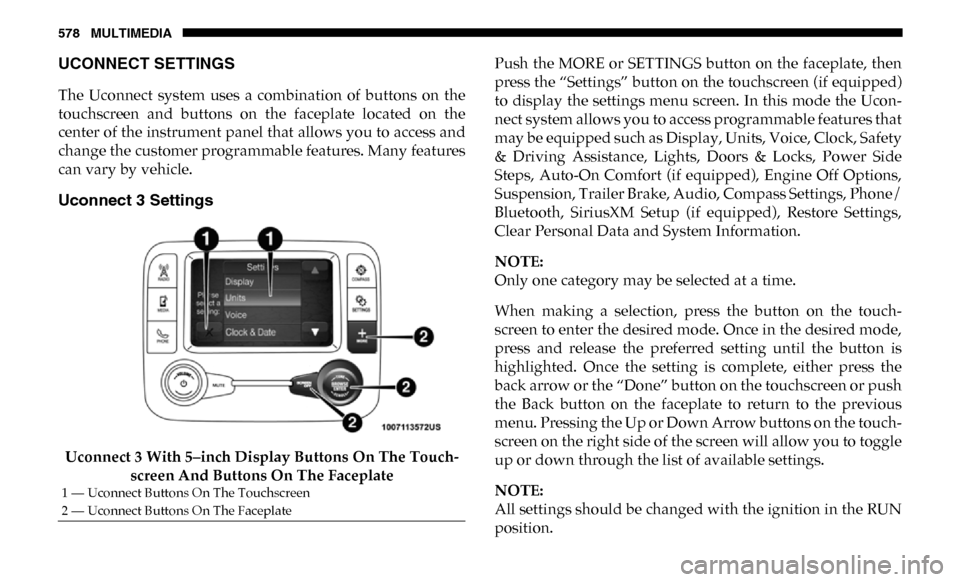
Uconnect 3 With 5–inch Display Buttons On The Touch-
screen And Buttons On The Faceplate Push the MORE or SETTINGS button on the faceplate, then
press the “Settings” button on the touchscreen (if equipped)
to display the settings menu screen. In this mode the Ucon
-
nect system allows you to access programmable features that
may be equipped such as Display, Units, Voice, Clock, Safety
& Driving Assistance, Lights, Doors & Locks, Power Side
Steps, Auto-On Comfort (if equipped), Engine Off Options,
Suspension, Trailer Brake, Audio, Compass Settings, Phone/
Bluetooth, SiriusXM Setup (if equipped), Restore Settings,
Clear Personal Data and System Information.
NOTE:
Only one category may be selected at a time.
When making a selection, press the button on the touch -
screen to enter the desired mode. Once in the desired mode,
press and release the preferred setting until the button is
highlighted. Once the setting is complete, either press the
back arrow or the “Done” button on the touchscreen or push
the Back button on the faceplate to return to the previous
menu. Pressing the Up or Down Arrow buttons on the touch -
screen on the right side of the screen will allow you to toggle
up or down through the list of available settings.
NOTE:
All settings should be changed with the ignition in the RUN
position.
1 — Uconnect Buttons On The Touchscreen
2 — Uconnect Buttons On The Faceplate
Page 586 of 696

584 MULTIMEDIA
Lights
After pressing the “Lights” button on the touchscreen, the following settings will be available:Hill Start Assist — If
Equipped
On
Off
NOTE:
When the “Hill Start Assist” feature is selected, the Hill Start Assist (HSA) system becomes active.
Tire Fill Assist On Off
Setting Name
Selectable Options
Setting NameSelectable Options
Headlight Off Delay 0 sec
30 sec
60 sec 90 sec
Headlight Illumination On Approach 0 sec
30 sec
60 sec 90 sec
NOTE:
When the “Headlight Illumination On Approach” feature is selected, it allows the adjustment of the amount of time the head -
lights remain on when the doors are unlocked with the key fob.
Headlights With Wipers — If
Equipped On
Off
Auto Dim High Beams — If Equipped OnOff
Flash Lights With Lock OnOff
Page 587 of 696

MULTIMEDIA 585
Doors & Locks
After pressing the “Doors & Locks” button on the touchscreen, the following settings will be available:NOTE:
When the “Flash Lights With Lock” feature is selected, the exterior lights flash when the doors are locked or unlocked with
the key fob. This feature may be selected with or without the sound horn on lock feature selected.
Steering Directed Lights
OnOff
NOTE:
When the “Steering Directed Lights” feature is selected, the headlights turn with the direction of the steering wheel.
Rear Cargo Guidance Lights — If
Equipped On
Off
NOTE:
When the “Rear Cargo Guidance Lights” feature is selected, the lights in the cargo and bed of the truck will come on either
when the headlight switch is pressed, or the button on the back bed of the truck is pressed. Setting Name
Selectable Options
Setting NameSelectable Options
Auto Door Locks — If
Equipped On
Off
NOTE:
When the “Auto Door Locks” feature is selected, all doors lock automatically when the vehicle reaches a speed of 15 mph
(24 km/h).
Auto Unlock On Exit On Off
9
Page 588 of 696

586 MULTIMEDIA
NOTE:
When the “Auto Unlock On Exit” feature is selected, all doors unlock when the vehicle is stopped, the transmission is in the
PARK or NEUTRAL position and the driver's door is opened.
Sound Horn With LockOff1st Press 2nd Press
Remote Door Unlock All Driver
NOTE:
The “Remote Door Unlock” feature allows you to program your remote door locks to open “All doors” or only the “Driver
door” with the first push of the key fob or grabbing the Passive Entry door handle.
Sound Horn With Remote
Start On
Off
NOTE:
When the “Sound Horn With Remote Start” feature is selected, the horn sounds when the remote start is activated.
Memory Linked To Fob — If
Equipped On
Off
NOTE:
• The “Memory Linked To Fob” feature provides automatic driver seat positioning to enhance driver mobility when entering and exiting the vehicle.
• The seat returns to the memorized seat location if “Memory Linked To Fob” is set to (On) when the key fob is used to unlock the door.
Passive Entry — If Equipped On Off
Setting Name
Selectable Options