door lock Ram 2500 2019 Owner's Guide
[x] Cancel search | Manufacturer: RAM, Model Year: 2019, Model line: 2500, Model: Ram 2500 2019Pages: 696, PDF Size: 13.89 MB
Page 49 of 696

GETTING TO KNOW YOUR VEHICLE 47
NOTE:
If a memory profile has not already been set, refer to
"Programming The Memory Feature" in this section for
instructions on how to set a memory profile.
3. Once the profile has been recalled, push and release theset (S) button on the memory switch.
4. Push and release button (1) or (2) accordingly. “Memory Profile Set” (1 or 2) will display in the instrument cluster.
5. Push and release the lock button on the key fob within 10 seconds.
NOTE:
Your key fob can be unlinked to your memory settings by
pushing the set (S) button, and within 10 seconds, followed
by pushing the unlock button on the key fob.
Memory Position Recall
NOTE:
The vehicle speed must be lower than 5 mph (8 km/h) to
recall memory positions. If a recall is attempted when the
vehicle speed is greater than 5 mph (8 km/h), a message will
be displayed in the instrument cluster display. Driver One Memory Position Recall
• To recall the memory settings for driver one using the
memory buttons on the door panel, push memory button
(1).
• To recall the memory settings for driver one using the key fob, push the unlock button on the key fob linked to
memory position 1.
Driver Two Memory Position Recall
• To recall the memory setting for driver two using the memory buttons on the door panel, push memory button
(2).
• To recall the memory settings for driver two using the key fob, push the unlock button on the key fob linked to
memory position 2.
A recall can be cancelled by pushing any of the memory
buttons during a recall (S, 1, or 2). When a recall is canceled,
the driver's seat and the power pedals (if equipped) stop
moving. A delay of one second will occur before another
recall can be selected.
2
Page 72 of 696

70 GETTING TO KNOW YOUR VEHICLE
Parking Lights And Panel Lights
To turn on the parking lights and instrument panel lights,
from the O (off) position, rotate the headlight switch clock-
wise to the first detent. To turn off the parking lights, rotate
the headlight switch back to the O (off) position.
Headlights On With Wipers (Available With Automatic
Headlights Only)
When this feature is active, the headlights will turn on
approximately 10 seconds after the wipers are turned on if
the headlight switch is placed in the AUTO position. In addi -
tion, the headlights will turn off when the wipers are turned
off, if they were turned on by this feature.
NOTE:
This feature can be programmed through the Uconnect
system. Refer to “Uconnect Settings” in “Multimedia” for
further information.
Headlight Delay
To aid in your exit, your vehicle is equipped with a headlight
delay that will leave the headlights on for approximately up
to 90 seconds. This delay is initiated when the ignition is
turned off while the headlight switch is on, and then the
headlight switch is cycled off. Headlight delay can be
canceled by either turning the headlight switch on then off,
or by turning the ignition to the ON/RUN position.
NOTE:
This feature can be programmed through the Uconnect
system. Refer to “Uconnect Settings” in “Multimedia” for
further information.
Lights-On Reminder
If the headlights, parking lights, or cargo lights are left on
after the ignition is turned OFF, a chime will sound when the
driver’s door is opened.
Page 75 of 696

GETTING TO KNOW YOUR VEHICLE 73
Battery Saver
To protect the life of your vehicle’s battery, load shedding is
provided for both the interior and exterior lights.
If the ignition is OFF, the interior lights will automatically
turn off when:
• Any door is left ajar for 10 minutes.
• The Dome Defeat button is pushed.
• The Cargo, Bed, and Spotter lights are manually activatedby either the headlight switch or the truck bed switch.
NOTE:
Battery saver mode is canceled if the ignition is ON.
If the headlights remain on while the ignition is cycled OFF,
the exterior lights will automatically turn off after eight
minutes. If the headlights are turned on and left on for eight
minutes while the ignition is OFF, the exterior lights will
automatically turn off.
INTERIOR LIGHTS
Courtesy Lights
The Courtesy, Dome, Cargo, and Bed Lights are turned on
when any door is opened or the Dome On button is pushed
on the overhead console. Also, if your vehicle is equipped
with Remote Keyless Entry, and the unlock button is pushed
on the key fob, the Courtesy, Dome, Cargo, and Bed Lights
will turn on.2
Page 78 of 696
76 GETTING TO KNOW YOUR VEHICLE
Illuminated Entry
The courtesy lights will turn on when you use the key fob to
unlock the doors or open any door.
This feature also turns on the puddle lamps located beneath
the outside mirrors (if equipped).
The lights will fade to off after approximately 30 seconds, or
they will immediately fade to off once the ignition switch is
turned to ON/RUN from the OFF position.
The front courtesy overhead console and door courtesy
lights will not turn off if the Dome On button on the over-
head console is pushed.
The illuminated entry system will not operate if the Dome
Defeat button on the overhead console is pushed.
NOTE:
If your vehicle is equipped with Illuminated Approach lights
under the outside mirrors, they can also be turned off by
pushing the Dome Defeat button.
WINDSHIELD WIPERS AND WASHERS
Windshield Wipers
The wipers and washers are operated by a switch in the
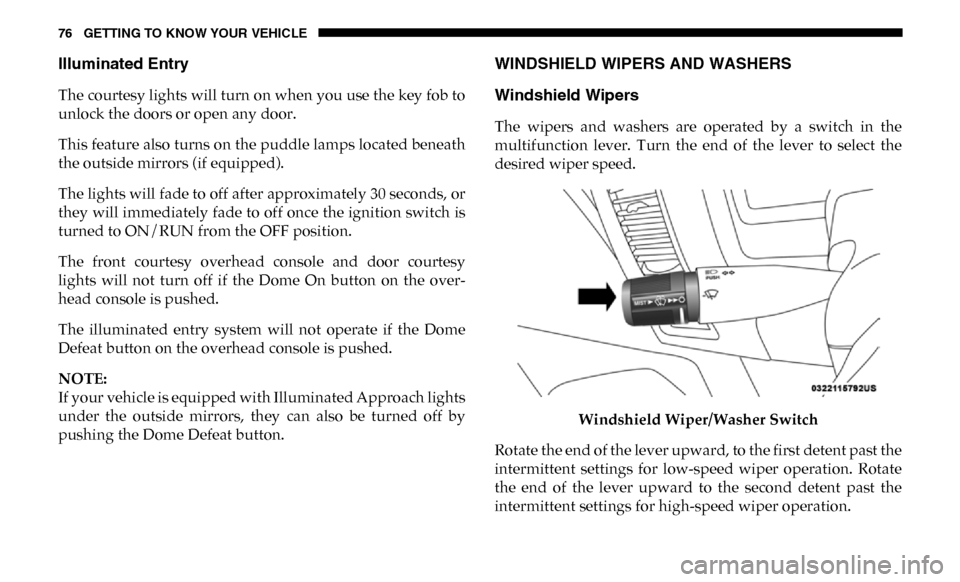
multifunction lever. Turn the end of the lever to select the
desired wiper speed.
Windshield Wiper/Washer Switch
Rotate the end of the lever upward, to the first detent past the
intermittent settings for low-speed wiper operation. Rotate
the end of the lever upward to the second detent past the
intermittent settings for high-speed wiper operation.
Page 98 of 696

96 GETTING TO KNOW YOUR VEHICLE
Window Lockout Switch
The window lockout switch on the driver's door allows you
to disable the window control on the rear passenger doors.
To disable the window controls on the rear passenger doors,
push the window lock switch into the latched or down posi-
tion. To enable the window controls, push the window lock
switch again and return the switch to the released or up posi -
tion.
Window Lockout Switch Power Sliding Rear Window — If Equipped
The switch for the power sliding rear window is located on
the overhead console.
Power Sliding Rear Window Switch
Push the switch rearward to open the glass. Pull the switch
forward to close the glass.
Page 102 of 696

100 GETTING TO KNOW YOUR VEHICLE
Venting Sunroof — Express
Push and release the Vent button within one half second and
the sunroof will open to the vent position. This is called
“Express Vent”, and it will occur regardless of sunroof posi-
tion. During Express Vent operation, any other actuation of
the switch will stop the sunroof.
Sunroof Maintenance
Use only a non-abrasive cleaner and a soft cloth to clean the
glass panel.
Ignition Off Operation
The power sunroof switch will remain active for up to
approximately 10 minutes after the ignition switch is turned
to the OFF/LOCK position. Opening either front door will
cancel this feature.
NOTE:
Ignition Off time is programmable through the Uconnect
System. Refer to “Uconnect Settings” in “Multimedia” for
further information. Relearn Procedure
For vehicles equipped with a sunroof, there is a relearn
procedure that allows you to calibrate the sunroof when the
“Express Operation” feature stops working. To reset the
sunroof, follow these steps:
1. Set the ignition to the ACC or the ON/RUN position.
2. Ensure that the sunroof is in the fully closed position.
3. Push and hold the close switch. The sunroof will hit the
hard stop and move to the vent position after ten seconds.
4. Release the close switch.
5. Push and hold the close switch again within five seconds to begin the teaching process. The sunroof will complete
one full cycle and return to the fully closed position.
NOTE:
If the close switch is released anytime during the teach cycle,
the procedure will need to be repeated starting from the first
step.
6. Once the sunroof has stopped in the fully closed position, release the close switch. The sunroof is now reset and
ready to use.
Page 104 of 696
102 GETTING TO KNOW YOUR VEHICLE
To Close The Hood
Lower the hood to approximately 12 inches (30 cm) from the
engine compartment and drop it. Make sure that the hood is
completely closed.
TAILGATE
Opening
The power tailgate may be opened by pushing the tailgate
release pad located on the tailgate door.
The tailgate damper strut will lower the tailgate to the open
position (if equipped).
Electronic Tailgate Release — If Equipped The key fob may be equipped with an electronic
release feature for the tailgate, allowing hands-free
tailgate opening. To activate, push and release the
Tailgate Release button on the key fob twice within five
seconds. The tailgate door will unlatch, and slowly lower
into the open position.
If equipped, a button on the center overhead console inside
the vehicle can be used to release the tailgate.
NOTE:
The Tri-Fold Tonneau Cover (if equipped) may prevent Elec -
tronic Tailgate Release if installed. The Tonneau Cover must
be removed or folded up before releasing the tailgate. Refer
to “Tri-Fold Tonneau Cover — If Equipped” in “Getting To
Know Your Vehicle” for further information.
WARNING!
Be sure the hood is fully latched before driving your
vehicle. If the hood is not fully latched, it could open
when the vehicle is in motion and block your vision.
Failure to follow this warning could result in serious
injury or death.
CAUTION!
To prevent possible damage, do not slam the hood to
close it. Use a firm downward push at the front center of
the hood to ensure that both latches engage.
Page 112 of 696

110 GETTING TO KNOW YOUR VEHICLE
Using HomeLink
To operate, push and release the programmed HomeLink
button. Activation will now occur for the programmed device
(i.e. garage door opener, gate operator, security system, entry
door lock, home/office lighting, etc.) The hand-held transmitter
of the device may also be used at any time.
Security
It is advised to erase all channels before you sell or turn in
your vehicle.
To do this, push and hold the two outside buttons for 20
seconds until the orange indicator flashes. Note that all chan-
nels will be erased. Individual channels cannot be erased.
The HomeLink Universal Transceiver is disabled when the
Vehicle Security Alarm is active.
Troubleshooting Tips
If you are having trouble programming HomeLink, here are
some of the most common solutions:
• Replace the battery in the Garage Door Opener hand-held transmitter. • Push the LEARN button on the Garage Door Opener to
complete the training for a Rolling Code.
• Did you unplug the device for programming and remember to plug it back in?
If you have any problems, or require assistance, please call
toll-free1-800-355-3515 or, on the Internet at HomeLink.com
for information or assistance.
General Information
The following regulatory statement applies to all Radio
Frequency (RF) devices equipped in this vehicle:
This device complies with Part 15 of the FCC Rules and with
Innovation, Science and Economic Development Canada
license-exempt RSS standard(s). Operation is subject to the
following two conditions:
1. This device may not cause harmful interference, and
2. This device must accept any interference received, including interference that may cause undesired operation.
NOTE:
Changes or modifications not expressly approved by the
party responsible for compliance could void the user’s
authority to operate the equipment.
Page 138 of 696
136 GETTING TO KNOW YOUR VEHICLE
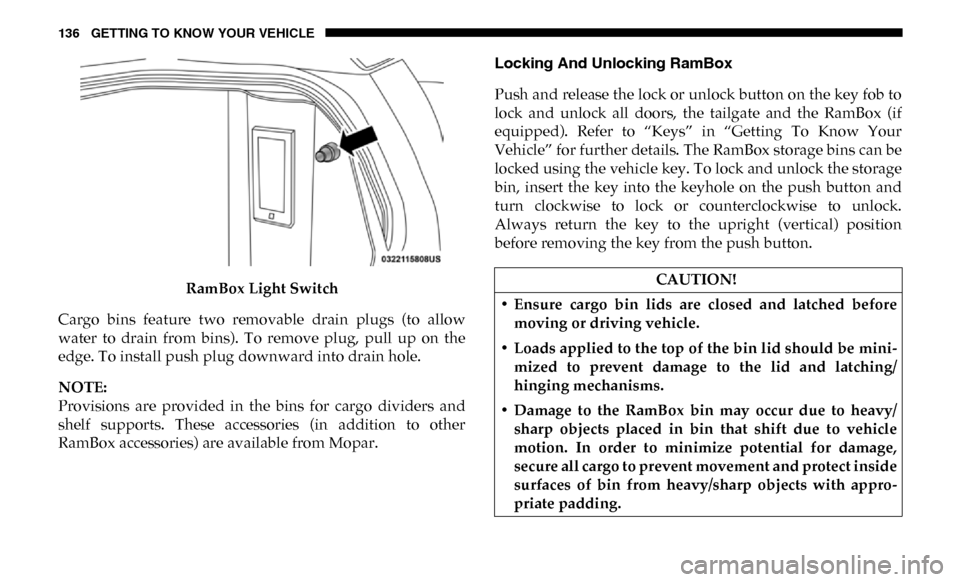
RamBox Light Switch
Cargo bins feature two removable drain plugs (to allow
water to drain from bins). To remove plug, pull up on the
edge. To install push plug downward into drain hole.
NOTE:
Provisions are provided in the bins for cargo dividers and
shelf supports. These accessories (in addition to other
RamBox accessories) are available from Mopar. Locking And Unlocking RamBox
Push and release the lock or unlock button on the key fob to
lock and unlock all doors, the tailgate and the RamBox (if
equipped). Refer to “Keys” in “Getting To Know Your
Vehicle” for further details. The RamBox storage bins can be
locked using the vehicle key. To lock and unlock the storage
bin, insert the key into the keyhole on the push button and
turn clockwise to lock or counterclockwise to unlock.
Always return the key to the upright (vertical) position
before removing the key from the push button.CAUTION!
• Ensure cargo bin lids are closed and latched before moving or driving vehicle.
• Loads applied to the top of the bin lid should be mini -
mized to prevent damage to the lid and latching/
hinging mechanisms.
• Damage to the RamBox bin may occur due to heavy/ sharp objects placed in bin that shift due to vehicle
motion. In order to minimize potential for damage,
secure all cargo to prevent movement and protect inside
surfaces of bin from heavy/sharp objects with appro -
priate padding.
Page 254 of 696

252 SAFETY
(Continued)
The SABICs may help reduce the risk of partial or complete
ejection of vehicle occupants through side windows in
certain side impact events.
Side Impacts
The Side Air Bags are designed to activate in certain side
impacts. The Occupant Restraint Controller (ORC) deter-
mines whether the deployment of the Side Air Bags in a
particular impact event is appropriate, based on the severity
and type of collision. The side impact sensors aid the ORC in
determining the appropriate response to impact events. The system is calibrated to deploy the Side Air Bags on the
impact side of the vehicle during impacts that require Side
Air Bag occupant protection. In side impacts, the Side Air
Bags deploy independently; a left side impact deploys the
left Side Air Bags only and a right-side impact deploys the
right Side Air Bags only. Vehicle damage by itself is not a
good indicator of whether or not Side Air Bags should have
deployed.
The Side Air Bags will not deploy in all side collisions,
including some collisions at certain angles, or some side
collisions that do not impact the area of the passenger
compartment. The Side Air Bags may deploy during angled
or offset frontal collisions where the front air bags deploy.
Side Air Bags are a supplement to the seat belt restraint
system. Side Air Bags deploy in less time than it takes to
blink your eyes.
WARNING!
• Do not mount equipment, or stack luggage or other cargo up high enough to block the deployment of the
SABICs. The trim covering above the side windows
where the SABIC and its deployment path are located
should remain free from any obstructions.
• In order for the SABICs to work as intended, do not install any accessory items in your vehicle which could
alter the roof. Do not add an aftermarket sunroof to
your vehicle. Do not add roof racks that require perma -
nent attachments (bolts or screws) for installation on
the vehicle roof. Do not drill into the roof of the vehicle
for any reason.
WARNING!
• Occupants, including children, who are up against or very close to Side Air Bags can be seriously injured or
killed. Occupants, including children, should never
lean on or sleep against the door, side windows, or area
where the side air bags inflate, even if they are in an
infant or child restraint.