door lock Ram 2500 2019 User Guide
[x] Cancel search | Manufacturer: RAM, Model Year: 2019, Model line: 2500, Model: Ram 2500 2019Pages: 696, PDF Size: 13.89 MB
Page 34 of 696

32 GETTING TO KNOW YOUR VEHICLE
VEHICLE SECURITY ALARM
The vehicle security alarm monitors the vehicle doors, tail-
gate, and ignition for unauthorized operation. When the
vehicle security alarm is activated, interior switches for door
locks are disabled. The system will turn the horn off after 29
seconds, 5 seconds between cycles, up to 8 cycles if the
trigger remains active and then the vehicle security alarm
will rearm itself.
To Arm The System
Follow these steps to arm the vehicle security alarm:
1. Remove the key from the ignition system (refer to "Starting The Engine" in "Starting And Operating" for
further information).
•Make sure the vehicle ignition system is "OFF."
2. Perform one of the following methods to lock the vehicle:
•Push lock button on the interior power door lock switchwith the driver and/or passenger door open.
• Push the lock button on the exterior Passive Entry Door Handle with a valid key fob available in the same exterior
zone (refer to "Keyless Enter- N-Go — Passive Entry" in
"Getting To Know Your Vehicle" for further information).
• Push the lock button on the key fob. 3. If any doors are open, close them.
The vehicle security alarm will set when you use the power
door locks, or use the key fob to lock the doors. After all the
doors are locked and closed, the vehicle security light, in the
instrument panel cluster, will flash rapidly for about 16
seconds to indicate that the alarm is being set. After the
alarm is set, the vehicle security light will flash at a slower
rate to indicate that the system is armed.
To Disarm The System
The vehicle security alarm can be disarmed using any of the
following methods:
1. Push the unlock button on the key fob.
2. Grasp the Passive Entry Unlock Door Handle with a valid
key fob within 5 ft (1.5 m) of the passive entry door
handle. If equipped, refer to "Keyless Enter-N-Go —
Passive Entry" in "Getting To Know Your Vehicle" for
further information.
3. Place the ignition out of the “OFF” position.
The vehicle security alarm is designed to protect your
vehicle. However, you can create conditions where the
system will give you a false alarm. If one of the previously
Page 35 of 696

GETTING TO KNOW YOUR VEHICLE 33
described arming sequences has occurred, the vehicle secu-
rity alarm will arm regardless of whether you are in the
vehicle or not. If you remain in the vehicle and open a door,
the alarm will sound. If this occurs, disarm the vehicle secu-
rity alarm.
If the vehicle security alarm is armed and the battery
becomes disconnected, the vehicle security alarm will
remain armed when the battery is reconnected; the exterior
lights will flash, and the horn will sound. If this occurs,
disarm the vehicle security alarm.
Rearming Of The System
If something triggers the alarm, and no action is taken to
disarm it, the vehicle security alarm will turn the horn off
after 29 seconds, 5 seconds between cycles, up to 8 cycles if
the trigger remains active and then the vehicle security alarm
will rearm itself.
Security System Manual Override
The vehicle security alarm will not arm/disarm if you lock/
unlock the doors using the manual door lock plunger.
DOORS
Manual Door Locks
Front and rear doors may be locked by moving the lock knob
down. The lock knobs will unlock when the interior handle
is used to open the doors.Door Lock Knob
Front doors may be opened with the inside door handle
without lifting the lock knob.
Doors locked before closing will remain locked when closed.2
Page 36 of 696
34 GETTING TO KNOW YOUR VEHICLE
(Continued)
The emergency key will unlock the driver door lock on your
vehicle.
WARNING!
• Do not leave children or animals inside parked vehicles in hot weather. Interior heat build-up may cause
serious injury or death.
• For personal security and safety in the event of an colli -
sion, lock the vehicle doors as you drive as well as
when you park and leave the vehicle.
• Before exiting a vehicle, always shift the automatic transmission into PARK, apply the parking brake, turn
the vehicle OFF, remove the key fobs from vehicle, and
lock all doors. and lock your vehicle.
• Never leave children alone in a vehicle, or with access to an unlocked vehicle. Leaving children in a vehicle
unattended is dangerous for a number of reasons. A
child or others could be seriously or fatally injured.
Children should be warned not to touch the parking
brake, brake pedal or the gear selector.
• Allowing children to be in a vehicle unattended isdangerous for a number of reasons. A child or others
could be seriously or fatally injured. Children should
be warned not to touch the parking brake, brake pedal
or the gear selector.
• Do not leave the key fob in or near the vehicle, or in a location accessible to children, and do not leave the
ignition of a vehicle equipped with Keyless
Enter-N-Go in the ACC or ON/RUN mode. A child
could operate power windows, other controls, or move
the vehicle.
WARNING! (Continued)
Page 37 of 696
GETTING TO KNOW YOUR VEHICLE 35
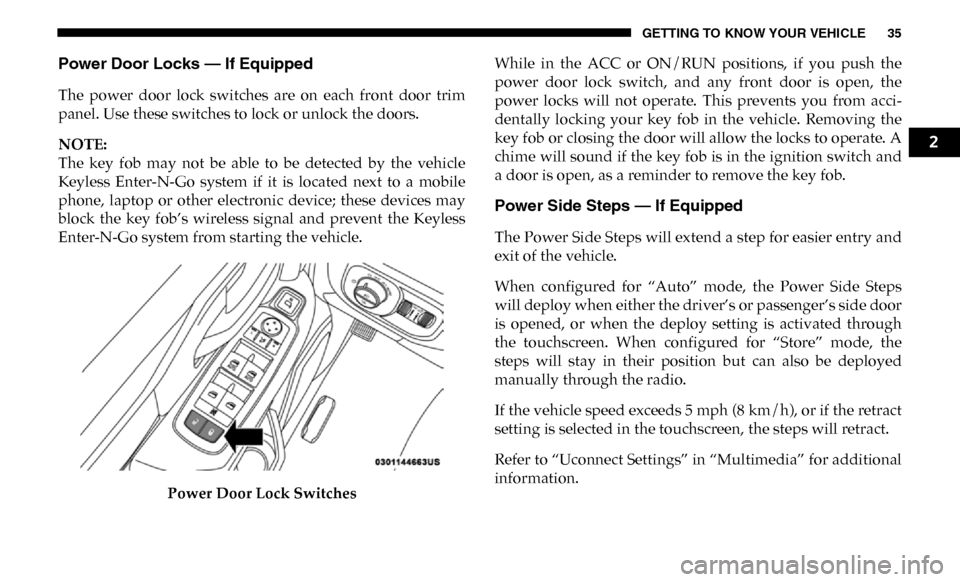
Power Door Locks — If Equipped
The power door lock switches are on each front door trim
panel. Use these switches to lock or unlock the doors.
NOTE:
The key fob may not be able to be detected by the vehicle
Keyless Enter-N-Go system if it is located next to a mobile
phone, laptop or other electronic device; these devices may
block the key fob’s wireless signal and prevent the Keyless
Enter-N-Go system from starting the vehicle.Power Door Lock Switches While in the ACC or ON/RUN positions, if you push the
power door lock switch, and any front door is open, the
power locks will not operate. This prevents you from acci
-
dentally locking your key fob in the vehicle. Removing the
key fob or closing the door will allow the locks to operate. A
chime will sound if the key fob is in the ignition switch and
a door is open, as a reminder to remove the key fob.
Power Side Steps — If Equipped
The Power Side Steps will extend a step for easier entry and
exit of the vehicle.
When configured for “Auto” mode, the Power Side Steps
will deploy when either the driver’s or passenger’s side door
is opened, or when the deploy setting is activated through
the touchscreen. When configured for “Store” mode, the
steps will stay in their position but can also be deployed
manually through the radio.
If the vehicle speed exceeds 5 mph (8 km/h), or if the retract
setting is selected in the touchscreen, the steps will retract.
Refer to “Uconnect Settings” in “Multimedia” for additional
information.
2
Page 38 of 696

36 GETTING TO KNOW YOUR VEHICLE
Keyless Enter-N-Go — Passive Entry
The Passive Entry system is an enhancement to the vehicle’s
Remote Keyless Entry system and a feature of Keyless
Enter-N-Go. This feature allows you to lock and unlock the
vehicle’s door(s) without having to push the key fob lock or
unlock buttons.
NOTE:
• Passive Entry may be programmed ON/OFF. Refer to “Ucon-
nect Settings” in “Multimedia” for further information.
• If wearing gloves on your hands, or if it has been raining/ snowing on the Passive Entry door handle, the unlock sensi -
tivity can be affected, resulting in a slower response time.
• If the vehicle is unlocked by Passive Entry and no door is opened within 60 seconds, the vehicle will re-lock and if
equipped will arm the security alarm.
• The vehicles security alarm can be armed/disarmed by pushing the passive entry key fob lock/unlock buttons (if
equipped).
• The key fob may not be able to be detected by the vehicle passive entry system if it is located next to a mobile phone,
laptop or other electronic device; these devices may block
the key fob's wireless signal and prevent the passive entry
handle from locking/unlocking the vehicle. To Unlock From The Driver's Side:
With a valid Passive Entry key fob within 5 ft (1.5 m) of the
driver door handle, grab the front driver door handle to
unlock the driver's door automatically. The interior door
panel lock knob will raise when the door is unlocked.
Grab The Door Handle To Unlock
NOTE:
If “Unlock All Doors 1st Press” is programmed, all doors will
unlock when you grab hold of the front driver’s door handle.
To select between “Unlock Driver Door 1st Press” and
“Unlock All Doors 1st Press,” refer to “Uconnect Settings” in
“Multimedia” for further information.
Page 39 of 696

GETTING TO KNOW YOUR VEHICLE 37
To Unlock From The Passenger Side:
With a valid Passive Entry key fob within 5 ft (1.5 m) of the
passenger door handle, grab the front passenger door handle
to unlock all doors automatically. The interior door panel
lock knob will raise when the door is unlocked.
NOTE:
All doors will unlock when the front passenger door handle
is grabbed regardless of the driver’s door unlock preference
setting (“Unlock Driver Door 1st Press” or “Unlock All
Doors 1st Press”).
Preventing Inadvertent Locking Of Passive Entry Key Fob
In Vehicle:
To minimize the possibility of unintentionally locking a Passive
Entry key fob inside your vehicle, the Passive Entry system is
equipped with an automatic door unlock feature which will
function if the ignition switch is in the OFF position.
If one of the vehicle doors is open and the door panel switch
is used to lock the vehicle, once all open doors have been
closed the vehicle checks the inside and outside of the vehicle
for any valid Passive Entry key fobs. If one of the vehicle's
Passive Entry key fobs is detected inside the vehicle, and no
other valid Passive Entry key fobs are detected outside the
vehicle, the Passive Entry System automatically unlocks allvehicle doors and chirps the horn three times (on the third
attempt ALL doors will lock and the Passive Entry key fob
can be locked in the vehicle).
To Lock The Vehicle’s Doors:
With one of the vehicle’s Passive Entry key fobs within 5 ft
(1.5 m) of the driver or passenger front door handles, push
the door handle lock button to lock all doors.
Push The Door Handle Button To Lock
Do NOT grab the door handle when pushing the door
handle lock button. This could unlock the door(s).
2
Page 40 of 696

38 GETTING TO KNOW YOUR VEHICLE
Do NOT Grab The Door Handle When Locking
NOTE:
• After pushing the door handle lock button, you must wait two seconds before you can lock or unlock the doors, using
either Passive Entry door handle. This is done to allow you
to check if the vehicle is locked by pulling the door handle,
without the vehicle reacting and unlocking.
• The Passive Entry system depends on a key fob that is not fully discharged of its coin battery capacity.
• The LED light on the key fob will not blink if the key fob battery is low or fully depleted, but a low key fob battery
condition will still support the Passive Entry system func -tionality. When the key fob battery is low, the instrument
cluster will display a message indicating that the key fob
battery is low. Refer to “Keys” in “Getting To Know Your
Vehicle” for further information.
The vehicle doors can also be locked by using the key fob
lock button or the lock button located on the vehicle’s inte -
rior door panel.
General Information
The following regulatory statement applies to all radio
frequency (RF) devices equipped in this vehicle:
This device complies with Part 15 of the FCC Rules and with
Industry Canada license-exempt RSS standard(s). Operation
is subject to the following two conditions:
1. This device may not cause harmful interference, and
2. This device must accept any interference received, including interference that may cause undesired opera -
tion.
NOTE:
Changes or modifications not expressly approved by the
party responsible for compliance could void the user’s
authority to operate the equipment.
Page 41 of 696

GETTING TO KNOW YOUR VEHICLE 39
Automatic Door Locks — If Equipped
The auto door lock feature default condition is enabled.
When enabled, the door locks will lock automatically when
the vehicle's speed exceeds 15 mph (24 km/h). The auto door
lock feature can be enabled or disabled by an authorized
dealer per written request of the customer. Please see an
authorized dealer for service.
Automatic Doors Unlock — If Equipped
This feature unlocks all of the doors of the vehicle when either front
door is opened. This will occur only after the vehicle has been
shifted into the PARK position after the vehicle has been driven
(shifted out of PARK and all doors closed).
Automatic Doors Unlock Programming — If Equipped
The Automatic Doors Unlock feature can be enabled or
disabled as follows:
• For vehicles not equipped with a touchscreen radio, referto “Instrument Cluster Display” in “Getting To Know
Your Instrument Panel” for further information.
• For vehicles equipped with a touchscreen radio, refer to “Ucon -
nect Settings” in “Multimedia” for further information.
NOTE:
Use the Auto Unlock Doors feature in accordance with local laws.
Child-Protection Door Lock
To provide a safer environment for children riding in the rear
seat, the rear doors (if equipped) of your vehicle have the
Child-Protection Door Lock system.
Child-Protection Door Lock Location
2
Page 42 of 696

40 GETTING TO KNOW YOUR VEHICLE
To use the system, open each rear door, use a flat blade
screwdriver (or emergency key) and rotate the dial to engage
and disengage the Child-Protection locks. When the system
on a door is engaged, that door can only be opened by using
the outside door handle even if the inside door lock is in the
unlocked position.Child Lock Control NOTE:
• After setting the Child-Protection Door Lock system,
always test the door from the inside to make certain it is in
the desired position.
• For emergency exit with the system engaged, move the door lock switch to the unlock position, roll down the
window, and open the door with the outside door handle.
SEATS
Seats are a part of the Occupant Restraint System of the
vehicle.
WARNING!
Avoid trapping anyone in the vehicle in a collision.
Remember that the sliding doors cannot be opened from
the inside door handle when the Child Protection Door
Locks are engaged.
WARNING!
• It is dangerous to ride in a cargo area, inside or outside of a vehicle. In a collision, people riding in these areas
are more likely to be seriously injured or killed.
• Do not allow people to ride in any area of your vehicle that is not equipped with seats and seat belts. In a colli -
sion, people riding in these areas are more likely to be
seriously injured or killed.
• Be sure everyone in your vehicle is in a seat and using a seat belt properly.
Page 48 of 696

46 GETTING TO KNOW YOUR VEHICLE
The driver memory seat buttons are located on the driver
door, next to the door handle.Driver Memory Seat Buttons
Programming The Memory Feature
To create a new memory profile, perform the following:
1. Cycle the vehicle’s ignition to the ON/RUN position (do not start the engine).
2. Adjust all memory profile settings to desired preferences (i.e., driver’s seat, outside mirrors, adjustable pedals (if
equipped), and radio station presets). 3. Push and release the set (S) button on the memory switch.
4. Within five seconds, push and release either of the
memory buttons (1) or (2). The instrument cluster display
will show which memory position has been set.
NOTE:
Memory profiles can be set without the vehicle in PARK.
Linking And Unlinking The Remote Keyless Entry Key
Fob To Memory
Your key fob can be programmed to recall one of two
pre-programmed memory profiles by pushing the unlock
button on the key fob.
NOTE:
Before programming your key fob you must select the
“Personal Settings Linked to Key Fob” feature through the
Uconnect Settings. Refer to “Uconnect Settings” in “Multi -
media” for further information.
To program your key fob, perform the following:
1. Cycle the vehicle’s ignition to the OFF position.
2. Select a desired memory profile 1 or 2.